More Related Content

PPT
color coding NM administrate network sevice.ppt 
PPT
color coding NM hardware and netwoking .ppt 
PPTX

DOCX

PPTX
3. UTP AND FIBER CABLING.pptx 
PPT
LO 02 Network Cabling.ppt 
PPSX
Cabling ytes gcg333333333333333gvUTP.ppsx 
PPTX
Cabling Straight Through and Crossover.pptx Similar to New Computer Network Practical 01 SYBSCit.pptx

PPT
4. RJ45 Wiring Guide Diagram.ppt 
PPTX

PPTX
cablecrimping-150219125046-conversion-gate01.pptx 
PPTX

PPT

PPTX
Lesson #1 (creating ethernet cable) 
PDF
Making stright and crossover cables and crimping 
PPT
Fun Way of Learning the Basics of Network Cabling 
PPT
Network_Cabling(2).pptgftgtyhfuyrfyufruyfyuyufytfgy 
PPT

PPT
Computer Network Engineering Presentation1.ppt 
PPTX

PPTX
Computer Networking Essentials Presentation.pptx 
PPT
Understanding fundamentals of Network Cabling 
PPTX
Straight&Cross-over cable connection 
PPT
Creating A Network Cable.ppt 
PPTX

PPT
Network cabling refers to the physical infrastructure, including various type... 
PDF
Self Learning Module for ICT - CSS 9 .pdf 
PPTX
New Computer Network Practical 02 SYBSCit.pptx More from profgufran

PPT
Introduction_to_AdvanceExcel_FA12 - Copy.ppt 
PPT
Confidentiality Integrity Availability PPT.ppt 
PPT
Types of Threats in Local, shared, national.ppt 
PPT
Threats in cyber security Local, shared, national.ppt 
PPT
Confidentialiy, Integrity, Availability.ppt 
PPT
Cyber Security in computer forensics.ppt 
PPTX
Action Elements in artifical Intelligence.pptx 
PPTX
Planning ans Acting in nondeterminitics.pptx 
DOCX
Project Cover Page Introduction SPM.docx 
PPT
Introduction to Machine Learning Process.ppt 
PPT
Supply chain management Coordination.ppt 
PPT
BullWhip effect in Supply Chain Management.ppt 
PPT
Supply chain management Processessss.ppt 
PPT
Supply chain management introduction.ppt 
PPT
Markov Learning Techniques and Tools.ppt 
PPT
Reinforcement Learning Tools and Techniques.ppt 
PPT
Wavelet Transformation techniques and tools.ppt 
PPT
Data Reduction tools and techniquess.ppt 
PPT
Coefficient and Correlation techniques.ppt 
PPT
Data Preprocessing in Data Analytics.ppt Recently uploaded

PPTX
Accelerate Innovation with Engineering R&D Services 
PPTX
Becoming Frontier for Dynamics 365 Finance PPT 
PDF
Best 10 Dedicated Servers in Amsterdam, Netherlands (2026 Enterprise Edition)... 
PPTX
Spacewalk 2026 - Presented at the IMAX in Raleigh, NC 
PDF
Are AI Hallucinations Getting Better or Worse? We Analyzed the Data. 
PDF
How Automation Powers Data Quality and Governance at Scale 
PDF
6 Insights from the Patron Saint of AI Failure 
PDF
Zniber Partners. Audience Foresight for Confident Decisions 
PPTX
congo red stain nd PAS STAIN histopathology 
PPTX
WIFI Enabled 8 by 32 Matrix.pptx for final year project 
PDF
A paper in the leading academic journal Telecommunication Policy cited Scott ... 
PDF
AI Data Analyst: Smarter Insights for Modern Real Estate Decisions 
PDF
2025-CB-NCAE-slide-deck.pptx-1-83.pdf Virtual Orientation on the Administrati... 
PPT
connectives-linking words in English.ppt 
PDF
UiPath Coded Agents - A Developer Driven Agentic Automation Era 
PDF
TrustArc Webinar - Unpacking India’s DPDP Act: What You Should Know 
PPTX
About Computer Hardware ................ 
PDF
Profiting from Technological Innovation: Managing Intellectual Property to Bu... 
PPTX
Storage-and-HCI-Positioning-update-sales.pptx 
PDF
Effective Ai powered mock interview .pdf New Computer Network Practical 01 SYBSCit.pptx
- 1.
Practical 1 Colourcode for crimping LAN (Cat 5/6/7) cable
a. Study of Different color codes
AIM: Study of different types of Network cables and Practically implement the cross-wired cable and straight
through cable using clamping tool.
Copyright © PROF. GUFRAN QURESHI
About the Cable:
You can find bulk supplies of ethernet cable at many computer stores or most
electrical or home centers. You want UTP (Unshielded Twisted Pair) ethernet
cable of at least Category 5 (Cat 5). Cat 5 is required for basic 10/100
functionality, you will want Cat 5e for gigabit (1000BaseT) operation and Cat
6 or higher gives you a measure of future proofing. You can also use STP
(Shielded Twisted Pair) for extra resistance to external interference but I
won't cover shielded connectors. Bulk ethernet cable comes in many types,
there are 2 basic categories, solid and braided stranded cable. Stranded
ethernet cable tends to work better in patch applications for desktop use.
It is more flexible and resilient than solid ethernet cable and easier to
work with, but really meant for shorter lengths. Solid ethernet cable is
meant for longer runs in a fixed position. Plenum rated ethernet cable
must be used whenever the cable travels through an air circulation
space. For example, above a false ceiling or below a raised floor. It
may be difficult or impossible to tell from the package or labeling
what type of ethernet cable it is, so peal out an end and
investigate.Here is what the internals of the ethernet cable look like:
- 2.
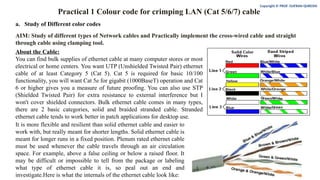
Inside the ethernetcable, there are 8 color coded wires. These wires are twisted into 4 pairs of wires, each pair has a
common color theme. One wire in the pair being a solid or primarily solid colored wire and the other being a primarily
white wire with a colored stripe (Sometimes ethernet cables won't have any color on the striped wire, the only way to tell
which is to check which wire it is twisted around). Examples of the naming schemes used are: Orange (alternatively
Orange/White) for the solid colored wire and White/Orange for the striped cable. The twists are extremely important.
They are there to counteract noise and interference. It is important to wire according to a standard to get proper
performance from the ethernet cable. The TIA/EIA-568-A specifies two wiring standards for an 8-position modular
connector such as RJ45. The two wiring standards, T568A and T568B vary only in the arrangement of the colored pairs.
Tom writes to say "...sources suggest using T568A cabling since T568B is the AT&T standard, but the US Government
specifies T568A since it matches USOC cabling for pairs 1 & 2, which allows it to work for 1/2 line phones...". Your
choice might be determined by the need to match existing wiring, jacks or personal preference, but you should maintain
consistency. I've shown both below for straight through cabling and just T568B for crossover cabling.
Copyright © PROF. GUFRAN QURESHI
About Modular Connector Plugs and Jacks:
The 8P8C modular connectors for Ethernet are often called RJ45 due to their physical
resemblance. The plug is an 8-position modular connector that looks like a large phone plug. There
are a couple variations available. The primary variation you need to pay attention to is whether the
connector is intended for braided or solid wire. For braided/stranded wires, the connector has sharp
pointed contacts that actually pierce the wire. For solid wires, the connector has fingers which cut
through the insulation and make contact with the wire by grasping it from both sides. The
connector is the weak point in an ethernet cable, choosing the wrong one will often cause grief
later. If you just walk into a computer store, it's nearly impossible to tell what type of plug it is.
You may be able to determine what type it is by crimping one without a cable.
- 3.
Copyright © PROF.GUFRAN QURESHI
Ethernet Cable Pin Outs: There are two basic ethernet cable pin outs. A straight through ethernet cable, which is
used to connect to a hub or switch, and a crossover ethernet cable used to operate in a peer-to-peer fashion without a
hub/switch. Generally all fixed wiring should be run as straight through. Some ethernet interfaces can cross and un-
cross a cable automatically as needed, a handy feature.
- 4.
Identifying the Cabletype
Hold both ends/RJ-45connectors of cable with their Jack in downward position. Now start matching the color coding
from left pin of connector towards right. Below is example to identify a cross cable.
Copyright © PROF. GUFRAN QURESHI
Straight Cable
It is used to connect devices having different function.
For example:
• Connecting a router to a hub or switch.
• Connecting a server to a hub or switch.
• Connecting workstations to a hub or switch.
- 5.
Console or Rollovercable
It is used for device configuration. For example you have bought a new router and what to configure it with initial
config. You need a console cable for same. One end of console cable is connected to console port of the router or a
switch and other end would be connected to NIC port of your laptop or PC. Below is the color coding of Console cable.
The color coding of both ends are totally reversed.
Copyright © PROF. GUFRAN QURESHI
- 6.
Practical 1 Colourcode for crimping LAN (Cat 5/6/7) cable
b. Study of different connecting devices and their differences
AIM: Study of following Network Devices in Detail
• Repeater
• Hub
• Switch
• Bridge
• Router
• Gate Way
Copyright © PROF. GUFRAN QURESHI
- 7.
- 8.
- 9.
Practical 1 Colourcode for crimping LAN (Cat 5/6/7) cable
c. Crimping LAN Cable
AIM: Study of crimping cable with RJ45
Copyright © PROF. GUFRAN QURESHI
Step 0) Slip on the RJ45 boot (optional)
Step 1) Strip the cable
• Push the cable into the razor slot of the strip tool
and turn it around the cable to make an even cut
around the sheath. Careful not to nick the wires
inside!
• Unwrap the blue foil shielding and plastic to
uncover the twisted wire pairs.
• Push the copper grounding wire to the side.
(Ignore the white string.)
- 10.
Copyright © PROF.GUFRAN QURESHI
Step 2) Organize the wires
In this step, you’ll be taking the 8 colored wires inside
the ethernet cable and putting them into the correct
ordering of colors.
Note: This is the hardest part of crimping! The wires
are small and are hard to control. Take your time and
make sure you do this step correctly! Otherwise you
might have to go back and restart.
Step 2.1) Untwist the wires
There should be 4 pairs of wires: green, brown, orange,
and blue. Each pair has a solid-colored wire and a
striped-colored wire. Untwist these pairs and separate
them into the 8 wires.
Step 2.2) Straighten out wires
After untwisting the wires, they are probably still kinked and look like they want to be twisted. In this step, you
should carefully grab all the wires and try to straighten them out by pulling on them. This will prevent the wires
from moving around later on.
Warning: Don’t break off the wires!