Data Communication & Networking Lab
           Code: IT 693
 Introduction
   Ethernet Cable
   Category
 How to wire
   Straight through
   Crossover


                       Amitava Nag Dept. Of IT AOT   8/21/2012   2
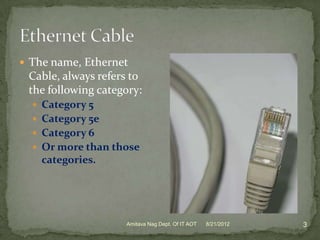
 The name, Ethernet
 Cable, always refers to
 the following category:
   Category 5
   Category 5e
   Category 6
   Or more than those
    categories.


                    Amitava Nag Dept. Of IT AOT   8/21/2012   3
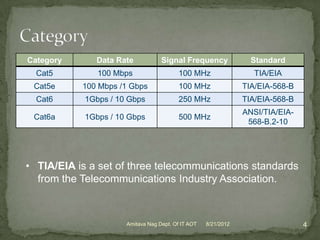
Category      Data Rate            Signal Frequency               Standard
  Cat5         100 Mbps                   100 MHz                  TIA/EIA
 Cat5e     100 Mbps /1 Gbps               100 MHz               TIA/EIA-568-B
  Cat6      1Gbps / 10 Gbps               250 MHz               TIA/EIA-568-B
                                                                ANSI/TIA/EIA-
 Cat6a      1Gbps / 10 Gbps               500 MHz
                                                                 568-B.2-10


• TIA/EIA is a set of three telecommunications standards
  from the Telecommunications Industry Association.


                      Amitava Nag Dept. Of IT AOT   8/21/2012                   4
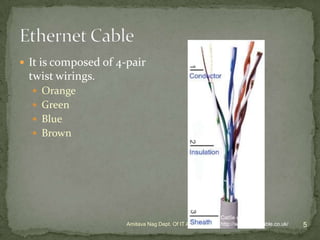
 It is composed of 4-pair
 twist wirings.
   Orange
   Green
   Blue
   Brown


                                                          Cat5e cable
                      Amitava Nag Dept. Of IT AOT         http://www.cat5ecable.co.uk/
                                                    8/21/2012                            5
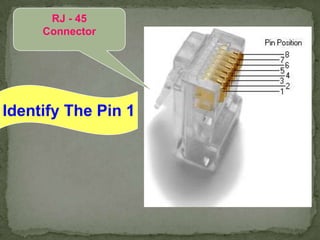
RJ - 45
     Connector


Identify The Pin 1
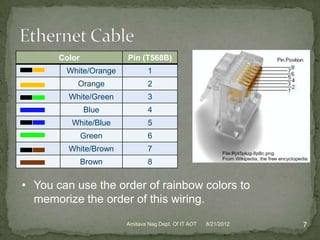
Color           Pin (T568B)
        White/Orange           1
           Orange              2
         White/Green           3
               Blue            4
          White/Blue           5
               Green           6
         White/Brown           7
               Brown           8


• You can use the order of rainbow colors to
  memorize the order of this wiring.
                       Amitava Nag Dept. Of IT AOT   8/21/2012   7
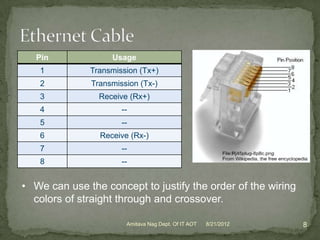
Pin             Usage
   1          Transmission (Tx+)
   2          Transmission (Tx-)
   3            Receive (Rx+)
   4                  --
   5                  --
   6            Receive (Rx-)
   7                  --
   8                  --


• We can use the concept to justify the order of the wiring
  colors of straight through and crossover.

                       Amitava Nag Dept. Of IT AOT   8/21/2012   8
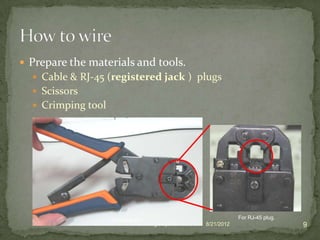
 Prepare the materials and tools.
   Cable & RJ-45 (registered jack ) plugs
   Scissors
   Crimping tool


                    Crimping tool                                   For RJ-45 plug.
                          Amitava Nag Dept. Of IT AOT   8/21/2012                     9
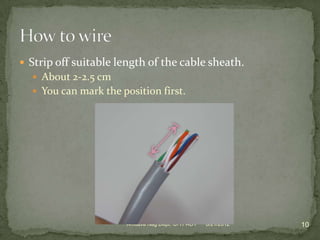
 Strip off suitable length of the cable sheath.
   About 2-2.5 cm
   You can mark the position first.


                      Amitava Nag Dept. Of IT AOT   8/21/2012   10
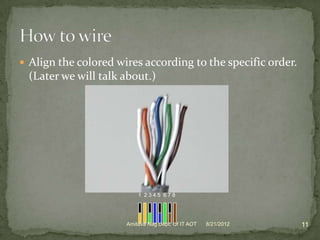
 Align the colored wires according to the specific order.
 (Later we will talk about.)


                          1 2345 678


                      Amitava Nag Dept. Of IT AOT   8/21/2012   11
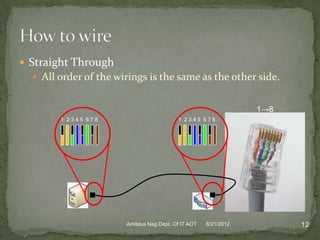
 Straight Through
   All order of the wirings is the same as the other side.


                                                                 1→8
        1 2345 678                        1 2345 678


                       Amitava Nag Dept. Of IT AOT   8/21/2012         12
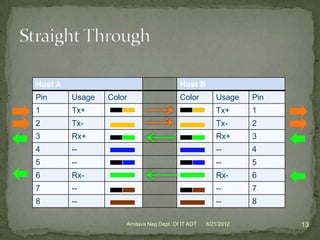
Host A                                   Host B
Pin      Usage   Color                   Color        Usage    Pin
1        Tx+                                          Tx+      1
2        Tx-                                          Tx-      2
3        Rx+                                          Rx+      3
4        --                                           --       4
5        --                                           --       5
6        Rx-                                          Rx-      6
7        --                                           --       7
8        --                                           --       8

                     Amitava Nag Dept. Of IT AOT   8/21/2012         13
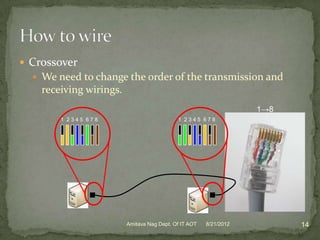
 Crossover
   We need to change the order of the transmission and
    receiving wirings.
                                                                   1→8
        1 2345 678                          1 2345 678


                         Amitava Nag Dept. Of IT AOT   8/21/2012         14
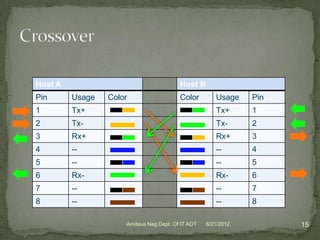
Host A                                   Host B
Pin      Usage   Color                   Color        Usage    Pin
1        Tx+                                          Tx+      1
2        Tx-                                          Tx-      2
3        Rx+                                          Rx+      3
4        --                                           --       4
5        --                                           --       5
6        Rx-                                          Rx-      6
7        --                                           --       7
8        --                                           --       8

                     Amitava Nag Dept. Of IT AOT   8/21/2012         15
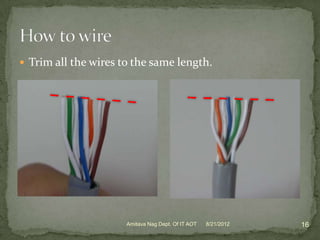
 Trim all the wires to the same length.


                      Amitava Nag Dept. Of IT AOT   8/21/2012   16
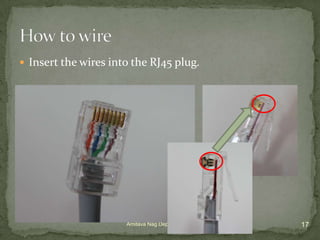
 Insert the wires into the RJ45 plug.


                      Amitava Nag Dept. Of IT AOT   8/21/2012   17
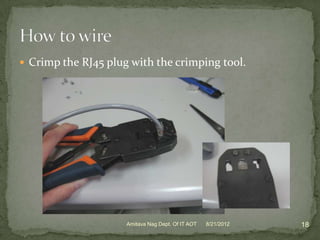
 Crimp the RJ45 plug with the crimping tool.


                     Amitava Nag Dept. Of IT AOT   8/21/2012   18
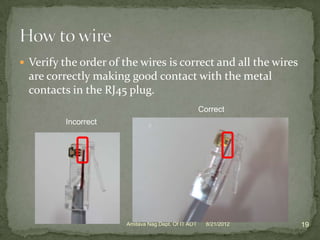
 Verify the order of the wires is correct and all the wires
  are correctly making good contact with the metal
  contacts in the RJ45 plug.
                                                     Correct
          Incorrect


                       Amitava Nag Dept. Of IT AOT     8/21/2012   19
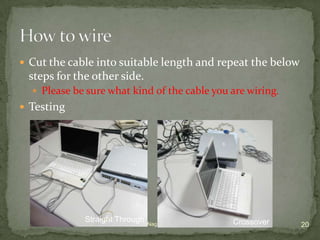
 Cut the cable into suitable length and repeat the below
 steps for the other side.
   Please be sure what kind of the cable you are wiring.
 Testing


             Straight Through Nag Dept. Of IT AOT               Crossover
                         Amitava                    8/21/2012               20

Ethernet cable

  • 1.
    Data Communication &Networking Lab Code: IT 693
  • 2.
     Introduction  Ethernet Cable  Category  How to wire  Straight through  Crossover Amitava Nag Dept. Of IT AOT 8/21/2012 2
  • 3.
     The name,Ethernet Cable, always refers to the following category:  Category 5  Category 5e  Category 6  Or more than those categories. Amitava Nag Dept. Of IT AOT 8/21/2012 3
  • 4.
    Category Data Rate Signal Frequency Standard Cat5 100 Mbps 100 MHz TIA/EIA Cat5e 100 Mbps /1 Gbps 100 MHz TIA/EIA-568-B Cat6 1Gbps / 10 Gbps 250 MHz TIA/EIA-568-B ANSI/TIA/EIA- Cat6a 1Gbps / 10 Gbps 500 MHz 568-B.2-10 • TIA/EIA is a set of three telecommunications standards from the Telecommunications Industry Association. Amitava Nag Dept. Of IT AOT 8/21/2012 4
  • 5.
     It iscomposed of 4-pair twist wirings.  Orange  Green  Blue  Brown Cat5e cable Amitava Nag Dept. Of IT AOT http://www.cat5ecable.co.uk/ 8/21/2012 5
  • 6.
    RJ - 45 Connector Identify The Pin 1
  • 7.
    Color Pin (T568B) White/Orange 1 Orange 2 White/Green 3 Blue 4 White/Blue 5 Green 6 White/Brown 7 Brown 8 • You can use the order of rainbow colors to memorize the order of this wiring. Amitava Nag Dept. Of IT AOT 8/21/2012 7
  • 8.
    Pin Usage 1 Transmission (Tx+) 2 Transmission (Tx-) 3 Receive (Rx+) 4 -- 5 -- 6 Receive (Rx-) 7 -- 8 -- • We can use the concept to justify the order of the wiring colors of straight through and crossover. Amitava Nag Dept. Of IT AOT 8/21/2012 8
  • 9.
     Prepare thematerials and tools.  Cable & RJ-45 (registered jack ) plugs  Scissors  Crimping tool Crimping tool For RJ-45 plug. Amitava Nag Dept. Of IT AOT 8/21/2012 9
  • 10.
     Strip offsuitable length of the cable sheath.  About 2-2.5 cm  You can mark the position first. Amitava Nag Dept. Of IT AOT 8/21/2012 10
  • 11.
     Align thecolored wires according to the specific order. (Later we will talk about.) 1 2345 678 Amitava Nag Dept. Of IT AOT 8/21/2012 11
  • 12.
     Straight Through  All order of the wirings is the same as the other side. 1→8 1 2345 678 1 2345 678 Amitava Nag Dept. Of IT AOT 8/21/2012 12
  • 13.
    Host A Host B Pin Usage Color Color Usage Pin 1 Tx+ Tx+ 1 2 Tx- Tx- 2 3 Rx+ Rx+ 3 4 -- -- 4 5 -- -- 5 6 Rx- Rx- 6 7 -- -- 7 8 -- -- 8 Amitava Nag Dept. Of IT AOT 8/21/2012 13
  • 14.
     Crossover  We need to change the order of the transmission and receiving wirings. 1→8 1 2345 678 1 2345 678 Amitava Nag Dept. Of IT AOT 8/21/2012 14
  • 15.
    Host A Host B Pin Usage Color Color Usage Pin 1 Tx+ Tx+ 1 2 Tx- Tx- 2 3 Rx+ Rx+ 3 4 -- -- 4 5 -- -- 5 6 Rx- Rx- 6 7 -- -- 7 8 -- -- 8 Amitava Nag Dept. Of IT AOT 8/21/2012 15
  • 16.
     Trim allthe wires to the same length. Amitava Nag Dept. Of IT AOT 8/21/2012 16
  • 17.
     Insert thewires into the RJ45 plug. Amitava Nag Dept. Of IT AOT 8/21/2012 17
  • 18.
     Crimp theRJ45 plug with the crimping tool. Amitava Nag Dept. Of IT AOT 8/21/2012 18
  • 19.
     Verify theorder of the wires is correct and all the wires are correctly making good contact with the metal contacts in the RJ45 plug. Correct Incorrect Amitava Nag Dept. Of IT AOT 8/21/2012 19
  • 20.
     Cut thecable into suitable length and repeat the below steps for the other side.  Please be sure what kind of the cable you are wiring.  Testing Straight Through Nag Dept. Of IT AOT Crossover Amitava 8/21/2012 20