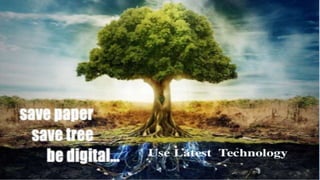
PAPERLESS
WORLD
Presented By : Neeraj Garwal
Introduction
Concept Introduced in 1980s .
Desktop computers made appearance in the workplace .
Office of future , one that require little or no paper
Instead of paper , use of modern technology to accomplish goals
Going Paperless can make documentation and information sharing
easier
Keep personal information more secure .
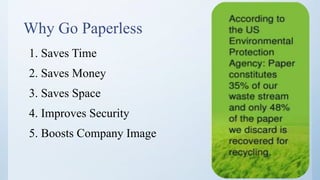
Why Go Paperless
1. Saves Time
2. Saves Money
3. Saves Space
4. Improves Security
5. Boosts Company Image
Eliminating paper via automation and electronic
forms automation
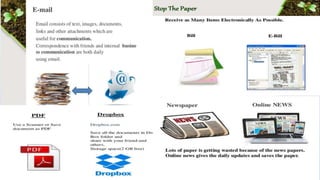
• Portable Document Format (PDF) - to create, display and interact with electronic documents
and forms
• E-form (electronic form) management software - to create, integrate and route forms and
form data with processing systems
• Databases - to capture data for prefilling and processing documents
• Workflow platforms - to route information, documents and direct process flow
• E-mail (electronics email) communication which allows sending and receiving information
of all kinds and enable attachments
• Digital signature solutions - to digitally sign documents (used by end-users)
• Web servers - to host the process, receive submitted data, store documents and manage
document rights
1. Eliminate storage space.
2. Reduce Expenses.
3. Enhance Customer Service .
4. Increased Security .
5. Improved Disaster recovery protection .
6. Reduce Environmental Impact .
7. Improve your competitiveness in
Industry
Solutions
• Use scan to e-mail instead of Faxing .
• Commit to all online banking : Invoicing ,
Statement , and payments .
• Engage Your client as well as suppliers in
utilizing technology to reduce paper
consumptions .
• File Taxes Electronically .
• If you must print, Print both side of paper .
• Use social media Tools ( Google drive ,
Dropbox ).
• Replace paper napkin with cloth material .
In sales and marketing
• Utilize social media tools ( Facebook
,Twitter ,Google ++ ) .
• Create an e – brochure vs. printed
brochure
• Sales calls and presentations :
– Use a USB memory sticks
– Leave your e – brochure and
presentations with your client .
Difficulties
Businesses may encounter technological difficulties such as :
File format Compatibility
Longevity of digital documents
System Stability
Employees and client not having appropriate technological skills .
The Cost of Hardware and Software
The Need for Training
Security Failure
Hardware Failure
References
• https://en.wikipedia.org/wiki/Paperless_office
• https://www.slideshare.net/rakeshrikame/presentation-on-going-
paperless
• https://www.powershow.com/view4/5110aa-
YjE3M/Paperless_Office_powerpoint_ppt_presentation
• https://www.youtube.com/watch?v=Q8QufBwdKsE
Paperless world

Paperless world

  • 1.
  • 2.
    Introduction Concept Introduced in1980s . Desktop computers made appearance in the workplace . Office of future , one that require little or no paper Instead of paper , use of modern technology to accomplish goals Going Paperless can make documentation and information sharing easier Keep personal information more secure .
  • 4.
    Why Go Paperless 1.Saves Time 2. Saves Money 3. Saves Space 4. Improves Security 5. Boosts Company Image
  • 6.
    Eliminating paper viaautomation and electronic forms automation • Portable Document Format (PDF) - to create, display and interact with electronic documents and forms • E-form (electronic form) management software - to create, integrate and route forms and form data with processing systems • Databases - to capture data for prefilling and processing documents • Workflow platforms - to route information, documents and direct process flow • E-mail (electronics email) communication which allows sending and receiving information of all kinds and enable attachments • Digital signature solutions - to digitally sign documents (used by end-users) • Web servers - to host the process, receive submitted data, store documents and manage document rights
  • 7.
    1. Eliminate storagespace. 2. Reduce Expenses. 3. Enhance Customer Service . 4. Increased Security . 5. Improved Disaster recovery protection . 6. Reduce Environmental Impact . 7. Improve your competitiveness in Industry
  • 8.
    Solutions • Use scanto e-mail instead of Faxing . • Commit to all online banking : Invoicing , Statement , and payments . • Engage Your client as well as suppliers in utilizing technology to reduce paper consumptions . • File Taxes Electronically . • If you must print, Print both side of paper . • Use social media Tools ( Google drive , Dropbox ). • Replace paper napkin with cloth material . In sales and marketing • Utilize social media tools ( Facebook ,Twitter ,Google ++ ) . • Create an e – brochure vs. printed brochure • Sales calls and presentations : – Use a USB memory sticks – Leave your e – brochure and presentations with your client .
  • 11.
    Difficulties Businesses may encountertechnological difficulties such as : File format Compatibility Longevity of digital documents System Stability Employees and client not having appropriate technological skills . The Cost of Hardware and Software The Need for Training Security Failure Hardware Failure
  • 12.
    References • https://en.wikipedia.org/wiki/Paperless_office • https://www.slideshare.net/rakeshrikame/presentation-on-going- paperless •https://www.powershow.com/view4/5110aa- YjE3M/Paperless_Office_powerpoint_ppt_presentation • https://www.youtube.com/watch?v=Q8QufBwdKsE