PRESENTATION ON
PAPERLESS OFFICE


     PREPARED BY
    SUNNY DUGGAL
          &
   MRINAL BHANDARI
INTRODUCTION
 Concept introduced in the 1980s.
 Desktop computers made their appearance in the
  workplace.
 Office of the Future, one that requires little or no
  paper to do business.
 Instead of paper, the paperless office would use
  modern technology to accomplish all of the same
  goals.
 The new theory behind paperless offices envisions
  waste-awareness and attempts to convert as
  much paper documentation to digital form as
  possible.
REALITY
 Paper is the number one material thrown away
  and also one of the biggest polluting industries.
 Companies interested in reducing cost and
  building business sustainability are actively
  pursuing PAPERLESS OFFICE.
 While a completely 100% paperless office may be
  unattainable , a few decisive steps applied over
  the time can dramatically reduce if not eliminate
  the vast majority of paper in office.
BENEFITS

 Eliminate Storage Space
 Reduce Expenses

 Enhance Customer Service

 Increased Security

 Improved Disaster recovery protection

 Reduce Environmental Impact

 Improve your competitiveness in the industry.
STRATEGIES-HOW TO GO ABOUT
IT
   BENCHMARK: Identify all activities in the business
    that utilize paper like printers, copiers , mail..Dig
    Deep to explore other areas of your business.
   How much paper are used in events, invoicing,
    packaging, shipping materials?
   Canteen/cafeteria ,Washroom . REMEMBER , its not
    just paper but PAPER PRODUCTS also.
   Consult with other Departments as to how , when,
    why they are using it and where is it coming from.
   Talk to the Purchasing Department and learn more
    about how much is being spent on paper products.
TARGET AREAS OF PAPER
REDUCTION
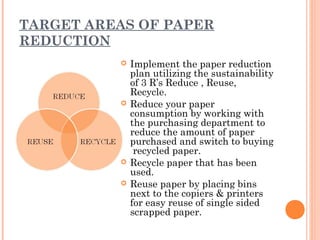
             Implement the paper reduction
              plan utilizing the sustainability
              of 3 R’s Reduce , Reuse,
              Recycle.
             Reduce your paper
              consumption by working with
              the purchasing department to
              reduce the amount of paper
              purchased and switch to buying
               recycled paper.
             Recycle paper that has been
              used.
             Reuse paper by placing bins
              next to the copiers & printers
              for easy reuse of single sided
              scrapped paper.
EDUCATE & TRAIN
 Articulate & Communicate the VISION
 Define the “HOW’S” & “WHY’S” of your plan.

 Schedule On Going Training.

 Celebrate Successes.

 Identifying areas for ongoing improvement.
MONITOR & MEASURE PROGRESS
 Regularly monitor the success of your program.
 Share your Success Stories with employees ,
  prospects, clients & suppliers.
 Engage all stakeholders in the processes.
GENERAL BEST PRACTICES
   Place phone directories, human resources documents
    and corporate policy manuals online (intranet or
    network folder)to avoid constantly updating paper
    versions.
   For correspondence, birthday cards and events, utilize
    e-cards or online event/party planning tools.
   Online e-zines , blogs and PDF versions of printed
    magazines are becoming more and more popular, both
    as a replacement for and a supplement to printed
    publications. If a printed copy is required, circulate it
    within the office/department.
   Reduce office junk mail.
   Use reusable bags to carry items.
   Recycle all paper, newspaper and shredded paper.
SOLUTIONS
   Use scan-to-e-mail instead of faxing.
   Replace paper planners with electronic ones. PDA’s:
    Blackberry and smart phones all have contact
    management capabilities.
   Commit to all online banking : Invoicing, Statements,
    and payments.
   Engage your clients as well as your suppliers in
    utilizing technology to reduce paper consumption.
   File Taxes Electronically.
   If you must print , print to both sides or use single
    sided paper as scrap paper.
   E-Brochure v/s Printed Brochure
   Use social media tools
    (LINKEDIN,FACEBOOK,FLICKR) to publish
    information and connect with clients.
   Replace paper napkins with cloth material.
ADVANTAGES & DISADVANTAGES
 Less space        Software & Hardware
 More Organised     Concerns
 Accessibility     Data Entry Errors

 Locatability      Security Concerns.

 Eco-Friendly
QUESTIONS:-


              THANKS

Final ppt

  • 1.
    PRESENTATION ON PAPERLESS OFFICE PREPARED BY SUNNY DUGGAL & MRINAL BHANDARI
  • 2.
    INTRODUCTION  Concept introducedin the 1980s.  Desktop computers made their appearance in the workplace.  Office of the Future, one that requires little or no paper to do business.  Instead of paper, the paperless office would use modern technology to accomplish all of the same goals.  The new theory behind paperless offices envisions waste-awareness and attempts to convert as much paper documentation to digital form as possible.
  • 3.
    REALITY  Paper isthe number one material thrown away and also one of the biggest polluting industries.  Companies interested in reducing cost and building business sustainability are actively pursuing PAPERLESS OFFICE.  While a completely 100% paperless office may be unattainable , a few decisive steps applied over the time can dramatically reduce if not eliminate the vast majority of paper in office.
  • 4.
    BENEFITS  Eliminate StorageSpace  Reduce Expenses  Enhance Customer Service  Increased Security  Improved Disaster recovery protection  Reduce Environmental Impact  Improve your competitiveness in the industry.
  • 5.
    STRATEGIES-HOW TO GOABOUT IT  BENCHMARK: Identify all activities in the business that utilize paper like printers, copiers , mail..Dig Deep to explore other areas of your business.  How much paper are used in events, invoicing, packaging, shipping materials?  Canteen/cafeteria ,Washroom . REMEMBER , its not just paper but PAPER PRODUCTS also.  Consult with other Departments as to how , when, why they are using it and where is it coming from.  Talk to the Purchasing Department and learn more about how much is being spent on paper products.
  • 6.
    TARGET AREAS OFPAPER REDUCTION  Implement the paper reduction plan utilizing the sustainability of 3 R’s Reduce , Reuse, Recycle.  Reduce your paper consumption by working with the purchasing department to reduce the amount of paper purchased and switch to buying recycled paper.  Recycle paper that has been used.  Reuse paper by placing bins next to the copiers & printers for easy reuse of single sided scrapped paper.
  • 7.
    EDUCATE & TRAIN Articulate & Communicate the VISION  Define the “HOW’S” & “WHY’S” of your plan.  Schedule On Going Training.  Celebrate Successes.  Identifying areas for ongoing improvement.
  • 8.
    MONITOR & MEASUREPROGRESS  Regularly monitor the success of your program.  Share your Success Stories with employees , prospects, clients & suppliers.  Engage all stakeholders in the processes.
  • 9.
    GENERAL BEST PRACTICES  Place phone directories, human resources documents and corporate policy manuals online (intranet or network folder)to avoid constantly updating paper versions.  For correspondence, birthday cards and events, utilize e-cards or online event/party planning tools.  Online e-zines , blogs and PDF versions of printed magazines are becoming more and more popular, both as a replacement for and a supplement to printed publications. If a printed copy is required, circulate it within the office/department.  Reduce office junk mail.  Use reusable bags to carry items.  Recycle all paper, newspaper and shredded paper.
  • 10.
    SOLUTIONS  Use scan-to-e-mail instead of faxing.  Replace paper planners with electronic ones. PDA’s: Blackberry and smart phones all have contact management capabilities.  Commit to all online banking : Invoicing, Statements, and payments.  Engage your clients as well as your suppliers in utilizing technology to reduce paper consumption.  File Taxes Electronically.  If you must print , print to both sides or use single sided paper as scrap paper.  E-Brochure v/s Printed Brochure  Use social media tools (LINKEDIN,FACEBOOK,FLICKR) to publish information and connect with clients.  Replace paper napkins with cloth material.
  • 11.
    ADVANTAGES & DISADVANTAGES Less space  Software & Hardware  More Organised Concerns  Accessibility  Data Entry Errors  Locatability  Security Concerns.  Eco-Friendly
  • 12.