A Detailed One-to-One Comparison
vs
LET’S START
WITH A
QUICK INTRODUCTION
TO
OFFICE 365ANDGOOGLE APPS
QUICK INTRODUCTION
OFFICE 365
Office 365 is a complete Business Productivity Tool
that has your familiar office applications integrated
with multiple cloud-based applications.
These applications offer a broad range of features
and provides capabilities with business class email,
online audio and video meetings, cloud storage and
sharing, real-time team collaboration, professional
document creation.
GOOGLE APPS
Google Apps is a set of web-based services that
include Google Email, Google Calendar, Google
Docs, Google Hangout, Google Mobile and Google
Sites.
Using these services you can work together and
collaborate with your team online in a whole new
way with chat, video conferences, document
collaborations, and more.
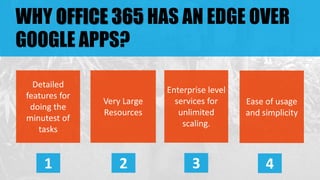
WHY OFFICE 365 HAS AN EDGE OVER
GOOGLE APPS?
Detailed
features for
doing the
minutest of
tasks
1
Very Large
Resources
2
Enterprise level
services for
unlimited
scaling.
3
Ease of usage
and simplicity
4
1 DETAILED FEATURES FOR EVERY
TASK
Office 365 is so feature-rich that it has a functionality for every task
that a business might need. Some of them are –
 Conducting polls or writing on white board during online meetings.
 Tracking live status of your employees – available, busy, off-work,
etc.
 An ocean of features in office applications for very tiny tasks.
 Setting smart rules for tracking mail flow of your employees.
 Real-time synchronization of your Mailbox and OneDrive from both
online and offline modes.
2 VERY LARGE RESOURCES
Office 365 is as resourceful as it is feature-rich. There is no sharp
constraint on the utilization of features. The limits are so placed that
businesses don’t feel bounded by them.
 A very large mail inbox up to 50 GB.
 Email attachments allowed up to 25 MB.
 Allows to conduct unlimited audio and video online meetings.
 Allows online meetings to have up to 250 participants at a time.
 Provides 1 TB of cloud storage space in OneDrive.
 Have Office Apps on your desktop, smartphone, tablet and even
online.
3 ENTERPRISE LEVEL SERVICES
Office 365 understands the exact needs of a business and provides
enterprise level services that help them in utilizing the services in a
much better way and become more efficient. Some of them are –
 Move to the cloud on your own pace.
 Unlimited scaling of services as and when required – add/remove
extra seats in your plan on requirement.
 Ability to work and collaborate with your team from anywhere and
anytime.
 Ability to continue your work on another device which was started
on some other device.
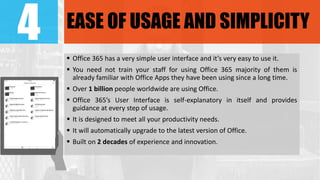
4 EASE OF USAGE AND SIMPLICITY
 Office 365 has a very simple user interface and it’s very easy to use it.
 You need not train your staff for using Office 365 majority of them is
already familiar with Office Apps they have been using since a long time.
 Over 1 billion people worldwide are using Office.
 Office 365’s User Interface is self-explanatory in itself and provides
guidance at every step of usage.
 It is designed to meet all your productivity needs.
 It will automatically upgrade to the latest version of Office.
 Built on 2 decades of experience and innovation.
LET US
COMPARE THEIR FEATURES
ONE TO ONE
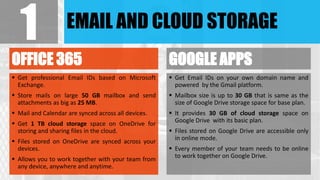
EMAIL AND CLOUD STORAGE
OFFICE 365
 Get professional Email IDs based on Microsoft
Exchange.
 Store mails on large 50 GB mailbox and send
attachments as big as 25 MB.
 Mail and Calendar are synced across all devices.
 Get 1 TB cloud storage space on OneDrive for
storing and sharing files in the cloud.
 Files stored on OneDrive are synced across your
devices.
 Allows you to work together with your team from
any device, anywhere and anytime.
GOOGLE APPS
 Get Email IDs on your own domain name and
powered by the Gmail platform.
 Mailbox size is up to 30 GB that is same as the
size of Google Drive storage space for base plan.
 It provides 30 GB of cloud storage space on
Google Drive with its basic plan.
 Files stored on Google Drive are accessible only
in online mode.
 Every member of your team needs to be online
to work together on Google Drive.
1
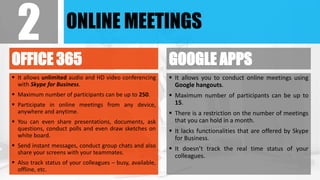
ONLINE MEETINGS
OFFICE 365
 It allows unlimited audio and HD video conferencing
with Skype for Business.
 Maximum number of participants can be up to 250.
 Participate in online meetings from any device,
anywhere and anytime.
 You can even share presentations, documents, ask
questions, conduct polls and even draw sketches on
white board.
 Send instant messages, conduct group chats and also
share your screens with your teammates.
 Also track status of your colleagues – busy, available,
offline, etc.
GOOGLE APPS
 It allows you to conduct online meetings using
Google hangouts.
 Maximum number of participants can be up to
15.
 There is a restriction on the number of meetings
that you can hold in a month.
 It lacks functionalities that are offered by Skype
for Business.
 It doesn’t track the real time status of your
colleagues.
2
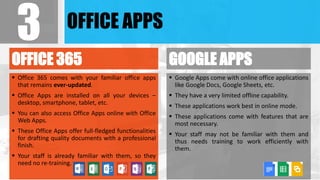
OFFICE APPS
OFFICE 365
 Office 365 comes with your familiar office apps
that remains ever-updated.
 Office Apps are installed on all your devices –
desktop, smartphone, tablet, etc.
 You can also access Office Apps online with Office
Web Apps.
 These Office Apps offer full-fledged functionalities
for drafting quality documents with a professional
finish.
 Your staff is already familiar with them, so they
need no re-training.
GOOGLE APPS
 Google Apps come with online office applications
like Google Docs, Google Sheets, etc.
 They have a very limited offline capability.
 These applications work best in online mode.
 These applications come with features that are
most necessary.
 Your staff may not be familiar with them and
thus needs training to work efficiently with
them.
3
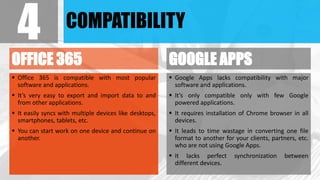
COMPATIBILITY
OFFICE 365
 Office 365 is compatible with most popular
software and applications.
 It’s very easy to export and import data to and
from other applications.
 It easily syncs with multiple devices like desktops,
smartphones, tablets, etc.
 You can start work on one device and continue on
another.
GOOGLE APPS
 Google Apps lacks compatibility with major
software and applications.
 It’s only compatible only with few Google
powered applications.
 It requires installation of Chrome browser in all
devices.
 It leads to time wastage in converting one file
format to another for your clients, partners, etc.
who are not using Google Apps.
 It lacks perfect synchronization between
different devices.
4
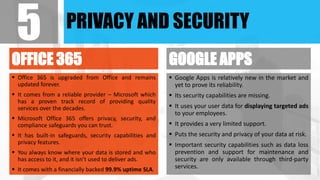
PRIVACY AND SECURITY
OFFICE 365
 Office 365 is upgraded from Office and remains
updated forever.
 It comes from a reliable provider – Microsoft which
has a proven track record of providing quality
services over the decades.
 Microsoft Office 365 offers privacy, security, and
compliance safeguards you can trust.
 It has built-in safeguards, security capabilities and
privacy features.
 You always know where your data is stored and who
has access to it, and it isn’t used to deliver ads.
 It comes with a financially backed 99.9% uptime SLA.
GOOGLE APPS
 Google Apps is relatively new in the market and
yet to prove its reliability.
 Its security capabilities are missing.
 It uses your user data for displaying targeted ads
to your employees.
 It provides a very limited support.
 Puts the security and privacy of your data at risk.
 Important security capabilities such as data loss
prevention and support for maintenance and
security are only available through third-party
services.
5
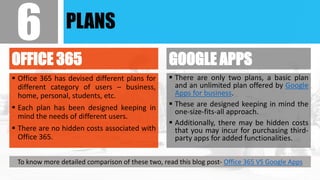
PLANS
OFFICE 365
 Office 365 has devised different plans for
different category of users – business,
home, personal, students, etc.
 Each plan has been designed keeping in
mind the needs of different users.
 There are no hidden costs associated with
Office 365.
GOOGLE APPS
 There are only two plans, a basic plan
and an unlimited plan offered by Google
Apps for business.
 These are designed keeping in mind the
one-size-fits-all approach.
 Additionally, there may be hidden costs
that you may incur for purchasing third-
party apps for added functionalities.
6
To know more detailed comparison of these two, read this blog post- Office 365 VS Google Apps
THE
MARKET
TRENDS
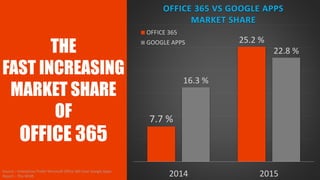
THE
FAST INCREASING
MARKET SHARE
OF
OFFICE 365
7.7 %
25.2 %
16.3 %
22.8 %
2014 2015
OFFICE 365 VS GOOGLE APPS
MARKET SHARE
OFFICE 365
GOOGLE APPS
Source – Enterprises Prefer Microsoft Office 365 Over Google Apps:
Report – The WHIR
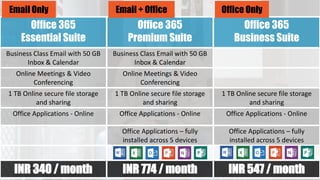
Office 365 Plans
at
Office 365
Essential Suite
Office 365
Premium Suite
Office 365
Business Suite
Business Class Email with 50 GB
Inbox & Calendar
Business Class Email with 50 GB
Inbox & Calendar
Online Meetings & Video
Conferencing
Online Meetings & Video
Conferencing
1 TB Online secure file storage
and sharing
1 TB Online secure file storage
and sharing
1 TB Online secure file storage
and sharing
Office Applications - Online Office Applications - Online Office Applications - Online
Office Applications – fully
installed across 5 devices
Office Applications – fully
installed across 5 devices
INR 340 / month INR 774 / month INR 547 / month
Office OnlyEmail + OfficeEmail Only
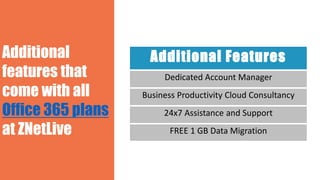
Additional Features
Dedicated Account Manager
Business Productivity Cloud Consultancy
24x7 Assistance and Support
FREE 1 GB Data Migration
Additional
features that
come with all
Office 365 plans
at ZNetLive
dakshesh@znetlive.com | +91-8003912111

Office 365 VS Google Apps- A Detailed One-to-One Comparison

  • 1.
    A Detailed One-to-OneComparison vs
  • 2.
    LET’S START WITH A QUICKINTRODUCTION TO OFFICE 365ANDGOOGLE APPS
  • 3.
    QUICK INTRODUCTION OFFICE 365 Office365 is a complete Business Productivity Tool that has your familiar office applications integrated with multiple cloud-based applications. These applications offer a broad range of features and provides capabilities with business class email, online audio and video meetings, cloud storage and sharing, real-time team collaboration, professional document creation. GOOGLE APPS Google Apps is a set of web-based services that include Google Email, Google Calendar, Google Docs, Google Hangout, Google Mobile and Google Sites. Using these services you can work together and collaborate with your team online in a whole new way with chat, video conferences, document collaborations, and more.
  • 4.
    WHY OFFICE 365HAS AN EDGE OVER GOOGLE APPS? Detailed features for doing the minutest of tasks 1 Very Large Resources 2 Enterprise level services for unlimited scaling. 3 Ease of usage and simplicity 4
  • 5.
    1 DETAILED FEATURESFOR EVERY TASK Office 365 is so feature-rich that it has a functionality for every task that a business might need. Some of them are –  Conducting polls or writing on white board during online meetings.  Tracking live status of your employees – available, busy, off-work, etc.  An ocean of features in office applications for very tiny tasks.  Setting smart rules for tracking mail flow of your employees.  Real-time synchronization of your Mailbox and OneDrive from both online and offline modes.
  • 6.
    2 VERY LARGERESOURCES Office 365 is as resourceful as it is feature-rich. There is no sharp constraint on the utilization of features. The limits are so placed that businesses don’t feel bounded by them.  A very large mail inbox up to 50 GB.  Email attachments allowed up to 25 MB.  Allows to conduct unlimited audio and video online meetings.  Allows online meetings to have up to 250 participants at a time.  Provides 1 TB of cloud storage space in OneDrive.  Have Office Apps on your desktop, smartphone, tablet and even online.
  • 7.
    3 ENTERPRISE LEVELSERVICES Office 365 understands the exact needs of a business and provides enterprise level services that help them in utilizing the services in a much better way and become more efficient. Some of them are –  Move to the cloud on your own pace.  Unlimited scaling of services as and when required – add/remove extra seats in your plan on requirement.  Ability to work and collaborate with your team from anywhere and anytime.  Ability to continue your work on another device which was started on some other device.
  • 8.
    4 EASE OFUSAGE AND SIMPLICITY  Office 365 has a very simple user interface and it’s very easy to use it.  You need not train your staff for using Office 365 majority of them is already familiar with Office Apps they have been using since a long time.  Over 1 billion people worldwide are using Office.  Office 365’s User Interface is self-explanatory in itself and provides guidance at every step of usage.  It is designed to meet all your productivity needs.  It will automatically upgrade to the latest version of Office.  Built on 2 decades of experience and innovation.
  • 9.
    LET US COMPARE THEIRFEATURES ONE TO ONE
  • 10.
    EMAIL AND CLOUDSTORAGE OFFICE 365  Get professional Email IDs based on Microsoft Exchange.  Store mails on large 50 GB mailbox and send attachments as big as 25 MB.  Mail and Calendar are synced across all devices.  Get 1 TB cloud storage space on OneDrive for storing and sharing files in the cloud.  Files stored on OneDrive are synced across your devices.  Allows you to work together with your team from any device, anywhere and anytime. GOOGLE APPS  Get Email IDs on your own domain name and powered by the Gmail platform.  Mailbox size is up to 30 GB that is same as the size of Google Drive storage space for base plan.  It provides 30 GB of cloud storage space on Google Drive with its basic plan.  Files stored on Google Drive are accessible only in online mode.  Every member of your team needs to be online to work together on Google Drive. 1
  • 11.
    ONLINE MEETINGS OFFICE 365 It allows unlimited audio and HD video conferencing with Skype for Business.  Maximum number of participants can be up to 250.  Participate in online meetings from any device, anywhere and anytime.  You can even share presentations, documents, ask questions, conduct polls and even draw sketches on white board.  Send instant messages, conduct group chats and also share your screens with your teammates.  Also track status of your colleagues – busy, available, offline, etc. GOOGLE APPS  It allows you to conduct online meetings using Google hangouts.  Maximum number of participants can be up to 15.  There is a restriction on the number of meetings that you can hold in a month.  It lacks functionalities that are offered by Skype for Business.  It doesn’t track the real time status of your colleagues. 2
  • 12.
    OFFICE APPS OFFICE 365 Office 365 comes with your familiar office apps that remains ever-updated.  Office Apps are installed on all your devices – desktop, smartphone, tablet, etc.  You can also access Office Apps online with Office Web Apps.  These Office Apps offer full-fledged functionalities for drafting quality documents with a professional finish.  Your staff is already familiar with them, so they need no re-training. GOOGLE APPS  Google Apps come with online office applications like Google Docs, Google Sheets, etc.  They have a very limited offline capability.  These applications work best in online mode.  These applications come with features that are most necessary.  Your staff may not be familiar with them and thus needs training to work efficiently with them. 3
  • 13.
    COMPATIBILITY OFFICE 365  Office365 is compatible with most popular software and applications.  It’s very easy to export and import data to and from other applications.  It easily syncs with multiple devices like desktops, smartphones, tablets, etc.  You can start work on one device and continue on another. GOOGLE APPS  Google Apps lacks compatibility with major software and applications.  It’s only compatible only with few Google powered applications.  It requires installation of Chrome browser in all devices.  It leads to time wastage in converting one file format to another for your clients, partners, etc. who are not using Google Apps.  It lacks perfect synchronization between different devices. 4
  • 14.
    PRIVACY AND SECURITY OFFICE365  Office 365 is upgraded from Office and remains updated forever.  It comes from a reliable provider – Microsoft which has a proven track record of providing quality services over the decades.  Microsoft Office 365 offers privacy, security, and compliance safeguards you can trust.  It has built-in safeguards, security capabilities and privacy features.  You always know where your data is stored and who has access to it, and it isn’t used to deliver ads.  It comes with a financially backed 99.9% uptime SLA. GOOGLE APPS  Google Apps is relatively new in the market and yet to prove its reliability.  Its security capabilities are missing.  It uses your user data for displaying targeted ads to your employees.  It provides a very limited support.  Puts the security and privacy of your data at risk.  Important security capabilities such as data loss prevention and support for maintenance and security are only available through third-party services. 5
  • 15.
    PLANS OFFICE 365  Office365 has devised different plans for different category of users – business, home, personal, students, etc.  Each plan has been designed keeping in mind the needs of different users.  There are no hidden costs associated with Office 365. GOOGLE APPS  There are only two plans, a basic plan and an unlimited plan offered by Google Apps for business.  These are designed keeping in mind the one-size-fits-all approach.  Additionally, there may be hidden costs that you may incur for purchasing third- party apps for added functionalities. 6 To know more detailed comparison of these two, read this blog post- Office 365 VS Google Apps
  • 16.
  • 17.
    THE FAST INCREASING MARKET SHARE OF OFFICE365 7.7 % 25.2 % 16.3 % 22.8 % 2014 2015 OFFICE 365 VS GOOGLE APPS MARKET SHARE OFFICE 365 GOOGLE APPS Source – Enterprises Prefer Microsoft Office 365 Over Google Apps: Report – The WHIR
  • 18.
  • 19.
    Office 365 Essential Suite Office365 Premium Suite Office 365 Business Suite Business Class Email with 50 GB Inbox & Calendar Business Class Email with 50 GB Inbox & Calendar Online Meetings & Video Conferencing Online Meetings & Video Conferencing 1 TB Online secure file storage and sharing 1 TB Online secure file storage and sharing 1 TB Online secure file storage and sharing Office Applications - Online Office Applications - Online Office Applications - Online Office Applications – fully installed across 5 devices Office Applications – fully installed across 5 devices INR 340 / month INR 774 / month INR 547 / month Office OnlyEmail + OfficeEmail Only
  • 20.
    Additional Features Dedicated AccountManager Business Productivity Cloud Consultancy 24x7 Assistance and Support FREE 1 GB Data Migration Additional features that come with all Office 365 plans at ZNetLive
  • 21.