• Multimedia
  Communication
• Global Information Internship
  Program from BUDNET
 www.budnetdesign.com
Outline
 Multimedia concept
 Tools for Multimedia communication
  _Software
 _Hardware
 Advanced coding standards
 Applications
What Is Multimedia
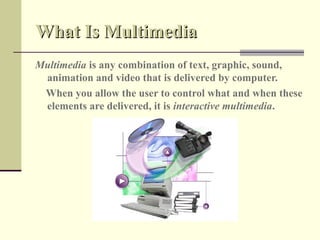
Multimedia is any combination of text, graphic, sound,
 animation and video that is delivered by computer.
 When you allow the user to control what and when these
 elements are delivered, it is interactive multimedia.
Multimedia Software
 Familiar Tools


 Multimedia Authoring
  Tools


 Elemental Tools
Familiar Tools
 Word Processors
   _ Microsoft Word
   _ WordPerfect

 Spreadsheets
   _ Excel

 Databases
   _Q+E Database/VB

 Presentation Tools
   _ PowerPoint
Multimedia Authoring Tools
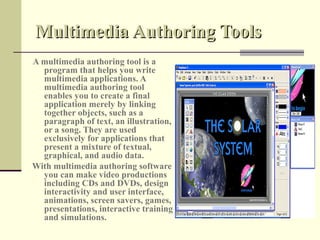
A multimedia authoring tool is a
  program that helps you write
  multimedia applications. A
  multimedia authoring tool
  enables you to create a final
  application merely by linking
  together objects, such as a
  paragraph of text, an illustration,
  or a song. They are used
  exclusively for applications that
  present a mixture of textual,
  graphical, and audio data.
With multimedia authoring software
  you can make video productions
  including CDs and DVDs, design
  interactivity and user interface,
  animations, screen savers, games,
  presentations, interactive training
  and simulations.
Types Of Authoring Tools

 Card- or Page-based Tools


 Icon-based Tools


 Time-based Tools
Card- or Page-based Tools
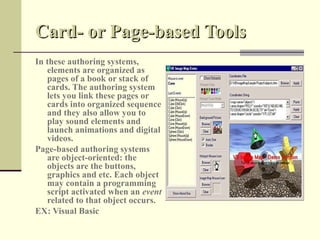
In these authoring systems,
   elements are organized as
   pages of a book or stack of
   cards. The authoring system
   lets you link these pages or
   cards into organized sequence
   and they also allow you to
   play sound elements and
   launch animations and digital
   videos.
Page-based authoring systems
   are object-oriented: the
   objects are the buttons,
   graphics and etc. Each object
   may contain a programming
   script activated when an event
   related to that object occurs.
EX: Visual Basic
Icon-based Authoring Tools
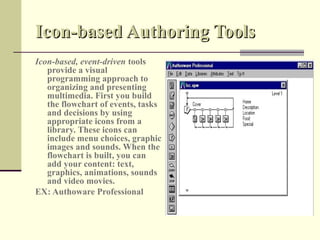
Icon-based, event-driven tools
   provide a visual
   programming approach to
   organizing and presenting
   multimedia. First you build
   the flowchart of events, tasks
   and decisions by using
   appropriate icons from a
   library. These icons can
   include menu choices, graphic
   images and sounds. When the
   flowchart is built, you can
   add your content: text,
   graphics, animations, sounds
   and video movies.
EX: Authoware Professional
Time-based Authoring Tools
Time-based authoring tools are the most common of
  multimedia authoring tools. In these authoring systems,
  elements are organized along a time line. They are the
  best to use when you have message with the beginning
  and an end. Sequentially organized graphic frames are
  played back at the speed that you can set. Other elements
  (such as audio events) are triggered at the given time or
  location in the sequence of events.

EX: Animation Works Interactive
Elemental Tools
Elemental tools help us work with the important basic elements of your
   project: its graphics, images, sound, text and moving pictures.
Elemental tools includes:
   Painting And Drawing Tools
   Cad And 3-D Drawing Tools
   Image Editing Tools
   OCR Software
   Sound Editing Programs
   Tools For Creating Animations And Digital Movies
   Helpful Accessories
Painting And Drawing Tools
Painting and drawing tools are the most
   important items in your toolkit
   because the impact of the graphics in
   your project will likely have the
   greatest influence on the end user.
Painting software is dedicated to
   producing excellent bitmapped
   images .
Drawing software is dedicated to
   producing line art that is easily
   printed to paper. Drawing packages
   include powerful and expensive
   computer-aided design (CAD)
   software.
Ex: DeskDraw, DeskPaint, Designer
CAD And 3-D Drawing Tools
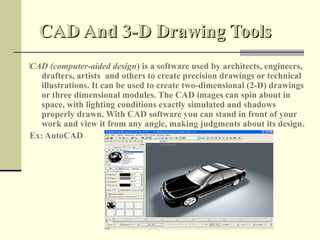
‍CAD (computer-aided design) is a software used by architects, engineers,
    drafters, artists and others to create precision drawings or technical
    illustrations. It can be used to create two-dimensional (2-D) drawings
    or three dimensional modules. The CAD images can spin about in
    space, with lighting conditions exactly simulated and shadows
    properly drawn. With CAD software you can stand in front of your
    work and view it from any angle, making judgments about its design.
 Ex: AutoCAD
Image Editing Tools
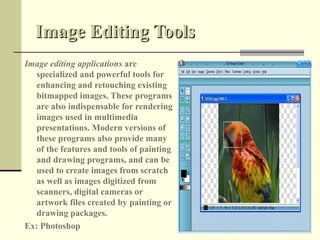
Image editing applications are
   specialized and powerful tools for
   enhancing and retouching existing
   bitmapped images. These programs
   are also indispensable for rendering
   images used in multimedia
   presentations. Modern versions of
   these programs also provide many
   of the features and tools of painting
   and drawing programs, and can be
   used to create images from scratch
   as well as images digitized from
   scanners, digital cameras or
   artwork files created by painting or
   drawing packages.
Ex: Photoshop
OCR Software
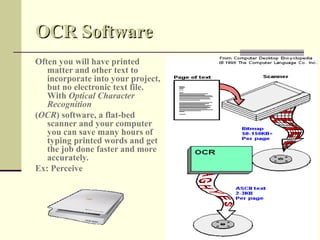
Often you will have printed
   matter and other text to
   incorporate into your project,
   but no electronic text file.
   With Optical Character
   Recognition
(OCR) software, a flat-bed
   scanner and your computer
   you can save many hours of
   typing printed words and get
   the job done faster and more
   accurately.
Ex: Perceive
Sound Editing Programs
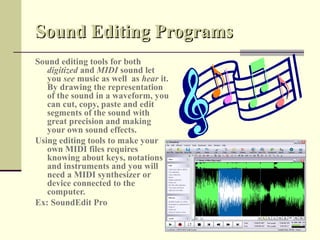
Sound editing tools for both
   digitized and MIDI sound let
   you see music as well as hear it.
   By drawing the representation
   of the sound in a waveform, you
   can cut, copy, paste and edit
   segments of the sound with
   great precision and making
   your own sound effects.
Using editing tools to make your
   own MIDI files requires
   knowing about keys, notations
   and instruments and you will
   need a MIDI synthesizer or
   device connected to the
   computer.
Ex: SoundEdit Pro
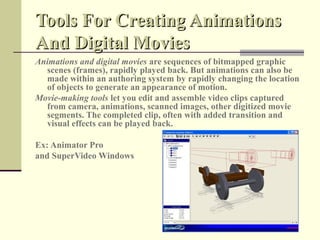
Tools For Creating Animations
And Digital Movies
Animations and digital movies are sequences of bitmapped graphic
  scenes (frames), rapidly played back. But animations can also be
  made within an authoring system by rapidly changing the location
  of objects to generate an appearance of motion.
Movie-making tools let you edit and assemble video clips captured
  from camera, animations, scanned images, other digitized movie
  segments. The completed clip, often with added transition and
  visual effects can be played back.

Ex: Animator Pro
and SuperVideo Windows
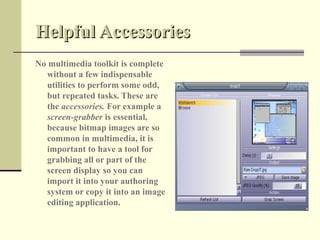
Helpful Accessories
No multimedia toolkit is complete
  without a few indispensable
  utilities to perform some odd,
  but repeated tasks. These are
  the accessories. For example a
  screen-grabber is essential,
  because bitmap images are so
  common in multimedia, it is
  important to have a tool for
  grabbing all or part of the
  screen display so you can
  import it into your authoring
  system or copy it into an image
  editing application.
Multimedia Hardware
Peripherals
 Input devices


 Output devices


 Storage devices


 Communication devices
  _Modems
  _Network Interfaces
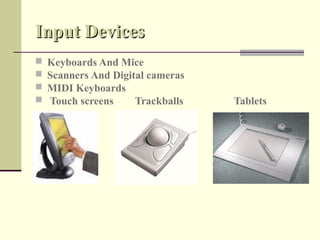
Input Devices
   Keyboards And Mice
   Scanners And Digital cameras
   MIDI Keyboards
   Touch screens     Trackballs   Tablets
Continue…
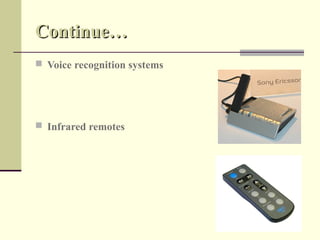
 Voice recognition systems


 Infrared remotes
Continue…
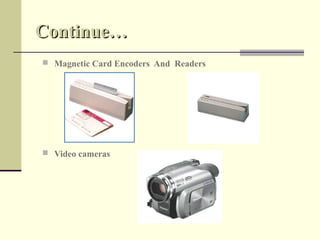
 Magnetic Card Encoders And Readers


 Video cameras
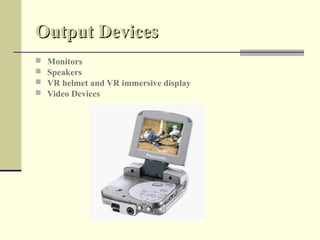
Output Devices
   Monitors
   Speakers
   VR helmet and VR immersive display
   Video Devices
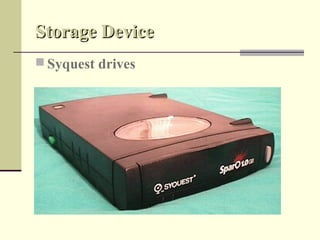
Storage Device
 Syquest drives
Continue…
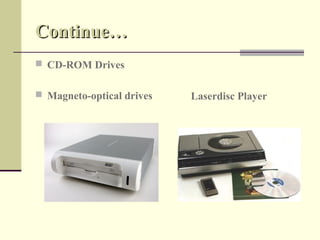
 CD-ROM Drives


 Magneto-optical drives   Laserdisc Player
Advanced Multimedia Coding
Standards
 Still Picture Coding: JPEG 2000
 Video Coding: MPEG-4
 Multimedia Content Description Interface: MPEG-7
 Speech Coding Standards: ITU G.729
 Audio Coding Standards: MPEG-4
 Text compression standards
   There is not a single algorithm for it but the
most popular schemes belong to Lempel-Ziv (LZ)
family.
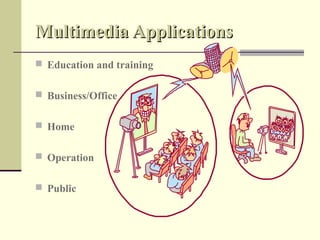
Multimedia Applications
 Education and training


 Business/Office


 Home


 Operation


 Public
Time For
Thanks
 Questions
Thanks…
References
Books:
•   Multimedia: Making It Work
    By: Tay Vaughan
•   Information Technology: Principles and Applications
    By: Ajoy Kumar Ray & Tinku Acharya
Web sites:
•   http://www.cse.fau.edu/research/mmlab/journal.html
•   http://www.iis.fraunhofer.de/amm/techinf/mpeg4/index.html
•   http://www.uky.edu/~rst/mmbook.html
•   http://www.clearleadinc.com/site/multimedia_authoring.html
Multimedia communication

  • 1.
    • Multimedia Communication • Global Information Internship Program from BUDNET www.budnetdesign.com
  • 2.
    Outline  Multimedia concept Tools for Multimedia communication _Software _Hardware  Advanced coding standards  Applications
  • 3.
    What Is Multimedia Multimediais any combination of text, graphic, sound, animation and video that is delivered by computer. When you allow the user to control what and when these elements are delivered, it is interactive multimedia.
  • 4.
    Multimedia Software  FamiliarTools  Multimedia Authoring Tools  Elemental Tools
  • 5.
    Familiar Tools  WordProcessors _ Microsoft Word _ WordPerfect  Spreadsheets _ Excel  Databases _Q+E Database/VB  Presentation Tools _ PowerPoint
  • 6.
    Multimedia Authoring Tools Amultimedia authoring tool is a program that helps you write multimedia applications. A multimedia authoring tool enables you to create a final application merely by linking together objects, such as a paragraph of text, an illustration, or a song. They are used exclusively for applications that present a mixture of textual, graphical, and audio data. With multimedia authoring software you can make video productions including CDs and DVDs, design interactivity and user interface, animations, screen savers, games, presentations, interactive training and simulations.
  • 7.
    Types Of AuthoringTools  Card- or Page-based Tools  Icon-based Tools  Time-based Tools
  • 8.
    Card- or Page-basedTools In these authoring systems, elements are organized as pages of a book or stack of cards. The authoring system lets you link these pages or cards into organized sequence and they also allow you to play sound elements and launch animations and digital videos. Page-based authoring systems are object-oriented: the objects are the buttons, graphics and etc. Each object may contain a programming script activated when an event related to that object occurs. EX: Visual Basic
  • 9.
    Icon-based Authoring Tools Icon-based,event-driven tools provide a visual programming approach to organizing and presenting multimedia. First you build the flowchart of events, tasks and decisions by using appropriate icons from a library. These icons can include menu choices, graphic images and sounds. When the flowchart is built, you can add your content: text, graphics, animations, sounds and video movies. EX: Authoware Professional
  • 10.
    Time-based Authoring Tools Time-basedauthoring tools are the most common of multimedia authoring tools. In these authoring systems, elements are organized along a time line. They are the best to use when you have message with the beginning and an end. Sequentially organized graphic frames are played back at the speed that you can set. Other elements (such as audio events) are triggered at the given time or location in the sequence of events. EX: Animation Works Interactive
  • 11.
    Elemental Tools Elemental toolshelp us work with the important basic elements of your project: its graphics, images, sound, text and moving pictures. Elemental tools includes:  Painting And Drawing Tools  Cad And 3-D Drawing Tools  Image Editing Tools  OCR Software  Sound Editing Programs  Tools For Creating Animations And Digital Movies  Helpful Accessories
  • 12.
    Painting And DrawingTools Painting and drawing tools are the most important items in your toolkit because the impact of the graphics in your project will likely have the greatest influence on the end user. Painting software is dedicated to producing excellent bitmapped images . Drawing software is dedicated to producing line art that is easily printed to paper. Drawing packages include powerful and expensive computer-aided design (CAD) software. Ex: DeskDraw, DeskPaint, Designer
  • 13.
    CAD And 3-DDrawing Tools ‍CAD (computer-aided design) is a software used by architects, engineers, drafters, artists and others to create precision drawings or technical illustrations. It can be used to create two-dimensional (2-D) drawings or three dimensional modules. The CAD images can spin about in space, with lighting conditions exactly simulated and shadows properly drawn. With CAD software you can stand in front of your work and view it from any angle, making judgments about its design. Ex: AutoCAD
  • 14.
    Image Editing Tools Imageediting applications are specialized and powerful tools for enhancing and retouching existing bitmapped images. These programs are also indispensable for rendering images used in multimedia presentations. Modern versions of these programs also provide many of the features and tools of painting and drawing programs, and can be used to create images from scratch as well as images digitized from scanners, digital cameras or artwork files created by painting or drawing packages. Ex: Photoshop
  • 15.
    OCR Software Often youwill have printed matter and other text to incorporate into your project, but no electronic text file. With Optical Character Recognition (OCR) software, a flat-bed scanner and your computer you can save many hours of typing printed words and get the job done faster and more accurately. Ex: Perceive
  • 16.
    Sound Editing Programs Soundediting tools for both digitized and MIDI sound let you see music as well as hear it. By drawing the representation of the sound in a waveform, you can cut, copy, paste and edit segments of the sound with great precision and making your own sound effects. Using editing tools to make your own MIDI files requires knowing about keys, notations and instruments and you will need a MIDI synthesizer or device connected to the computer. Ex: SoundEdit Pro
  • 17.
    Tools For CreatingAnimations And Digital Movies Animations and digital movies are sequences of bitmapped graphic scenes (frames), rapidly played back. But animations can also be made within an authoring system by rapidly changing the location of objects to generate an appearance of motion. Movie-making tools let you edit and assemble video clips captured from camera, animations, scanned images, other digitized movie segments. The completed clip, often with added transition and visual effects can be played back. Ex: Animator Pro and SuperVideo Windows
  • 18.
    Helpful Accessories No multimediatoolkit is complete without a few indispensable utilities to perform some odd, but repeated tasks. These are the accessories. For example a screen-grabber is essential, because bitmap images are so common in multimedia, it is important to have a tool for grabbing all or part of the screen display so you can import it into your authoring system or copy it into an image editing application.
  • 19.
    Multimedia Hardware Peripherals  Inputdevices  Output devices  Storage devices  Communication devices _Modems _Network Interfaces
  • 20.
    Input Devices  Keyboards And Mice  Scanners And Digital cameras  MIDI Keyboards  Touch screens Trackballs Tablets
  • 21.
    Continue…  Voice recognitionsystems  Infrared remotes
  • 22.
    Continue…  Magnetic CardEncoders And Readers  Video cameras
  • 23.
    Output Devices  Monitors  Speakers  VR helmet and VR immersive display  Video Devices
  • 24.
  • 25.
    Continue…  CD-ROM Drives Magneto-optical drives Laserdisc Player
  • 26.
    Advanced Multimedia Coding Standards Still Picture Coding: JPEG 2000  Video Coding: MPEG-4  Multimedia Content Description Interface: MPEG-7  Speech Coding Standards: ITU G.729  Audio Coding Standards: MPEG-4  Text compression standards There is not a single algorithm for it but the most popular schemes belong to Lempel-Ziv (LZ) family.
  • 27.
    Multimedia Applications  Educationand training  Business/Office  Home  Operation  Public
  • 28.
  • 29.
    Thanks… References Books: • Multimedia: Making It Work By: Tay Vaughan • Information Technology: Principles and Applications By: Ajoy Kumar Ray & Tinku Acharya Web sites: • http://www.cse.fau.edu/research/mmlab/journal.html • http://www.iis.fraunhofer.de/amm/techinf/mpeg4/index.html • http://www.uky.edu/~rst/mmbook.html • http://www.clearleadinc.com/site/multimedia_authoring.html