





SEO – HIGH TRAFFIC ROUTING

 Global Information Internship
  Program from BUDNET
 www.budnetdesign.com
Today’s Agenda
   What is SEO?
   The Seven Steps to Higher Rankings
       Get Your Site Fully Indexed
       Get Your Pages Visible
       Build Links & PageRank
       Leverage Your PageRank
       Encourage Clickthrough
       Track the Right Metrics
       Avoid Worst Practices
Part 1: What Is SEO?
Everything
Revolves
Around Search
Search Engine Optimization

 6 times more effective than a banner ad
 Delivers qualified leads
 80% of Internet user sessions begin at the
  search engines (Source: Internetstats.com)
 55% of online purchases are made on sites
  found through search engine listings
  (Source: Internetstats.com)
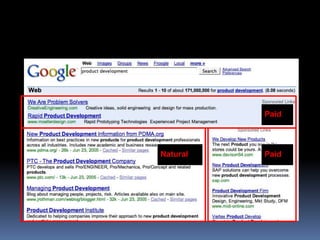
SEO is NOT Paid Advertising


 SEO – “Search Engine Optimization” – seeks to
  influence rankings in the “natural” (a.k.a.
  “organic”, a.k.a. “algorithmic”) search results
 PPC – paid search advertising on a pay-per-click
  basis. The more you pay, the higher your
  placement. Stop paying = stop receiving traffic.
 SEM – encompasses both SEO and PPC
Paid


Natural   Paid
Google Listings – Your Virtual
Sales Force making 6-7 figures a month from
   Savvy retailers
      natural listings
     Savvy MFA (Made for AdSense) site owners
      making 5-6 figures per month
     Most sites are not SE-friendly
     Google friendliness = friendly to other engines
     First calculate your missed opportunities
Not doing SEO? You’re Leaving
 Money on the Table
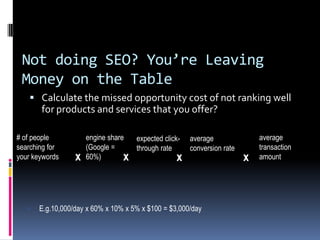
     Calculate the missed opportunity cost of not ranking well
       for products and services that you offer?

# of people           engine share  expected click- average               average
searching for         (Google =     through rate    conversion rate       transaction
your keywords     x   60%)        x               x                   x   amount


      E.g.10,000/day x 60% x 10% x 5% x $100 = $3,000/day
Most Important Search
Engines
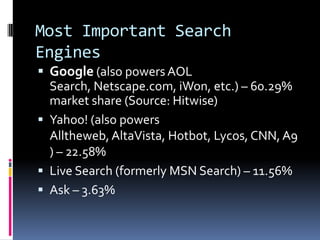
 Google (also powers AOL
  Search, Netscape.com, iWon, etc.) – 60.29%
  market share (Source: Hitwise)
 Yahoo! (also powers
  Alltheweb, AltaVista, Hotbot, Lycos, CNN, A9
  ) – 22.58%
 Live Search (formerly MSN Search) – 11.56%
 Ask – 3.63%
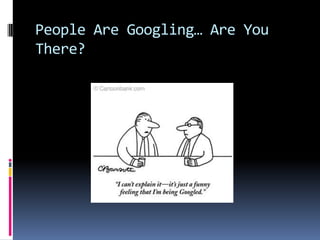
People Are Googling… Are You
There?
What Are Searchers Looking
For?
 Keyword Research
   “Target the wrong keywords and all your efforts will
    be in vain.”
 The “right” keywords are…
   relevant to your business
   popular with searchers
Keyword Research

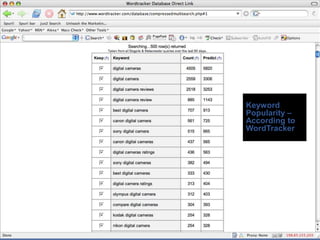
 Tools to check popularity of keyword
  searches
   WordTracker.com
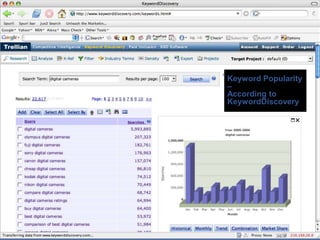
   Trellian’s KeywordDiscovery.com
   Google’s Keyword Tool
   Google Trends
   Google Suggest
WordTracker.com
 Pros
     Based on last 60 days worth of searches
     Singular vs plural, misspellings, verb tenses all separated out
     Advanced functionality: keyword “projects”, import data into
      Excel, synonyms, …
 Cons
   Requires subscription fee ($260/year)
   Data is from a small sample of Internet searches (from the minor search
    engines Dogpile and MetaCrawler)
   Contains bogus data from automated searches
   No historical archives
Keyword
Popularity –
According to
WordTracker
Trellian’s
KeywordDiscovery.com
 Pros
    Full year of historical archives
    Data is from a large sample of Internet searches (9 billion searches
     compiled from 37 engines)
    Singular vs plural, misspellings, verb tenses all separated out
    Can segment by country
    Advanced functionality: keyword “projects”, import data into Excel,
     synonyms, …
 Cons
   Access to the historical data requires subscription fee (~$30/month)
      Contains bogus data from automated searches
Keyword Popularity
–
According to
KeywordDiscovery
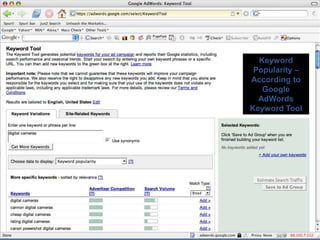
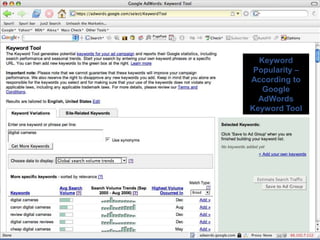
Google AdWords Keyword Tool
 Pros
      Free! (Must have an AdWords account though)
      Data is from a large sample of Internet searches (from Google)
      Singular vs plural, misspellings, verb tenses all separated out
      Can segment by country
      Synonyms
 Cons
      No hard numbers


 Augment this tool with other free Google tools:
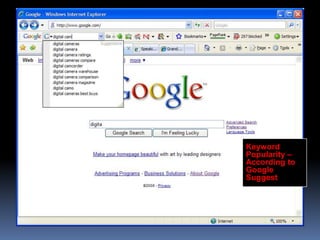
      Google Suggest (labs.google.com/suggest)
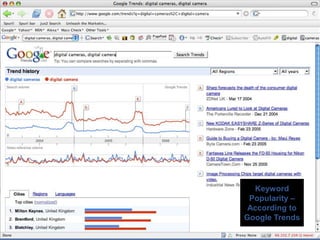
      Google Trends (www.google.com/trends)
Keyword
 Popularity –
According to
   Google
  AdWords
Keyword Tool
Keyword
 Popularity –
According to
   Google
  AdWords
Keyword Tool
Keyword
 Popularity –
 According to
Google Trends
Keyword
Popularity –
According to
Google
Suggest
Keyword Research

 Competition for that keyword should also be
  considered
   Calculate KEI Score (Keyword Effectiveness
    Indicator) = ratio of searches over number of
    pages in search results
   The higher the KEI Score, the more attractive the
    keyword is to target (assuming it’s relevant to
    your business)
SEO. A Moving Target.
  A lot is changing…
     Personalization & customization
     Vertical search services (Images, Video, News, Maps, etc.)
     “Blended Search” – aka “Universal Search”
  Fortunately, the tried-and-true tactics still work…
       Topically relevant links from important sites
       Anchor text
       Keyword-rich title tags
       Keyword-rich content
       Internal hierarchical linking structure
       The whole is greater than the sum of the parts
The Search Engines Are Your
Friend
 Sitemaps.org
 Webmaster tools (e.g. Google Webmaster Central, Live
    Search Webmaster Center, Yahoo Site Explorer)
   Rel=“nofollow” tag
   Meta NOODP tag
   Speaking at search engine conferences
   Publishing blogs dedicated to helping webmasters
   Participating on SEO forums
   “Weather reports”
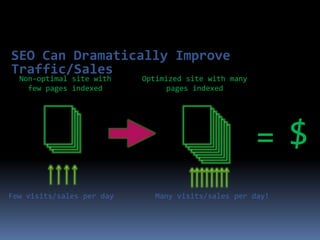
SEO Can Dramatically Improve
Traffic/Sales
  Non-optimal site with    Optimized site with many
    few pages indexed            pages indexed


                                                      =$
Few visits/sales per day     Many visits/sales per day!
Part 2: Seven Steps to High
          Rankings
Begin The 7 Steps

1) Get Your Site Fully Indexed
2) Get Your Pages Visible
3) Build Links & PageRank
4) Leverage Your PageRank
4) Encourage Clickthrough
6) Track the Right Metrics
7) Avoid Worst Practices
1) Get Your Site Fully
 Indexed
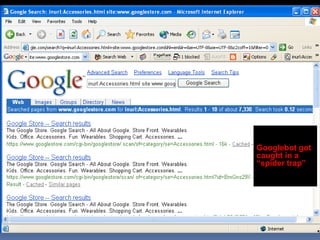
 Search engines are wary of “dynamic” pages - they fear “spider traps”

 Avoid stop characters (?, &, =) ‘cgi-bin’, session IDs and unnecessary
   variables in your URLs; frames; redirects; pop-ups; navigation in
   Flash/Java/Javascript/pulldown boxes
    If not feasible due to platform constraints, can be easily handled
      through proxy technology (e.g. GravityStream)

 The better your PageRank, the deeper and more often your site will be
   spidered
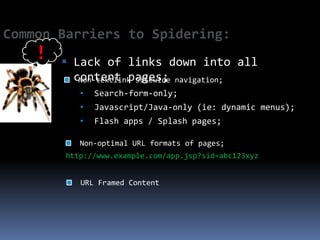
Common Barriers to Spidering:
    !    Lack of links down into all
          content pages; navigation;
           Non-textlink sitewide
           •   Search-form-only;
           •   Javascript/Java-only (ie: dynamic menus);
           •   Flash apps / Splash pages;

           Non-optimal URL formats of pages;
        http://www.example.com/app.jsp?sid=abc123xyz


           URL Framed Content
1) Get Your Site Fully Indexed
(cont’d)
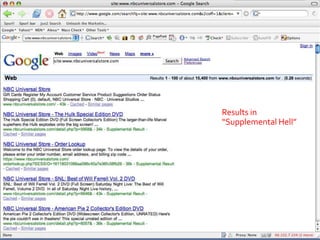
 Page # estimates are wildly inaccurate, and include non-indexed
   pages (e.g. ones with no title or snippet)
 Misconfigurations (in robots.txt, in the type of redirects used,
   requiring cookies, etc.) can kill indexation
 Keep your error pages out of the index by returning 404 status code
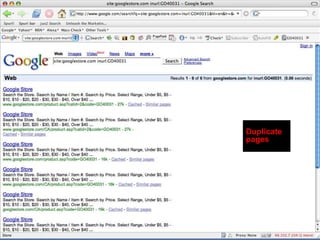
 Keep duplicate pages out of the index by standardizing your URLs,
   eliminating unnecessary variables, using 301 redirects when needed
Results in
“Supplemental Hell”
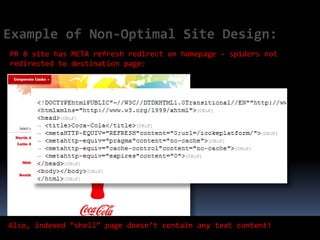
Example of Non-Optimal Site Design:
PR 8 site has META refresh redirect on homepage – spiders not
redirected to destination page:


Also, indexed “shell” page doesn’t contain any text content!
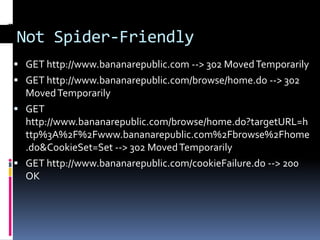
Not Spider-Friendly
 GET http://www.bananarepublic.com --> 302 Moved Temporarily
 GET http://www.bananarepublic.com/browse/home.do --> 302
  Moved Temporarily
 GET
  http://www.bananarepublic.com/browse/home.do?targetURL=h
  ttp%3A%2F%2Fwww.bananarepublic.com%2Fbrowse%2Fhome
  .do&CookieSet=Set --> 302 Moved Temporarily
 GET http://www.bananarepublic.com/cookieFailure.do --> 200
  OK
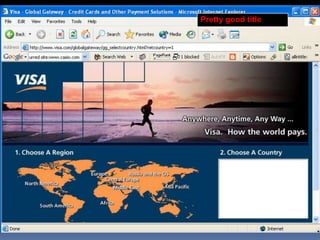
2) Get Your Pages Visible
 100+ “signals” that influence ranking
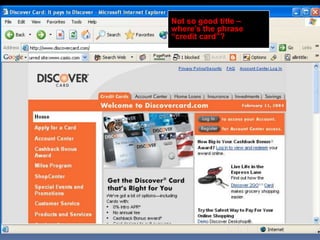
 “Title tag” is the most important copy on the page
 Home page is the most important page of a site
 Every page of your site has a “song” (keyword theme)
 Incorporate keywords into title tags, hyperlink text, headings
  (H1 & H2 tags), alt tags, and high up in the page (where
  they’re given more “weight”)
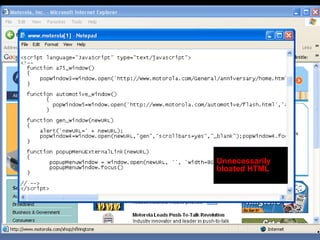
 Eliminate extraneous HTML code
 “Meta tags” are not a magic bullet
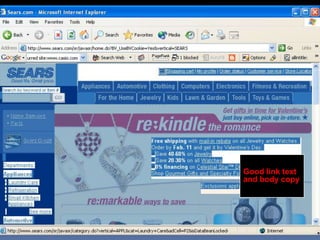
 Have text for navigation, not graphics
Pretty good title
Not so good title –
where’s the phrase
“credit card”?
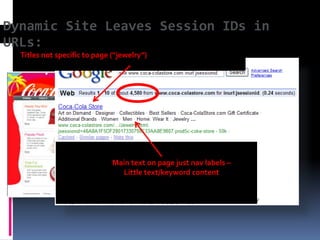
Dynamic Site Leaves Session IDs in
URLs:
  Titles not specific to page (“jewelry”)


                              Main text on page just nav labels –
                                Little text/keyword content
Good link text
and body copy
Good link text
and body copy
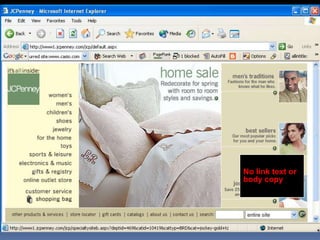
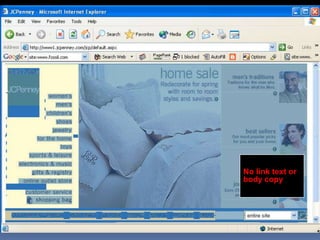
No link text or
body copy
No link text or
body copy
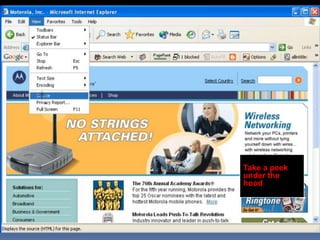
Take a peek
under the
hood
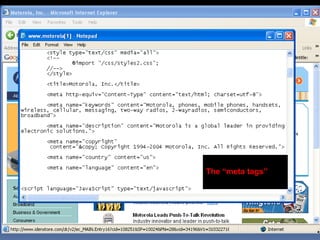
The “meta tags”
Unnecessarily
bloated HTML
3) Build Links and PageRank
 “Link popularity” affects search engine rankings
 PageRank™ - Links from “important” sites have more impact on
  your Google rankings (weighted link popularity)
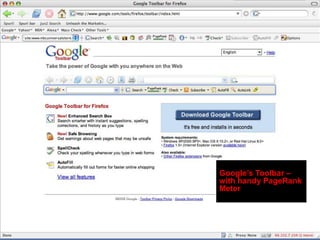
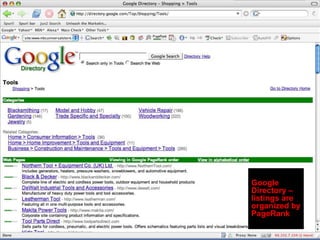
 Google offers a window into your PageRank
    PageRank meter in the Google Toolbar (toolbar.google.com)
    Google Directory (directory.google.com) category pages
    3rd party tools like SEOChat.com’s “PageRank Lookup” & “PageRank
     Search”
 Scores range from 0-10 on a logarithmic scale
 Live Search and Yahoo have similar measures to PageRank™
Google’s Toolbar –
with handy PageRank
Meter
Google
Directory –
listings are
organized by
PageRank
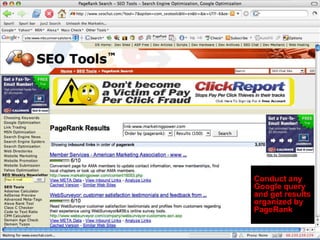
Conduct any
Google query
and get results
organized by
PageRank
4) Leverage Your PageRank
 Your home page’s PageRank gets distributed
  to your deep pages by virtue of your
  hierarchical internal linking structure (e.g.
  breadcrumb nav)
 Pay attention to the text used within the
  hyperlink (“Google bombing”)
 Don’t hoard your PageRank
 Don’t link to “bad neighborhoods”
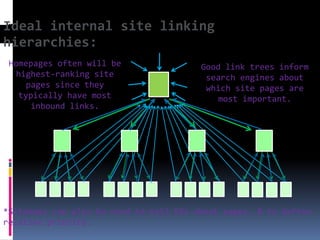
Ideal internal site linking
hierarchies:
 Homepages often will be                Good link trees inform
  highest-ranking site                   search engines about
     pages since they                    which site pages are
   typically have most                     most important.
      inbound links.


*Sitemaps can also be used to tell SEs about pages, & to define
relative priority.
4) Leverage Your PageRank
 Avoid PageRank dilution
   Canonicalization (www.domain.com vs. domain.com)
   Duplicate pages: (session IDs, tracking codes,
    superfluous parameters)
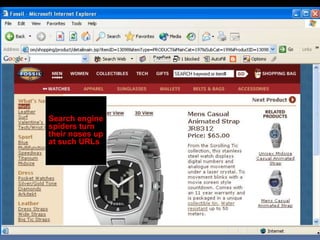
   In general, search engines are cautious of dynamic
    URLs (with ?, &, and = characters) because of “spider
    traps”
     Rewrite your URLs (using a server module/plug-in) or use
      a hosted proxy service (e.g. GravityStream)
     See
      http://catalogagemag.com/mag/marketing_right_page_
      web/
Duplicate
pages
Googlebot got
caught in a
“spider trap”
Search engine
spiders turn
their noses up
at such URLs
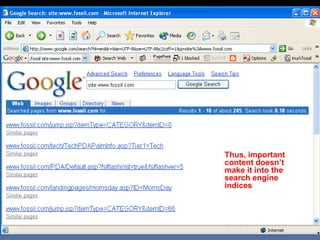
Thus, important
content doesn’t
make it into the
search engine
indices
5) Encourage Clickthrough
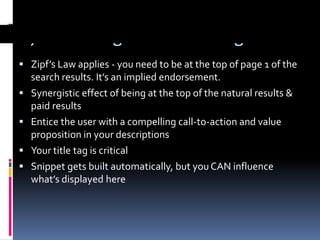
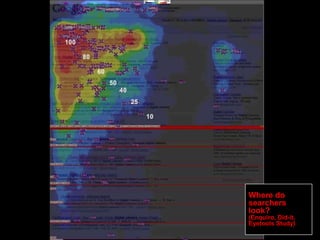
 Zipf’s Law applies - you need to be at the top of page 1 of the
    search results. It’s an implied endorsement.
   Synergistic effect of being at the top of the natural results &
    paid results
   Entice the user with a compelling call-to-action and value
    proposition in your descriptions
   Your title tag is critical
   Snippet gets built automatically, but you CAN influence
    what’s displayed here
Where do
searchers
look?
(Enquiro, Did-it,
Eyetools Study)
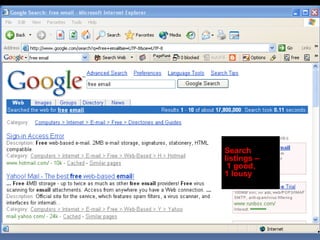
Search
listings –
 1 good,
1 lousy
6) Track the Right Metrics
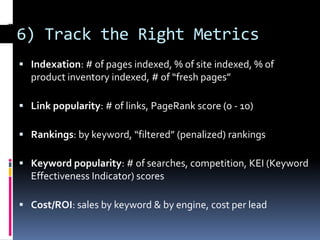
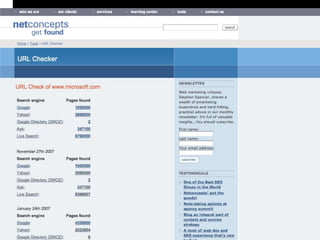
 Indexation: # of pages indexed, % of site indexed, % of
  product inventory indexed, # of “fresh pages”

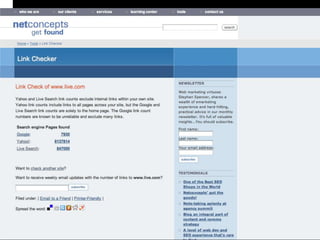
 Link popularity: # of links, PageRank score (0 - 10)

 Rankings: by keyword, “filtered” (penalized) rankings

 Keyword popularity: # of searches, competition, KEI (Keyword
  Effectiveness Indicator) scores

 Cost/ROI: sales by keyword & by engine, cost per lead
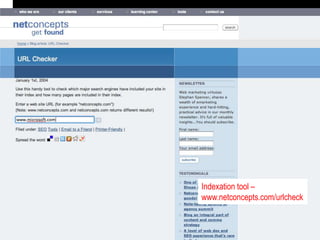
Indexation tool –
www.netconcepts.com/urlcheck
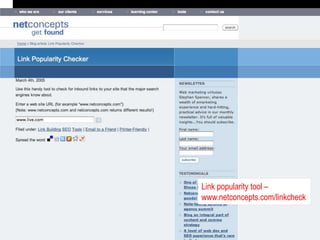
Link popularity tool –
www.netconcepts.com/linkcheck
Avoid Worst Practices

 Target relevant keywords
 Don’t stuff keywords or replicate pages
 Create deep, useful content
 Don't conceal, manipulate, or over-optimize
  content
 Links should be relevant (no scheming!)
 Observe copyright/trademark law & Google’s
  guidelines
Spamming in Its Many Forms…
   Hidden or small text
   Keyword stuffing
   Targeted to obviously irrelevant keywords
   Automated submitting, resubmitting, deep
    submitting
   Competitor names in meta tags
   Duplicate pages with minimal or no changes
   Spamglish
   Machine generated content
Spamming in Its Many Forms…


 Pagejacking
 Doorway pages
 Cloaking
 Submitting to FFA (“Free For All”) sites & link farms
 Buying up expired domains with high PageRanks
 Scraping
 Splogging (spam blogging)
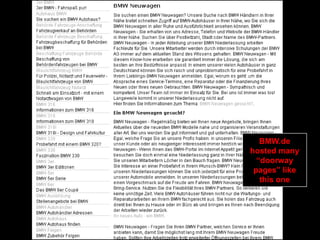
BMW.de
hosted many
  “doorway
 pages” like
   this one
“Sneaky
redirect” sent
 searchers to
  this page
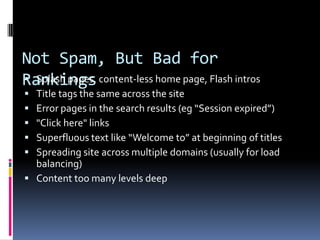
Not Spam, But Bad for
Rankings content-less home page, Flash intros
 Splash pages,
 Title tags the same across the site
 Error pages in the search results (eg “Session expired”)
 "Click here" links
 Superfluous text like “Welcome to” at beginning of titles
 Spreading site across multiple domains (usually for load
  balancing)
 Content too many levels deep
What Next? Conduct an SEO
Audit!
 Is your site fully indexed?
 Are your pages fully optimized?
 Could you be acquiring more PageRank?
 Are you spending your PageRank wisely?
 Are you maximizing your clickthrough rates?
 Are you measuring the right things?
 Are you applying “best practices” in SEO and
  avoiding all the “worst practices”?
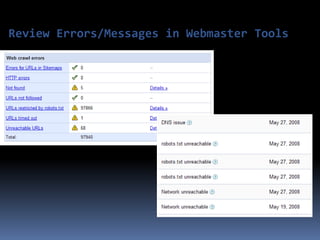
Review Errors/Messages in Webmaster Tools
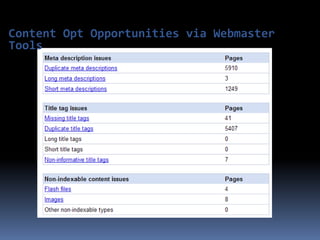
Content Opt Opportunities via Webmaster
Tools
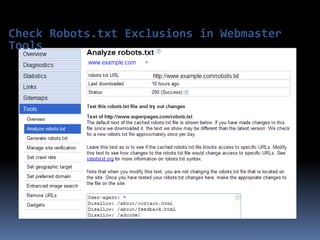
Check Robots.txt Exclusions in Webmaster
Tools
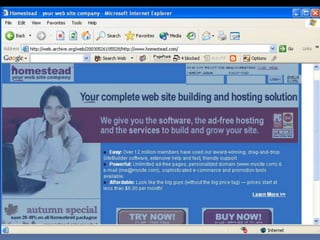
Case Study: Homestead.com

 What worked
   Comprehensive SEO & usability audit
   Intensive on-site training sessions with their IT
    and marketing teams
   6 months of support
 What didn’t work
   No significant changes to the look of the home
    page were allowed for political reasons,
    significantly reducing the options available
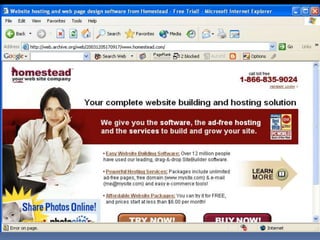
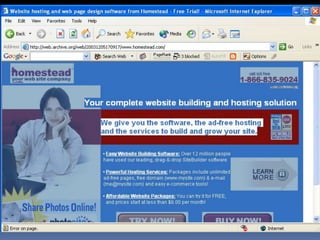
Case Study: Homestead.com

 Results
   Within 8 weeks of launch of some preliminary
    optimization work, on page 1 for “website
    hosting” in Google
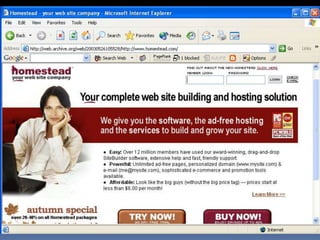
   With our audit as a blueprint, later that year
    launched an internally built site redesign which
    landed them the #1 Google position for “website
    hosting”
   Consistently held #1 position for 2 years
In Summary


   Focus on the right keywords
   Have great keyword-rich content
   Build links, and thus your PageRank™
   Spend that PageRank™ wisely within your site
   Measure the right things
   Continually monitor and benchmark
Further Reading
 blogs.cnet.com/seosearchlight
 google.com/support/webmasters/bin/answer.py?answer=35769
 www.google.com/webmasters/
 www.mattcutts.com/blog
 googlewebmastercentral.blogspot.com
 blog.outer-court.com
 www.searchengineland.com
 www.seroundtable.com
 www.naturalsearchblog.com
 www.stephanspencer.com
Q&A!
       Special White Papers Available:
          Image Search Optimization
          Local Search Optimization Tactics
          New Link Building Paradigms
          Online Marketing Tips for Universities
          Tips & Tricks for Local Search Ads

SEO-HIGH TRAFFIC ROUTING

  • 1.
    SEO – HIGHTRAFFIC ROUTING  Global Information Internship Program from BUDNET  www.budnetdesign.com
  • 2.
    Today’s Agenda  What is SEO?  The Seven Steps to Higher Rankings  Get Your Site Fully Indexed  Get Your Pages Visible  Build Links & PageRank  Leverage Your PageRank  Encourage Clickthrough  Track the Right Metrics  Avoid Worst Practices
  • 3.
    Part 1: WhatIs SEO?
  • 4.
  • 5.
    Search Engine Optimization 6 times more effective than a banner ad  Delivers qualified leads  80% of Internet user sessions begin at the search engines (Source: Internetstats.com)  55% of online purchases are made on sites found through search engine listings (Source: Internetstats.com)
  • 6.
    SEO is NOTPaid Advertising  SEO – “Search Engine Optimization” – seeks to influence rankings in the “natural” (a.k.a. “organic”, a.k.a. “algorithmic”) search results  PPC – paid search advertising on a pay-per-click basis. The more you pay, the higher your placement. Stop paying = stop receiving traffic.  SEM – encompasses both SEO and PPC
  • 7.
  • 8.
    Google Listings –Your Virtual Sales Force making 6-7 figures a month from  Savvy retailers natural listings  Savvy MFA (Made for AdSense) site owners making 5-6 figures per month  Most sites are not SE-friendly  Google friendliness = friendly to other engines  First calculate your missed opportunities
  • 9.
    Not doing SEO?You’re Leaving Money on the Table  Calculate the missed opportunity cost of not ranking well for products and services that you offer? # of people engine share expected click- average average searching for (Google = through rate conversion rate transaction your keywords x 60%) x x x amount  E.g.10,000/day x 60% x 10% x 5% x $100 = $3,000/day
  • 10.
    Most Important Search Engines Google (also powers AOL Search, Netscape.com, iWon, etc.) – 60.29% market share (Source: Hitwise)  Yahoo! (also powers Alltheweb, AltaVista, Hotbot, Lycos, CNN, A9 ) – 22.58%  Live Search (formerly MSN Search) – 11.56%  Ask – 3.63%
  • 11.
    People Are Googling…Are You There?
  • 12.
    What Are SearchersLooking For?  Keyword Research  “Target the wrong keywords and all your efforts will be in vain.”  The “right” keywords are…  relevant to your business  popular with searchers
  • 13.
    Keyword Research  Toolsto check popularity of keyword searches  WordTracker.com  Trellian’s KeywordDiscovery.com  Google’s Keyword Tool  Google Trends  Google Suggest
  • 14.
    WordTracker.com  Pros  Based on last 60 days worth of searches  Singular vs plural, misspellings, verb tenses all separated out  Advanced functionality: keyword “projects”, import data into Excel, synonyms, …  Cons  Requires subscription fee ($260/year)  Data is from a small sample of Internet searches (from the minor search engines Dogpile and MetaCrawler)  Contains bogus data from automated searches  No historical archives
  • 15.
  • 16.
    Trellian’s KeywordDiscovery.com  Pros  Full year of historical archives  Data is from a large sample of Internet searches (9 billion searches compiled from 37 engines)  Singular vs plural, misspellings, verb tenses all separated out  Can segment by country  Advanced functionality: keyword “projects”, import data into Excel, synonyms, …  Cons  Access to the historical data requires subscription fee (~$30/month)  Contains bogus data from automated searches
  • 17.
  • 18.
    Google AdWords KeywordTool  Pros  Free! (Must have an AdWords account though)  Data is from a large sample of Internet searches (from Google)  Singular vs plural, misspellings, verb tenses all separated out  Can segment by country  Synonyms  Cons  No hard numbers  Augment this tool with other free Google tools:  Google Suggest (labs.google.com/suggest)  Google Trends (www.google.com/trends)
  • 19.
    Keyword Popularity – Accordingto Google AdWords Keyword Tool
  • 20.
    Keyword Popularity – Accordingto Google AdWords Keyword Tool
  • 21.
    Keyword Popularity – According to Google Trends
  • 22.
  • 23.
    Keyword Research  Competitionfor that keyword should also be considered  Calculate KEI Score (Keyword Effectiveness Indicator) = ratio of searches over number of pages in search results  The higher the KEI Score, the more attractive the keyword is to target (assuming it’s relevant to your business)
  • 24.
    SEO. A MovingTarget.  A lot is changing…  Personalization & customization  Vertical search services (Images, Video, News, Maps, etc.)  “Blended Search” – aka “Universal Search”  Fortunately, the tried-and-true tactics still work…  Topically relevant links from important sites  Anchor text  Keyword-rich title tags  Keyword-rich content  Internal hierarchical linking structure  The whole is greater than the sum of the parts
  • 25.
    The Search EnginesAre Your Friend  Sitemaps.org  Webmaster tools (e.g. Google Webmaster Central, Live Search Webmaster Center, Yahoo Site Explorer)  Rel=“nofollow” tag  Meta NOODP tag  Speaking at search engine conferences  Publishing blogs dedicated to helping webmasters  Participating on SEO forums  “Weather reports”
  • 26.
    SEO Can DramaticallyImprove Traffic/Sales Non-optimal site with Optimized site with many few pages indexed pages indexed =$ Few visits/sales per day Many visits/sales per day!
  • 27.
    Part 2: SevenSteps to High Rankings
  • 28.
    Begin The 7Steps 1) Get Your Site Fully Indexed 2) Get Your Pages Visible 3) Build Links & PageRank 4) Leverage Your PageRank 4) Encourage Clickthrough 6) Track the Right Metrics 7) Avoid Worst Practices
  • 29.
    1) Get YourSite Fully Indexed  Search engines are wary of “dynamic” pages - they fear “spider traps”  Avoid stop characters (?, &, =) ‘cgi-bin’, session IDs and unnecessary variables in your URLs; frames; redirects; pop-ups; navigation in Flash/Java/Javascript/pulldown boxes  If not feasible due to platform constraints, can be easily handled through proxy technology (e.g. GravityStream)  The better your PageRank, the deeper and more often your site will be spidered
  • 30.
    Common Barriers toSpidering: !  Lack of links down into all content pages; navigation; Non-textlink sitewide • Search-form-only; • Javascript/Java-only (ie: dynamic menus); • Flash apps / Splash pages; Non-optimal URL formats of pages; http://www.example.com/app.jsp?sid=abc123xyz URL Framed Content
  • 31.
    1) Get YourSite Fully Indexed (cont’d)  Page # estimates are wildly inaccurate, and include non-indexed pages (e.g. ones with no title or snippet)  Misconfigurations (in robots.txt, in the type of redirects used, requiring cookies, etc.) can kill indexation  Keep your error pages out of the index by returning 404 status code  Keep duplicate pages out of the index by standardizing your URLs, eliminating unnecessary variables, using 301 redirects when needed
  • 32.
  • 33.
    Example of Non-OptimalSite Design: PR 8 site has META refresh redirect on homepage – spiders not redirected to destination page: Also, indexed “shell” page doesn’t contain any text content!
  • 34.
    Not Spider-Friendly  GEThttp://www.bananarepublic.com --> 302 Moved Temporarily  GET http://www.bananarepublic.com/browse/home.do --> 302 Moved Temporarily  GET http://www.bananarepublic.com/browse/home.do?targetURL=h ttp%3A%2F%2Fwww.bananarepublic.com%2Fbrowse%2Fhome .do&CookieSet=Set --> 302 Moved Temporarily  GET http://www.bananarepublic.com/cookieFailure.do --> 200 OK
  • 35.
    2) Get YourPages Visible  100+ “signals” that influence ranking  “Title tag” is the most important copy on the page  Home page is the most important page of a site  Every page of your site has a “song” (keyword theme)  Incorporate keywords into title tags, hyperlink text, headings (H1 & H2 tags), alt tags, and high up in the page (where they’re given more “weight”)  Eliminate extraneous HTML code  “Meta tags” are not a magic bullet  Have text for navigation, not graphics
  • 36.
  • 37.
    Not so goodtitle – where’s the phrase “credit card”?
  • 38.
    Dynamic Site LeavesSession IDs in URLs: Titles not specific to page (“jewelry”) Main text on page just nav labels – Little text/keyword content
  • 39.
  • 40.
  • 41.
    No link textor body copy
  • 42.
    No link textor body copy
  • 43.
  • 44.
  • 45.
  • 46.
    3) Build Linksand PageRank  “Link popularity” affects search engine rankings  PageRank™ - Links from “important” sites have more impact on your Google rankings (weighted link popularity)  Google offers a window into your PageRank  PageRank meter in the Google Toolbar (toolbar.google.com)  Google Directory (directory.google.com) category pages  3rd party tools like SEOChat.com’s “PageRank Lookup” & “PageRank Search”  Scores range from 0-10 on a logarithmic scale  Live Search and Yahoo have similar measures to PageRank™
  • 47.
    Google’s Toolbar – withhandy PageRank Meter
  • 48.
  • 49.
    Conduct any Google query andget results organized by PageRank
  • 50.
    4) Leverage YourPageRank  Your home page’s PageRank gets distributed to your deep pages by virtue of your hierarchical internal linking structure (e.g. breadcrumb nav)  Pay attention to the text used within the hyperlink (“Google bombing”)  Don’t hoard your PageRank  Don’t link to “bad neighborhoods”
  • 51.
    Ideal internal sitelinking hierarchies: Homepages often will be Good link trees inform highest-ranking site search engines about pages since they which site pages are typically have most most important. inbound links. *Sitemaps can also be used to tell SEs about pages, & to define relative priority.
  • 52.
    4) Leverage YourPageRank  Avoid PageRank dilution  Canonicalization (www.domain.com vs. domain.com)  Duplicate pages: (session IDs, tracking codes, superfluous parameters)  In general, search engines are cautious of dynamic URLs (with ?, &, and = characters) because of “spider traps”  Rewrite your URLs (using a server module/plug-in) or use a hosted proxy service (e.g. GravityStream)  See http://catalogagemag.com/mag/marketing_right_page_ web/
  • 53.
  • 54.
    Googlebot got caught ina “spider trap”
  • 55.
    Search engine spiders turn theirnoses up at such URLs
  • 56.
    Thus, important content doesn’t makeit into the search engine indices
  • 57.
    5) Encourage Clickthrough Zipf’s Law applies - you need to be at the top of page 1 of the search results. It’s an implied endorsement.  Synergistic effect of being at the top of the natural results & paid results  Entice the user with a compelling call-to-action and value proposition in your descriptions  Your title tag is critical  Snippet gets built automatically, but you CAN influence what’s displayed here
  • 58.
  • 59.
    Search listings – 1good, 1 lousy
  • 60.
    6) Track theRight Metrics  Indexation: # of pages indexed, % of site indexed, % of product inventory indexed, # of “fresh pages”  Link popularity: # of links, PageRank score (0 - 10)  Rankings: by keyword, “filtered” (penalized) rankings  Keyword popularity: # of searches, competition, KEI (Keyword Effectiveness Indicator) scores  Cost/ROI: sales by keyword & by engine, cost per lead
  • 61.
  • 63.
    Link popularity tool– www.netconcepts.com/linkcheck
  • 65.
    Avoid Worst Practices Target relevant keywords  Don’t stuff keywords or replicate pages  Create deep, useful content  Don't conceal, manipulate, or over-optimize content  Links should be relevant (no scheming!)  Observe copyright/trademark law & Google’s guidelines
  • 66.
    Spamming in ItsMany Forms…  Hidden or small text  Keyword stuffing  Targeted to obviously irrelevant keywords  Automated submitting, resubmitting, deep submitting  Competitor names in meta tags  Duplicate pages with minimal or no changes  Spamglish  Machine generated content
  • 67.
    Spamming in ItsMany Forms…  Pagejacking  Doorway pages  Cloaking  Submitting to FFA (“Free For All”) sites & link farms  Buying up expired domains with high PageRanks  Scraping  Splogging (spam blogging)
  • 68.
    BMW.de hosted many “doorway pages” like this one
  • 69.
  • 70.
    Not Spam, ButBad for Rankings content-less home page, Flash intros  Splash pages,  Title tags the same across the site  Error pages in the search results (eg “Session expired”)  "Click here" links  Superfluous text like “Welcome to” at beginning of titles  Spreading site across multiple domains (usually for load balancing)  Content too many levels deep
  • 71.
    What Next? Conductan SEO Audit!  Is your site fully indexed?  Are your pages fully optimized?  Could you be acquiring more PageRank?  Are you spending your PageRank wisely?  Are you maximizing your clickthrough rates?  Are you measuring the right things?  Are you applying “best practices” in SEO and avoiding all the “worst practices”?
  • 72.
  • 73.
    Content Opt Opportunitiesvia Webmaster Tools
  • 74.
    Check Robots.txt Exclusionsin Webmaster Tools
  • 75.
    Case Study: Homestead.com What worked  Comprehensive SEO & usability audit  Intensive on-site training sessions with their IT and marketing teams  6 months of support  What didn’t work  No significant changes to the look of the home page were allowed for political reasons, significantly reducing the options available
  • 76.
    Case Study: Homestead.com Results  Within 8 weeks of launch of some preliminary optimization work, on page 1 for “website hosting” in Google  With our audit as a blueprint, later that year launched an internally built site redesign which landed them the #1 Google position for “website hosting”  Consistently held #1 position for 2 years
  • 81.
    In Summary  Focus on the right keywords  Have great keyword-rich content  Build links, and thus your PageRank™  Spend that PageRank™ wisely within your site  Measure the right things  Continually monitor and benchmark
  • 82.
    Further Reading  blogs.cnet.com/seosearchlight google.com/support/webmasters/bin/answer.py?answer=35769  www.google.com/webmasters/  www.mattcutts.com/blog  googlewebmastercentral.blogspot.com  blog.outer-court.com  www.searchengineland.com  www.seroundtable.com  www.naturalsearchblog.com  www.stephanspencer.com
  • 83.
    Q&A! Special White Papers Available: Image Search Optimization Local Search Optimization Tactics New Link Building Paradigms Online Marketing Tips for Universities Tips & Tricks for Local Search Ads