
Multimedia
Global Information Internship Program from
BUDNET
www.budnetdesign.com
Outlines
   Difference with classic applications
   Classes of multimedia applications
       Requirements/Constraints
   Problems with today’s Internet and
    solutions
   Common multimedia protocols
       RTP, RTCP
   Accessing multimedia data through a web
    server
   Conclusion
Difference with classic
applications
   Highly delay-sensitive
       Packets are useless if they arrive too
        late
   Loss-tolerant (for the most part)
       Packet loss can be concealed
Outlines
   Difference with classic applications
   Classes of multimedia applications
       Requirements/Constraints
   Problems with today’s Internet and
    solutions
   Common multimedia protocols
       RTP, RTCP
   Accessing multimedia data through a web
    server
   Conclusion
Classes of multimedia
Applications
 Streaming Stored Audio and Video
 Streaming Live Audio and Video
 Real-Time Interactive Audio and
  Video
 Others
Class: Streaming Stored
Audio and Video
   The multimedia content has been
    prerecorded and stored on a server
   User may pause, rewind, forward, etc…
   The time between the initial request and
    display start can be 1 to 10 seconds
   Constraint: after display start, the
    playout must be continuous
Class: Streaming Live Audio
and Video
   Similar to traditional broadcast TV/radio,
    but delivery on the Internet
   Non-interactive just view/listen
       Can not pause or rewind
   Often combined with multicast
   The time between the initial request and
    display start can be up to 10 seconds
   Constraint: like stored streaming, after
    display start, the playout must be
    continuous
Class: Real-Time
Interactive Audio and Video
   Phone conversation/Video conferencing
   Constraint: delay between initial request
    and display start must be small
       Video: <150 ms acceptable
       Audio: <150 ms not perceived, <400 ms
        acceptable
   Constraint: after display start, the
    playout must be continuous
Class: Others
   Multimedia sharing applications
     Download-and-then-play applications
     E.g. Napster, Gnutella, Freenet

   Distance learning applications
     Coordinate video, audio and data
     Typically distributed on CDs
Outlines
   Difference with classic applications
   Classes of multimedia applications
       Requirements/Constraints
   Problems with today’s Internet and
    solutions
   Common multimedia protocols
       RTP, RTCP
   Accessing multimedia data through a web
    server
   Conclusion
Challenge
   TCP/UDP/IP suite provides best-effort, no
    guarantees on expectation or variance of
    packet delay

   Performance deteriorate if links are
    congested (transoceanic)

   Most router implementations use only
    First-Come-First-Serve (FCFS) packet
    processing and transmission scheduling
Problems and solutions
   Limited bandwidth
       Solution: Compression
   Packet Jitter
       Solution: Fixed/adaptive playout delay
        for Audio (example: phone over IP)
   Packet loss
       Solution: FEC, Interleaving
Problem: Limited bandwidth
Intro: Digitalization
   Audio
     x samples every second (x=frequency)
     The value of each sample is rounded to
      a finite number of values (for example
      256). This is called quantization
   Video
     Each pixel has a color
     Each color has a value
Problem: Limited bandwidth
Need for compression
   Audio
       CD quality: 44100 samples per seconds with
        16 bits per sample, stereo sound
       44100*16*2 = 1.411 Mbps
       For a 3-minute song: 1.441 * 180 = 254 Mb
        = 31.75 MB
   Video
       For 320*240 images with 24-bit colors
       320*240*24 = 230KB/image
       15 frames/sec: 15*230KB = 3.456MB
       3 minutes of video: 3.456*180 = 622MB
Audio compression
   Several techniques
       GSM (13 kbps), G.729(8 kbps), G723.3(6.4
        and 5.3kbps)
       MPEG 1 layer 3 (also known as MP3)
         • Typical compress rates 96kbps, 128kbps, 160kbps
         • Very little sound degradation
         • If file is broken up, each piece is still playable
         • Complex (psychoacoustic masking, redundancy
           reduction, and bit reservoir buffering)
         • 3-minute song (128kbps) : 2.8MB
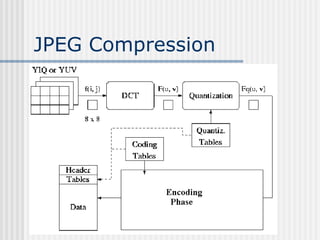
Image compression: JPEG
   Divide digitized image in 8x8 pixel blocks
   Pixel blocks are transformed into
    frequency blocks using DCT (Discrete
    Cosine Transform). This is similar to FFT
    (Fast Fourier Transform)
   The quantization phase limits the
    precision of the frequency coefficient.
   The encoding phase packs this
    information in a dense fashion
JPEG Compression
Video compression
   Popular techniques
     MPEG 1 for CD-ROM quality video
      (1.5Mbps)
     MPEG 2 for high quality DVD video (3-6
      Mbps)
     MPEG 4 for object-oriented video
      compression
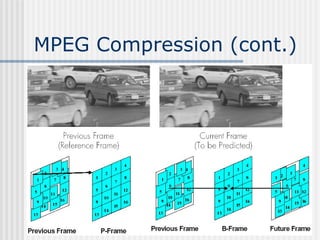
Video Compression: MPEG
   MPEG uses inter-frame encoding
       Exploits the similarity between consecutive frames
   Three frame types
       I frame: independent encoding of the frame (JPEG)
       P frame: encodes difference relative to I-frame (predicted)
       B frame: encodes difference relative to interpolated frame
       Note that frames will have different sizes
   Complex encoding, e.g. motion of pixel blocks, scene
    changes, …
       Decoding is easier then encoding
   MPEG often uses fixed-rate encoding


I    B     B   P    B    B   P    B   B    I    B   B    P    B   B
MPEG Compression (cont.)
MPEG System Streams
   Combine MPEG video and audio streams
    in a single synchronized stream
    Consists of a hierarchy with meta data at
    every level describing the data
       System level contains synchronization
        information
       Video level is organized as a stream of group
        of pictures
       Group of pictures consists of pictures
       Pictures are organized in slices
       …
MPEG System Streams
(cont.)
MPEG System Streams
(cont.)
Problem: Packet Jitter
   Jitter: Variation in delay
Sender
No jitter
            6       5   4       3       2   1

Receiver
Jitter
                5   6       4       3   2       1

   Example
pkt 6

pkt 5
Dealing with packet jitter
   How does Phone over IP applications
    limit the effect of jitter?
     A sequence number is added to each
      packet
     A timestamp is added to each packet

     Playout is delayed
Dealing with packet jitter
Fixed playout delay
   Fixed playout delay
Dealing with packet jitter
Adaptive playout delay
   Objective is to use a value for p-r that
    tracks the network delay performance as it
    varies during a transfer. The following
    formulas are used:
            di = (1-u)di-1 + u(ri – ti)      u=0.01 for example
            ν i = (1-u)ν i-1 + u|ri-ti-di|
Where
  ti is the timestamp of the ith packet (the time pkt i is sent)
    ri is the time packet i is received
    pi is the time packet i is played
    di is an estimate of the average network delay
    ν i is an estimate of the average deviation of the delay from
Problem: Packet loss
 Loss is in a broader sense: packet
  never arrives or arrives later than its
  scheduled playout time
 Since retransmission is
  inappropriate for Real Time
  applications, FEC or Interleaving are
  used to reduce loss impact.
Recovering from packet loss
Forward Error Correction
   Send redundant encoded chunk every n
    chunks (XOR original n chunks)
       If 1 packet in this group lost, can reconstruct
       If >1 packets lost, cannot recover
   Disadvantages
       The smaller the group size, the larger the
        overhead
       Playout delay increased
Recovering from packet loss
Piggybacking Lo-fi stream
   With one redundant low quality chunk per chunk,
    scheme can recover from single packet losses
Recovering from packet loss
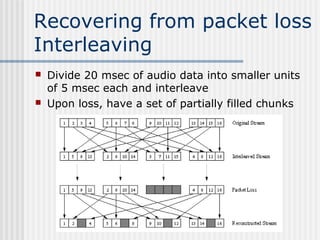
Interleaving
   Divide 20 msec of audio data into smaller units
    of 5 msec each and interleave
   Upon loss, have a set of partially filled chunks
Recovering from packet loss
Receiver-based Repair
   The simplest form: Packet repetition
       Replaces lost packets with copies of the
        packets that arrived immediately before
        the loss
   A more computationally intensive
    form: Interpolation
       Uses Audio before and after the loss to
        interpolate a suitable packet to cover
        the loss
Movie Time
Outlines
   Difference with classic applications
   Classes of multimedia applications
       Requirements/Constraints
   Problems with today’s Internet and
    solutions
   Common multimedia protocols
       RTP, RTCP
   Accessing multimedia data through a web
    server
   Conclusion
Real Time Protocol (RTP)
   RTP logically extends UDP
     Sits between UDP and application
     Implemented as an application library

   What does it do?
     Framing
     Multiplexing
     Synchronization
     Feedback (RTCP)
RTP packet format
   Payload Type: 7 bits, providing 128
    possible different types of encoding; eg
    PCM, MPEG2 video, etc.
   Sequence Number: 16 bits; used to
    detect packet loss
RTP packet format (cont)
   Timestamp: 32 bytes; gives the
    sampling instant of the first audio/video
    byte in the packet; used to remove jitter
    introduced by the network
   Synchronization Source identifier
    (SSRC): 32 bits; an id for the source of a
    stream; assigned randomly by the source
Timestamp vs. Sequence
No
   Timestamps relates packets to real
    time
       Timestamp value sampled from a
        media specific clock
   Sequence number relates packets to
    other packets
Audio silence example
   Consider audio data type
       What do you want to send during silence?
         • Not sending anything
       Why might this cause problems?
         • Other side needs to distinguish between loss and
           silence
       Receiver uses Timestamps and sequence No.
        to figure out what happened
RTP Control Protocol (RTCP)
   Used in conjunction with RTP. Used to exchange
    control information between the sender and the
    receiver.
   Three reports are defined: Receiver reception,
    Sender, and Source description
   Reports contain statistics such as the number of
    packets sent, number
    of packets lost,
    inter-arrival jitter
   Typically, limit the
    RTCP bandwidth to 5%.
    Approximately one
    sender report for three
    receiver reports
Outlines
   Difference with classic applications
   Classes of multimedia applications
       Requirements/Constraints
   Problems with today’s Internet and
    solutions
   Common multimedia protocols
       RTP, RTCP
   Accessing multimedia data through
    a web server
   Conclusion
Streaming Stored
Multimedia Example
   Audio/Video file is segmented and sent
    over either TCP or UDP, public
    segmentation protocol: Real-Time
    Protocol (RTP)

   User interactive control is provided, e.g.
    the public protocol Real Time
    Streaming Protocol (RTSP)
Streaming Stored
Multimedia Example
   Helper Application: displays content,
    which is typically requested via a Web
    browser; e.g. RealPlayer; typical
    functions:
       Decompression
       Jitter removal
       Error correction: use redundant packets to be
        used for reconstruction of original stream
       GUI for user control
Streaming from Web
Servers
   Audio: in files sent as HTTP objects
   Video (interleaved audio and images in one file,
    or two separate files and client synchronizes the
    display) sent as HTTP object(s)

   A simple architecture is to have the Browser
    request the object(s)
    and after their
    reception pass
    them to the player
    for display
     - No pipelining
Streaming from a Web
Server (cont)
   Alternative: set up connection between
    server and player, then download
   Web browser requests and receives a
    Meta File
    (a file describing the object) instead of
    receiving the file itself;
   Browser launches the appropriate Player
    and passes it the Meta File;
   Player sets up a TCP connection with a
    streaming server Server and downloads
    the file
Using a Streaming Server
Options when using a
streaming server
   Use UDP, and Server sends at a rate (Compression and
    Transmission) appropriate for client; to reduce jitter,
    Player buffers initially for 2-5 seconds, then starts display
   Use TCP, and sender sends at maximum possible rate
    under TCP; retransmit when error is encountered; Player
    uses a much large buffer to smooth delivery rate of TCP
Real Time Streaming
Protocol (RTSP)
   For user to control display: rewind, fast forward,
    pause, resume, etc…
   Out-of-band protocol (uses two connections, one
    for control messages (Port 554) and one for
    media stream)
   RFC 2326 permits use of either TCP or UDP for
    the control messages connection, sometimes
    called the RTSP Channel
   As before, meta file is communicated to web
    browser which then launches the Player; Player
    sets up an RTSP connection for control messages
    in addition to the connection for the streaming
    media
Meta File Example
<title>Twister</title>
<session>
      <group language=en lipsync>
            <switch>
              <track type=audio
                  e="PCMU/8000/1"
                  src =
   "rtsp://audio.example.com/twister/audio.en/lofi">
              <track type=audio
                  e="DVI4/16000/2" pt="90 DVI4/8000/1"
  src="rtsp://audio.example.com/twister/audio.en/hifi">
           </switch>
         <track type="video/jpeg"

  src="rtsp://video.example.com/twister/video">
      </group>
</session>
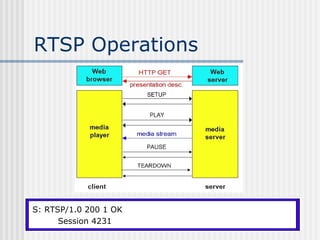
RTSP Operations


C:C: SETUP rtsp://audio.example.com/twister/audio RTSP/1.0
S: TEARDOWN rtsp://audio.example.com/twister/audio.en/lofi RTSP/1.0
   RTSP/1.0 200 1 OK
   PAUSE rtsp://audio.example.com/twister/audio.en/lofi RTSP/1.0
   PLAY rtsp://audio.example.com/twister/audio.en/lofi RTSP/1.0
        Session: 4231
      Session: 4231 Range: npt=0-
      Transport: rtp/udp; npt=37
       Session 4231         compression; port=3056; mode=PLAY
Outlines
   Difference with classic applications
   Classes of multimedia applications
       Requirements/Constraints
   Problems with today’s Internet and
    solutions
   Common multimedia protocols
       RTP, RTCP
   Accessing multimedia data through a web
    server
   Conclusion
Conclusion
   None of the proposed solutions give a real
    guarantee to the user that multimedia data will
    arrive on time.
   Couldn’t we reserve some bandwidth for our
    multimedia transfer?

Multimedia

  • 1.
    Multimedia Global Information InternshipProgram from BUDNET www.budnetdesign.com
  • 2.
    Outlines  Difference with classic applications  Classes of multimedia applications  Requirements/Constraints  Problems with today’s Internet and solutions  Common multimedia protocols  RTP, RTCP  Accessing multimedia data through a web server  Conclusion
  • 3.
    Difference with classic applications  Highly delay-sensitive  Packets are useless if they arrive too late  Loss-tolerant (for the most part)  Packet loss can be concealed
  • 4.
    Outlines  Difference with classic applications  Classes of multimedia applications  Requirements/Constraints  Problems with today’s Internet and solutions  Common multimedia protocols  RTP, RTCP  Accessing multimedia data through a web server  Conclusion
  • 5.
    Classes of multimedia Applications Streaming Stored Audio and Video  Streaming Live Audio and Video  Real-Time Interactive Audio and Video  Others
  • 6.
    Class: Streaming Stored Audioand Video  The multimedia content has been prerecorded and stored on a server  User may pause, rewind, forward, etc…  The time between the initial request and display start can be 1 to 10 seconds  Constraint: after display start, the playout must be continuous
  • 7.
    Class: Streaming LiveAudio and Video  Similar to traditional broadcast TV/radio, but delivery on the Internet  Non-interactive just view/listen  Can not pause or rewind  Often combined with multicast  The time between the initial request and display start can be up to 10 seconds  Constraint: like stored streaming, after display start, the playout must be continuous
  • 8.
    Class: Real-Time Interactive Audioand Video  Phone conversation/Video conferencing  Constraint: delay between initial request and display start must be small  Video: <150 ms acceptable  Audio: <150 ms not perceived, <400 ms acceptable  Constraint: after display start, the playout must be continuous
  • 9.
    Class: Others  Multimedia sharing applications  Download-and-then-play applications  E.g. Napster, Gnutella, Freenet  Distance learning applications  Coordinate video, audio and data  Typically distributed on CDs
  • 10.
    Outlines  Difference with classic applications  Classes of multimedia applications  Requirements/Constraints  Problems with today’s Internet and solutions  Common multimedia protocols  RTP, RTCP  Accessing multimedia data through a web server  Conclusion
  • 11.
    Challenge  TCP/UDP/IP suite provides best-effort, no guarantees on expectation or variance of packet delay  Performance deteriorate if links are congested (transoceanic)  Most router implementations use only First-Come-First-Serve (FCFS) packet processing and transmission scheduling
  • 12.
    Problems and solutions  Limited bandwidth  Solution: Compression  Packet Jitter  Solution: Fixed/adaptive playout delay for Audio (example: phone over IP)  Packet loss  Solution: FEC, Interleaving
  • 13.
    Problem: Limited bandwidth Intro:Digitalization  Audio  x samples every second (x=frequency)  The value of each sample is rounded to a finite number of values (for example 256). This is called quantization  Video  Each pixel has a color  Each color has a value
  • 14.
    Problem: Limited bandwidth Needfor compression  Audio  CD quality: 44100 samples per seconds with 16 bits per sample, stereo sound  44100*16*2 = 1.411 Mbps  For a 3-minute song: 1.441 * 180 = 254 Mb = 31.75 MB  Video  For 320*240 images with 24-bit colors  320*240*24 = 230KB/image  15 frames/sec: 15*230KB = 3.456MB  3 minutes of video: 3.456*180 = 622MB
  • 15.
    Audio compression  Several techniques  GSM (13 kbps), G.729(8 kbps), G723.3(6.4 and 5.3kbps)  MPEG 1 layer 3 (also known as MP3) • Typical compress rates 96kbps, 128kbps, 160kbps • Very little sound degradation • If file is broken up, each piece is still playable • Complex (psychoacoustic masking, redundancy reduction, and bit reservoir buffering) • 3-minute song (128kbps) : 2.8MB
  • 16.
    Image compression: JPEG  Divide digitized image in 8x8 pixel blocks  Pixel blocks are transformed into frequency blocks using DCT (Discrete Cosine Transform). This is similar to FFT (Fast Fourier Transform)  The quantization phase limits the precision of the frequency coefficient.  The encoding phase packs this information in a dense fashion
  • 17.
  • 18.
    Video compression  Popular techniques  MPEG 1 for CD-ROM quality video (1.5Mbps)  MPEG 2 for high quality DVD video (3-6 Mbps)  MPEG 4 for object-oriented video compression
  • 19.
    Video Compression: MPEG  MPEG uses inter-frame encoding  Exploits the similarity between consecutive frames  Three frame types  I frame: independent encoding of the frame (JPEG)  P frame: encodes difference relative to I-frame (predicted)  B frame: encodes difference relative to interpolated frame  Note that frames will have different sizes  Complex encoding, e.g. motion of pixel blocks, scene changes, …  Decoding is easier then encoding  MPEG often uses fixed-rate encoding I B B P B B P B B I B B P B B
  • 20.
  • 21.
    MPEG System Streams  Combine MPEG video and audio streams in a single synchronized stream  Consists of a hierarchy with meta data at every level describing the data  System level contains synchronization information  Video level is organized as a stream of group of pictures  Group of pictures consists of pictures  Pictures are organized in slices  …
  • 22.
  • 23.
  • 24.
    Problem: Packet Jitter  Jitter: Variation in delay Sender No jitter 6 5 4 3 2 1 Receiver Jitter 5 6 4 3 2 1  Example pkt 6 pkt 5
  • 25.
    Dealing with packetjitter  How does Phone over IP applications limit the effect of jitter?  A sequence number is added to each packet  A timestamp is added to each packet  Playout is delayed
  • 26.
    Dealing with packetjitter Fixed playout delay  Fixed playout delay
  • 27.
    Dealing with packetjitter Adaptive playout delay  Objective is to use a value for p-r that tracks the network delay performance as it varies during a transfer. The following formulas are used: di = (1-u)di-1 + u(ri – ti) u=0.01 for example ν i = (1-u)ν i-1 + u|ri-ti-di| Where ti is the timestamp of the ith packet (the time pkt i is sent) ri is the time packet i is received pi is the time packet i is played di is an estimate of the average network delay ν i is an estimate of the average deviation of the delay from
  • 28.
    Problem: Packet loss Loss is in a broader sense: packet never arrives or arrives later than its scheduled playout time  Since retransmission is inappropriate for Real Time applications, FEC or Interleaving are used to reduce loss impact.
  • 29.
    Recovering from packetloss Forward Error Correction  Send redundant encoded chunk every n chunks (XOR original n chunks)  If 1 packet in this group lost, can reconstruct  If >1 packets lost, cannot recover  Disadvantages  The smaller the group size, the larger the overhead  Playout delay increased
  • 30.
    Recovering from packetloss Piggybacking Lo-fi stream  With one redundant low quality chunk per chunk, scheme can recover from single packet losses
  • 31.
    Recovering from packetloss Interleaving  Divide 20 msec of audio data into smaller units of 5 msec each and interleave  Upon loss, have a set of partially filled chunks
  • 32.
    Recovering from packetloss Receiver-based Repair  The simplest form: Packet repetition  Replaces lost packets with copies of the packets that arrived immediately before the loss  A more computationally intensive form: Interpolation  Uses Audio before and after the loss to interpolate a suitable packet to cover the loss
  • 33.
  • 34.
    Outlines  Difference with classic applications  Classes of multimedia applications  Requirements/Constraints  Problems with today’s Internet and solutions  Common multimedia protocols  RTP, RTCP  Accessing multimedia data through a web server  Conclusion
  • 35.
    Real Time Protocol(RTP)  RTP logically extends UDP  Sits between UDP and application  Implemented as an application library  What does it do?  Framing  Multiplexing  Synchronization  Feedback (RTCP)
  • 36.
    RTP packet format  Payload Type: 7 bits, providing 128 possible different types of encoding; eg PCM, MPEG2 video, etc.  Sequence Number: 16 bits; used to detect packet loss
  • 37.
    RTP packet format(cont)  Timestamp: 32 bytes; gives the sampling instant of the first audio/video byte in the packet; used to remove jitter introduced by the network  Synchronization Source identifier (SSRC): 32 bits; an id for the source of a stream; assigned randomly by the source
  • 38.
    Timestamp vs. Sequence No  Timestamps relates packets to real time  Timestamp value sampled from a media specific clock  Sequence number relates packets to other packets
  • 39.
    Audio silence example  Consider audio data type  What do you want to send during silence? • Not sending anything  Why might this cause problems? • Other side needs to distinguish between loss and silence  Receiver uses Timestamps and sequence No. to figure out what happened
  • 40.
    RTP Control Protocol(RTCP)  Used in conjunction with RTP. Used to exchange control information between the sender and the receiver.  Three reports are defined: Receiver reception, Sender, and Source description  Reports contain statistics such as the number of packets sent, number of packets lost, inter-arrival jitter  Typically, limit the RTCP bandwidth to 5%. Approximately one sender report for three receiver reports
  • 41.
    Outlines  Difference with classic applications  Classes of multimedia applications  Requirements/Constraints  Problems with today’s Internet and solutions  Common multimedia protocols  RTP, RTCP  Accessing multimedia data through a web server  Conclusion
  • 42.
    Streaming Stored Multimedia Example  Audio/Video file is segmented and sent over either TCP or UDP, public segmentation protocol: Real-Time Protocol (RTP)  User interactive control is provided, e.g. the public protocol Real Time Streaming Protocol (RTSP)
  • 43.
    Streaming Stored Multimedia Example  Helper Application: displays content, which is typically requested via a Web browser; e.g. RealPlayer; typical functions:  Decompression  Jitter removal  Error correction: use redundant packets to be used for reconstruction of original stream  GUI for user control
  • 44.
    Streaming from Web Servers  Audio: in files sent as HTTP objects  Video (interleaved audio and images in one file, or two separate files and client synchronizes the display) sent as HTTP object(s)  A simple architecture is to have the Browser request the object(s) and after their reception pass them to the player for display - No pipelining
  • 45.
    Streaming from aWeb Server (cont)  Alternative: set up connection between server and player, then download  Web browser requests and receives a Meta File (a file describing the object) instead of receiving the file itself;  Browser launches the appropriate Player and passes it the Meta File;  Player sets up a TCP connection with a streaming server Server and downloads the file
  • 46.
  • 47.
    Options when usinga streaming server  Use UDP, and Server sends at a rate (Compression and Transmission) appropriate for client; to reduce jitter, Player buffers initially for 2-5 seconds, then starts display  Use TCP, and sender sends at maximum possible rate under TCP; retransmit when error is encountered; Player uses a much large buffer to smooth delivery rate of TCP
  • 48.
    Real Time Streaming Protocol(RTSP)  For user to control display: rewind, fast forward, pause, resume, etc…  Out-of-band protocol (uses two connections, one for control messages (Port 554) and one for media stream)  RFC 2326 permits use of either TCP or UDP for the control messages connection, sometimes called the RTSP Channel  As before, meta file is communicated to web browser which then launches the Player; Player sets up an RTSP connection for control messages in addition to the connection for the streaming media
  • 49.
    Meta File Example <title>Twister</title> <session> <group language=en lipsync> <switch> <track type=audio e="PCMU/8000/1" src = "rtsp://audio.example.com/twister/audio.en/lofi"> <track type=audio e="DVI4/16000/2" pt="90 DVI4/8000/1" src="rtsp://audio.example.com/twister/audio.en/hifi"> </switch> <track type="video/jpeg" src="rtsp://video.example.com/twister/video"> </group> </session>
  • 50.
    RTSP Operations C:C: SETUPrtsp://audio.example.com/twister/audio RTSP/1.0 S: TEARDOWN rtsp://audio.example.com/twister/audio.en/lofi RTSP/1.0 RTSP/1.0 200 1 OK PAUSE rtsp://audio.example.com/twister/audio.en/lofi RTSP/1.0 PLAY rtsp://audio.example.com/twister/audio.en/lofi RTSP/1.0 Session: 4231 Session: 4231 Range: npt=0- Transport: rtp/udp; npt=37 Session 4231 compression; port=3056; mode=PLAY
  • 51.
    Outlines  Difference with classic applications  Classes of multimedia applications  Requirements/Constraints  Problems with today’s Internet and solutions  Common multimedia protocols  RTP, RTCP  Accessing multimedia data through a web server  Conclusion
  • 52.
    Conclusion  None of the proposed solutions give a real guarantee to the user that multimedia data will arrive on time.  Couldn’t we reserve some bandwidth for our multimedia transfer?