TOUCH SCREEN
TECHNOLOGIES
PRESENTED BY:
Deepak kumar
MCA
ABSTRACT
 The touch screen is an assistive technology. This
interface can be beneficial to those that have
difficulty in using other input devices such as a
mouse or keyboard.
 When used in conjunction with software such as
on-screen keyboards, or other assistive technology,
they can help make computing resources more
available to people that have difficulty in using
computers.
 Touch screen based system allows an easy
navigation around a GUI based environment.
CONTENT
 INTRODUCTION
 TYPES OF TOUCH SCREEN
 COMPONENTS
 WORKING
 ADVANTAGES AND DISADVANTAGES
 APPLICATIONS
 CONCLUSION
INTRODUCTION
What is a Touch Screen?
 A touch screen is an Electronic Visual Display that
can detect the presence and location of a touch
within the display area.
OR
 A touch screen is an Electronic Visual
Display that responds when it detects a
touch on its Surface
EVOLUTION OF TOUCH
SCREEN
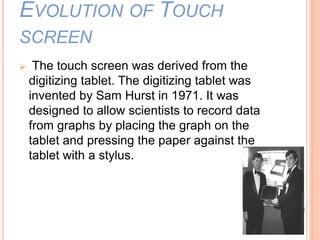
 The touch screen was derived from the
digitizing tablet. The digitizing tablet was
invented by Sam Hurst in 1971. It was
designed to allow scientists to record data
from graphs by placing the graph on the
tablet and pressing the paper against the
tablet with a stylus.
TYPES OF TOUCH SCREEN
 Resistive touch screen
 Capacitive touch screen
 Infrared touch screen
 Surface acoustic wave (SAW) touch screen
RESISTIVE TOUCH SCREEN
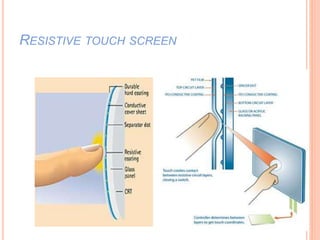
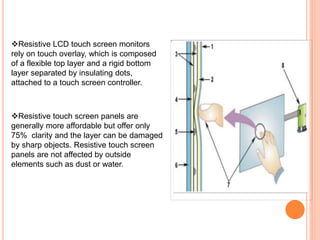
Resistive LCD touch screen monitors
rely on touch overlay, which is composed
of a flexible top layer and a rigid bottom
layer separated by insulating dots,
attached to a touch screen controller.
Resistive touch screen panels are
generally more affordable but offer only
75% clarity and the layer can be damaged
by sharp objects. Resistive touch screen
panels are not affected by outside
elements such as dust or water.
Resistive Touch Screen
Advantages:-
 Low cost
 High resistance to dust
 Best used with finger ,stylus or gloved hand
Disadvantages:-
 Not too sensitive
 Poor contrast
 Doesn’t support multi-touch
Phones:-
Samsung Star Duos, Samsung Champ Duos,
Spice FLO, Nokia C2-02, LG Cookie Joy
CAPACITIVE TOUCH SCREEN
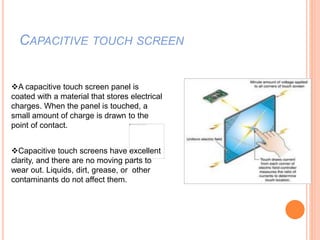
A capacitive touch screen panel is
coated with a material that stores electrical
charges. When the panel is touched, a
small amount of charge is drawn to the
point of contact.
Capacitive touch screens have excellent
clarity, and there are no moving parts to
wear out. Liquids, dirt, grease, or other
contaminants do not affect them.
Capacitive Touch Screen
Advantages:-
 Brighter and Sharper
 High touch sensitive & doesn’t need stylus
 Support multi-touch
Disadvantages:-
 Expensive
 Glass is more prone to breaking
Nokia Lumia 800, HTC Explorer, Apple iPhone
4S, Spice Mi-310, Samsung Galaxy Note
Phones:-
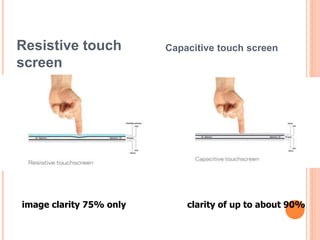
Resistive touch
screen
Capacitive touch screen
image clarity 75% only clarity of up to about 90%
INFRARED TOUCH SCREEN
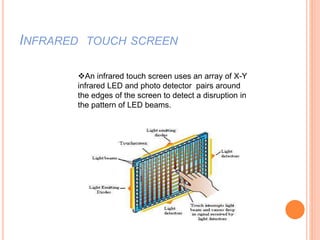
An infrared touch screen uses an array of X-Y
infrared LED and photo detector pairs around
the edges of the screen to detect a disruption in
the pattern of LED beams.
SAW TOUCH SCREEN
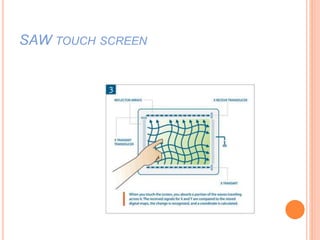
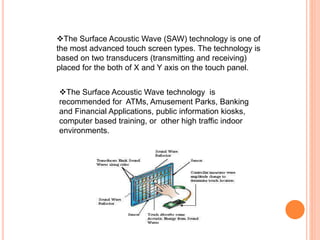
The Surface Acoustic Wave (SAW) technology is one of
the most advanced touch screen types. The technology is
based on two transducers (transmitting and receiving)
placed for the both of X and Y axis on the touch panel.
The Surface Acoustic Wave technology is
recommended for ATMs, Amusement Parks, Banking
and Financial Applications, public information kiosks,
computer based training, or other high traffic indoor
environments.
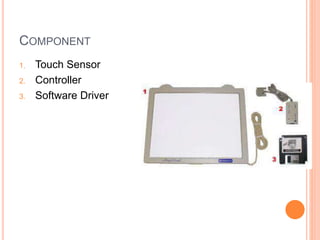
COMPONENT
1. Touch Sensor
2. Controller
3. Software Driver
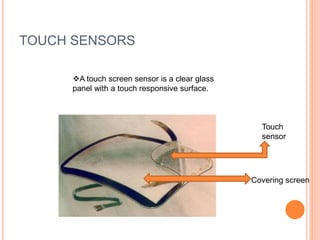
TOUCH SENSORS
Touch
sensor
Covering screen
A touch screen sensor is a clear glass
panel with a touch responsive surface.
CONTROLLER [RESISTIVE]
 NAME:
 VS20UA
CONTROLLER
 Supply Voltage
 5.0V DC
 Maximum Current
 20mA
 Resolution
 12-bit
CONTROLLER [CAPACITIVE]
 Name:
 5000 RSU SERIAL
CONTROLLER
 Supply Voltage:
 +5 V DC or +12V
 Touch Resolution
 12bit, size independent.
SOFTWARE DRIVER
 The driver is a software update for the PC system that
allows the touch screen and computer to work together.
 It tells the computer's operating system, How to interpret
the touch event information that is sent from the
controller.
WORKING
 Touch screens are activated by the insertion or removal
of the fingertip or by pressing the controls, active areas or
targets with a head stick, or other similar device (stylus).
 Resistive touch screens are pressure sensitive, so they
can be operated with any input device, including a gloved
hand or stylus.
 Capacitive touch screens offer higher clarity and are
more durable, but they do not respond to gloved hands or
most styluses.
 Infrared touch screens are based on light-beam
interruption technology.
 Surface Acoustic Wave (SAW) is a newer technology that
uses ultrasonic waves that pass over the screen.
ADVANTAGES
 Touching a visual display of choices requires little
thinking and is a form of direct manipulation that is
easy to learn.
 Touch screens are the fastest pointing devices.
 Touch screens have easier hand eye coordination
than mice or keyboards.
 No extra work space is required as with other
pointing devices.
DISADVANTAGES
 User's hand may obscure the screen.
 Some reduction in image brightness may occur.
 They cost more than alternative devices.
APPLICATIONS
 Public information displays
 Tourism displays
 Trade show display
 Awareness kiosks
 Customer self service
 General departmental Stores
 Restaurants
 ATM
 Airline ticket terminals
 Other uses
 Digital jukeboxes
 Computerized gaming
 Student Registration systems
Touchscreen
Touchscreen

Touchscreen

  • 1.
  • 2.
    ABSTRACT  The touchscreen is an assistive technology. This interface can be beneficial to those that have difficulty in using other input devices such as a mouse or keyboard.  When used in conjunction with software such as on-screen keyboards, or other assistive technology, they can help make computing resources more available to people that have difficulty in using computers.  Touch screen based system allows an easy navigation around a GUI based environment.
  • 3.
    CONTENT  INTRODUCTION  TYPESOF TOUCH SCREEN  COMPONENTS  WORKING  ADVANTAGES AND DISADVANTAGES  APPLICATIONS  CONCLUSION
  • 4.
    INTRODUCTION What is aTouch Screen?  A touch screen is an Electronic Visual Display that can detect the presence and location of a touch within the display area. OR  A touch screen is an Electronic Visual Display that responds when it detects a touch on its Surface
  • 5.
    EVOLUTION OF TOUCH SCREEN The touch screen was derived from the digitizing tablet. The digitizing tablet was invented by Sam Hurst in 1971. It was designed to allow scientists to record data from graphs by placing the graph on the tablet and pressing the paper against the tablet with a stylus.
  • 6.
    TYPES OF TOUCHSCREEN  Resistive touch screen  Capacitive touch screen  Infrared touch screen  Surface acoustic wave (SAW) touch screen
  • 7.
  • 8.
    Resistive LCD touchscreen monitors rely on touch overlay, which is composed of a flexible top layer and a rigid bottom layer separated by insulating dots, attached to a touch screen controller. Resistive touch screen panels are generally more affordable but offer only 75% clarity and the layer can be damaged by sharp objects. Resistive touch screen panels are not affected by outside elements such as dust or water.
  • 9.
    Resistive Touch Screen Advantages:- Low cost  High resistance to dust  Best used with finger ,stylus or gloved hand Disadvantages:-  Not too sensitive  Poor contrast  Doesn’t support multi-touch Phones:- Samsung Star Duos, Samsung Champ Duos, Spice FLO, Nokia C2-02, LG Cookie Joy
  • 10.
    CAPACITIVE TOUCH SCREEN Acapacitive touch screen panel is coated with a material that stores electrical charges. When the panel is touched, a small amount of charge is drawn to the point of contact. Capacitive touch screens have excellent clarity, and there are no moving parts to wear out. Liquids, dirt, grease, or other contaminants do not affect them.
  • 11.
    Capacitive Touch Screen Advantages:- Brighter and Sharper  High touch sensitive & doesn’t need stylus  Support multi-touch Disadvantages:-  Expensive  Glass is more prone to breaking Nokia Lumia 800, HTC Explorer, Apple iPhone 4S, Spice Mi-310, Samsung Galaxy Note Phones:-
  • 12.
    Resistive touch screen Capacitive touchscreen image clarity 75% only clarity of up to about 90%
  • 13.
    INFRARED TOUCH SCREEN Aninfrared touch screen uses an array of X-Y infrared LED and photo detector pairs around the edges of the screen to detect a disruption in the pattern of LED beams.
  • 14.
  • 15.
    The Surface AcousticWave (SAW) technology is one of the most advanced touch screen types. The technology is based on two transducers (transmitting and receiving) placed for the both of X and Y axis on the touch panel. The Surface Acoustic Wave technology is recommended for ATMs, Amusement Parks, Banking and Financial Applications, public information kiosks, computer based training, or other high traffic indoor environments.
  • 16.
    COMPONENT 1. Touch Sensor 2.Controller 3. Software Driver
  • 17.
    TOUCH SENSORS Touch sensor Covering screen Atouch screen sensor is a clear glass panel with a touch responsive surface.
  • 18.
    CONTROLLER [RESISTIVE]  NAME: VS20UA CONTROLLER  Supply Voltage  5.0V DC  Maximum Current  20mA  Resolution  12-bit
  • 19.
    CONTROLLER [CAPACITIVE]  Name: 5000 RSU SERIAL CONTROLLER  Supply Voltage:  +5 V DC or +12V  Touch Resolution  12bit, size independent.
  • 20.
    SOFTWARE DRIVER  Thedriver is a software update for the PC system that allows the touch screen and computer to work together.  It tells the computer's operating system, How to interpret the touch event information that is sent from the controller.
  • 21.
    WORKING  Touch screensare activated by the insertion or removal of the fingertip or by pressing the controls, active areas or targets with a head stick, or other similar device (stylus).  Resistive touch screens are pressure sensitive, so they can be operated with any input device, including a gloved hand or stylus.  Capacitive touch screens offer higher clarity and are more durable, but they do not respond to gloved hands or most styluses.  Infrared touch screens are based on light-beam interruption technology.  Surface Acoustic Wave (SAW) is a newer technology that uses ultrasonic waves that pass over the screen.
  • 22.
    ADVANTAGES  Touching avisual display of choices requires little thinking and is a form of direct manipulation that is easy to learn.  Touch screens are the fastest pointing devices.  Touch screens have easier hand eye coordination than mice or keyboards.  No extra work space is required as with other pointing devices.
  • 23.
    DISADVANTAGES  User's handmay obscure the screen.  Some reduction in image brightness may occur.  They cost more than alternative devices.
  • 24.
    APPLICATIONS  Public informationdisplays  Tourism displays  Trade show display  Awareness kiosks  Customer self service  General departmental Stores  Restaurants  ATM  Airline ticket terminals  Other uses  Digital jukeboxes  Computerized gaming  Student Registration systems