Building Touch ApplicationsMartha Rottermartharo@microsoft.comMicrosoft Irelandhttp://twitter.com/martharotter
Multi-Touch Is Here!HardwareMulti-touch capable machines on the market today; multi-touch appears in a broad set of form factorsSoftwareWindows 7, .NET Framework 4.0, SilverlightConsumersNew scenarios, next wave of user experience, high “WOW” factor
PaintDemoUsing OS multi-touch capability
AgendaMulti-touch overviewTouch scenarios, “Good, Better, Best” modelPlatform detailsUX guidelines for touch applicationsSummary
Control PanelPen and Touch
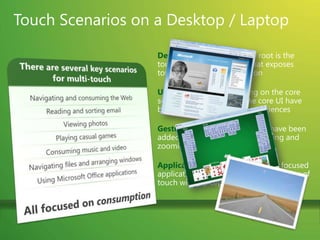
Touch Scenarios on a Desktop / LaptopDeveloper Platform: At the root is the touch developer platform that exposes touch APIs for any application UI Enhancements: Focusing on the core scenarios, many parts of the core UI have been optimized for touch experiences Gestures: Multi-touch gestures have been added to enable consistent panning and zooming in most applications.Applications: A set of multi-touch focused applications that demonstrate the power of touch will ship separately from Windows 7There are several key scenarios for multi-touchNavigating and consuming the WebReading and sorting emailViewing photosPlaying casual gamesConsuming music and videoNavigating files and arranging windowsUsing Microsoft Office applicationsAll focused on consumption
GamesDemoUsing OS - level multi-touch capability for entertainment
Large Scale Interactive Touch ExperiencesThere are several key scenarios for multi-touchLearning ApplicationsEngaging multiple people togetherDisplaying informationPlaying casual gamesConsuming music and videoAll focused on interaction
PhotosDemoUsing Surface style interaction to showcase videos and photos
Multi-Touch Development TiersGood – Better – BestDesktop application can target one of three levels of touch integrationGood:  No specific touch APIs are used but the application UI is appropriately sized and works well with the built-in gesturesBetter:  The gesture APIs are supported to give smooth natural interactionsBest:  Deep touch-focused experiences designed to take advantage of multi-touch features
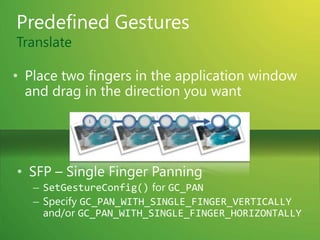
Predefined GesturesTranslatePlace two fingers in the application window and drag in the direction you wantSFP – Single Finger Panning
SetGestureConfig() for GC_PAN
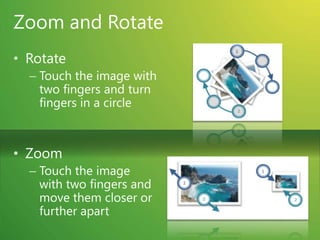
Specify GC_PAN_WITH_SINGLE_FINGER_VERTICALLY and/or GC_PAN_WITH_SINGLE_FINGER_HORIZONTALLYZoom and RotateRotateTouch the image with two fingers and turn fingers in a circleZoomTouch the image with two fingers and move them closer or further apart
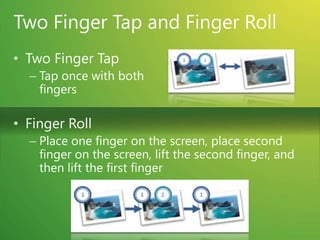
Two Finger Tap and Finger RollTwo Finger TapTap once with both fingersFinger RollPlace one finger on the screen, place second finger on the screen, lift the second finger, and then lift the first finger
Multi-Touch in .NET FrameworkFor WPFInterop sample library for .NET Framework 3.5Multi-touch, gesture, Inertia, Manipulation.NET Framework 4.0 releaseMulti-touch specific new controlsFor WinForms (Windows 7 launch)Interoperability to native Win32 APIs – TouchWrapper
Multi-Touch in WPFUIElement and UIElement3D changesGesture events (tracking)Touch system gesture events (single)Raw touch eventsMulti-touch support in controlsScrollViewer update to accept pan gesturesBase controls updated to be multi-touch awareMulti-capture supportNew multi-touch specific controlsCompatible with Surface SDK 2.0

Building Multi-Touch Experiences

  • 1.
    Building Touch ApplicationsMarthaRottermartharo@microsoft.comMicrosoft Irelandhttp://twitter.com/martharotter
  • 2.
    Multi-Touch Is Here!HardwareMulti-touchcapable machines on the market today; multi-touch appears in a broad set of form factorsSoftwareWindows 7, .NET Framework 4.0, SilverlightConsumersNew scenarios, next wave of user experience, high “WOW” factor
  • 3.
  • 4.
    AgendaMulti-touch overviewTouch scenarios,“Good, Better, Best” modelPlatform detailsUX guidelines for touch applicationsSummary
  • 5.
  • 6.
    Touch Scenarios ona Desktop / LaptopDeveloper Platform: At the root is the touch developer platform that exposes touch APIs for any application UI Enhancements: Focusing on the core scenarios, many parts of the core UI have been optimized for touch experiences Gestures: Multi-touch gestures have been added to enable consistent panning and zooming in most applications.Applications: A set of multi-touch focused applications that demonstrate the power of touch will ship separately from Windows 7There are several key scenarios for multi-touchNavigating and consuming the WebReading and sorting emailViewing photosPlaying casual gamesConsuming music and videoNavigating files and arranging windowsUsing Microsoft Office applicationsAll focused on consumption
  • 7.
    GamesDemoUsing OS -level multi-touch capability for entertainment
  • 8.
    Large Scale InteractiveTouch ExperiencesThere are several key scenarios for multi-touchLearning ApplicationsEngaging multiple people togetherDisplaying informationPlaying casual gamesConsuming music and videoAll focused on interaction
  • 9.
    PhotosDemoUsing Surface styleinteraction to showcase videos and photos
  • 10.
    Multi-Touch Development TiersGood– Better – BestDesktop application can target one of three levels of touch integrationGood: No specific touch APIs are used but the application UI is appropriately sized and works well with the built-in gesturesBetter: The gesture APIs are supported to give smooth natural interactionsBest: Deep touch-focused experiences designed to take advantage of multi-touch features
  • 11.
    Predefined GesturesTranslatePlace twofingers in the application window and drag in the direction you wantSFP – Single Finger Panning
  • 12.
  • 13.
    Specify GC_PAN_WITH_SINGLE_FINGER_VERTICALLY and/orGC_PAN_WITH_SINGLE_FINGER_HORIZONTALLYZoom and RotateRotateTouch the image with two fingers and turn fingers in a circleZoomTouch the image with two fingers and move them closer or further apart
  • 14.
    Two Finger Tapand Finger RollTwo Finger TapTap once with both fingersFinger RollPlace one finger on the screen, place second finger on the screen, lift the second finger, and then lift the first finger
  • 15.
    Multi-Touch in .NETFrameworkFor WPFInterop sample library for .NET Framework 3.5Multi-touch, gesture, Inertia, Manipulation.NET Framework 4.0 releaseMulti-touch specific new controlsFor WinForms (Windows 7 launch)Interoperability to native Win32 APIs – TouchWrapper
  • 16.
    Multi-Touch in WPFUIElementand UIElement3D changesGesture events (tracking)Touch system gesture events (single)Raw touch eventsMulti-touch support in controlsScrollViewer update to accept pan gesturesBase controls updated to be multi-touch awareMulti-capture supportNew multi-touch specific controlsCompatible with Surface SDK 2.0