PUNJAB COLLEGE OF TECHNICAL EDUCATION Presented by:- Names:- Simranjeet Singh Pratik Jain Amit Sharma Harshdeep Singh Ankur Bhalla BCA-2D PRESENTATION ON TOUCH TECHNOLOGY IN MOBILES
Points of Discussion Introduction to touch technology History & Development Founder First Touch Phone First Touch Mobile Construction of Touch Screen Types of Touch Technologies Comparison Manufacturer Applications Advantages Disadvantages Future Closing Thought
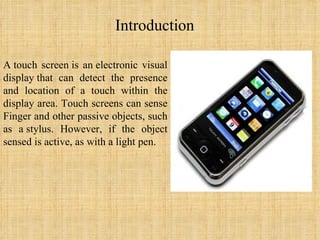
Introduction A touch screen is an electronic visual display that can detect the presence and location of a touch within the display area. Touch screens can sense Finger and other passive objects, such as a stylus. However, if the object sensed is active, as with a light pen.
History & Development In 1971 Dr. Sam Hurst, founder of Elographics developed the first touch opaque sensor “Elograph” at the University of Kentucky.  In 1974 He developed the first real touch screen.  In 1977, Elographics developed the five-wire resistive technology then with the backing of Siemens Corporation, developed a curved glass sensor called the  touch screen .  The new transparent technology, AccuTouch, was later developed by the founders of Elographics, Dr. Hurst and Bill Colwell

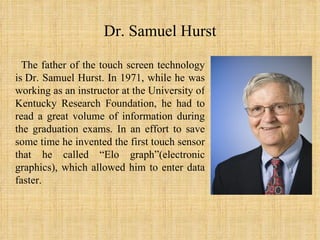
Dr. Samuel Hurst The father of the touch screen technology is Dr. Samuel Hurst. In 1971, while he was working as an instructor at the University of Kentucky Research Foundation, he had to read a great volume of information during the graduation exams. In an effort to save some time he invented the first touch sensor that he called “Еlo graph”(electronic graphics), which allowed him to enter data faster.
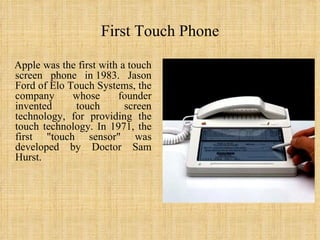
First Touch Phone Apple was the first with a touch screen phone in 1983. Jason Ford of Elo Touch Systems, the company whose founder invented touch screen technology, for providing the touch technology. In 1971, the first "touch sensor" was developed by Doctor Sam Hurst.
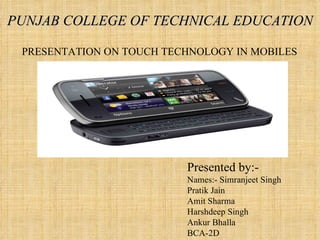
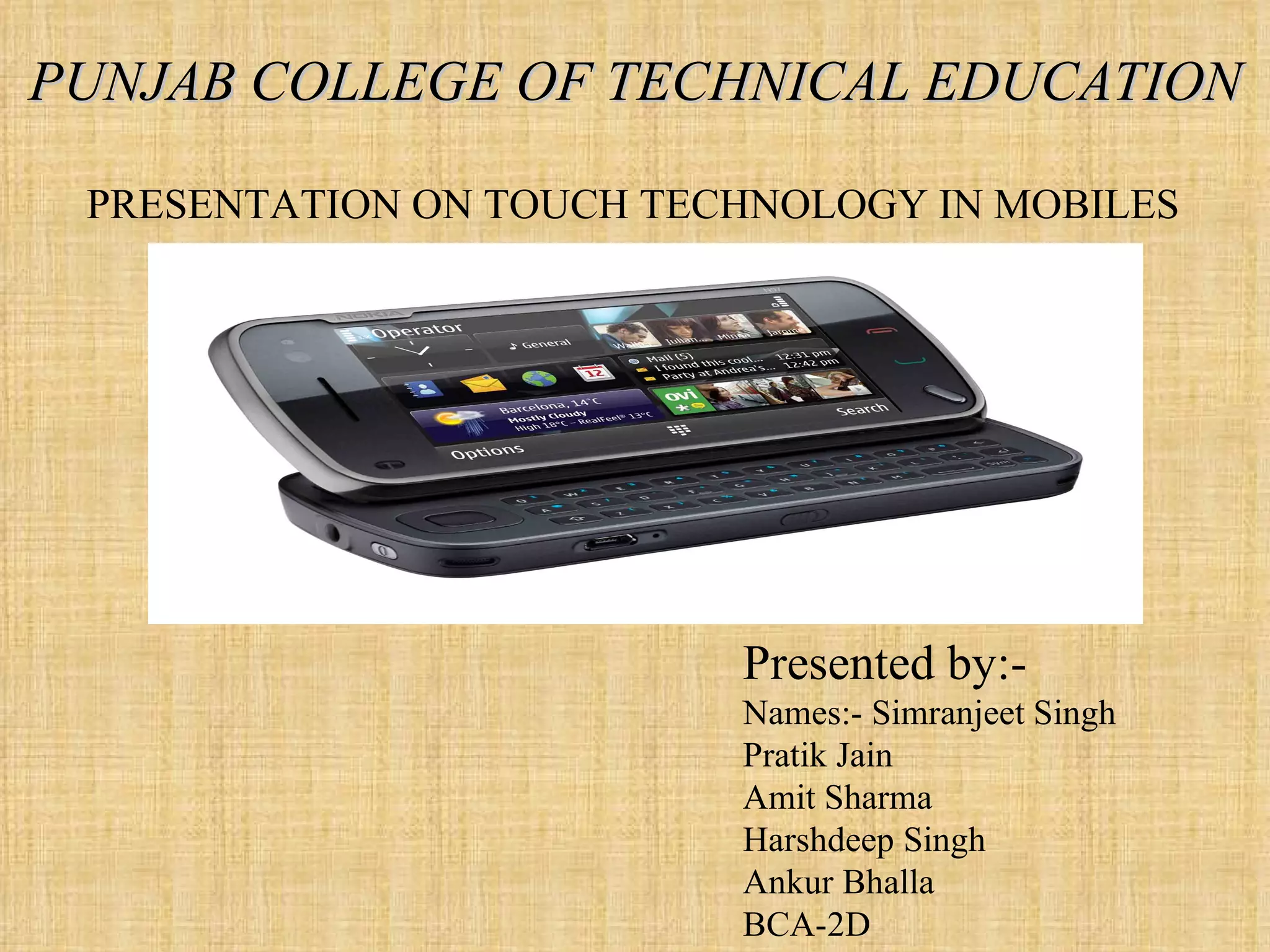
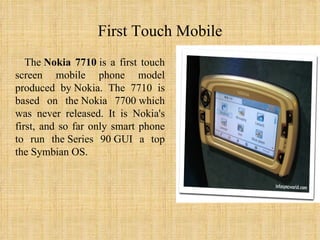
First Touch Mobile The  Nokia 7710  is a first touch screen mobile phone model produced by Nokia. The 7710 is based on the Nokia 7700 which was never released. It is Nokia's first, and so far only smart phone to run the Series 90 GUI a top the Symbian OS.
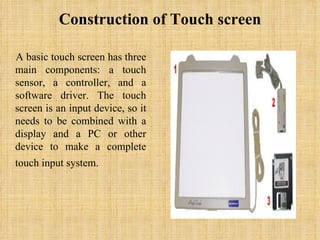
Construction of Touch screen A basic touch screen has three main components: a touch sensor, a controller, and a software driver. The touch screen is an input device, so it needs to be combined with a display and a PC or other device to make a complete touch input system.   
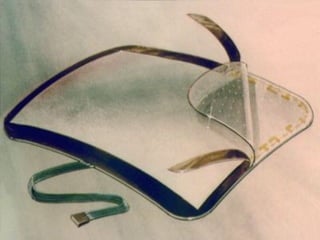
Touch Sensor A touch screen sensor is a clear glass panel with a touch responsive surface which is placed over a display screen so that the responsive area of the panel covers the viewable area of the display screen.  The sensor generally has an electrical current or signal going through it and touching the screen causes a voltage or signal change. This voltage change is used to determine the location of the touch to the screen
 
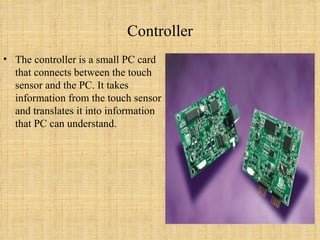
Controller The controller is a small PC card that connects between the touch sensor and the PC. It takes information from the touch sensor and translates it into information that PC can understand.
Software Driver The driver is a software that allows the touch screen and computer to work together. It tells the operating system how to interpret the touch event information that is sent from the controller.  Most touch screen drivers today are a mouse-emulation type driver. This makes touching the screen the same as clicking your mouse at the same location on the screen.
 
Types of Touch Technologies There are mainly 4 types of touch Technologies:- 1.Resistive 2. Surface acoustic wave 3. Capacitive 4. Infrared
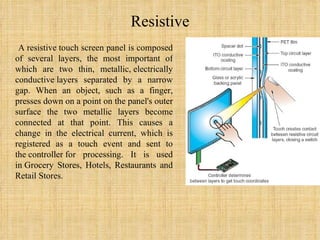
Resistive A resistive touch screen panel is composed of several layers, the most important of which are two thin, metallic, electrically conductive layers separated by a narrow gap. When an object, such as a finger, presses down on a point on the panel's outer surface the two metallic layers become connected at that point. This causes a change in the electrical current, which is registered as a touch event and sent to the controller for processing. It is used in Grocery Stores, Hotels, Restaurants and Retail Stores.
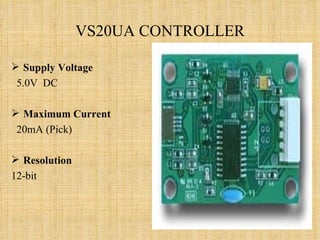
VS20UA CONTROLLER Supply Voltage 5.0V  DC Maximum Current   20mA (Pick) Resolution 12-bit
Advantages & Disadvantages of Resistive Advantages Cost-effective solution Activated by any stylus Very accurate Low power requirements Liquids won't affect touch screen performance Disadvantages Polyester surface can be damaged Lower endurance (35 million touches)
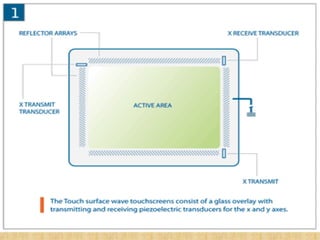
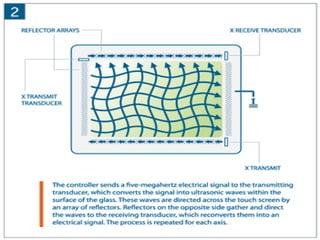
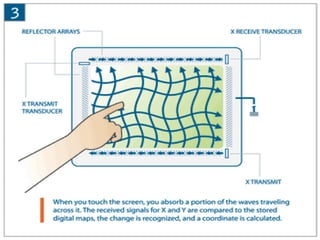
Surface Acoustic Wave (SAW) Surface acoustic wave (SAW) technology uses ultrasonic waves that pass over the touch screen panel. When the panel is touched, a portion of the wave is absorbed. This change in the ultrasonic waves registers the position of the touch event and sends this information to the controller for processing. SAW touch screen technology is suggested for use in ATMs, Amusement Parks, Gaming Environments, Industrial Control Rooms etc.


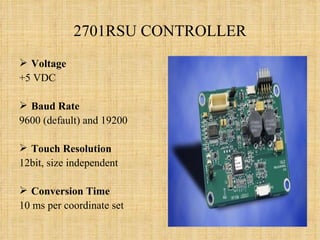
2701RSU CONTROLLER Voltage +5 VDC Baud Rate 9600 (default) and 19200  Touch Resolution 12bit, size independent  Conversion Time 10 ms per coordinate set
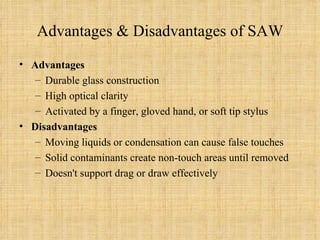
Advantages & Disadvantages of SAW Advantages Durable glass construction High optical clarity Activated by a finger, gloved hand, or soft tip stylus Disadvantages Moving liquids or condensation can cause false touches Solid contaminants create non-touch areas until removed Doesn't support drag or draw effectively
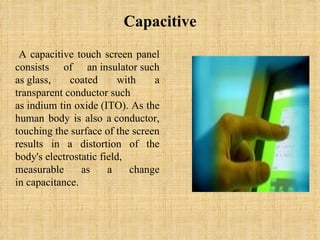
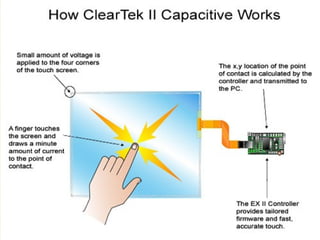
Capacitive A capacitive touch screen panel consists of an insulator such as glass, coated with a transparent conductor such as indium tin oxide (ITO). As the human body is also a conductor, touching the surface of the screen results in a distortion of the body's electrostatic field, measurable as a change in capacitance.
 
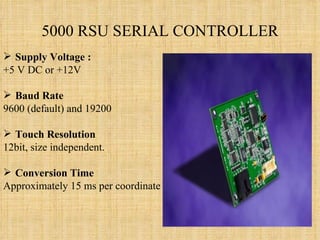
5000 RSU SERIAL CONTROLLER Supply Voltage : +5 V DC or +12V Baud Rate 9600 (default) and 19200  Touch Resolution 12bit, size independent.  Conversion Time Approximately 15 ms per coordinate set
Advantages & Disadvantages of Capacitive Advantages Scratch resistant, durable surface High endurance (225 million touches) Very accurate Good optical clarity Liquids won't affect touch screen performance Disadvantages Does not work with gloved fingers or stylus
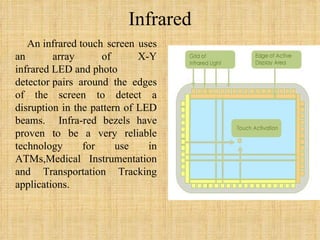
Infrared An infrared touch screen uses an array of X-Y infrared LED and photo detector pairs around the edges of the screen to detect a disruption in the pattern of LED beams.  Infra-red bezels have proven to be a very reliable technology for use in ATMs,Medical Instrumentation and Transportation Tracking applications.
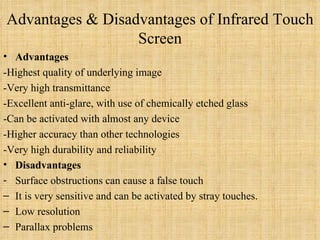
Advantages & Disadvantages of Infrared Touch Screen Advantages -Highest quality of underlying image -Very high transmittance  -Excellent anti-glare, with use of chemically etched glass -Can be activated with almost any device -Higher accuracy than other technologies -Very high durability and reliability Disadvantages Surface obstructions can cause a false touch It is very sensitive and can be activated by stray touches. Low resolution  Parallax problems
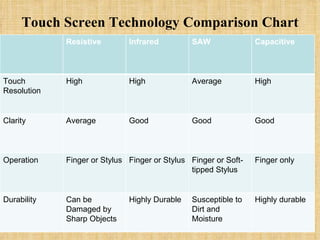
Touch Screen Technology Comparison Chart Resistive Infrared SAW Capacitive Touch Resolution High High Average High Clarity Average Good Good Good Operation Finger or Stylus Finger or Stylus Finger or Soft-tipped Stylus Finger only Durability Can be Damaged by Sharp Objects Highly Durable Susceptible to Dirt and Moisture Highly durable
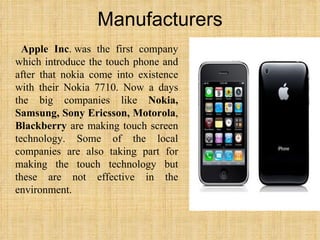
Manufacturers Apple Inc . was the first company which introduce the touch phone and after that nokia come into existence with their Nokia 7710. Now a days the big companies like  Nokia, Samsung, Sony Ericsson, Motorola ,  Blackberry  are making touch screen technology. Some of the local companies are also taking part for making the touch technology but these are not effective in the environment.
Applications of Touch Screens    Informational kiosks  Trade show displays  Museum / tourism displays  Point-of-sale terminals  Restaurant systems  Employee time clocks  Industrial process controls  World Wide Web access kiosks  Home automation systems  Casino and other gaming systems  Computer access for the physically disabled
Advantages & Disadvantages of all Touch Technology Touch screens have several  advantages  over other pointing devices:    A touch screen is easy to use (as the user simply touches what he or she sees on the display).   Save space as no buttons are required.   Touching a visual display of choices requires little thinking and is a form of direct manipulation that is easy to learn.    Touch screens are the fastest pointing devices.   Touch screens have easier hand eye coordination than buttons.   Touch screens are durable in public access and in high volume usage.
  Disadvantages   Screen has to be really big not to miss things when pressing them with your finger:   Big screen leads to low battery life.   Touch screen means screen can’t be read too well in direct sunlight as it applies an additional not 100% transparent.  Touch screen devices usually has no additional keys (see the iPhone) and this means when an app crashes, without crashing the OS, you can’t get to the main menu as the whole screen becomes unresponsive.   Most user interfaces are not optimized for thumb operation, so a stylus in necessary, and this means using two hands   Screens get very dirty.   These devices require massive computing power which leads to slow devices.
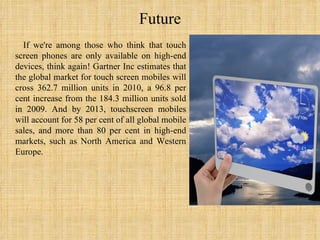
Future If we're among those who think that touch screen phones are only available on high-end devices, think again! Gartner Inc estimates that the global market for touch screen mobiles will cross 362.7 million units in 2010, a 96.8 per cent increase from the 184.3 million units sold in 2009. And by 2013, touchscreen mobiles will account for 58 per cent of all global mobile sales, and more than 80 per cent in high-end markets, such as North America and Western Europe.
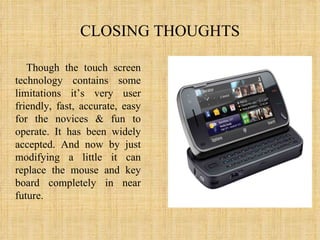
CLOSING THOUGHTS Though the touch screen technology contains some limitations it’s very user friendly, fast, accurate, easy for the novices & fun to operate. It has been widely accepted. And now by just modifying a little it can replace the mouse and key board completely in near future.
NOW THE HOUSE IS OPEN 4 QUERIES ???????

Touch Technology....ppt

  • 1.
    PUNJAB COLLEGE OFTECHNICAL EDUCATION Presented by:- Names:- Simranjeet Singh Pratik Jain Amit Sharma Harshdeep Singh Ankur Bhalla BCA-2D PRESENTATION ON TOUCH TECHNOLOGY IN MOBILES
  • 2.
    Points of DiscussionIntroduction to touch technology History & Development Founder First Touch Phone First Touch Mobile Construction of Touch Screen Types of Touch Technologies Comparison Manufacturer Applications Advantages Disadvantages Future Closing Thought
  • 3.
    Introduction A touch screen isan electronic visual display that can detect the presence and location of a touch within the display area. Touch screens can sense Finger and other passive objects, such as a stylus. However, if the object sensed is active, as with a light pen.
  • 4.
    History & DevelopmentIn 1971 Dr. Sam Hurst, founder of Elographics developed the first touch opaque sensor “Elograph” at the University of Kentucky. In 1974 He developed the first real touch screen. In 1977, Elographics developed the five-wire resistive technology then with the backing of Siemens Corporation, developed a curved glass sensor called the touch screen . The new transparent technology, AccuTouch, was later developed by the founders of Elographics, Dr. Hurst and Bill Colwell
  • 5.
    Dr. Samuel HurstThe father of the touch screen technology is Dr. Samuel Hurst. In 1971, while he was working as an instructor at the University of Kentucky Research Foundation, he had to read a great volume of information during the graduation exams. In an effort to save some time he invented the first touch sensor that he called “Еlo graph”(electronic graphics), which allowed him to enter data faster.
  • 6.
    First Touch PhoneApple was the first with a touch screen phone in 1983. Jason Ford of Elo Touch Systems, the company whose founder invented touch screen technology, for providing the touch technology. In 1971, the first "touch sensor" was developed by Doctor Sam Hurst.
  • 7.
    First Touch MobileThe  Nokia 7710  is a first touch screen mobile phone model produced by Nokia. The 7710 is based on the Nokia 7700 which was never released. It is Nokia's first, and so far only smart phone to run the Series 90 GUI a top the Symbian OS.
  • 8.
    Construction of Touchscreen A basic touch screen has three main components: a touch sensor, a controller, and a software driver. The touch screen is an input device, so it needs to be combined with a display and a PC or other device to make a complete touch input system.   
  • 9.
    Touch Sensor Atouch screen sensor is a clear glass panel with a touch responsive surface which is placed over a display screen so that the responsive area of the panel covers the viewable area of the display screen. The sensor generally has an electrical current or signal going through it and touching the screen causes a voltage or signal change. This voltage change is used to determine the location of the touch to the screen
  • 10.
  • 11.
    Controller The controlleris a small PC card that connects between the touch sensor and the PC. It takes information from the touch sensor and translates it into information that PC can understand.
  • 12.
    Software Driver Thedriver is a software that allows the touch screen and computer to work together. It tells the operating system how to interpret the touch event information that is sent from the controller. Most touch screen drivers today are a mouse-emulation type driver. This makes touching the screen the same as clicking your mouse at the same location on the screen.
  • 13.
  • 14.
    Types of TouchTechnologies There are mainly 4 types of touch Technologies:- 1.Resistive 2. Surface acoustic wave 3. Capacitive 4. Infrared
  • 15.
    Resistive A resistive touch screenpanel is composed of several layers, the most important of which are two thin, metallic, electrically conductive layers separated by a narrow gap. When an object, such as a finger, presses down on a point on the panel's outer surface the two metallic layers become connected at that point. This causes a change in the electrical current, which is registered as a touch event and sent to the controller for processing. It is used in Grocery Stores, Hotels, Restaurants and Retail Stores.
  • 16.
    VS20UA CONTROLLER SupplyVoltage 5.0V  DC Maximum Current   20mA (Pick) Resolution 12-bit
  • 17.
    Advantages & Disadvantagesof Resistive Advantages Cost-effective solution Activated by any stylus Very accurate Low power requirements Liquids won't affect touch screen performance Disadvantages Polyester surface can be damaged Lower endurance (35 million touches)
  • 18.
    Surface Acoustic Wave(SAW) Surface acoustic wave (SAW) technology uses ultrasonic waves that pass over the touch screen panel. When the panel is touched, a portion of the wave is absorbed. This change in the ultrasonic waves registers the position of the touch event and sends this information to the controller for processing. SAW touch screen technology is suggested for use in ATMs, Amusement Parks, Gaming Environments, Industrial Control Rooms etc.
  • 19.
  • 20.
  • 21.
  • 22.
    2701RSU CONTROLLER Voltage+5 VDC Baud Rate 9600 (default) and 19200 Touch Resolution 12bit, size independent Conversion Time 10 ms per coordinate set
  • 23.
    Advantages & Disadvantagesof SAW Advantages Durable glass construction High optical clarity Activated by a finger, gloved hand, or soft tip stylus Disadvantages Moving liquids or condensation can cause false touches Solid contaminants create non-touch areas until removed Doesn't support drag or draw effectively
  • 24.
    Capacitive A capacitivetouch screen panel consists of an insulator such as glass, coated with a transparent conductor such as indium tin oxide (ITO). As the human body is also a conductor, touching the surface of the screen results in a distortion of the body's electrostatic field, measurable as a change in capacitance.
  • 25.
  • 26.
    5000 RSU SERIALCONTROLLER Supply Voltage : +5 V DC or +12V Baud Rate 9600 (default) and 19200 Touch Resolution 12bit, size independent. Conversion Time Approximately 15 ms per coordinate set
  • 27.
    Advantages & Disadvantagesof Capacitive Advantages Scratch resistant, durable surface High endurance (225 million touches) Very accurate Good optical clarity Liquids won't affect touch screen performance Disadvantages Does not work with gloved fingers or stylus
  • 28.
    Infrared An infrared touch screenuses an array of X-Y infrared LED and photo detector pairs around the edges of the screen to detect a disruption in the pattern of LED beams. Infra-red bezels have proven to be a very reliable technology for use in ATMs,Medical Instrumentation and Transportation Tracking applications.
  • 29.
    Advantages & Disadvantagesof Infrared Touch Screen Advantages -Highest quality of underlying image -Very high transmittance -Excellent anti-glare, with use of chemically etched glass -Can be activated with almost any device -Higher accuracy than other technologies -Very high durability and reliability Disadvantages Surface obstructions can cause a false touch It is very sensitive and can be activated by stray touches. Low resolution Parallax problems
  • 30.
    Touch Screen TechnologyComparison Chart Resistive Infrared SAW Capacitive Touch Resolution High High Average High Clarity Average Good Good Good Operation Finger or Stylus Finger or Stylus Finger or Soft-tipped Stylus Finger only Durability Can be Damaged by Sharp Objects Highly Durable Susceptible to Dirt and Moisture Highly durable
  • 31.
    Manufacturers Apple Inc. was the first company which introduce the touch phone and after that nokia come into existence with their Nokia 7710. Now a days the big companies like Nokia, Samsung, Sony Ericsson, Motorola , Blackberry are making touch screen technology. Some of the local companies are also taking part for making the touch technology but these are not effective in the environment.
  • 32.
    Applications of TouchScreens  Informational kiosks Trade show displays Museum / tourism displays Point-of-sale terminals Restaurant systems Employee time clocks Industrial process controls World Wide Web access kiosks Home automation systems Casino and other gaming systems Computer access for the physically disabled
  • 33.
    Advantages & Disadvantagesof all Touch Technology Touch screens have several advantages over other pointing devices:   A touch screen is easy to use (as the user simply touches what he or she sees on the display).   Save space as no buttons are required.   Touching a visual display of choices requires little thinking and is a form of direct manipulation that is easy to learn.    Touch screens are the fastest pointing devices.   Touch screens have easier hand eye coordination than buttons.   Touch screens are durable in public access and in high volume usage.
  • 34.
    Disadvantages  Screen has to be really big not to miss things when pressing them with your finger:   Big screen leads to low battery life.   Touch screen means screen can’t be read too well in direct sunlight as it applies an additional not 100% transparent. Touch screen devices usually has no additional keys (see the iPhone) and this means when an app crashes, without crashing the OS, you can’t get to the main menu as the whole screen becomes unresponsive.   Most user interfaces are not optimized for thumb operation, so a stylus in necessary, and this means using two hands   Screens get very dirty.   These devices require massive computing power which leads to slow devices.
  • 35.
    Future If we'reamong those who think that touch screen phones are only available on high-end devices, think again! Gartner Inc estimates that the global market for touch screen mobiles will cross 362.7 million units in 2010, a 96.8 per cent increase from the 184.3 million units sold in 2009. And by 2013, touchscreen mobiles will account for 58 per cent of all global mobile sales, and more than 80 per cent in high-end markets, such as North America and Western Europe.
  • 36.
    CLOSING THOUGHTS Thoughthe touch screen technology contains some limitations it’s very user friendly, fast, accurate, easy for the novices & fun to operate. It has been widely accepted. And now by just modifying a little it can replace the mouse and key board completely in near future.
  • 37.
    NOW THE HOUSEIS OPEN 4 QUERIES ???????