

Android Flash DevelopmentAn Introduction to Flash and AIR Development on AndroidOswald CampesatoTwitter: @ocampesatohttp://book2-web.com/Stephen ChinTwitter: @steveonjavahttp://flash.steveonjava.com/
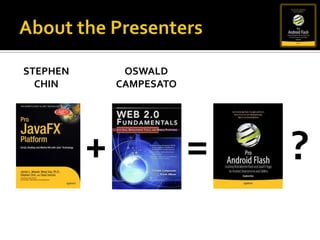
About the PresentersStephenChinOswaldCampesato+=?
DISCLAIMERBleeding Edge DevelopmentWE ARE NOT AFFILIATED WITH ADOBE CORPORATION AND DO NOT REPRESENT THEIR OFFICIAL PRODUCT STATEMENTS.  THE TECHNOLOGIES REPRESENTED WITHIN ARE NOT FINAL AND MAY BE SUBJECT TO CHANGE.  WE ARE NOT RESPONSIBLE FOR OUTBREAKS OF SPONTANEOUS ANDROID FLASH HACKING.HACK RESPONSIBLY!
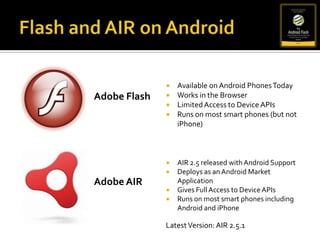
Flash and AIR on AndroidAvailable on Android Phones Today
Works in the Browser
Limited Access to Device APIs
Runs on most smart phones (but not iPhone)Adobe FlashAIR 2.5 released with Android Support
Deploys as an Android Market Application
Gives Full Access to Device APIs
Runs on most smart phones including Android and iPhoneAdobe AIRLatest Version: AIR 2.5.1
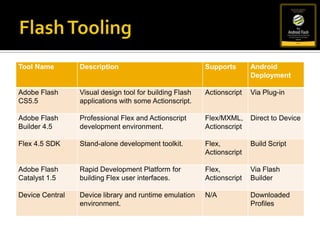
Flash Tooling
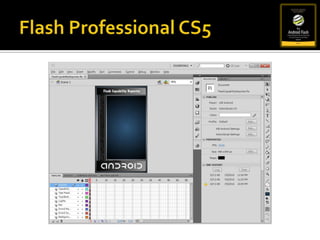
Flash Professional CS5
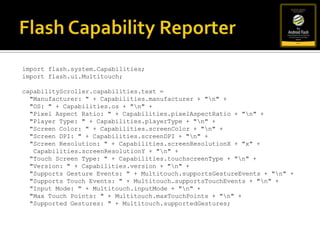
Flash Capability Reporterimport flash.system.Capabilities;import flash.ui.Multitouch; capabilityScroller.capabilities.text =  "Manufacturer: " + Capabilities.manufacturer + "\n" +  "OS: " + Capabilities.os + "\n" +  "Pixel Aspect Ratio: " + Capabilities.pixelAspectRatio + "\n" +  "Player Type: " + Capabilities.playerType + "\n" +  "Screen Color: " + Capabilities.screenColor + "\n" +  "Screen DPI: " + Capabilities.screenDPI + "\n" +  "Screen Resolution: " + Capabilities.screenResolutionX + "x" + Capabilities.screenResolutionY + "\n" +  "Touch Screen Type: " + Capabilities.touchscreenType + "\n" +  "Version: " + Capabilities.version + "\n" +  "Supports Gesture Events: " + Multitouch.supportsGestureEvents + "\n" +  "Supports Touch Events: " + Multitouch.supportsTouchEvents + "\n" +  "Input Mode: " + Multitouch.inputMode + "\n" +  "Max Touch Points: " + Multitouch.maxTouchPoints + "\n" +  "Supported Gestures: " + Multitouch.supportedGestures;
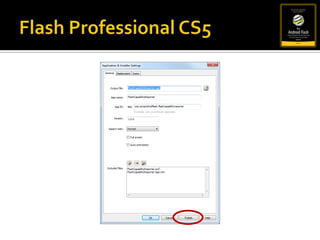
Flash Professional CS5
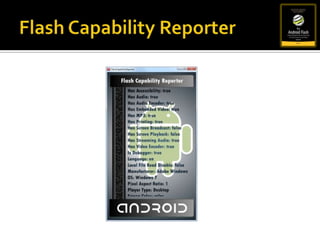
Flash Capability Reporter
Android Devices
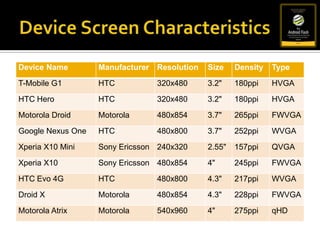
Device Screen Characteristics
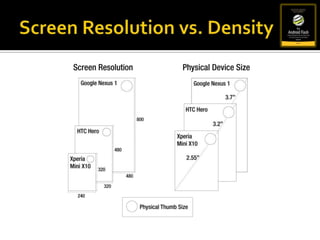
Screen Resolution vs. Density
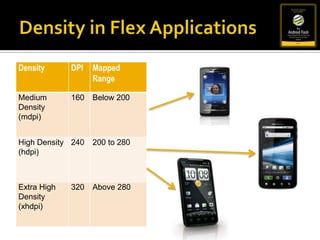
Density in Flex Applications
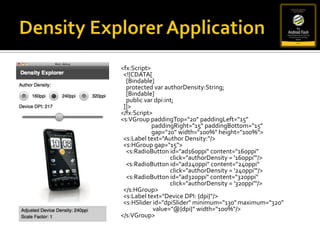
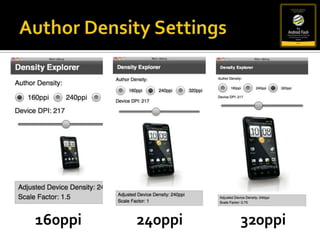
Density Explorer Application<fx:Script>  <![CDATA[    [Bindable]    protected varauthorDensity:String;    [Bindable]    public vardpi:int;  ]]></fx:Script><s:VGrouppaddingTop="20" paddingLeft="15" paddingRight="15" paddingBottom="15"     gap="20" width="100%" height="100%">  <s:Label text="Author Density:"/>  <s:HGroup gap="15">    <s:RadioButton id="ad160ppi" content="160ppi"                                     click="authorDensity = '160ppi'"/>    <s:RadioButton id="ad240ppi" content="240ppi"                                     click="authorDensity = '240ppi'"/>    <s:RadioButton id="ad320ppi" content="320ppi"                                     click="authorDensity = '320ppi'"/>  </s:HGroup>  <s:Label text="Device DPI: {dpi}"/>  <s:HSlider id="dpiSlider" minimum="130" maximum="320"                        value="@{dpi}" width="100%"/></s:VGroup>
Author Density Settings160ppi240ppi320ppi
Flash/AIR Mobile APIsScreen Orientation *Multitouch *Gestures *AccelerometerCameraCameraRollGPSMicrophoneAudioVideoRESTJSON/XMLViewNavigatorCSSEtc.* APIs we will show examples of today
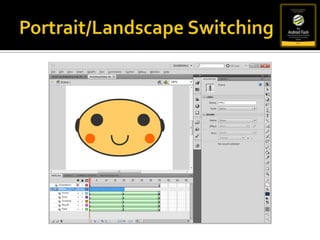
Screen OrientationStage Event Listenerstage.addEventListener(StageOrientationEvent.ORIENTATION_CHANGE,    <function callback>);StageOrientation ValuesDEFAULTROTATED_LEFTROTATED_RIGHTUPSIDE_DOWNUNKNOWN
Screen Orientation Exampleimport flash.display.StageOrientation;import flash.events.StageOrientationEvent;stop();stage.addEventListener(StageOrientationEvent.ORIENTATION_CHANGE, onChanged);function onChanged(event:StageOrientationEvent):void {	play();}
Portrait/Landscape Switching
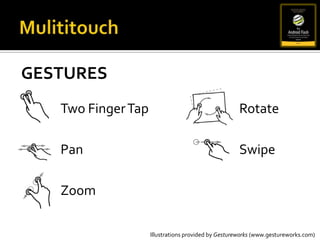
MulititouchGesturesTwo Finger TapPanZoomRotateSwipeIllustrations provided by Gestureworks (www.gestureworks.com)
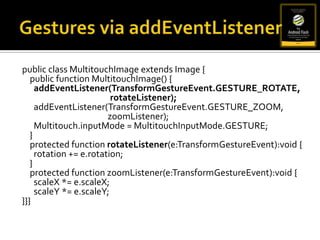
Gestures via addEventListenerpublic class MultitouchImage extends Image {    public function MultitouchImage() {addEventListener(TransformGestureEvent.GESTURE_ROTATE, rotateListener);addEventListener(TransformGestureEvent.GESTURE_ZOOM,zoomListener);Multitouch.inputMode = MultitouchInputMode.GESTURE;}    protected function rotateListener(e:TransformGestureEvent):void {      rotation += e.rotation;}    protected function zoomListener(e:TransformGestureEvent):void {scaleX *= e.scaleX;scaleY *= e.scaleY;}}}
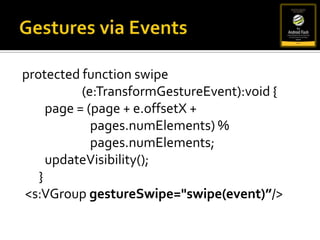
Gestures via Eventsprotected function swipe	(e:TransformGestureEvent):void {        page = (page + e.offsetX + pages.numElements) % pages.numElements;updateVisibility();} <s:VGroupgestureSwipe="swipe(event)”/>
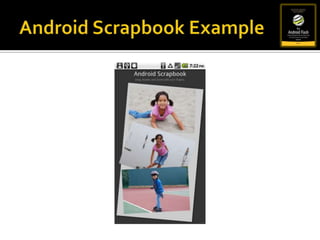
Android Scrapbook Example
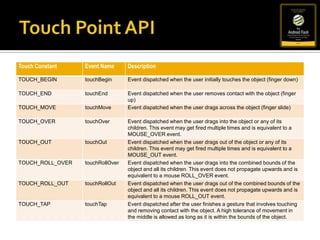
Touch Point API
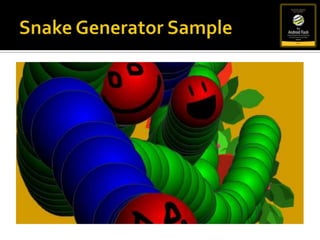
Snake Generator Sample
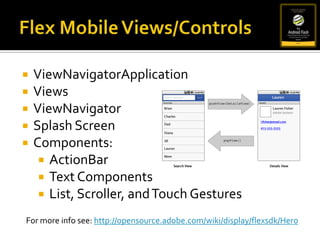
Flex Mobile Views/ControlsViewNavigatorApplication
Views
ViewNavigator
Splash Screen
Components:

Beginning Android Flash Development

  • 1.
    Android Flash DevelopmentAnIntroduction to Flash and AIR Development on AndroidOswald CampesatoTwitter: @ocampesatohttp://book2-web.com/Stephen ChinTwitter: @steveonjavahttp://flash.steveonjava.com/
  • 2.
  • 3.
    DISCLAIMERBleeding Edge DevelopmentWEARE NOT AFFILIATED WITH ADOBE CORPORATION AND DO NOT REPRESENT THEIR OFFICIAL PRODUCT STATEMENTS. THE TECHNOLOGIES REPRESENTED WITHIN ARE NOT FINAL AND MAY BE SUBJECT TO CHANGE. WE ARE NOT RESPONSIBLE FOR OUTBREAKS OF SPONTANEOUS ANDROID FLASH HACKING.HACK RESPONSIBLY!
  • 4.
    Flash and AIRon AndroidAvailable on Android Phones Today
  • 5.
  • 6.
  • 7.
    Runs on mostsmart phones (but not iPhone)Adobe FlashAIR 2.5 released with Android Support
  • 8.
    Deploys as anAndroid Market Application
  • 9.
    Gives Full Accessto Device APIs
  • 10.
    Runs on mostsmart phones including Android and iPhoneAdobe AIRLatest Version: AIR 2.5.1
  • 11.
  • 12.
  • 13.
    Flash Capability Reporterimportflash.system.Capabilities;import flash.ui.Multitouch; capabilityScroller.capabilities.text = "Manufacturer: " + Capabilities.manufacturer + "\n" + "OS: " + Capabilities.os + "\n" + "Pixel Aspect Ratio: " + Capabilities.pixelAspectRatio + "\n" + "Player Type: " + Capabilities.playerType + "\n" + "Screen Color: " + Capabilities.screenColor + "\n" + "Screen DPI: " + Capabilities.screenDPI + "\n" + "Screen Resolution: " + Capabilities.screenResolutionX + "x" + Capabilities.screenResolutionY + "\n" + "Touch Screen Type: " + Capabilities.touchscreenType + "\n" + "Version: " + Capabilities.version + "\n" + "Supports Gesture Events: " + Multitouch.supportsGestureEvents + "\n" + "Supports Touch Events: " + Multitouch.supportsTouchEvents + "\n" + "Input Mode: " + Multitouch.inputMode + "\n" + "Max Touch Points: " + Multitouch.maxTouchPoints + "\n" + "Supported Gestures: " + Multitouch.supportedGestures;
  • 14.
  • 15.
  • 16.
  • 17.
  • 18.
  • 19.
    Density in FlexApplications
  • 20.
    Density Explorer Application<fx:Script> <![CDATA[ [Bindable] protected varauthorDensity:String; [Bindable] public vardpi:int; ]]></fx:Script><s:VGrouppaddingTop="20" paddingLeft="15" paddingRight="15" paddingBottom="15" gap="20" width="100%" height="100%"> <s:Label text="Author Density:"/> <s:HGroup gap="15"> <s:RadioButton id="ad160ppi" content="160ppi" click="authorDensity = '160ppi'"/> <s:RadioButton id="ad240ppi" content="240ppi" click="authorDensity = '240ppi'"/> <s:RadioButton id="ad320ppi" content="320ppi" click="authorDensity = '320ppi'"/> </s:HGroup> <s:Label text="Device DPI: {dpi}"/> <s:HSlider id="dpiSlider" minimum="130" maximum="320" value="@{dpi}" width="100%"/></s:VGroup>
  • 21.
  • 22.
    Flash/AIR Mobile APIsScreenOrientation *Multitouch *Gestures *AccelerometerCameraCameraRollGPSMicrophoneAudioVideoRESTJSON/XMLViewNavigatorCSSEtc.* APIs we will show examples of today
  • 23.
    Screen OrientationStage EventListenerstage.addEventListener(StageOrientationEvent.ORIENTATION_CHANGE, <function callback>);StageOrientation ValuesDEFAULTROTATED_LEFTROTATED_RIGHTUPSIDE_DOWNUNKNOWN
  • 24.
    Screen Orientation Exampleimportflash.display.StageOrientation;import flash.events.StageOrientationEvent;stop();stage.addEventListener(StageOrientationEvent.ORIENTATION_CHANGE, onChanged);function onChanged(event:StageOrientationEvent):void { play();}
  • 25.
  • 26.
  • 27.
    MulititouchGesturesTwo Finger TapPanZoomRotateSwipeIllustrationsprovided by Gestureworks (www.gestureworks.com)
  • 28.
    Gestures via addEventListenerpublicclass MultitouchImage extends Image { public function MultitouchImage() {addEventListener(TransformGestureEvent.GESTURE_ROTATE, rotateListener);addEventListener(TransformGestureEvent.GESTURE_ZOOM,zoomListener);Multitouch.inputMode = MultitouchInputMode.GESTURE;} protected function rotateListener(e:TransformGestureEvent):void { rotation += e.rotation;} protected function zoomListener(e:TransformGestureEvent):void {scaleX *= e.scaleX;scaleY *= e.scaleY;}}}
  • 29.
    Gestures via Eventsprotectedfunction swipe (e:TransformGestureEvent):void { page = (page + e.offsetX + pages.numElements) % pages.numElements;updateVisibility();} <s:VGroupgestureSwipe="swipe(event)”/>
  • 30.
  • 31.
  • 32.
  • 33.
  • 34.
  • 35.
  • 36.
  • 37.