
SDLC Module 4
Module 4 Need for System Analysis  Stages in System Analysis  Structured SAD and tools : DFD Context Diagram  Decision Table  Structured Diagram.  System Development Models:  Water Flow Prototype Spiral RAD  Roles and responsibilities of  System Analyst, Database Administrator  Database Designer.
SDLC SDLC stands for  Systems Development  Life Cycle   First, SDLC is a  Life Cycle . All  systems  have a life cycle or a series of stages they naturally undergo.   The number and name of the stages varies, but the primary stages are conception,  development , maturity and decline.  The  systems development life cycle (SDLC)  therefore, refers to the  development  stage of the  system ’s  life cycle .
Need for SDLC System Objective System Boundaries System Importance Nature of the System Role of the system as an interface Participation of users Understanding of Resource Needs Assessment of Feasibility
Need for SDLC.. extra Seeks to understand what humans need to analyze data input or data flow stematically, process or transform data, store data, and output information in the context of a particular business. Systems analysis and design is used to analyze, design, and implement improvements in the support of users and the functioning of businesses that can be accomplished through the use of computerized information systems.
Need for SDLC… Series of processes systematically undertaken to improve a business through the use of computerized information systems.
Steps / Stages in SDLC Identifying problems, opportunities and objectives Deciding information requirements Frequency of information Analyzing the need of the system Designing the recommended system Developing the system Documentation Testing and maintenance of the system Implementing and evaluating the system
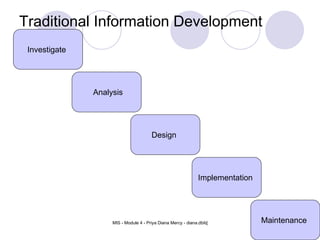
Traditional Information Development Cycle Design Implementation Maintenance Investigate Analysis
System Development Lifecycle Flowchart
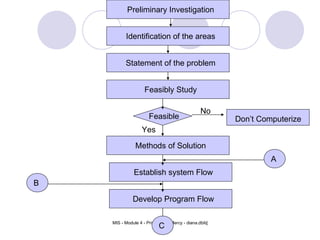
Preliminary Investigation Identification of the areas Statement of the problem Feasibly Study Methods of Solution Establish system Flow Develop Program Flow Feasible Don’t Computerize No Yes A B C
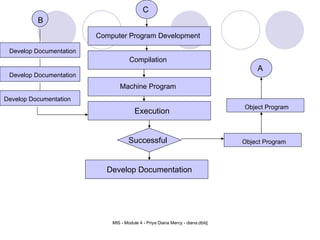
Execution Develop Documentation C Computer Program Development Compilation Machine Program Successful Develop Documentation Develop Documentation Develop Documentation B Object Program Object Program A
Structured SAD and tools
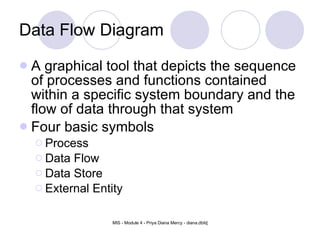
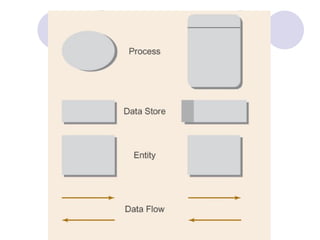
Data Flow Diagram A graphical tool that depicts the sequence of processes and functions contained within a specific system boundary and the flow of data through that system Four basic symbols Process Data Flow Data Store External Entity
 
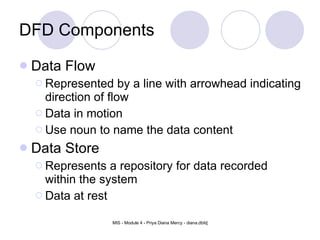
DFD Components Data Flow Represented by a line with arrowhead indicating direction of flow Data in motion Use noun to name the data content Data Store Represents a repository for data recorded within the system Data at rest
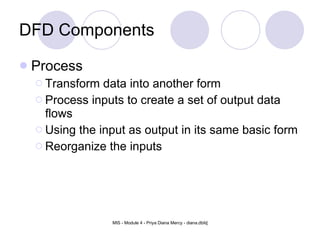
DFD Components Process Transform data into another form Process inputs to create a set of output data flows Using the input as output in its same basic form Reorganize the inputs
External agent Someone or something interacts with the system but resides outside the system boundary Source: serve as the origin of data flowing into the system Sink: represents a destination for data flowing out from the system DFD Components
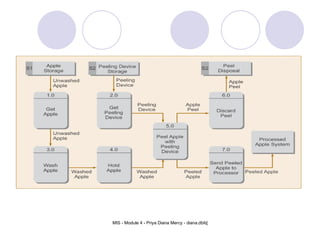
Figure 5-2.  Data Flow Diagram for Logical Apple-Peeling Process
DFD’s versus Flowcharts Flow chart  a diagram that specifies all programs, inputs, outputs, and data store accesses and retrievals depicts the specific flow of control through an IS
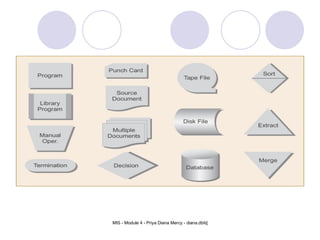
Figure 5-8.  ANSI System Flowchart Symbology
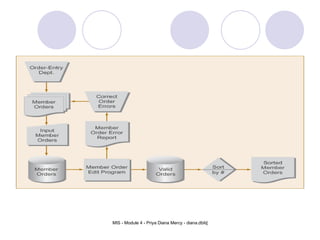
Figure 5-9.  System Flowchart Example
DFD Guidelines Establish system boundary. Label processes and data flows with sufficient information. Think WHAT and not HOW. Think data FLOW, not control.
Analyzing and Using the DFD Constant verification is the key to an accurate set of DFDs. DFD should be carefully reviewed with end users. DFD should be checked against the stated system objectives.
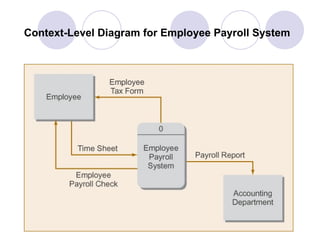
Context Level Diagram Shows the system boundary Contain only one process, labeled with the name of the system, assigned a zero as its identifier Data flow connects the process to its source and sink entities
Context-Level Diagram for Employee Payroll System
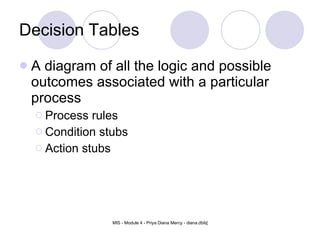
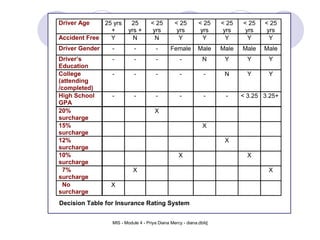
Decision Tables A diagram of all the logic and possible outcomes associated with a particular process Process rules Condition stubs Action stubs
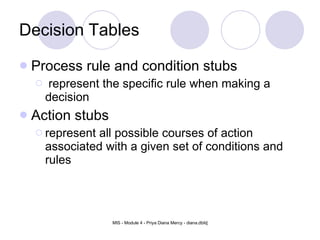
Decision Tables Process rule and condition stubs represent the specific rule when making a decision Action stubs  represent all possible courses of action associated with a given set of conditions and rules
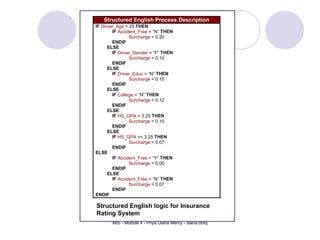
Structured English logic for Insurance Rating System
Decision Table for Insurance Rating System
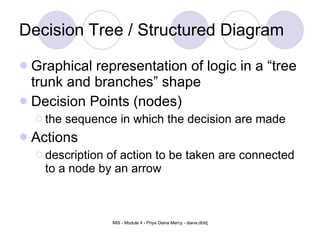
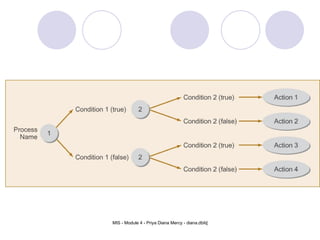
Decision Tree / Structured Diagram Graphical representation of logic in a “tree trunk and branches” shape Decision Points (nodes) the sequence in which the decision are made Actions  description of action to be taken are connected to a node by an arrow
Figure 5-11.  The basic Structure of a NonProbabilistic Decision Tree
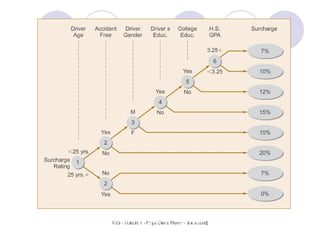
Figure 5-12.  Decision Tree for Insurance Rating System
SDLC Steps
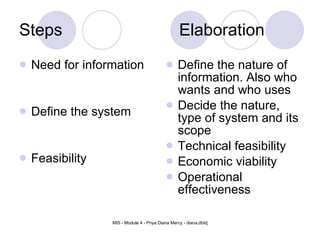
Steps Elaboration Need for information Define the system Feasibility Define the nature of information. Also who wants and who uses Decide the nature, type of system and its scope Technical feasibility Economic viability Operational effectiveness
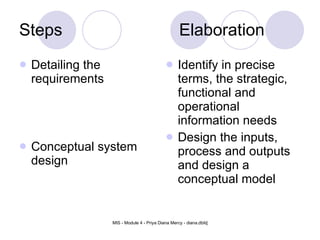
Steps Elaboration Detailing the requirements Conceptual system design Identify in precise terms, the strategic, functional and operational information needs Design the inputs, process and outputs and design a conceptual model
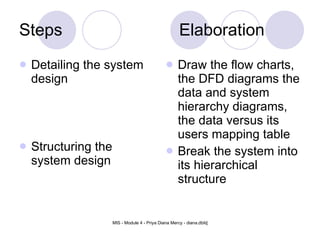
Steps Elaboration Detailing the system design Structuring the system design Draw the flow charts, the DFD diagrams the data and system  hierarchy diagrams, the data versus its users mapping table Break the system into its hierarchical structure
Steps Elaboration Conceptual model of computer system Break the system in programme modules Define step by step the usage of files, processes and interface. Define the data structures and the validation procedures Make a physical conversion of the system into the program structures in a logical  order
Steps Elaboration Develop the test data for checking the system ability Install the system Test the modules and the integrity of the system in terms of input versus output. Plan white box & black box testing Install on the hardware
Steps Elaboration Implementation Review and maintenance Train the personnel. Run the system in parallel. Prepare a system manual Review the system through audit trail and test data, also confirm whether the objective is fulfilled. Carry out the modification if any
System Development Models
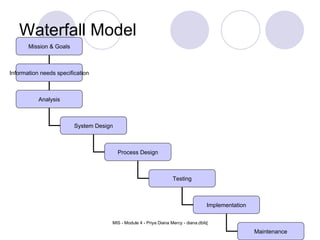
Waterfall Model Mission & Goals Information needs specification Analysis System Design Process Design Testing Implementation Maintenance
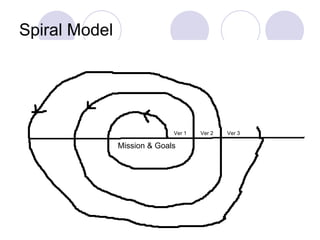
Spiral Model Ver 1 Ver 3 Ver 2 Mission & Goals
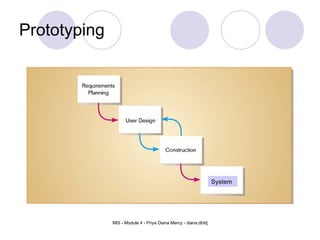
Prototyping Building a scaled-down working version of the system Advantages: Users are involved in design Captures requirements in concrete form
Advantages of prototyping May provide the proof of concept necessary to attract funding  Early visibility of the prototype gives users an idea of what the final system looks like  Encourages active participation among users and producer  Enables a higher output for user  Increases system development speed  Assists to identify any problems with the efficacy of earlier design, requirements analysis and coding activities  Various aspects can be tested and quicker feedback can be got from the user  User interaction available during development cycle of prototype
Disadvantages of prototyping Producer might produce a system inadequate for overall organization needs  User can get too involved whereas the program can not be to a high standard  Structure of system can be damaged since many changes could be made  Producer might get too attached to it
Prototyping System
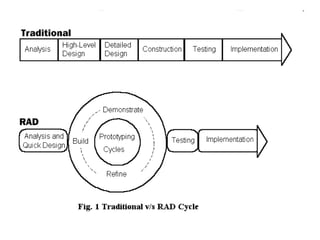
RAD Rapid Application Development (RAD) is a development lifecycle designed to give much faster development and higher-quality results than those achieved with the traditional lifecycle. It is designed to take the maximum advantage of powerful development software that has evolved recently Rapid Application Development is a software development methodology that involves techniques like iterative development and software prototyping.
 
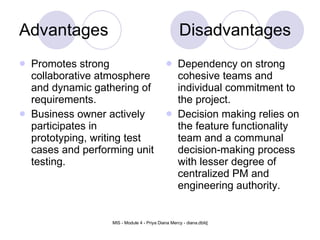
Advantages Disadvantages Promotes strong collaborative atmosphere and dynamic gathering of requirements.   Business owner actively participates in prototyping, writing test cases and performing unit testing.   Dependency on strong cohesive teams and individual commitment to the project.  Decision making relies on the feature functionality team and a communal decision-making process with lesser degree of centralized PM and engineering authority.
Roles and responsibilities of : System Analyst Database Administrator  Database Designer
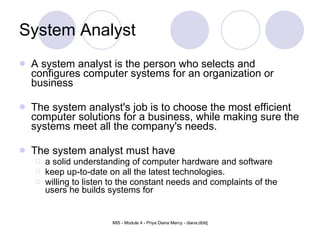
System Analyst A system analyst is the person who selects and configures computer systems for an organization or business  The system analyst's job is to choose the most efficient computer solutions for a business, while making sure the systems meet all the company's needs. The system analyst must have a solid understanding of computer hardware and software keep up-to-date on all the latest technologies. willing to listen to the constant needs and complaints of the users he builds systems for
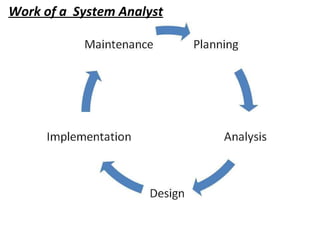
System Analyst A system analyst does exactly that they analyze systems they look at all aspects of a system and determine where it needs improving or changing to do the job it's supposed to do with maximum efficiency. They interview the clients and ask them exactly what they want their new system to do, and then they determine how long it will take, what needs doing, how many people it will need and how much it will cost. Work of a  System Analyst
ROLE OF SYSTEMS ANALYST Defining Requirements - Involves Interviewing Users Prioritizing Requirements- Obtain Users Consensus Fact Gathering- Data, Facts, Opinions of Managers -Lower level Users should be consulted
ROLE OF SYSTEMS ANALYST Analysis and evaluation- Arrive at appropriate system Solving problems - Hazy requirements converted into specific requirements Suggest many alternative solutions Quantify cost and benefits
ROLE OF SYSTEMS ANALYST Drawing up specifications- FUNCTIONAL SPECIFICATIONS - Understood by users and programmers Accepted by users Precise and detailed Account for possible changes SYSTEM DESIGN Logical design of system Objects identification Normalizing database Test plan Design must be modular to accommodate change
ROLE OF SYSTEMS ANALYST Evaluating Systems- Evaluation after use for sometime Plan periodicity for evaluation Modify as needed
System Analyst   - RESPONSIBILITIES Collect information to analyze and evaluate existing or proposed systems.  Research, plan, install, configure, troubleshoot, maintain and upgrade operating systems.  Research, plan, install, configure, troubleshoot, maintain and upgrade hardware and software interfaces with the operating system. Analyze and evaluate present or proposed business procedures or problems to define data processing needs.
System Analyst   - RESPONSIBILITIES Prepare detailed flow charts and diagrams outlining systems capabilities and processes.  Research and recommend hardware and software development, purchase, and use.  Troubleshoot and resolve hardware, software, and connectivity problems, including user access and component configuration.  Select among authorized procedures and seek assistance when guidelines are inadequate, significant deviations are proposed, or when unanticipated problems arise.
System Analyst   - RESPONSIBILITIES Record and maintain hardware and software inventories, site and/or server licensing, and user access and security.  Install, configure, and upgrade desktop hardware and peripherals to include; network cards, printers, modems, mice and add-in boards.  Work as a team member with other technical staff, such as networking to ensure connectivity and compatibility between systems.
System Analyst   - RESPONSIBILITIES Write and maintain system documentation.  Conduct technical research on system upgrades to determine feasibility, cost, time required, and compatibility with current system.  Maintain confidentiality with regard to the information being processed, stored or accessed by the network.  Document system problems and resolutions for future reference.
Database Administrator A  database administrator  ( DBA ) is a person responsible for the design, implementation, maintenance and repair of an organization's database.  They are also known by the titles  Database Coordinator   Database Programmer and is closely related to the  Database Analyst ,  Database Modeler ,  Programmer Analyst , and  Systems Manager .
Database Administrator - Roles Development and design of database strategies,  Monitoring and improving database performance and capacity,  Planning for future expansion requirements.  They may also plan, co-ordinate and implement security measures to safeguard the database. Employing organizations may require that a database administrator have a certification or degree for database systems.
Responsibility of DBA Installing and upgrading the Server and application tools. Allocating  system storage and planning future storage requirements for the database  system. Managing primary database structures (tablespaces) Managing primary objects (table,views,indexes) Enrolling users and maintaining system security.
Responsibility of DBA Ensuring compliance with license agreement Controlling and monitoring user access to the database. Monitoring and optimizing the performance of the database. Planning for backup and recovery of database information. Maintain archived data on tape Backing up and restoring the database
Database Designer The database designer ensures that all necessary data has a place to be stored. At the same time, the speed at which the data can be stored and retrieved are taken in to account so that user's are not left waiting for unreasonable amounts of time.
The database designer is responsible for designing the persistent data storage to be used by the system.
Thank You

VTU - MIS Module 4 - SDLC

  • 1.
  • 2.
    Module 4 Needfor System Analysis Stages in System Analysis Structured SAD and tools : DFD Context Diagram Decision Table Structured Diagram. System Development Models: Water Flow Prototype Spiral RAD Roles and responsibilities of System Analyst, Database Administrator Database Designer.
  • 3.
    SDLC SDLC standsfor Systems Development Life Cycle First, SDLC is a Life Cycle . All systems have a life cycle or a series of stages they naturally undergo.  The number and name of the stages varies, but the primary stages are conception, development , maturity and decline. The systems development life cycle (SDLC) therefore, refers to the development stage of the system ’s life cycle .
  • 4.
    Need for SDLCSystem Objective System Boundaries System Importance Nature of the System Role of the system as an interface Participation of users Understanding of Resource Needs Assessment of Feasibility
  • 5.
    Need for SDLC..extra Seeks to understand what humans need to analyze data input or data flow stematically, process or transform data, store data, and output information in the context of a particular business. Systems analysis and design is used to analyze, design, and implement improvements in the support of users and the functioning of businesses that can be accomplished through the use of computerized information systems.
  • 6.
    Need for SDLC…Series of processes systematically undertaken to improve a business through the use of computerized information systems.
  • 7.
    Steps / Stagesin SDLC Identifying problems, opportunities and objectives Deciding information requirements Frequency of information Analyzing the need of the system Designing the recommended system Developing the system Documentation Testing and maintenance of the system Implementing and evaluating the system
  • 8.
    Traditional Information DevelopmentCycle Design Implementation Maintenance Investigate Analysis
  • 9.
  • 10.
    Preliminary Investigation Identificationof the areas Statement of the problem Feasibly Study Methods of Solution Establish system Flow Develop Program Flow Feasible Don’t Computerize No Yes A B C
  • 11.
    Execution Develop DocumentationC Computer Program Development Compilation Machine Program Successful Develop Documentation Develop Documentation Develop Documentation B Object Program Object Program A
  • 12.
  • 13.
    Data Flow DiagramA graphical tool that depicts the sequence of processes and functions contained within a specific system boundary and the flow of data through that system Four basic symbols Process Data Flow Data Store External Entity
  • 14.
  • 15.
    DFD Components DataFlow Represented by a line with arrowhead indicating direction of flow Data in motion Use noun to name the data content Data Store Represents a repository for data recorded within the system Data at rest
  • 16.
    DFD Components ProcessTransform data into another form Process inputs to create a set of output data flows Using the input as output in its same basic form Reorganize the inputs
  • 17.
    External agent Someoneor something interacts with the system but resides outside the system boundary Source: serve as the origin of data flowing into the system Sink: represents a destination for data flowing out from the system DFD Components
  • 18.
    Figure 5-2. Data Flow Diagram for Logical Apple-Peeling Process
  • 19.
    DFD’s versus FlowchartsFlow chart a diagram that specifies all programs, inputs, outputs, and data store accesses and retrievals depicts the specific flow of control through an IS
  • 20.
    Figure 5-8. ANSI System Flowchart Symbology
  • 21.
    Figure 5-9. System Flowchart Example
  • 22.
    DFD Guidelines Establishsystem boundary. Label processes and data flows with sufficient information. Think WHAT and not HOW. Think data FLOW, not control.
  • 23.
    Analyzing and Usingthe DFD Constant verification is the key to an accurate set of DFDs. DFD should be carefully reviewed with end users. DFD should be checked against the stated system objectives.
  • 24.
    Context Level DiagramShows the system boundary Contain only one process, labeled with the name of the system, assigned a zero as its identifier Data flow connects the process to its source and sink entities
  • 25.
    Context-Level Diagram forEmployee Payroll System
  • 26.
    Decision Tables Adiagram of all the logic and possible outcomes associated with a particular process Process rules Condition stubs Action stubs
  • 27.
    Decision Tables Processrule and condition stubs represent the specific rule when making a decision Action stubs represent all possible courses of action associated with a given set of conditions and rules
  • 28.
    Structured English logicfor Insurance Rating System
  • 29.
    Decision Table forInsurance Rating System
  • 30.
    Decision Tree /Structured Diagram Graphical representation of logic in a “tree trunk and branches” shape Decision Points (nodes) the sequence in which the decision are made Actions description of action to be taken are connected to a node by an arrow
  • 31.
    Figure 5-11. The basic Structure of a NonProbabilistic Decision Tree
  • 32.
    Figure 5-12. Decision Tree for Insurance Rating System
  • 33.
  • 34.
    Steps Elaboration Needfor information Define the system Feasibility Define the nature of information. Also who wants and who uses Decide the nature, type of system and its scope Technical feasibility Economic viability Operational effectiveness
  • 35.
    Steps Elaboration Detailingthe requirements Conceptual system design Identify in precise terms, the strategic, functional and operational information needs Design the inputs, process and outputs and design a conceptual model
  • 36.
    Steps Elaboration Detailingthe system design Structuring the system design Draw the flow charts, the DFD diagrams the data and system hierarchy diagrams, the data versus its users mapping table Break the system into its hierarchical structure
  • 37.
    Steps Elaboration Conceptualmodel of computer system Break the system in programme modules Define step by step the usage of files, processes and interface. Define the data structures and the validation procedures Make a physical conversion of the system into the program structures in a logical order
  • 38.
    Steps Elaboration Developthe test data for checking the system ability Install the system Test the modules and the integrity of the system in terms of input versus output. Plan white box & black box testing Install on the hardware
  • 39.
    Steps Elaboration ImplementationReview and maintenance Train the personnel. Run the system in parallel. Prepare a system manual Review the system through audit trail and test data, also confirm whether the objective is fulfilled. Carry out the modification if any
  • 40.
  • 41.
    Waterfall Model Mission& Goals Information needs specification Analysis System Design Process Design Testing Implementation Maintenance
  • 42.
    Spiral Model Ver1 Ver 3 Ver 2 Mission & Goals
  • 43.
    Prototyping Building ascaled-down working version of the system Advantages: Users are involved in design Captures requirements in concrete form
  • 44.
    Advantages of prototypingMay provide the proof of concept necessary to attract funding Early visibility of the prototype gives users an idea of what the final system looks like Encourages active participation among users and producer Enables a higher output for user Increases system development speed Assists to identify any problems with the efficacy of earlier design, requirements analysis and coding activities Various aspects can be tested and quicker feedback can be got from the user User interaction available during development cycle of prototype
  • 45.
    Disadvantages of prototypingProducer might produce a system inadequate for overall organization needs User can get too involved whereas the program can not be to a high standard Structure of system can be damaged since many changes could be made Producer might get too attached to it
  • 46.
  • 47.
    RAD Rapid ApplicationDevelopment (RAD) is a development lifecycle designed to give much faster development and higher-quality results than those achieved with the traditional lifecycle. It is designed to take the maximum advantage of powerful development software that has evolved recently Rapid Application Development is a software development methodology that involves techniques like iterative development and software prototyping.
  • 48.
  • 49.
    Advantages Disadvantages Promotesstrong collaborative atmosphere and dynamic gathering of requirements. Business owner actively participates in prototyping, writing test cases and performing unit testing. Dependency on strong cohesive teams and individual commitment to the project. Decision making relies on the feature functionality team and a communal decision-making process with lesser degree of centralized PM and engineering authority.
  • 50.
    Roles and responsibilitiesof : System Analyst Database Administrator Database Designer
  • 51.
    System Analyst Asystem analyst is the person who selects and configures computer systems for an organization or business The system analyst's job is to choose the most efficient computer solutions for a business, while making sure the systems meet all the company's needs. The system analyst must have a solid understanding of computer hardware and software keep up-to-date on all the latest technologies. willing to listen to the constant needs and complaints of the users he builds systems for
  • 52.
    System Analyst Asystem analyst does exactly that they analyze systems they look at all aspects of a system and determine where it needs improving or changing to do the job it's supposed to do with maximum efficiency. They interview the clients and ask them exactly what they want their new system to do, and then they determine how long it will take, what needs doing, how many people it will need and how much it will cost. Work of a System Analyst
  • 53.
    ROLE OF SYSTEMSANALYST Defining Requirements - Involves Interviewing Users Prioritizing Requirements- Obtain Users Consensus Fact Gathering- Data, Facts, Opinions of Managers -Lower level Users should be consulted
  • 54.
    ROLE OF SYSTEMSANALYST Analysis and evaluation- Arrive at appropriate system Solving problems - Hazy requirements converted into specific requirements Suggest many alternative solutions Quantify cost and benefits
  • 55.
    ROLE OF SYSTEMSANALYST Drawing up specifications- FUNCTIONAL SPECIFICATIONS - Understood by users and programmers Accepted by users Precise and detailed Account for possible changes SYSTEM DESIGN Logical design of system Objects identification Normalizing database Test plan Design must be modular to accommodate change
  • 56.
    ROLE OF SYSTEMSANALYST Evaluating Systems- Evaluation after use for sometime Plan periodicity for evaluation Modify as needed
  • 57.
    System Analyst - RESPONSIBILITIES Collect information to analyze and evaluate existing or proposed systems. Research, plan, install, configure, troubleshoot, maintain and upgrade operating systems. Research, plan, install, configure, troubleshoot, maintain and upgrade hardware and software interfaces with the operating system. Analyze and evaluate present or proposed business procedures or problems to define data processing needs.
  • 58.
    System Analyst - RESPONSIBILITIES Prepare detailed flow charts and diagrams outlining systems capabilities and processes. Research and recommend hardware and software development, purchase, and use. Troubleshoot and resolve hardware, software, and connectivity problems, including user access and component configuration. Select among authorized procedures and seek assistance when guidelines are inadequate, significant deviations are proposed, or when unanticipated problems arise.
  • 59.
    System Analyst - RESPONSIBILITIES Record and maintain hardware and software inventories, site and/or server licensing, and user access and security. Install, configure, and upgrade desktop hardware and peripherals to include; network cards, printers, modems, mice and add-in boards. Work as a team member with other technical staff, such as networking to ensure connectivity and compatibility between systems.
  • 60.
    System Analyst - RESPONSIBILITIES Write and maintain system documentation. Conduct technical research on system upgrades to determine feasibility, cost, time required, and compatibility with current system. Maintain confidentiality with regard to the information being processed, stored or accessed by the network. Document system problems and resolutions for future reference.
  • 61.
    Database Administrator A database administrator ( DBA ) is a person responsible for the design, implementation, maintenance and repair of an organization's database. They are also known by the titles Database Coordinator Database Programmer and is closely related to the Database Analyst , Database Modeler , Programmer Analyst , and Systems Manager .
  • 62.
    Database Administrator -Roles Development and design of database strategies, Monitoring and improving database performance and capacity, Planning for future expansion requirements. They may also plan, co-ordinate and implement security measures to safeguard the database. Employing organizations may require that a database administrator have a certification or degree for database systems.
  • 63.
    Responsibility of DBAInstalling and upgrading the Server and application tools. Allocating  system storage and planning future storage requirements for the database  system. Managing primary database structures (tablespaces) Managing primary objects (table,views,indexes) Enrolling users and maintaining system security.
  • 64.
    Responsibility of DBAEnsuring compliance with license agreement Controlling and monitoring user access to the database. Monitoring and optimizing the performance of the database. Planning for backup and recovery of database information. Maintain archived data on tape Backing up and restoring the database
  • 65.
    Database Designer Thedatabase designer ensures that all necessary data has a place to be stored. At the same time, the speed at which the data can be stored and retrieved are taken in to account so that user's are not left waiting for unreasonable amounts of time.
  • 66.
    The database designer isresponsible for designing the persistent data storage to be used by the system.
  • 67.

Editor's Notes

  • #4 Development stage is critical. For example, learning behavior of humans is heavily influenced by their development period (and is the reason why money and effort is probably more effective in early stages of development).  In much the same way, the success or failure of an information systems and the amount of maintenance required is dependent on the events during development.