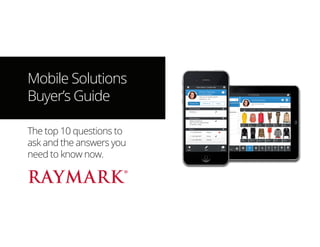
Mobile Solutions
Buyer’s Guide
The top 10 questions to
ask and the answers you
need to know now.
Hello.
So, you’re thinking of taking your retail operations mobile.
That’s great!
We’re so happy that you thought of Raymark to empower
your associates with the best mobile platform for retail
stores.
With Raymark Mosaic, you can provide your store
managers and sales associates with a single platform
including POS, award-winning clienteling, a complete
inventory management solution and retail analytics.
Read on to learn about the most common questions
people have when evaluating mobile store solutions.
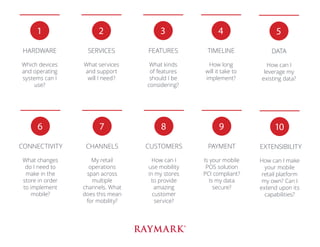
1
HARDWARE
Which devices
and operating
systems can I
use?
2
SERVICES
What services
and support
will I need?
3
FEATURES
What kinds
of features
should I be
considering?
4
TIMELINE
How long
will it take to
implement?
5
DATA
How can I
leverage my
existing data?
6
CONNECTIVITY
What changes
do I need to
make in the
store in order
to implement
mobile?
7
CHANNELS
My retail
operations
span across
multiple
channels. What
does this mean
for mobility?
8
CUSTOMERS
How can I
use mobility
in my stores
to provide
amazing
customer
service?
9
PAYMENT
Is your mobile
POS solution
PCI compliant?
Is my data
secure?
10
EXTENSIBILITY
How can I make
your mobile
retail platform
my own? Can I
extend upon its
capabilities?
HARDWARE
Which devices and operating systems can I use?
Most mobile solutions on the market today were written
with a particular device in mind. They only work on iPad,
for example. That may be fine for now, but at the rate
mobile hardware is evolving, buyers need to know that
their software will keep up.
Raymark took a different approach with Mosaic. HTML5
technology allows Mosaic solutions to run on a PC
workstation, iPad, Android tablet or Windows tablet. That
means that Mosaic isn’t only mobile: it’s cross-platform.
Some solutions, such as Clienteling and Inventory
Management, have also been optimized for the handheld
form factor, like iPhone or iPod Touch.
Raymark’s suite of mobile solutions for retail can be
accessed from any Apple iPad 2 or newer or Android tablet
running Google Chrome version 34.0 or newer. They can
also be accessed from a PC or fixed POS terminal running
Google Chrome version 34.0 or newer.
1
SERVICES
What services and support will I need?
Nobody knows your business’ needs better than you.
Perhaps you have awesome servers and knowledgeable
people in-house, so you prefer hosting your own software.
Maybe you’re deploying clienteling for the first time, so you
could use some help with cultural change. Whatever your
service and support requirements may be, Raymark will
meet you there.
Some examples of professional services you may want to
consider include:
•	 Hosting
•	 SaaS (Software as a Service, or Subscription Model)
•	 Maintenance
•	 Project Management
•	 Integration and Interface Support
•	 Business Analysis
•	 Configuration
•	 Training (Train-the-Trainer, Remote, Classroom)
•	 Cultural Change
•	 Post-Implementation Support
•	 System Audits
2
FEATURES
What kinds of features should I be considering?
That depends on what you’re looking to accomplish. The
Mosaic platform was designed as a modular solution, so
retailers have the flexibility to acquire and deploy only
those apps they really need. As business needs evolve,
retailers can always extend Mosaic’s functionality by
purchasing new modules.
We’re always adding awesome new features to the
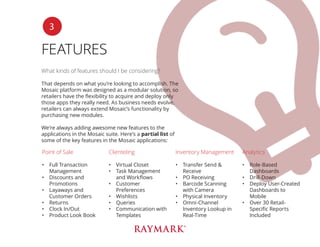
applications in the Mosaic suite. Here’s a partial list of
some of the key features in the Mosaic applications:
3
Point of Sale
•	 Full Transaction
Management
•	 Discounts and
Promotions
•	 Layaways and
Customer Orders
•	 Returns
•	 Clock In/Out
•	 Product Look Book
Clienteling
•	 Virtual Closet
•	 Task Management
and Workflows
•	 Customer
Preferences
•	 Wishlists
•	 Queries
•	 Communication with
Templates
Inventory Management
•	 Transfer Send &
Receive
•	 PO Receiving
•	 Barcode Scanning
with Camera
•	 Physical Inventory
•	 Omni-Channel
Inventory Lookup in
Real-Time
Analytics
•	 Role-Based
Dashboards
•	 Drill-Down
•	 Deploy User-Created
Dashboards to
Mobile
•	 Over 30 Retail-
Specific Reports
Included
TIMELINE
How long will it take to implement?
Every implementation is unique, but most will take
between 1 and 6 months. Our shortest implementation
was fewer than 4 weeks from contract signature to go live.
Several factors can influence the implementation timeline,
including:
•	 Number and Complexity of Third Party Integrations
•	 Customizations to the Software
•	 Data Cleansing Processes
•	 Availability of Your Resources for Testing and Training
•	 Cultural Change Processes
4
DATA
How can I leverage my existing data?
Raymark provides a library of file layouts and an easy-
to-use proprietary integration tool that requires minimal
training. Once your files are mapped using the tool, your
existing data stores for elements such as associates,
customers, products, stores and transactions can be
leveraged.
Successful integration efforts require a complete
understanding of a retailer’s current environment, data
sources, and availability. At Raymark, we recognize the
efforts most retail organizations have undertaken to
cleanse and consolidate their records. We take these
efforts into account in every project, and work with our
retail customers to define the ideal source and location
of data. Key aspects of integration such as data integrity,
duplication and latency for each data type are carefully
studied in every project.
You can perform as much or as little of the integration and
import work as you desire. Raymark can also recommend
partners who specialize in data enhancements such as
address verification and de-duplications.
5
CONNECTIVITY
What changes do I need to make in the store in order to
implement mobile?
All you need in terms of connectivity is a secure wireless
internet connection to use Mosaic in your stores. Most
often, no changes to the existing hardware infrastructure
are required.
Because Raymark solutions operate in a centralized
environment, applications connect in real-time to a server
located wherever you choose. You don’t need to invest
your hardware dollars on store-level servers. This also
means that you can quickly open new or temporary stores
wherever an internet connection can be established:
sidewalk sales, kiosks, pop-up shops or events.
In the event of a lost internet connection, you can
continue to run Mosaic Point of Sale by connecting with
Raymark’s standalone solution, installed on any PC in
the local network. The standalone solution includes a
subset of the centralized database stored locally, with
minimal information in order to keep the store operating
in the case of an outage. When internet is restored, data
will automatically be synchronized with the centralized
database.
6
CHANNELS
My retail operations span across multiple channels. What
does this mean for mobility?
Your customers aren’t loyal to any one channel anymore.
They may browse your website, then shop in your stores,
or vice-versa. Maybe they shop across the channels,
depending on what’s convenient at any given moment.
They expect a consistent brand experience no matter how
they choose to interact with you.
What does this mean for mobility? Because Mosaic
operates from a centralized database, your associates gain
real-time visibility into data from anywhere.
Some examples of how omni-channel retail needs to be
considered in mobile deployments may include:
•	 Customer Purchase History from Multiple Channels
•	 Inventory Lookup in Real-Time from Other Stores,
Warehouses
•	 Promotions and Gift Cards That can be Used In-Store
and Online
•	 Customer Orders for Pickup at Any Location or Shipping
to the Customer
•	 Customer Management of Profile and Wish Lists Online
7
CUSTOMERS
How can I use mobility in my stores to provide amazing
customer service?
By equipping your associates with mobile solutions, you
empower them to provide more immediate, more personal
and more informed service wherever the customer shops.
Some examples of how mobile solutions can be used to
improve the customer experience include:
•	 Eliminate line-ups and process transactions from
anywhere in the store.
•	 Service customers anywhere with easily-accessible and
in-depth customer information.
•	 Bring the online experience to the store with
Mosaic Look Book. Browse through an image
gallery of products with your customer and make
recommendations directly on the mobile device. If the
item is out of stock, real-time omni-channel inventory
lookup allows you to search for the product elsewhere.
•	 Eliminate non-selling time in the back store by equipping
associates with Mosaic Inventory Management and
freeing them to perform transfers and receiving from
the store floor.
8
PAYMENT
Is your mobile POS solution PCI compliant? Is my data
secure?
Raymark has provided PCI compliant retail solutions since
the PABP standard was released in 2008. Our POS solution
supports the latest point-to-point encryption (P2PE)
technology to safeguard against threats related to security
of sensitive card holder data. We can also recommend
hardware devices that support P2PE for the most secure
mobile solution available on the market today.
You retain the ability to accept payment from a bank
terminal, so you don’t need to invest in mobile peripherals
all at once.
With regards to customer data, no sensitive information is
ever stored on the local device. Whether you decide to self-
host or use Raymark’s hosting or SaaS deployment options,
your data always remains your own.
9
EXTENSIBILITY
How can I make your mobile retail platform my own? Can
I extend upon its capabilities?
Are your associates already using web applications
or online tools such as e-learning portals or intranet
resources? Enhance or add your own capabilities to the
solution by developing apps that may be embedded on
the landing page. That can hugely influence adoption in a
positive way, since all the tools they need are located in a
single place.
Other elements of Mosaic can also be configured or
customized according to your needs: for instance, the
background image and colours can be changed to match
your own branding. Workflows and business rules can be
configured to support existing business processes.
Raymark also loves doing custom development for our
customers. We’ll work with you to bring your ideas to
reality. Because Raymark doesn’t branch code, you will
also benefit from changes commissioned by our customer
community in subsequent upgrades.
10
Raymark
5460 Côte de Liesse
Montréal, Québec
Canada H4P 1A5
T: 1-800-346-7296
F: 1-514-737-0014
E: info@raymark.com
W: www.raymark.com
For 25 years, Raymark has been empowering retail with leading-edge
enterprise software solutions that help the world’s most prestigious
international retailers optimize stock turns, build customer loyalty, and
increase sales. Raymark develops and markets the ultimate suite of flex-
ible and interconnected applications deployed in a centralized environ-
ment and offers professional turnkey solutions including implementa-
tion, training and customer support. www.raymark.com

Mobile Solutions Buyer's Guide

  • 1.
    Mobile Solutions Buyer’s Guide Thetop 10 questions to ask and the answers you need to know now.
  • 2.
    Hello. So, you’re thinkingof taking your retail operations mobile. That’s great! We’re so happy that you thought of Raymark to empower your associates with the best mobile platform for retail stores. With Raymark Mosaic, you can provide your store managers and sales associates with a single platform including POS, award-winning clienteling, a complete inventory management solution and retail analytics. Read on to learn about the most common questions people have when evaluating mobile store solutions.
  • 3.
    1 HARDWARE Which devices and operating systemscan I use? 2 SERVICES What services and support will I need? 3 FEATURES What kinds of features should I be considering? 4 TIMELINE How long will it take to implement? 5 DATA How can I leverage my existing data? 6 CONNECTIVITY What changes do I need to make in the store in order to implement mobile? 7 CHANNELS My retail operations span across multiple channels. What does this mean for mobility? 8 CUSTOMERS How can I use mobility in my stores to provide amazing customer service? 9 PAYMENT Is your mobile POS solution PCI compliant? Is my data secure? 10 EXTENSIBILITY How can I make your mobile retail platform my own? Can I extend upon its capabilities?
  • 4.
    HARDWARE Which devices andoperating systems can I use? Most mobile solutions on the market today were written with a particular device in mind. They only work on iPad, for example. That may be fine for now, but at the rate mobile hardware is evolving, buyers need to know that their software will keep up. Raymark took a different approach with Mosaic. HTML5 technology allows Mosaic solutions to run on a PC workstation, iPad, Android tablet or Windows tablet. That means that Mosaic isn’t only mobile: it’s cross-platform. Some solutions, such as Clienteling and Inventory Management, have also been optimized for the handheld form factor, like iPhone or iPod Touch. Raymark’s suite of mobile solutions for retail can be accessed from any Apple iPad 2 or newer or Android tablet running Google Chrome version 34.0 or newer. They can also be accessed from a PC or fixed POS terminal running Google Chrome version 34.0 or newer. 1
  • 5.
    SERVICES What services andsupport will I need? Nobody knows your business’ needs better than you. Perhaps you have awesome servers and knowledgeable people in-house, so you prefer hosting your own software. Maybe you’re deploying clienteling for the first time, so you could use some help with cultural change. Whatever your service and support requirements may be, Raymark will meet you there. Some examples of professional services you may want to consider include: • Hosting • SaaS (Software as a Service, or Subscription Model) • Maintenance • Project Management • Integration and Interface Support • Business Analysis • Configuration • Training (Train-the-Trainer, Remote, Classroom) • Cultural Change • Post-Implementation Support • System Audits 2
  • 6.
    FEATURES What kinds offeatures should I be considering? That depends on what you’re looking to accomplish. The Mosaic platform was designed as a modular solution, so retailers have the flexibility to acquire and deploy only those apps they really need. As business needs evolve, retailers can always extend Mosaic’s functionality by purchasing new modules. We’re always adding awesome new features to the applications in the Mosaic suite. Here’s a partial list of some of the key features in the Mosaic applications: 3 Point of Sale • Full Transaction Management • Discounts and Promotions • Layaways and Customer Orders • Returns • Clock In/Out • Product Look Book Clienteling • Virtual Closet • Task Management and Workflows • Customer Preferences • Wishlists • Queries • Communication with Templates Inventory Management • Transfer Send & Receive • PO Receiving • Barcode Scanning with Camera • Physical Inventory • Omni-Channel Inventory Lookup in Real-Time Analytics • Role-Based Dashboards • Drill-Down • Deploy User-Created Dashboards to Mobile • Over 30 Retail- Specific Reports Included
  • 7.
    TIMELINE How long willit take to implement? Every implementation is unique, but most will take between 1 and 6 months. Our shortest implementation was fewer than 4 weeks from contract signature to go live. Several factors can influence the implementation timeline, including: • Number and Complexity of Third Party Integrations • Customizations to the Software • Data Cleansing Processes • Availability of Your Resources for Testing and Training • Cultural Change Processes 4
  • 8.
    DATA How can Ileverage my existing data? Raymark provides a library of file layouts and an easy- to-use proprietary integration tool that requires minimal training. Once your files are mapped using the tool, your existing data stores for elements such as associates, customers, products, stores and transactions can be leveraged. Successful integration efforts require a complete understanding of a retailer’s current environment, data sources, and availability. At Raymark, we recognize the efforts most retail organizations have undertaken to cleanse and consolidate their records. We take these efforts into account in every project, and work with our retail customers to define the ideal source and location of data. Key aspects of integration such as data integrity, duplication and latency for each data type are carefully studied in every project. You can perform as much or as little of the integration and import work as you desire. Raymark can also recommend partners who specialize in data enhancements such as address verification and de-duplications. 5
  • 9.
    CONNECTIVITY What changes doI need to make in the store in order to implement mobile? All you need in terms of connectivity is a secure wireless internet connection to use Mosaic in your stores. Most often, no changes to the existing hardware infrastructure are required. Because Raymark solutions operate in a centralized environment, applications connect in real-time to a server located wherever you choose. You don’t need to invest your hardware dollars on store-level servers. This also means that you can quickly open new or temporary stores wherever an internet connection can be established: sidewalk sales, kiosks, pop-up shops or events. In the event of a lost internet connection, you can continue to run Mosaic Point of Sale by connecting with Raymark’s standalone solution, installed on any PC in the local network. The standalone solution includes a subset of the centralized database stored locally, with minimal information in order to keep the store operating in the case of an outage. When internet is restored, data will automatically be synchronized with the centralized database. 6
  • 10.
    CHANNELS My retail operationsspan across multiple channels. What does this mean for mobility? Your customers aren’t loyal to any one channel anymore. They may browse your website, then shop in your stores, or vice-versa. Maybe they shop across the channels, depending on what’s convenient at any given moment. They expect a consistent brand experience no matter how they choose to interact with you. What does this mean for mobility? Because Mosaic operates from a centralized database, your associates gain real-time visibility into data from anywhere. Some examples of how omni-channel retail needs to be considered in mobile deployments may include: • Customer Purchase History from Multiple Channels • Inventory Lookup in Real-Time from Other Stores, Warehouses • Promotions and Gift Cards That can be Used In-Store and Online • Customer Orders for Pickup at Any Location or Shipping to the Customer • Customer Management of Profile and Wish Lists Online 7
  • 11.
    CUSTOMERS How can Iuse mobility in my stores to provide amazing customer service? By equipping your associates with mobile solutions, you empower them to provide more immediate, more personal and more informed service wherever the customer shops. Some examples of how mobile solutions can be used to improve the customer experience include: • Eliminate line-ups and process transactions from anywhere in the store. • Service customers anywhere with easily-accessible and in-depth customer information. • Bring the online experience to the store with Mosaic Look Book. Browse through an image gallery of products with your customer and make recommendations directly on the mobile device. If the item is out of stock, real-time omni-channel inventory lookup allows you to search for the product elsewhere. • Eliminate non-selling time in the back store by equipping associates with Mosaic Inventory Management and freeing them to perform transfers and receiving from the store floor. 8
  • 12.
    PAYMENT Is your mobilePOS solution PCI compliant? Is my data secure? Raymark has provided PCI compliant retail solutions since the PABP standard was released in 2008. Our POS solution supports the latest point-to-point encryption (P2PE) technology to safeguard against threats related to security of sensitive card holder data. We can also recommend hardware devices that support P2PE for the most secure mobile solution available on the market today. You retain the ability to accept payment from a bank terminal, so you don’t need to invest in mobile peripherals all at once. With regards to customer data, no sensitive information is ever stored on the local device. Whether you decide to self- host or use Raymark’s hosting or SaaS deployment options, your data always remains your own. 9
  • 13.
    EXTENSIBILITY How can Imake your mobile retail platform my own? Can I extend upon its capabilities? Are your associates already using web applications or online tools such as e-learning portals or intranet resources? Enhance or add your own capabilities to the solution by developing apps that may be embedded on the landing page. That can hugely influence adoption in a positive way, since all the tools they need are located in a single place. Other elements of Mosaic can also be configured or customized according to your needs: for instance, the background image and colours can be changed to match your own branding. Workflows and business rules can be configured to support existing business processes. Raymark also loves doing custom development for our customers. We’ll work with you to bring your ideas to reality. Because Raymark doesn’t branch code, you will also benefit from changes commissioned by our customer community in subsequent upgrades. 10
  • 14.
    Raymark 5460 Côte deLiesse Montréal, Québec Canada H4P 1A5 T: 1-800-346-7296 F: 1-514-737-0014 E: info@raymark.com W: www.raymark.com For 25 years, Raymark has been empowering retail with leading-edge enterprise software solutions that help the world’s most prestigious international retailers optimize stock turns, build customer loyalty, and increase sales. Raymark develops and markets the ultimate suite of flex- ible and interconnected applications deployed in a centralized environ- ment and offers professional turnkey solutions including implementa- tion, training and customer support. www.raymark.com