NETWORK FORENSICS
NETWORK FORENSICS OVERVIEW
• Network forensics
• Systematic tracking of incoming and outgoing traffic
• To ascertain how an attack was carried out or how an event occurred on a network
• Intruders leave trail behind
• Determine the cause of the abnormal traffic
• Internal bug
• Attackers
SECURING A NETWORK
• Layered network defense strategy
• Sets up layers of protection to hide the most valuable data at the innermost part of the
network
• Defense in depth (DiD)
• Similar approach developed by the NSA
• Modes of protection
• People (hiring and treatment)
• Technology (firewalls, IDSs, etc.)
• Operations (patches, updates)
PERFORMING LIVE
ACQUISITIONS
PERFORMING LIVE ACQUISITIONS
• Live acquisitions are especially useful when you’re dealing with
active network intrusions or attacks
• Live acquisitions done before taking a system offline are also
becoming a necessity
• Because attacks might leave footprints only in running processes or
RAM
• Live acquisitions don’t follow typical forensics procedures
• Order of volatility (OOV)
• How long a piece of information lasts on a system
PERFORMING LIVE ACQUISITIONS (CONTINUED)
• Steps
• Create or download a live-acquisition forensic CD
• Make sure you keep a log of all your actions
• A network drive is ideal as a place to send the information you collect;
an alternative is a USB disk
• Copy the physical memory (RAM)
• The next step varies: search for rootkits, check firmware, image the
drive over the network, or shut down for later static acquisition
• Be sure to get a forensic hash value of all files you recover during the
live acquisition
DEVELOPING STANDARD PROCEDURES
FOR NETWORK FORENSICS
• Long, tedious process
• Standard procedure
• Always use a standard installation image for systems on a network
• Close any way in after an attack
• Attempt to retrieve all volatile data
• Acquire all compromised drives
• Compare files on the forensic image to the original installation image
REVIEWING NETWORK LOGS
• Record ingoing and outgoing traffic
• Network servers
• Routers
• Firewalls
• Tcpdump tool for examining network traffic
• Can generate top 10 lists
• Can identify patterns
• Attacks might include other companies
• Do not reveal information discovered about other companies
SOCIAL MEDIA
FORENSICS
APPLYING DIGITAL FORENSICS TO SOCIAL MEDIA
• Online social networks (OSNs) are used to conduct business, brag about criminal
activities, raise money, and have class discussions
• Social media can contain:
• Evidence of cyberbullying and witness tampering
• A company’s position on an issue
• Whether intellectual property rights have been violated
• Who posted information and when
10
APPLYING DIGITAL FORENSICS TO SOCIAL MEDIA
• Social media can often substantiate a party’s claims
• OSNs involve multiple jurisdictions that might even cross national boundaries
• A warrant or subpoena is needed to access social media servers
• In cases involving imminent danger, law enforcement can file for emergency
requests
11
FORENSICS TOOLS FOR SOCIAL MEDIA
INVESTIGATIONS
• Software for social media forensics is being developed
• Not many tools are available now
• There are questions about how the information these tools gather can be used in
court or in arbitration
• Using social media forensics software might also require getting the permission
of the people whose information is being examined
12
MOBILE FORENSICS
UNDERSTANDING MOBILE DEVICE FORENSICS
• People store a wealth of information on cell phones
• People don’t think about securing their cell phones
• Items stored on cell phones:
• Incoming, outgoing, and missed calls
• Text and Short Message Service (SMS) messages
• E-mail
• Instant-messaging (IM) logs
• Web pages
• Pictures
UNDERSTANDING MOBILE DEVICE FORENSICS
(CONTINUED)
• Items stored on cell phones: (continued)
• Personal calendars
• Address books
• Music files
• Voice recordings
• Investigating cell phones and mobile devices is one of the most challenging tasks
in digital forensics
INSIDE MOBILE DEVICES
• Mobile devices can range from simple phones to small computers
• Also called smart phones
• Hardware components
• Microprocessor, ROM, RAM, a digital signal processor, a radio module, a microphone
and speaker, hardware interfaces, and an LCD display
• Most basic phones have a proprietary OS
• Although smart phones use stripped-down versions of PC operating systems
INSIDE MOBILE DEVICES (CONTINUED)
• Phones store system data in electronically erasable programmable read-only
memory (EEPROM)
• Enables service providers to reprogram phones without having to physically access
memory chips
• OS is stored in ROM
• Nonvolatile memory
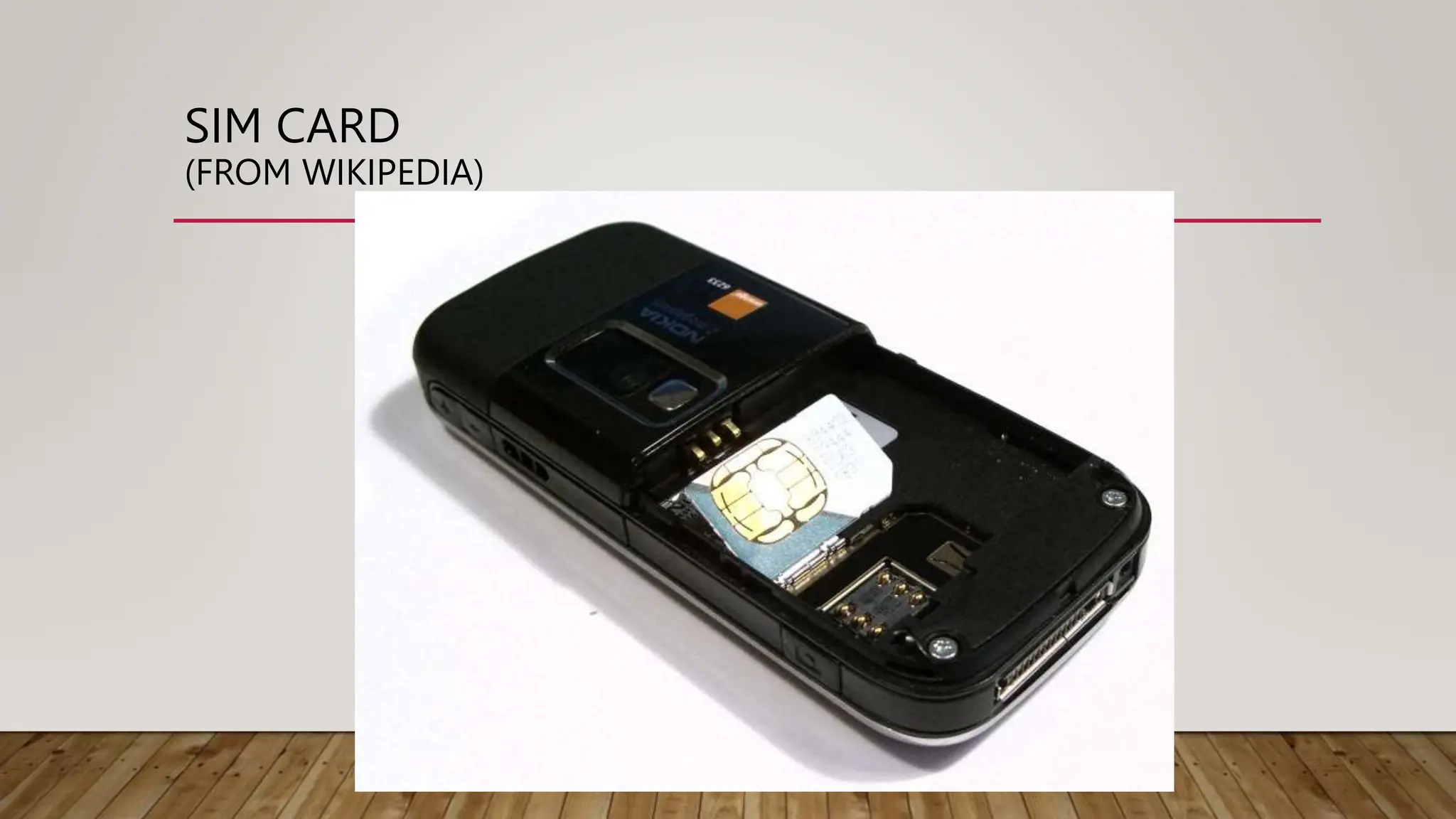
SIM CARD
(FROM WIKIPEDIA)
INSIDE MOBILE DEVICES (CONTINUED)
• Subscriber identity module (SIM) cards
• Found most commonly in GSM devices
• Microprocessor and from 16 KB to 4 MB EEPROM
• Sometimes even more, up go 1 GB EEPROM
• GSM refers to mobile phones as “mobile stations” and divides a station into two parts:
• The SIM card and the mobile equipment (ME)
• SIM cards come in two sizes
• Portability of information makes SIM cards versatile
INSIDE MOBILE DEVICES (CONTINUED)
• Subscriber identity module (SIM) cards (continued)
• Additional SIM card purposes:
• Identifies the subscriber to the network
• Stores personal information
• Stores address books and messages
• Stores service-related information
INSIDE PDAS
• Personal digital assistants (PDAs)
• Can be separate devices from mobile phones
• Most users carry them instead of a laptop
• PDAs house a microprocessor, flash ROM, RAM, and various
hardware components
• The amount of information on a PDA varies depending on the
model
• Usually, you can retrieve a user’s calendar, address book, Web
access, and other items
INSIDE PDAS (CONTINUED)
• Peripheral memory cards are used with PDAs
• Compact Flash (CF)
• MultiMedia Card (MMC)
• Secure Digital (SD)
• Most PDAs synchronize with a computer
• Built-in slots for that purpose
UNDERSTANDING ACQUISITION PROCEDURES FOR
CELL PHONES AND MOBILE DEVICES
• The main concerns with mobile devices are loss of power and
synchronization with PCs
• All mobile devices have volatile memory
• Making sure they don’t lose power before you can retrieve RAM data is
critical
• Mobile device attached to a PC via a cable or cradle/docking station
should be disconnected from the PC immediately
• Depending on the warrant or subpoena, the time of seizure might
be relevant
UNDERSTANDING ACQUISITION
PROCEDURES FOR CELL PHONES AND
MOBILE DEVICES (CONTINUED)
• Messages might be received on the mobile device after seizure
• Isolate the device from incoming signals with one of the following
options:
• Place the device in a paint can
• Use the Paraben Wireless StrongHold Bag
• Use eight layers of antistatic bags to block the signal
• The drawback to using these isolating options is that the mobile
device is put into roaming mode
• Which accelerates battery drainage
UNDERSTANDING ACQUISITION
PROCEDURES FOR CELL PHONES AND
MOBILE DEVICES (CONTINUED)
• Check these areas in the forensics lab :
• Internal memory
• SIM card
• Removable or external memory cards
• System server
• Checking system servers requires a search warrant or subpoena
• SIM card file system is a hierarchical structure
MOBILE FORENSICS EQUIPMENT
• Mobile forensics is a new science
• Biggest challenge is dealing with constantly changing models of cell phones
• When you’re acquiring evidence, generally you’re performing two tasks:
• Acting as though you’re a PC synchronizing with the device (to download data)
• Reading the SIM card
• First step is to identify the mobile device
MOBILE FORENSICS EQUIPMENT (CONTINUED)
• Make sure you have installed the mobile device software on your forensic
workstation
• Attach the phone to its power supply and connect the correct cables
• After you’ve connected the device
• Start the forensics program and begin downloading the available information
MOBILE FORENSICS EQUIPMENT (CONTINUED)
• SIM card readers
• A combination hardware/software device used to access the SIM card
• You need to be in a forensics lab equipped with appropriate antistatic devices
• General procedure is as follows:
• Remove the back panel of the device
• Remove the battery
• Under the battery, remove the SIM card from holder
• Insert the SIM card into the card reader
MOBILE FORENSICS EQUIPMENT (CONTINUED)
• SIM card readers (continued)
• A variety of SIM card readers are on the market
• Some are forensically sound and some are not
• Documenting messages that haven’t been read yet is critical
• Use a tool that takes pictures of each screen
IPHONE FORENSICS
• MacLockPick II
• Uses backup files
• It can’t recover deleted files
• MDBackUp Extract
• Analyzes the iTunes mobile sync backup directory
MOBILE FORENSICS TOOLS
• Paraben Software Device Seizure Toolbox
• Contains cables, SIM card readers, and more
• Data Pilot
• Similar to Paraben
• BitPim
• Can view data on many phones, but it's not intended for forensics
• MOBILedit!
• Has a write-blocker

Network Forensics- Social Media Forensics

  • 1.
  • 2.
    NETWORK FORENSICS OVERVIEW •Network forensics • Systematic tracking of incoming and outgoing traffic • To ascertain how an attack was carried out or how an event occurred on a network • Intruders leave trail behind • Determine the cause of the abnormal traffic • Internal bug • Attackers
  • 3.
    SECURING A NETWORK •Layered network defense strategy • Sets up layers of protection to hide the most valuable data at the innermost part of the network • Defense in depth (DiD) • Similar approach developed by the NSA • Modes of protection • People (hiring and treatment) • Technology (firewalls, IDSs, etc.) • Operations (patches, updates)
  • 4.
  • 5.
    PERFORMING LIVE ACQUISITIONS •Live acquisitions are especially useful when you’re dealing with active network intrusions or attacks • Live acquisitions done before taking a system offline are also becoming a necessity • Because attacks might leave footprints only in running processes or RAM • Live acquisitions don’t follow typical forensics procedures • Order of volatility (OOV) • How long a piece of information lasts on a system
  • 6.
    PERFORMING LIVE ACQUISITIONS(CONTINUED) • Steps • Create or download a live-acquisition forensic CD • Make sure you keep a log of all your actions • A network drive is ideal as a place to send the information you collect; an alternative is a USB disk • Copy the physical memory (RAM) • The next step varies: search for rootkits, check firmware, image the drive over the network, or shut down for later static acquisition • Be sure to get a forensic hash value of all files you recover during the live acquisition
  • 7.
    DEVELOPING STANDARD PROCEDURES FORNETWORK FORENSICS • Long, tedious process • Standard procedure • Always use a standard installation image for systems on a network • Close any way in after an attack • Attempt to retrieve all volatile data • Acquire all compromised drives • Compare files on the forensic image to the original installation image
  • 8.
    REVIEWING NETWORK LOGS •Record ingoing and outgoing traffic • Network servers • Routers • Firewalls • Tcpdump tool for examining network traffic • Can generate top 10 lists • Can identify patterns • Attacks might include other companies • Do not reveal information discovered about other companies
  • 9.
  • 10.
    APPLYING DIGITAL FORENSICSTO SOCIAL MEDIA • Online social networks (OSNs) are used to conduct business, brag about criminal activities, raise money, and have class discussions • Social media can contain: • Evidence of cyberbullying and witness tampering • A company’s position on an issue • Whether intellectual property rights have been violated • Who posted information and when 10
  • 11.
    APPLYING DIGITAL FORENSICSTO SOCIAL MEDIA • Social media can often substantiate a party’s claims • OSNs involve multiple jurisdictions that might even cross national boundaries • A warrant or subpoena is needed to access social media servers • In cases involving imminent danger, law enforcement can file for emergency requests 11
  • 12.
    FORENSICS TOOLS FORSOCIAL MEDIA INVESTIGATIONS • Software for social media forensics is being developed • Not many tools are available now • There are questions about how the information these tools gather can be used in court or in arbitration • Using social media forensics software might also require getting the permission of the people whose information is being examined 12
  • 13.
  • 14.
    UNDERSTANDING MOBILE DEVICEFORENSICS • People store a wealth of information on cell phones • People don’t think about securing their cell phones • Items stored on cell phones: • Incoming, outgoing, and missed calls • Text and Short Message Service (SMS) messages • E-mail • Instant-messaging (IM) logs • Web pages • Pictures
  • 15.
    UNDERSTANDING MOBILE DEVICEFORENSICS (CONTINUED) • Items stored on cell phones: (continued) • Personal calendars • Address books • Music files • Voice recordings • Investigating cell phones and mobile devices is one of the most challenging tasks in digital forensics
  • 16.
    INSIDE MOBILE DEVICES •Mobile devices can range from simple phones to small computers • Also called smart phones • Hardware components • Microprocessor, ROM, RAM, a digital signal processor, a radio module, a microphone and speaker, hardware interfaces, and an LCD display • Most basic phones have a proprietary OS • Although smart phones use stripped-down versions of PC operating systems
  • 17.
    INSIDE MOBILE DEVICES(CONTINUED) • Phones store system data in electronically erasable programmable read-only memory (EEPROM) • Enables service providers to reprogram phones without having to physically access memory chips • OS is stored in ROM • Nonvolatile memory
  • 18.
  • 19.
    INSIDE MOBILE DEVICES(CONTINUED) • Subscriber identity module (SIM) cards • Found most commonly in GSM devices • Microprocessor and from 16 KB to 4 MB EEPROM • Sometimes even more, up go 1 GB EEPROM • GSM refers to mobile phones as “mobile stations” and divides a station into two parts: • The SIM card and the mobile equipment (ME) • SIM cards come in two sizes • Portability of information makes SIM cards versatile
  • 20.
    INSIDE MOBILE DEVICES(CONTINUED) • Subscriber identity module (SIM) cards (continued) • Additional SIM card purposes: • Identifies the subscriber to the network • Stores personal information • Stores address books and messages • Stores service-related information
  • 21.
    INSIDE PDAS • Personaldigital assistants (PDAs) • Can be separate devices from mobile phones • Most users carry them instead of a laptop • PDAs house a microprocessor, flash ROM, RAM, and various hardware components • The amount of information on a PDA varies depending on the model • Usually, you can retrieve a user’s calendar, address book, Web access, and other items
  • 22.
    INSIDE PDAS (CONTINUED) •Peripheral memory cards are used with PDAs • Compact Flash (CF) • MultiMedia Card (MMC) • Secure Digital (SD) • Most PDAs synchronize with a computer • Built-in slots for that purpose
  • 23.
    UNDERSTANDING ACQUISITION PROCEDURESFOR CELL PHONES AND MOBILE DEVICES • The main concerns with mobile devices are loss of power and synchronization with PCs • All mobile devices have volatile memory • Making sure they don’t lose power before you can retrieve RAM data is critical • Mobile device attached to a PC via a cable or cradle/docking station should be disconnected from the PC immediately • Depending on the warrant or subpoena, the time of seizure might be relevant
  • 24.
    UNDERSTANDING ACQUISITION PROCEDURES FORCELL PHONES AND MOBILE DEVICES (CONTINUED) • Messages might be received on the mobile device after seizure • Isolate the device from incoming signals with one of the following options: • Place the device in a paint can • Use the Paraben Wireless StrongHold Bag • Use eight layers of antistatic bags to block the signal • The drawback to using these isolating options is that the mobile device is put into roaming mode • Which accelerates battery drainage
  • 25.
    UNDERSTANDING ACQUISITION PROCEDURES FORCELL PHONES AND MOBILE DEVICES (CONTINUED) • Check these areas in the forensics lab : • Internal memory • SIM card • Removable or external memory cards • System server • Checking system servers requires a search warrant or subpoena • SIM card file system is a hierarchical structure
  • 26.
    MOBILE FORENSICS EQUIPMENT •Mobile forensics is a new science • Biggest challenge is dealing with constantly changing models of cell phones • When you’re acquiring evidence, generally you’re performing two tasks: • Acting as though you’re a PC synchronizing with the device (to download data) • Reading the SIM card • First step is to identify the mobile device
  • 27.
    MOBILE FORENSICS EQUIPMENT(CONTINUED) • Make sure you have installed the mobile device software on your forensic workstation • Attach the phone to its power supply and connect the correct cables • After you’ve connected the device • Start the forensics program and begin downloading the available information
  • 28.
    MOBILE FORENSICS EQUIPMENT(CONTINUED) • SIM card readers • A combination hardware/software device used to access the SIM card • You need to be in a forensics lab equipped with appropriate antistatic devices • General procedure is as follows: • Remove the back panel of the device • Remove the battery • Under the battery, remove the SIM card from holder • Insert the SIM card into the card reader
  • 29.
    MOBILE FORENSICS EQUIPMENT(CONTINUED) • SIM card readers (continued) • A variety of SIM card readers are on the market • Some are forensically sound and some are not • Documenting messages that haven’t been read yet is critical • Use a tool that takes pictures of each screen
  • 30.
    IPHONE FORENSICS • MacLockPickII • Uses backup files • It can’t recover deleted files • MDBackUp Extract • Analyzes the iTunes mobile sync backup directory
  • 31.
    MOBILE FORENSICS TOOLS •Paraben Software Device Seizure Toolbox • Contains cables, SIM card readers, and more • Data Pilot • Similar to Paraben • BitPim • Can view data on many phones, but it's not intended for forensics • MOBILedit! • Has a write-blocker