MIDP:	
  Music	
  and	
  Sound	
  

            Jussi	
  Pohjolainen	
  
Tampere	
  University	
  of	
  Applied	
  Sciences	
  
Sound	
  and	
  Music,	
  the	
  Basics	
  
•  MIDP	
  2.0	
  includes	
  basic	
  audio	
  capabiliEes	
  
•  Media	
  API	
  in	
  MIDP	
  2.0	
  is	
  a	
  subset	
  of	
  the	
  MMAPI	
  (Mobile	
  
   Media	
  API).	
  
    –  MMAPI:	
  hHp://jcp.org/en/jsr/detail?id=135	
  
•  Subset	
  of	
  the	
  MMAPI	
  that	
  is	
  included	
  in	
  MIDP	
  2.0	
  is	
  called	
  
   Audio	
  Building	
  Block	
  (ABB).	
  
    –  Features:	
  Playing	
  simple	
  tones	
  and	
  sampled	
  audio	
  
•  Media	
  API	
  can	
  also	
  be	
  used	
  as	
  playing	
  all	
  kinds	
  of	
  media,	
  for	
  
   example	
  movies.	
  
MIDP	
  2.0	
  Media	
  Concepts	
  
•  Audio	
  data	
  comes	
  in	
  variety	
  of	
  content	
  types.	
  
•  Content	
  type	
  =	
  file	
  format!	
  
     –  MP3,	
  AIFF,	
  WAF	
  etc.	
  	
  
•  Content	
  types	
  are	
  specified	
  using	
  MIME	
  
   types,	
  which	
  use	
  a	
  string	
  to	
  specify	
  a	
  1)	
  
   primary	
  and	
  2)	
  secondary	
  type.	
  
     –  Example:	
  "audio/x-­‐wav"	
  
•  Content	
  type	
  tells	
  how	
  to	
  translate	
  bits	
  into	
  
   sound.	
  
Different	
  content	
  types	
  
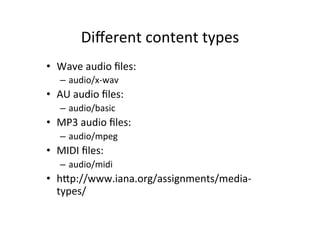
•  Wave	
  audio	
  files:	


          –  audio/x-­‐wav	
  
•  AU	
  audio	
  files:	


          –  audio/basic	
  
•  MP3	
  audio	
  files:	


          –  audio/mpeg	
  
•  MIDI	
  files:	


          –  audio/midi	
  
•  hHp://www.iana.org/assignments/media-­‐
   types/	
  	
  
Audio	
  Data	
  Path	
  

            For	
  example:	
               Handles	
  
                                                                                  Interface	
  in	
  	
  
            applause.wa                     transporEng	
  the	
  
                                                                                  javax.microediEon.	
  
                                            data	
  to	
  the	
  
            v	
                                                                   media	
  
                                            player	


Audio	
  
                           DataSource	
                              Player	
  
Data	


                                                                                               [	
  speaker	
  ]	
  
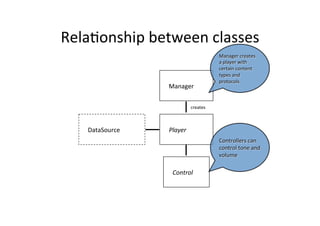
RelaEonship	
  between	
  classes	
  
                                                Manager	
  creates	
  
                                                a	
  player	
  with	
  
                                                certain	
  content	
  
                                                types	
  and	
  
                                                protocols	
  
                     Manager	


                                  creates	


    DataSource	
     Player	
  
                                                Controllers	
  can	
  
                                                control	
  tone	
  and	
  
                                                volume	
  

                      Control	
  
Supported	
  Content	
  Types	
  and	
  Protocols	
  

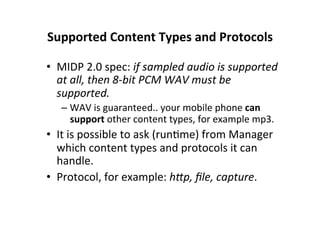
•  MIDP	
  2.0	
  spec:	
  if	
  sampled	
  audio	
  is	
  supported	
  
   at	
  all,	
  then	
  8-­‐bit	
  PCM	
  WAV	
  must	
  be	
  
   supported.	
  
    –  WAV	
  is	
  guaranteed..	
  your	
  mobile	
  phone	
  can	
  
       support	
  other	
  content	
  types,	
  for	
  example	
  mp3.	
  
•  It	
  is	
  possible	
  to	
  ask	
  (runEme)	
  from	
  Manager	
  
   which	
  content	
  types	
  and	
  protocols	
  it	
  can	
  
   handle.	
  	
  
•  Protocol,	
  for	
  example:	
  hCp,	
  file,	
  capture.	
  
Manager-­‐class	
  
•  javac.microedition.media.Manager	
  
   is	
  the	
  access	
  point	
  for	
  obtaining	
  system	
  
   dependent	
  resources	
  such	
  as	
  Players	
  for	
  
   mulEmedia	
  processing.	
  
•  A	
  Player	
  is	
  an	
  object	
  used	
  to	
  control	
  and	
  render	
  
   media	
  that	
  is	
  specific	
  to	
  the	
  content	
  type	
  of	
  the	
  
   data.	
  
•  Manager	
  provides	
  access	
  to	
  an	
  implementaEon	
  
   specific	
  mechanism	
  for	
  construcEng	
  Players.	
  
•  For	
  convenience,	
  Manager	
  also	
  provides	
  a	
  
   simplified	
  method	
  to	
  generate	
  simple	
  tones.	
  	
  
Supported	
  Protocols	
  and	
  Content	
  types	
  

•  To	
  find	
  out	
  at	
  runEme	
  what	
  content	
  types	
  
   and	
  protocols	
  are	
  supported:	
  
    –  Manager-­‐class	
  
         •  public static String[]
            getSupportedContentTypes(String protocol)!
         •  public static String[]
            getSupportedProtocols(String content_type)!

•  See	
  example:	
  MediaInformaEonMIDlet.java	
  
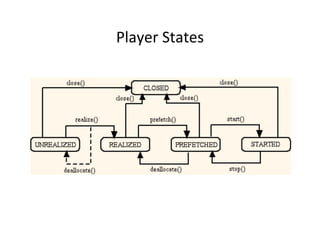
Player	
  Life	
  Cycle	
  
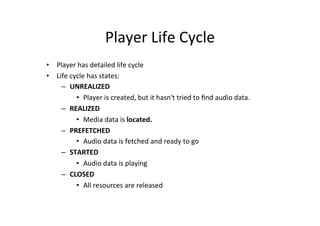
•  Player	
  has	
  detailed	
  life	
  cycle	
  
•  Life	
  cycle	
  has	
  states:	
  
     –  UNREALIZED	
  
             •  Player	
  is	
  created,	
  but	
  it	
  hasn't	
  tried	
  to	
  find	
  audio	
  data.	
  
     –  REALIZED	
  
             •  Media	
  data	
  is	
  located.	
  
     –  PREFETCHED	
  
             •  Audio	
  data	
  is	
  fetched	
  and	
  ready	
  to	
  go	
  
     –  STARTED	
  
             •  Audio	
  data	
  is	
  playing	
  
     –  CLOSED	
  
             •  All	
  resources	
  are	
  released	
  
Player	
  States	
  
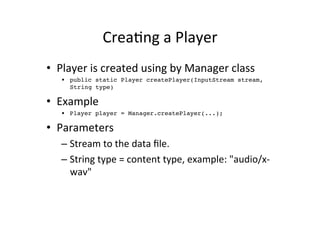
CreaEng	
  a	
  Player	
  
•  Player	
  is	
  created	
  using	
  by	
  Manager	
  class	
  
    •  public static Player createPlayer(InputStream stream,
       String type)!

•  Example	
  
    •  Player player = Manager.createPlayer(...);!

•  Parameters	
  
    –  Stream	
  to	
  the	
  data	
  file.	
  
    –  String	
  type	
  =	
  content	
  type,	
  example:	
  "audio/x-­‐
       wav"	
  
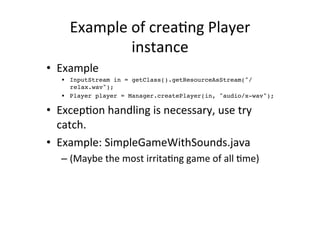
Example	
  of	
  creaEng	
  Player	
  
                  instance	
  
•  Example	
  
    •  InputStream in = getClass().getResourceAsStream("/
       relax.wav");!
    •  Player player = Manager.createPlayer(in, "audio/x-wav");!

•  ExcepEon	
  handling	
  is	
  necessary,	
  use	
  try	
  
   catch.	
  
•  Example:	
  SimpleGameWithSounds.java	
  
    –  (Maybe	
  the	
  most	
  irritaEng	
  game	
  of	
  all	
  Eme)	
  
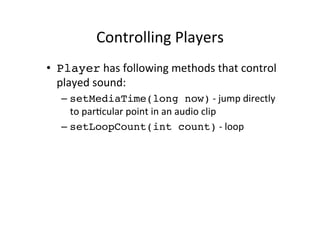
Controlling	
  Players	
  
•  Player	
  has	
  following	
  methods	
  that	
  control	
  
   played	
  sound:	
  
    –  setMediaTime(long now)	
  -­‐	
  jump	
  directly	
  
       to	
  parEcular	
  point	
  in	
  an	
  audio	
  clip	
  
    –  setLoopCount(int count)	
  -­‐	
  loop	
  
Player	
  Controls	
  
•  Control	
  classes	
  can	
  control	
  Players	
  
•  You	
  can	
  obtain	
  a	
  list	
  of	
  Controls	
  for	
  a	
  Player	
  by	
  calling	
  
   getControls().	
  
•  MIDP	
  2.0	
  has	
  only	
  two	
  Controls	
  for	
  the	
  Player:	
  
    –  VolumeControl	
  
    –  ToneControl!
•  Example	
  of	
  usage:	
  
    –  VolumeControl vc = (VolumeControl)
       player.getControl("VolumeControl");!
    –  vc.setLevel(50);	
  
OpEonal	
  APIs	
  
Mobile	
  Media	
  API	
  (JSR	
  135)	
  
•  Playing	
  sounds	
  and	
  tones	
  
•  Also	
  capturing	
  media	
  
    –  MMAPI	
  supports	
  capturing	
  audio	
  and	
  video	
  
       from	
  onboard	
  hardware	
  
    –  Recording	
  sound,	
  video	
  and	
  taking	
  pictures	
  
•  hHp://today.java.net/pub/a/today/
   2005/09/27/j2me4.html	
  
Wireless	
  Messaging	
  API	
  (JSR	
  205)	
  
•  Common	
  API	
  for	
  sending	
  and	
  receiving	
  text	
  
   and	
  binary	
  messages.	
  
•  hHp://developers.sun.com/mobility/midp/
   arEcles/wma/	
  
Bluetooth	
  API	
  (JSR	
  82)	
  
•  ConnecEng	
  via	
  Bluetooth	
  
•  Tutorial	
  
   –  hHp://developers.sun.com/mobility/midp/
      arEcles/bluetooth2/	
  
JAXP	
  XML	
  Parser	
  (JSR	
  172)	
  
•  This	
  JSR	
  is	
  designed	
  to	
  provide	
  a	
  general	
  
   purpose	
  XML	
  API	
  for	
  the	
  next	
  generaEon	
  of	
  
   mobile	
  devices	
  
•  Supports	
  
    –  SAX	
  2	
  event	
  handler-­‐based	
  parsing	
  
LocaEon	
  API	
  (JSR	
  179)	
  
•  Enables	
  developers	
  to	
  write	
  mobile	
  locaEon-­‐
   based	
  applicaEons	
  for	
  resource-­‐limited	
  
   devices	
  
•  Determining	
  device's	
  locaEon	
  (GPS)	
  
•  Tutorial	
  
    –  hHp://developers.sun.com/mobility/apis/
       arEcles/locaEon/	
  
Mobile	
  InternaEonalizaEon	
  API	
  (JSR	
  238)	
  

•  This	
  JSR	
  defines	
  an	
  API	
  that	
  provides	
  
   culturally	
  correct	
  data	
  formakng,	
  sorEng	
  of	
  
   text	
  strings	
  and	
  applicaEon	
  resource	
  
   processing	
  for	
  J2ME	
  MIDlets	
  running	
  in	
  MIDP	
  
   over	
  CLDC.	
  
•  Tutorial	
  
    –  hHp://www.ibm.com/developerworks/wireless/
       library/wi-­‐midapi/	
  
Scalable	
  2D	
  Vector	
  Graphics	
  API	
  for	
  J2ME	
  
                     (JSR	
  226)	
  
•  Scalable	
  2D	
  Vector	
  Graphics	
  API	
  for	
  J2ME	
  
   (JSR	
  226)	
  provides	
  MIDlets	
  with	
  an	
  API	
  for	
  
   displaying	
  SVG	
  content.	
  	
  
•  Tutorial	
  
    –  hHp://developers.sun.com/mobility/midp/
       arEcles/s2dvg/index.html	


MIDP: Music and Sound

  • 1.
    MIDP:  Music  and  Sound   Jussi  Pohjolainen   Tampere  University  of  Applied  Sciences  
  • 2.
    Sound  and  Music,  the  Basics   •  MIDP  2.0  includes  basic  audio  capabiliEes   •  Media  API  in  MIDP  2.0  is  a  subset  of  the  MMAPI  (Mobile   Media  API).   –  MMAPI:  hHp://jcp.org/en/jsr/detail?id=135   •  Subset  of  the  MMAPI  that  is  included  in  MIDP  2.0  is  called   Audio  Building  Block  (ABB).   –  Features:  Playing  simple  tones  and  sampled  audio   •  Media  API  can  also  be  used  as  playing  all  kinds  of  media,  for   example  movies.  
  • 3.
    MIDP  2.0  Media  Concepts   •  Audio  data  comes  in  variety  of  content  types.   •  Content  type  =  file  format!   –  MP3,  AIFF,  WAF  etc.     •  Content  types  are  specified  using  MIME   types,  which  use  a  string  to  specify  a  1)   primary  and  2)  secondary  type.   –  Example:  "audio/x-­‐wav"   •  Content  type  tells  how  to  translate  bits  into   sound.  
  • 4.
    Different  content  types   •  Wave  audio  files:       –  audio/x-­‐wav   •  AU  audio  files:             –  audio/basic   •  MP3  audio  files:           –  audio/mpeg   •  MIDI  files:                           –  audio/midi   •  hHp://www.iana.org/assignments/media-­‐ types/    
  • 5.
    Audio  Data  Path   For  example:   Handles   Interface  in     applause.wa transporEng  the   javax.microediEon.   data  to  the   v   media   player   Audio   DataSource   Player   Data   [  speaker  ]  
  • 6.
    RelaEonship  between  classes   Manager  creates   a  player  with   certain  content   types  and   protocols   Manager   creates   DataSource   Player   Controllers  can   control  tone  and   volume   Control  
  • 7.
    Supported  Content  Types  and  Protocols   •  MIDP  2.0  spec:  if  sampled  audio  is  supported   at  all,  then  8-­‐bit  PCM  WAV  must  be   supported.   –  WAV  is  guaranteed..  your  mobile  phone  can   support  other  content  types,  for  example  mp3.   •  It  is  possible  to  ask  (runEme)  from  Manager   which  content  types  and  protocols  it  can   handle.     •  Protocol,  for  example:  hCp,  file,  capture.  
  • 8.
    Manager-­‐class   •  javac.microedition.media.Manager   is  the  access  point  for  obtaining  system   dependent  resources  such  as  Players  for   mulEmedia  processing.   •  A  Player  is  an  object  used  to  control  and  render   media  that  is  specific  to  the  content  type  of  the   data.   •  Manager  provides  access  to  an  implementaEon   specific  mechanism  for  construcEng  Players.   •  For  convenience,  Manager  also  provides  a   simplified  method  to  generate  simple  tones.    
  • 9.
    Supported  Protocols  and  Content  types   •  To  find  out  at  runEme  what  content  types   and  protocols  are  supported:   –  Manager-­‐class   •  public static String[] getSupportedContentTypes(String protocol)! •  public static String[] getSupportedProtocols(String content_type)! •  See  example:  MediaInformaEonMIDlet.java  
  • 10.
    Player  Life  Cycle   •  Player  has  detailed  life  cycle   •  Life  cycle  has  states:   –  UNREALIZED   •  Player  is  created,  but  it  hasn't  tried  to  find  audio  data.   –  REALIZED   •  Media  data  is  located.   –  PREFETCHED   •  Audio  data  is  fetched  and  ready  to  go   –  STARTED   •  Audio  data  is  playing   –  CLOSED   •  All  resources  are  released  
  • 11.
  • 12.
    CreaEng  a  Player   •  Player  is  created  using  by  Manager  class   •  public static Player createPlayer(InputStream stream, String type)! •  Example   •  Player player = Manager.createPlayer(...);! •  Parameters   –  Stream  to  the  data  file.   –  String  type  =  content  type,  example:  "audio/x-­‐ wav"  
  • 13.
    Example  of  creaEng  Player   instance   •  Example   •  InputStream in = getClass().getResourceAsStream("/ relax.wav");! •  Player player = Manager.createPlayer(in, "audio/x-wav");! •  ExcepEon  handling  is  necessary,  use  try   catch.   •  Example:  SimpleGameWithSounds.java   –  (Maybe  the  most  irritaEng  game  of  all  Eme)  
  • 14.
    Controlling  Players   • Player  has  following  methods  that  control   played  sound:   –  setMediaTime(long now)  -­‐  jump  directly   to  parEcular  point  in  an  audio  clip   –  setLoopCount(int count)  -­‐  loop  
  • 15.
    Player  Controls   • Control  classes  can  control  Players   •  You  can  obtain  a  list  of  Controls  for  a  Player  by  calling   getControls().   •  MIDP  2.0  has  only  two  Controls  for  the  Player:   –  VolumeControl   –  ToneControl! •  Example  of  usage:   –  VolumeControl vc = (VolumeControl) player.getControl("VolumeControl");! –  vc.setLevel(50);  
  • 16.
  • 17.
    Mobile  Media  API  (JSR  135)   •  Playing  sounds  and  tones   •  Also  capturing  media   –  MMAPI  supports  capturing  audio  and  video   from  onboard  hardware   –  Recording  sound,  video  and  taking  pictures   •  hHp://today.java.net/pub/a/today/ 2005/09/27/j2me4.html  
  • 18.
    Wireless  Messaging  API  (JSR  205)   •  Common  API  for  sending  and  receiving  text   and  binary  messages.   •  hHp://developers.sun.com/mobility/midp/ arEcles/wma/  
  • 19.
    Bluetooth  API  (JSR  82)   •  ConnecEng  via  Bluetooth   •  Tutorial   –  hHp://developers.sun.com/mobility/midp/ arEcles/bluetooth2/  
  • 20.
    JAXP  XML  Parser  (JSR  172)   •  This  JSR  is  designed  to  provide  a  general   purpose  XML  API  for  the  next  generaEon  of   mobile  devices   •  Supports   –  SAX  2  event  handler-­‐based  parsing  
  • 21.
    LocaEon  API  (JSR  179)   •  Enables  developers  to  write  mobile  locaEon-­‐ based  applicaEons  for  resource-­‐limited   devices   •  Determining  device's  locaEon  (GPS)   •  Tutorial   –  hHp://developers.sun.com/mobility/apis/ arEcles/locaEon/  
  • 22.
    Mobile  InternaEonalizaEon  API  (JSR  238)   •  This  JSR  defines  an  API  that  provides   culturally  correct  data  formakng,  sorEng  of   text  strings  and  applicaEon  resource   processing  for  J2ME  MIDlets  running  in  MIDP   over  CLDC.   •  Tutorial   –  hHp://www.ibm.com/developerworks/wireless/ library/wi-­‐midapi/  
  • 23.
    Scalable  2D  Vector  Graphics  API  for  J2ME   (JSR  226)   •  Scalable  2D  Vector  Graphics  API  for  J2ME   (JSR  226)  provides  MIDlets  with  an  API  for   displaying  SVG  content.     •  Tutorial   –  hHp://developers.sun.com/mobility/midp/ arEcles/s2dvg/index.html