Microsoft 365
Security
By Kushantha Gunawardana
Instructor introduction
• Trainer: Kushantha Gunawardana
• Consultant / Trainer /Lecturer
MSc-IT, MCT, C|EI, E|CSAv9, C|EH, C|HFI,
E|NSA, CCNSP, IRNSS, CISE, MIEEE, MBCS, CSSL, MCP, MCSE,
MCSA +M, HNDIT
• Microsoft 365 Enterprise Administrator Expert
• MCSE: SharePoint
• MCSE: Productivity
• MCSE: Private Cloud
• MCSE: Cloud Platform and Infrastructure
20+ Years of total IT experience with vast exposure
to IT Infrastructure, Security, Compliance and
Management space conducted training and
consultations over 20 countries including Asia,
Africa, Europe and Australia.
Agenda
Security concepts
Common threats
Microsoft 365 Security features
How to protect your infrastructure
Conclusion - QnA
Security concepts
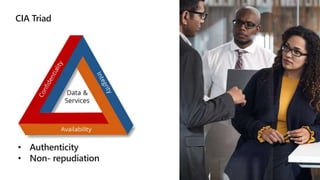
CIA Triad
• Authenticity
• Non- repudiation
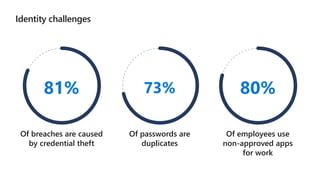
Identity challenges
81%
Of breaches are caused
by credential theft
73%
Of passwords are
duplicates
80%
Of employees use
non-approved apps
for work
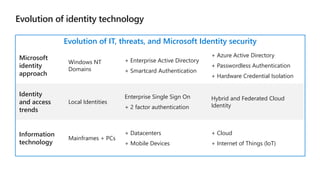
Evolution of identity technology
Evolution of IT, threats, and Microsoft Identity security
Microsoft
identity
approach
Windows NT
Domains
+ Enterprise Active Directory
+ Smartcard Authentication
+ Azure Active Directory
+ Passwordless Authentication
+ Hardware Credential Isolation
Identity
and access
trends
Local Identities
Enterprise Single Sign On
+ 2 factor authentication
Hybrid and Federated Cloud
Identity
Information
technology
Mainframes + PCs
+ Datacenters
+ Mobile Devices
+ Cloud
+ Internet of Things (loT)
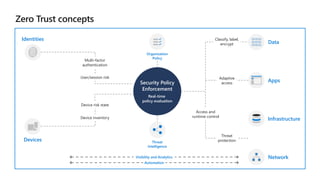
Zero Trust concepts
Security Policy
Enforcement
Real-time
policy evaluation
User/session risk
Multi-factor
authentication
Identities
Device risk state
Device inventory
Devices
Organization
Policy
Threat
Intelligence
Access and
runtime control
Threat
protection
Infrastructure
Network
Adaptive
access
Apps
Classify, label,
encrypt Data
Visibility and Analytics
Automation
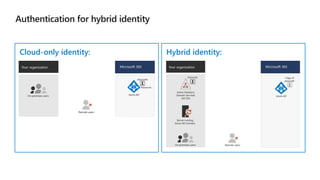
Authentication for hybrid identity
Cloud-only identity: Hybrid identity:
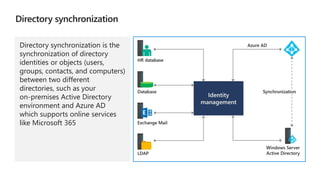
Directory synchronization
Directory synchronization is the
synchronization of directory
identities or objects (users,
groups, contacts, and computers)
between two different
directories, such as your
on-premises Active Directory
environment and Azure AD
which supports online services
like Microsoft 365
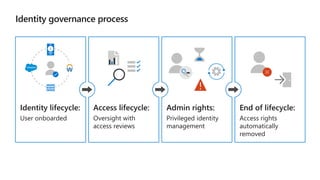
Identity governance process
Identity lifecycle:
User onboarded
Access lifecycle:
Oversight with
access reviews
Admin rights:
Privileged identity
management
End of lifecycle:
Access rights
automatically
removed
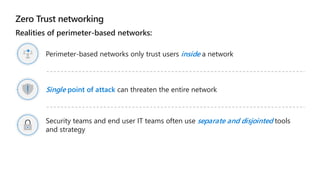
Zero Trust networking
Realities of perimeter-based networks:
Perimeter-based networks only trust users inside a network
Single point of attack can threaten the entire network
Security teams and end user IT teams often use separate and disjointed tools
and strategy
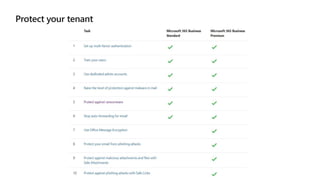
Protect your tenant
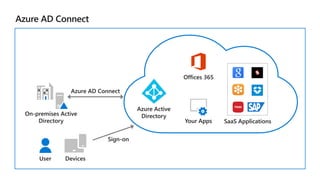
Azure AD Connect
Azure Active
Directory
Offices 365
Your Apps SaaS Applications
On-premises Active
Directory
Azure AD Connect
User Devices
Sign-on
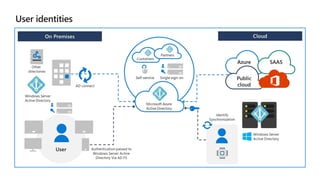
User identities
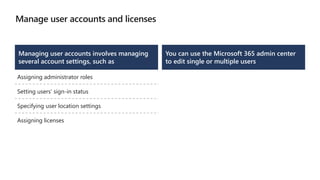
Manage user accounts and licenses
Managing user accounts involves managing
several account settings, such as
Assigning administrator roles
Setting users’ sign-in status
Specifying user location settings
Assigning licenses
You can use the Microsoft 365 admin center
to edit single or multiple users
Multi-factor authentication
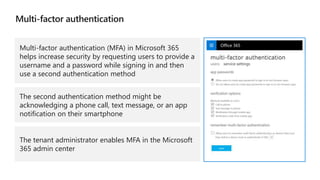
Multi-factor authentication (MFA) in Microsoft 365
helps increase security by requesting users to provide a
username and a password while signing in and then
use a second authentication method
The second authentication method might be
acknowledging a phone call, text message, or an app
notification on their smartphone
The tenant administrator enables MFA in the Microsoft
365 admin center
Self-service
password reset
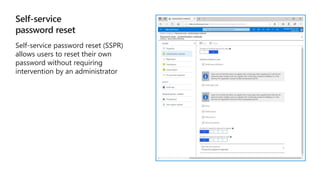
Self-service password reset (SSPR)
allows users to reset their own
password without requiring
intervention by an administrator
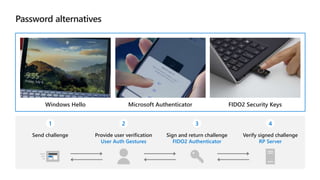
Password alternatives
Windows Hello Microsoft Authenticator FIDO2 Security Keys
1
Send challenge
2
Provide user verification
User Auth Gestures
3
Sign and return challenge
FIDO2 Authenticator
4
Verify signed challenge
RP Server
Windows Hello for business
In Windows 10, Windows Hello for Business replaces passwords with
strong two-factor authentication on PCs and mobile devices. This
authentication consists of a new type of user credential that is tied to a
device and uses a biometric or PIN
Windows Hello for Business lets users authenticate to an Active Directory
or Azure Active Directory account
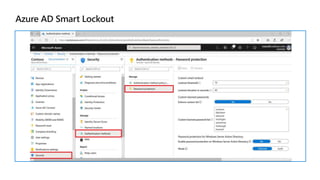
Azure AD Smart Lockout
© Copyright Microsoft Corporation. All rights reserved.
Kushantha Gunawardana.
MSc-IT CEI MCT ECSA CEH CHFI ENSA CND CSCU CCNSP IRSS CISE MIEEE MBCS MCP MCSA MCSA + M
Consultant / Trainer
M +61 488990231
WhatsApp / Viber +94 715345530
E kushantha@gmail.com
https://www.linkedin.com/in/kushantha/
https://twitter.com/KushanthaB
https://www.youtube.com/c/kushanthag
https://blog.kushantha.com/
https://www.facebook.com/KushanthaTech/
https://www.slideshare.net/KushanthaGunawardana
Thank you !

Mct summit 2021

  • 1.
  • 2.
    Instructor introduction • Trainer:Kushantha Gunawardana • Consultant / Trainer /Lecturer MSc-IT, MCT, C|EI, E|CSAv9, C|EH, C|HFI, E|NSA, CCNSP, IRNSS, CISE, MIEEE, MBCS, CSSL, MCP, MCSE, MCSA +M, HNDIT • Microsoft 365 Enterprise Administrator Expert • MCSE: SharePoint • MCSE: Productivity • MCSE: Private Cloud • MCSE: Cloud Platform and Infrastructure 20+ Years of total IT experience with vast exposure to IT Infrastructure, Security, Compliance and Management space conducted training and consultations over 20 countries including Asia, Africa, Europe and Australia.
  • 3.
    Agenda Security concepts Common threats Microsoft365 Security features How to protect your infrastructure Conclusion - QnA
  • 4.
  • 5.
  • 6.
    Identity challenges 81% Of breachesare caused by credential theft 73% Of passwords are duplicates 80% Of employees use non-approved apps for work
  • 7.
    Evolution of identitytechnology Evolution of IT, threats, and Microsoft Identity security Microsoft identity approach Windows NT Domains + Enterprise Active Directory + Smartcard Authentication + Azure Active Directory + Passwordless Authentication + Hardware Credential Isolation Identity and access trends Local Identities Enterprise Single Sign On + 2 factor authentication Hybrid and Federated Cloud Identity Information technology Mainframes + PCs + Datacenters + Mobile Devices + Cloud + Internet of Things (loT)
  • 8.
    Zero Trust concepts SecurityPolicy Enforcement Real-time policy evaluation User/session risk Multi-factor authentication Identities Device risk state Device inventory Devices Organization Policy Threat Intelligence Access and runtime control Threat protection Infrastructure Network Adaptive access Apps Classify, label, encrypt Data Visibility and Analytics Automation
  • 9.
    Authentication for hybrididentity Cloud-only identity: Hybrid identity:
  • 10.
    Directory synchronization Directory synchronizationis the synchronization of directory identities or objects (users, groups, contacts, and computers) between two different directories, such as your on-premises Active Directory environment and Azure AD which supports online services like Microsoft 365
  • 11.
    Identity governance process Identitylifecycle: User onboarded Access lifecycle: Oversight with access reviews Admin rights: Privileged identity management End of lifecycle: Access rights automatically removed
  • 12.
    Zero Trust networking Realitiesof perimeter-based networks: Perimeter-based networks only trust users inside a network Single point of attack can threaten the entire network Security teams and end user IT teams often use separate and disjointed tools and strategy
  • 13.
  • 14.
    Azure AD Connect AzureActive Directory Offices 365 Your Apps SaaS Applications On-premises Active Directory Azure AD Connect User Devices Sign-on
  • 15.
  • 16.
    Manage user accountsand licenses Managing user accounts involves managing several account settings, such as Assigning administrator roles Setting users’ sign-in status Specifying user location settings Assigning licenses You can use the Microsoft 365 admin center to edit single or multiple users
  • 17.
    Multi-factor authentication Multi-factor authentication(MFA) in Microsoft 365 helps increase security by requesting users to provide a username and a password while signing in and then use a second authentication method The second authentication method might be acknowledging a phone call, text message, or an app notification on their smartphone The tenant administrator enables MFA in the Microsoft 365 admin center
  • 18.
    Self-service password reset Self-service passwordreset (SSPR) allows users to reset their own password without requiring intervention by an administrator
  • 19.
    Password alternatives Windows HelloMicrosoft Authenticator FIDO2 Security Keys 1 Send challenge 2 Provide user verification User Auth Gestures 3 Sign and return challenge FIDO2 Authenticator 4 Verify signed challenge RP Server
  • 20.
    Windows Hello forbusiness In Windows 10, Windows Hello for Business replaces passwords with strong two-factor authentication on PCs and mobile devices. This authentication consists of a new type of user credential that is tied to a device and uses a biometric or PIN Windows Hello for Business lets users authenticate to an Active Directory or Azure Active Directory account
  • 21.
  • 22.
    © Copyright MicrosoftCorporation. All rights reserved. Kushantha Gunawardana. MSc-IT CEI MCT ECSA CEH CHFI ENSA CND CSCU CCNSP IRSS CISE MIEEE MBCS MCP MCSA MCSA + M Consultant / Trainer M +61 488990231 WhatsApp / Viber +94 715345530 E kushantha@gmail.com https://www.linkedin.com/in/kushantha/ https://twitter.com/KushanthaB https://www.youtube.com/c/kushanthag https://blog.kushantha.com/ https://www.facebook.com/KushanthaTech/ https://www.slideshare.net/KushanthaGunawardana Thank you !

Editor's Notes

  • #3 Welcome students to the course and introduce yourself. Provide a brief overview of your background to establish credibility.
  • #7 Use this slide to discuss why identity and access management is important.
  • #9 Zero-Trust overview (includes eBook) aka.ms/zero-trust Zero-Trust device mgmt. overview aka.ms/zero-trust-device How-To documentation #MSIntune aka.ms/device-security-docs
  • #10 Supporting videos for instructor or student use: Azure Active Directory: Choosing the right authentication for your organization https://youtu.be/oPeKXefxEgg
  • #13 Supporting videos for instructor or student use: Azure AD conditional access enabling Zero Trust networks https://youtu.be/XruceejcCKQ?list=PLXtHYVsvn_b8dbRbnL19GUPcBH1UQ7c4x  Let’s start with a few hard realities: Perimeter based networks only trust users INSIDE a network Single point of attack can threaten the entire network. Security and IT often use separate and disjointed tools. We need a new security model. ENTER ZERO TRUST
  • #14 The Identity video below is highly recommended to explain the primary concepts of this lesson. Supporting videos for instructor or student use: Identity models and authentication for Microsoft 365 https://www.microsoft.com/en-us/videoplayer/embed/RE2Pjwu
  • #15 The Azure Active Directory Connect (Azure AD Connect) tool is the officially recommended directory synchronization tool for Microsoft 365 Azure AD Connect is made up of three parts - the synchronization services, the optional Active Directory Federation Services piece, and the monitoring piece Azure AD Connect comes with several features you can optionally turn on or are enabled by default Azure AD requires a single source of authority for every object The source of authority is the on-premises Active Directory
  • #16 Supporting videos for instructor or student use: Azure Active Directory explained https://youtu.be/6MSrkUDOqsE Identity models and authentication for Microsoft 365 https://www.microsoft.com/en-us/videoplayer/embed/RE2Pjwu
  • #17 Demonstration: You should do a demonstration of managing user accounts from the steps in the course handbook.
  • #18 Supporting videos for instructor or student use: Demonstration: Implement Multi-factor authentication https://youtu.be/SN-J7L1na34
  • #19 Self-service password reset (SSPR) allows users to reset their own password without requiring intervention by an administrator SSPR is not enabled by default To reset a password, users must authenticate their identity first If an administrator wants to use SSPR, they must use two verification methods, and they are not able to use security questions If you purchase Azure AD Premium, it includes the ability to write back passwords. This enables you to implement self-service password reset for synchronized identities and federated identities Supporting videos for instructor or student use: How to set up self-service password reset for Microsoft 365 https://www.youtube.com/watch?v=Jppfvl95DvE
  • #20 Supporting videos for instructor or student use: Demonstration: Password-less Auth using Azure AD https://youtu.be/YFvAbr-Qsm4?list=PLXtHYVsvn_b8dbRbnL19GUPcBH1UQ7c4x
  • #21 Supporting videos for instructor or student use: Windows Hello Explained https://youtu.be/ASe5HiCr71I Demonstration: Windows Hello https://youtu.be/NHPDj_eVCvs
  • #22 Supporting videos for instructor or student use: Describing Smart Lockout https://youtu.be/aeuFaG8ZJnY