Go mobile.
Stay in control.
David J. Rosenthal, CEO, Atidan
August 20, 2016
Microsoft Briefing Center, NYC
EMPOWER ENTERPRISE MOBILITY
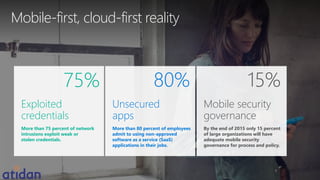
Mobile-first, cloud-first reality
Exploited
credentials
More than 75 percent of network
intrusions exploit weak or
stolen credentials.
75% 15%
Mobile security
governance
By the end of 2015 only 15 percent
of large organizations will have
adequate mobile security
governance for process and policy.
Unsecured
apps
More than 80 percent of employees
admit to using non-approved
software as a service (SaaS)
applications in their jobs.
80%
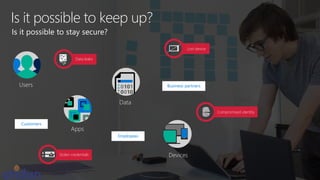
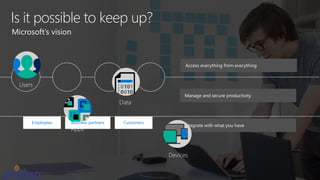
Is it possible to keep up?
Employees
Business partners
Customers
Is it possible to stay secure?
Apps
Devices
Data
Users
Data leaks
Lost device
Compromised identity
Stolen credentials
Is it possible to keep up?
Employees Business partners Customers
Microsoft’s vision
Access everything from everything
Manage and secure productivity
Integrate with what you have
Apps
Devices
Data
Users
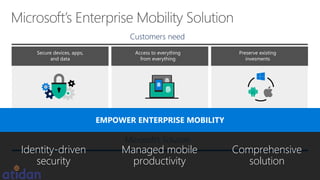
Access to everything
from everything
Secure devices, apps,
and data
Preserve existing
invesments
Customers need
Integrated,
secure identity
It protects
Office better
It just works
Microsoft’s Solution
EMPOWER ENTERPRISE MOBILITY
Identity-driven
security
Comprehensive
solution
Managed mobile
productivity
Identity-driven
security
Comprehensive
solution
Managed mobile
productivity
EMPOWER ENTERPRISE MOBILITY
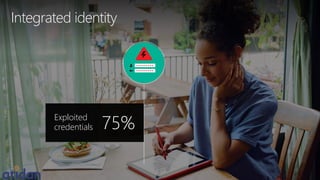
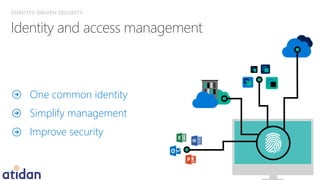
Integrated identity
Exploited
credentials 75%
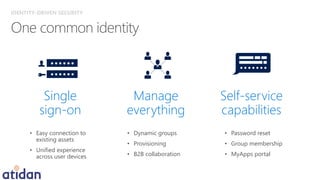
One common identity
Simplify management
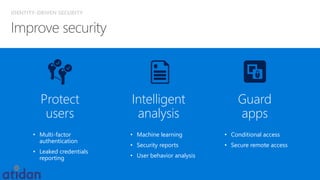
Improve security
IDENTITY-DRIVEN SECURITY
Self-service
capabilities
• Password reset
• Group membership
• MyApps portal
Manage
everything
• Dynamic groups
• Provisioning
• B2B collaboration
Single
sign-on
• Easy connection to
existing assets
• Unified experience
across user devices
IDENTITY-DRIVEN SECURITY
Guard
apps
• Conditional access
• Secure remote access
Intelligent
analysis
• Machine learning
• Security reports
• User behavior analysis
Protect
users
• Multi-factor
authentication
• Leaked credentials
reporting
IDENTITY-DRIVEN SECURITY
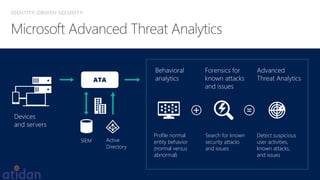
ATA
Devices
and servers
Behavioral
analytics
Forensics for
known attacks
and issues
Advanced
Threat Analytics
Profile normal
entity behavior
(normal versus
abnormal)
Search for known
security attacks
and issues
Detect suspicious
user activities,
known attacks,
and issues
SIEM Active
Directory
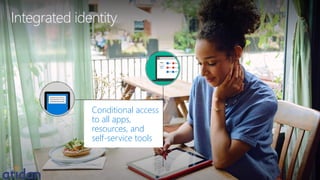
Integrated identity
Conditional access
to all apps,
resources, and
self-service tools
Identity-driven
security
Comprehensive
solution
Managed mobile
productivity
EMPOWER ENTERPRISE MOBILITY
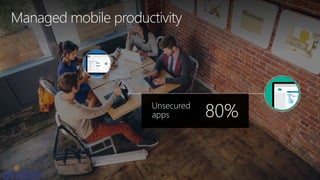
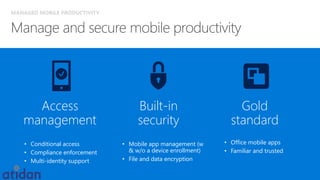
Managed mobile productivity
Unsecured
apps 80%
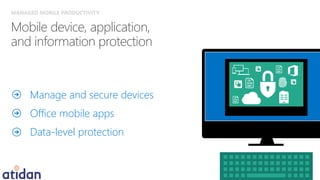
Manage and secure devices
Office mobile apps
Data-level protection
MANAGED MOBILE PRODUCTIVITY
• Conditional access
• Compliance enforcement
• Multi-identity support
Access
management
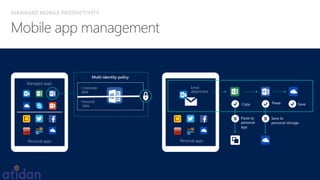
• Mobile app management (w
& w/o a device enrollment)
• File and data encryption
Built-in
security
• Office mobile apps
• Familiar and trusted
Gold
standard
MANAGED MOBILE PRODUCTIVITY
Managed
apps
Personal
apps
Personal apps
Managed apps
Corporate
data
Personal
data
Multi-identity policy
Personal apps
Managed
apps
Copy Paste Save
Save to
personal storage
Paste to
personal
app
Email
attachment
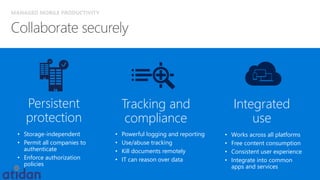
MANAGED MOBILE PRODUCTIVITY
Integrated
use
• Works across all platforms
• Free content consumption
• Consistent user experience
• Integrate into common
apps and services
Persistent
protection
• Storage-independent
• Permit all companies to
authenticate
• Enforce authorization
policies
Tracking and
compliance
• Powerful logging and reporting
• Use/abuse tracking
• Kill documents remotely
• IT can reason over data
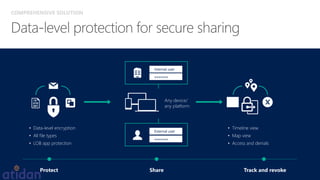
COMPREHENSIVE SOLUTION
Any device/
any platform
• Data-level encryption
• All file types
• LOB app protection
Protect Share Track and revoke
External user
*******
Internal user
*******
• Timeline view
• Map view
• Access and denials
MANAGED MOBILE PRODUCTIVITY
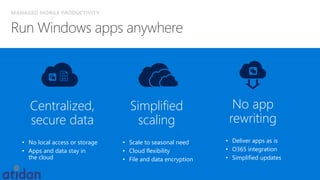
Centralized,
secure data
• No local access or storage
• Apps and data stay in
the cloud
No app
rewriting
• Deliver apps as is
• O365 integration
• Simplified updates
Simplified
scaling
• Scale to seasonal need
• Cloud flexibility
• File and data encryption
Managed mobile productivity
Protected mobile
users, devices,
apps, and data—
everywhere
Identity-driven
security
Comprehensive
solution
Managed mobile
productivity
EMPOWER ENTERPRISE MOBILITY
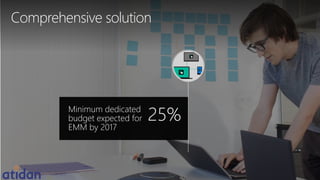
Comprehensive solution
Minimum dedicated
budget expected for
EMM by 2017
25%
COMPREHENSIVE SOLUTION
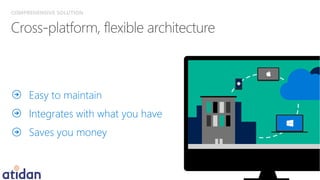
Easy to maintain
Integrates with what you have
Saves you money
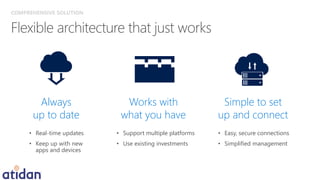
Always
up to date
• Real-time updates
• Keep up with new
apps and devices
Works with
what you have
• Support multiple platforms
• Use existing investments
Simple to set
up and connect
• Easy, secure connections
• Simplified management
COMPREHENSIVE SOLUTION
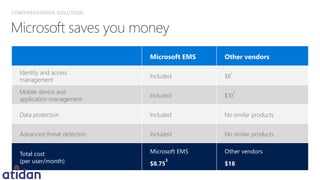
Microsoft EMS Other vendors
Identity and access
management
Included $8
1
Mobile device and
application management
Included $10
2
Data protection Included No similar products
Advanced threat detection Included No similar products
Total cost
(per user/month)
Microsoft EMS
$8.75
3
Other vendors
$18
COMPREHENSIVE SOLUTION
Comprehensive solution
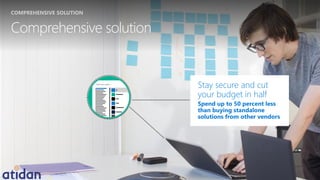
Stay secure and cut
your budget in half
Spend up to 50 percent less
than buying standalone
solutions from other vendors
COMPREHENSIVE SOLUTION
EMPOWER ENTERPRISE MOBILITY
Identity-based security for
greater control and visibility.
Identity-driven
security
Manage your mobile and
on-premises environment across
devices and operating systems.
Comprehensive
solution
Encourage secure work habits
by providing the best apps
with built-in security.
Managed mobile
productivity
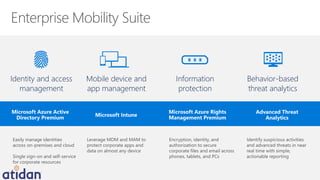
Enterprise Mobility Suite
Microsoft Intune
Microsoft Azure Active
Directory Premium
Microsoft Azure Rights
Management Premium
Advanced Threat
Analytics
Easily manage identities
across on-premises and cloud
Single sign-on and self-service
for corporate resources
Leverage MDM and MAM to
protect corporate apps and
data on almost any device
Encryption, identity, and
authorization to secure
corporate files and email across
phones, tablets, and PCs
Identify suspicious activities
and advanced threats in near
real time with simple,
actionable reporting
Behavior-based
threat analytics
Information
protection
Identity and access
management
Mobile device and
app management
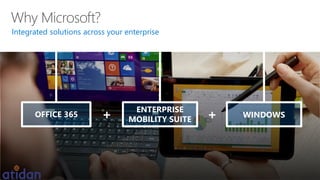
Integrated solutions across your enterprise
OFFICE 365
ENTERPRISE
MOBILITY SUITE
WINDOWS+ +
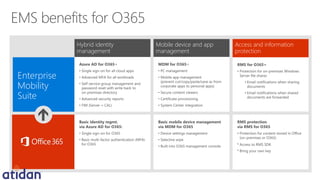
Enterprise
Mobility
Suite
Mobile device and app
management
Access and information
protection
Basic identity mgmt.
via Azure AD for O365:
• Single sign-on for O365
• Basic multi-factor authentication (MFA)
for O365
Basic mobile device management
via MDM for O365
• Device settings management
• Selective wipe
• Built into O365 management console
RMS protection
via RMS for O365
• Protection for content stored in Office
(on-premises or O365)
• Access to RMS SDK
• Bring your own key
Azure AD for O365+
• Single sign-on for all cloud apps
• Advanced MFA for all workloads
• Self-service group management and
password reset with write back to
on-premises directory
• Advanced security reports
• FIM (Server + CAL)
MDM for O365+
• PC management
• Mobile app management
(prevent cut/copy/paste/save as from
corporate apps to personal apps)
• Secure content viewers
• Certificate provisioning
• System Center integration
RMS for O365+
• Protection for on-premises Windows
Server file shares
• Email notifications when sharing
documents
• Email notifications when shared
documents are forwarded
Hybrid identity
management
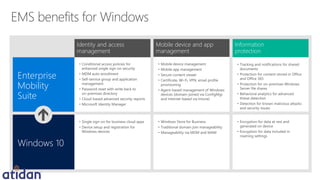
Windows 10
Enterprise
Mobility
Suite
Mobile device and app
management
Information
protection
• Single sign-on for business cloud apps
• Device setup and registration for
Windows devices
• Windows Store for Business
• Traditional domain join manageability
• Manageability via MDM and MAM
• Encryption for data at rest and
generated on device
• Encryption for data included in
roaming settings
• Conditional access policies for
enhanced single sign-on security
• MDM auto-enrollment
• Self-service group and application
management
• Password reset with write back to
on-premises directory
• Cloud-based advanced security reports
• Microsoft Identity Manager
• Mobile device management
• Mobile app management
• Secure content viewer
• Certificate, Wi-Fi, VPN, email profile
provisioning
• Agent-based management of Windows
devices (domain-joined via ConfigMgr
and internet-based via Intune)
• Tracking and notifications for shared
documents
• Protection for content stored in Office
and Office 365
• Protection for on-premises Windows
Server file shares
• Behavioral analytics for advanced
threat detection
• Detection for known malicious attacks
and security issues
Identity and access
management
David J. Rosenthal, CEO
David.Rosenthal@Atidan.com
1-215-825-5045 ex. 5001

Empower Enterprise Mobility- Maximize Mobile Control- Presented by Atidan

  • 1.
    Go mobile. Stay incontrol. David J. Rosenthal, CEO, Atidan August 20, 2016 Microsoft Briefing Center, NYC EMPOWER ENTERPRISE MOBILITY
  • 2.
    Mobile-first, cloud-first reality Exploited credentials Morethan 75 percent of network intrusions exploit weak or stolen credentials. 75% 15% Mobile security governance By the end of 2015 only 15 percent of large organizations will have adequate mobile security governance for process and policy. Unsecured apps More than 80 percent of employees admit to using non-approved software as a service (SaaS) applications in their jobs. 80%
  • 3.
    Is it possibleto keep up? Employees Business partners Customers Is it possible to stay secure? Apps Devices Data Users Data leaks Lost device Compromised identity Stolen credentials
  • 4.
    Is it possibleto keep up? Employees Business partners Customers Microsoft’s vision Access everything from everything Manage and secure productivity Integrate with what you have Apps Devices Data Users
  • 5.
    Access to everything fromeverything Secure devices, apps, and data Preserve existing invesments Customers need Integrated, secure identity It protects Office better It just works Microsoft’s Solution EMPOWER ENTERPRISE MOBILITY Identity-driven security Comprehensive solution Managed mobile productivity
  • 6.
  • 7.
  • 8.
    One common identity Simplifymanagement Improve security IDENTITY-DRIVEN SECURITY
  • 9.
    IDENTITY-DRIVEN SECURITY Self-service capabilities • Passwordreset • Group membership • MyApps portal Manage everything • Dynamic groups • Provisioning • B2B collaboration Single sign-on • Easy connection to existing assets • Unified experience across user devices
  • 10.
    IDENTITY-DRIVEN SECURITY Guard apps • Conditionalaccess • Secure remote access Intelligent analysis • Machine learning • Security reports • User behavior analysis Protect users • Multi-factor authentication • Leaked credentials reporting
  • 11.
    IDENTITY-DRIVEN SECURITY ATA Devices and servers Behavioral analytics Forensicsfor known attacks and issues Advanced Threat Analytics Profile normal entity behavior (normal versus abnormal) Search for known security attacks and issues Detect suspicious user activities, known attacks, and issues SIEM Active Directory
  • 12.
    Integrated identity Conditional access toall apps, resources, and self-service tools
  • 13.
  • 14.
  • 15.
    Manage and securedevices Office mobile apps Data-level protection MANAGED MOBILE PRODUCTIVITY
  • 16.
    MANAGED MOBILE PRODUCTIVITY •Conditional access • Compliance enforcement • Multi-identity support Access management • Mobile app management (w & w/o a device enrollment) • File and data encryption Built-in security • Office mobile apps • Familiar and trusted Gold standard
  • 17.
    MANAGED MOBILE PRODUCTIVITY Managed apps Personal apps Personalapps Managed apps Corporate data Personal data Multi-identity policy Personal apps Managed apps Copy Paste Save Save to personal storage Paste to personal app Email attachment
  • 18.
    MANAGED MOBILE PRODUCTIVITY Integrated use •Works across all platforms • Free content consumption • Consistent user experience • Integrate into common apps and services Persistent protection • Storage-independent • Permit all companies to authenticate • Enforce authorization policies Tracking and compliance • Powerful logging and reporting • Use/abuse tracking • Kill documents remotely • IT can reason over data
  • 19.
    COMPREHENSIVE SOLUTION Any device/ anyplatform • Data-level encryption • All file types • LOB app protection Protect Share Track and revoke External user ******* Internal user ******* • Timeline view • Map view • Access and denials
  • 20.
    MANAGED MOBILE PRODUCTIVITY Centralized, securedata • No local access or storage • Apps and data stay in the cloud No app rewriting • Deliver apps as is • O365 integration • Simplified updates Simplified scaling • Scale to seasonal need • Cloud flexibility • File and data encryption
  • 21.
    Managed mobile productivity Protectedmobile users, devices, apps, and data— everywhere
  • 22.
  • 23.
  • 24.
    COMPREHENSIVE SOLUTION Easy tomaintain Integrates with what you have Saves you money
  • 25.
    Always up to date •Real-time updates • Keep up with new apps and devices Works with what you have • Support multiple platforms • Use existing investments Simple to set up and connect • Easy, secure connections • Simplified management COMPREHENSIVE SOLUTION
  • 26.
    Microsoft EMS Othervendors Identity and access management Included $8 1 Mobile device and application management Included $10 2 Data protection Included No similar products Advanced threat detection Included No similar products Total cost (per user/month) Microsoft EMS $8.75 3 Other vendors $18 COMPREHENSIVE SOLUTION
  • 27.
    Comprehensive solution Stay secureand cut your budget in half Spend up to 50 percent less than buying standalone solutions from other vendors COMPREHENSIVE SOLUTION
  • 28.
    EMPOWER ENTERPRISE MOBILITY Identity-basedsecurity for greater control and visibility. Identity-driven security Manage your mobile and on-premises environment across devices and operating systems. Comprehensive solution Encourage secure work habits by providing the best apps with built-in security. Managed mobile productivity
  • 29.
    Enterprise Mobility Suite MicrosoftIntune Microsoft Azure Active Directory Premium Microsoft Azure Rights Management Premium Advanced Threat Analytics Easily manage identities across on-premises and cloud Single sign-on and self-service for corporate resources Leverage MDM and MAM to protect corporate apps and data on almost any device Encryption, identity, and authorization to secure corporate files and email across phones, tablets, and PCs Identify suspicious activities and advanced threats in near real time with simple, actionable reporting Behavior-based threat analytics Information protection Identity and access management Mobile device and app management
  • 30.
    Integrated solutions acrossyour enterprise OFFICE 365 ENTERPRISE MOBILITY SUITE WINDOWS+ +
  • 31.
    Enterprise Mobility Suite Mobile device andapp management Access and information protection Basic identity mgmt. via Azure AD for O365: • Single sign-on for O365 • Basic multi-factor authentication (MFA) for O365 Basic mobile device management via MDM for O365 • Device settings management • Selective wipe • Built into O365 management console RMS protection via RMS for O365 • Protection for content stored in Office (on-premises or O365) • Access to RMS SDK • Bring your own key Azure AD for O365+ • Single sign-on for all cloud apps • Advanced MFA for all workloads • Self-service group management and password reset with write back to on-premises directory • Advanced security reports • FIM (Server + CAL) MDM for O365+ • PC management • Mobile app management (prevent cut/copy/paste/save as from corporate apps to personal apps) • Secure content viewers • Certificate provisioning • System Center integration RMS for O365+ • Protection for on-premises Windows Server file shares • Email notifications when sharing documents • Email notifications when shared documents are forwarded Hybrid identity management
  • 32.
    Windows 10 Enterprise Mobility Suite Mobile deviceand app management Information protection • Single sign-on for business cloud apps • Device setup and registration for Windows devices • Windows Store for Business • Traditional domain join manageability • Manageability via MDM and MAM • Encryption for data at rest and generated on device • Encryption for data included in roaming settings • Conditional access policies for enhanced single sign-on security • MDM auto-enrollment • Self-service group and application management • Password reset with write back to on-premises directory • Cloud-based advanced security reports • Microsoft Identity Manager • Mobile device management • Mobile app management • Secure content viewer • Certificate, Wi-Fi, VPN, email profile provisioning • Agent-based management of Windows devices (domain-joined via ConfigMgr and internet-based via Intune) • Tracking and notifications for shared documents • Protection for content stored in Office and Office 365 • Protection for on-premises Windows Server file shares • Behavioral analytics for advanced threat detection • Detection for known malicious attacks and security issues Identity and access management
  • 33.
    David J. Rosenthal,CEO David.Rosenthal@Atidan.com 1-215-825-5045 ex. 5001