Advanced eDiscovery
for Microsoft Teams
Albert Hoitingh
Microsoft 365 Compliance, Risk & Security
InSpark –The Netherlands
alberthoitingh.com | @alberthoitingh | #M365CHI22 | @M365Chicago | m365chicago.com
https://otsn.live/M365CHI-CFFDonation
Donate
Today!
Help Us Improve Our
Conference!
Fill out a short speaker survey for
each session you attend AND for
the conference, overall!
https://otsn.live/M365CHI-Feedback
alberthoitingh.com | @alberthoitingh | #M365CHI22 | @M365Chicago | m365chicago.com
Massive Thanks to Our Sponsors!
alberthoitingh.com | @alberthoitingh | #M365CHI22 | @M365Chicago | m365chicago.com
Silver Partners
Gold Partner
M365 Chicago is an OTSN Conference
Community
Partners
Chicago Power Platform Users Group
M365 Friday Cabo San Lucas
Raffles and Giveaways
alberthoitingh.com | @alberthoitingh | #M365CHI22 | @M365Chicago | m365chicago.com
$250 Gift Card for
Partner Raffle
2Winners
$100 Gift Card for
Opt-in Raffle
5Winners
PARTNER RAFFLE
Please, visit our Partners!While you’re
there, ask for their Special Phrase and gain
an entry for our Partner Raffle prize!
Xbox One for Attendee
Opt-in Raffle
1Winner
TWITTER GIVEAWAY!!!
Tweet about the conference
using #M365CHI22 for a chance
to win a Chicago Prize Pack. One
Winner selected at random!
OPT-IN REGISTRATION
RAFFLE
Did you opt-in to talk to our
partners during registration?
Thank you! Join us in the General
Channel at 5:50 to see if you won
an Opt-In Raffle prize!
Submit your Partner Raffle entries to https://otsn.live/M365Chi-SponsorContest
Chicago Prize Pack
Twitter Giveaway
1Winner
Microsoft 365 eDiscovery and
Microsoft Teams
Introduction and
objectives for this session
Albert Hoitingh
Consultant Microsoft 365 Compliance, Risk, Security
Microsoft MVP Enterprise Mobility
alberthoitingh.com | @alberthoitingh | #M365CHI22 | @M365Chicago | m365chicago.com
Session Objectives
- A close look at Microsoft 365 eDiscovery
- Microsoft Teams information architecture
- eDiscovery and Microsoft Teams
- See what works and doesn’t work
eDiscovery and Microsoft 365
What is eDiscovery?
“Electronic discovery (also e-discovery or
eDiscovery) refers to discovery in legal proceedings
such as litigation, government investigations, or
Freedom of InformationAct requests, where the
information sought is in electronic format (often
referred to as electronically stored information or
ESI”
According to Wikipedia…
alberthoitingh.com | @alberthoitingh | #M365CHI22 | @M365Chicago | m365chicago.com
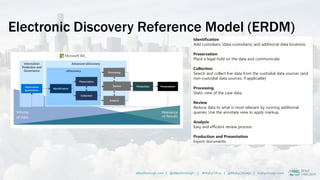
Electronic Discovery Reference Model (ERDM)
alberthoitingh.com | @alberthoitingh | #M365CHI22 | @M365Chicago | m365chicago.com
Identification
Add custodians (data custodians) and additional data locations.
Preservation
Place a legal hold on the data and communicate.
Collection
Search and collect live data from the custodial data sources (and
non-custodial data sources, if applicable)
Processing
Static view of the case data.
Review
Reduce data to what is most relevant by running additional
queries. Use the annotate view to apply markup.
Analysis
Easy and efficient review process.
Production and Presentation
Export documents
Content search | eDiscovery core/advanced
alberthoitingh.com | @alberthoitingh | #M365CHI22 | @M365Chicago | m365chicago.com
https://docs.microsoft.com/en-us/microsoft-365/compliance/ediscovery
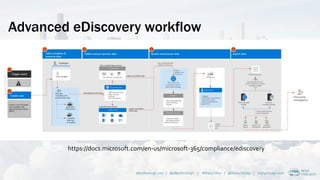
Advanced eDiscovery workflow
alberthoitingh.com | @alberthoitingh | #M365CHI22 | @M365Chicago | m365chicago.com
https://docs.microsoft.com/en-us/microsoft-365/compliance/ediscovery
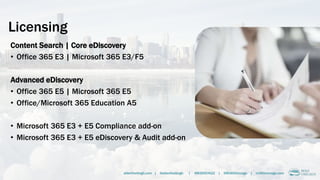
Licensing
Content Search | Core eDiscovery
• Office 365 E3 | Microsoft 365 E3/F5
Advanced eDiscovery
• Office 365 E5 | Microsoft 365 E5
• Office/Microsoft 365 Education A5
• Microsoft 365 E3 + E5 Compliance add-on
• Microsoft 365 E3 + E5 eDiscovery & Audit add-on
alberthoitingh.com | @alberthoitingh | #M365CHI22 | @M365Chicago | m365chicago.com
Microsoft Teams
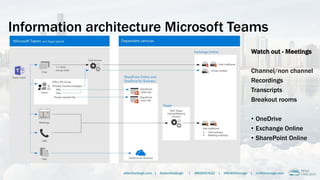
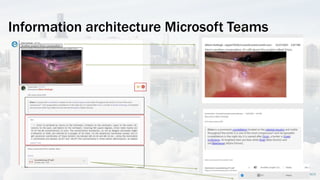
Information architecture Microsoft Teams
Watch out - Meetings
Channel/non channel
Recordings
Transcripts
Breakout rooms
• OneDrive
• Exchange Online

• SharePoint Online
alberthoitingh.com | @alberthoitingh | #M365CHI22 | @M365Chicago | m365chicago.com
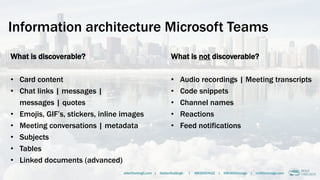
Information architecture Microsoft Teams
What is discoverable?
• Card content
• Chat links | messages |
messages | quotes
• Emojis, GIF’s, stickers, inline images
• Meeting conversations | metadata
• Subjects
• Tables
• Linked documents (advanced)
alberthoitingh.com | @alberthoitingh | #M365CHI22 | @M365Chicago | m365chicago.com
What is not discoverable?
• Audio recordings | Meeting transcripts
• Code snippets
• Channel names
• Reactions
• Feed notifications
Information architecture Microsoft Teams
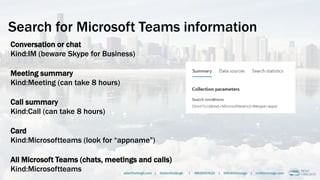
Search for Microsoft Teams information
Conversation or chat
Kind:IM (beware Skype for Business)
Meeting summary
Kind:Meeting (can take 8 hours)
Call summary
Kind:Call (can take 8 hours)
Card
Kind:Microsoftteams (look for “appname”)
All Microsoft Teams (chats, meetings and calls)
Kind:Microsoftteams alberthoitingh.com | @alberthoitingh | #M365CHI22 | @M365Chicago | m365chicago.com
Demo time!
Content Search
Core eDiscovery
Advanced eDiscovery
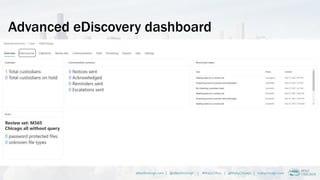
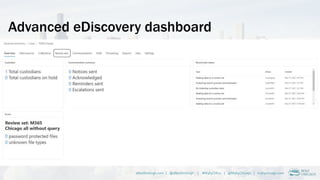
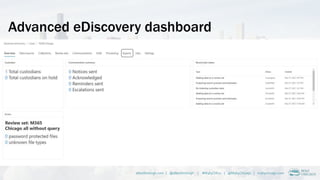
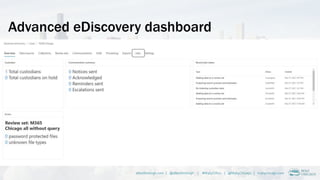
Advanced eDiscovery dashboard
alberthoitingh.com | @alberthoitingh | #M365CHI22 | @M365Chicago | m365chicago.com
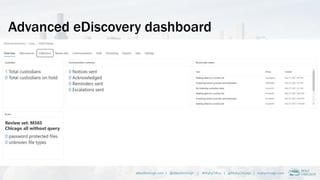
Advanced eDiscovery dashboard
alberthoitingh.com | @alberthoitingh | #M365CHI22 | @M365Chicago | m365chicago.com
Advanced eDiscovery dashboard
alberthoitingh.com | @alberthoitingh | #M365CHI22 | @M365Chicago | m365chicago.com
Advanced eDiscovery dashboard
alberthoitingh.com | @alberthoitingh | #M365CHI22 | @M365Chicago | m365chicago.com
Advanced eDiscovery dashboard
alberthoitingh.com | @alberthoitingh | #M365CHI22 | @M365Chicago | m365chicago.com
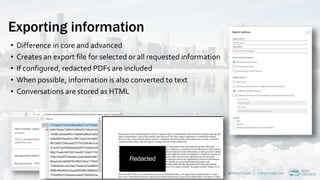
Exporting information
• Difference in core and advanced
• Creates an export file for selected or all requested information
• If configured, redacted PDFs are included
• When possible, information is also converted to text
• Conversations are stored as HTML
alberthoitingh.com | @alberthoitingh | #M365CHI22 | @M365Chicago | m365chicago.com
Demo time!
Advanced eDiscovery
Breakout room &
Private channels
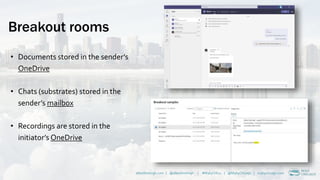
Breakout rooms
• Documents stored in the sender’s
OneDrive
• Chats (substrates) stored in the
sender’s mailbox
• Recordings are stored in the
initiator’s OneDrive
alberthoitingh.com | @alberthoitingh | #M365CHI22 | @M365Chicago | m365chicago.com
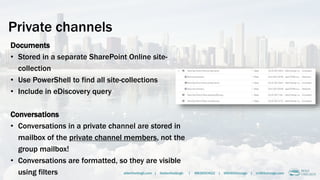
Private channels
Documents
• Stored in a separate SharePoint Online site-
collection
• Use PowerShell to find all site-collections
• Include in eDiscovery query
Conversations
• Conversations in a private channel are stored in
mailbox of the private channel members, not the
group mailbox!
• Conversations are formatted, so they are visible
using filters alberthoitingh.com | @alberthoitingh | #M365CHI22 | @M365Chicago | m365chicago.com
Breakout rooms & private channels
• Need to add all users’ mailboxes and
OneDrives if you have breakout rooms
need to collect chats, documents and
meeting recordings
• Private channels have a different
permissions model
• Any member of a private channel can
and contribute to conversations
• You will need find and include all site-
collections and users' mailboxes for the
shared channel…..
alberthoitingh.com | @alberthoitingh | #M365CHI22 | @M365Chicago | m365chicago.com
Wrapping up
Wrapping up - gotchas
• Breakout rooms, private channels
• Meetings (channel, non-channel)
• E-mail messages (exclude these)
• Cards & meeting transcripts & details
• Filters (Subject, Author)
• Committed collections cannot be rerun or edited
alberthoitingh.com | @alberthoitingh | #M365CHI22 | @M365Chicago | m365chicago.com
More information
Thank you!
Albert Hoitingh
alberthoitingh.com | @alberthoitingh | #M365CHI22 | @M365Chicago | m365chicago.com

Microsoft 365 Chicago - eDiscovery and Microsoft Teams

  • 1.
    Advanced eDiscovery for MicrosoftTeams Albert Hoitingh Microsoft 365 Compliance, Risk & Security InSpark –The Netherlands alberthoitingh.com | @alberthoitingh | #M365CHI22 | @M365Chicago | m365chicago.com
  • 2.
    alberthoitingh.com | @alberthoitingh| #M365CHI22 | @M365Chicago | m365chicago.com https://otsn.live/M365CHI-CFFDonation Donate Today!
  • 3.
    Help Us ImproveOur Conference! Fill out a short speaker survey for each session you attend AND for the conference, overall! https://otsn.live/M365CHI-Feedback https://otsn.live/M365CHI-Feedback alberthoitingh.com | @alberthoitingh | #M365CHI22 | @M365Chicago | m365chicago.com
  • 4.
    Massive Thanks toOur Sponsors! alberthoitingh.com | @alberthoitingh | #M365CHI22 | @M365Chicago | m365chicago.com Silver Partners Gold Partner M365 Chicago is an OTSN Conference Community Partners Chicago Power Platform Users Group M365 Friday Cabo San Lucas
  • 5.
    Raffles and Giveaways alberthoitingh.com| @alberthoitingh | #M365CHI22 | @M365Chicago | m365chicago.com $250 Gift Card for Partner Raffle 2Winners $100 Gift Card for Opt-in Raffle 5Winners PARTNER RAFFLE Please, visit our Partners!While you’re there, ask for their Special Phrase and gain an entry for our Partner Raffle prize! Xbox One for Attendee Opt-in Raffle 1Winner TWITTER GIVEAWAY!!! Tweet about the conference using #M365CHI22 for a chance to win a Chicago Prize Pack. One Winner selected at random! OPT-IN REGISTRATION RAFFLE Did you opt-in to talk to our partners during registration? Thank you! Join us in the General Channel at 5:50 to see if you won an Opt-In Raffle prize! Submit your Partner Raffle entries to https://otsn.live/M365Chi-SponsorContest Chicago Prize Pack Twitter Giveaway 1Winner
  • 6.
    Microsoft 365 eDiscoveryand Microsoft Teams Introduction and objectives for this session
  • 7.
    Albert Hoitingh Consultant Microsoft365 Compliance, Risk, Security Microsoft MVP Enterprise Mobility alberthoitingh.com | @alberthoitingh | #M365CHI22 | @M365Chicago | m365chicago.com
  • 8.
    Session Objectives - Aclose look at Microsoft 365 eDiscovery - Microsoft Teams information architecture - eDiscovery and Microsoft Teams - See what works and doesn’t work
  • 9.
  • 10.
    What is eDiscovery? “Electronicdiscovery (also e-discovery or eDiscovery) refers to discovery in legal proceedings such as litigation, government investigations, or Freedom of InformationAct requests, where the information sought is in electronic format (often referred to as electronically stored information or ESI” According to Wikipedia… alberthoitingh.com | @alberthoitingh | #M365CHI22 | @M365Chicago | m365chicago.com
  • 11.
    Electronic Discovery ReferenceModel (ERDM) alberthoitingh.com | @alberthoitingh | #M365CHI22 | @M365Chicago | m365chicago.com Identification Add custodians (data custodians) and additional data locations. Preservation Place a legal hold on the data and communicate. Collection Search and collect live data from the custodial data sources (and non-custodial data sources, if applicable) Processing Static view of the case data. Review Reduce data to what is most relevant by running additional queries. Use the annotate view to apply markup. Analysis Easy and efficient review process. Production and Presentation Export documents
  • 12.
    Content search |eDiscovery core/advanced alberthoitingh.com | @alberthoitingh | #M365CHI22 | @M365Chicago | m365chicago.com https://docs.microsoft.com/en-us/microsoft-365/compliance/ediscovery
  • 13.
    Advanced eDiscovery workflow alberthoitingh.com| @alberthoitingh | #M365CHI22 | @M365Chicago | m365chicago.com https://docs.microsoft.com/en-us/microsoft-365/compliance/ediscovery
  • 14.
    Licensing Content Search |Core eDiscovery • Office 365 E3 | Microsoft 365 E3/F5 Advanced eDiscovery • Office 365 E5 | Microsoft 365 E5 • Office/Microsoft 365 Education A5 • Microsoft 365 E3 + E5 Compliance add-on • Microsoft 365 E3 + E5 eDiscovery & Audit add-on alberthoitingh.com | @alberthoitingh | #M365CHI22 | @M365Chicago | m365chicago.com
  • 15.
  • 16.
    Information architecture MicrosoftTeams Watch out - Meetings Channel/non channel Recordings Transcripts Breakout rooms • OneDrive • Exchange Online • SharePoint Online alberthoitingh.com | @alberthoitingh | #M365CHI22 | @M365Chicago | m365chicago.com
  • 17.
    Information architecture MicrosoftTeams What is discoverable? • Card content • Chat links | messages | messages | quotes • Emojis, GIF’s, stickers, inline images • Meeting conversations | metadata • Subjects • Tables • Linked documents (advanced) alberthoitingh.com | @alberthoitingh | #M365CHI22 | @M365Chicago | m365chicago.com What is not discoverable? • Audio recordings | Meeting transcripts • Code snippets • Channel names • Reactions • Feed notifications
  • 18.
  • 19.
    Search for MicrosoftTeams information Conversation or chat Kind:IM (beware Skype for Business) Meeting summary Kind:Meeting (can take 8 hours) Call summary Kind:Call (can take 8 hours) Card Kind:Microsoftteams (look for “appname”) All Microsoft Teams (chats, meetings and calls) Kind:Microsoftteams alberthoitingh.com | @alberthoitingh | #M365CHI22 | @M365Chicago | m365chicago.com
  • 20.
  • 21.
  • 22.
    Advanced eDiscovery dashboard alberthoitingh.com| @alberthoitingh | #M365CHI22 | @M365Chicago | m365chicago.com
  • 23.
    Advanced eDiscovery dashboard alberthoitingh.com| @alberthoitingh | #M365CHI22 | @M365Chicago | m365chicago.com
  • 24.
    Advanced eDiscovery dashboard alberthoitingh.com| @alberthoitingh | #M365CHI22 | @M365Chicago | m365chicago.com
  • 25.
    Advanced eDiscovery dashboard alberthoitingh.com| @alberthoitingh | #M365CHI22 | @M365Chicago | m365chicago.com
  • 26.
    Advanced eDiscovery dashboard alberthoitingh.com| @alberthoitingh | #M365CHI22 | @M365Chicago | m365chicago.com
  • 27.
    Exporting information • Differencein core and advanced • Creates an export file for selected or all requested information • If configured, redacted PDFs are included • When possible, information is also converted to text • Conversations are stored as HTML alberthoitingh.com | @alberthoitingh | #M365CHI22 | @M365Chicago | m365chicago.com
  • 28.
  • 29.
  • 30.
    Breakout rooms • Documentsstored in the sender’s OneDrive • Chats (substrates) stored in the sender’s mailbox • Recordings are stored in the initiator’s OneDrive alberthoitingh.com | @alberthoitingh | #M365CHI22 | @M365Chicago | m365chicago.com
  • 31.
    Private channels Documents • Storedin a separate SharePoint Online site- collection • Use PowerShell to find all site-collections • Include in eDiscovery query Conversations • Conversations in a private channel are stored in mailbox of the private channel members, not the group mailbox! • Conversations are formatted, so they are visible using filters alberthoitingh.com | @alberthoitingh | #M365CHI22 | @M365Chicago | m365chicago.com
  • 32.
    Breakout rooms &private channels • Need to add all users’ mailboxes and OneDrives if you have breakout rooms need to collect chats, documents and meeting recordings • Private channels have a different permissions model • Any member of a private channel can and contribute to conversations • You will need find and include all site- collections and users' mailboxes for the shared channel….. alberthoitingh.com | @alberthoitingh | #M365CHI22 | @M365Chicago | m365chicago.com
  • 33.
  • 34.
    Wrapping up -gotchas • Breakout rooms, private channels • Meetings (channel, non-channel) • E-mail messages (exclude these) • Cards & meeting transcripts & details • Filters (Subject, Author) • Committed collections cannot be rerun or edited alberthoitingh.com | @alberthoitingh | #M365CHI22 | @M365Chicago | m365chicago.com More information
  • 35.
    Thank you! Albert Hoitingh alberthoitingh.com| @alberthoitingh | #M365CHI22 | @M365Chicago | m365chicago.com