Microsoft 365 E5
Value and contributions of the E5 offer
This document deals only with the features brought by microsoft 365 E5 and deliberately ignores the features of
previous plans (M365 F1/E1/E3)
Information Protection
Oversight of cloud and
application usages
Identity and access
management
Protection from advanced
threats
Insider risk management Data governance
Cloud Telephony Dynamic dashboards
Microsoft 365 E5 in one image
 Discovery, Classification and
Automated Data Protection
 Import your encryption key
 Advanced messages encryption
 Discovery, investigation, continuous
analysis and detection of anomalies on
cloud applications
 Visibility of your data in the cloud
 Connection risk assessment
 Management of privileged accounts
 Identity Governance
 Advanced protection of messaging,
documents, SaaS application,
workstation and Active Directory
Automatically identify and protect your
sensitive data wherever it is
Supervise, understand, manage and
protect yourself from the uses and
threats of cloud applications
An interconnected defensive arsenal
against sophisticated and targeted
threats
Protectiion and Governance of Data
Access by Users and Administrators
Educate users and protect yourself from
risky behaviors, whether voluntary or not
 Data Access Approval Workflow
 Supervision of communications
 Ethical wall
 Automated data lifecycle management
 Searching for information (litigation or
internal searches)
Keep, delete and find sensitive data
- automatically -
 Next-generation telephony
 Conference bridge
 Advanced business functions
 Choosing the operator connection
Corporate telephony system integrated
into collaborative suite
 Make the most of your data
 Share dashboards
 Artificial intelligence support
Browse your data and bring out key
metrics in real time
Information Protection
Automatic classification of
documents based on their
sensitivity
Personal Public Confidential
Encryption Watermark
Tracking Revocation
Automatic classification of
your local file servers (and
SharePoint)
Use your own key and
infrastructure for document
encryption
Scan and detect sensitive data
based on policies
Classify and lay data based on
their sensitivity
Apply protection, and actions
such as encryption and
restriction of access
Reports, alerts and
remediation
Protection follows the document
wherever it is, even outside of
Office 365
A scanner identifies, classifies and
protects your local file servers
and SharePoint
In highly regulated contexts, you
can use your own encryption
infrastructure with your keys for
data hosted on Office 365
Advanced e-mail
encryption
Send encrypted messages with
your colors and logos, with the
ability to put an expiration date
or revoke the message
Automatically identify and protect your sensitive data wherever it is
Oversight of cloud and application usages
Discovering Cloud
Applications actually used
Advanced Incident
Investigation Tools
Cloud visibility of your data
 Shadow IT detection
(unapproved applications)
 Application risk assessment
 Understand usages, traffic,
categories
 Investigation of users, files,
activities, locations.
 Quantify exposure and risk
 Block or manage apps
 Monitor and protect
information through apps
 Identify how classified and
unclassified data is shared on
cloud applications and assess
risks
Continuous analysis and
detection of anomalies
 Warnings on abnormal uses
and behaviors
 Alerts on new apps and
trends
Office 365
Salesforce Azure
Box
Aws
DropboxFacebook
TwitterYoutube
Supervise, understand, manage and protect yourself from the uses and threats of cloud applications
Identity and access management
Connection risk assessment
Management of Privileged
Identities
Identity Governance
 Conditional access strategies
for connections and risk-
based sessions
 Identifying vulnerabilities and
accounts at risk
 Investigation into risky events
 Workflow to raise privileges
for admin accounts
 Reducing attack surface in
case of compromised
account
 Protection against internal
risk of malicious
administrators
 Automation of access query
workflows, access
assignments, revisions and
expiration.
 Effectively manage access to
groups, applications and sites
Access review
 User access can be reviewed
regularly to ensure that only
appropriate people continue
to benefit from access
 Managing new hires and
changing jobs
Protection and Governance of Data Access by Users and Administrators
Session
Risk
3
User - role
Known and compliant device
Physical/virtual location
Client and authentication method Strategies
Ask for a 2nd authentication
factor
Allow/deny access
**
**
**
Limited access
Force the password
reset
Context Organization policy Conditioned action Access to data
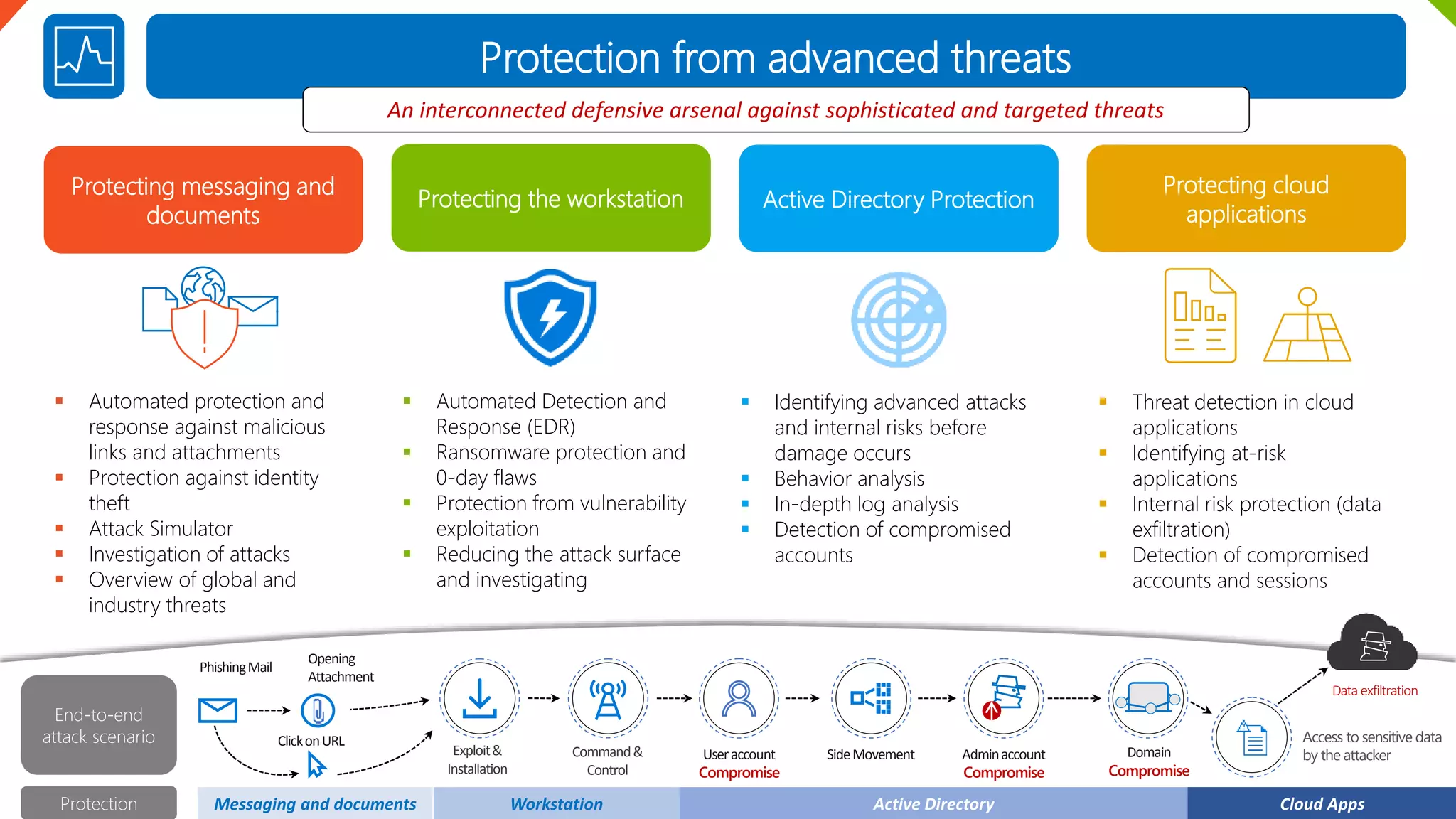
Protection from advanced threats
Protecting messaging and
documents
Protecting the workstation Active Directory Protection
 Automated protection and
response against malicious
links and attachments
 Protection against identity
theft
 Attack Simulator
 Investigation of attacks
 Overview of global and
industry threats
 Automated Detection and
Response (EDR)
 Ransomware protection and
0-day flaws
 Protection from vulnerability
exploitation
 Reducing the attack surface
and investigating
 Identifying advanced attacks
and internal risks before
damage occurs
 Behavior analysis
 In-depth log analysis
 Detection of compromised
accounts
Protecting cloud
applications
 Threat detection in cloud
applications
 Identifying at-risk
applications
 Internal risk protection (data
exfiltration)
 Detection of compromised
accounts and sessions
An interconnected defensive arsenal against sophisticated and targeted threats
PhishingMail
Opening
Attachment
ClickonURL
Exploit&
Installation
Command&
Control
Useraccount
Compromise
SideMovement Adminaccount
Compromise
Domain
Compromise
Access to sensitive data
by the attacker
Dataexfiltration
End-to-end
attack scenario
Protection Messaging and documents Workstation Active Directory Cloud Apps
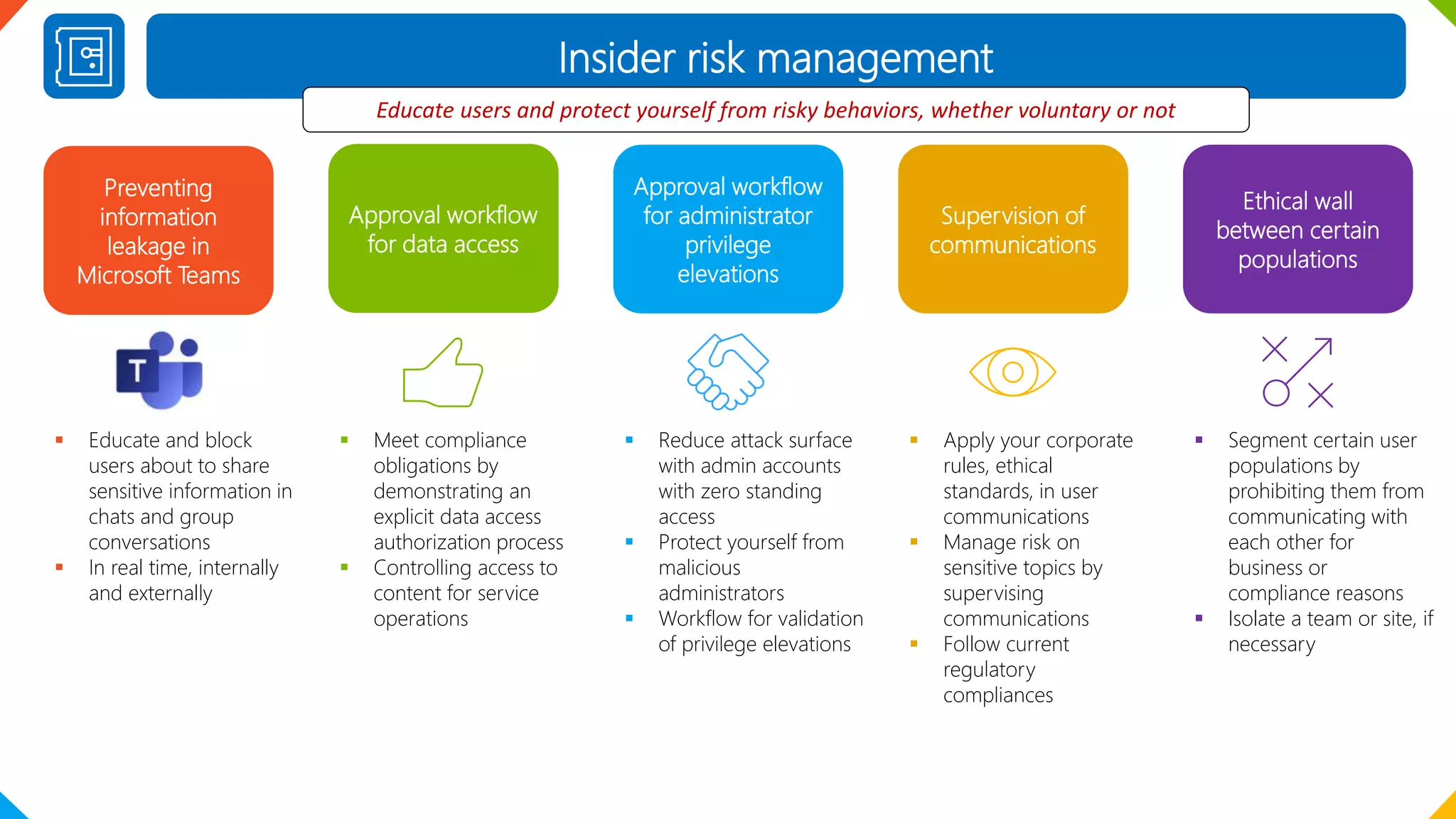
Insider risk management
Preventing
information
leakage in
Microsoft Teams
Approval workflow
for data access
Approval workflow
for administrator
privilege
elevations
 Educate and block
users about to share
sensitive information in
chats and group
conversations
 In real time, internally
and externally
 Meet compliance
obligations by
demonstrating an
explicit data access
authorization process
 Controlling access to
content for service
operations
 Reduce attack surface
with admin accounts
with zero standing
access
 Protect yourself from
malicious
administrators
 Workflow for validation
of privilege elevations
Supervision of
communications
 Apply your corporate
rules, ethical
standards, in user
communications
 Manage risk on
sensitive topics by
supervising
communications
 Follow current
regulatory
compliances
Educate users and protect yourself from risky behaviors, whether voluntary or not
Ethical wall
between certain
populations
 Segment certain user
populations by
prohibiting them from
communicating with
each other for
business or
compliance reasons
 Isolate a team or site, if
necessary
Data governance
Automated data lifecycle
management
Import your encryption key
for data at rest
Search for information
(litigation or internal
research)
 Automated detection of
sensitive data and application
of a label based on content
 Set retention or deletion
policies to meet compliance
or quality requirements
 Use your own encryption key
for data at rest in Office 365
 Enjoy the right to be
forgotten through key
revocation
 Meet the compliance
requirements that require
you to use your keys
 Drastically reduce the
number of documents to
review
 Rearrange the results,
through themes, deletion of
duplicates and reconstruction
of conversation threads
 Annotate documents
User and administrator
activity logs
 365-day retention of all user
and admin activities
 Find out quickly who did
what on the data or service
configuration
Keep, delete and find sensitive data - automatically -
Governance Label
 Retention strategy
 Deletion strategy
 Review before deletion
 Record management
 Import third-party data
Supervision
Violation of Strategy
Search for
content
 Insights
 Analysis
 Reports
Data at risk
Cloud Telephony
Next-generation telephony Conference bridge
Advanced business
functions
 Full telephony system in the
cloud to replace your local
PBX system
 There's no need to maintain
local infrastructure
 Conference bridge in
meetings to be reached by
phone
 Responding to group calls
 Line sharing
 Call parking
Choosing the operator
connection
 Direct routing in Microsoft
Teams
 Microsoft Call Package
 Communication credits
Corporate telephone system integrated into collaborative suite
Dynamic dashboards
Do more with your data Sharing culture Artificial intelligence
 Get your data talking
 Publication of dynamic
reports, dashboards
 Reduce the costs, complexity
and challenges of multiples
solutions
 Publication of dynamic
reports in a collaborative
workspace
 Self-service spirit
 Many connectors and visual
options
 Include reports in other apps
 Make sense of unstructured
data (images, text, etc.)
 Ask your questions in natural
language
 Discover the hidden
information that influences
your key metrics
Accessible from anywhere
 From a browser
 From the rich app
 From a smartphone
 From an Office app
 From the intranet
 From Microsoft Teams
Browse your data and bring out key metrics in real time

Value Microsoft 365 E5 English

  • 1.
    Microsoft 365 E5 Valueand contributions of the E5 offer This document deals only with the features brought by microsoft 365 E5 and deliberately ignores the features of previous plans (M365 F1/E1/E3)
  • 2.
    Information Protection Oversight ofcloud and application usages Identity and access management Protection from advanced threats Insider risk management Data governance Cloud Telephony Dynamic dashboards Microsoft 365 E5 in one image  Discovery, Classification and Automated Data Protection  Import your encryption key  Advanced messages encryption  Discovery, investigation, continuous analysis and detection of anomalies on cloud applications  Visibility of your data in the cloud  Connection risk assessment  Management of privileged accounts  Identity Governance  Advanced protection of messaging, documents, SaaS application, workstation and Active Directory Automatically identify and protect your sensitive data wherever it is Supervise, understand, manage and protect yourself from the uses and threats of cloud applications An interconnected defensive arsenal against sophisticated and targeted threats Protectiion and Governance of Data Access by Users and Administrators Educate users and protect yourself from risky behaviors, whether voluntary or not  Data Access Approval Workflow  Supervision of communications  Ethical wall  Automated data lifecycle management  Searching for information (litigation or internal searches) Keep, delete and find sensitive data - automatically -  Next-generation telephony  Conference bridge  Advanced business functions  Choosing the operator connection Corporate telephony system integrated into collaborative suite  Make the most of your data  Share dashboards  Artificial intelligence support Browse your data and bring out key metrics in real time
  • 3.
    Information Protection Automatic classificationof documents based on their sensitivity Personal Public Confidential Encryption Watermark Tracking Revocation Automatic classification of your local file servers (and SharePoint) Use your own key and infrastructure for document encryption Scan and detect sensitive data based on policies Classify and lay data based on their sensitivity Apply protection, and actions such as encryption and restriction of access Reports, alerts and remediation Protection follows the document wherever it is, even outside of Office 365 A scanner identifies, classifies and protects your local file servers and SharePoint In highly regulated contexts, you can use your own encryption infrastructure with your keys for data hosted on Office 365 Advanced e-mail encryption Send encrypted messages with your colors and logos, with the ability to put an expiration date or revoke the message Automatically identify and protect your sensitive data wherever it is
  • 4.
    Oversight of cloudand application usages Discovering Cloud Applications actually used Advanced Incident Investigation Tools Cloud visibility of your data  Shadow IT detection (unapproved applications)  Application risk assessment  Understand usages, traffic, categories  Investigation of users, files, activities, locations.  Quantify exposure and risk  Block or manage apps  Monitor and protect information through apps  Identify how classified and unclassified data is shared on cloud applications and assess risks Continuous analysis and detection of anomalies  Warnings on abnormal uses and behaviors  Alerts on new apps and trends Office 365 Salesforce Azure Box Aws DropboxFacebook TwitterYoutube Supervise, understand, manage and protect yourself from the uses and threats of cloud applications
  • 5.
    Identity and accessmanagement Connection risk assessment Management of Privileged Identities Identity Governance  Conditional access strategies for connections and risk- based sessions  Identifying vulnerabilities and accounts at risk  Investigation into risky events  Workflow to raise privileges for admin accounts  Reducing attack surface in case of compromised account  Protection against internal risk of malicious administrators  Automation of access query workflows, access assignments, revisions and expiration.  Effectively manage access to groups, applications and sites Access review  User access can be reviewed regularly to ensure that only appropriate people continue to benefit from access  Managing new hires and changing jobs Protection and Governance of Data Access by Users and Administrators Session Risk 3 User - role Known and compliant device Physical/virtual location Client and authentication method Strategies Ask for a 2nd authentication factor Allow/deny access ** ** ** Limited access Force the password reset Context Organization policy Conditioned action Access to data
  • 6.
    Protection from advancedthreats Protecting messaging and documents Protecting the workstation Active Directory Protection  Automated protection and response against malicious links and attachments  Protection against identity theft  Attack Simulator  Investigation of attacks  Overview of global and industry threats  Automated Detection and Response (EDR)  Ransomware protection and 0-day flaws  Protection from vulnerability exploitation  Reducing the attack surface and investigating  Identifying advanced attacks and internal risks before damage occurs  Behavior analysis  In-depth log analysis  Detection of compromised accounts Protecting cloud applications  Threat detection in cloud applications  Identifying at-risk applications  Internal risk protection (data exfiltration)  Detection of compromised accounts and sessions An interconnected defensive arsenal against sophisticated and targeted threats PhishingMail Opening Attachment ClickonURL Exploit& Installation Command& Control Useraccount Compromise SideMovement Adminaccount Compromise Domain Compromise Access to sensitive data by the attacker Dataexfiltration End-to-end attack scenario Protection Messaging and documents Workstation Active Directory Cloud Apps
  • 7.
    Insider risk management Preventing information leakagein Microsoft Teams Approval workflow for data access Approval workflow for administrator privilege elevations  Educate and block users about to share sensitive information in chats and group conversations  In real time, internally and externally  Meet compliance obligations by demonstrating an explicit data access authorization process  Controlling access to content for service operations  Reduce attack surface with admin accounts with zero standing access  Protect yourself from malicious administrators  Workflow for validation of privilege elevations Supervision of communications  Apply your corporate rules, ethical standards, in user communications  Manage risk on sensitive topics by supervising communications  Follow current regulatory compliances Educate users and protect yourself from risky behaviors, whether voluntary or not Ethical wall between certain populations  Segment certain user populations by prohibiting them from communicating with each other for business or compliance reasons  Isolate a team or site, if necessary
  • 8.
    Data governance Automated datalifecycle management Import your encryption key for data at rest Search for information (litigation or internal research)  Automated detection of sensitive data and application of a label based on content  Set retention or deletion policies to meet compliance or quality requirements  Use your own encryption key for data at rest in Office 365  Enjoy the right to be forgotten through key revocation  Meet the compliance requirements that require you to use your keys  Drastically reduce the number of documents to review  Rearrange the results, through themes, deletion of duplicates and reconstruction of conversation threads  Annotate documents User and administrator activity logs  365-day retention of all user and admin activities  Find out quickly who did what on the data or service configuration Keep, delete and find sensitive data - automatically - Governance Label  Retention strategy  Deletion strategy  Review before deletion  Record management  Import third-party data Supervision Violation of Strategy Search for content  Insights  Analysis  Reports Data at risk
  • 9.
    Cloud Telephony Next-generation telephonyConference bridge Advanced business functions  Full telephony system in the cloud to replace your local PBX system  There's no need to maintain local infrastructure  Conference bridge in meetings to be reached by phone  Responding to group calls  Line sharing  Call parking Choosing the operator connection  Direct routing in Microsoft Teams  Microsoft Call Package  Communication credits Corporate telephone system integrated into collaborative suite
  • 10.
    Dynamic dashboards Do morewith your data Sharing culture Artificial intelligence  Get your data talking  Publication of dynamic reports, dashboards  Reduce the costs, complexity and challenges of multiples solutions  Publication of dynamic reports in a collaborative workspace  Self-service spirit  Many connectors and visual options  Include reports in other apps  Make sense of unstructured data (images, text, etc.)  Ask your questions in natural language  Discover the hidden information that influences your key metrics Accessible from anywhere  From a browser  From the rich app  From a smartphone  From an Office app  From the intranet  From Microsoft Teams Browse your data and bring out key metrics in real time