Canvas and Model driven
apps
(By Vaishali Vyas, Software Engineer)
Agenda
1. What is Canvas and Model driven App
2. Difference between Canvas and Model driven App
3. How to Create Canvas App with Dynamics 365 Data Source
4. How to Create Model driven App
5. How to create Entity and fields in CDS.
6. Run and Share Canvas and Model driven App.
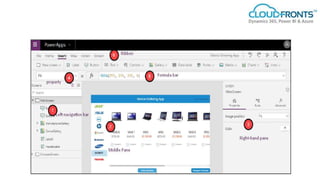
Canvas App
1. Design the app by dragging and dropping elements onto a
canvas.
2. You have design control.
3. Uses excel type formulas .
4. Can connect to Microsoft and non-Microsoft data sources.
5. Can run on mobile device, browser.
Model driven App
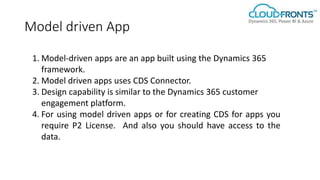
1. Model-driven apps are an app built using the Dynamics 365
framework.
2. Model driven apps uses CDS Connector.
3. Design capability is similar to the Dynamics 365 customer
engagement platform.
4. For using model driven apps or for creating CDS for apps you
require P2 License. And also you should have access to the
data.
Difference
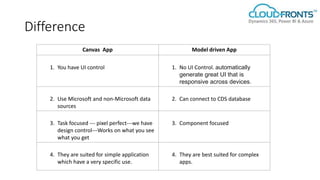
Canvas App Model driven App
1. You have UI control 1. No UI Control. automatically
generate great UI that is
responsive across devices.
2. Use Microsoft and non-Microsoft data
sources
2. Can connect to CDS database
3. Task focused --- pixel perfect---we have
design control---Works on what you see
what you get
3. Component focused
4. They are suited for simple application
which have a very specific use.
4. They are best suited for complex
apps.
DEMO
Thank You !

Canvas and Model Driven Apps

  • 1.
    Canvas and Modeldriven apps (By Vaishali Vyas, Software Engineer)
  • 2.
    Agenda 1. What isCanvas and Model driven App 2. Difference between Canvas and Model driven App 3. How to Create Canvas App with Dynamics 365 Data Source 4. How to Create Model driven App 5. How to create Entity and fields in CDS. 6. Run and Share Canvas and Model driven App.
  • 3.
    Canvas App 1. Designthe app by dragging and dropping elements onto a canvas. 2. You have design control. 3. Uses excel type formulas . 4. Can connect to Microsoft and non-Microsoft data sources. 5. Can run on mobile device, browser.
  • 5.
    Model driven App 1.Model-driven apps are an app built using the Dynamics 365 framework. 2. Model driven apps uses CDS Connector. 3. Design capability is similar to the Dynamics 365 customer engagement platform. 4. For using model driven apps or for creating CDS for apps you require P2 License. And also you should have access to the data.
  • 6.
    Difference Canvas App Modeldriven App 1. You have UI control 1. No UI Control. automatically generate great UI that is responsive across devices. 2. Use Microsoft and non-Microsoft data sources 2. Can connect to CDS database 3. Task focused --- pixel perfect---we have design control---Works on what you see what you get 3. Component focused 4. They are suited for simple application which have a very specific use. 4. They are best suited for complex apps.
  • 7.
  • 8.