Building bibliographies and managing
citations with Mendeley
Ada Giannatelli
20th March, 2014
METID – Politecnico di Milano
Disclaimer: due to the continuing development of Mendeley, no guarantee for the
accuracy of information over time can be assumed
Mendeley in a nutshell
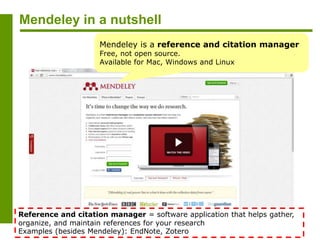
Mendeley is a reference and citation manager
Free, not open source.
Available for Mac, Windows and Linux
Reference and citation manager = software application that helps gather,
organize, and maintain references for your research
Examples (besides Mendeley): EndNote, Zotero
Mendeley in a nutshell
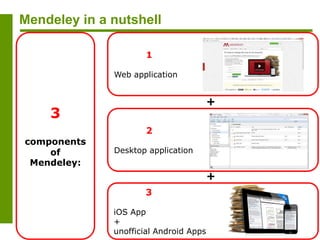
1
Web application
2
Desktop application
3
iOS App
+
unofficial Android Apps
3
components
of
Mendeley:
+
+
Mendeley’s identity card
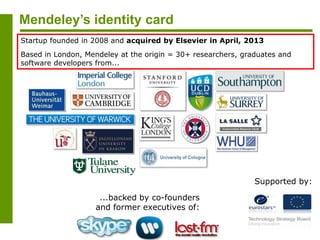
...backed by co-founders
and former executives of:
Supported by:
Startup founded in 2008 and acquired by Elsevier in April, 2013
Based in London, Mendeley at the origin = 30+ researchers, graduates and
software developers from...
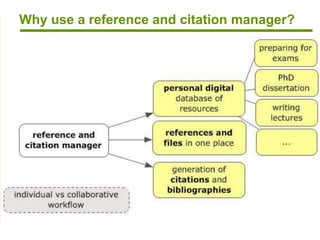
Why use a reference and citation manager?
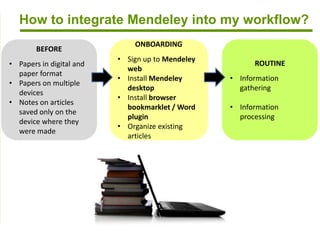
How to integrate Mendeley into my workflow?
ONBOARDING
• Sign up to Mendeley
web
• Install Mendeley
desktop
• Install browser
bookmarklet / Word
plugin
• Organize existing
articles
ROUTINE
• Information
gathering
• Information
processing
BEFORE
• Papers in digital and
paper format
• Papers on multiple
devices
• Notes on articles
saved only on the
device where they
were made
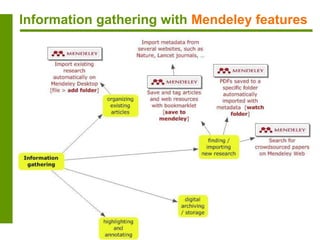
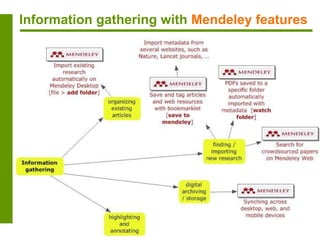
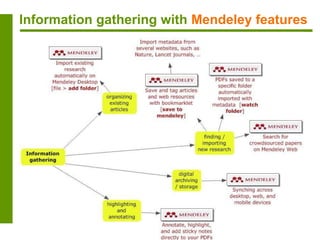
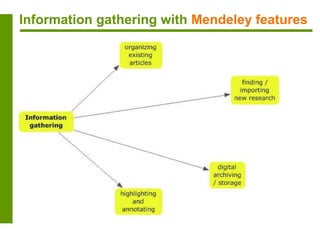
Information gathering with Mendeley features
Information gathering
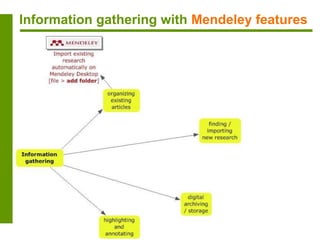
Import existing research with [add file], [add folder]
On Mendeley Desktop:
1. [file > add file] or [file > add folder]
2. select the file / folder you would like to import. All PDFs will be
imported into Mendeley
3. MyLibrary > New folder: additional organization with subfolders that
match e.g. your research topics or courses (drag&drop files, such as PDFs
and Words, into the sub folder)
Information gathering with Mendeley features
Information gathering
Import new research with [watch folder]
On Mendeley Desktop:
1. file > watch folder
2. tick the folders you want mendeley to watch. Any new PDFs in these
folders will be imported into Mendeley automatically (remember to click
[apply])
Information gathering
Import new research with [save to Mendeley] bookmarklet
supported sites
Information gathering
Import new research with [save to Mendeley] bookmarklet
Mendeley normally
bookmarks links and saves
metadata, NOT the
corresponding files
Verify that
[Details]: if theys
look ok, click the
[Save] button
Information gathering
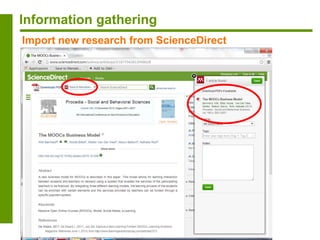
Import new research from ScienceDirect
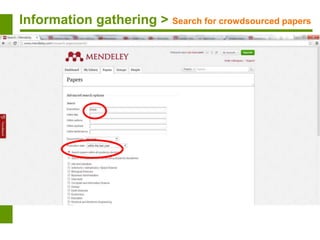
Information gathering >
Search for crowdsourced
papers
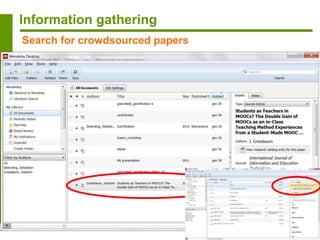
Information gathering > Search for crowdsourced papers
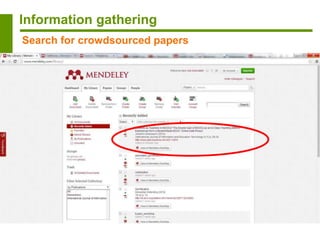
Information gathering
Search for crowdsourced papers
Information gathering
Search for crowdsourced papers
Information gathering with Mendeley features
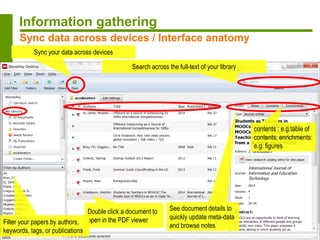
Search across the full-text of your library
Sync your data across devices
Double click a document to
open in the PDF viewerFilter your papers by authors,
keywords, tags, or publications
See document details to
quickly update meta-data
and browse notes
Information gathering
Sync data across devices / Interface anatomy
contents : e.g.table of
contents; enrichments:
e.g. figures
Information gathering with Mendeley features
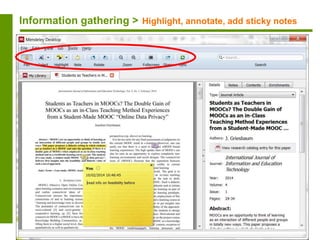
Information gathering > Highlight, annotate, add sticky notes
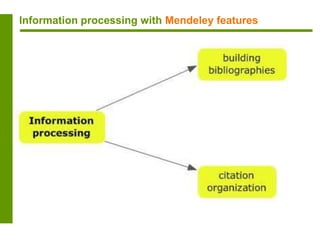
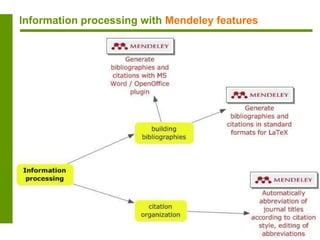
Information processing with Mendeley features
Information processing
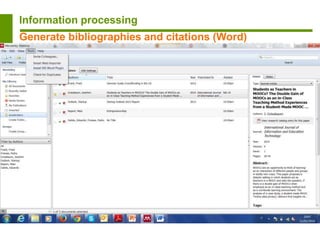
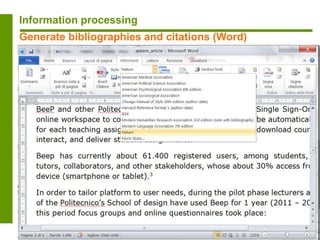
Generate bibliographies and citations (Word)
Information processing
Generate bibliographies and citations (Word)
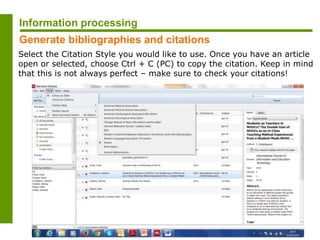
Select the Citation Style you would like to use. Once you have an article
open or selected, choose Ctrl + C (PC) to copy the citation. Keep in mind
that this is not always perfect – make sure to check your citations!
Information processing
Generate bibliographies and citations
Information processing
Generate bibliographies and citations (LaTeX)
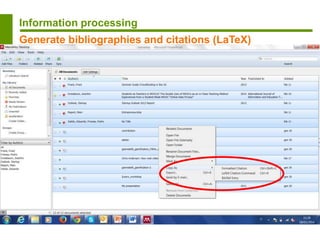
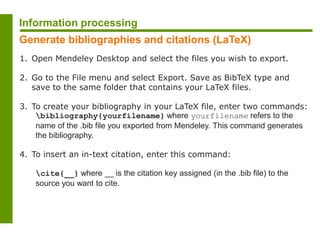
1. Open Mendeley Desktop and select the files you wish to export.
2. Go to the File menu and select Export. Save as BibTeX type and
save to the same folder that contains your LaTeX files.
3. To create your bibliography in your LaTeX file, enter two commands:
bibliography{yourfilename} where yourfilename refers to the
name of the .bib file you exported from Mendeley. This command generates
the bibliography.
4. To insert an in-text citation, enter this command:
cite{__} where __ is the citation key assigned (in the .bib file) to the
source you want to cite.
Information processing
Generate bibliographies and citations (LaTeX)
Mendeley: tips&tricks
Literature search: choose [open access] to perform full-text
search
open access
If you use LaTeX to write your articles, Mendeley automatically
syncs its database to a nominated .bib file for BibTeX or BibLaTeX
with up to date research data
for LaTeX users
If needed (e.g. to clean up “altered” citation keys imported from
Papers database into Mendeley), Mendeley Desktop’s local
configuration and data store is sqlite, a standard lightweight
application storage database (SQL interface)
manual cleaning
Author names with apostrophes, such as “O’Sullivan”, generate
invalid citation keys in the .bib file (e.g. “O’Sullivan1990″). You
have to perform a manual edit of the citation key in the desktop
app (e.g. “OSullivan1990″)
mind apostrophes
Mendeley: tips&tricks
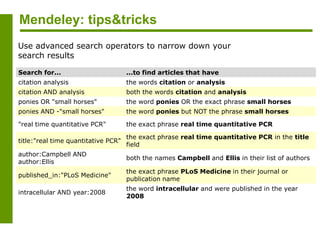
Use advanced search operators to narrow down your
search results
Search for... ...to find articles that have
citation analysis the words citation or analysis
citation AND analysis both the words citation and analysis
ponies OR "small horses" the word ponies OR the exact phrase small horses
ponies AND -"small horses" the word ponies but NOT the phrase small horses
"real time quantitative PCR" the exact phrase real time quantitative PCR
title:"real time quantitative PCR"
the exact phrase real time quantitative PCR in the title
field
author:Campbell AND
author:Ellis
both the names Campbell and Ellis in their list of authors
published_in:"PLoS Medicine"
the exact phrase PLoS Medicine in their journal or
publication name
intracellular AND year:2008
the word intracellular and were published in the year
2008
Mendeley: tips&tricks
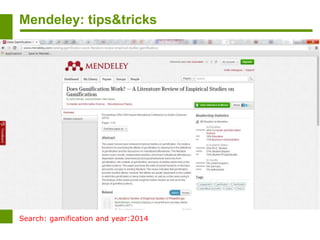
Search: gamification and year:2014
Mendeley: tips&tricks
My Library Search
Only available when searching your local library, or groups.
Search for... ...to find articles that have
tag:"To read" the tag or keyword To read
note:"study material"
contains the exact phrase study material in the
notes field.
Literature Search
Only available when using the "Literature Search" on Mendeley Desktop,
or the Paper search on the Mendeley Web.
Search for... ...to find articles that have
oa_journal:yes
is published in a Journal that Mendeley recognizes as
Open Access
intracellular AND
year:[1998 TO 2008]
the word intracellular and were published between
the years 1998 and 2008
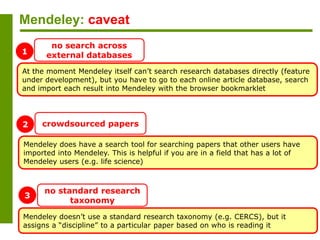
Mendeley: caveat
At the moment Mendeley itself can’t search research databases directly (feature
under development), but you have to go to each online article database, search
and import each result into Mendeley with the browser bookmarklet
no search across
external databases
Mendeley does have a search tool for searching papers that other users have
imported into Mendeley. This is helpful if you are in a field that has a lot of
Mendeley users (e.g. life science)
crowdsourced papers
Mendeley doesn’t use a standard research taxonomy (e.g. CERCS), but it
assigns a “discipline” to a particular paper based on who is reading it
no standard research
taxonomy
1
2
3
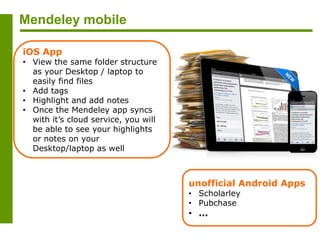
Mendeley mobile
iOS App
• View the same folder structure
as your Desktop / laptop to
easily find files
• Add tags
• Highlight and add notes
• Once the Mendeley app syncs
with it’s cloud service, you will
be able to see your highlights
or notes on your
Desktop/laptop as well
unofficial Android Apps
• Scholarley
• Pubchase
• …
For more info…
Reference management software comparison (Imperial College London)- Dec, 2013
https://workspace.imperial.ac.uk/library/Public/Reference_management_software_comparison.pdf
Mendeley help guides, videos and tutorials
http://resources.mendeley.com/index.html

Building bibliographies and managing citations with Mendeley

  • 1.
    Building bibliographies andmanaging citations with Mendeley Ada Giannatelli 20th March, 2014 METID – Politecnico di Milano Disclaimer: due to the continuing development of Mendeley, no guarantee for the accuracy of information over time can be assumed
  • 2.
    Mendeley in anutshell Mendeley is a reference and citation manager Free, not open source. Available for Mac, Windows and Linux Reference and citation manager = software application that helps gather, organize, and maintain references for your research Examples (besides Mendeley): EndNote, Zotero
  • 3.
    Mendeley in anutshell 1 Web application 2 Desktop application 3 iOS App + unofficial Android Apps 3 components of Mendeley: + +
  • 4.
    Mendeley’s identity card ...backedby co-founders and former executives of: Supported by: Startup founded in 2008 and acquired by Elsevier in April, 2013 Based in London, Mendeley at the origin = 30+ researchers, graduates and software developers from...
  • 5.
    Why use areference and citation manager?
  • 6.
    How to integrateMendeley into my workflow? ONBOARDING • Sign up to Mendeley web • Install Mendeley desktop • Install browser bookmarklet / Word plugin • Organize existing articles ROUTINE • Information gathering • Information processing BEFORE • Papers in digital and paper format • Papers on multiple devices • Notes on articles saved only on the device where they were made
  • 7.
    Information gathering withMendeley features
  • 8.
    Information gathering withMendeley features
  • 9.
    Information gathering Import existingresearch with [add file], [add folder] On Mendeley Desktop: 1. [file > add file] or [file > add folder] 2. select the file / folder you would like to import. All PDFs will be imported into Mendeley 3. MyLibrary > New folder: additional organization with subfolders that match e.g. your research topics or courses (drag&drop files, such as PDFs and Words, into the sub folder)
  • 10.
    Information gathering withMendeley features
  • 11.
    Information gathering Import newresearch with [watch folder] On Mendeley Desktop: 1. file > watch folder 2. tick the folders you want mendeley to watch. Any new PDFs in these folders will be imported into Mendeley automatically (remember to click [apply])
  • 12.
    Information gathering Import newresearch with [save to Mendeley] bookmarklet supported sites
  • 13.
    Information gathering Import newresearch with [save to Mendeley] bookmarklet Mendeley normally bookmarks links and saves metadata, NOT the corresponding files Verify that [Details]: if theys look ok, click the [Save] button
  • 14.
    Information gathering Import newresearch from ScienceDirect
  • 15.
    Information gathering > Searchfor crowdsourced papers Information gathering > Search for crowdsourced papers
  • 16.
  • 17.
  • 18.
    Information gathering withMendeley features
  • 19.
    Search across thefull-text of your library Sync your data across devices Double click a document to open in the PDF viewerFilter your papers by authors, keywords, tags, or publications See document details to quickly update meta-data and browse notes Information gathering Sync data across devices / Interface anatomy contents : e.g.table of contents; enrichments: e.g. figures
  • 20.
    Information gathering withMendeley features
  • 21.
    Information gathering >Highlight, annotate, add sticky notes
  • 22.
    Information processing withMendeley features
  • 23.
    Information processing withMendeley features
  • 24.
  • 25.
  • 26.
    Select the CitationStyle you would like to use. Once you have an article open or selected, choose Ctrl + C (PC) to copy the citation. Keep in mind that this is not always perfect – make sure to check your citations! Information processing Generate bibliographies and citations
  • 27.
  • 28.
    1. Open MendeleyDesktop and select the files you wish to export. 2. Go to the File menu and select Export. Save as BibTeX type and save to the same folder that contains your LaTeX files. 3. To create your bibliography in your LaTeX file, enter two commands: bibliography{yourfilename} where yourfilename refers to the name of the .bib file you exported from Mendeley. This command generates the bibliography. 4. To insert an in-text citation, enter this command: cite{__} where __ is the citation key assigned (in the .bib file) to the source you want to cite. Information processing Generate bibliographies and citations (LaTeX)
  • 29.
    Mendeley: tips&tricks Literature search:choose [open access] to perform full-text search open access If you use LaTeX to write your articles, Mendeley automatically syncs its database to a nominated .bib file for BibTeX or BibLaTeX with up to date research data for LaTeX users If needed (e.g. to clean up “altered” citation keys imported from Papers database into Mendeley), Mendeley Desktop’s local configuration and data store is sqlite, a standard lightweight application storage database (SQL interface) manual cleaning Author names with apostrophes, such as “O’Sullivan”, generate invalid citation keys in the .bib file (e.g. “O’Sullivan1990″). You have to perform a manual edit of the citation key in the desktop app (e.g. “OSullivan1990″) mind apostrophes
  • 30.
    Mendeley: tips&tricks Use advancedsearch operators to narrow down your search results Search for... ...to find articles that have citation analysis the words citation or analysis citation AND analysis both the words citation and analysis ponies OR "small horses" the word ponies OR the exact phrase small horses ponies AND -"small horses" the word ponies but NOT the phrase small horses "real time quantitative PCR" the exact phrase real time quantitative PCR title:"real time quantitative PCR" the exact phrase real time quantitative PCR in the title field author:Campbell AND author:Ellis both the names Campbell and Ellis in their list of authors published_in:"PLoS Medicine" the exact phrase PLoS Medicine in their journal or publication name intracellular AND year:2008 the word intracellular and were published in the year 2008
  • 31.
  • 32.
    Mendeley: tips&tricks My LibrarySearch Only available when searching your local library, or groups. Search for... ...to find articles that have tag:"To read" the tag or keyword To read note:"study material" contains the exact phrase study material in the notes field. Literature Search Only available when using the "Literature Search" on Mendeley Desktop, or the Paper search on the Mendeley Web. Search for... ...to find articles that have oa_journal:yes is published in a Journal that Mendeley recognizes as Open Access intracellular AND year:[1998 TO 2008] the word intracellular and were published between the years 1998 and 2008
  • 33.
    Mendeley: caveat At themoment Mendeley itself can’t search research databases directly (feature under development), but you have to go to each online article database, search and import each result into Mendeley with the browser bookmarklet no search across external databases Mendeley does have a search tool for searching papers that other users have imported into Mendeley. This is helpful if you are in a field that has a lot of Mendeley users (e.g. life science) crowdsourced papers Mendeley doesn’t use a standard research taxonomy (e.g. CERCS), but it assigns a “discipline” to a particular paper based on who is reading it no standard research taxonomy 1 2 3
  • 34.
    Mendeley mobile iOS App •View the same folder structure as your Desktop / laptop to easily find files • Add tags • Highlight and add notes • Once the Mendeley app syncs with it’s cloud service, you will be able to see your highlights or notes on your Desktop/laptop as well unofficial Android Apps • Scholarley • Pubchase • …
  • 35.
    For more info… Referencemanagement software comparison (Imperial College London)- Dec, 2013 https://workspace.imperial.ac.uk/library/Public/Reference_management_software_comparison.pdf Mendeley help guides, videos and tutorials http://resources.mendeley.com/index.html