SOCIAL MEDIA STRATEGY
for communication and dissemination
Ada Giannatelli, Politecnico di Milano - METID
June, 26th, 2014, 11:30 AM CET
Disclaimer: due to the continuing development of social media, no guarantee for the
accuracy of information over time can be assumed
Aim of the webinar
To inspire the use of social media
to communicate project activities and results
(dissemination), with a special focus on education and
research context
Webinar outline
1.Definitions and context
2.Examples
3.Tools
4.How to increase the impact on social media
5.How to manage dissemination on social media
Duration: 1 hour
Definitions
Social media strategy
for dissemination
websites and applications that enable
users to create and share content
or to participate in social networking
(Oxford dictionary)
otherwise known as Web 2.0 tools
accessibility also from mobile devices
free or (relatively) low cost options
websites and applications that enable
users to create and share content
or to participate in social networking
(Oxford dictionary)
otherwise known as Web 2.0 tools
accessibility also from mobile devices
free or (relatively) low cost options
action plan aimed
at achieving specific
objectives
action plan aimed
at achieving specific
objectives
making project results
available (European
Commission)
making project results
available (European
Commission)
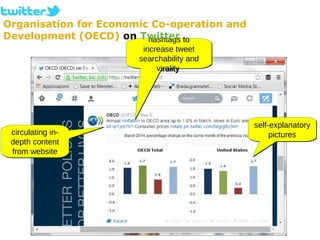
self-explanatory
pictures
self-explanatory
pictures
hashtags to
increase tweet
searchability and
virality
hashtags to
increase tweet
searchability and
virality
circulating in-
depth content
from website
circulating in-
depth content
from website
Organisation for Economic Co-operation and
Development (OECD) on Twitter
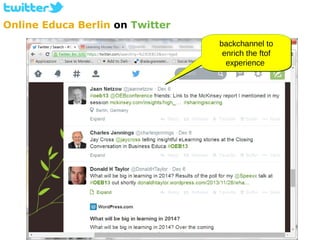
Online Educa Berlin on Twitter
backchannel to
enrich the ftof
experience
backchannel to
enrich the ftof
experience
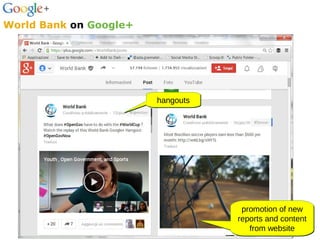
hangoutshangouts
promotion of new
reports and content
from website
promotion of new
reports and content
from website
World Bank on Google+
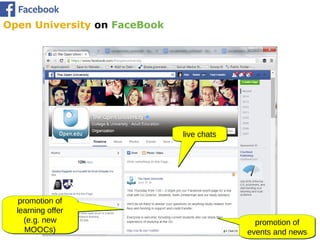
promotion of
events and news
promotion of
events and news
live chatslive chats
promotion of
learning offer
(e.g. new
MOOCs)
promotion of
learning offer
(e.g. new
MOOCs)
Open University on FaceBook
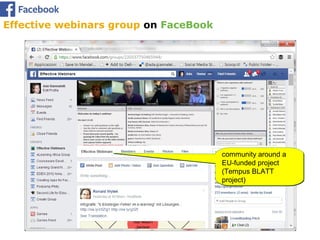
Effective webinars group on FaceBook
community around a
EU-funded project
(Tempus BLATT
project)
community around a
EU-funded project
(Tempus BLATT
project)
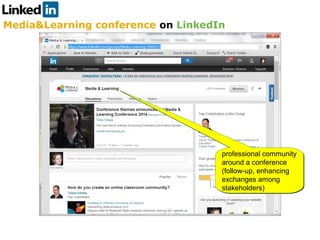
Media&Learning conference on LinkedIn
professional community
around a conference
(follow-up, enhancing
exchanges among
stakeholders)
professional community
around a conference
(follow-up, enhancing
exchanges among
stakeholders)
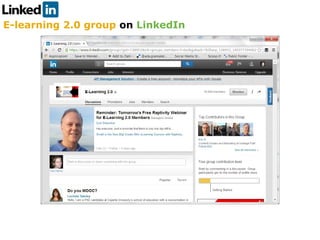
E-learning 2.0 group on LinkedIn
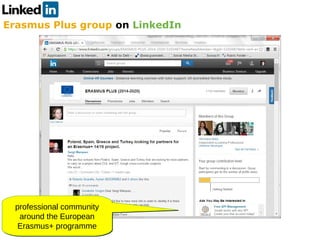
Erasmus Plus group on LinkedIn
professional community
around the European
Erasmus+ programme
professional community
around the European
Erasmus+ programme
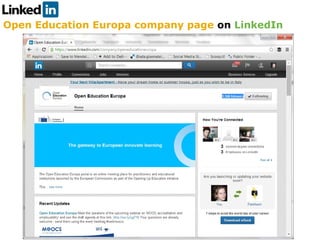
Open Education Europa company page on LinkedIn
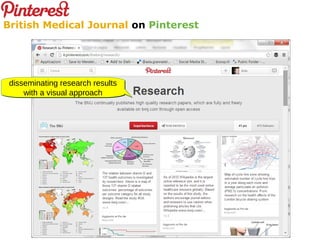
disseminating research results
with a visual approach
disseminating research results
with a visual approach
British Medical Journal on Pinterest
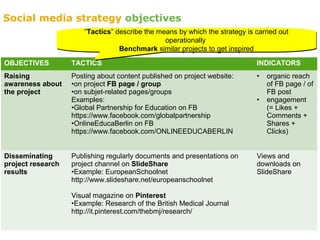
OBJECTIVES TACTICS INDICATORS
Raising
awareness about
the project
Posting about content published on project website:
•on project FB page / group
•on subjet-related pages/groups
Examples:
•Global Partnership for Education on FB
https://www.facebook.com/globalpartnership
•OnlineEducaBerlin on FB
https://www.facebook.com/ONLINEEDUCABERLIN
• organic reach
of FB page / of
FB post
• engagement
(= Likes +
Comments +
Shares +
Clicks)
Disseminating
project research
results
Publishing regularly documents and presentations on
project channel on SlideShare
•Example: EuropeanSchoolnet
http://www.slideshare.net/europeanschoolnet
Visual magazine on Pinterest
•Example: Research of the British Medical Journal
http://it.pinterest.com/thebmj/research/
Views and
downloads on
SlideShare
“Tactics” describe the means by which the strategy is carried out
operationally
Benchmark similar projects to get inspired
“Tactics” describe the means by which the strategy is carried out
operationally
Benchmark similar projects to get inspired
Social media strategy objectives
OBJECTIVES TACTICS INDICATORS
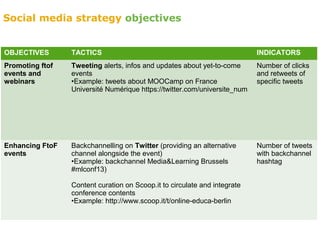
Promoting ftof
events and
webinars
Tweeting alerts, infos and updates about yet-to-come
events
•Example: tweets about MOOCamp on France
Université Numérique https://twitter.com/universite_num
Number of clicks
and retweets of
specific tweets
Enhancing FtoF
events
Backchannelling on Twitter (providing an alternative
channel alongside the event)
•Example: backchannel Media&Learning Brussels
#mlconf13)
Content curation on Scoop.it to circulate and integrate
conference contents
•Example: http://www.scoop.it/t/online-educa-berlin
Number of tweets
with backchannel
hashtag
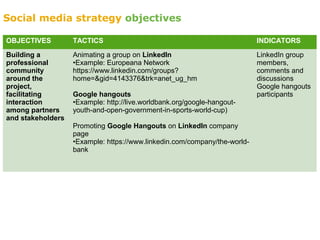
Social media strategy objectives
OBJECTIVES TACTICS INDICATORS
Building a
professional
community
around the
project,
facilitating
interaction
among partners
and stakeholders
Animating a group on LinkedIn
•Example: Europeana Network
https://www.linkedin.com/groups?
home=&gid=4143376&trk=anet_ug_hm
Google hangouts
•Example: http://live.worldbank.org/google-hangout-
youth-and-open-government-in-sports-world-cup)
Promoting Google Hangouts on LinkedIn company
page
•Example: https://www.linkedin.com/company/the-world-
bank
LinkedIn group
members,
comments and
discussions
Google hangouts
participants
Social media strategy objectives
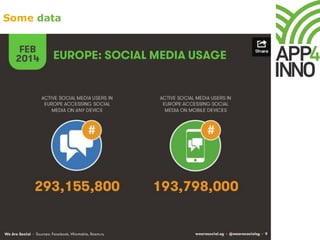
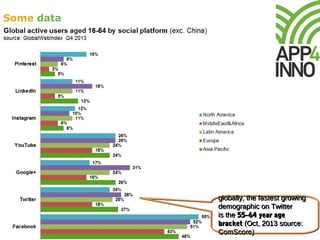
Some data
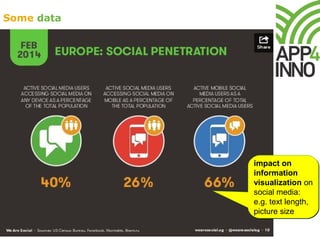
Some data
impact on
information
visualization on
social media:
e.g. text length,
picture size
impact on
information
visualization on
social media:
e.g. text length,
picture size
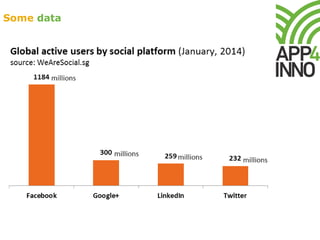
Some data
Some data
globally, the fastest growing
demographic on Twitter
is the 55–64 year age
bracket (Oct, 2013 source:
ComScore)
globally, the fastest growing
demographic on Twitter
is the 55–64 year age
bracket (Oct, 2013 source:
ComScore)
Which tools
?
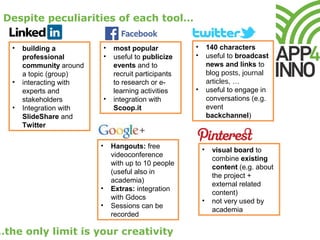
Despite peculiarities of each tool…
…the only limit is your creativity
• building a
professional
community around
a topic (group)
• interacting with
experts and
stakeholders
• Integration with
SlideShare and
Twitter
• most popular
• useful to publicize
events and to
recruit participants
to research or e-
learning activities
• integration with
Scoop.it
• visual board to
combine existing
content (e.g. about
the project +
external related
content)
• not very used by
academia
• Hangouts: free
videoconference
with up to 10 people
(useful also in
academia)
• Extras: integration
with Gdocs
• Sessions can be
recorded
• 140 characters
• useful to broadcast
news and links to
blog posts, journal
articles, …
• useful to engage in
conversations (e.g.
event
backchannel)
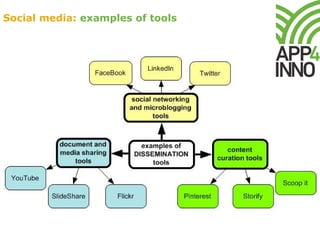
Social media: examples of tools
stability over time
social media landscape is quickly evolving and many free tools either
expire or change their pricing policy;
familiar interface
popular social media provide an interface target users are already
familiar with and signed-up to
account federation
many social media allow to log onto third-party applications with their
existing identity, so that people do not need to sign up separately.
(Popular) social media: advantages
sometimes less is more
maintaining many social media channels for the same project can be too
demanding: sometimes it is better to choose and preside only 2-3
channels
backup of social media content
export features (or custom procedures) that allow backup of social media
content are often lacking or poor: possible loss of materials if the social
media fails
cautious plans for indicators
to set objectives it can be useful to benchmark performances of similar
projects (e.g. project FB group members, Twitter followers, etc.)
internal policy
consider possible internal social media policy and terms of use of each
chosen social media
possibly indelible
contributions of social media users are persistent, which implies that they
are stored for others to view and share, also out of the original context
Social media: caveat
How to increase the
impact on social media
?
Which audience?
In the case of education and research projects, we can
reasonably consider not only:
•teachers
•researchers
•students
…but also other stakeholders, such as:
•academia (universities, research institutions)
•educational and non-educational institutions at local, regional,
national, European, and international level
•policy makers
•media
Tips to increase the impact of social media
Provide connections among dissemination channels
•display social media channels on project home page and on project
leaflet (if any)
•display the other social media channels of the project on each social
media channel
•advertise project social media channels on personal social media profiles
(e.g. LinkedIn, Twitter)
Use keywords, hashtags, and tags to increase content
virality
•upload slides and documents on SlideShare (or other document sharing
tools) to increase virality and circulate the link on the other social profiles
(e.g. FB, LinkedIn,Twitter)
•use hashtags (Twitter) and tags (e.g. SlideShare) consistently: same
spelling, punctuation and capitalisation
•in case of international / EU-funded projects: mind localisation of tags,
hashtags, and keywords
•useful tools to get inspired about the most trendy / effective keywords
and hashtags: Hashtags.org, Ritetag.com, Google Trends, Top
Keywords of SocialMention.com
See also the handbook #1 and #2 of the Web2LLP project
http://web2llp.eu/training
See also the handbook #1 and #2 of the Web2LLP project
http://web2llp.eu/training
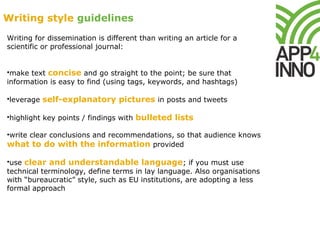
Writing for dissemination is different than writing an article for a
scientific or professional journal:
•make text concise and go straight to the point; be sure that
information is easy to find (using tags, keywords, and hashtags)
•leverage self-explanatory pictures in posts and tweets
•highlight key points / findings with bulleted lists
•write clear conclusions and recommendations, so that audience knows
what to do with the information provided
•use clear and understandable language; if you must use
technical terminology, define terms in lay language. Also organisations
with “bureaucratic” style, such as EU institutions, are adopting a less
formal approach
Writing style guidelines
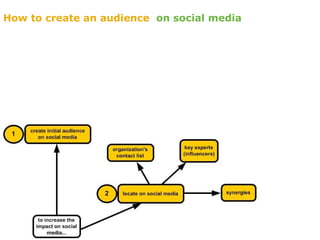
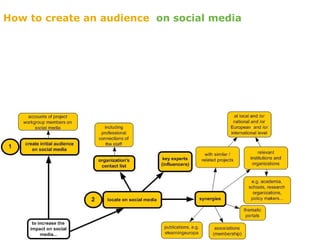
How to create an audience on social media
How to manage
dissemination on social
media
?
Phases of dissemination on social media
Some useful tools
editing and monitoring tools
Hootsuite and Buffer allow to
•schedule posts and Tweets for deferred communication
•post on multiple social media channels at the same time
•monitor the social media channels of the project from a single platform
Klout helps to measure the impact of the social media presence
utility
IFTTT (If This Then That) automates simple tasks, such as automatically
adding new Twitter followers in a Google spreadsheet
Useful links
…
Designing social media strategy for dissemination
http://www.scoop.it/t/social-media-strategy-for-communication-and-dissemination-
of-e-learning-e-collaboration-and-research-projects
Implementing social media strategy: examples and tools
http://www.scoop.it/t/social-media-strategy-examples-and-tools

Social media strategy for communication and dissemination

  • 1.
    SOCIAL MEDIA STRATEGY forcommunication and dissemination Ada Giannatelli, Politecnico di Milano - METID June, 26th, 2014, 11:30 AM CET Disclaimer: due to the continuing development of social media, no guarantee for the accuracy of information over time can be assumed
  • 2.
    Aim of thewebinar To inspire the use of social media to communicate project activities and results (dissemination), with a special focus on education and research context Webinar outline 1.Definitions and context 2.Examples 3.Tools 4.How to increase the impact on social media 5.How to manage dissemination on social media Duration: 1 hour
  • 3.
    Definitions Social media strategy fordissemination websites and applications that enable users to create and share content or to participate in social networking (Oxford dictionary) otherwise known as Web 2.0 tools accessibility also from mobile devices free or (relatively) low cost options websites and applications that enable users to create and share content or to participate in social networking (Oxford dictionary) otherwise known as Web 2.0 tools accessibility also from mobile devices free or (relatively) low cost options action plan aimed at achieving specific objectives action plan aimed at achieving specific objectives making project results available (European Commission) making project results available (European Commission)
  • 4.
    self-explanatory pictures self-explanatory pictures hashtags to increase tweet searchabilityand virality hashtags to increase tweet searchability and virality circulating in- depth content from website circulating in- depth content from website Organisation for Economic Co-operation and Development (OECD) on Twitter
  • 5.
    Online Educa Berlinon Twitter backchannel to enrich the ftof experience backchannel to enrich the ftof experience
  • 6.
    hangoutshangouts promotion of new reportsand content from website promotion of new reports and content from website World Bank on Google+
  • 7.
    promotion of events andnews promotion of events and news live chatslive chats promotion of learning offer (e.g. new MOOCs) promotion of learning offer (e.g. new MOOCs) Open University on FaceBook
  • 8.
    Effective webinars groupon FaceBook community around a EU-funded project (Tempus BLATT project) community around a EU-funded project (Tempus BLATT project)
  • 9.
    Media&Learning conference onLinkedIn professional community around a conference (follow-up, enhancing exchanges among stakeholders) professional community around a conference (follow-up, enhancing exchanges among stakeholders)
  • 10.
  • 11.
    Erasmus Plus groupon LinkedIn professional community around the European Erasmus+ programme professional community around the European Erasmus+ programme
  • 12.
    Open Education Europacompany page on LinkedIn
  • 13.
    disseminating research results witha visual approach disseminating research results with a visual approach British Medical Journal on Pinterest
  • 14.
    OBJECTIVES TACTICS INDICATORS Raising awarenessabout the project Posting about content published on project website: •on project FB page / group •on subjet-related pages/groups Examples: •Global Partnership for Education on FB https://www.facebook.com/globalpartnership •OnlineEducaBerlin on FB https://www.facebook.com/ONLINEEDUCABERLIN • organic reach of FB page / of FB post • engagement (= Likes + Comments + Shares + Clicks) Disseminating project research results Publishing regularly documents and presentations on project channel on SlideShare •Example: EuropeanSchoolnet http://www.slideshare.net/europeanschoolnet Visual magazine on Pinterest •Example: Research of the British Medical Journal http://it.pinterest.com/thebmj/research/ Views and downloads on SlideShare “Tactics” describe the means by which the strategy is carried out operationally Benchmark similar projects to get inspired “Tactics” describe the means by which the strategy is carried out operationally Benchmark similar projects to get inspired Social media strategy objectives
  • 15.
    OBJECTIVES TACTICS INDICATORS Promotingftof events and webinars Tweeting alerts, infos and updates about yet-to-come events •Example: tweets about MOOCamp on France Université Numérique https://twitter.com/universite_num Number of clicks and retweets of specific tweets Enhancing FtoF events Backchannelling on Twitter (providing an alternative channel alongside the event) •Example: backchannel Media&Learning Brussels #mlconf13) Content curation on Scoop.it to circulate and integrate conference contents •Example: http://www.scoop.it/t/online-educa-berlin Number of tweets with backchannel hashtag Social media strategy objectives
  • 16.
    OBJECTIVES TACTICS INDICATORS Buildinga professional community around the project, facilitating interaction among partners and stakeholders Animating a group on LinkedIn •Example: Europeana Network https://www.linkedin.com/groups? home=&gid=4143376&trk=anet_ug_hm Google hangouts •Example: http://live.worldbank.org/google-hangout- youth-and-open-government-in-sports-world-cup) Promoting Google Hangouts on LinkedIn company page •Example: https://www.linkedin.com/company/the-world- bank LinkedIn group members, comments and discussions Google hangouts participants Social media strategy objectives
  • 17.
  • 18.
    Some data impact on information visualizationon social media: e.g. text length, picture size impact on information visualization on social media: e.g. text length, picture size
  • 19.
  • 20.
    Some data globally, thefastest growing demographic on Twitter is the 55–64 year age bracket (Oct, 2013 source: ComScore) globally, the fastest growing demographic on Twitter is the 55–64 year age bracket (Oct, 2013 source: ComScore)
  • 21.
  • 22.
    Despite peculiarities ofeach tool… …the only limit is your creativity • building a professional community around a topic (group) • interacting with experts and stakeholders • Integration with SlideShare and Twitter • most popular • useful to publicize events and to recruit participants to research or e- learning activities • integration with Scoop.it • visual board to combine existing content (e.g. about the project + external related content) • not very used by academia • Hangouts: free videoconference with up to 10 people (useful also in academia) • Extras: integration with Gdocs • Sessions can be recorded • 140 characters • useful to broadcast news and links to blog posts, journal articles, … • useful to engage in conversations (e.g. event backchannel)
  • 23.
  • 24.
    stability over time socialmedia landscape is quickly evolving and many free tools either expire or change their pricing policy; familiar interface popular social media provide an interface target users are already familiar with and signed-up to account federation many social media allow to log onto third-party applications with their existing identity, so that people do not need to sign up separately. (Popular) social media: advantages
  • 25.
    sometimes less ismore maintaining many social media channels for the same project can be too demanding: sometimes it is better to choose and preside only 2-3 channels backup of social media content export features (or custom procedures) that allow backup of social media content are often lacking or poor: possible loss of materials if the social media fails cautious plans for indicators to set objectives it can be useful to benchmark performances of similar projects (e.g. project FB group members, Twitter followers, etc.) internal policy consider possible internal social media policy and terms of use of each chosen social media possibly indelible contributions of social media users are persistent, which implies that they are stored for others to view and share, also out of the original context Social media: caveat
  • 26.
    How to increasethe impact on social media ?
  • 27.
    Which audience? In thecase of education and research projects, we can reasonably consider not only: •teachers •researchers •students …but also other stakeholders, such as: •academia (universities, research institutions) •educational and non-educational institutions at local, regional, national, European, and international level •policy makers •media
  • 28.
    Tips to increasethe impact of social media Provide connections among dissemination channels •display social media channels on project home page and on project leaflet (if any) •display the other social media channels of the project on each social media channel •advertise project social media channels on personal social media profiles (e.g. LinkedIn, Twitter) Use keywords, hashtags, and tags to increase content virality •upload slides and documents on SlideShare (or other document sharing tools) to increase virality and circulate the link on the other social profiles (e.g. FB, LinkedIn,Twitter) •use hashtags (Twitter) and tags (e.g. SlideShare) consistently: same spelling, punctuation and capitalisation •in case of international / EU-funded projects: mind localisation of tags, hashtags, and keywords •useful tools to get inspired about the most trendy / effective keywords and hashtags: Hashtags.org, Ritetag.com, Google Trends, Top Keywords of SocialMention.com See also the handbook #1 and #2 of the Web2LLP project http://web2llp.eu/training See also the handbook #1 and #2 of the Web2LLP project http://web2llp.eu/training
  • 29.
    Writing for disseminationis different than writing an article for a scientific or professional journal: •make text concise and go straight to the point; be sure that information is easy to find (using tags, keywords, and hashtags) •leverage self-explanatory pictures in posts and tweets •highlight key points / findings with bulleted lists •write clear conclusions and recommendations, so that audience knows what to do with the information provided •use clear and understandable language; if you must use technical terminology, define terms in lay language. Also organisations with “bureaucratic” style, such as EU institutions, are adopting a less formal approach Writing style guidelines
  • 30.
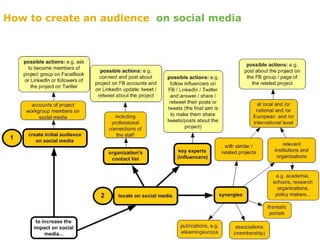
    How to createan audience on social media
  • 31.
    How to createan audience on social media
  • 32.
    How to createan audience on social media
  • 33.
    How to manage disseminationon social media ?
  • 34.
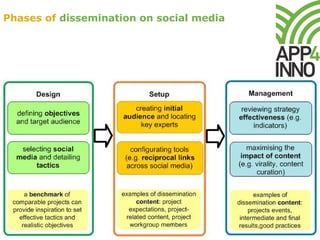
    Phases of disseminationon social media
  • 35.
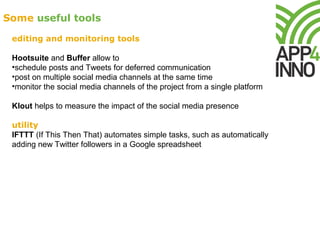
    Some useful tools editingand monitoring tools Hootsuite and Buffer allow to •schedule posts and Tweets for deferred communication •post on multiple social media channels at the same time •monitor the social media channels of the project from a single platform Klout helps to measure the impact of the social media presence utility IFTTT (If This Then That) automates simple tasks, such as automatically adding new Twitter followers in a Google spreadsheet
  • 36.
  • 37.
    Designing social mediastrategy for dissemination http://www.scoop.it/t/social-media-strategy-for-communication-and-dissemination- of-e-learning-e-collaboration-and-research-projects Implementing social media strategy: examples and tools http://www.scoop.it/t/social-media-strategy-examples-and-tools

Editor's Notes

  • #4 Interactivity allows to overcome the traditional approach of dissemination, where usual websites and paper products such as leaflets and factsheets enable a one-way with stakeholders
  • #5 https://twitter.com/OECD/status/464714646088605696
  • #6 https://twitter.com/search?q=%23OEB13&src=typd Backchannelling on Twitter (providing an alternative channel alongside the event)
  • #7 https://plus.google.com/+WorldBank/posts
  • #8 https://www.facebook.com/theopenuniversity
  • #9 https://www.facebook.com/groups/230337750465944/ 233 members
  • #10 https://www.linkedin.com/groups/Media-Learning-3960155 1910 members LinkedIn’s niche is business, and content is related to professional topics. A community may be defined as a group of individuals sharing common interests or purposes
  • #11 https://www.linkedin.com/groups?viewMembers=&gid=138953&sik=1403510251092 50,812 members
  • #12 1,113 members https://www.linkedin.com/groups/ERASMUS-PLUS-2014-2020-5103487
  • #13 https://www.linkedin.com/company/openeducationeuropa 1,160 followers
  • #14 «Visual magazine» http://www.pinterest.com/thebmj/research/
  • #15 Benchmark similar projects to find out the ways in which they engage with their target groups online Indicators are information that allow to assess the effectiveness of the dissemination on a specific social media channel, with special reference to engagement of target audience with content. Engagement goes beyond how many people see the posts / tweets of the project, as it reflects project’s ability to capture users’ attention and to create interactions and connections with its content. FaceBook Organic reach: the number of unique people who saw your content in their News Feeds, tickers, or on your Page. It’s a more accurate measure of your Facebook audience than fans, since not all your fans see your posts and many users who do see your posts are not fans of your Page. It’s a more accurate measure than impressions, that measure the times a content has been displayed (also by the same person) It can be measured for the whole page and for each post Engagement refers to unique visitors that Liked, Commented on, Shared, Clicked on the page, or on each post It can be measured for the whole page and for each post
  • #23 Facebook Facebook Timeline integration with Scoop.it: Facebook Timeline will be automatically updated in real time whenever you curate new content (to boost the impact of your curation) LinkedIn Useful to keep and establish new professional connections. LinkedIn allows you to embed your tweets and presentations on SlideShare in your LinkedIn Profile Twitter Useful for academia, as it enables to share links to articles, etc. Twitter can also be used as an additional communication channel (backchannel) at face to face events, such as conferences and workshops. Adding a specific hashtag identifying the event to their tweets, anyone can run a Twitter search to review all the backchannel tweets related to that event. When you tweet a link to Storify stories, your followers will see an interactive slideshow preview of the story Pinterest Useful also for procedures and DIY
  • #24 Social networking = establishing many-to-many connections for the purposes of sharing information Content curation tools= allow to create new meaning by combining existing content with a new perspective. Content curation tools are relatively new to dissemination and provide users with a “board” interface where they can exhibit, categorize, and share content related to the project and / or found on the web. Storify can be useful to archive tweets from a backchannel
  • #31 The first step to creating your network is involving your partners, asking them to share all the project channels and updates with their own connections. Use shared connections to expand your network. Look at your connections on LinkedIn and FaceBook to find further relevant groups and / or pages where to post. Share value-added information you shared by those within your network with others in your network. That helps you establish relationships with those whose information you are sharing. Leverage social media not only as an information channel for your project, but also to spread information about similar topics, initiatives and projects that may interest your audience. Commenting on what others say and share helps establish relationships with others. See social media channels on social media to discover relevant groups to include into dissemination
  • #36 In case a project has more than one social media channel, editing and monitoring tools, such as Hootsuite and Buffer, can be very useful, as they allow to post (also setting times for deferred communication) and to monitor (including specific interactions with project content, such as new followers, retweets, likes, etc. with e-mail notification) the social media channels of the project from a single platform. Remember that conveying the same type of information across all your communication channels as a standard communication strategy is not recommended. Data from monitoring tools should be integrated with data from GoogleAnalytics about project website (e.g. where site visitors are coming from). Google Analytics (http://www.google.com/analytics/) tracks referrals from the company’s social media profiles. Klout (http://klout.com/) tracks the impact of your posted content and links, including which audiences are exposed to the content and how they interact with it. IFTTT (If This Then That) can integrate activities on social media editing tools automating simple tasks, such as automatically adding new Twitter followers in a Google spreadsheet