Mendeley
 Allan Parsons
What Is Mendeley?
At the level of the bibliographic entity…

Mendeley is a bibliographic management
tool, enabling you:

• to cite a text
• to create a bibliography of citations
• to ‘write and cite’ (integrate with Word)
What Is Mendeley?
At the level of the text…

Mendeley is a concept management
tool, enabling you:

• to filter textual content (using tags)
• to search textual content
• to collate texts for literature search
What Is Mendeley?
At the level of the text collection…

Mendeley is an information management and
knowledge management tool, enabling you:

• to organise a collection of texts (Tags)
• to classify sub-collections (Groups and
  Folders)
What Is Mendeley?

At the level of the database…

Mendeley forms a research database,
enabling you:

• to search the collective, crowd-sourced
  database
• to join groups and benefit from others’
  collections
What Is Mendeley?
At the level of the network…

Mendeley is a professional social
network, enabling you:

• to find other researchers with
  similar interests
• to collaborate with other
  researchers
What Is Mendeley?
As an element in your relational,
professional identity…

Mendeley can be integrated with,
for example,

•   Academia.edu
•   ResearchGate
•   LinkedIn
•   Facebook
Step 1: Join Mendeley Online
      Name and Email
Step 1: Join Mendeley Online
  Password and Download
Step 2: Create a Profile
Step 3: Start Collecting
•   Bookmarks toolbar
•   Direct from database
•   Download PDF, drag and drop
•   Download PDF, add file
•   Download PDF, watch folder
•   Transfer existing collection
•   Manually add record
Step 3: Start Collecting
  Bookmarks toolbar
Step 3: Start Collecting
 Direct from database


        Click on database name
Step 3: Start Collecting
Conduct search and click on Abstract
Step 3: Start Collecting
Click on Mendeley icon
Step 3: Start Collecting
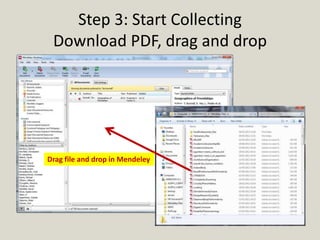
 Download PDF, drag and drop


Drag file and drop in Mendeley
Step 3: Start Collecting
               Download PDF, add files


Click on File, then Add Files, then select files
Step 3: Start Collecting
           Download PDF, watch folder
Click on File, then Watch folder, then select folder from list
Step 4: Bibliographic Management
      Set bibliographic style


 Click on View, click on Citation Style, then select preferred style
Step 4: Bibliographic Management
     Edit bibliographic record


   Match details from PDF text to
   fields in bibliographic record,
   correcting where necessary
Step 5: Information Management
             Add tags
Step 5: Information Management
    Check consistency of tags
Step 6: Synchronise desktop and web
Step 7: Create Group
    Desktop


               Online
Step 8: Join Group
Step 9: Mendeley Suggest
Step 10: Write and Cite Add-on


Click on Tools, then click on Install MS Word Plugin

Introduction to Mendeley

  • 1.
  • 2.
    What Is Mendeley? Atthe level of the bibliographic entity… Mendeley is a bibliographic management tool, enabling you: • to cite a text • to create a bibliography of citations • to ‘write and cite’ (integrate with Word)
  • 3.
    What Is Mendeley? Atthe level of the text… Mendeley is a concept management tool, enabling you: • to filter textual content (using tags) • to search textual content • to collate texts for literature search
  • 4.
    What Is Mendeley? Atthe level of the text collection… Mendeley is an information management and knowledge management tool, enabling you: • to organise a collection of texts (Tags) • to classify sub-collections (Groups and Folders)
  • 5.
    What Is Mendeley? Atthe level of the database… Mendeley forms a research database, enabling you: • to search the collective, crowd-sourced database • to join groups and benefit from others’ collections
  • 6.
    What Is Mendeley? Atthe level of the network… Mendeley is a professional social network, enabling you: • to find other researchers with similar interests • to collaborate with other researchers
  • 7.
    What Is Mendeley? Asan element in your relational, professional identity… Mendeley can be integrated with, for example, • Academia.edu • ResearchGate • LinkedIn • Facebook
  • 8.
    Step 1: JoinMendeley Online
  • 9.
    Step 1: JoinMendeley Online Name and Email
  • 10.
    Step 1: JoinMendeley Online Password and Download
  • 11.
    Step 2: Createa Profile
  • 12.
    Step 2: Createa Profile
  • 13.
    Step 3: StartCollecting • Bookmarks toolbar • Direct from database • Download PDF, drag and drop • Download PDF, add file • Download PDF, watch folder • Transfer existing collection • Manually add record
  • 14.
    Step 3: StartCollecting Bookmarks toolbar
  • 15.
    Step 3: StartCollecting Direct from database Click on database name
  • 16.
    Step 3: StartCollecting Conduct search and click on Abstract
  • 17.
    Step 3: StartCollecting Click on Mendeley icon
  • 18.
    Step 3: StartCollecting Download PDF, drag and drop Drag file and drop in Mendeley
  • 19.
    Step 3: StartCollecting Download PDF, add files Click on File, then Add Files, then select files
  • 20.
    Step 3: StartCollecting Download PDF, watch folder Click on File, then Watch folder, then select folder from list
  • 21.
    Step 4: BibliographicManagement Set bibliographic style Click on View, click on Citation Style, then select preferred style
  • 22.
    Step 4: BibliographicManagement Edit bibliographic record Match details from PDF text to fields in bibliographic record, correcting where necessary
  • 23.
    Step 5: InformationManagement Add tags
  • 24.
    Step 5: InformationManagement Check consistency of tags
  • 25.
    Step 6: Synchronisedesktop and web
  • 26.
    Step 7: CreateGroup Desktop Online
  • 27.
  • 28.
  • 29.
    Step 10: Writeand Cite Add-on Click on Tools, then click on Install MS Word Plugin