MEMORYMEMORY
RAM – RANDOM ACCESS MEMORY
• RAM-the primary memory of a computer:
it stores the programs and data while they
are being processed
• There are different types but each kind can
be ACCESSED (read or written) directly by
the CPU in a very short time regardless of
the sequence (RANDOM ACCESS
MEMORY) in which they were recorded..
RAM CONT’D
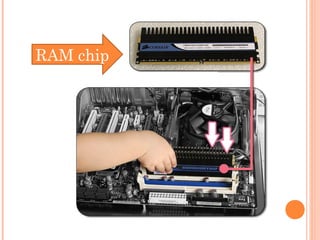
 RAM is made up of small memory chips on
the motherboard of your computer.
 Every time you open a program, it gets
loaded from the hard drive into the RAM.
RAM chip
RAM CONT’D
 Running programs from the RAM of the
computer allows them to function without any
lag time. The more RAM your computer has, the
more data can be loaded from the hard drive into
the RAM, which can effectively speed up your
computer.
 To check how much RAM a Windows computer
has, open the "System" Control Panel. This can
be done by right-clicking "My Computer" and
selecting "Properties..."
CACHE
 Cache is primary memory that holds a copy of the
most recently accessed and the most likely to be
accessed data.
 Why does it hold this kind of data?
 So that the CPU can access the data and instructions
needed faster.
compared to R.A.M.,
cache is smaller and
faster
ROM – READ ONLY MEMORY
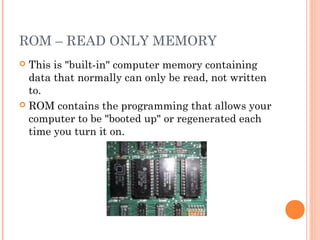
 This is "built-in" computer memory containing
data that normally can only be read, not written
to.
 ROM contains the programming that allows your
computer to be "booted up" or regenerated each
time you turn it on.
ROM CONT’D
 Unlike a computer's random access memory
(RAM), the data in ROM is not lost when the
computer power is turned off.
 The ROM is sustained by a small long-life
battery in your computer.
PROM – PROGRAMMABLE ROM
 This is a form of digital memory that can be
programmed only once.
 Such PROMs are used to store programs
permanently.
 The key difference from a strict ROM is that the
programming is applied after the device is
constructed.
EPROM
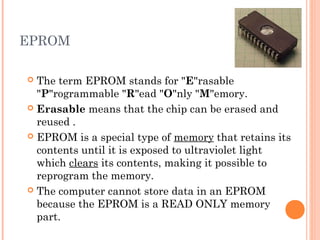
 The term EPROM stands for "E"rasable
"P"rogrammable "R"ead "O"nly "M"emory.
 Erasable means that the chip can be erased and
reused .
 EPROM is a special type of memory that retains its
contents until it is exposed to ultraviolet light
which clears its contents, making it possible to
reprogram the memory.
 The computer cannot store data in an EPROM
because the EPROM is a READ ONLY memory
part.
EPROM CONT’D
 In short, the EPROM is a memory part which
will not forget its program or data when power is
removed. It must be programmed by a special
programming product
 Once the EPROM is programmed it cannot be
changed until it is erased in an EPROM eraser
and then reprogrammed in a programmer.
 An EPROM differs from a PROM in that a
PROM can be written to only once and cannot be
erased.
EEPROM
 Stands for Electrically Erasable Programmable Read-
Only Memory
 Is a rewritable memory chip that can be erased and
reprogrammed (written to) repeatedly through the
application of higher than normal electrical voltage.
 Unlike EPROM chips, EEPROMs do not need to be
removed from the computer to be modified. It also has
a limited life - that is, the number of times it can be
reprogrammed is limited to tens or hundreds of
thousands of times.
 EEPROMs are bit or byte addressable at the write
level, which means either the bit or byte must be
erased before it can be re-written.
BISTABLE
 An electronic device or circuit that can assume
either of two stable states (ON or OFF) by
applying an electric pulse
 Hence, all these memory devices are examples of
bistable devices!!
FURTHER READING:
• Log On to IT for CSEC, pg 26
• Discovering Computers, pg 197

Memory

  • 1.
  • 2.
    RAM – RANDOMACCESS MEMORY • RAM-the primary memory of a computer: it stores the programs and data while they are being processed • There are different types but each kind can be ACCESSED (read or written) directly by the CPU in a very short time regardless of the sequence (RANDOM ACCESS MEMORY) in which they were recorded..
  • 3.
    RAM CONT’D  RAMis made up of small memory chips on the motherboard of your computer.  Every time you open a program, it gets loaded from the hard drive into the RAM.
  • 4.
  • 5.
    RAM CONT’D  Runningprograms from the RAM of the computer allows them to function without any lag time. The more RAM your computer has, the more data can be loaded from the hard drive into the RAM, which can effectively speed up your computer.  To check how much RAM a Windows computer has, open the "System" Control Panel. This can be done by right-clicking "My Computer" and selecting "Properties..."
  • 6.
    CACHE  Cache isprimary memory that holds a copy of the most recently accessed and the most likely to be accessed data.  Why does it hold this kind of data?  So that the CPU can access the data and instructions needed faster. compared to R.A.M., cache is smaller and faster
  • 7.
    ROM – READONLY MEMORY  This is "built-in" computer memory containing data that normally can only be read, not written to.  ROM contains the programming that allows your computer to be "booted up" or regenerated each time you turn it on.
  • 8.
    ROM CONT’D  Unlikea computer's random access memory (RAM), the data in ROM is not lost when the computer power is turned off.  The ROM is sustained by a small long-life battery in your computer.
  • 9.
    PROM – PROGRAMMABLEROM  This is a form of digital memory that can be programmed only once.  Such PROMs are used to store programs permanently.  The key difference from a strict ROM is that the programming is applied after the device is constructed.
  • 10.
    EPROM  The termEPROM stands for "E"rasable "P"rogrammable "R"ead "O"nly "M"emory.  Erasable means that the chip can be erased and reused .  EPROM is a special type of memory that retains its contents until it is exposed to ultraviolet light which clears its contents, making it possible to reprogram the memory.  The computer cannot store data in an EPROM because the EPROM is a READ ONLY memory part.
  • 11.
    EPROM CONT’D  Inshort, the EPROM is a memory part which will not forget its program or data when power is removed. It must be programmed by a special programming product  Once the EPROM is programmed it cannot be changed until it is erased in an EPROM eraser and then reprogrammed in a programmer.  An EPROM differs from a PROM in that a PROM can be written to only once and cannot be erased.
  • 12.
    EEPROM  Stands forElectrically Erasable Programmable Read- Only Memory  Is a rewritable memory chip that can be erased and reprogrammed (written to) repeatedly through the application of higher than normal electrical voltage.  Unlike EPROM chips, EEPROMs do not need to be removed from the computer to be modified. It also has a limited life - that is, the number of times it can be reprogrammed is limited to tens or hundreds of thousands of times.  EEPROMs are bit or byte addressable at the write level, which means either the bit or byte must be erased before it can be re-written.
  • 13.
    BISTABLE  An electronicdevice or circuit that can assume either of two stable states (ON or OFF) by applying an electric pulse  Hence, all these memory devices are examples of bistable devices!!
  • 14.
    FURTHER READING: • LogOn to IT for CSEC, pg 26 • Discovering Computers, pg 197