Analysing Print & E-Media
A-Level Media
In this lesson we will…
• Go through your mock exam feedback and set
targets for improvement
• Review processes and terms for analysing print
and e-media products (take notes!)
• Apply process and terms to 2 examples
• Apply process and terms to your own examples
Mock Exam Feedback
Section A:
• Have a structure for your note taking during viewings
• Underline key points in questions and supporting text
• Use supporting text and reference in your responses
• Make detailed reference to the micro features (this was
a major issue and lost a lot of people a lot of marks)
• Don't repeat the same point over and over - move on
• Make sure you discuss logos and text when looking at
brand values
Mock Exam Feedback
• Section B:
• Answer the question - refer back to it throughout (most people
were just describing their case studies - the better responses
answered the actual question)
• Consider audience response
• Try and have a balanced approach - what are some of the
limitations of your products?
• Don’t worry a lot of this can be fixed by simply reworking your
approach to analysis
• Create mind maps for Section B responses – use questions from the
list that you were emailed
MEST 1 - Form
• Mark Scheme from June 2012 (MoneyBART)
• Level 4 (10-12 marks)
• Thorough knowledge and understanding of a
wide range of ways media language is used
to draw the audience in, demonstrated by
detailed reference to the text and confident
use of media terminology.
Remember….semiotics!
• The signifier is…
• The signified is…
• The denotation is…
• The connotation is…
• You are being asked to make observations about
the KEY MESSAGES from the text
• Highlight specific SIGNS from the text that
communicate meaning
Print Terms
• Masthead
• Headline
• Dateline
• Sub Head
• By Line
• Columns
• Copy
• Slogans and taglines
• Also consider, sponsorship/adverts
E-Media Terms
• Navigation Bar
• Sidebar
• Hyperlinks
• Banners
• Headers
• Footers
• Boxes
• Animations
• Sliders
• Links to social media should also be considered
Codes
• Technical
• MuSCLE / Print & E-Media specific terms
• Denotation
• Symbolic
• Connotation
• Body language
• Appearance
• Intertextual references
• Written
• Headlines
• Captions
• Typography
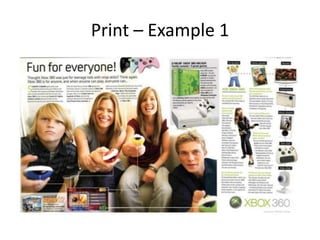
Print – Example 1
Question
• How does the advertisement imitate the
layout of a magazine cover?
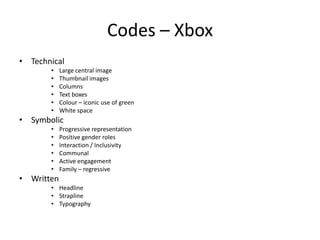
Codes – Xbox
• Technical
• Large central image
• Thumbnail images
• Columns
• Text boxes
• Colour – iconic use of green
• White space
• Symbolic
• Progressive representation
• Positive gender roles
• Interaction / Inclusivity
• Communal
• Active engagement
• Family – regressive
• Written
• Headline
• Strapline
• Typography
Print – Example 2
Question
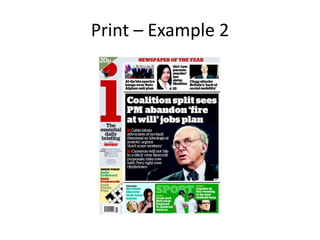
• How is the front page designed to attract
potential readers?
Codes – i Newspaper
• Technical
• Use of colour images
• Large CU image
• Red top ‘I’
• Graphics
• Symbolic
• Webpage layout
• Left wing ideologies
• Written
• Headline
• Strapline
• Typography
• Use of colour copy
E-Media – Example 1
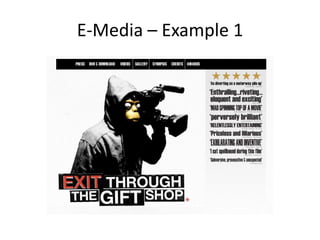
Codes – Exit Through the Giftshop
• Technical
• Captivating central image
• Hoodie – symbol of youth
• Monkey – Banksy (mid shot)
• Camera – ‘real’
• Colour – black and red
• White space
• Symbolic
• Urban image
• Monkey – primitive/anarchic
• Graffiti
• Media – camera
• Space – canvas
• Written
• ‘Exit Through the Giftshop’ – comment on consumerist culture
• Awards – critical acclaim
• Typography – ransom style (anonymous/anarchic)
• DVD release – distribution
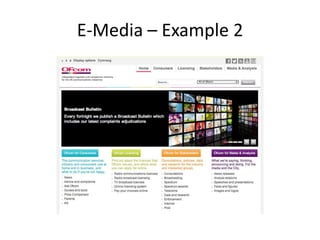
E-Media – Example 2
Codes –Ofcom
• Technical
• Lack of images
• Multi coloured
• Ofcom – testcard logo
• Boxes for each stakeholder
• Very linear structure
• Publishes broadcast – latest adjudications
• Social Media Icons – top right
• Symbolic
• Official organisation
• Independent – impartial
• Formal
• Written
• Also available in Welsh – inclusivity
• Display options – inclusivity
• Anchorage – text describes responsibilities
• Official and formal language – ‘consumers’ & ‘stakeholders’
Task
• Choose a newspaper – any newspaper
• Choose a website – any website
• Analyse using the structure outlined
• Present back in small groups
When analysing form…
• Plan
• Make specific references to the text
• Use the supporting text
• Use the structure (technical, symbolic, written)
• Use technical language

Media print &e media

  • 1.
    Analysing Print &E-Media A-Level Media
  • 2.
    In this lessonwe will… • Go through your mock exam feedback and set targets for improvement • Review processes and terms for analysing print and e-media products (take notes!) • Apply process and terms to 2 examples • Apply process and terms to your own examples
  • 3.
    Mock Exam Feedback SectionA: • Have a structure for your note taking during viewings • Underline key points in questions and supporting text • Use supporting text and reference in your responses • Make detailed reference to the micro features (this was a major issue and lost a lot of people a lot of marks) • Don't repeat the same point over and over - move on • Make sure you discuss logos and text when looking at brand values
  • 4.
    Mock Exam Feedback •Section B: • Answer the question - refer back to it throughout (most people were just describing their case studies - the better responses answered the actual question) • Consider audience response • Try and have a balanced approach - what are some of the limitations of your products? • Don’t worry a lot of this can be fixed by simply reworking your approach to analysis • Create mind maps for Section B responses – use questions from the list that you were emailed
  • 5.
    MEST 1 -Form • Mark Scheme from June 2012 (MoneyBART) • Level 4 (10-12 marks) • Thorough knowledge and understanding of a wide range of ways media language is used to draw the audience in, demonstrated by detailed reference to the text and confident use of media terminology.
  • 6.
    Remember….semiotics! • The signifieris… • The signified is… • The denotation is… • The connotation is… • You are being asked to make observations about the KEY MESSAGES from the text • Highlight specific SIGNS from the text that communicate meaning
  • 7.
    Print Terms • Masthead •Headline • Dateline • Sub Head • By Line • Columns • Copy • Slogans and taglines • Also consider, sponsorship/adverts
  • 8.
    E-Media Terms • NavigationBar • Sidebar • Hyperlinks • Banners • Headers • Footers • Boxes • Animations • Sliders • Links to social media should also be considered
  • 9.
    Codes • Technical • MuSCLE/ Print & E-Media specific terms • Denotation • Symbolic • Connotation • Body language • Appearance • Intertextual references • Written • Headlines • Captions • Typography
  • 10.
  • 11.
    Question • How doesthe advertisement imitate the layout of a magazine cover?
  • 12.
    Codes – Xbox •Technical • Large central image • Thumbnail images • Columns • Text boxes • Colour – iconic use of green • White space • Symbolic • Progressive representation • Positive gender roles • Interaction / Inclusivity • Communal • Active engagement • Family – regressive • Written • Headline • Strapline • Typography
  • 13.
  • 14.
    Question • How isthe front page designed to attract potential readers?
  • 15.
    Codes – iNewspaper • Technical • Use of colour images • Large CU image • Red top ‘I’ • Graphics • Symbolic • Webpage layout • Left wing ideologies • Written • Headline • Strapline • Typography • Use of colour copy
  • 16.
  • 17.
    Codes – ExitThrough the Giftshop • Technical • Captivating central image • Hoodie – symbol of youth • Monkey – Banksy (mid shot) • Camera – ‘real’ • Colour – black and red • White space • Symbolic • Urban image • Monkey – primitive/anarchic • Graffiti • Media – camera • Space – canvas • Written • ‘Exit Through the Giftshop’ – comment on consumerist culture • Awards – critical acclaim • Typography – ransom style (anonymous/anarchic) • DVD release – distribution
  • 18.
  • 19.
    Codes –Ofcom • Technical •Lack of images • Multi coloured • Ofcom – testcard logo • Boxes for each stakeholder • Very linear structure • Publishes broadcast – latest adjudications • Social Media Icons – top right • Symbolic • Official organisation • Independent – impartial • Formal • Written • Also available in Welsh – inclusivity • Display options – inclusivity • Anchorage – text describes responsibilities • Official and formal language – ‘consumers’ & ‘stakeholders’
  • 20.
    Task • Choose anewspaper – any newspaper • Choose a website – any website • Analyse using the structure outlined • Present back in small groups
  • 21.
    When analysing form… •Plan • Make specific references to the text • Use the supporting text • Use the structure (technical, symbolic, written) • Use technical language