MEDIA 
CAMERA ANGLES
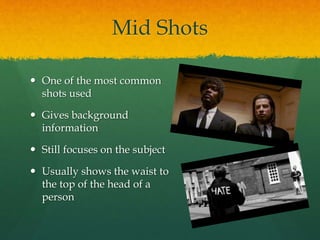
Mid Shots 
 One of the most common 
shots used 
 Gives background 
information 
 Still focuses on the subject 
 Usually shows the waist to 
the top of the head of a 
person
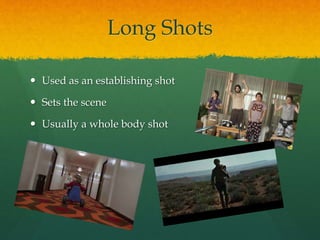
Long Shots 
 Used as an establishing shot 
 Sets the scene 
 Usually a whole body shot
Close Ups 
 Focuses on the detail of the object or 
person 
 Shows expressions and reactions 
 Usually just the head but sometimes 
includes the shoulders 
 Reveals thoughts and feelings 
 Sometimes gets closer as more truth 
is revealed
Extreme Close Ups (ECU) 
 Small part of the body or object 
shown (often lips/eyes) 
 Emphasises significance 
 Makes small things look larger 
 Audience focuses on one thing
Wide Shots 
 Use a wide angle lens 
 Gives visual information 
 Sets the scene
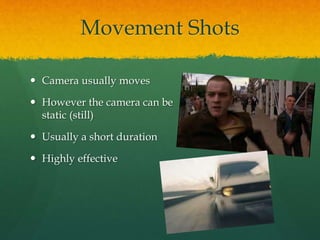
Movement Shots 
 Camera usually moves 
 However the camera can be 
static (still) 
 Usually a short duration 
 Highly effective
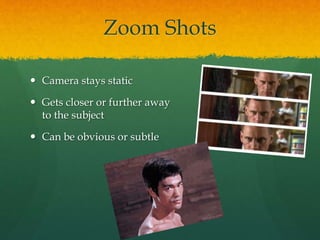
Zoom Shots 
 Camera stays static 
 Gets closer or further away 
to the subject 
 Can be obvious or subtle
Pan Shots 
 Camera moves horizontally 
 Stays static 
 Shows a large amount of 
scenery
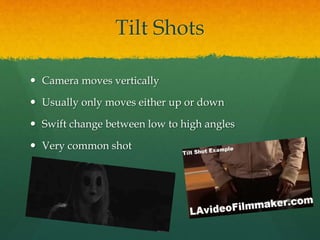
Tilt Shots 
 Camera moves vertically 
 Usually only moves either up or down 
 Swift change between low to high angles 
 Very common shot
Tracking Shots 
 The entire camera moves 
 Mounted on a dolly
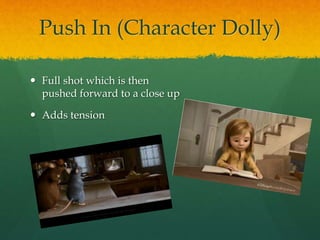
Push In (Character Dolly) 
 Full shot which is then 
pushed forward to a close up 
 Adds tension
Pull Back Reveal Shots 
 Camera focuses on one thing then 
moves back
Expand Dolly Shots 
 Camera follows character as they 
move away 
 The actor/actress moves faster 
than the dolly 
 Creates distance between the 
characters/audience
Contract Dolly Shots 
 Camera moves forward as the 
actor/actress does 
 Makes a simple action seem 
more dramatic 
 A variation could have the 
character move toward the 
camera while the camera pans 
up, revealing the subject
Crane Shots 
 Camera is suspended using a 
mechanical arm/crane 
 Not lifted very high 
 Camera shots become more 
flexible 
 Dramatic shot that can simulate 
flying/swooping
Aerial Shots 
 Camera on a helicopter/ plane 
 Gives a birds eye view of the 
action 
 Extremely long distance
Handheld Shots 
 Camera is not mounted on a 
stable structure 
 Held by a person 
 Gives a bumpy/jolty look 
 Often used for POV shots
Eye Level/Straight On 
Angle 
 Gives a real life effect 
 Same level as the subject 
 Makes the audience feel 
involved
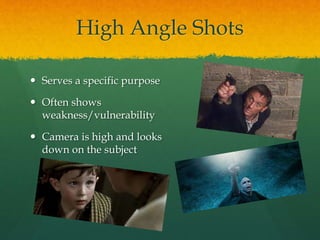
High Angle Shots 
 Serves a specific purpose 
 Often shows 
weakness/vulnerability 
 Camera is high and looks 
down on the subject
Low Angle Shots 
 Creates a feel of intimidation 
for other characters/the 
audience 
 Very common shot
Point Of View (POV) Shots 
 1st person perspective 
 Lets the audience into the 
mind of the character 
 Only see what the character 
would see
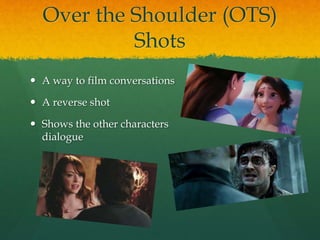
Over the Shoulder (OTS) 
Shots 
 A way to film conversations 
 A reverse shot 
 Shows the other characters 
dialogue
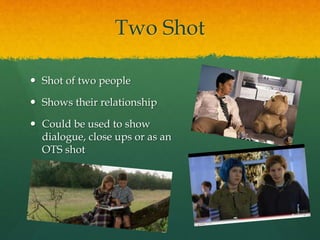
Two Shot 
 Shot of two people 
 Shows their relationship 
 Could be used to show 
dialogue, close ups or as an 
OTS shot
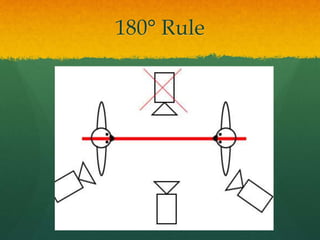
180° Rule
Rule of Thirds

Media camera angles presentation

  • 1.
  • 2.
    Mid Shots One of the most common shots used  Gives background information  Still focuses on the subject  Usually shows the waist to the top of the head of a person
  • 3.
    Long Shots Used as an establishing shot  Sets the scene  Usually a whole body shot
  • 4.
    Close Ups Focuses on the detail of the object or person  Shows expressions and reactions  Usually just the head but sometimes includes the shoulders  Reveals thoughts and feelings  Sometimes gets closer as more truth is revealed
  • 5.
    Extreme Close Ups(ECU)  Small part of the body or object shown (often lips/eyes)  Emphasises significance  Makes small things look larger  Audience focuses on one thing
  • 6.
    Wide Shots Use a wide angle lens  Gives visual information  Sets the scene
  • 7.
    Movement Shots Camera usually moves  However the camera can be static (still)  Usually a short duration  Highly effective
  • 8.
    Zoom Shots Camera stays static  Gets closer or further away to the subject  Can be obvious or subtle
  • 9.
    Pan Shots Camera moves horizontally  Stays static  Shows a large amount of scenery
  • 10.
    Tilt Shots Camera moves vertically  Usually only moves either up or down  Swift change between low to high angles  Very common shot
  • 11.
    Tracking Shots The entire camera moves  Mounted on a dolly
  • 12.
    Push In (CharacterDolly)  Full shot which is then pushed forward to a close up  Adds tension
  • 13.
    Pull Back RevealShots  Camera focuses on one thing then moves back
  • 14.
    Expand Dolly Shots  Camera follows character as they move away  The actor/actress moves faster than the dolly  Creates distance between the characters/audience
  • 15.
    Contract Dolly Shots  Camera moves forward as the actor/actress does  Makes a simple action seem more dramatic  A variation could have the character move toward the camera while the camera pans up, revealing the subject
  • 16.
    Crane Shots Camera is suspended using a mechanical arm/crane  Not lifted very high  Camera shots become more flexible  Dramatic shot that can simulate flying/swooping
  • 17.
    Aerial Shots Camera on a helicopter/ plane  Gives a birds eye view of the action  Extremely long distance
  • 18.
    Handheld Shots Camera is not mounted on a stable structure  Held by a person  Gives a bumpy/jolty look  Often used for POV shots
  • 19.
    Eye Level/Straight On Angle  Gives a real life effect  Same level as the subject  Makes the audience feel involved
  • 20.
    High Angle Shots  Serves a specific purpose  Often shows weakness/vulnerability  Camera is high and looks down on the subject
  • 21.
    Low Angle Shots  Creates a feel of intimidation for other characters/the audience  Very common shot
  • 22.
    Point Of View(POV) Shots  1st person perspective  Lets the audience into the mind of the character  Only see what the character would see
  • 23.
    Over the Shoulder(OTS) Shots  A way to film conversations  A reverse shot  Shows the other characters dialogue
  • 24.
    Two Shot Shot of two people  Shows their relationship  Could be used to show dialogue, close ups or as an OTS shot
  • 25.
  • 26.