




Internet Safety, Ethics &
Netiquette
Media and Information Literacy 104
Marvin Broñoso
ICT Coordinator / Mentor
Olongapo City, Philippines
What is Phishing?
What are somethings that you can do to avoid
being caught by Phishing scam?
What is AUP?
What are the six key element of AUP?
What is Netiquette?
What are the core rules of netiquettes?
Key Topics
 PHISHING
 AUP
 NETIQUETTE
PHISING
is a type of online scam where criminals create
a website or send an email that appears to be
from a legitimate company or group asking you
to provide sensitive and private information.
This is usually done by including a link that
supposedly takes you to the company’s website
where you are asked to fill in your information –
but the website is a clever fake and the
information you provide goes straight to the
crooks behind the scam.
PHISING
Phishing is a scam used by
identity thieves to trick you into
providing your sensitive
personal or financial
information
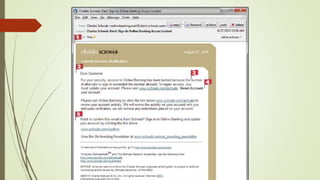
ONLINE SCAM INDICATIONS
1. The email is not addressed to
the recipient. If the recipient was
truly being notified by Charles
Schwab that there was an issue
with their account, they would
know the recipient’s name.
2. Again, they don’t know the
recipient’s name;"Dear Customer"
isn’t an identifier.
3. Grammatical errors: The words
Online Banking are capitalized
throughout the text. And, if you
read carefully, the text say
3. Grammatical errors: The words
Online Banking are capitalized
throughout the text. And, if you
read carefully, the text say
How can we guarantee that we don’t fall
for a Phishing Scam?
Drive, don’t be pulled. Stay
in the driver’s seat by
finding the website
yourself.
Install or activate a web
tool that identifies
malicious sites for you so
you know the website you
find is legitimate.
Protect your personal
information.
Beware of suspicious
emails and do not click
suspicious links.
Know the common
phishing language
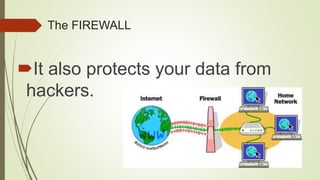
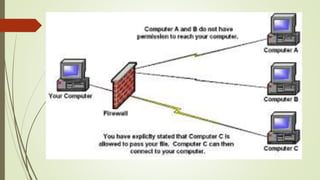
The FIREWALL
Used to protect your computer,
laptops, smartphones, tablets and
other electronic devices from
viruses, spyware and other malicious
software.
The FIREWALL
It also protects your data from
hackers.
AUP (Acceptable User Policy)
 is a document stipulating
constraints and practices that a user
must agree to for access to a
corporate network or the Internet.
AUP (Acceptable User Policy)
Many businesses and educational
facilities require that employees or
students sign an acceptable use
policy before being granted a
network ID.
Why is it important?
A good Acceptable Use Policy will cover
provisions for network etiquette, mention
limits on the use of network resources, and
clearly indicate the level of privacy a
member of the network should expect.
Why is it important?
The importance of AUPs is fairly well-known to
organizations like schools or libraries that offer Internet
as well as internal (intranet) access. These policies are
primarily geared towards protecting the safety of young
people against inappropriate language, pornography,
and other questionable influences. Within corporations,
the scope expands to include other factors such as
guarding business interests.
SIX KEY ELEMENT OF AUP
1.) PREAMBLE
explains why the policy is needed, its
goals, and the process of developing the
policy. This section should say that the
school's overall code of conduct also
applies to student online activity.
2.) DEFINITION SECTIONS
defines key words used in the policy.
Words and terms such as Internet,
computer network, education purpose, and
other possibly ambiguous terms need to be
defined and explained to ensure student
and parent comprehension.
3.) POLICY STATEMENT
must tell what computer services
are covered by the AUP and the
circumstances under which students can
use computer services.
4.) ACCEPTABLE USES SECTION
must define appropriate student
use of the computer network.
5.) UNACCEPTABLE USES SECTION
AUP should give clear, specific examples of
what constitutes unacceptable student use.
In determining what is unacceptable, the
committee charged with drafting the AUP
must consider
6.) VIOLATION SANCTIONS SECTION
should tell students how to
report violations of the policy or
whom to question about its
application.
NETIQUETTE
Correct and acceptable way of
communicating over the Internet.
Computer ethics
Flaming is a hostile and insulting
interaction between Internet users, often
involving the use of profanity. It can also
be the swapping of insults back and
forth or with many people teaming up on
a single victim.
CORE RULES OF
NETIQUETTES
RULE 1: Remember the Human
When you're holding a conversation online --
whether it's an email exchange or a response to
a discussion group posting -- it's easy to
misinterpret your correspondent's meaning. And
it's frighteningly easy to forget that your
correspondent is a person with feelings more or
less like your own.
Not to be offensive online
RULE 2: Adhere to the same standards of
behavior online that you follow in real life
In real life, most people are fairly law-abiding, either
by disposition or because we're afraid of getting
caught. In cyberspace, the chances of getting caught
sometimes seem slim. And, perhaps because people
sometimes forget that there's a human being on the
other side of the computer, some people think that a
lower standard of ethics or personal behavior is
acceptable in cyberspace.
Be Ethical
RULE 3: Know where you are in
cyberspace
What's perfectly acceptable in one area may be
dreadfully rude in another. For example, in most
TV discussion groups, passing on idle gossip is
perfectly permissible. But throwing around
unsubstantiated rumors in a journalists' mailing
list will make you very unpopular there.
Lurk before you leap
RULE 4: Respect other people's time and
bandwidth
It's a cliché that people today seem to have less time
than ever before, even though (or perhaps because)
we sleep less and have more labor-saving devices
than our grandparents did. When you send email or
post to a discussion group, you're taking up other
people's time (or hoping to). It's your responsibility to
ensure that the time they spend reading your posting
isn't wasted.
You are not the center of cyerspace
RULE 5: Make yourself look good online
be judged by the quality of your writing. For
most people who choose to communicate
online, this is an advantage; if they didn't
enjoy using the written word, they wouldn't
be there. So spelling and grammar do
count. And most importantly the content
Know what you're talking about and
make sense
Every comment and post counts.
RULE 6: Share expert knowledge
The strength of cyberspace is in its numbers. The
reason asking questions online works is that a lot of
knowledgeable people are reading the questions. And
if even a few of them offer intelligent answers, the
sum total of world knowledge increases. The Internet
itself was founded and grew because scientists
wanted to share information. Gradually, the rest of us
got in on the act.
Help and get helped.
RULE 7: Help keep flame wars under control
"Flaming" is what people do when they
express a strongly held opinion without
holding back any emotion. It's the kind of
message that makes people respond, "Oh
come on, tell us how you really feel." Tact is
not its objective.
Don’t start the flame
RULE 8: Respect other people's privacy
Of course, you'd never dream of going through
your colleagues' desk drawers. So naturally you
wouldn't read their email either.
EARN RESPECT
BY BUILDING A
GOOD
REPUTATION
RULE 9: Don’t abuse your power
Some people in cyberspace have more
power than others. There are wizards in
MUDs (multi-user dungeons), experts in
every office, and system administrators
in every system.
You are not
a God.
RULE 10: Be forgiving of other people's
mistakes
Everyone was a network newbie once. And not everyone has
had the benefit of reading this book. So when someone makes
a mistake -- whether it's a spelling error or a spelling flame, a
stupid question or an unnecessarily long answer -- be kind
about it. If it's a minor error, you may not need to say anything.
Even if you feel strongly about it, think twice before reacting.
Having good manners yourself doesn't give you license to
correct everyone else.
To hurt is
to learn.
 EQUIPPING VIDEOS
https://www.youtube.com/watch?v=9TRR6lHviQc
https://www.youtube.com/watch?v=yrln8nyVBLU
https://www.youtube.com/watch?v=J3iCuT0ONTo

Media and Information Literacy 104

  • 1.
    Internet Safety, Ethics& Netiquette Media and Information Literacy 104 Marvin Broñoso ICT Coordinator / Mentor Olongapo City, Philippines
  • 2.
    What is Phishing? Whatare somethings that you can do to avoid being caught by Phishing scam? What is AUP? What are the six key element of AUP? What is Netiquette? What are the core rules of netiquettes?
  • 3.
    Key Topics  PHISHING AUP  NETIQUETTE
  • 4.
    PHISING is a typeof online scam where criminals create a website or send an email that appears to be from a legitimate company or group asking you to provide sensitive and private information. This is usually done by including a link that supposedly takes you to the company’s website where you are asked to fill in your information – but the website is a clever fake and the information you provide goes straight to the crooks behind the scam.
  • 5.
    PHISING Phishing is ascam used by identity thieves to trick you into providing your sensitive personal or financial information
  • 6.
    ONLINE SCAM INDICATIONS 1.The email is not addressed to the recipient. If the recipient was truly being notified by Charles Schwab that there was an issue with their account, they would know the recipient’s name.
  • 8.
    2. Again, theydon’t know the recipient’s name;"Dear Customer" isn’t an identifier.
  • 9.
    3. Grammatical errors:The words Online Banking are capitalized throughout the text. And, if you read carefully, the text say
  • 10.
    3. Grammatical errors:The words Online Banking are capitalized throughout the text. And, if you read carefully, the text say
  • 11.
    How can weguarantee that we don’t fall for a Phishing Scam?
  • 12.
    Drive, don’t bepulled. Stay in the driver’s seat by finding the website yourself.
  • 13.
    Install or activatea web tool that identifies malicious sites for you so you know the website you find is legitimate.
  • 14.
  • 15.
    Beware of suspicious emailsand do not click suspicious links.
  • 16.
  • 17.
    The FIREWALL Used toprotect your computer, laptops, smartphones, tablets and other electronic devices from viruses, spyware and other malicious software.
  • 18.
    The FIREWALL It alsoprotects your data from hackers.
  • 20.
    AUP (Acceptable UserPolicy)  is a document stipulating constraints and practices that a user must agree to for access to a corporate network or the Internet.
  • 21.
    AUP (Acceptable UserPolicy) Many businesses and educational facilities require that employees or students sign an acceptable use policy before being granted a network ID.
  • 22.
    Why is itimportant? A good Acceptable Use Policy will cover provisions for network etiquette, mention limits on the use of network resources, and clearly indicate the level of privacy a member of the network should expect.
  • 23.
    Why is itimportant? The importance of AUPs is fairly well-known to organizations like schools or libraries that offer Internet as well as internal (intranet) access. These policies are primarily geared towards protecting the safety of young people against inappropriate language, pornography, and other questionable influences. Within corporations, the scope expands to include other factors such as guarding business interests.
  • 25.
  • 26.
    1.) PREAMBLE explains whythe policy is needed, its goals, and the process of developing the policy. This section should say that the school's overall code of conduct also applies to student online activity.
  • 27.
    2.) DEFINITION SECTIONS defineskey words used in the policy. Words and terms such as Internet, computer network, education purpose, and other possibly ambiguous terms need to be defined and explained to ensure student and parent comprehension.
  • 28.
    3.) POLICY STATEMENT musttell what computer services are covered by the AUP and the circumstances under which students can use computer services.
  • 29.
    4.) ACCEPTABLE USESSECTION must define appropriate student use of the computer network.
  • 30.
    5.) UNACCEPTABLE USESSECTION AUP should give clear, specific examples of what constitutes unacceptable student use. In determining what is unacceptable, the committee charged with drafting the AUP must consider
  • 31.
    6.) VIOLATION SANCTIONSSECTION should tell students how to report violations of the policy or whom to question about its application.
  • 32.
    NETIQUETTE Correct and acceptableway of communicating over the Internet. Computer ethics
  • 33.
    Flaming is ahostile and insulting interaction between Internet users, often involving the use of profanity. It can also be the swapping of insults back and forth or with many people teaming up on a single victim.
  • 34.
  • 35.
    RULE 1: Rememberthe Human When you're holding a conversation online -- whether it's an email exchange or a response to a discussion group posting -- it's easy to misinterpret your correspondent's meaning. And it's frighteningly easy to forget that your correspondent is a person with feelings more or less like your own.
  • 36.
    Not to beoffensive online
  • 37.
    RULE 2: Adhereto the same standards of behavior online that you follow in real life In real life, most people are fairly law-abiding, either by disposition or because we're afraid of getting caught. In cyberspace, the chances of getting caught sometimes seem slim. And, perhaps because people sometimes forget that there's a human being on the other side of the computer, some people think that a lower standard of ethics or personal behavior is acceptable in cyberspace.
  • 38.
  • 39.
    RULE 3: Knowwhere you are in cyberspace What's perfectly acceptable in one area may be dreadfully rude in another. For example, in most TV discussion groups, passing on idle gossip is perfectly permissible. But throwing around unsubstantiated rumors in a journalists' mailing list will make you very unpopular there.
  • 40.
  • 41.
    RULE 4: Respectother people's time and bandwidth It's a cliché that people today seem to have less time than ever before, even though (or perhaps because) we sleep less and have more labor-saving devices than our grandparents did. When you send email or post to a discussion group, you're taking up other people's time (or hoping to). It's your responsibility to ensure that the time they spend reading your posting isn't wasted.
  • 42.
    You are notthe center of cyerspace
  • 43.
    RULE 5: Makeyourself look good online be judged by the quality of your writing. For most people who choose to communicate online, this is an advantage; if they didn't enjoy using the written word, they wouldn't be there. So spelling and grammar do count. And most importantly the content
  • 44.
    Know what you'retalking about and make sense Every comment and post counts.
  • 45.
    RULE 6: Shareexpert knowledge The strength of cyberspace is in its numbers. The reason asking questions online works is that a lot of knowledgeable people are reading the questions. And if even a few of them offer intelligent answers, the sum total of world knowledge increases. The Internet itself was founded and grew because scientists wanted to share information. Gradually, the rest of us got in on the act.
  • 46.
    Help and gethelped.
  • 47.
    RULE 7: Helpkeep flame wars under control "Flaming" is what people do when they express a strongly held opinion without holding back any emotion. It's the kind of message that makes people respond, "Oh come on, tell us how you really feel." Tact is not its objective.
  • 48.
  • 49.
    RULE 8: Respectother people's privacy Of course, you'd never dream of going through your colleagues' desk drawers. So naturally you wouldn't read their email either.
  • 50.
    EARN RESPECT BY BUILDINGA GOOD REPUTATION
  • 51.
    RULE 9: Don’tabuse your power Some people in cyberspace have more power than others. There are wizards in MUDs (multi-user dungeons), experts in every office, and system administrators in every system.
  • 52.
  • 53.
    RULE 10: Beforgiving of other people's mistakes Everyone was a network newbie once. And not everyone has had the benefit of reading this book. So when someone makes a mistake -- whether it's a spelling error or a spelling flame, a stupid question or an unnecessarily long answer -- be kind about it. If it's a minor error, you may not need to say anything. Even if you feel strongly about it, think twice before reacting. Having good manners yourself doesn't give you license to correct everyone else.
  • 54.
  • 55.

Editor's Notes

  • #6  Thieves use official-looking emails to impersonate trusted entities like banks, credit card companies, and online resources like eBay or PayPal. These emails are used to lure unsuspecting consumers to a particular website through a link where they will be asked to enter their information. According to a study done in 2006, approximately 109 million people received a phishing email of some sort in that year.
  • #12  This is the ONLY way to guarantee you land on the legitimate site. If you use the link (or phone number) in an email, IM, ad on a website/blog site/forum/social network/text message, etc., where you land (or who you talk to) is their choice, not yours. The website they take you to (or the ’bank manager’ on the phone) may be a very convincing copy, but if you enter your information it will be stolen and abused. 
  • #15 To protect yourself from falling victim to a phishing scam, it's important to be very cautious with your personal information including your usernames and passwords. Some phishing scams divert you to a fraudulent website designed to look like your bank's website or a similar trusted source.
  • #16 Be very suspicious of any emails you receive from trusted entities like your bank. If the email contains a link, don't click on it. Deceptive links that mimic legitimate URL addresses are a common tools con artists use in phishing scams.
  • #17 Look out for common phishing language in emails like "Verify your account." Legitimate businesses will not send you an email to ask for your login information or sensitive personal information. Also, look out for emails that try to convey a sense of urgency. Warnings that your account has been compromised, for example, are a common way to lure victims. Again, contact the company directly to inquire about such emails rather than using any link or other contact information provided in the email. Finally, be wary of any email that does not address you directly. While some phishing scams will use your name in the email, many are sent out as spam messages to thousands at a time. Most legitimate businesses will use your first and/or last name in all communication.
  • #23 The best AUPs incorporate "what if" scenarios that illustrate the usefulness of the policy in real-world terms.
  • #24 Many policy details you should expect to find in an AUP relate to computer security. These include managing passwords, software licenses, and online intellectual property. Others relate to basic interpersonal etiquette, particularly in email and bulletin board conversations. A third category deals with overuse or misuse of resources, such as generating excessive network traffic by playing computer games, for example.
  • #29 Schools may, for example, base student access to computer services on the completion of a "computer responsibility" class that will enhance student understanding of the AUP guidelines.
  • #30 It may, for example, limit student use of the network to "educational purposes," which then must be defined.
  • #31 "what kind of computer network sites, if any, should be off limits to students; what kind of student sending, forwarding, or posting of information, if any, should be prohibited, and what kind of student behavior will be destructive to the computer network services and should, therefore, be restricted."
  • #32 "As a practical matter," says the NEA, "the AUP may simply provide that violations will be handled in accordance with the school's general student disciplinary code."
  • #36 The golden rule your parents and your kindergarten teacher taught you was pretty simple: Do unto others as you'd have others do unto you. Imagine how you'd feel if you were in the other person's shoes. Stand up for yourself, but try not to hurt people's feelings.
  • #38 The confusion may be understandable, but these people are mistaken. Standards of behavior may be different in some areas of cyberspace, but they are not lower than in real life. Be ethical Don't believe anyone who says, "The only ethics out there are what you can get away with." This is a book about manners, not about ethics. But if you encounter an ethical dilemma in cyberspace, consult the code you follow in real life. Chances are good you'll find the answer.
  • #42 The word "bandwidth" is sometimes used synonymously with time, but it's really a different thing. Bandwidth is the information-carrying capacity of the wires and channels that connect everyone in cyberspace. There's a limit to the amount of data that any piece of wiring can carry at any given moment -- even a state-of-the-art fiber-optic cable. The word "bandwidth" is also sometimes used to refer to the storage capacity of a host system. When you accidentally post the same note to the same newsgroup five times, you are wasting both time (of the people who check all five copies of the posting) and bandwidth (by sending repetitive information over the wires and requiring it to be stored somewhere).
  • #44 I don't want to give the impression that the net is a cold, cruel place full of people who just can't wait to insult each other. As in the world at large, most people who communicate online just want to be liked. Networks -- particularly discussion groups -- let you reach out to people you'd otherwise never meet. And none of them can see you. You won't be judged by the color of your skin, eyes, or hair, your weight, your age, or your clothing.
  • #46 Finally, after all that negativity, some positive advice. It's especially polite to share the results of your questions with others. When you anticipate that you'll get a lot of answers to a question, or when you post a question to a discussion group that you don't visit often, it's customary to request replies by email instead of to the group. When you get all those responses, write up a summary and post it to the discussion group. That way, everyone benefits from the experts who took the time to write to you.
  • #48 Finally, after all that negativity, some positive advice. It's especially polite to share the results of your questions with others. When you anticipate that you'll get a lot of answers to a question, or when you post a question to a discussion group that you don't visit often, it's customary to request replies by email instead of to the group. When you get all those responses, write up a summary and post it to the discussion group. That way, everyone benefits from the experts who took the time to write to you.
  • #50 The case of the snoopy foreign correspondent In 1993, a highly regarded foreign correspondent in the Moscow bureau of the Los Angeles Times was caught reading his coworkers' email. His colleagues became suspicious when system records showed that someone had logged in to check their email at times when they knew they hadn't been near the computer. So they set up a sting operation. They planted false information in messages from another one of the paper's foreign bureaus. The reporter read the notes and later asked colleagues about the false information. Bingo! As a disciplinary measure, he was immediately reassigned to another position at the paper's Los Angeles bureau. The moral: Failing to respect other people's privacy is not just bad Netiquette. It could also cost you your job.
  • #52 Knowing more than others, or having more power than they do, does not give you the right to take advantage of them. For example, sysadmins should never read private email.
  • #54 Knowing more than others, or having more power than they do, does not give you the right to take advantage of them. For example, sysadmins should never read private email.