NETIQUETTES
SONAL BHARAL (23)
105 Advanced Pedagogy & Application of ICT
F.Y.B.ED
TILAK COLLEGE OF EDUCATION
DEFINITION AND PURPOSE
 Etiquette - The forms required by good breeding or prescribed by
authority, to be observed in social or official life.
 Internet - worldwide computer networks that use the TCP/IP
network protocols to facilitate data transmission and exchange.
 A set of rules for behaving online.
 NETIQUETTE =Net + etiquettes
 Cyberspace is a culture in itself. It’s important to learn the etiquettes
of a culture to avoid misunderstandings and/or offending others.
It’s also important to remember that in cyberspace, the people
online are REAL.
 They have feelings so please learn the DOs and DON’Ts of
Netiquette to minimize the chance of offending your cyberspace
friends.
1. Remember the Golden rule
 When communicating electronically, whether through e-mail, instant
message, discussion post, text or some other method- practice the
Golden Rule: Do unto others as you would have others do unto you.
 Your written words are read by real people and all deserve
respectful communication.
 Before you press "send" or "submit" Ask yourself- "Would I be okay
with this if someone else had written it?"
 Remember the user and recipient.
 Make sure you are ethical in all of your actions.
 Behave as you would in face to face situation.
2. Respect other people's time
and bandwidth
 Be considerate as sending messages, upload and download of
information consumes bandwidth and time.
 Make your written communication meaningful and to the point,
without extraneous text or superfluous graphics or attachments that
may take long time to download.
3. Know where person is in
cyberspace and adhere to its rules
Netiquette varies from domain to domain.
A written communication acceptable in one area,
might be considered inappropriate in another.
A text to a friend may not be appropriate in a e-mail
to a classmate or colleague.
4. Make yourself look good
online
 One of the best things about the virtual world is the lack of
judgement associated with your physical appearance, your voice or
the clothes you wear unless you post a video of yourself singing
Karaoke in a clown outfit 
 You will be judged by the quality of your writing.
 Always check for spelling and grammatical errors. Proof read all
posts.
 State the topic clearly. Do not post irrelevant comments, text,
pictures, videos, etc.
5. Share expert knowledge
 The Internet offers its users the ease in which information can be
shared or accessed.
 Share what you know! When you post a question and receive
intelligent answers, share the results with others.
 If you an expert at something, post resources and references about
your subject matter.
 If you have recently expanded your knowledge about a subject that
might be of interest to others, share that as well.
 Don't feed the flames (exchange of angry posts); extinguish them by
guiding the discussion back to a more productive direction.
6. Respect other people's privacy
 Be sure and cautious when deciding to discuss or not to discuss
matter or information through virtual communication.
 Expertise in technology or years of experience in a particular skill or
subject matter gives more power than others but not the right to
take advantage of anyone.
 Do not start cyberbullying. Put a stop to it right away.
7. Never open up to strangers
 Never talk to strangers on the internet. Do not accept friend
requests on social media from people you do not know. They can
steal or hack your personal information.
 Do not download games or other information from suspicious
websites as many have malicious virus which corrupt data.
8. Be kind to forgive others.
 At some point, you will see a stupid question, read an unnecessarily
long response or encounter misspelled words; when this happens-
practice kindness and forgiveness as you would hope someone
would do if you had committed the same offense.
 If it's a minor "offense," you might want to let it slide. If you feel
compelled to respond to a mistake, do so in a private e-mail rather
than a public forum.
9. Strong password
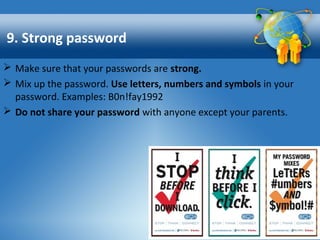
 Make sure that your passwords are strong.
 Mix up the password. Use letters, numbers and symbols in your
password. Examples: B0n!fay1992
 Do not share your password with anyone except your parents.
10. Copyright
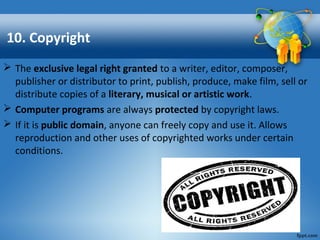
 The exclusive legal right granted to a writer, editor, composer,
publisher or distributor to print, publish, produce, make film, sell or
distribute copies of a literary, musical or artistic work.
 Computer programs are always protected by copyright laws.
 If it is public domain, anyone can freely copy and use it. Allows
reproduction and other uses of copyrighted works under certain
conditions.
References
The Core Rules of Netiquette are excerpted from
the book Netiquette by Virginia Shea.
•www.albion.com/netiquette/corerules.html
•www.bbc.co.uk/webwise/guides/about-
netiquette
•https://en.wikipedia.org/wiki/Etiquette_in_technol
ogy
•learning.colostate.edu › Guides
Questions
Netiquettes

Netiquettes

  • 1.
    NETIQUETTES SONAL BHARAL (23) 105Advanced Pedagogy & Application of ICT F.Y.B.ED TILAK COLLEGE OF EDUCATION
  • 2.
    DEFINITION AND PURPOSE Etiquette - The forms required by good breeding or prescribed by authority, to be observed in social or official life.  Internet - worldwide computer networks that use the TCP/IP network protocols to facilitate data transmission and exchange.  A set of rules for behaving online.  NETIQUETTE =Net + etiquettes  Cyberspace is a culture in itself. It’s important to learn the etiquettes of a culture to avoid misunderstandings and/or offending others. It’s also important to remember that in cyberspace, the people online are REAL.  They have feelings so please learn the DOs and DON’Ts of Netiquette to minimize the chance of offending your cyberspace friends.
  • 3.
    1. Remember theGolden rule  When communicating electronically, whether through e-mail, instant message, discussion post, text or some other method- practice the Golden Rule: Do unto others as you would have others do unto you.  Your written words are read by real people and all deserve respectful communication.  Before you press "send" or "submit" Ask yourself- "Would I be okay with this if someone else had written it?"  Remember the user and recipient.  Make sure you are ethical in all of your actions.  Behave as you would in face to face situation.
  • 4.
    2. Respect otherpeople's time and bandwidth  Be considerate as sending messages, upload and download of information consumes bandwidth and time.  Make your written communication meaningful and to the point, without extraneous text or superfluous graphics or attachments that may take long time to download.
  • 5.
    3. Know whereperson is in cyberspace and adhere to its rules Netiquette varies from domain to domain. A written communication acceptable in one area, might be considered inappropriate in another. A text to a friend may not be appropriate in a e-mail to a classmate or colleague.
  • 6.
    4. Make yourselflook good online  One of the best things about the virtual world is the lack of judgement associated with your physical appearance, your voice or the clothes you wear unless you post a video of yourself singing Karaoke in a clown outfit   You will be judged by the quality of your writing.  Always check for spelling and grammatical errors. Proof read all posts.  State the topic clearly. Do not post irrelevant comments, text, pictures, videos, etc.
  • 7.
    5. Share expertknowledge  The Internet offers its users the ease in which information can be shared or accessed.  Share what you know! When you post a question and receive intelligent answers, share the results with others.  If you an expert at something, post resources and references about your subject matter.  If you have recently expanded your knowledge about a subject that might be of interest to others, share that as well.  Don't feed the flames (exchange of angry posts); extinguish them by guiding the discussion back to a more productive direction.
  • 8.
    6. Respect otherpeople's privacy  Be sure and cautious when deciding to discuss or not to discuss matter or information through virtual communication.  Expertise in technology or years of experience in a particular skill or subject matter gives more power than others but not the right to take advantage of anyone.  Do not start cyberbullying. Put a stop to it right away.
  • 9.
    7. Never openup to strangers  Never talk to strangers on the internet. Do not accept friend requests on social media from people you do not know. They can steal or hack your personal information.  Do not download games or other information from suspicious websites as many have malicious virus which corrupt data.
  • 10.
    8. Be kindto forgive others.  At some point, you will see a stupid question, read an unnecessarily long response or encounter misspelled words; when this happens- practice kindness and forgiveness as you would hope someone would do if you had committed the same offense.  If it's a minor "offense," you might want to let it slide. If you feel compelled to respond to a mistake, do so in a private e-mail rather than a public forum.
  • 11.
    9. Strong password Make sure that your passwords are strong.  Mix up the password. Use letters, numbers and symbols in your password. Examples: B0n!fay1992  Do not share your password with anyone except your parents.
  • 12.
    10. Copyright  Theexclusive legal right granted to a writer, editor, composer, publisher or distributor to print, publish, produce, make film, sell or distribute copies of a literary, musical or artistic work.  Computer programs are always protected by copyright laws.  If it is public domain, anyone can freely copy and use it. Allows reproduction and other uses of copyrighted works under certain conditions.
  • 13.
    References The Core Rulesof Netiquette are excerpted from the book Netiquette by Virginia Shea. •www.albion.com/netiquette/corerules.html •www.bbc.co.uk/webwise/guides/about- netiquette •https://en.wikipedia.org/wiki/Etiquette_in_technol ogy •learning.colostate.edu › Guides
  • 14.