Studio 2WordPressIntroduction to the Digital Liberal ArtsMDST 3703 / 7703Fall 2010
RecapHow do computers change the properties of text?In what sense are computers textual?
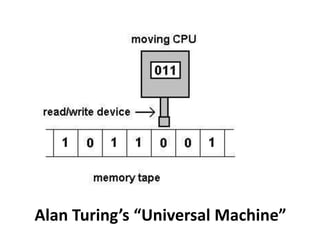
Alan Turing’s “Universal Machine”
GoalsIntroduction to WordPressOverview of basic featuresGetting started with customizationDiscussion in light of SeminarThink about WordPress as a literary machineKeep Nelson’s Fantics in mind
WordPress2003 (6 AG)Open SourceA “personal publishing system” AKA Content Management System (CMS)
PlanA quick overview of WordPress’ layoutForm groupsPCs and MacsDistribute the knowledge!Specific exercises
Your SiteServerhttp://pages.shanti.virginia.eduResource/mdst3703_f10_rca2tDoes everyone have a site?
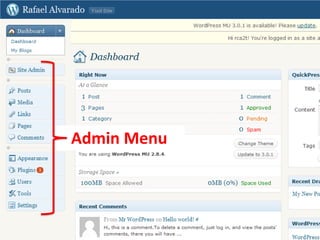
The Administration PageAdmin bar (can be disabled)HeaderLeft menuMain area
Admin MenuAdmin Menu
Important Admin StuffUsersYour ProfileSettingsGeneralWritingReadingPrivacyPermalinks
Exercise: Change Your ProfileGo to Users  Your ProfileCan’t change nameAdd a web site if you want toAdd some biographical info
Exercise: Change Site SettingsGeneral Site name, tagline, email for admin, date/time/week formatWritingEnable Atom and XML-RPCReadingNote “Front Page Displays” (we’ll come back to this)DiscussionComment settings
Exercise: Change Site SettingsPrivacySet to ‘I would like my blog to be visible only to registered members of this blog.’PermalinksSet Category Base to “category”Set Tag Base to “tag”
Exercise: Pick a ThemeThemes define the “look and feel” of your siteThey also provide different functionsConfigurabilityRegions to park things (widgets)Go to Appearance ThemesSuggestions:Constructor – highly configurable, but advancedMisty Look  -- can change header (also SHANTI #1)P2 – Twitter-like, good for ideas …Tarski
Exercise: Add WidgetsGo to Appearance  WidgetsDrag widgets to regions on rightRegions vary by themeAdd Links, Categories, and the Tag List WidgetConfigure widgets as necessaryDrag off to removeSome themes have hard-coded widgetse.g. iNove
Pages and PostsThe basic units of information in WP:	PagesStatic contentOrganized into a menu tree	PostsDynamic contentOrganized by date, tag, and category
Exercise: Create a Welcome PageGo to Pages  Add NewUse the title “Welcome”Add some content and saveAlso Create a “News” page, with no contentGo to Settings  ReadingSet  Front page to “Welcome”Set 	Posts page to “News”
Exercise: Create a Child PageCreate a Page called “Child” Just for demo purposesBefore saving, choose “Welcome” as its “parent”
Exercise: Add a Link to the Course SiteGo Links  Add NewCreate new linkView in widget
Exercise: Add a PostGo to Posts  Add NewCreate some content
Categories and TagsCategories are hierarchicalTags are rhizomicWhat kinds of things are appropriate to each?
CommentsComments can be turned on or off per postDefault settings can be made in the Discussion section of Settings
Media, Links, and PluginsTo be discussed next time …
How does WordPress compare to the Memex?… to Nelson’s “dream machines”?How would you describe it’s “fantics”?Connections

MDST 3703 F10 Studio 2

  • 1.
    Studio 2WordPressIntroduction tothe Digital Liberal ArtsMDST 3703 / 7703Fall 2010
  • 2.
    RecapHow do computerschange the properties of text?In what sense are computers textual?
  • 3.
  • 4.
    GoalsIntroduction to WordPressOverviewof basic featuresGetting started with customizationDiscussion in light of SeminarThink about WordPress as a literary machineKeep Nelson’s Fantics in mind
  • 5.
    WordPress2003 (6 AG)OpenSourceA “personal publishing system” AKA Content Management System (CMS)
  • 6.
    PlanA quick overviewof WordPress’ layoutForm groupsPCs and MacsDistribute the knowledge!Specific exercises
  • 7.
  • 8.
    The Administration PageAdminbar (can be disabled)HeaderLeft menuMain area
  • 9.
  • 10.
    Important Admin StuffUsersYourProfileSettingsGeneralWritingReadingPrivacyPermalinks
  • 11.
    Exercise: Change YourProfileGo to Users  Your ProfileCan’t change nameAdd a web site if you want toAdd some biographical info
  • 12.
    Exercise: Change SiteSettingsGeneral Site name, tagline, email for admin, date/time/week formatWritingEnable Atom and XML-RPCReadingNote “Front Page Displays” (we’ll come back to this)DiscussionComment settings
  • 13.
    Exercise: Change SiteSettingsPrivacySet to ‘I would like my blog to be visible only to registered members of this blog.’PermalinksSet Category Base to “category”Set Tag Base to “tag”
  • 14.
    Exercise: Pick aThemeThemes define the “look and feel” of your siteThey also provide different functionsConfigurabilityRegions to park things (widgets)Go to Appearance ThemesSuggestions:Constructor – highly configurable, but advancedMisty Look -- can change header (also SHANTI #1)P2 – Twitter-like, good for ideas …Tarski
  • 15.
    Exercise: Add WidgetsGoto Appearance  WidgetsDrag widgets to regions on rightRegions vary by themeAdd Links, Categories, and the Tag List WidgetConfigure widgets as necessaryDrag off to removeSome themes have hard-coded widgetse.g. iNove
  • 16.
    Pages and PostsThebasic units of information in WP: PagesStatic contentOrganized into a menu tree PostsDynamic contentOrganized by date, tag, and category
  • 17.
    Exercise: Create aWelcome PageGo to Pages  Add NewUse the title “Welcome”Add some content and saveAlso Create a “News” page, with no contentGo to Settings  ReadingSet Front page to “Welcome”Set Posts page to “News”
  • 18.
    Exercise: Create aChild PageCreate a Page called “Child” Just for demo purposesBefore saving, choose “Welcome” as its “parent”
  • 19.
    Exercise: Add aLink to the Course SiteGo Links  Add NewCreate new linkView in widget
  • 20.
    Exercise: Add aPostGo to Posts  Add NewCreate some content
  • 21.
    Categories and TagsCategoriesare hierarchicalTags are rhizomicWhat kinds of things are appropriate to each?
  • 22.
    CommentsComments can beturned on or off per postDefault settings can be made in the Discussion section of Settings
  • 23.
    Media, Links, andPluginsTo be discussed next time …
  • 24.
    How does WordPresscompare to the Memex?… to Nelson’s “dream machines”?How would you describe it’s “fantics”?Connections