Matlab:Working with images
Types of imagesBinary imageGrayscale imagesIndexed imageRGB image
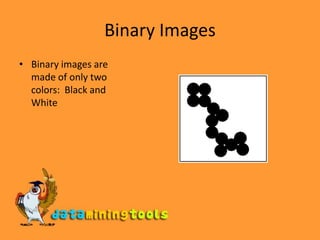
Binary ImagesBinary images are made of only two colors:  Black and White
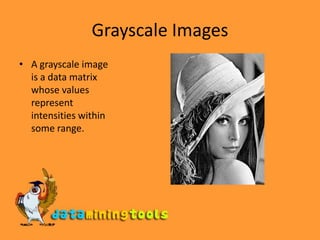
Grayscale ImagesA grayscale image is a data matrix whose values represent intensities within some range.
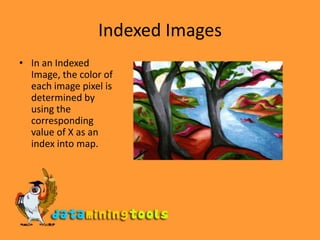
Indexed ImagesIn an Indexed Image, the color of each image pixel is determined by using the corresponding value of X as an index into map.
RGB ImagesAn RGB image is stored as an m*n*3 data array that defines red, green, and blue color components for each individual pixel.
ConvertingMatalb  offers many useful commands to convert images form one form to another:Demosaic	Convert Bayer pattern encoded image to truecolor (RGB) image. Dither	Use dithering to convert a grayscale image to a binary image or to convert a truecolor image to an indexed image.Gray2ind	Convert a grayscale image to an indexed image.Grayslice	Convert a grayscale image to an indexed image by using multilevel thresholding.
ConvertingMatalb  offers many useful commands to convert images form one form to another:Im2bw	Convert a grayscale image, indexed image, or truecolor image, to a binary image, based on a luminance threshold.Ind2gray	Convert an indexed image to a grayscale image.Ind2rgb	Convert an indexed image to a truecolor image.
ConvertingMatalb  offers many useful commands to convert images form one form to another:Mat2gray	Convert a data matrix to a grayscale image, by scaling the data.Rgb2gray	Convert a truecolor image to a grayscale image. Rgb2ind	Convert a truecolor image to an indexed image.
ViewingThe following set of commands will read an image and display it:IMAGE=imread(‘image1.jpg’);
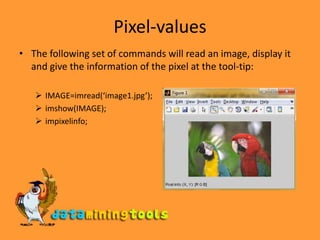
imshow(IMAGE);Pixel-valuesThe following set of commands will read an image, display it and give the information of the pixel at the tool-tip:IMAGE=imread(‘image1.jpg’);
imshow(IMAGE);
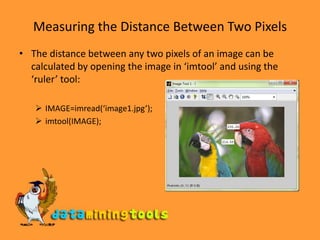
impixelinfo;Measuring the Distance Between Two PixelsThe distance between any two pixels of an image can be calculated by opening the image in ‘imtool’ and using the ‘ruler’ tool:IMAGE=imread(‘image1.jpg’);
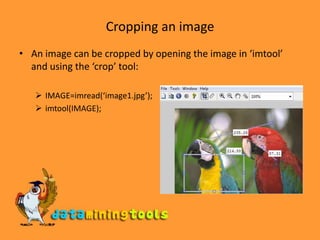
imtool(IMAGE);Cropping an imageAn image can be cropped by opening the image in ‘imtool’ and using the ‘crop’ tool:IMAGE=imread(‘image1.jpg’);

Matlab Working With Images

  • 1.
  • 2.
    Types of imagesBinaryimageGrayscale imagesIndexed imageRGB image
  • 3.
    Binary ImagesBinary imagesare made of only two colors: Black and White
  • 4.
    Grayscale ImagesA grayscaleimage is a data matrix whose values represent intensities within some range.
  • 5.
    Indexed ImagesIn anIndexed Image, the color of each image pixel is determined by using the corresponding value of X as an index into map.
  • 6.
    RGB ImagesAn RGBimage is stored as an m*n*3 data array that defines red, green, and blue color components for each individual pixel.
  • 7.
    ConvertingMatalb offersmany useful commands to convert images form one form to another:Demosaic Convert Bayer pattern encoded image to truecolor (RGB) image. Dither Use dithering to convert a grayscale image to a binary image or to convert a truecolor image to an indexed image.Gray2ind Convert a grayscale image to an indexed image.Grayslice Convert a grayscale image to an indexed image by using multilevel thresholding.
  • 8.
    ConvertingMatalb offersmany useful commands to convert images form one form to another:Im2bw Convert a grayscale image, indexed image, or truecolor image, to a binary image, based on a luminance threshold.Ind2gray Convert an indexed image to a grayscale image.Ind2rgb Convert an indexed image to a truecolor image.
  • 9.
    ConvertingMatalb offersmany useful commands to convert images form one form to another:Mat2gray Convert a data matrix to a grayscale image, by scaling the data.Rgb2gray Convert a truecolor image to a grayscale image. Rgb2ind Convert a truecolor image to an indexed image.
  • 10.
    ViewingThe following setof commands will read an image and display it:IMAGE=imread(‘image1.jpg’);
  • 11.
    imshow(IMAGE);Pixel-valuesThe following setof commands will read an image, display it and give the information of the pixel at the tool-tip:IMAGE=imread(‘image1.jpg’);
  • 12.
  • 13.
    impixelinfo;Measuring the DistanceBetween Two PixelsThe distance between any two pixels of an image can be calculated by opening the image in ‘imtool’ and using the ‘ruler’ tool:IMAGE=imread(‘image1.jpg’);
  • 14.
    imtool(IMAGE);Cropping an imageAnimage can be cropped by opening the image in ‘imtool’ and using the ‘crop’ tool:IMAGE=imread(‘image1.jpg’);
  • 15.
    imtool(IMAGE);Cropping an imageAnimage can be cropped by opening the image in ‘imtool’ and using the ‘crop’ tool:IMAGE=imread(‘image1.jpg’);