1© 2014 The MathWorks, Inc.
MathWorks and Freescale Cup
Working with MATLAB & Simulink
Christoph Hahn
Dr. Joachim Schlosser
2
You have an algorithm idea.
How long does it take you to find out whether it will
work in at all and on the car?
3
Outline
 What are MATLAB & Simulink?
 How to benefit from MathWorks supporting Freescale Cup?
 What about all the code I have already written?
5
What are MATLAB & Simulink?
6
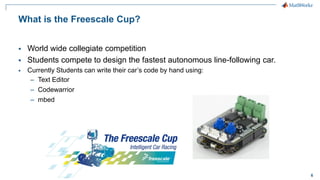
What is Freescale Cup?
 World wide collegiate competition
 Students compete to design the fastest autonomous line-following car.
 Currently Students can write their car’s code by hand using:
– Text Editor
– Codewarrior
– mbed
7
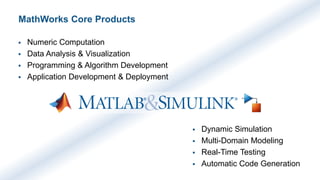
MathWorks Core Products
 Numeric Computation
 Data Analysis & Visualization
 Programming & Algorithm Development
 Application Development & Deployment
 Dynamic Simulation
 Multi-Domain Modeling
 Real-Time Testing
 Automatic Code Generation
8
MathWorks Learning Hardware Solutions
Connect to / generate code for
Arduino, Raspberry Pi, ROS, Lego Mindstorms, Kinect, Webcams, Nao Robot,
Analog Discovery, iPhone, Android, BeagleBoard, myDAQ, ARM Cortex A/M, …
mathworks.com/hardware-support/
9
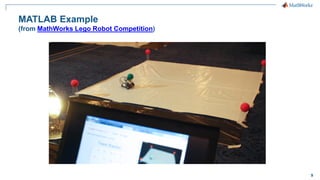
MATLAB Example
(from MathWorks Lego Robot Competition)
11
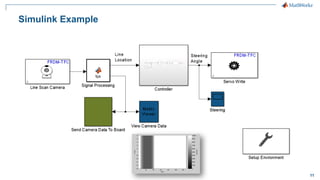
Simulink Example
13
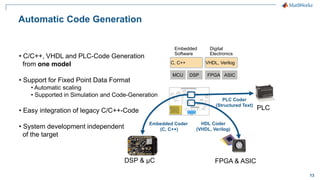
Automatic Code Generation
• C/C++, VHDL and PLC-Code Generation
from one model
• Support for Fixed Point Data Format
• Automatic scaling
• Supported in Simulation and Code-Generation
• Easy integration of legacy C/C++-Code
• System development independent
of the target
DSP FPGA ASIC
Embedded
Software
Digital
Electronics
C, C++ VHDL, Verilog
MCU
Embedded Coder
(C, C++)
DSP & µC FPGA & ASIC
HDL Coder
(VHDL, Verilog)
PLC
PLC Coder
(Structured Text)
14
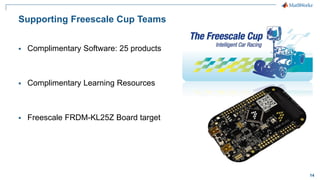
Supporting Freescale Cup Teams
 Complimentary Software: 25 products
 Complimentary Learning Resources
 Freescale FRDM-KL25Z Board target
15
Complimentary Software
16
Complimentary Software from MathWorks
 MathWorks sponsors Freescale Cup
• MATLAB
• Simulink
• Stateflow
• Control System Toolbox
• DSP System Toolbox
• Embedded Coder
• Filter Design HDL Coder
• Fixed-Point Designer
• Global Optimization Toolbox
• MATLAB Coder
• Neural Network Toolbox
• Optimization Toolbox
• Signal Processing Toolbox
• SimDriveline
• SimElectronics
• SimMechanics
• SimPowerSystems
• Simscape
• Simulink Coder
• Simulink Control Design
• Simulink Design Optimization
• Simulink Design Verifier
• HDL Coder
• Simulink PLC Coder
• Simulink Verification and Validation
17
Complimentary Learning Resources & Support
18
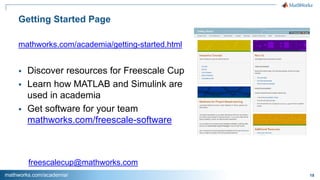
Getting Started Page
mathworks.com/academia/getting-started.html
 Discover resources for Freescale Cup
 Learn how MATLAB and Simulink are
used in academia
 Get software for your team
mathworks.com/freescale-software
mathworks.com/academia/
freescalecup@mathworks.com
19
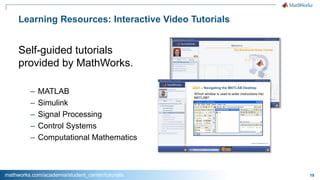
Learning Resources: Interactive Video Tutorials
Self-guided tutorials
provided by MathWorks.
– MATLAB
– Simulink
– Signal Processing
– Control Systems
– Computational Mathematics
mathworks.com/academia/student_center/tutorials
20
Getting started and help on MATLAB and Simulink
1. Online Getting Started
2. Do
3. MATLAB Answers
4. Technical Support in your country
(in that exact sequence)
21
Freedom Board Automatic Code Generation Target
22
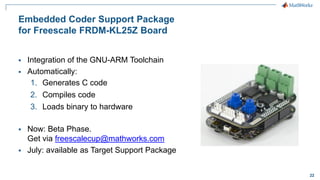
Embedded Coder Support Package
for Freescale FRDM-KL25Z Board
 Integration of the GNU-ARM Toolchain
 Automatically:
1. Generates C code
2. Compiles code
3. Loads binary to hardware
 Now: Beta Phase.
Get via freescalecup@mathworks.com
 July: available as Target Support Package
23
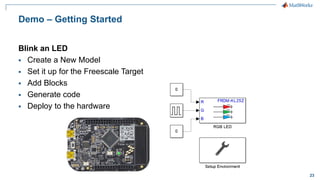
Demo – Getting Started
Blink an LED
 Create a New Model
 Set it up for the Freescale Target
 Add Blocks
 Generate code
 Deploy to the hardware
24
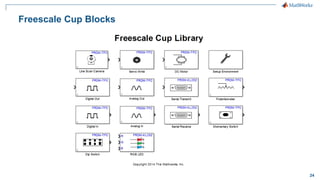
Freescale Cup Blocks
25
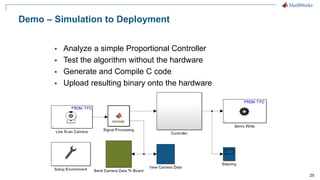
Demo – Simulation to Deployment
 Analyze a simple Proportional Controller
 Test the algorithm without the hardware
 Generate and Compile C code
 Upload resulting binary onto the hardware
26
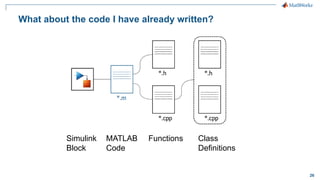
What about the code I have already written?
Class
Definitions
FunctionsMATLAB
Code
Simulink
Block
27
Do you speak MATLAB?
28
For student teams
1. Check your university for campus license.
2. Request complimentary Freescale Cup
license.
29
Professors and Teachers
1. Which part of your teaching do you
like to give a hands-on twist with
MATLAB & Simulink?
2. Find resources on
mathworks.com/academia

MathWorks and Freescale Cup - Working with MATLAB & Simulink

  • 1.
    1© 2014 TheMathWorks, Inc. MathWorks and Freescale Cup Working with MATLAB & Simulink Christoph Hahn Dr. Joachim Schlosser
  • 2.
    2 You have analgorithm idea. How long does it take you to find out whether it will work in at all and on the car?
  • 3.
    3 Outline  What areMATLAB & Simulink?  How to benefit from MathWorks supporting Freescale Cup?  What about all the code I have already written?
  • 4.
    5 What are MATLAB& Simulink?
  • 5.
    6 What is FreescaleCup?  World wide collegiate competition  Students compete to design the fastest autonomous line-following car.  Currently Students can write their car’s code by hand using: – Text Editor – Codewarrior – mbed
  • 6.
    7 MathWorks Core Products Numeric Computation  Data Analysis & Visualization  Programming & Algorithm Development  Application Development & Deployment  Dynamic Simulation  Multi-Domain Modeling  Real-Time Testing  Automatic Code Generation
  • 7.
    8 MathWorks Learning HardwareSolutions Connect to / generate code for Arduino, Raspberry Pi, ROS, Lego Mindstorms, Kinect, Webcams, Nao Robot, Analog Discovery, iPhone, Android, BeagleBoard, myDAQ, ARM Cortex A/M, … mathworks.com/hardware-support/
  • 8.
    9 MATLAB Example (from MathWorksLego Robot Competition)
  • 9.
  • 10.
    13 Automatic Code Generation •C/C++, VHDL and PLC-Code Generation from one model • Support for Fixed Point Data Format • Automatic scaling • Supported in Simulation and Code-Generation • Easy integration of legacy C/C++-Code • System development independent of the target DSP FPGA ASIC Embedded Software Digital Electronics C, C++ VHDL, Verilog MCU Embedded Coder (C, C++) DSP & µC FPGA & ASIC HDL Coder (VHDL, Verilog) PLC PLC Coder (Structured Text)
  • 11.
    14 Supporting Freescale CupTeams  Complimentary Software: 25 products  Complimentary Learning Resources  Freescale FRDM-KL25Z Board target
  • 12.
  • 13.
    16 Complimentary Software fromMathWorks  MathWorks sponsors Freescale Cup • MATLAB • Simulink • Stateflow • Control System Toolbox • DSP System Toolbox • Embedded Coder • Filter Design HDL Coder • Fixed-Point Designer • Global Optimization Toolbox • MATLAB Coder • Neural Network Toolbox • Optimization Toolbox • Signal Processing Toolbox • SimDriveline • SimElectronics • SimMechanics • SimPowerSystems • Simscape • Simulink Coder • Simulink Control Design • Simulink Design Optimization • Simulink Design Verifier • HDL Coder • Simulink PLC Coder • Simulink Verification and Validation
  • 14.
  • 15.
    18 Getting Started Page mathworks.com/academia/getting-started.html Discover resources for Freescale Cup  Learn how MATLAB and Simulink are used in academia  Get software for your team mathworks.com/freescale-software mathworks.com/academia/ freescalecup@mathworks.com
  • 16.
    19 Learning Resources: InteractiveVideo Tutorials Self-guided tutorials provided by MathWorks. – MATLAB – Simulink – Signal Processing – Control Systems – Computational Mathematics mathworks.com/academia/student_center/tutorials
  • 17.
    20 Getting started andhelp on MATLAB and Simulink 1. Online Getting Started 2. Do 3. MATLAB Answers 4. Technical Support in your country (in that exact sequence)
  • 18.
    21 Freedom Board AutomaticCode Generation Target
  • 19.
    22 Embedded Coder SupportPackage for Freescale FRDM-KL25Z Board  Integration of the GNU-ARM Toolchain  Automatically: 1. Generates C code 2. Compiles code 3. Loads binary to hardware  Now: Beta Phase. Get via freescalecup@mathworks.com  July: available as Target Support Package
  • 20.
    23 Demo – GettingStarted Blink an LED  Create a New Model  Set it up for the Freescale Target  Add Blocks  Generate code  Deploy to the hardware
  • 21.
  • 22.
    25 Demo – Simulationto Deployment  Analyze a simple Proportional Controller  Test the algorithm without the hardware  Generate and Compile C code  Upload resulting binary onto the hardware
  • 23.
    26 What about thecode I have already written? Class Definitions FunctionsMATLAB Code Simulink Block
  • 24.
  • 25.
    28 For student teams 1.Check your university for campus license. 2. Request complimentary Freescale Cup license.
  • 26.
    29 Professors and Teachers 1.Which part of your teaching do you like to give a hands-on twist with MATLAB & Simulink? 2. Find resources on mathworks.com/academia