About Pantech
Established in 2004
4 Engineering Graduates
Products & Services – EduTech Domain
100+ Direct Team
Direct Presence in TN,KA,TL&AP
350K Followers in Social Media
10K Community Members
Pantech eLearning Pvt Ltd
• 20+ Years in Tech Domain
• INTEL FLK Technology Partner
• Custom Product Design
• Development Boards
• Online/Offline Trainings
• Internships
• FDP’s / STTP’s
ONLINE PORTFOLIO
OUR LEARNING MANAGEMENT SYSTEMS
Free Courses & Presentations
https://lms.pantechelearning.com
Download Pantech E Learning App from
Google Play store
'https://play.google.com/store/apps/details?
id=com.pantechlearning.courses
Get Access to our Free Courses & Materials
LEARN ANYTIME ! ANYWHERE !
Our Presence
https://www.youtube.com/pantechelearning
https://www.linkedin.com/company/pantechelearning
https://www.instagram.com/pantechelearning
https://www.facebook.com/pantechelearning
https://twitter.com/PantecheLe31488
Office
Chennai
Pantech eLearning Pvt. Ltd.
Kotta Srinivasiah Charities Building,
Thanjavur Road, Behind Canara Bank, Near Duraisamy Subway, T.Nagar, Chennai – 600 017
Tamil Nadu, India.
Bangalore
Pantech eLearning Pvt. Ltd.
49 B, 9th Main Rd, 2nd Block, Jayanagar, Bengaluru - 560 011
Karnataka, India.
Hyderbad
Pantech eLearning Pvt. Ltd.4th Floor, Delta Chamber,
Behind Chennai Shopping Mall,
Ameerpet, Hyderabad – 500 016
Telangana, India.
Vijayawada
Pantech eLearning Pvt. Ltd.4th Floor, Datta Complex,
Beside PVP Mall, Labbipet,
Vijayawada – 520 010
Andhra Pradesh, India.
Contact Us
Pantech eLearning Pvt. Ltd.
Central R & D Office
#8, Natrajan St, Nookampalayam Link Road,
Chemmencherry, Chennai - 600 119
Tamil Nadu, India.
training@pantechelearning.com
+91 8925533489 / 88
❖ MATLAB (Matrix Laboratory) is a programming
environment for algorithm development, data analysis,
visualization, and numerical computation, developed by
Mathworks.
❖ MATLAB is widely used for matrix-based computation
designed for scientific and engineering use.
ABOUT MATLAB
❑ J. H. Wilkinson, George Forsythe, and John Todd, played important roles in the origins of MATLAB.
❑ Cleve moler invention on 1974’s.
❑ In the 1980’s, MATLAB was rewritten in C with more functionality (such as plotting routines)
❑ It gives support with other languages C/C++/Java/ FORTRAN.
❑ It’s speed is low for some processes and it is not suitable for large scale system
❑ The Mathworks, Inc. was created in 1984
❑ The Mathworks is now responsible for development, sale, and support for MATLAB
❑ The Mathworks is located in Natick.
BACKGROUND REVIEW
W
H
AT
C
AN
I
D
O
W
ITH
M
ATLA
B?
WHO USES
MATLAB? IS
M
ATLA
B
H
A
R
D
TO
LEARN
?
WHAT ARE WINDOWS AVAILABLE ON
MATLAB ?
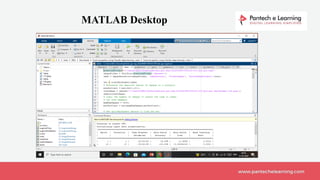
• Command Window
• Editor Window
• Workspace
• Current Directory
MATLAB DESKTOP TOOLS
MATLAB Desktop
clc , clear ,close all
save , load
who , whos
cd , edit ,ls
input , disp
version
mkdir , pwd
delete
size
length
General Purpose Commands
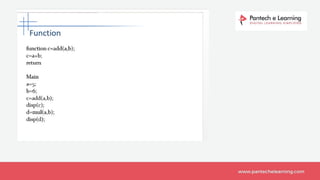
❑ Functions are similar to scripts
❑ Functions may take arguments
❑ Functions may return one or more
values
MATLAB Functions
⚫ plot linear plot
⚫ stem discrete plot
⚫ grid add grid lines
⚫ xlabel add X-axis label
⚫ ylabel add Y-axis label
⚫ title add graph title
⚫ subplotdivide figure window
⚫ figure create new figure window
⚫ pause wait for user response
Graph Functions (summary)
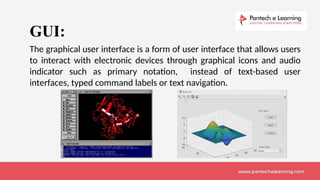
The graphical user interface is a form of user interface that allows users
to interact with electronic devices through graphical icons and audio
indicator such as primary notation, instead of text-based user
interfaces, typed command labels or text navigation.
GUI:
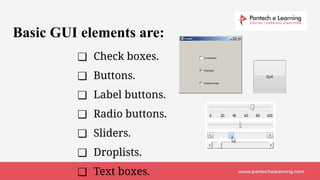
❑ Check boxes.
❑ Buttons.
❑ Label buttons.
❑ Radio buttons.
❑ Sliders.
❑ Droplists.
❑ Text boxes.
Basic GUI elements are:
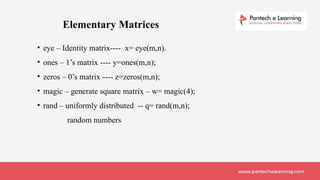
• eye – Identity matrix---- x= eye(m,n).
• ones – 1’s matrix ---- y=ones(m,n);
• zeros – 0’s matrix ---- z=zeros(m,n);
• magic – generate square matrix – w= magic(4);
• rand – uniformly distributed -- q= rand(m,n);
random numbers
Elementary Matrices
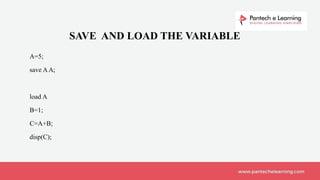
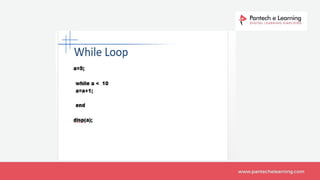
A=5;
save AA;
load A
B=1;
C=A+B;
disp(C);
SAVE AND LOAD THE VARIABLE
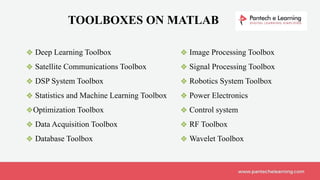
TOOLBOXES ON MATLAB
❖ Image Processing Toolbox
❖ Signal Processing Toolbox
❖ Robotics System Toolbox
❖ Power Electronics
❖ Control system
❖ RF Toolbox
❖ Wavelet Toolbox
❖ Deep Learning Toolbox
❖ Satellite Communications Toolbox
❖ DSP System Toolbox
❖ Statistics and Machine Learning Toolbox
❖Optimization Toolbox
❖ Data Acquisition Toolbox
❖ Database Toolbox
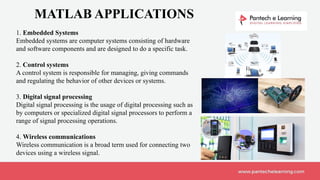
MATLAB APPLICATIONS
1. Embedded Systems
Embedded systems are computer systems consisting of hardware
and software components and are designed to do a specific task.
2. Control systems
A control system is responsible for managing, giving commands
and regulating the behavior of other devices or systems.
3. Digital signal processing
Digital signal processing is the usage of digital processing such as
by computers or specialized digital signal processors to perform a
range of signal processing operations.
4. Wireless communications
Wireless communication is a broad term used for connecting two
devices using a wireless signal.
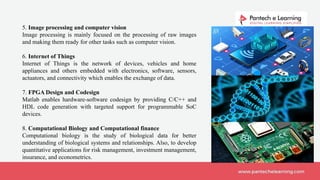
5. Image processing and computer vision
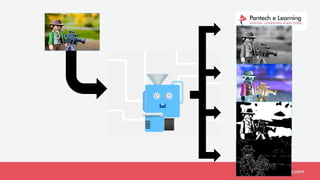
Image processing is mainly focused on the processing of raw images
and making them ready for other tasks such as computer vision.
6. Internet of Things
Internet of Things is the network of devices, vehicles and home
appliances and others embedded with electronics, software, sensors,
actuators, and connectivity which enables the exchange of data.
7. FPGA Design and Codesign
Matlab enables hardware-software codesign by providing C/C++ and
HDL code generation with targeted support for programmable SoC
devices.
8. Computational Biology and Computational finance
Computational biology is the study of biological data for better
understanding of biological systems and relationships. Also, to develop
quantitative applications for risk management, investment management,
insurance, and econometrics.
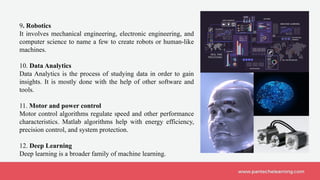
9. Robotics
It involves mechanical engineering, electronic engineering, and
computer science to name a few to create robots or human-like
machines.
10. Data Analytics
Data Analytics is the process of studying data in order to gain
insights. It is mostly done with the help of other software and
tools.
11. Motor and power control
Motor control algorithms regulate speed and other performance
characteristics. Matlab algorithms help with energy efficiency,
precision control, and system protection.
12. Deep Learning
Deep learning is a broader family of machine learning.
SCOPE OF MATLAB
It is used in the research phase of any project. Research departments of companies
generally can afford to buy the licenses for the entire department.
It is highly convenient to use for data visualization and analysis in research studies
and experiments. Every step of what happens to the data - from preprocessing, to
analysis, to building and validating models, to statistical tests - can be done in
MATLAB.
Most scientists in the industry would have used MATLAB in their academic
experience, thus they don't have to learn something new. Mathworks has done well
in creating packages for specific areas of research to analyze their data.
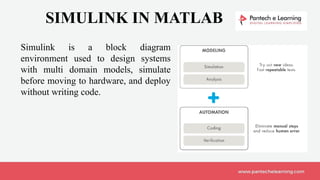
SIMULINK IN MATLAB
Simulink is a block diagram
environment used to design systems
with multi domain models, simulate
before moving to hardware, and deploy
without writing code.
WHAT IS IMAGE PROCESSING ?
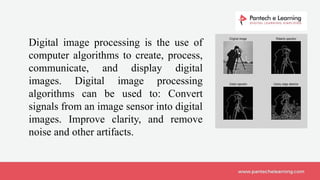
Digital image processing is the use of
computer algorithms to create, process,
communicate, and display digital
images. Digital image processing
algorithms can be used to: Convert
signals from an image sensor into digital
images. Improve clarity, and remove
noise and other artifacts.
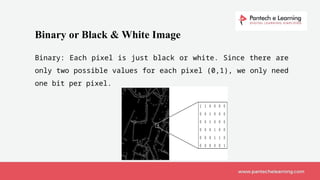
Binary or Black & White Image
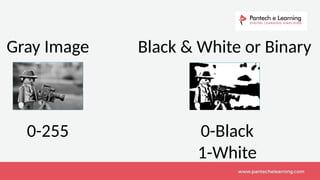
Binary: Each pixel is just black or white. Since there are
only two possible values for each pixel (0,1), we only need
one bit per pixel.
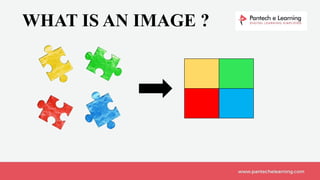
WHAT IS AN IMAGE ?
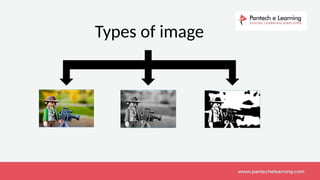
Image Types
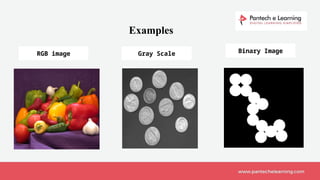
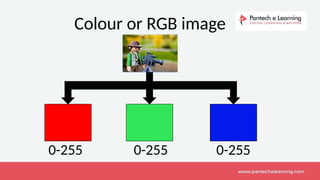
• Color Image (RGB type) – Three Planes
• Gray Scale Image – Single plane – Intensity range[0-255]
• Binary Image or bi level image – Intensity range[0 & 1]
Types of image
Examples
RGB image Gray Scale Binary Image
Colour or RGB image
0-255 0-255
0-255
Gray Image
0-255
Black & White or Binary
0-Black
1-White
APPLICATION
OF
IMAGE PROCESSING
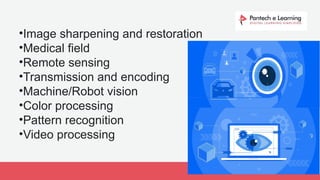
•Image sharpening and restoration
•Medical field
•Remote sensing
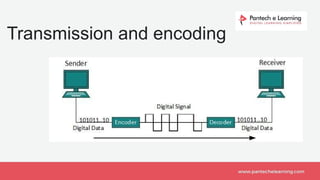
•Transmission and encoding
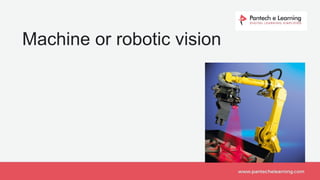
•Machine/Robot vision
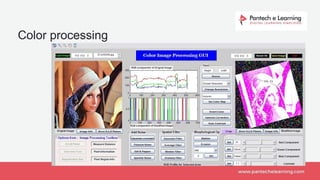
•Color processing
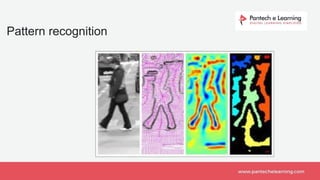
•Pattern recognition
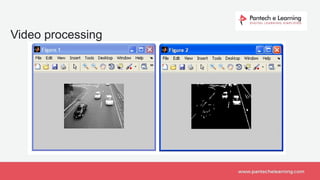
•Video processing
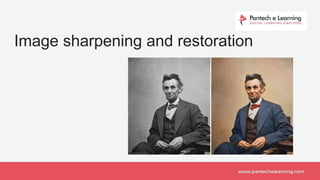
Image sharpening and restoration
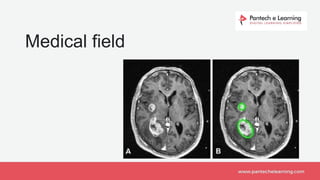
Medical field
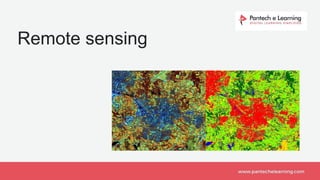
Remote sensing
Transmission and encoding
Machine or robotic vision
Color processing
Pattern recognition
Video processing

image processing using matlab in faculty 2

  • 2.
    About Pantech Established in2004 4 Engineering Graduates Products & Services – EduTech Domain 100+ Direct Team Direct Presence in TN,KA,TL&AP 350K Followers in Social Media 10K Community Members
  • 3.
    Pantech eLearning PvtLtd • 20+ Years in Tech Domain • INTEL FLK Technology Partner • Custom Product Design • Development Boards • Online/Offline Trainings • Internships • FDP’s / STTP’s
  • 4.
    ONLINE PORTFOLIO OUR LEARNINGMANAGEMENT SYSTEMS Free Courses & Presentations https://lms.pantechelearning.com Download Pantech E Learning App from Google Play store 'https://play.google.com/store/apps/details? id=com.pantechlearning.courses Get Access to our Free Courses & Materials LEARN ANYTIME ! ANYWHERE !
  • 5.
  • 6.
    Office Chennai Pantech eLearning Pvt.Ltd. Kotta Srinivasiah Charities Building, Thanjavur Road, Behind Canara Bank, Near Duraisamy Subway, T.Nagar, Chennai – 600 017 Tamil Nadu, India. Bangalore Pantech eLearning Pvt. Ltd. 49 B, 9th Main Rd, 2nd Block, Jayanagar, Bengaluru - 560 011 Karnataka, India. Hyderbad Pantech eLearning Pvt. Ltd.4th Floor, Delta Chamber, Behind Chennai Shopping Mall, Ameerpet, Hyderabad – 500 016 Telangana, India. Vijayawada Pantech eLearning Pvt. Ltd.4th Floor, Datta Complex, Beside PVP Mall, Labbipet, Vijayawada – 520 010 Andhra Pradesh, India.
  • 7.
    Contact Us Pantech eLearningPvt. Ltd. Central R & D Office #8, Natrajan St, Nookampalayam Link Road, Chemmencherry, Chennai - 600 119 Tamil Nadu, India. training@pantechelearning.com +91 8925533489 / 88
  • 8.
    ❖ MATLAB (MatrixLaboratory) is a programming environment for algorithm development, data analysis, visualization, and numerical computation, developed by Mathworks. ❖ MATLAB is widely used for matrix-based computation designed for scientific and engineering use. ABOUT MATLAB
  • 9.
    ❑ J. H.Wilkinson, George Forsythe, and John Todd, played important roles in the origins of MATLAB. ❑ Cleve moler invention on 1974’s. ❑ In the 1980’s, MATLAB was rewritten in C with more functionality (such as plotting routines) ❑ It gives support with other languages C/C++/Java/ FORTRAN. ❑ It’s speed is low for some processes and it is not suitable for large scale system ❑ The Mathworks, Inc. was created in 1984 ❑ The Mathworks is now responsible for development, sale, and support for MATLAB ❑ The Mathworks is located in Natick. BACKGROUND REVIEW
  • 10.
  • 11.
    WHAT ARE WINDOWSAVAILABLE ON MATLAB ?
  • 12.
    • Command Window •Editor Window • Workspace • Current Directory MATLAB DESKTOP TOOLS
  • 13.
  • 14.
    clc , clear,close all save , load who , whos cd , edit ,ls input , disp version mkdir , pwd delete size length General Purpose Commands
  • 15.
    ❑ Functions aresimilar to scripts ❑ Functions may take arguments ❑ Functions may return one or more values MATLAB Functions
  • 16.
    ⚫ plot linearplot ⚫ stem discrete plot ⚫ grid add grid lines ⚫ xlabel add X-axis label ⚫ ylabel add Y-axis label ⚫ title add graph title ⚫ subplotdivide figure window ⚫ figure create new figure window ⚫ pause wait for user response Graph Functions (summary)
  • 17.
    The graphical userinterface is a form of user interface that allows users to interact with electronic devices through graphical icons and audio indicator such as primary notation, instead of text-based user interfaces, typed command labels or text navigation. GUI:
  • 18.
    ❑ Check boxes. ❑Buttons. ❑ Label buttons. ❑ Radio buttons. ❑ Sliders. ❑ Droplists. ❑ Text boxes. Basic GUI elements are:
  • 19.
    • eye –Identity matrix---- x= eye(m,n). • ones – 1’s matrix ---- y=ones(m,n); • zeros – 0’s matrix ---- z=zeros(m,n); • magic – generate square matrix – w= magic(4); • rand – uniformly distributed -- q= rand(m,n); random numbers Elementary Matrices
  • 20.
  • 25.
    TOOLBOXES ON MATLAB ❖Image Processing Toolbox ❖ Signal Processing Toolbox ❖ Robotics System Toolbox ❖ Power Electronics ❖ Control system ❖ RF Toolbox ❖ Wavelet Toolbox ❖ Deep Learning Toolbox ❖ Satellite Communications Toolbox ❖ DSP System Toolbox ❖ Statistics and Machine Learning Toolbox ❖Optimization Toolbox ❖ Data Acquisition Toolbox ❖ Database Toolbox
  • 26.
    MATLAB APPLICATIONS 1. EmbeddedSystems Embedded systems are computer systems consisting of hardware and software components and are designed to do a specific task. 2. Control systems A control system is responsible for managing, giving commands and regulating the behavior of other devices or systems. 3. Digital signal processing Digital signal processing is the usage of digital processing such as by computers or specialized digital signal processors to perform a range of signal processing operations. 4. Wireless communications Wireless communication is a broad term used for connecting two devices using a wireless signal.
  • 27.
    5. Image processingand computer vision Image processing is mainly focused on the processing of raw images and making them ready for other tasks such as computer vision. 6. Internet of Things Internet of Things is the network of devices, vehicles and home appliances and others embedded with electronics, software, sensors, actuators, and connectivity which enables the exchange of data. 7. FPGA Design and Codesign Matlab enables hardware-software codesign by providing C/C++ and HDL code generation with targeted support for programmable SoC devices. 8. Computational Biology and Computational finance Computational biology is the study of biological data for better understanding of biological systems and relationships. Also, to develop quantitative applications for risk management, investment management, insurance, and econometrics.
  • 28.
    9. Robotics It involvesmechanical engineering, electronic engineering, and computer science to name a few to create robots or human-like machines. 10. Data Analytics Data Analytics is the process of studying data in order to gain insights. It is mostly done with the help of other software and tools. 11. Motor and power control Motor control algorithms regulate speed and other performance characteristics. Matlab algorithms help with energy efficiency, precision control, and system protection. 12. Deep Learning Deep learning is a broader family of machine learning.
  • 29.
    SCOPE OF MATLAB Itis used in the research phase of any project. Research departments of companies generally can afford to buy the licenses for the entire department. It is highly convenient to use for data visualization and analysis in research studies and experiments. Every step of what happens to the data - from preprocessing, to analysis, to building and validating models, to statistical tests - can be done in MATLAB. Most scientists in the industry would have used MATLAB in their academic experience, thus they don't have to learn something new. Mathworks has done well in creating packages for specific areas of research to analyze their data.
  • 30.
    SIMULINK IN MATLAB Simulinkis a block diagram environment used to design systems with multi domain models, simulate before moving to hardware, and deploy without writing code.
  • 31.
    WHAT IS IMAGEPROCESSING ?
  • 32.
    Digital image processingis the use of computer algorithms to create, process, communicate, and display digital images. Digital image processing algorithms can be used to: Convert signals from an image sensor into digital images. Improve clarity, and remove noise and other artifacts.
  • 33.
    Binary or Black& White Image Binary: Each pixel is just black or white. Since there are only two possible values for each pixel (0,1), we only need one bit per pixel.
  • 35.
    WHAT IS ANIMAGE ?
  • 36.
    Image Types • ColorImage (RGB type) – Three Planes • Gray Scale Image – Single plane – Intensity range[0-255] • Binary Image or bi level image – Intensity range[0 & 1]
  • 37.
  • 38.
    Examples RGB image GrayScale Binary Image
  • 39.
    Colour or RGBimage 0-255 0-255 0-255
  • 40.
    Gray Image 0-255 Black &White or Binary 0-Black 1-White
  • 41.
  • 42.
    •Image sharpening andrestoration •Medical field •Remote sensing •Transmission and encoding •Machine/Robot vision •Color processing •Pattern recognition •Video processing
  • 43.
  • 44.
  • 45.
  • 46.
  • 47.
  • 48.
  • 49.
  • 50.