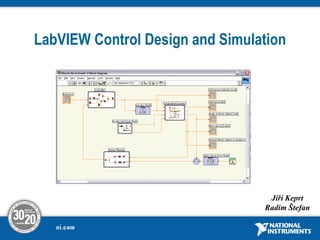
LabVIEW Control Design and Simulation
Jiří Keprt
Radim Štefan
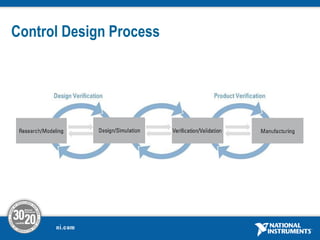
Control Design Process
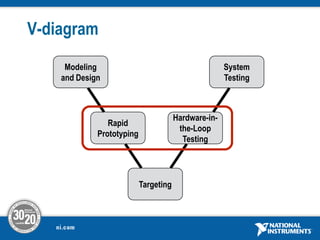
V-diagram
System
Testing
Modeling
and Design
Targeting
Rapid
Prototyping
Hardware-in-
the-Loop
Testing
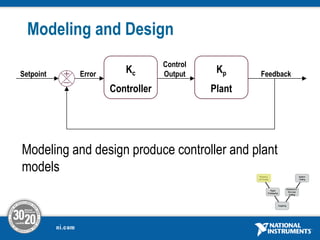
Modeling and Design
Modeling and design produce controller and plant
models
Kc
Controller
Kp
Plant
Error
Control
Output Feedback
Setpoint
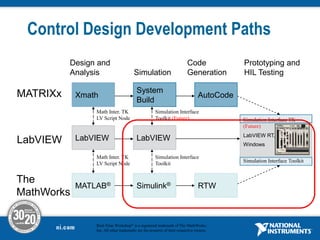
Control Design Development Paths
LabVIEW LabVIEW
Xmath
System
Build
AutoCode
MATRIXx
MATLAB® Simulink® RTW
The
MathWorks
Design and
Analysis Simulation
Code
Generation
Prototyping and
HIL Testing
LabVIEW
LabVIEW RT,
Windows
Simulation Interface TK
(Future)
Simulation Interface Toolkit
Math Inter. TK
LV Script Node
Math Inter. TK
LV Script Node
Simulation Interface
Toolkit (Future)
Simulation Interface
Toolkit
Real-Time Workshop® is a registered trademark of The MathWorks,
Inc. All other trademarks are the property of their respective owners.
Demo Bouncing Ball
.
• A rubber ball is thrown into the air with a velocity of 15
meters per second from a height of 10 m.
• Only gravitation is the force affecting the ball.
• The speed of the ball is decreased to 80 % when the
ball hits the ground and the direction is reversed .
• The position of the ball is shown in the lower plot of
the scope, and the velocity of the ball is shown in the
upper plot.
Demo Bouncing Ball
.
mg
x
m 



g
x 



• Initial condition
s
m
x /
15
]
0
[ 

• Differential equation of the model
m
x 10
]
0
[ 
Demo Bouncing Ball
.
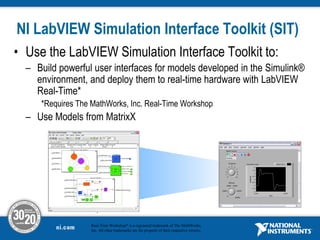
NI LabVIEW Simulation Interface Toolkit (SIT)
• Use the LabVIEW Simulation Interface Toolkit to:
– Build powerful user interfaces for models developed in the Simulink®
environment, and deploy them to real-time hardware with LabVIEW
Real-Time*
*Requires The MathWorks, Inc. Real-Time Workshop
– Use Models from MatrixX
.
Real-Time Workshop® is a registered trademark of The MathWorks,
Inc. All other trademarks are the property of their respective owners.
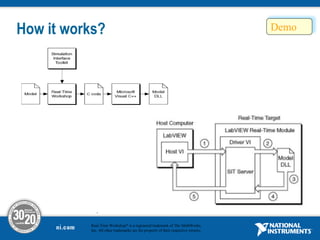
How it works?
.
Real-Time Workshop® is a registered trademark of The MathWorks,
Inc. All other trademarks are the property of their respective owners.
System Requirements
Simulink® is a registered trademark of The MathWorks, Inc. All other
trademarks are the property of their respective owners.
• The MathWorks MATLAB® 6.0 or later
• The MathWorks Simulink® 4.0 or later
• The MathWorks Real-Time Workshop® 4.0 or later
• Microsoft Visual C++ 5.0 or later
• Gcc WindRiver Compiler for VxWorks
• National Instruments LabVIEW 7.0 or later, Full or
Professional Development Systems
• National Instruments LabVIEW Real-Time Module
• NI-DAQ
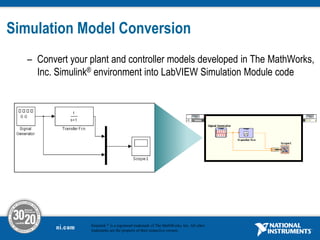
Simulation Model Conversion
– Convert your plant and controller models developed in The MathWorks,
Inc. Simulink® environment into LabVIEW Simulation Module code
Simulink ® is a registered trademark of The MathWorks, Inc. All other
trademarks are the property of their respective owners.
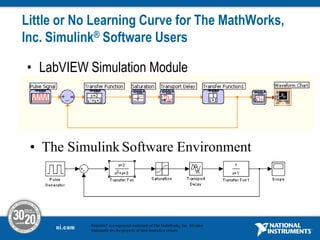
Little or No Learning Curve for The MathWorks,
Inc. Simulink® Software Users
• LabVIEW Simulation Module
• The Simulink Software Environment
Simulink® is a registered trademark of The MathWorks, Inc. All other
trademarks are the property of their respective owners.
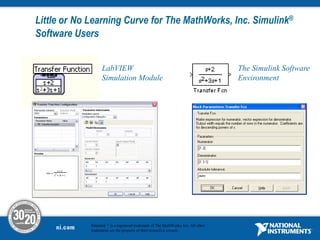
Little or No Learning Curve for The MathWorks, Inc. Simulink®
Software Users
The Simulink Software
Environment
LabVIEW
Simulation Module
Simulink ® is a registered trademark of The MathWorks, Inc. All other
trademarks are the property of their respective owners.
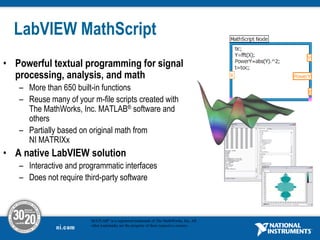
LabVIEW MathScript
• Powerful textual programming for signal
processing, analysis, and math
– More than 650 built-in functions
– Reuse many of your m-file scripts created with
The MathWorks, Inc. MATLAB® software and
others
– Partially based on original math from
NI MATRIXx
• A native LabVIEW solution
– Interactive and programmatic interfaces
– Does not require third-party software
MATLAB® is a registered trademark of The MathWorks, Inc. All
other trademarks are the property of their respective owners.
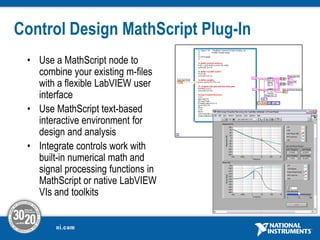
Control Design MathScript Plug-In
• Use a MathScript node to
combine your existing m-files
with a flexible LabVIEW user
interface
• Use MathScript text-based
interactive environment for
design and analysis
• Integrate controls work with
built-in numerical math and
signal processing functions in
MathScript or native LabVIEW
VIs and toolkits
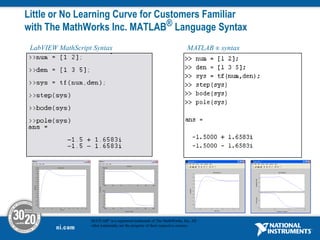
Little or No Learning Curve for Customers Familiar
with The MathWorks Inc. MATLAB® Language Syntax
LabVIEW MathScript Syntax MATLAB ® syntax
MATLAB® is a registered trademark of The MathWorks, Inc. All
other trademarks are the property of their respective owners.
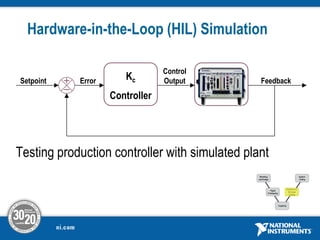
Hardware-in-the-Loop (HIL) Simulation
Testing production controller with simulated plant
Kc
Controller
Kp
Plant
Error
Control
Output Feedback
Setpoint
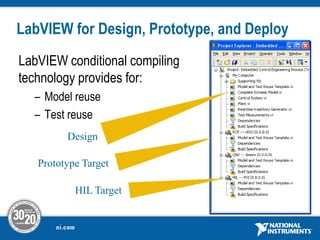
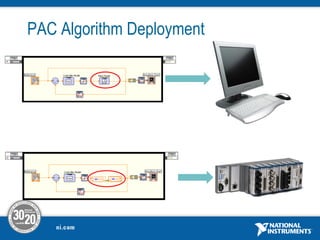
LabVIEW for Design, Prototype, and Deploy
LabVIEW conditional compiling
technology provides for:
– Model reuse
– Test reuse
Design
HIL Target
Prototype Target
PAC Algorithm Deployment
LabVIEW Control Design and Simulation
Benefits
• Complete simulation and real-time implementation capability –
stay in one environment from design to test to implementation
• LabVIEW user interface to change and observe parameters as
simulation or control system is running
• Use any LabVIEW VI or programming structure inside or outside of
simulation loops:
– Integrated design and simulation, batch simulation
– DAQ, RIO, vision, or CAN for I/O and feedback
• Easily create parallel and multirate simulation or control loops
SIT / HIL Demo
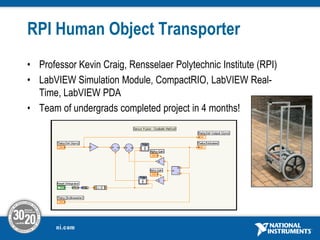
RPI Human Object Transporter
• Professor Kevin Craig, Rensselaer Polytechnic Institute (RPI)
• LabVIEW Simulation Module, CompactRIO, LabVIEW Real-
Time, LabVIEW PDA
• Team of undergrads completed project in 4 months!
Děkujeme za pozornost

LabVIEWControlDesignandSimulationKeprt_Jiri.pdf

  • 1.
    LabVIEW Control Designand Simulation Jiří Keprt Radim Štefan
  • 2.
  • 3.
  • 4.
    Modeling and Design Modelingand design produce controller and plant models Kc Controller Kp Plant Error Control Output Feedback Setpoint
  • 5.
    Control Design DevelopmentPaths LabVIEW LabVIEW Xmath System Build AutoCode MATRIXx MATLAB® Simulink® RTW The MathWorks Design and Analysis Simulation Code Generation Prototyping and HIL Testing LabVIEW LabVIEW RT, Windows Simulation Interface TK (Future) Simulation Interface Toolkit Math Inter. TK LV Script Node Math Inter. TK LV Script Node Simulation Interface Toolkit (Future) Simulation Interface Toolkit Real-Time Workshop® is a registered trademark of The MathWorks, Inc. All other trademarks are the property of their respective owners.
  • 6.
    Demo Bouncing Ball . •A rubber ball is thrown into the air with a velocity of 15 meters per second from a height of 10 m. • Only gravitation is the force affecting the ball. • The speed of the ball is decreased to 80 % when the ball hits the ground and the direction is reversed . • The position of the ball is shown in the lower plot of the scope, and the velocity of the ball is shown in the upper plot.
  • 7.
    Demo Bouncing Ball . mg x m    g x     • Initial condition s m x / 15 ] 0 [   • Differential equation of the model m x 10 ] 0 [ 
  • 8.
  • 9.
    NI LabVIEW SimulationInterface Toolkit (SIT) • Use the LabVIEW Simulation Interface Toolkit to: – Build powerful user interfaces for models developed in the Simulink® environment, and deploy them to real-time hardware with LabVIEW Real-Time* *Requires The MathWorks, Inc. Real-Time Workshop – Use Models from MatrixX . Real-Time Workshop® is a registered trademark of The MathWorks, Inc. All other trademarks are the property of their respective owners.
  • 10.
    How it works? . Real-TimeWorkshop® is a registered trademark of The MathWorks, Inc. All other trademarks are the property of their respective owners.
  • 11.
    System Requirements Simulink® isa registered trademark of The MathWorks, Inc. All other trademarks are the property of their respective owners. • The MathWorks MATLAB® 6.0 or later • The MathWorks Simulink® 4.0 or later • The MathWorks Real-Time Workshop® 4.0 or later • Microsoft Visual C++ 5.0 or later • Gcc WindRiver Compiler for VxWorks • National Instruments LabVIEW 7.0 or later, Full or Professional Development Systems • National Instruments LabVIEW Real-Time Module • NI-DAQ
  • 12.
    Simulation Model Conversion –Convert your plant and controller models developed in The MathWorks, Inc. Simulink® environment into LabVIEW Simulation Module code Simulink ® is a registered trademark of The MathWorks, Inc. All other trademarks are the property of their respective owners.
  • 13.
    Little or NoLearning Curve for The MathWorks, Inc. Simulink® Software Users • LabVIEW Simulation Module • The Simulink Software Environment Simulink® is a registered trademark of The MathWorks, Inc. All other trademarks are the property of their respective owners.
  • 14.
    Little or NoLearning Curve for The MathWorks, Inc. Simulink® Software Users The Simulink Software Environment LabVIEW Simulation Module Simulink ® is a registered trademark of The MathWorks, Inc. All other trademarks are the property of their respective owners.
  • 15.
    LabVIEW MathScript • Powerfultextual programming for signal processing, analysis, and math – More than 650 built-in functions – Reuse many of your m-file scripts created with The MathWorks, Inc. MATLAB® software and others – Partially based on original math from NI MATRIXx • A native LabVIEW solution – Interactive and programmatic interfaces – Does not require third-party software MATLAB® is a registered trademark of The MathWorks, Inc. All other trademarks are the property of their respective owners.
  • 16.
    Control Design MathScriptPlug-In • Use a MathScript node to combine your existing m-files with a flexible LabVIEW user interface • Use MathScript text-based interactive environment for design and analysis • Integrate controls work with built-in numerical math and signal processing functions in MathScript or native LabVIEW VIs and toolkits
  • 17.
    Little or NoLearning Curve for Customers Familiar with The MathWorks Inc. MATLAB® Language Syntax LabVIEW MathScript Syntax MATLAB ® syntax MATLAB® is a registered trademark of The MathWorks, Inc. All other trademarks are the property of their respective owners.
  • 18.
    Hardware-in-the-Loop (HIL) Simulation Testingproduction controller with simulated plant Kc Controller Kp Plant Error Control Output Feedback Setpoint
  • 19.
    LabVIEW for Design,Prototype, and Deploy LabVIEW conditional compiling technology provides for: – Model reuse – Test reuse Design HIL Target Prototype Target
  • 20.
  • 21.
    LabVIEW Control Designand Simulation Benefits • Complete simulation and real-time implementation capability – stay in one environment from design to test to implementation • LabVIEW user interface to change and observe parameters as simulation or control system is running • Use any LabVIEW VI or programming structure inside or outside of simulation loops: – Integrated design and simulation, batch simulation – DAQ, RIO, vision, or CAN for I/O and feedback • Easily create parallel and multirate simulation or control loops
  • 22.
  • 23.
    RPI Human ObjectTransporter • Professor Kevin Craig, Rensselaer Polytechnic Institute (RPI) • LabVIEW Simulation Module, CompactRIO, LabVIEW Real- Time, LabVIEW PDA • Team of undergrads completed project in 4 months!
  • 24.