Application of MapInfo
Discover3D in Renewable
Energy Resources – Wind
Energy
Agenda
How is GIS applicable as a tool1
Using MapInfo Discover3D in Wind Energy Resources2
MapInfo Pro Discover3D in Wind Energy Resources
Introduction to MapInfo Suite of Products1
2
3
MapInfo Pro Discover3D in Wind Energy Resources
What is MapInfo Pro Advanced?
•Next generation raster GIS capabilities
– Provided as an add-on to MapInfo Pro.
– Runs with the 64 bit version of MapInfo Pro.
•Innovative new grid format and high performance engine
– Full featured raster GIS capabilities
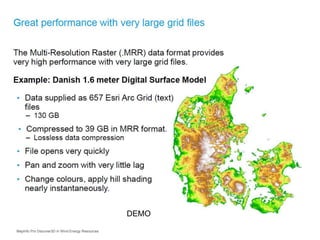
– Great performance with very large grid files.
• Takes advantage of industry standard compression methods
• Efficiently displays data at all zoom levels ("pyramiding")
– Support for both numeric, classified (categorical) and
imagery data in the same file.
MapInfo Pro Advanced
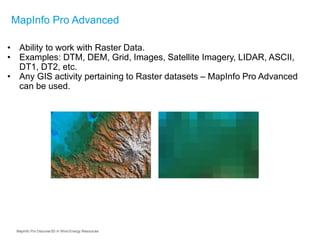
• Ability to work with Raster Data.
• Examples: DTM, DEM, Grid, Images, Satellite Imagery, LIDAR, ASCII,
DT1, DT2, etc.
• Any GIS activity pertaining to Raster datasets – MapInfo Pro Advanced
can be used.
MapInfo Pro Discover3D in Wind Energy Resources
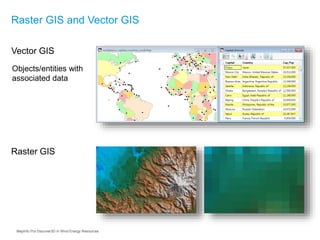
Raster GIS and Vector GIS
Raster GIS
Vector GIS
Objects/entities with
associated data
MapInfo Pro Discover3D in Wind Energy Resources
Features of MapInfo Pro Advanced
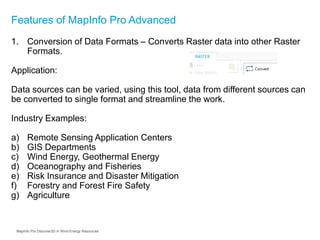
1. Conversion of Data Formats – Converts Raster data into other Raster
Formats.
Application:
Data sources can be varied, using this tool, data from different sources can
be converted to single format and streamline the work.
Industry Examples:
a) Remote Sensing Application Centers
b) GIS Departments
c) Wind Energy, Geothermal Energy
d) Oceanography and Fisheries
e) Risk Insurance and Disaster Mitigation
f) Forestry and Forest Fire Safety
g) Agriculture
MapInfo Pro Discover3D in Wind Energy Resources
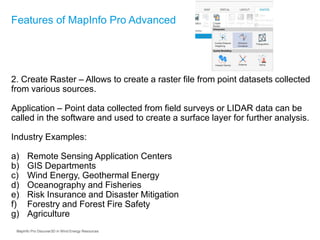
2. Create Raster – Allows to create a raster file from point datasets collected
from various sources.
Application – Point data collected from field surveys or LIDAR data can be
called in the software and used to create a surface layer for further analysis.
Industry Examples:
a) Remote Sensing Application Centers
b) GIS Departments
c) Wind Energy, Geothermal Energy
d) Oceanography and Fisheries
e) Risk Insurance and Disaster Mitigation
f) Forestry and Forest Fire Safety
g) Agriculture
Features of MapInfo Pro Advanced
MapInfo Pro Discover3D in Wind Energy Resources
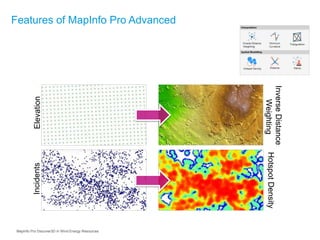
Features of MapInfo Pro Advanced
ElevationIncidents
HotspotDensity
InverseDistance
Weighting
MapInfo Pro Discover3D in Wind Energy Resources
3. Clip a Raster – Allows the user to clip the raster to rectangle or any
shape.
Applications: Defined boundary extents of the raster can be taken out for
further analysis.
Industry Examples:
a) Agriculture
b) Forestry
c) Urban Planning and Development
d) Mineral Exploration
e) GIS Departments
Features of MapInfo Pro Advanced
MapInfo Pro Discover3D in Wind Energy Resources
4. Merge – Combine multiple or adjacent raster files to a single file
Applications: In case of huge areas with multiple raster datasets, it is
required to view all files together, using this operation all files can be
merged to a single file.
Industry Examples:
Features of MapInfo Pro Advanced
a) Agriculture
b) Forestry
c) Wind Energy, Geothermal Energy
d) Urban Planning and Development
e) Mineral Exploration
f) GIS Departments
g) Risk Evaluation and Disaster Mitigation
MapInfo Pro Discover3D in Wind Energy Resources
Features of MapInfo Pro Advanced
Numeric grids
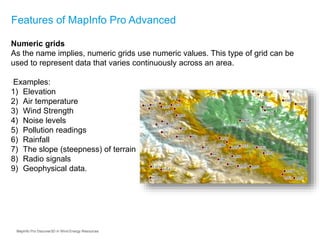
As the name implies, numeric grids use numeric values. This type of grid can be
used to represent data that varies continuously across an area.
Examples:
1) Elevation
2) Air temperature
3) Wind Strength
4) Noise levels
5) Pollution readings
6) Rainfall
7) The slope (steepness) of terrain
8) Radio signals
9) Geophysical data.
MapInfo Pro Discover3D in Wind Energy Resources
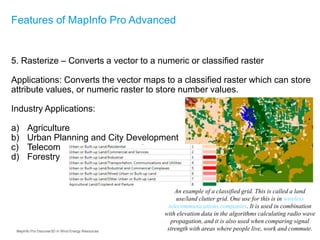
5. Rasterize – Converts a vector to a numeric or classified raster
Applications: Converts the vector maps to a classified raster which can store
attribute values, or numeric raster to store number values.
Industry Applications:
a) Agriculture
b) Urban Planning and City Development
c) Telecom
d) Forestry
Features of MapInfo Pro Advanced
An example of a classified grid. This is called a land
use/land clutter grid. One use for this is in wireless
telecommunications companies. It is used in combination
with elevation data in the algorithms calculating radio wave
propagation, and it is also used when comparing signal
strength with areas where people live, work and commute.MapInfo Pro Discover3D in Wind Energy Resources
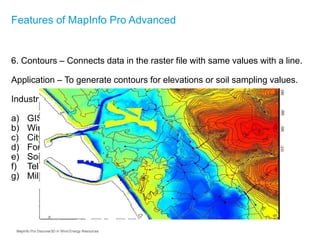
6. Contours – Connects data in the raster file with same values with a line.
Application – To generate contours for elevations or soil sampling values.
Industry Examples:
a) GIS Departments
b) Wind Energy, Geothermal Energy
c) City Planning, Road and Railway Departments
d) Forestry/Agriculture
e) Soil Sampling, Chemical Sampling Laboratories
f) Telecom
g) Military, Armed Forces
Features of MapInfo Pro Advanced
MapInfo Pro Discover3D in Wind Energy Resources
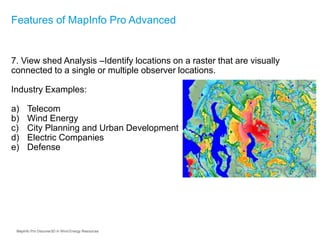
7. View shed Analysis –Identify locations on a raster that are visually
connected to a single or multiple observer locations.
Industry Examples:
a) Telecom
b) Wind Energy
c) City Planning and Urban Development
d) Electric Companies
e) Defense
Features of MapInfo Pro Advanced
MapInfo Pro Discover3D in Wind Energy Resources
MapInfo Pro Raster summary of capabilities
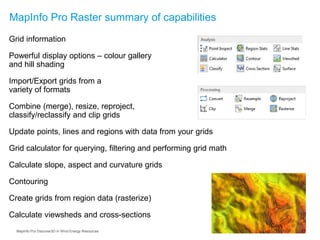
Grid information
Powerful display options – colour gallery
and hill shading
Import/Export grids from a
variety of formats
Combine (merge), resize, reproject,
classify/reclassify and clip grids
Update points, lines and regions with data from your grids
Grid calculator for querying, filtering and performing grid math
Calculate slope, aspect and curvature grids
Contouring
Create grids from region data (rasterize)
Calculate viewsheds and cross-sections
MapInfo Pro Discover3D in Wind Energy Resources
Industry Examples for MapInfo Professional Advanced
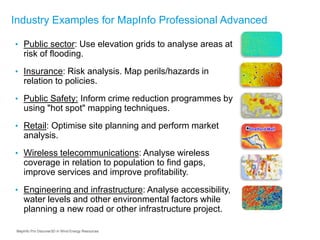
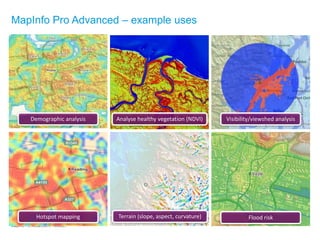
• Public sector: Use elevation grids to analyse areas at
risk of flooding.
• Insurance: Risk analysis. Map perils/hazards in
relation to policies.
• Public Safety: Inform crime reduction programmes by
using "hot spot" mapping techniques.
• Retail: Optimise site planning and perform market
analysis.
• Wireless telecommunications: Analyse wireless
coverage in relation to population to find gaps,
improve services and improve profitability.
• Engineering and infrastructure: Analyse accessibility,
water levels and other environmental factors while
planning a new road or other infrastructure project.
MapInfo Pro Discover3D in Wind Energy Resources
MapInfo Pro Advanced in Telecom
Demographic analysis Analyse healthy vegetation (NDVI) Visibility/viewshed analysis
Hotspot mapping Terrain (slope, aspect, curvature) Flood risk
MapInfo Pro Advanced – example uses
DEMO
MapInfo Pro Discover3D in Wind Energy Resources
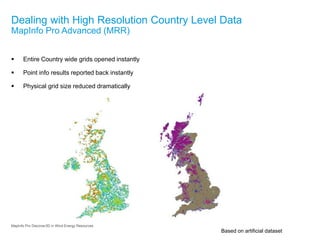
Dealing with High Resolution Country Level Data
MapInfo Pro Advanced (MRR)
 Entire Country wide grids opened instantly
 Point info results reported back instantly
 Physical grid size reduced dramatically
Based on artificial dataset
MapInfo Pro Discover3D in Wind Energy Resources
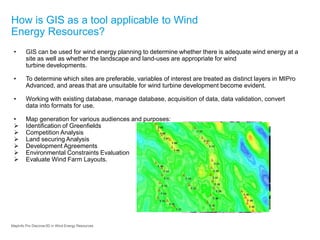
How is GIS as a tool applicable to Wind
Energy Resources?
• GIS can be used for wind energy planning to determine whether there is adequate wind energy at a
site as well as whether the landscape and land-uses are appropriate for wind
turbine developments.
• To determine which sites are preferable, variables of interest are treated as distinct layers in MIPro
Advanced, and areas that are unsuitable for wind turbine development become evident.
• Working with existing database, manage database, acquisition of data, data validation, convert
data into formats for use.
• Map generation for various audiences and purposes:
 Identification of Greenfields
 Competition Analysis
 Land securing Analysis
 Development Agreements
 Environmental Constraints Evaluation
 Evaluate Wind Farm Layouts.
MapInfo Pro Discover3D in Wind Energy Resources
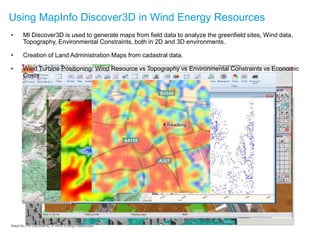
• MI Discover3D is used to generate maps from field data to analyze the greenfield sites, Wind data,
Topography, Environmental Constraints, both in 2D and 3D environments.
• Creation of Land Administration Maps from cadastral data.
• Wind Turbine Positioning: Wind Resource vs Topography vs Environmental Constraints vs Economic
Costs
Using MapInfo Discover3D in Wind Energy Resources
MapInfo Pro Discover3D in Wind Energy Resources
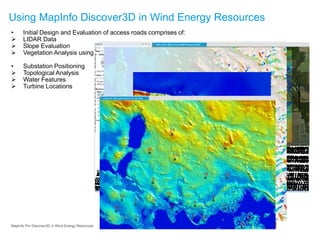
• Initial Design and Evaluation of access roads comprises of:
 LIDAR Data
 Slope Evaluation
 Vegetation Analysis using High Resolution Imagery
• Substation Positioning
 Topological Analysis
 Water Features
 Turbine Locations
Using MapInfo Discover3D in Wind Energy Resources
MapInfo Pro Discover3D in Wind Energy Resources
Thanks
MapInfo Pro Discover3D in Wind Energy Resources

MapInfo Discover 3D for Wind Energy Resources

  • 1.
    Application of MapInfo Discover3Din Renewable Energy Resources – Wind Energy
  • 2.
    Agenda How is GISapplicable as a tool1 Using MapInfo Discover3D in Wind Energy Resources2 MapInfo Pro Discover3D in Wind Energy Resources Introduction to MapInfo Suite of Products1 2 3
  • 3.
    MapInfo Pro Discover3Din Wind Energy Resources What is MapInfo Pro Advanced? •Next generation raster GIS capabilities – Provided as an add-on to MapInfo Pro. – Runs with the 64 bit version of MapInfo Pro. •Innovative new grid format and high performance engine – Full featured raster GIS capabilities – Great performance with very large grid files. • Takes advantage of industry standard compression methods • Efficiently displays data at all zoom levels ("pyramiding") – Support for both numeric, classified (categorical) and imagery data in the same file.
  • 4.
    MapInfo Pro Advanced •Ability to work with Raster Data. • Examples: DTM, DEM, Grid, Images, Satellite Imagery, LIDAR, ASCII, DT1, DT2, etc. • Any GIS activity pertaining to Raster datasets – MapInfo Pro Advanced can be used. MapInfo Pro Discover3D in Wind Energy Resources
  • 5.
    Raster GIS andVector GIS Raster GIS Vector GIS Objects/entities with associated data MapInfo Pro Discover3D in Wind Energy Resources
  • 6.
    Features of MapInfoPro Advanced 1. Conversion of Data Formats – Converts Raster data into other Raster Formats. Application: Data sources can be varied, using this tool, data from different sources can be converted to single format and streamline the work. Industry Examples: a) Remote Sensing Application Centers b) GIS Departments c) Wind Energy, Geothermal Energy d) Oceanography and Fisheries e) Risk Insurance and Disaster Mitigation f) Forestry and Forest Fire Safety g) Agriculture MapInfo Pro Discover3D in Wind Energy Resources
  • 7.
    2. Create Raster– Allows to create a raster file from point datasets collected from various sources. Application – Point data collected from field surveys or LIDAR data can be called in the software and used to create a surface layer for further analysis. Industry Examples: a) Remote Sensing Application Centers b) GIS Departments c) Wind Energy, Geothermal Energy d) Oceanography and Fisheries e) Risk Insurance and Disaster Mitigation f) Forestry and Forest Fire Safety g) Agriculture Features of MapInfo Pro Advanced MapInfo Pro Discover3D in Wind Energy Resources
  • 8.
    Features of MapInfoPro Advanced ElevationIncidents HotspotDensity InverseDistance Weighting MapInfo Pro Discover3D in Wind Energy Resources
  • 9.
    3. Clip aRaster – Allows the user to clip the raster to rectangle or any shape. Applications: Defined boundary extents of the raster can be taken out for further analysis. Industry Examples: a) Agriculture b) Forestry c) Urban Planning and Development d) Mineral Exploration e) GIS Departments Features of MapInfo Pro Advanced MapInfo Pro Discover3D in Wind Energy Resources
  • 10.
    4. Merge –Combine multiple or adjacent raster files to a single file Applications: In case of huge areas with multiple raster datasets, it is required to view all files together, using this operation all files can be merged to a single file. Industry Examples: Features of MapInfo Pro Advanced a) Agriculture b) Forestry c) Wind Energy, Geothermal Energy d) Urban Planning and Development e) Mineral Exploration f) GIS Departments g) Risk Evaluation and Disaster Mitigation MapInfo Pro Discover3D in Wind Energy Resources
  • 11.
    Features of MapInfoPro Advanced Numeric grids As the name implies, numeric grids use numeric values. This type of grid can be used to represent data that varies continuously across an area. Examples: 1) Elevation 2) Air temperature 3) Wind Strength 4) Noise levels 5) Pollution readings 6) Rainfall 7) The slope (steepness) of terrain 8) Radio signals 9) Geophysical data. MapInfo Pro Discover3D in Wind Energy Resources
  • 12.
    5. Rasterize –Converts a vector to a numeric or classified raster Applications: Converts the vector maps to a classified raster which can store attribute values, or numeric raster to store number values. Industry Applications: a) Agriculture b) Urban Planning and City Development c) Telecom d) Forestry Features of MapInfo Pro Advanced An example of a classified grid. This is called a land use/land clutter grid. One use for this is in wireless telecommunications companies. It is used in combination with elevation data in the algorithms calculating radio wave propagation, and it is also used when comparing signal strength with areas where people live, work and commute.MapInfo Pro Discover3D in Wind Energy Resources
  • 13.
    6. Contours –Connects data in the raster file with same values with a line. Application – To generate contours for elevations or soil sampling values. Industry Examples: a) GIS Departments b) Wind Energy, Geothermal Energy c) City Planning, Road and Railway Departments d) Forestry/Agriculture e) Soil Sampling, Chemical Sampling Laboratories f) Telecom g) Military, Armed Forces Features of MapInfo Pro Advanced MapInfo Pro Discover3D in Wind Energy Resources
  • 14.
    7. View shedAnalysis –Identify locations on a raster that are visually connected to a single or multiple observer locations. Industry Examples: a) Telecom b) Wind Energy c) City Planning and Urban Development d) Electric Companies e) Defense Features of MapInfo Pro Advanced MapInfo Pro Discover3D in Wind Energy Resources
  • 15.
    MapInfo Pro Rastersummary of capabilities Grid information Powerful display options – colour gallery and hill shading Import/Export grids from a variety of formats Combine (merge), resize, reproject, classify/reclassify and clip grids Update points, lines and regions with data from your grids Grid calculator for querying, filtering and performing grid math Calculate slope, aspect and curvature grids Contouring Create grids from region data (rasterize) Calculate viewsheds and cross-sections MapInfo Pro Discover3D in Wind Energy Resources
  • 16.
    Industry Examples forMapInfo Professional Advanced • Public sector: Use elevation grids to analyse areas at risk of flooding. • Insurance: Risk analysis. Map perils/hazards in relation to policies. • Public Safety: Inform crime reduction programmes by using "hot spot" mapping techniques. • Retail: Optimise site planning and perform market analysis. • Wireless telecommunications: Analyse wireless coverage in relation to population to find gaps, improve services and improve profitability. • Engineering and infrastructure: Analyse accessibility, water levels and other environmental factors while planning a new road or other infrastructure project. MapInfo Pro Discover3D in Wind Energy Resources
  • 17.
    MapInfo Pro Advancedin Telecom Demographic analysis Analyse healthy vegetation (NDVI) Visibility/viewshed analysis Hotspot mapping Terrain (slope, aspect, curvature) Flood risk MapInfo Pro Advanced – example uses
  • 18.
    DEMO MapInfo Pro Discover3Din Wind Energy Resources
  • 19.
    Dealing with HighResolution Country Level Data MapInfo Pro Advanced (MRR)  Entire Country wide grids opened instantly  Point info results reported back instantly  Physical grid size reduced dramatically Based on artificial dataset MapInfo Pro Discover3D in Wind Energy Resources
  • 20.
    How is GISas a tool applicable to Wind Energy Resources? • GIS can be used for wind energy planning to determine whether there is adequate wind energy at a site as well as whether the landscape and land-uses are appropriate for wind turbine developments. • To determine which sites are preferable, variables of interest are treated as distinct layers in MIPro Advanced, and areas that are unsuitable for wind turbine development become evident. • Working with existing database, manage database, acquisition of data, data validation, convert data into formats for use. • Map generation for various audiences and purposes:  Identification of Greenfields  Competition Analysis  Land securing Analysis  Development Agreements  Environmental Constraints Evaluation  Evaluate Wind Farm Layouts. MapInfo Pro Discover3D in Wind Energy Resources
  • 21.
    • MI Discover3Dis used to generate maps from field data to analyze the greenfield sites, Wind data, Topography, Environmental Constraints, both in 2D and 3D environments. • Creation of Land Administration Maps from cadastral data. • Wind Turbine Positioning: Wind Resource vs Topography vs Environmental Constraints vs Economic Costs Using MapInfo Discover3D in Wind Energy Resources MapInfo Pro Discover3D in Wind Energy Resources
  • 22.
    • Initial Designand Evaluation of access roads comprises of:  LIDAR Data  Slope Evaluation  Vegetation Analysis using High Resolution Imagery • Substation Positioning  Topological Analysis  Water Features  Turbine Locations Using MapInfo Discover3D in Wind Energy Resources MapInfo Pro Discover3D in Wind Energy Resources
  • 23.
    Thanks MapInfo Pro Discover3Din Wind Energy Resources