Fraud and Identity Theft
 Cybercrime: Any criminal action perpetrated primarily through the use of a computer
 Programs damaging computers
 Stealing identities online
 Attacking corporate websites
 Cybercriminals: Individuals who use computers, networks, and the Internet to perpetrate crime.
 Top categories of complaints
 FBI-related scams
 Identity theft
 Nonauction/nondelivery of merchandise
 Advance fee fraud
 Identity theft: Occurs when a thief steals personal information such as your name, address,
Social Security number, birth date, bank account, and credit card information and runs up debt
in your name
 Acts perpetrated by identity thieves
 Counterfeiting existing credit and debit cards
 Requesting changes of address on bank and credit card statements
 Obtaining new credit cards and bank account in your name and writing bad checks and not paying off
credit card balances
 Obtaining medical services in your name
 Buying a home with a mortgage in your name, then reselling the house
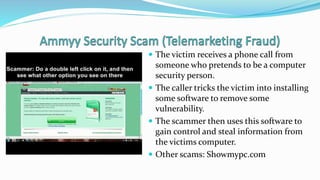
 The victim receives a phone call from
someone who pretends to be a computer
security person.
 The caller tricks the victim into installing
some software to remove some
vulnerability.
 The scammer then uses this software to
gain control and steal information from
the victims computer.
 Other scams: Showmypc.com
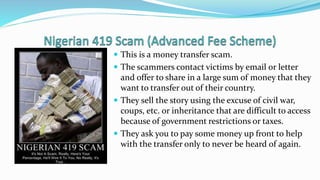
 This is a money transfer scam.
 The scammers contact victims by email or letter
and offer to share in a large sum of money that they
want to transfer out of their country.
 They sell the story using the excuse of civil war,
coups, etc. or inheritance that are difficult to access
because of government restrictions or taxes.
 They ask you to pay some money up front to help
with the transfer only to never be heard of again.
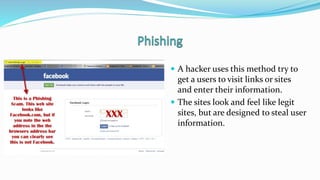
 A hacker uses this method try to
get a users to visit links or sites
and enter their information.
 The sites look and feel like legit
sites, but are designed to steal user
information.
 Keep hackers out
 Prevent them from accessing
computer
 Protect your digital information
 Use passwords
 Hide activities from prying eyes
 Firewall: Software program or hardware device designed to protect
computers from hackers
 Personal firewall: Specifically designed for home networks
 Both Windows and OS X include firewalls
 Security suites also include firewall software
 You can also buy and configure hardware firewall devices
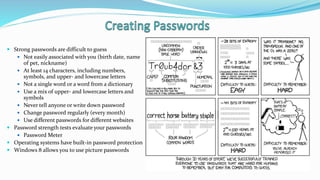
 Strong passwords are difficult to guess
 Not easily associated with you (birth date, name
of pet, nickname)
 At least 14 characters, including numbers,
symbols, and upper- and lowercase letters
 Not a single word or a word from a dictionary
 Use a mix of upper- and lowercase letters and
symbols
 Never tell anyone or write down password
 Change password regularly (every month)
 Use different passwords for different websites
 Password strength tests evaluate your passwords
 Password Meter
 Operating systems have built-in password protection
 Windows 8 allows you to use picture passwords
 Current versions of Google Chrome, Firefox,
and Internet Explorer include privacy tools that
help you surf the web anonymously
 Incognito
 Private Browsing
 InPrivate
 Portable privacy devices provide an even higher
level of surfing privacy
 Imation Personal Flash Drive
 Store sensitive Internet files
 Preload Linux OS on a flash drive to avoid using
the public or work computer’s OS
 Third-party software developers offer apps to
enhance tablet security
 hidePad
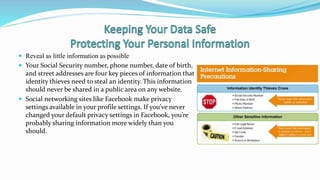
 Reveal as little information as possible
 Your Social Security number, phone number, date of birth,
and street addresses are four key pieces of information that
identity thieves need to steal an identity. This information
should never be shared in a public area on any website.
 Social networking sites like Facebook make privacy
settings available in your profile settings. If you’ve never
changed your default privacy settings in Facebook, you’re
probably sharing information more widely than you
should.
 Data on your computer faces three major threats
 Unauthorized access
 Tampering
 Destruction
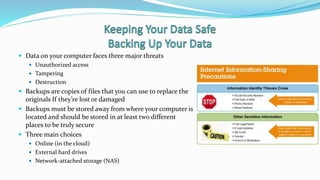
 Backups are copies of files that you can use to replace the
originals If they’re lost or damaged
 Backups must be stored away from where your computer is
located and should be stored in at least two different
places to be truly secure
 Three main choices
 Online (in the cloud)
 External hard drives
 Network-attached storage (NAS)
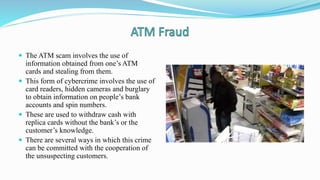
 The ATM scam involves the use of
information obtained from one’s ATM
cards and stealing from them.
 This form of cybercrime involves the use of
card readers, hidden cameras and burglary
to obtain information on people’s bank
accounts and spin numbers.
 These are used to withdraw cash with
replica cards without the bank’s or the
customer’s knowledge.
 There are several ways in which this crime
can be committed with the cooperation of
the unsuspecting customers.
 Use of Gadgets to read Personal Data
 The criminals may attach false facades on the ATMs set up in unsecure areas to
capture customer’s cards.
 Ghost ATM Machines: Freestanding machines would be set up on busy places
where people may need to withdraw their money more frequently and
unsuspectingly.
 Criminals place cash receptacle machine inside the ATM machine vestibules to
confuse the clients.
 Snatching of the cards from clients
 Four main security concerns with computerized devices
 Keeping them from being stolen
 Keeping data secure in case they are stolen
 Finding a device if it is stolen
 Remotely recovering and wiping data off a stolen device
Copyright © 2014 Pearson Education, Inc. Publishing as Prentice
Hall 15
 The methods used in committing cyber frauds and scam keep developing each
and everyday.
 The forms used vary from technological forms
 These crimes can however be prevented by the banks in application of the
latest forms of technology in ensuring safety to client accounts. Application of
high security measures would also be ideal.
 Customers can also help in prevention of the crimes by being watchful of their
surrounding to avoid being tricked or mugged.

Lock It Down, Keep It Safe

  • 1.
  • 2.
     Cybercrime: Anycriminal action perpetrated primarily through the use of a computer  Programs damaging computers  Stealing identities online  Attacking corporate websites  Cybercriminals: Individuals who use computers, networks, and the Internet to perpetrate crime.  Top categories of complaints  FBI-related scams  Identity theft  Nonauction/nondelivery of merchandise  Advance fee fraud
  • 3.
     Identity theft:Occurs when a thief steals personal information such as your name, address, Social Security number, birth date, bank account, and credit card information and runs up debt in your name  Acts perpetrated by identity thieves  Counterfeiting existing credit and debit cards  Requesting changes of address on bank and credit card statements  Obtaining new credit cards and bank account in your name and writing bad checks and not paying off credit card balances  Obtaining medical services in your name  Buying a home with a mortgage in your name, then reselling the house
  • 4.
     The victimreceives a phone call from someone who pretends to be a computer security person.  The caller tricks the victim into installing some software to remove some vulnerability.  The scammer then uses this software to gain control and steal information from the victims computer.  Other scams: Showmypc.com
  • 5.
     This isa money transfer scam.  The scammers contact victims by email or letter and offer to share in a large sum of money that they want to transfer out of their country.  They sell the story using the excuse of civil war, coups, etc. or inheritance that are difficult to access because of government restrictions or taxes.  They ask you to pay some money up front to help with the transfer only to never be heard of again.
  • 6.
     A hackeruses this method try to get a users to visit links or sites and enter their information.  The sites look and feel like legit sites, but are designed to steal user information.
  • 7.
     Keep hackersout  Prevent them from accessing computer  Protect your digital information  Use passwords  Hide activities from prying eyes
  • 8.
     Firewall: Softwareprogram or hardware device designed to protect computers from hackers  Personal firewall: Specifically designed for home networks  Both Windows and OS X include firewalls  Security suites also include firewall software  You can also buy and configure hardware firewall devices
  • 9.
     Strong passwordsare difficult to guess  Not easily associated with you (birth date, name of pet, nickname)  At least 14 characters, including numbers, symbols, and upper- and lowercase letters  Not a single word or a word from a dictionary  Use a mix of upper- and lowercase letters and symbols  Never tell anyone or write down password  Change password regularly (every month)  Use different passwords for different websites  Password strength tests evaluate your passwords  Password Meter  Operating systems have built-in password protection  Windows 8 allows you to use picture passwords
  • 10.
     Current versionsof Google Chrome, Firefox, and Internet Explorer include privacy tools that help you surf the web anonymously  Incognito  Private Browsing  InPrivate  Portable privacy devices provide an even higher level of surfing privacy  Imation Personal Flash Drive  Store sensitive Internet files  Preload Linux OS on a flash drive to avoid using the public or work computer’s OS  Third-party software developers offer apps to enhance tablet security  hidePad
  • 11.
     Reveal aslittle information as possible  Your Social Security number, phone number, date of birth, and street addresses are four key pieces of information that identity thieves need to steal an identity. This information should never be shared in a public area on any website.  Social networking sites like Facebook make privacy settings available in your profile settings. If you’ve never changed your default privacy settings in Facebook, you’re probably sharing information more widely than you should.
  • 12.
     Data onyour computer faces three major threats  Unauthorized access  Tampering  Destruction  Backups are copies of files that you can use to replace the originals If they’re lost or damaged  Backups must be stored away from where your computer is located and should be stored in at least two different places to be truly secure  Three main choices  Online (in the cloud)  External hard drives  Network-attached storage (NAS)
  • 13.
     The ATMscam involves the use of information obtained from one’s ATM cards and stealing from them.  This form of cybercrime involves the use of card readers, hidden cameras and burglary to obtain information on people’s bank accounts and spin numbers.  These are used to withdraw cash with replica cards without the bank’s or the customer’s knowledge.  There are several ways in which this crime can be committed with the cooperation of the unsuspecting customers.
  • 14.
     Use ofGadgets to read Personal Data  The criminals may attach false facades on the ATMs set up in unsecure areas to capture customer’s cards.  Ghost ATM Machines: Freestanding machines would be set up on busy places where people may need to withdraw their money more frequently and unsuspectingly.  Criminals place cash receptacle machine inside the ATM machine vestibules to confuse the clients.  Snatching of the cards from clients
  • 15.
     Four mainsecurity concerns with computerized devices  Keeping them from being stolen  Keeping data secure in case they are stolen  Finding a device if it is stolen  Remotely recovering and wiping data off a stolen device Copyright © 2014 Pearson Education, Inc. Publishing as Prentice Hall 15
  • 16.
     The methodsused in committing cyber frauds and scam keep developing each and everyday.  The forms used vary from technological forms  These crimes can however be prevented by the banks in application of the latest forms of technology in ensuring safety to client accounts. Application of high security measures would also be ideal.  Customers can also help in prevention of the crimes by being watchful of their surrounding to avoid being tricked or mugged.

Editor's Notes

  • #16 Because they’re portable, laptops, tablets, and phones are easy targets for thieves. You have four main security concerns with mobile devices: Keeping them from being stolen Keeping data secure in case they are stolen Finding a device if it is stolen Remotely recovering and wiping data off a stolen device