TRINITY INSTITUTE OF PROFESSIONAL STUDIES
Sector – 9, Dwarka Institutional Area, New Delhi-75
Affiliated to Institution of G.G.S.IP.U, Delhi
BCA,Linux
Enviornment,20306
Priyanka Rattan
Assistant Professor
TRINITY INSTITUTE OF PROFESSIONAL STUDIES
Sector – 9, Dwarka Institutional Area, New Delhi-75
What is an Operating System?
• The operating system (OS) is the program which starts up when you turn
on your computer and runs underneath all other programs - without it
nothing would happen at all.
• In simple terms, an operating system is a manager. It manages all the
available resources on a computer, from the CPU to memory to hard disk
accesses.
• Tasks the operating system must perform:
– Control Hardware - The operating system controls all the parts of the
computer and attempts to get everything working together.
– Run Applications - Another job the OS does is run application
software. This would include word processors, web browsers, games,
etc...
– Manage Data and Files - The OS makes it easy for you to organize
your computer. Through the OS you are able to do a number of things
to data, including copy, move, delete, and rename it. This makes it
much easier to find and organize what you have.
TRINITY INSTITUTE OF PROFESSIONAL STUDIES
Sector – 9, Dwarka Institutional Area, New Delhi-75
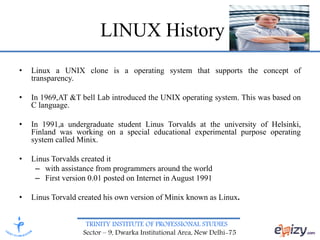
LINUX History
• Linux a UNIX clone is a operating system that supports the concept of
transparency.
• In 1969,AT &T bell Lab introduced the UNIX operating system. This was based on
C language.
• In 1991,a undergraduate student Linus Torvalds at the university of Helsinki,
Finland was working on a special educational experimental purpose operating
system called Minix.
• Linus Torvalds created it
– with assistance from programmers around the world
– First version 0.01 posted on Internet in August 1991
• Linus Torvald created his own version of Minix known as Linux.
TRINITY INSTITUTE OF PROFESSIONAL STUDIES
Sector – 9, Dwarka Institutional Area, New Delhi-75
Features of Linux
• Linux is Free.
• Open source
• Secure.
• Multi-user
• Multitasking
• Linux is portable to any hardware platform.
• Linux is very stable - computers running Linux almost
never crash
• Linux is very efficient it can smoothly manage
extremely huge amounts of data
• Linux comes with networking facilities
• Linux is case sensitive i.e. WHO is not same as who
TRINITY INSTITUTE OF PROFESSIONAL STUDIES
Sector – 9, Dwarka Institutional Area, New Delhi-75
Linux vs. Windows
• Linux is free while windows operating system is not
freely available.
• Linux is open source right from the beginning while
windows is not open source.
• Microsoft is only liable for producing all the flavors of
Windows, while various Linux distribution come from
different companies.
• Windows typically uses FAT32 or NTFS file systems
while Linux typically uses the ext2 or ext3 file systems.
• Windows lists all drives separately (A:,C:,D:, etc…),
with “My Computer” at the highest level while Linux
starts its highest level at “/” and drives can be mounted
anywhere underneath it.
TRINITY INSTITUTE OF PROFESSIONAL STUDIES
Sector – 9, Dwarka Institutional Area, New Delhi-75
Advantages
• Linux is more secure than other OS
• It does not infect from viruses
• Linux uses ext2 file system which is superior
in performance and reliability to file system
provided by windows operating system
• Linux provides advanced disk
mangement(RAID)which makes it possible to
automatically duplicate stored data on several
hard drives.
• Multi-user, multitasking,stable.
TRINITY INSTITUTE OF PROFESSIONAL STUDIES
Sector – 9, Dwarka Institutional Area, New Delhi-75
Disadvantages
• Slightly difficult to install and configure.
• Difficult to learn for windows users or
beginners.
TRINITY INSTITUTE OF PROFESSIONAL STUDIES
Sector – 9, Dwarka Institutional Area, New Delhi-75
Linux Distributions
TRINITY INSTITUTE OF PROFESSIONAL STUDIES
Sector – 9, Dwarka Institutional Area, New Delhi-75
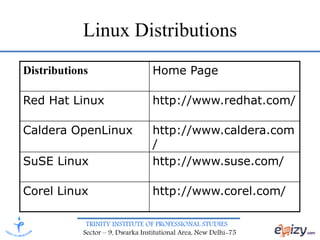
Linux Distributions
Distributions Home Page
Red Hat Linux http://www.redhat.com/
Caldera OpenLinux http://www.caldera.com
/
SuSE Linux http://www.suse.com/
Corel Linux http://www.corel.com/
TRINITY INSTITUTE OF PROFESSIONAL STUDIES
Sector – 9, Dwarka Institutional Area, New Delhi-75
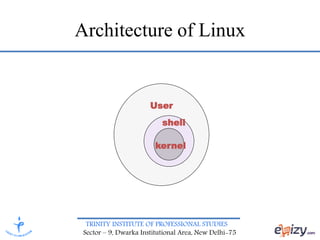
Architecture of Linux
User
shell
kernel
TRINITY INSTITUTE OF PROFESSIONAL STUDIES
Sector – 9, Dwarka Institutional Area, New Delhi-75
Kernel
• The kernel is a program that constitutes the
central core of the OS.
• Managing memory: Allocation and de-
allocation of memory
• Scheduling: Enabling each user to work
efficiently
• Organizing data transfer between I/O devices
and memory
• Accept the instructions from shell and execute
them
TRINITY INSTITUTE OF PROFESSIONAL STUDIES
Sector – 9, Dwarka Institutional Area, New Delhi-75
Shell
• Shell is the OS command interpreter .
• Shell is a program which interprets commands
given by user.
• Shell commands can be used to automate
various programming tasks
• It is the interface between user and the kernel.
• Shell allows background processing
• A variety of shells supported by Linux are:
Bourne shell, Korn shell, C shell.
TRINITY INSTITUTE OF PROFESSIONAL STUDIES
Sector – 9, Dwarka Institutional Area, New Delhi-75
Linux File System
It follows tree or hierarchical directory structure.
It starts with root directory. It is represented by forward slash(/).
Data files are stored in directories (folders).
– Directories may be nested as deep as needed.
– A single disk can store thousand of file.
– To manage these files, OS provides a file system.
– Similar files can be grouped in a directory
– Under the root directory, there are various directories.
TRINITY INSTITUTE OF PROFESSIONAL STUDIES
Sector – 9, Dwarka Institutional Area, New Delhi-75
Conclusion
• Linux is everywhere-from the high
performance servers to mobile handsets and
even airport kiosks where you can quickly get
some news or arrange your travel.

Linux Environment

  • 1.
    TRINITY INSTITUTE OFPROFESSIONAL STUDIES Sector – 9, Dwarka Institutional Area, New Delhi-75 Affiliated to Institution of G.G.S.IP.U, Delhi BCA,Linux Enviornment,20306 Priyanka Rattan Assistant Professor
  • 2.
    TRINITY INSTITUTE OFPROFESSIONAL STUDIES Sector – 9, Dwarka Institutional Area, New Delhi-75 What is an Operating System? • The operating system (OS) is the program which starts up when you turn on your computer and runs underneath all other programs - without it nothing would happen at all. • In simple terms, an operating system is a manager. It manages all the available resources on a computer, from the CPU to memory to hard disk accesses. • Tasks the operating system must perform: – Control Hardware - The operating system controls all the parts of the computer and attempts to get everything working together. – Run Applications - Another job the OS does is run application software. This would include word processors, web browsers, games, etc... – Manage Data and Files - The OS makes it easy for you to organize your computer. Through the OS you are able to do a number of things to data, including copy, move, delete, and rename it. This makes it much easier to find and organize what you have.
  • 3.
    TRINITY INSTITUTE OFPROFESSIONAL STUDIES Sector – 9, Dwarka Institutional Area, New Delhi-75 LINUX History • Linux a UNIX clone is a operating system that supports the concept of transparency. • In 1969,AT &T bell Lab introduced the UNIX operating system. This was based on C language. • In 1991,a undergraduate student Linus Torvalds at the university of Helsinki, Finland was working on a special educational experimental purpose operating system called Minix. • Linus Torvalds created it – with assistance from programmers around the world – First version 0.01 posted on Internet in August 1991 • Linus Torvald created his own version of Minix known as Linux.
  • 4.
    TRINITY INSTITUTE OFPROFESSIONAL STUDIES Sector – 9, Dwarka Institutional Area, New Delhi-75 Features of Linux • Linux is Free. • Open source • Secure. • Multi-user • Multitasking • Linux is portable to any hardware platform. • Linux is very stable - computers running Linux almost never crash • Linux is very efficient it can smoothly manage extremely huge amounts of data • Linux comes with networking facilities • Linux is case sensitive i.e. WHO is not same as who
  • 5.
    TRINITY INSTITUTE OFPROFESSIONAL STUDIES Sector – 9, Dwarka Institutional Area, New Delhi-75 Linux vs. Windows • Linux is free while windows operating system is not freely available. • Linux is open source right from the beginning while windows is not open source. • Microsoft is only liable for producing all the flavors of Windows, while various Linux distribution come from different companies. • Windows typically uses FAT32 or NTFS file systems while Linux typically uses the ext2 or ext3 file systems. • Windows lists all drives separately (A:,C:,D:, etc…), with “My Computer” at the highest level while Linux starts its highest level at “/” and drives can be mounted anywhere underneath it.
  • 6.
    TRINITY INSTITUTE OFPROFESSIONAL STUDIES Sector – 9, Dwarka Institutional Area, New Delhi-75 Advantages • Linux is more secure than other OS • It does not infect from viruses • Linux uses ext2 file system which is superior in performance and reliability to file system provided by windows operating system • Linux provides advanced disk mangement(RAID)which makes it possible to automatically duplicate stored data on several hard drives. • Multi-user, multitasking,stable.
  • 7.
    TRINITY INSTITUTE OFPROFESSIONAL STUDIES Sector – 9, Dwarka Institutional Area, New Delhi-75 Disadvantages • Slightly difficult to install and configure. • Difficult to learn for windows users or beginners.
  • 8.
    TRINITY INSTITUTE OFPROFESSIONAL STUDIES Sector – 9, Dwarka Institutional Area, New Delhi-75 Linux Distributions
  • 9.
    TRINITY INSTITUTE OFPROFESSIONAL STUDIES Sector – 9, Dwarka Institutional Area, New Delhi-75 Linux Distributions Distributions Home Page Red Hat Linux http://www.redhat.com/ Caldera OpenLinux http://www.caldera.com / SuSE Linux http://www.suse.com/ Corel Linux http://www.corel.com/
  • 10.
    TRINITY INSTITUTE OFPROFESSIONAL STUDIES Sector – 9, Dwarka Institutional Area, New Delhi-75 Architecture of Linux User shell kernel
  • 11.
    TRINITY INSTITUTE OFPROFESSIONAL STUDIES Sector – 9, Dwarka Institutional Area, New Delhi-75 Kernel • The kernel is a program that constitutes the central core of the OS. • Managing memory: Allocation and de- allocation of memory • Scheduling: Enabling each user to work efficiently • Organizing data transfer between I/O devices and memory • Accept the instructions from shell and execute them
  • 12.
    TRINITY INSTITUTE OFPROFESSIONAL STUDIES Sector – 9, Dwarka Institutional Area, New Delhi-75 Shell • Shell is the OS command interpreter . • Shell is a program which interprets commands given by user. • Shell commands can be used to automate various programming tasks • It is the interface between user and the kernel. • Shell allows background processing • A variety of shells supported by Linux are: Bourne shell, Korn shell, C shell.
  • 13.
    TRINITY INSTITUTE OFPROFESSIONAL STUDIES Sector – 9, Dwarka Institutional Area, New Delhi-75 Linux File System It follows tree or hierarchical directory structure. It starts with root directory. It is represented by forward slash(/). Data files are stored in directories (folders). – Directories may be nested as deep as needed. – A single disk can store thousand of file. – To manage these files, OS provides a file system. – Similar files can be grouped in a directory – Under the root directory, there are various directories.
  • 14.
    TRINITY INSTITUTE OFPROFESSIONAL STUDIES Sector – 9, Dwarka Institutional Area, New Delhi-75 Conclusion • Linux is everywhere-from the high performance servers to mobile handsets and even airport kiosks where you can quickly get some news or arrange your travel.