


Welcome
to my presentation !
Linux Presentation
Naiyan Noor
CSE,BAUST
Submitted by
Pronunciation of Linux
(‘Leenooks’)
This is LinusTorvalds’ original pronunciation, based on the
pronunciation of his name in Swedish.
(‘Linnuks’)
This is now LinusTorvalds’ preferred pronunciation, as he considers
closer to the original than . It also follows the pronunciation of the
English word ‘linen’.
(‘Lynuks’)
The other major alternative is based on the pronunciation of the
English version of ‘Linus’. It also happens to be the version I use.
What is Linux
Linux is a generic term referring to Unix-like
graphical user interface (GUI) based computer
operating systems.
It is Multi-user, Multitasking, Multiprocessor
Has the X Windows GUI
Coexists with other Operating Systems
Runs on multiple platforms
Includes the Source Code
Where is Linux?
One of the most noted properties of Linux is where it
can be used. Windows and OS X are predominantly
found on personal computing devices such as desktop
and laptop computers. Other operating systems, such as
Symbian, are found on small devices such as phones
and PDAs, while mainframes and supercomputers found
in major academic and corporate labs use specialized
operating systems such as AS/400 and the Cray OS.
HISTORY OF LINUX
The History of Linux began in 1991 with the commencement of
a personal project by a Finnish student, Linus Torvalds, to
create a new free operating system kernel.Since then, the
resulting Linux kernel has been marked by constant growth
throughout its history. Since the initial release of its source
code in 1991, it has grown from a small number of C files under
a license prohibiting commercial distribution to the 3.10 version
in 2013 with more than 16 million lines of source code under
the GNU General Public License.
FOUNDER OF LINUX
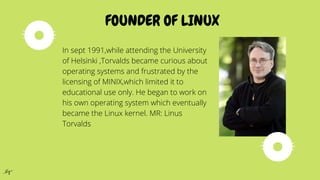
In sept 1991,while attending the University
of Helsinki ,Torvalds became curious about
operating systems and frustrated by the
licensing of MINIX,which limited it to
educational use only. He began to work on
his own operating system which eventually
became the Linux kernel. MR: Linus
Torvalds
BEFORE LINUX
In 80’s, Microsoft’s DOS was the dominated OS for PC . Apple MAC
was better, but expensive . UNIX was much better, but much,
much more expensive. Only for minicomputer for commercial
applications .People was looking for a UNIX based system, which is
cheaper and can run on PC . Both DOS, MAC and UNIX were
proprietary, i.e., the source code of their kernel is protected . No
modification is possible without paying high license fees.
Why is it significant?
Runs on multiple hardware platforms
Users like its speed and stability
No requirement for latest hardware
Powerful
Licensed under GPL
Vendors are distributors who package Linux
It’s “free”
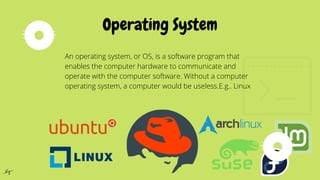
An operating system, or OS, is a software program that
enables the computer hardware to communicate and
operate with the computer software. Without a computer
operating system, a computer would be useless.E.g.. Linux
Operating System
Multi-user
A multi-user operating system allows for multiple users to use the same
computer at the same time and/or different times.
Multiprocessing
An operating system capable of supporting and utilizing more than one computer
processor.
Multitasking
An operating system that is capable of allowing multiple software processes to run
at the same time.
Multithreading
Operating systems that allow different parts of a software program to run
concurrently. Operating systems that would fall into this category are
LINUX TODAY
Linux has been used for many computing platforms •
PC, PDA, Supercomputer,…
Not only character user interface but graphical user interface is
available
Commercial vendors moved in Linux itself to provide freely
distributed code. They make their money by compiling up various
software and gathering them in a distributable format
Red Hat, Slackware, etc
ADVANTAGE OF LINUX
You don’t need to spend time and money to obtain licenses since Linux
and much of its software come with the GNU General Public License.
Linux doesn’t need to be rebooted periodically to maintain performance
levels.Linux provides persistent high performance on workstations and
on networks.
Linux was developed by a group of programmers over the Internet and has
therefore strong support for network functionality; client and server systems
can be easily set up on any computer running Linux.Linux can be used for
high performance server applications, desktop applications, and embedded
systems. It runs all common Unix software packages and can process all
common file formats.
ADVANTAGE OF LINUX
The large number of Linux distributions gives you a choice. Each
distribution is developed and supported by a different organization.Most
Linux distributions come with user-friendly installation and setup programs.
Linux continues work well even when the hard disk is almost full. Linux is
designed to do many things at the same time. Linux is one of the most
secure operating systems. “Walls” and flexible file access permission
systems prevent access by unwanted visitors or viruses.
LINUX SYSTEM ARCHETECTURE
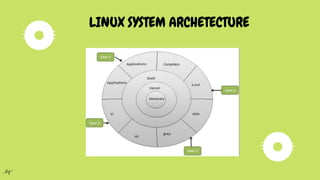
Linux System Architecture is consists of following
layers:
Hardware layer - Hardware consists of all
peripheral devices (RAM/ HDD/ CPU etc).
Kernel - Core component of Operating System,
interacts directly with hardware, provides low level
services to upper layer components.
Shell - An interface to kernel, hiding complexity of
kernel's functions from users.
Utilities - Utility programs giving user most of the
functionalities of an operating systems.
LINUX SYSTEM ARCHETECTURE
Applications of Linux
AS the Linux is the OS, it provides lot of-applications. Some of them
given below:
1)Text And Word Processing Applications Star Office is Text and word
application-instead of WordPad and notepad.
2) Programming Language There is a wide verity of Programming and-
scripting languages and tools available for Linux.
3)X-windows X-windows is a highly flexible and-configurable GUI
environment that run on Linux as-well as almost UNIX System.
4) Internet tool It supports Netscape as well as Mosaic It
provides wide and full range of software neededto create
internet server. It also provide the complete network support
toconnect the internet.
5) Data bases Today Oracle, Sybase and Informix all
offerrelational data base provides for Linux.
6) Dos and Windows Capability Software Linux can be made to
run DOS software with highdegree of stability and compatibility.
Applications of Linux
Acquiring and using Linux
There are quite a few ways to obtain a Linux distribution.
1. One way is to go to the distributors website and download the
linux distribution of our choice.
For example,
If you want to download a. Mandrake, the go to
http://www.mandriva.com/. b. SUSE Linux Enterprise Server 9, go to
http://www.novell.com/linux/download_linux.html.
2. Other way is to obtain pre-burned copies of the Linux distribution
we need from the distributor’s website or from sites like
cheapISO.com – The price is of such distributions starts from less
than Rs. 100/- – Some new computers have Linux as preinstalled.
Further Reference
www.linux.com - News, Software, Documentation, Tutorials, etc.
www.linuxhq.com - Another great Linux resource site.
www.linuxjournal.com - The Monthly Magazine for Linux Community
www.tldp.org - The Linux Documentation Project. Excellent help for beginners.
www.userfriendly.org - Linux cartoon strips
Thank You...

Linux Presentation

  • 1.
  • 2.
  • 3.
    Pronunciation of Linux (‘Leenooks’) Thisis LinusTorvalds’ original pronunciation, based on the pronunciation of his name in Swedish. (‘Linnuks’) This is now LinusTorvalds’ preferred pronunciation, as he considers closer to the original than . It also follows the pronunciation of the English word ‘linen’. (‘Lynuks’) The other major alternative is based on the pronunciation of the English version of ‘Linus’. It also happens to be the version I use.
  • 4.
    What is Linux Linuxis a generic term referring to Unix-like graphical user interface (GUI) based computer operating systems. It is Multi-user, Multitasking, Multiprocessor Has the X Windows GUI Coexists with other Operating Systems Runs on multiple platforms Includes the Source Code
  • 5.
    Where is Linux? Oneof the most noted properties of Linux is where it can be used. Windows and OS X are predominantly found on personal computing devices such as desktop and laptop computers. Other operating systems, such as Symbian, are found on small devices such as phones and PDAs, while mainframes and supercomputers found in major academic and corporate labs use specialized operating systems such as AS/400 and the Cray OS.
  • 6.
    HISTORY OF LINUX TheHistory of Linux began in 1991 with the commencement of a personal project by a Finnish student, Linus Torvalds, to create a new free operating system kernel.Since then, the resulting Linux kernel has been marked by constant growth throughout its history. Since the initial release of its source code in 1991, it has grown from a small number of C files under a license prohibiting commercial distribution to the 3.10 version in 2013 with more than 16 million lines of source code under the GNU General Public License.
  • 7.
    FOUNDER OF LINUX Insept 1991,while attending the University of Helsinki ,Torvalds became curious about operating systems and frustrated by the licensing of MINIX,which limited it to educational use only. He began to work on his own operating system which eventually became the Linux kernel. MR: Linus Torvalds
  • 8.
    BEFORE LINUX In 80’s,Microsoft’s DOS was the dominated OS for PC . Apple MAC was better, but expensive . UNIX was much better, but much, much more expensive. Only for minicomputer for commercial applications .People was looking for a UNIX based system, which is cheaper and can run on PC . Both DOS, MAC and UNIX were proprietary, i.e., the source code of their kernel is protected . No modification is possible without paying high license fees.
  • 9.
    Why is itsignificant? Runs on multiple hardware platforms Users like its speed and stability No requirement for latest hardware Powerful Licensed under GPL Vendors are distributors who package Linux It’s “free”
  • 10.
    An operating system,or OS, is a software program that enables the computer hardware to communicate and operate with the computer software. Without a computer operating system, a computer would be useless.E.g.. Linux Operating System
  • 11.
    Multi-user A multi-user operatingsystem allows for multiple users to use the same computer at the same time and/or different times. Multiprocessing An operating system capable of supporting and utilizing more than one computer processor. Multitasking An operating system that is capable of allowing multiple software processes to run at the same time. Multithreading Operating systems that allow different parts of a software program to run concurrently. Operating systems that would fall into this category are
  • 12.
    LINUX TODAY Linux hasbeen used for many computing platforms • PC, PDA, Supercomputer,… Not only character user interface but graphical user interface is available Commercial vendors moved in Linux itself to provide freely distributed code. They make their money by compiling up various software and gathering them in a distributable format Red Hat, Slackware, etc
  • 13.
    ADVANTAGE OF LINUX Youdon’t need to spend time and money to obtain licenses since Linux and much of its software come with the GNU General Public License. Linux doesn’t need to be rebooted periodically to maintain performance levels.Linux provides persistent high performance on workstations and on networks. Linux was developed by a group of programmers over the Internet and has therefore strong support for network functionality; client and server systems can be easily set up on any computer running Linux.Linux can be used for high performance server applications, desktop applications, and embedded systems. It runs all common Unix software packages and can process all common file formats.
  • 14.
    ADVANTAGE OF LINUX Thelarge number of Linux distributions gives you a choice. Each distribution is developed and supported by a different organization.Most Linux distributions come with user-friendly installation and setup programs. Linux continues work well even when the hard disk is almost full. Linux is designed to do many things at the same time. Linux is one of the most secure operating systems. “Walls” and flexible file access permission systems prevent access by unwanted visitors or viruses.
  • 15.
  • 16.
    Linux System Architectureis consists of following layers: Hardware layer - Hardware consists of all peripheral devices (RAM/ HDD/ CPU etc). Kernel - Core component of Operating System, interacts directly with hardware, provides low level services to upper layer components. Shell - An interface to kernel, hiding complexity of kernel's functions from users. Utilities - Utility programs giving user most of the functionalities of an operating systems. LINUX SYSTEM ARCHETECTURE
  • 17.
    Applications of Linux ASthe Linux is the OS, it provides lot of-applications. Some of them given below: 1)Text And Word Processing Applications Star Office is Text and word application-instead of WordPad and notepad. 2) Programming Language There is a wide verity of Programming and- scripting languages and tools available for Linux. 3)X-windows X-windows is a highly flexible and-configurable GUI environment that run on Linux as-well as almost UNIX System.
  • 18.
    4) Internet toolIt supports Netscape as well as Mosaic It provides wide and full range of software neededto create internet server. It also provide the complete network support toconnect the internet. 5) Data bases Today Oracle, Sybase and Informix all offerrelational data base provides for Linux. 6) Dos and Windows Capability Software Linux can be made to run DOS software with highdegree of stability and compatibility. Applications of Linux
  • 19.
    Acquiring and usingLinux There are quite a few ways to obtain a Linux distribution. 1. One way is to go to the distributors website and download the linux distribution of our choice. For example, If you want to download a. Mandrake, the go to http://www.mandriva.com/. b. SUSE Linux Enterprise Server 9, go to http://www.novell.com/linux/download_linux.html. 2. Other way is to obtain pre-burned copies of the Linux distribution we need from the distributor’s website or from sites like cheapISO.com – The price is of such distributions starts from less than Rs. 100/- – Some new computers have Linux as preinstalled.
  • 20.
    Further Reference www.linux.com -News, Software, Documentation, Tutorials, etc. www.linuxhq.com - Another great Linux resource site. www.linuxjournal.com - The Monthly Magazine for Linux Community www.tldp.org - The Linux Documentation Project. Excellent help for beginners. www.userfriendly.org - Linux cartoon strips
  • 21.