Android Storage –
StorageManager & OBB
William.L
wiliwe@gmail.com
Date: 2011-11-08
Outline
Introduction
Usage of OBB
Good Point of OBB
Introduction
What is StorageManager?
Since Android Gingerbread 2.3
The interface to the system’s storage service,
MountService, for Android applications
Handle storage-related items such as Opaque Binary Blobs
(OBB)
Code
AndroidSrc/frameworks/base/core/java/android/os/storage/St
orageManager.java
Usage
By calling getService(Context.STORAGE_SERVICE)
STORAGE_SERVICE represents “storage”
Ex : StorageManager stMgr =
(StorageManager)getService(Context.STORAGE_SERVIC
E)
What is OBB? (1/3)
Opaque Binary Blob, since Gingerbread 2.3
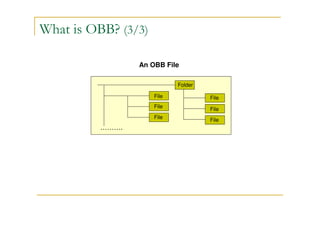
A file contains a filesystem that maybe be
encrypted on disk and mounted on-demand from
an application
A good way of providing large amounts of binary
assets without packaging them into APKs as
they may be multiple gigabytes
What is OBB? (2/3)
Other names
Disk Image / Virtual Drive / Virtual Disk Image /
Virtual Optical Drive file (虛擬光碟虛擬光碟虛擬光碟虛擬光碟)
Mount on the Linux LOOP device(total 7 devices)
Ex : sudo losetup /dev/loop0 Virtual-Disk-File
sudo mount /dev/loop0 /mnt/Mount-Point
What is OBB? (3/3)
……….
File
File
File
Folder
File
File
File
An OBB File
Usage (1/6)
The following steps are steps to create an OBB
file
Based on Androind Honeycomb 3.2
environment and its tools
Load needed modules :
sudo modprobe cryptoloop
sudo modprobe twofish
sudo modprobe vfat
Under your home directory, create a folder
named "obbdir“
Usage (2/6)
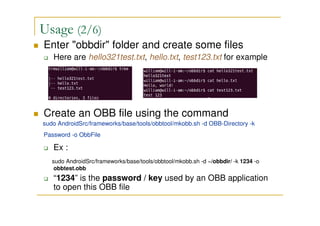
Enter "obbdir" folder and create some files
Here are hello321test.txt, hello.txt, test123.txt for example
Create an OBB file using the command
sudo AndroidSrc/frameworks/base/tools/obbtool/mkobb.sh -d OBB-Directory -k
Password -o ObbFile
Ex :
sudo AndroidSrc/frameworks/base/tools/obbtool/mkobb.sh -d ~/obbdir/ -k 1234 -o
obbtest.obb
“1234” is the password / key used by an OBB application
to open this OBB file
Usage (3/6)
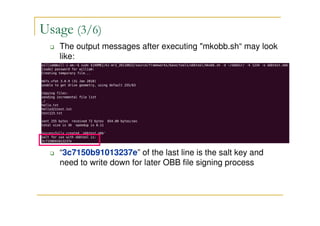
The output messages after executing "mkobb.sh“ may look
like:
“3c7150b91013237e” of the last line is the salt key and
need to write down for later OBB file signing process
Usage (4/6)
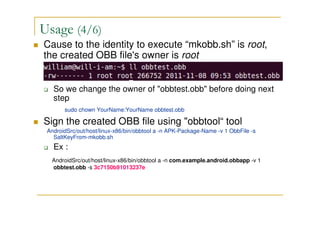
Cause to the identity to execute “mkobb.sh” is root,
the created OBB file's owner is root
So we change the owner of "obbtest.obb" before doing next
step
sudo chown YourName:YourName obbtest.obb
Sign the created OBB file using "obbtool“ tool
AndroidSrc/out/host/linux-x86/bin/obbtool a -n APK-Package-Name -v 1 ObbFile -s
SaltKeyFrom-mkobb.sh
Ex :
AndroidSrc/out/host/linux-x86/bin/obbtool a -n com.example.android.obbapp -v 1
obbtest.obb -s 3c7150b91013237e
Usage (5/6)
obbtool Parameters
-n with "package name" of your application (APK)
-v with user defined version number of the OBB file
-s with the salt key generated by "mkobb.sh"
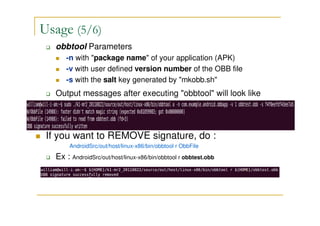
Output messages after executing "obbtool" will look like
If you want to REMOVE signature, do :
AndroidSrc/out/host/linux-x86/bin/obbtool r ObbFile
Ex : AndroidSrc/out/host/linux-x86/bin/obbtool r obbtest.obb
Usage (6/6)
Now, you can use the OBB file with corresponding
OBB APKs with the valid key(assigned when using
mkobb.sh) and Package-Name (assigned when
using obbtool)
Good Point of OBB
Security
Only the APK with the valid key and matched
package name could open the signed OBB file
containing private or important files
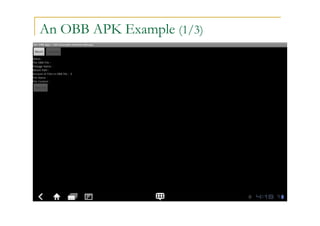
An OBB APK Example (1/3)
An OBB APK Example (2/3)
An OBB APK Example (3/3)
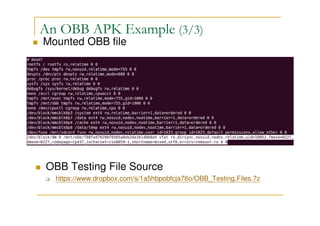
Mounted OBB file
OBB Testing File Source (GitHub)
https://github.com/wiliwe/android-obb-example.git
Reference
http://julianshen.blogspot.com/2011/01/android-
gingerbread-storagemanager-and.html
http://stackoverflow.com/questions/4524981/what-is-
obbopaque-binary-blob-in-android-develop-site
http://developer.android.com/reference/android/os/st
orage/StorageManager.html
http://en.wikipedia.org/wiki/Opaque_binary_blob

Android Storage - StorageManager & OBB

  • 1.
    Android Storage – StorageManager& OBB William.L wiliwe@gmail.com Date: 2011-11-08
  • 2.
  • 3.
  • 4.
    What is StorageManager? SinceAndroid Gingerbread 2.3 The interface to the system’s storage service, MountService, for Android applications Handle storage-related items such as Opaque Binary Blobs (OBB) Code AndroidSrc/frameworks/base/core/java/android/os/storage/St orageManager.java Usage By calling getService(Context.STORAGE_SERVICE) STORAGE_SERVICE represents “storage” Ex : StorageManager stMgr = (StorageManager)getService(Context.STORAGE_SERVIC E)
  • 5.
    What is OBB?(1/3) Opaque Binary Blob, since Gingerbread 2.3 A file contains a filesystem that maybe be encrypted on disk and mounted on-demand from an application A good way of providing large amounts of binary assets without packaging them into APKs as they may be multiple gigabytes
  • 6.
    What is OBB?(2/3) Other names Disk Image / Virtual Drive / Virtual Disk Image / Virtual Optical Drive file (虛擬光碟虛擬光碟虛擬光碟虛擬光碟) Mount on the Linux LOOP device(total 7 devices) Ex : sudo losetup /dev/loop0 Virtual-Disk-File sudo mount /dev/loop0 /mnt/Mount-Point
  • 7.
    What is OBB?(3/3) ………. File File File Folder File File File An OBB File
  • 8.
    Usage (1/6) The followingsteps are steps to create an OBB file Based on Androind Honeycomb 3.2 environment and its tools Load needed modules : sudo modprobe cryptoloop sudo modprobe twofish sudo modprobe vfat Under your home directory, create a folder named "obbdir“
  • 9.
    Usage (2/6) Enter "obbdir"folder and create some files Here are hello321test.txt, hello.txt, test123.txt for example Create an OBB file using the command sudo AndroidSrc/frameworks/base/tools/obbtool/mkobb.sh -d OBB-Directory -k Password -o ObbFile Ex : sudo AndroidSrc/frameworks/base/tools/obbtool/mkobb.sh -d ~/obbdir/ -k 1234 -o obbtest.obb “1234” is the password / key used by an OBB application to open this OBB file
  • 10.
    Usage (3/6) The outputmessages after executing "mkobb.sh“ may look like: “3c7150b91013237e” of the last line is the salt key and need to write down for later OBB file signing process
  • 11.
    Usage (4/6) Cause tothe identity to execute “mkobb.sh” is root, the created OBB file's owner is root So we change the owner of "obbtest.obb" before doing next step sudo chown YourName:YourName obbtest.obb Sign the created OBB file using "obbtool“ tool AndroidSrc/out/host/linux-x86/bin/obbtool a -n APK-Package-Name -v 1 ObbFile -s SaltKeyFrom-mkobb.sh Ex : AndroidSrc/out/host/linux-x86/bin/obbtool a -n com.example.android.obbapp -v 1 obbtest.obb -s 3c7150b91013237e
  • 12.
    Usage (5/6) obbtool Parameters -nwith "package name" of your application (APK) -v with user defined version number of the OBB file -s with the salt key generated by "mkobb.sh" Output messages after executing "obbtool" will look like If you want to REMOVE signature, do : AndroidSrc/out/host/linux-x86/bin/obbtool r ObbFile Ex : AndroidSrc/out/host/linux-x86/bin/obbtool r obbtest.obb
  • 13.
    Usage (6/6) Now, youcan use the OBB file with corresponding OBB APKs with the valid key(assigned when using mkobb.sh) and Package-Name (assigned when using obbtool)
  • 14.
    Good Point ofOBB Security Only the APK with the valid key and matched package name could open the signed OBB file containing private or important files
  • 15.
    An OBB APKExample (1/3)
  • 16.
    An OBB APKExample (2/3)
  • 17.
    An OBB APKExample (3/3) Mounted OBB file OBB Testing File Source (GitHub) https://github.com/wiliwe/android-obb-example.git
  • 18.