Under the Guidance ofProf.  Y. S. KALESubmitted By:SUNIL MAURYAB-TECH SEM VIII,       COMP-II,     Roll No. 22DEPARTMENT OF COMPUTER ENGINEERINGBHARTI VIDYAPEETH COLLEGE OF ENGINEERING,PUNE
Outlines1. Introduction2. Platform3. Process Scheduling4. Software development & SDK5. Overall evaluationSUNIL MAURYA COMP-II Roll No 222
What is Android? A complete software stack for mobile devices. Android is A first joined project of the Open Handset Alliance (OHA). It’s a First open, complete and free platform Its Software stack is open-sourced and licensed under Apache 2.0 In Android Source code will be available to everyone and anyone will have the capability to built an image The Android platform includes an operating system, a middleware and some applications. Android is very Lightweight and fully featured Developers can extend and replace existing components A generous development environment A SDK is available to build, compile, test and debug user applications. Applications are developed using Java programming language No difference between the built-in applications and the user ones SUNIL MAURYA COMP-II Roll No 223
Introduction What is the Open Handset Alliance (OHA)? ->It's a consortium of several companiesSUNIL MAURYA COMP-II Roll No 224
Introduction What is the Open Handset Alliance (OHA)? Devoted to advancing open standards for mobile devices
Develop technologies that will significantly lower the cost of developing and distributing mobile devices and servicesSUNIL MAURYA COMP-II Roll No 225
VersionsSUNIL MAURYA COMP-II Roll No 226
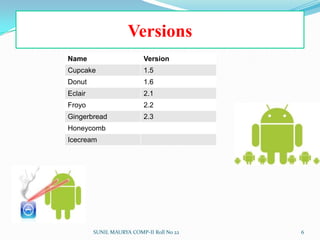
SUNIL MAURYA COMP-II Roll No 227VersionsThe most recent released versions of Android are:2.0/2.1 (Eclair), which revamped the user interface and introduced HTML5 and Exchange ActiveSync 2.5 support2.2 (Froyo), which introduced speed improvements with JIT optimization and the Chrome V8 JavaScript engine2.3 (Gingerbread), which refined the user interface, improved the soft keyboard and copy/paste features, and added support for Near Field Communication3.0 (Honeycomb), a tablet-orientedrelease which supports larger screen devices and introduces many new user interface features, and supports multicore processors and hardware acceleration for graphics.[The upcoming version of Android is:Ice Cream Sandwich,[a combination of Gingerbread and Honeycomb into a "cohesive whole,"with a possible release in mid-2011.
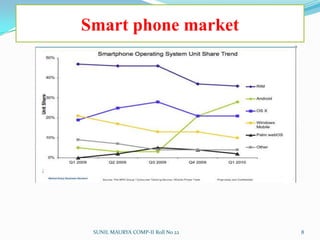
Smart phone marketSUNIL MAURYA COMP-II Roll No 228
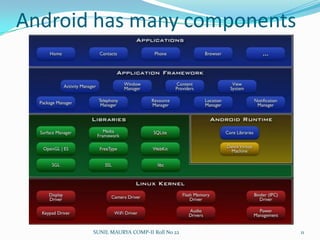
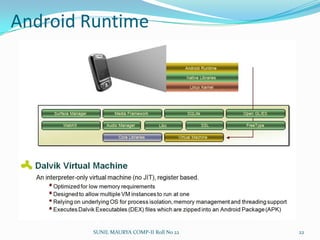
Platform Operating System Android uses Linux for its device drivers, memory management, process management, and networking. The next level up contains the Android native libraries. They are all written in C/C++ internally, but you’ll be calling them through Java interfaces. In this layer you can find the Surface Manager, 2D and 3D graphics, Media codecs, the SQL database (SQLite), and a native web browser engine (WebKit). Dalvik Virtual Machine. Dalvik runs dex files, which are converted at compile time from standard class and jar files. SUNIL MAURYA COMP-II Roll No 229
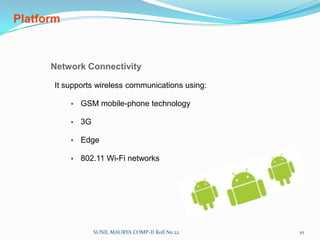
PlatformNetwork Connectivity It supports wireless communications using:GSM mobile-phone technology
3G
Edge
802.11 Wi-Fi networks SUNIL MAURYA COMP-II Roll No 2210
Android has many components SUNIL MAURYA COMP-II Roll No 2211
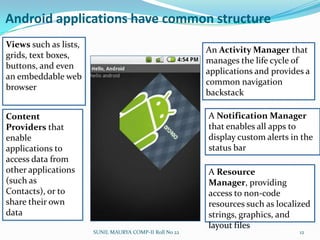
Android applications have common structureViews such as lists, grids, text boxes, buttons, and even an embeddable web browserAn Activity Manager that manages the life cycle of applications and provides a common navigation backstackA Notification Manager that enables all apps to display custom alerts in the status barContent Providers that enable applications to access data from other applications (such as Contacts), or to share their own dataA Resource Manager, providing access to non-code resources such as localized strings, graphics, and layout filesSUNIL MAURYA COMP-II Roll No 2212
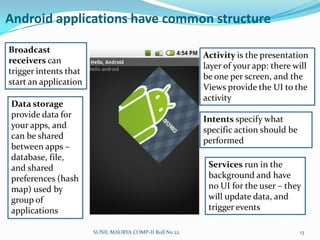
Android applications have common structureBroadcast receivers can trigger intents that start an applicationActivity is the presentation layer of your app: there will be one per screen, and the Views provide the UI to the activityData storage provide data for your apps, and can be shared between apps – database, file, and shared preferences (hash map) used by group of applicationsIntents specify what specific action should be performedServices run in the background and have no UI for the user – they will update data, and trigger eventsSUNIL MAURYA COMP-II Roll No 2213
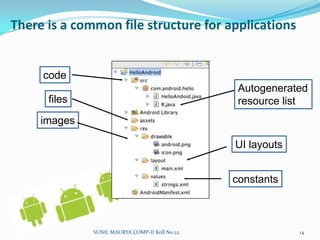
There is a common file structure for applicationscodeAutogenerated resource listfilesimagesUI layoutsconstantsSUNIL MAURYA COMP-II Roll No 2214
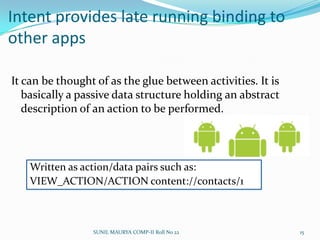
Intent provides late running binding to other appsIt can be thought of as the glue between activities. It is basically a passive data structure holding an abstract description of an action to be performed.Written as action/data pairs such as: VIEW_ACTION/ACTION content://contacts/1SUNIL MAURYA COMP-II Roll No 2215
Services declared in the manifest and provide supportServices run in the background:Music player providing the music playing in an audio applicationIntensive background apps, might need to spawn their own thread so as to not block the applicationSUNIL MAURYA COMP-II Roll No 2216
Notifications let you know of background eventsThis way you know that an SMS arrived, or that your phone is ringing, and the MP3 player should pauseSUNIL MAURYA COMP-II Roll No 2217
Content Providers share dataYou need one if your application shares data with other applicationsThis way you can share the contact list with the IM applicationIf you don’t need to share data, then you can use SQLlite databaseSUNIL MAURYA COMP-II Roll No 2218
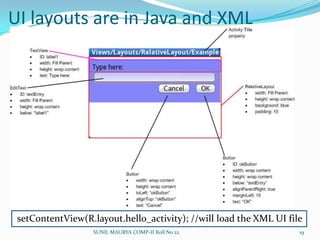
UI layouts are in Java and XML setContentView(R.layout.hello_activity); //will load the XML UI file SUNIL MAURYA COMP-II Roll No 2219
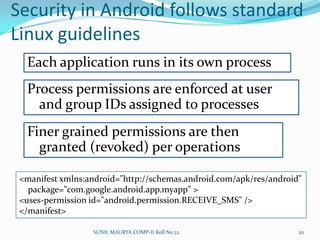
Security in Android follows standard Linux guidelinesEach application runs in its own processProcess permissions are enforced at user and group IDs assigned to processesFiner grained permissions are then granted (revoked) per operations<manifest xmlns:android="http://schemas.android.com/apk/res/android"    package="com.google.android.app.myapp" ><uses-permission id="android.permission.RECEIVE_SMS" /></manifest>SUNIL MAURYA COMP-II Roll No 2220
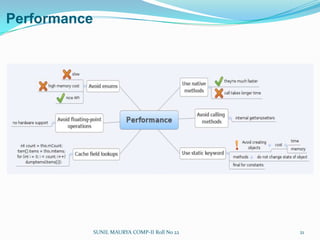
Performance  SUNIL MAURYA COMP-II Roll No 2221
Android Runtime SUNIL MAURYA COMP-II Roll No 2222
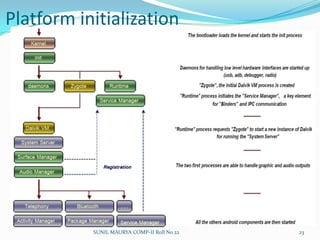
Platform initialization SUNIL MAURYA COMP-II Roll No 2223
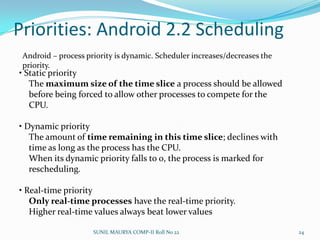
Priorities: Android 2.2 Scheduling• Static priority	The maximum size of the time slice a process should be allowed	before being forced to allow other processes to compete for the	CPU.• Dynamic priority	The amount of time remaining in this time slice; declines with	time as long as the process has the CPU.	When its dynamic priority falls to 0, the process is marked for	rescheduling.• Real-time priorityOnly real-time processes have the real-time priority.	Higher real-time values always beat lower valuesAndroid – process priority is dynamic. Scheduler increases/decreases the priority. SUNIL MAURYA COMP-II Roll No 2224
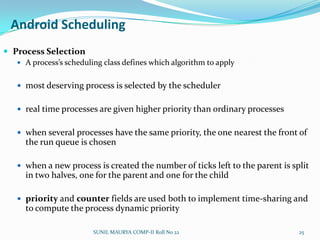
Android SchedulingProcess SelectionA process’s scheduling class defines which algorithm to applymost deserving process is selected by the schedulerreal time processes are given higher priority than ordinary processeswhen several processes have the same priority, the one nearest the front of the run queue is chosenwhen a new process is created the number of ticks left to the parent is split in two halves, one for the parent and one for the childpriority and counter fields are used both to implement time-sharing and to compute the process dynamic prioritySUNIL MAURYA COMP-II Roll No 2225
Android makes mobile Java easierWell, sort of…SUNIL MAURYA COMP-II Roll No 2226
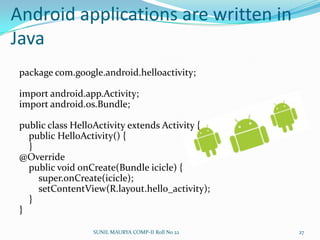
Android applications are written in Javapackage com.google.android.helloactivity;import android.app.Activity;import android.os.Bundle;public class HelloActivity extends Activity {    public HelloActivity() {    }@Override    public void onCreate(Bundle icicle) {super.onCreate(icicle);setContentView(R.layout.hello_activity);    }}SUNIL MAURYA COMP-II Roll No 2227
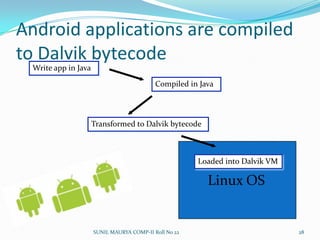
Android applications are compiled to Dalvik bytecodeLinux OSLoaded into Dalvik VMWrite app in JavaCompiled in JavaTransformed to Dalvik bytecodeSUNIL MAURYA COMP-II Roll No 2228
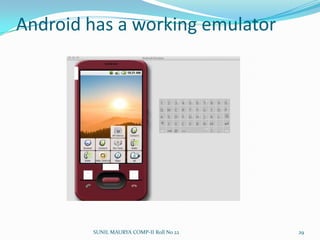
Android has a working emulatorSUNIL MAURYA COMP-II Roll No 2229
Software developmentDevelopment requirements Java
Android SDK
Eclipse IDE (optional)  SUNIL MAURYA COMP-II Roll No 2230
Software development (Contd..)IDE and Tools Android SDKClass Library

Android Operating System

  • 1.
    Under the GuidanceofProf. Y. S. KALESubmitted By:SUNIL MAURYAB-TECH SEM VIII, COMP-II, Roll No. 22DEPARTMENT OF COMPUTER ENGINEERINGBHARTI VIDYAPEETH COLLEGE OF ENGINEERING,PUNE
  • 2.
    Outlines1. Introduction2. Platform3.Process Scheduling4. Software development & SDK5. Overall evaluationSUNIL MAURYA COMP-II Roll No 222
  • 3.
    What is Android?A complete software stack for mobile devices. Android is A first joined project of the Open Handset Alliance (OHA). It’s a First open, complete and free platform Its Software stack is open-sourced and licensed under Apache 2.0 In Android Source code will be available to everyone and anyone will have the capability to built an image The Android platform includes an operating system, a middleware and some applications. Android is very Lightweight and fully featured Developers can extend and replace existing components A generous development environment A SDK is available to build, compile, test and debug user applications. Applications are developed using Java programming language No difference between the built-in applications and the user ones SUNIL MAURYA COMP-II Roll No 223
  • 4.
    Introduction What isthe Open Handset Alliance (OHA)? ->It's a consortium of several companiesSUNIL MAURYA COMP-II Roll No 224
  • 5.
    Introduction What isthe Open Handset Alliance (OHA)? Devoted to advancing open standards for mobile devices
  • 6.
    Develop technologies thatwill significantly lower the cost of developing and distributing mobile devices and servicesSUNIL MAURYA COMP-II Roll No 225
  • 7.
  • 8.
    SUNIL MAURYA COMP-IIRoll No 227VersionsThe most recent released versions of Android are:2.0/2.1 (Eclair), which revamped the user interface and introduced HTML5 and Exchange ActiveSync 2.5 support2.2 (Froyo), which introduced speed improvements with JIT optimization and the Chrome V8 JavaScript engine2.3 (Gingerbread), which refined the user interface, improved the soft keyboard and copy/paste features, and added support for Near Field Communication3.0 (Honeycomb), a tablet-orientedrelease which supports larger screen devices and introduces many new user interface features, and supports multicore processors and hardware acceleration for graphics.[The upcoming version of Android is:Ice Cream Sandwich,[a combination of Gingerbread and Honeycomb into a "cohesive whole,"with a possible release in mid-2011.
  • 9.
    Smart phone marketSUNILMAURYA COMP-II Roll No 228
  • 10.
    Platform Operating System Androiduses Linux for its device drivers, memory management, process management, and networking. The next level up contains the Android native libraries. They are all written in C/C++ internally, but you’ll be calling them through Java interfaces. In this layer you can find the Surface Manager, 2D and 3D graphics, Media codecs, the SQL database (SQLite), and a native web browser engine (WebKit). Dalvik Virtual Machine. Dalvik runs dex files, which are converted at compile time from standard class and jar files. SUNIL MAURYA COMP-II Roll No 229
  • 11.
    PlatformNetwork Connectivity It supportswireless communications using:GSM mobile-phone technology
  • 12.
  • 13.
  • 14.
    802.11 Wi-Fi networksSUNIL MAURYA COMP-II Roll No 2210
  • 15.
    Android has manycomponents SUNIL MAURYA COMP-II Roll No 2211
  • 16.
    Android applications havecommon structureViews such as lists, grids, text boxes, buttons, and even an embeddable web browserAn Activity Manager that manages the life cycle of applications and provides a common navigation backstackA Notification Manager that enables all apps to display custom alerts in the status barContent Providers that enable applications to access data from other applications (such as Contacts), or to share their own dataA Resource Manager, providing access to non-code resources such as localized strings, graphics, and layout filesSUNIL MAURYA COMP-II Roll No 2212
  • 17.
    Android applications havecommon structureBroadcast receivers can trigger intents that start an applicationActivity is the presentation layer of your app: there will be one per screen, and the Views provide the UI to the activityData storage provide data for your apps, and can be shared between apps – database, file, and shared preferences (hash map) used by group of applicationsIntents specify what specific action should be performedServices run in the background and have no UI for the user – they will update data, and trigger eventsSUNIL MAURYA COMP-II Roll No 2213
  • 18.
    There is acommon file structure for applicationscodeAutogenerated resource listfilesimagesUI layoutsconstantsSUNIL MAURYA COMP-II Roll No 2214
  • 19.
    Intent provides laterunning binding to other appsIt can be thought of as the glue between activities. It is basically a passive data structure holding an abstract description of an action to be performed.Written as action/data pairs such as: VIEW_ACTION/ACTION content://contacts/1SUNIL MAURYA COMP-II Roll No 2215
  • 20.
    Services declared inthe manifest and provide supportServices run in the background:Music player providing the music playing in an audio applicationIntensive background apps, might need to spawn their own thread so as to not block the applicationSUNIL MAURYA COMP-II Roll No 2216
  • 21.
    Notifications let youknow of background eventsThis way you know that an SMS arrived, or that your phone is ringing, and the MP3 player should pauseSUNIL MAURYA COMP-II Roll No 2217
  • 22.
    Content Providers sharedataYou need one if your application shares data with other applicationsThis way you can share the contact list with the IM applicationIf you don’t need to share data, then you can use SQLlite databaseSUNIL MAURYA COMP-II Roll No 2218
  • 23.
    UI layouts arein Java and XML setContentView(R.layout.hello_activity); //will load the XML UI file SUNIL MAURYA COMP-II Roll No 2219
  • 24.
    Security in Androidfollows standard Linux guidelinesEach application runs in its own processProcess permissions are enforced at user and group IDs assigned to processesFiner grained permissions are then granted (revoked) per operations<manifest xmlns:android="http://schemas.android.com/apk/res/android" package="com.google.android.app.myapp" ><uses-permission id="android.permission.RECEIVE_SMS" /></manifest>SUNIL MAURYA COMP-II Roll No 2220
  • 25.
  • 26.
    Android Runtime SUNILMAURYA COMP-II Roll No 2222
  • 27.
    Platform initialization SUNILMAURYA COMP-II Roll No 2223
  • 28.
    Priorities: Android 2.2Scheduling• Static priority The maximum size of the time slice a process should be allowed before being forced to allow other processes to compete for the CPU.• Dynamic priority The amount of time remaining in this time slice; declines with time as long as the process has the CPU. When its dynamic priority falls to 0, the process is marked for rescheduling.• Real-time priorityOnly real-time processes have the real-time priority. Higher real-time values always beat lower valuesAndroid – process priority is dynamic. Scheduler increases/decreases the priority. SUNIL MAURYA COMP-II Roll No 2224
  • 29.
    Android SchedulingProcess SelectionAprocess’s scheduling class defines which algorithm to applymost deserving process is selected by the schedulerreal time processes are given higher priority than ordinary processeswhen several processes have the same priority, the one nearest the front of the run queue is chosenwhen a new process is created the number of ticks left to the parent is split in two halves, one for the parent and one for the childpriority and counter fields are used both to implement time-sharing and to compute the process dynamic prioritySUNIL MAURYA COMP-II Roll No 2225
  • 30.
    Android makes mobileJava easierWell, sort of…SUNIL MAURYA COMP-II Roll No 2226
  • 31.
    Android applications arewritten in Javapackage com.google.android.helloactivity;import android.app.Activity;import android.os.Bundle;public class HelloActivity extends Activity { public HelloActivity() { }@Override public void onCreate(Bundle icicle) {super.onCreate(icicle);setContentView(R.layout.hello_activity); }}SUNIL MAURYA COMP-II Roll No 2227
  • 32.
    Android applications arecompiled to Dalvik bytecodeLinux OSLoaded into Dalvik VMWrite app in JavaCompiled in JavaTransformed to Dalvik bytecodeSUNIL MAURYA COMP-II Roll No 2228
  • 33.
    Android has aworking emulatorSUNIL MAURYA COMP-II Roll No 2229
  • 34.
  • 35.
  • 36.
    Eclipse IDE (optional)  SUNILMAURYA COMP-II Roll No 2230
  • 37.
    Software development (Contd..)IDEand Tools Android SDKClass Library