Vision for the 21st Century
Math, Technology and Documentation in
Kindergarten
By: Emily Klimchuk (Rodgers)
21st Century Learners
 According to NCTE (2013), students
must:
◦ “develop proficiency with the tools of
technology”
◦ “create, critique, analyze and evaluate
multimedia texts”
Will Richardson and the 21st
Century
 Students must :
◦ ask questions
◦ work with others to find answers
◦ do real work for real audiences
◦ add to the storehouse of knowledge that
the web is becoming (2012, 61)
DigitalLiteracy
 BC Digital Literacy Standards
◦ Illustrate and communicate original ideas
using digital tools
◦ Engage in learning activities from multiple
cultures through email and electronic
means
Assessment and 21st Century
 “Shift our assessment of students’
mastery to ones that examine mastery
in action” (Richardson, 2012, 88).
 “This isn’t about delivery. In a
word, it’s about discovery”
(Richardson, 2012, 60).
Assessment and 21st Century
 Changes in BC Curriculum:
◦ Shift from reporting to communicating
student learning
◦ Support meaningful communication
between teachers, parents and learners
◦ Move toward meaningful
descriptions/collections and
demonstrations of student learning
What are students already
doing?
 Using iPad apps to practice math
concepts (Hungry Fish, Candy
Crush, etc.)
 Using manipulatives to
explore, create, demonstrate and
collaborate
 Sharing their learning with classmates
through informal discussions or group
meetings
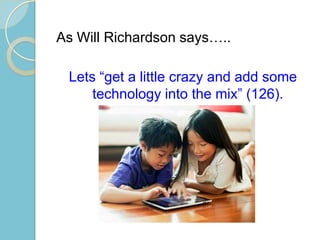
As Will Richardson says…..
Lets “get a little crazy and add some
technology into the mix” (126).
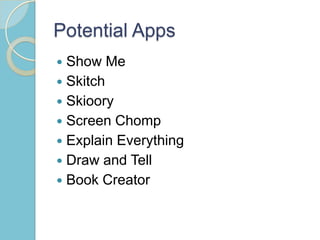
Potential Apps
 Show Me
 Skitch
 Skioory
 Screen Chomp
 Explain Everything
 Draw and Tell
 Book Creator
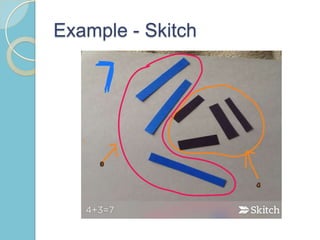
Example - Skitch
Example – Show Me
 Show Me Example (embedded on
web)
Benefits of using iPads
 “Being able to hear a student explain
his or her thinking is a transformative
event” (Burley)
 Reflection and rethinking (Burley)
 Visuals
 Opportunity to capture and share
learning that would otherwise be
cleaned up and put back in the bin
Beyond Our Classroom Walls
 Posting learning to blogs
 Parents and other students can
comment
 Use data from another class at a
different school to solve problems
 Engage in a collaborative problem
activity by connecting to other classes
anywhere in the world
Next Steps…
 Which app will you choose?
 Decide how students will use this app
– Will iPads be available during
centres? Who will be in charge of the
ipads (students or teacher)?
 How will students share their learning?
– Projector? Apple TV? Blog?
 Can you connect with another class?
Works Cited
 http://mediasmarts.ca/digital-media-
literacy-fundamentals/digital-literacy-
fundamentals
 http://ipadsatburley.blogspot.ca/2012/0
2/making-assessment-meaningful.html
 https://www.youtube.com/watch?v=O3
5n_tvOK74

LIBE 477 - Final Project

  • 1.
    Vision for the21st Century Math, Technology and Documentation in Kindergarten By: Emily Klimchuk (Rodgers)
  • 2.
    21st Century Learners According to NCTE (2013), students must: ◦ “develop proficiency with the tools of technology” ◦ “create, critique, analyze and evaluate multimedia texts”
  • 4.
    Will Richardson andthe 21st Century  Students must : ◦ ask questions ◦ work with others to find answers ◦ do real work for real audiences ◦ add to the storehouse of knowledge that the web is becoming (2012, 61)
  • 5.
    DigitalLiteracy  BC DigitalLiteracy Standards ◦ Illustrate and communicate original ideas using digital tools ◦ Engage in learning activities from multiple cultures through email and electronic means
  • 6.
    Assessment and 21stCentury  “Shift our assessment of students’ mastery to ones that examine mastery in action” (Richardson, 2012, 88).  “This isn’t about delivery. In a word, it’s about discovery” (Richardson, 2012, 60).
  • 7.
    Assessment and 21stCentury  Changes in BC Curriculum: ◦ Shift from reporting to communicating student learning ◦ Support meaningful communication between teachers, parents and learners ◦ Move toward meaningful descriptions/collections and demonstrations of student learning
  • 8.
    What are studentsalready doing?  Using iPad apps to practice math concepts (Hungry Fish, Candy Crush, etc.)  Using manipulatives to explore, create, demonstrate and collaborate  Sharing their learning with classmates through informal discussions or group meetings
  • 9.
    As Will Richardsonsays….. Lets “get a little crazy and add some technology into the mix” (126).
  • 10.
    Potential Apps  ShowMe  Skitch  Skioory  Screen Chomp  Explain Everything  Draw and Tell  Book Creator
  • 12.
  • 13.
    Example – ShowMe  Show Me Example (embedded on web)
  • 14.
    Benefits of usingiPads  “Being able to hear a student explain his or her thinking is a transformative event” (Burley)  Reflection and rethinking (Burley)  Visuals  Opportunity to capture and share learning that would otherwise be cleaned up and put back in the bin
  • 15.
    Beyond Our ClassroomWalls  Posting learning to blogs  Parents and other students can comment  Use data from another class at a different school to solve problems  Engage in a collaborative problem activity by connecting to other classes anywhere in the world
  • 16.
    Next Steps…  Whichapp will you choose?  Decide how students will use this app – Will iPads be available during centres? Who will be in charge of the ipads (students or teacher)?  How will students share their learning? – Projector? Apple TV? Blog?  Can you connect with another class?
  • 17.
    Works Cited  http://mediasmarts.ca/digital-media- literacy-fundamentals/digital-literacy- fundamentals http://ipadsatburley.blogspot.ca/2012/0 2/making-assessment-meaningful.html  https://www.youtube.com/watch?v=O3 5n_tvOK74

Editor's Notes

  • #2 Notes?
  • #4 Video that discusses shift in 21st century education
  • #6 Digital citizens use technology in positive and meaningful ways (Mediasmarts)Teachers should provide students with authentic learning opportunities that are enhanced through technological tools (Media smarts)
  • #17 Seeing if notes work