Page 1 4/3/14	
  
Favorite Apps for the one iPad Classroom
Applications for devices
Application Title
Device Options
Description Tips for integrating this application into the classroom
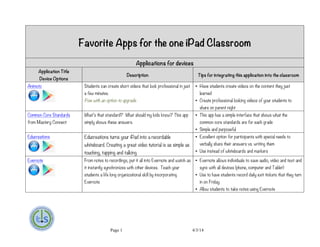
Animoto Students can create short videos that look professional in just
a few minutes.
Free with an option to upgrade.
• Have students create videos on the content they just
learned
• Create professional looking videos of your students to
share on parent night
Common Core Standards
from Mastery Connect
What’s that standard? What should my kids know? This app
simply shows these answers.
• This app has a simple interface that shows what the
common core standards are for each grade
• Simple and purposeful
Educreations
	
  
Educreations turns your iPad into a recordable
whiteboard. Creating a great video tutorial is as simple as
touching, tapping and talking
• Excellent option for participants with special needs to
verbally share their answers vs. writing them
• Use instead of whiteboards and markers
Evernote From notes to recordings, put it all into Evernote and watch as
it instantly synchronizes with other devices. Teach your
students a life long organizational skill by incorporating
Evernote
• Evernote allows individuals to save audio, video and text and
sync with all devices (phone, computer and Tablet)
• Use to have students record daily exit tickets that they turn
in on Friday
• Allow students to take notes using Evernote
Page 2 4/3/14	
  
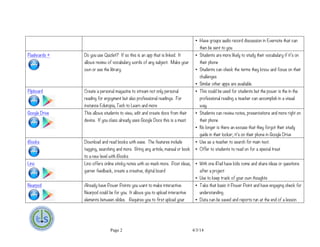
• Have groups audio record discussion in Evernote that can
then be sent to you
Flashcards + Do you use Quizlet? If so this is an app that is linked. It
allows review of vocabulary words of any subject. Make your
own or use the library.
• Students are more likely to study their vocabulary if it’s on
their phone
• Students can check the terms they know and focus on their
challenges
• Similar other apps are available.
Flipboard
	
  
Create a personal magazine to stream not only personal
reading for enjoyment but also professional readings. For
instance Edutopia, Tech to Learn and more
• This could be used for students but the power is the in the
professional reading a teacher can accomplish in a visual
way.
Google Drive This allows students to view, edit and create docs from their
device. If you class already uses Google Docs this is a must.
• Students can review notes, presentations and more right on
their phone
• No longer is there an excuse that they forgot their study
guide in their locker; it’s on their phone in Google Drive
iBooks Download and read books with ease. The features include
tagging, searching and more. Bring any article, manual or book
to a new level with iBooks
• Use as a teacher to search for main text.
• Offer to students to read on for a special treat
Lino Lino offers online sticky notes with so much more. Post ideas,
garner feedback, create a creative, digital board
• With one iPad have kids come and share ideas or questions
after a project
• Use to keep track of your own thoughts
Nearpod Already have Power Points you want to make interactive.
Nearpod could be for you. It allows you to upload interactive
elements between slides. Requires you to first upload your
• Take that basic it Power Point and have engaging check for
understanding
• Data can be saved and reports run at the end of a lesson
Page 3 4/3/14	
  
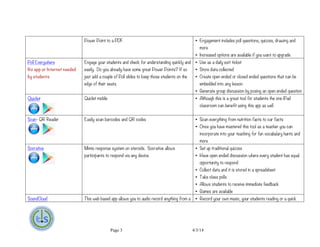
Power Point to a PDF. • Engagement includes poll questions, quizzes, drawing and
more
• Increased options are available if you want to upgrade
Poll Everywhere
No app or Internet needed
by students
Engage your students and check for understanding quickly and
easily. Do you already have some great Power Points? If so
just add a couple of Poll slides to keep those students on the
edge of their seats.
• Use as a daily exit ticket
• Store data collected
• Create open ended or closed ended questions that can be
embedded into any lesson
• Generate group discussion by posing an open ended question
Quizlet Quizlet mobile • Although this is a great tool for students the one iPad
classroom can benefit using this app as well
Scan- QR Reader Easily scan barcodes and QR codes • Scan everything from nutrition facts to car facts
• Once you have mastered this tool as a teacher you can
incorporate into your teaching for fun vocabulary hunts and
more
Socrative Mimio response system on steroids. Socrative allows
participants to respond via any device.
• Set up traditional quizzes
• Have open ended discussion where every student has equal
opportunity to respond
• Collect data and it is stored in a spreadsheet
• Take class polls
• Allows students to receive immediate feedback
• Games are available
SoundCloud This web based app allows you to audio record anything from a • Record your own music, your students reading or a quick
Page 4 4/3/14	
  
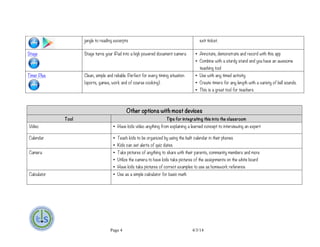
Other options with most devices
Tool Tips for integrating this into the classroom
Video • Have kids video anything from explaining a learned concept to interviewing an expert
Calendar • Teach kids to be organized by using the built calendar in their phones
• Kids can set alerts of quiz dates
Camera • Take pictures of anything to share with their parents, community members and more
• Utilize the camera to have kids take pictures of the assignments on the white board
• Have kids take pictures of correct examples to use as homework reference
Calculator • Use as a simple calculator for basic math
jungle to reading excerpts exit ticket.
Stage Stage turns your iPad into a high powered document camera • Annotate, demonstrate and record with this app
• Combine with a sturdy stand and you have an awesome
teaching tool
Timer Plus Clean, simple and reliable. Perfect for every timing situation
(sports, games, work and of course cooking).
• Use with any timed activity
• Create timers for any length with a variety of bell sounds.
• This is a great tool for teachers
Page 5 4/3/14	
  
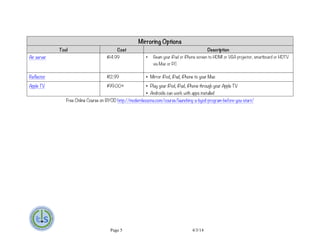
Mirroring Options
Tool Cost Description
Air server $14.99 • Beam your iPad or iPhone screen to HDMI or VGA projector, smartboard or HDTV
via Mac or PC
Reflector $12.99 • Mirror iPod, iPad, iPhone to your Mac
Apple TV $99.00+ • Play your iPod, iPad, iPhone through your Apple TV
• Androids can work with apps installed
Free Online Course on BYOD http://modernlessons.com/course/launching-a-byod-program-before-you-start/

iPad App Suggestions for the 1 iPad Classroom

  • 1.
    Page 1 4/3/14   Favorite Apps for the one iPad Classroom Applications for devices Application Title Device Options Description Tips for integrating this application into the classroom Animoto Students can create short videos that look professional in just a few minutes. Free with an option to upgrade. • Have students create videos on the content they just learned • Create professional looking videos of your students to share on parent night Common Core Standards from Mastery Connect What’s that standard? What should my kids know? This app simply shows these answers. • This app has a simple interface that shows what the common core standards are for each grade • Simple and purposeful Educreations   Educreations turns your iPad into a recordable whiteboard. Creating a great video tutorial is as simple as touching, tapping and talking • Excellent option for participants with special needs to verbally share their answers vs. writing them • Use instead of whiteboards and markers Evernote From notes to recordings, put it all into Evernote and watch as it instantly synchronizes with other devices. Teach your students a life long organizational skill by incorporating Evernote • Evernote allows individuals to save audio, video and text and sync with all devices (phone, computer and Tablet) • Use to have students record daily exit tickets that they turn in on Friday • Allow students to take notes using Evernote
  • 2.
    Page 2 4/3/14   • Have groups audio record discussion in Evernote that can then be sent to you Flashcards + Do you use Quizlet? If so this is an app that is linked. It allows review of vocabulary words of any subject. Make your own or use the library. • Students are more likely to study their vocabulary if it’s on their phone • Students can check the terms they know and focus on their challenges • Similar other apps are available. Flipboard   Create a personal magazine to stream not only personal reading for enjoyment but also professional readings. For instance Edutopia, Tech to Learn and more • This could be used for students but the power is the in the professional reading a teacher can accomplish in a visual way. Google Drive This allows students to view, edit and create docs from their device. If you class already uses Google Docs this is a must. • Students can review notes, presentations and more right on their phone • No longer is there an excuse that they forgot their study guide in their locker; it’s on their phone in Google Drive iBooks Download and read books with ease. The features include tagging, searching and more. Bring any article, manual or book to a new level with iBooks • Use as a teacher to search for main text. • Offer to students to read on for a special treat Lino Lino offers online sticky notes with so much more. Post ideas, garner feedback, create a creative, digital board • With one iPad have kids come and share ideas or questions after a project • Use to keep track of your own thoughts Nearpod Already have Power Points you want to make interactive. Nearpod could be for you. It allows you to upload interactive elements between slides. Requires you to first upload your • Take that basic it Power Point and have engaging check for understanding • Data can be saved and reports run at the end of a lesson
  • 3.
    Page 3 4/3/14   Power Point to a PDF. • Engagement includes poll questions, quizzes, drawing and more • Increased options are available if you want to upgrade Poll Everywhere No app or Internet needed by students Engage your students and check for understanding quickly and easily. Do you already have some great Power Points? If so just add a couple of Poll slides to keep those students on the edge of their seats. • Use as a daily exit ticket • Store data collected • Create open ended or closed ended questions that can be embedded into any lesson • Generate group discussion by posing an open ended question Quizlet Quizlet mobile • Although this is a great tool for students the one iPad classroom can benefit using this app as well Scan- QR Reader Easily scan barcodes and QR codes • Scan everything from nutrition facts to car facts • Once you have mastered this tool as a teacher you can incorporate into your teaching for fun vocabulary hunts and more Socrative Mimio response system on steroids. Socrative allows participants to respond via any device. • Set up traditional quizzes • Have open ended discussion where every student has equal opportunity to respond • Collect data and it is stored in a spreadsheet • Take class polls • Allows students to receive immediate feedback • Games are available SoundCloud This web based app allows you to audio record anything from a • Record your own music, your students reading or a quick
  • 4.
    Page 4 4/3/14   Other options with most devices Tool Tips for integrating this into the classroom Video • Have kids video anything from explaining a learned concept to interviewing an expert Calendar • Teach kids to be organized by using the built calendar in their phones • Kids can set alerts of quiz dates Camera • Take pictures of anything to share with their parents, community members and more • Utilize the camera to have kids take pictures of the assignments on the white board • Have kids take pictures of correct examples to use as homework reference Calculator • Use as a simple calculator for basic math jungle to reading excerpts exit ticket. Stage Stage turns your iPad into a high powered document camera • Annotate, demonstrate and record with this app • Combine with a sturdy stand and you have an awesome teaching tool Timer Plus Clean, simple and reliable. Perfect for every timing situation (sports, games, work and of course cooking). • Use with any timed activity • Create timers for any length with a variety of bell sounds. • This is a great tool for teachers
  • 5.
    Page 5 4/3/14   Mirroring Options Tool Cost Description Air server $14.99 • Beam your iPad or iPhone screen to HDMI or VGA projector, smartboard or HDTV via Mac or PC Reflector $12.99 • Mirror iPod, iPad, iPhone to your Mac Apple TV $99.00+ • Play your iPod, iPad, iPhone through your Apple TV • Androids can work with apps installed Free Online Course on BYOD http://modernlessons.com/course/launching-a-byod-program-before-you-start/