Including Constraints
Objectives After completing this lesson, you should be able to do the following: Describe constraints Create and maintain constraints
What Are Constraints? Constraints enforce rules at the table level. Constraints prevent the deletion of a table if there are dependencies. The following constraint types are valid in Oracle: NOT NULL UNIQUE  PRIMARY KEY FOREIGN KEY CHECK
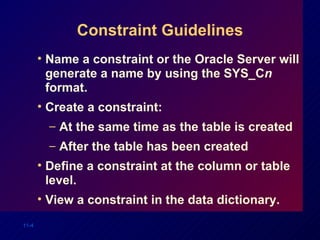
Constraint Guidelines Name a constraint or the Oracle Server will generate a name by using the SYS_C n  format. Create a constraint: At the same time as the table is created After the table has been created Define a constraint at the column or table level. View a constraint in the data dictionary.
Defining Constraints CREATE TABLE [ schema .] table   ( column   datatype  [DEFAULT  expr ] [ column_constraint ], ... [ table_constraint ][,...]); CREATE TABLE emp(   empno  NUMBER(4),   ename  VARCHAR2(10),   ...   deptno  NUMBER(7,2) NOT NULL,   CONSTRAINT emp_empno_pk    PRIMARY KEY (EMPNO));
Defining Constraints Column constraint level Table constraint level column  [CONSTRAINT  constraint_name ]  constraint_type , column,... [CONSTRAINT  constraint_name ]  constraint_type ( column , ...),
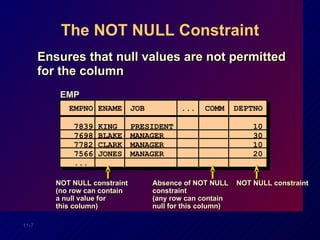
The NOT NULL Constraint Ensures that null values are not permitted for the column EMP EMPNO  ENAME  JOB  ...  COMM  DEPTNO  7839 KING PRESIDENT   10 7698 BLAKE MANAGER   30 7782 CLARK MANAGER   10 7566 JONES MANAGER   20 ... NOT NULL constraint (no row can contain a null value for this column) Absence of NOT NULL constraint (any row can contain null for this column) NOT NULL constraint
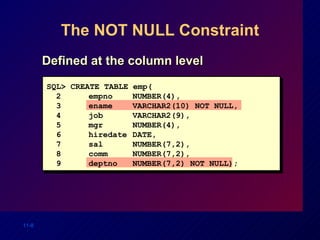
The NOT NULL Constraint Defined at the column level SQL> CREATE TABLE emp( 2  empno  NUMBER(4), 3 ename VARCHAR2(10) NOT NULL, 4 job VARCHAR2(9), 5 mgr NUMBER(4), 6 hiredate DATE, 7 sal NUMBER(7,2), 8  comm NUMBER(7,2), 9 deptno NUMBER(7,2) NOT NULL);
The UNIQUE Key Constraint DEPT  DEPTNO DNAME  LOC  ------ ---------- -------- 10 ACCOUNTING NEW YORK 20 RESEARCH DALLAS 30 SALES CHICAGO 40 OPERATIONS BOSTON UNIQUE key constraint 50 SALES DETROIT 60 BOSTON Insert into Not allowed  (DNAME  SALES  already exists) Allowed
The UNIQUE Key Constraint Defined at either the table level or the column level  SQL> CREATE TABLE  dept( 2  deptno    NUMBER(2), 3 dname   VARCHAR2(14), 4 loc   VARCHAR2(13), 5 CONSTRAINT dept_dname_uk UNIQUE(dname));
The PRIMARY KEY Constraint DEPT  DEPTNO DNAME  LOC  ------ ---------- -------- 10 ACCOUNTING NEW YORK 20 RESEARCH DALLAS 30 SALES CHICAGO 40 OPERATIONS BOSTON PRIMARY KEY Insert into 20 MARKETING DALLAS FINANCE NEW YORK Not allowed (DEPTNO  20 already exists) Not allowed (DEPTNO is null)
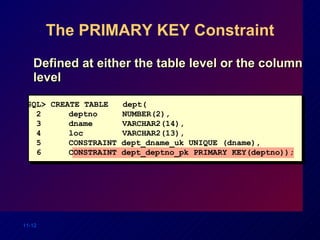
The PRIMARY KEY Constraint Defined at either the table level or the column level SQL> CREATE TABLE  dept( 2  deptno    NUMBER(2), 3 dname   VARCHAR2(14), 4 loc   VARCHAR2(13), 5 CONSTRAINT dept_dname_uk UNIQUE (dname), 6 CONSTRAINT dept_deptno_pk PRIMARY KEY(deptno));
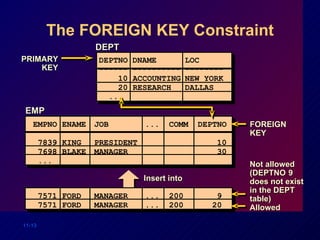
The FOREIGN KEY Constraint DEPT  DEPTNO DNAME  LOC  ------ ---------- -------- 10 ACCOUNTING NEW YORK 20 RESEARCH DALLAS ... PRIMARY KEY EMP EMPNO  ENAME  JOB  ...  COMM  DEPTNO  7839 KING PRESIDENT   10 7698 BLAKE MANAGER   30 ... FOREIGN KEY 7571 FORD MANAGER  ...  200   9 7571 FORD MANAGER  ...  200  20 Insert into Not allowed (DEPTNO  9  does not exist in the DEPT table) Allowed
The FOREIGN KEY Constraint Defined at either the table level or the column level SQL> CREATE TABLE emp( 2  empno  NUMBER(4), 3 ename VARCHAR2(10) NOT NULL, 4 job VARCHAR2(9), 5 mgr NUMBER(4), 6 hiredate DATE, 7 sal NUMBER(7,2), 8  comm NUMBER(7,2), 9 deptno NUMBER(7,2) NOT NULL, 10 CONSTRAINT emp_deptno_fk FOREIGN KEY (deptno) 11 REFERENCES dept (deptno));
FOREIGN KEY Constraint  Keywords FOREIGN KEY Defines the column in the child table at the table constraint level REFERENCES Identifies the table and column in the parent table ON DELETE CASCADE Allows deletion in the parent table and deletion of the dependent rows in the child table
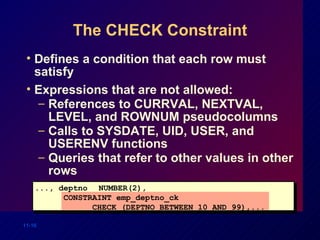
The CHECK Constraint Defines a condition that each row must satisfy Expressions that are not allowed: References to CURRVAL, NEXTVAL, LEVEL, and ROWNUM pseudocolumns  Calls to SYSDATE, UID, USER, and USERENV functions Queries that refer to other values in other rows ..., deptno NUMBER(2), CONSTRAINT emp_deptno_ck  CHECK (DEPTNO BETWEEN 10 AND 99),...
Adding a Constraint Add or drop, but not modify, a constraint Enable or disable constraints Add a NOT NULL constraint by using the MODIFY clause ALTER TABLE   table ADD [CONSTRAINT  constraint ]  type  ( column );
Adding a Constraint Add a FOREIGN KEY constraint to the EMP table indicating that a manager must already exist as a valid employee in the EMP table. SQL> ALTER TABLE  emp 2  ADD CONSTRAINT  emp_mgr_fk  3  FOREIGN KEY(mgr) REFERENCES emp(empno); Table altered.
Dropping a Constraint Remove the manager constraint from the EMP table. SQL> ALTER TABLE   emp 2  DROP CONSTRAINT  emp_mgr_fk; Table altered. Remove the PRIMARY KEY constraint on the DEPT table and drop the associated FOREIGN KEY constraint on the EMP.DEPTNO column. SQL> ALTER TABLE dept 2  DROP PRIMARY KEY CASCADE; Table altered.
Disabling Constraints Execute the DISABLE clause of the ALTER TABLE statement to deactivate an integrity constraint. Apply the CASCADE option to disable dependent integrity constraints. SQL> ALTER TABLE emp 2  DISABLE CONSTRAINT emp_empno_pk CASCADE; Table altered.
Enabling Constraints Activate an integrity constraint currently disabled in the table definition by using the ENABLE clause.  A UNIQUE or PRIMARY KEY index is automatically created if you enable a UNIQUE key or PRIMARY KEY constraint. SQL> ALTER TABLE emp 2  ENABLE CONSTRAINT emp_empno_pk; Table altered.
Viewing Constraints Query the USER_CONSTRAINTS table to view all constraint definitions and names. CONSTRAINT_NAME  C SEARCH_CONDITION ------------------------ - -------------------------  SYS_C00674  C EMPNO IS NOT NULL  SYS_C00675  C DEPTNO IS NOT NULL EMP_EMPNO_PK   P ... SQL>  SELECT constraint_name, constraint_type, 2 search_condition 3  FROM user_constraints 4  WHERE table_name = 'EMP';
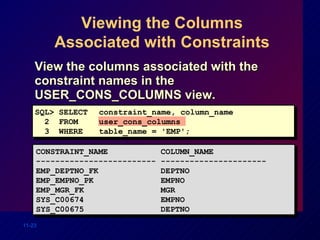
Viewing the Columns Associated with Constraints View the columns associated with the constraint names in the USER_CONS_COLUMNS view. CONSTRAINT_NAME  COLUMN_NAME ------------------------- ---------------------- EMP_DEPTNO_FK  DEPTNO EMP_EMPNO_PK  EMPNO EMP_MGR_FK  MGR SYS_C00674  EMPNO SYS_C00675  DEPTNO SQL> SELECT constraint_name, column_name 2  FROM user_cons_columns 3  WHERE table_name = 'EMP';
Summary Create the following types of constraints: NOT NULL UNIQUE PRIMARY KEY FOREIGN KEY CHECK Query the USER_CONSTRAINTS table to view all constraint definitions and names.
Practice Overview Adding constraints to existing tables Adding more columns to a table Displaying information in data dictionary views

Les11

  • 1.
  • 2.
    Objectives After completingthis lesson, you should be able to do the following: Describe constraints Create and maintain constraints
  • 3.
    What Are Constraints?Constraints enforce rules at the table level. Constraints prevent the deletion of a table if there are dependencies. The following constraint types are valid in Oracle: NOT NULL UNIQUE PRIMARY KEY FOREIGN KEY CHECK
  • 4.
    Constraint Guidelines Namea constraint or the Oracle Server will generate a name by using the SYS_C n format. Create a constraint: At the same time as the table is created After the table has been created Define a constraint at the column or table level. View a constraint in the data dictionary.
  • 5.
    Defining Constraints CREATETABLE [ schema .] table ( column datatype [DEFAULT expr ] [ column_constraint ], ... [ table_constraint ][,...]); CREATE TABLE emp( empno NUMBER(4), ename VARCHAR2(10), ... deptno NUMBER(7,2) NOT NULL, CONSTRAINT emp_empno_pk PRIMARY KEY (EMPNO));
  • 6.
    Defining Constraints Columnconstraint level Table constraint level column [CONSTRAINT constraint_name ] constraint_type , column,... [CONSTRAINT constraint_name ] constraint_type ( column , ...),
  • 7.
    The NOT NULLConstraint Ensures that null values are not permitted for the column EMP EMPNO ENAME JOB ... COMM DEPTNO 7839 KING PRESIDENT 10 7698 BLAKE MANAGER 30 7782 CLARK MANAGER 10 7566 JONES MANAGER 20 ... NOT NULL constraint (no row can contain a null value for this column) Absence of NOT NULL constraint (any row can contain null for this column) NOT NULL constraint
  • 8.
    The NOT NULLConstraint Defined at the column level SQL> CREATE TABLE emp( 2 empno NUMBER(4), 3 ename VARCHAR2(10) NOT NULL, 4 job VARCHAR2(9), 5 mgr NUMBER(4), 6 hiredate DATE, 7 sal NUMBER(7,2), 8 comm NUMBER(7,2), 9 deptno NUMBER(7,2) NOT NULL);
  • 9.
    The UNIQUE KeyConstraint DEPT DEPTNO DNAME LOC ------ ---------- -------- 10 ACCOUNTING NEW YORK 20 RESEARCH DALLAS 30 SALES CHICAGO 40 OPERATIONS BOSTON UNIQUE key constraint 50 SALES DETROIT 60 BOSTON Insert into Not allowed (DNAME  SALES already exists) Allowed
  • 10.
    The UNIQUE KeyConstraint Defined at either the table level or the column level SQL> CREATE TABLE dept( 2 deptno NUMBER(2), 3 dname VARCHAR2(14), 4 loc VARCHAR2(13), 5 CONSTRAINT dept_dname_uk UNIQUE(dname));
  • 11.
    The PRIMARY KEYConstraint DEPT DEPTNO DNAME LOC ------ ---------- -------- 10 ACCOUNTING NEW YORK 20 RESEARCH DALLAS 30 SALES CHICAGO 40 OPERATIONS BOSTON PRIMARY KEY Insert into 20 MARKETING DALLAS FINANCE NEW YORK Not allowed (DEPTNO  20 already exists) Not allowed (DEPTNO is null)
  • 12.
    The PRIMARY KEYConstraint Defined at either the table level or the column level SQL> CREATE TABLE dept( 2 deptno NUMBER(2), 3 dname VARCHAR2(14), 4 loc VARCHAR2(13), 5 CONSTRAINT dept_dname_uk UNIQUE (dname), 6 CONSTRAINT dept_deptno_pk PRIMARY KEY(deptno));
  • 13.
    The FOREIGN KEYConstraint DEPT DEPTNO DNAME LOC ------ ---------- -------- 10 ACCOUNTING NEW YORK 20 RESEARCH DALLAS ... PRIMARY KEY EMP EMPNO ENAME JOB ... COMM DEPTNO 7839 KING PRESIDENT 10 7698 BLAKE MANAGER 30 ... FOREIGN KEY 7571 FORD MANAGER ... 200 9 7571 FORD MANAGER ... 200 20 Insert into Not allowed (DEPTNO  9 does not exist in the DEPT table) Allowed
  • 14.
    The FOREIGN KEYConstraint Defined at either the table level or the column level SQL> CREATE TABLE emp( 2 empno NUMBER(4), 3 ename VARCHAR2(10) NOT NULL, 4 job VARCHAR2(9), 5 mgr NUMBER(4), 6 hiredate DATE, 7 sal NUMBER(7,2), 8 comm NUMBER(7,2), 9 deptno NUMBER(7,2) NOT NULL, 10 CONSTRAINT emp_deptno_fk FOREIGN KEY (deptno) 11 REFERENCES dept (deptno));
  • 15.
    FOREIGN KEY Constraint Keywords FOREIGN KEY Defines the column in the child table at the table constraint level REFERENCES Identifies the table and column in the parent table ON DELETE CASCADE Allows deletion in the parent table and deletion of the dependent rows in the child table
  • 16.
    The CHECK ConstraintDefines a condition that each row must satisfy Expressions that are not allowed: References to CURRVAL, NEXTVAL, LEVEL, and ROWNUM pseudocolumns Calls to SYSDATE, UID, USER, and USERENV functions Queries that refer to other values in other rows ..., deptno NUMBER(2), CONSTRAINT emp_deptno_ck CHECK (DEPTNO BETWEEN 10 AND 99),...
  • 17.
    Adding a ConstraintAdd or drop, but not modify, a constraint Enable or disable constraints Add a NOT NULL constraint by using the MODIFY clause ALTER TABLE table ADD [CONSTRAINT constraint ] type ( column );
  • 18.
    Adding a ConstraintAdd a FOREIGN KEY constraint to the EMP table indicating that a manager must already exist as a valid employee in the EMP table. SQL> ALTER TABLE emp 2 ADD CONSTRAINT emp_mgr_fk 3 FOREIGN KEY(mgr) REFERENCES emp(empno); Table altered.
  • 19.
    Dropping a ConstraintRemove the manager constraint from the EMP table. SQL> ALTER TABLE emp 2 DROP CONSTRAINT emp_mgr_fk; Table altered. Remove the PRIMARY KEY constraint on the DEPT table and drop the associated FOREIGN KEY constraint on the EMP.DEPTNO column. SQL> ALTER TABLE dept 2 DROP PRIMARY KEY CASCADE; Table altered.
  • 20.
    Disabling Constraints Executethe DISABLE clause of the ALTER TABLE statement to deactivate an integrity constraint. Apply the CASCADE option to disable dependent integrity constraints. SQL> ALTER TABLE emp 2 DISABLE CONSTRAINT emp_empno_pk CASCADE; Table altered.
  • 21.
    Enabling Constraints Activatean integrity constraint currently disabled in the table definition by using the ENABLE clause. A UNIQUE or PRIMARY KEY index is automatically created if you enable a UNIQUE key or PRIMARY KEY constraint. SQL> ALTER TABLE emp 2 ENABLE CONSTRAINT emp_empno_pk; Table altered.
  • 22.
    Viewing Constraints Querythe USER_CONSTRAINTS table to view all constraint definitions and names. CONSTRAINT_NAME C SEARCH_CONDITION ------------------------ - ------------------------- SYS_C00674 C EMPNO IS NOT NULL SYS_C00675 C DEPTNO IS NOT NULL EMP_EMPNO_PK P ... SQL> SELECT constraint_name, constraint_type, 2 search_condition 3 FROM user_constraints 4 WHERE table_name = 'EMP';
  • 23.
    Viewing the ColumnsAssociated with Constraints View the columns associated with the constraint names in the USER_CONS_COLUMNS view. CONSTRAINT_NAME COLUMN_NAME ------------------------- ---------------------- EMP_DEPTNO_FK DEPTNO EMP_EMPNO_PK EMPNO EMP_MGR_FK MGR SYS_C00674 EMPNO SYS_C00675 DEPTNO SQL> SELECT constraint_name, column_name 2 FROM user_cons_columns 3 WHERE table_name = 'EMP';
  • 24.
    Summary Create thefollowing types of constraints: NOT NULL UNIQUE PRIMARY KEY FOREIGN KEY CHECK Query the USER_CONSTRAINTS table to view all constraint definitions and names.
  • 25.
    Practice Overview Addingconstraints to existing tables Adding more columns to a table Displaying information in data dictionary views

Editor's Notes

  • #2 Schedule: Timing Topic 45 minutes Lecture 25 minutes Practice 70 minutes Total
  • #3 Lesson Aim In this lesson, you will learn how to implement business rules by including integrity constraints.
  • #4 Schedule: Timing Topic 45 minutes Lecture 25 minutes Practice 70 minutes Total
  • #5 Constraint Guidelines All constraints are stored in the data dictionary. Constraints are easy to reference if you give them a meaningful name. Constraint names must follow the standard object-naming rules. If you do not name your constraint, Oracle generates a name with the format SYS_C n , where n is an integer to create a unique constraint name. Constraints can be defined at the time of table creation or after the table has been created. You can view the constraints defined for a specific table by looking at the USER_CONSTRAINTS data dictionary table.
  • #6 Schedule: Timing Topic 45 minutes Lecture 25 minutes Practice 70 minutes Total
  • #7 Schedule: Timing Topic 45 minutes Lecture 25 minutes Practice 70 minutes Total
  • #8 Schedule: Timing Topic 45 minutes Lecture 25 minutes Practice 70 minutes Total
  • #9 Schedule: Timing Topic 45 minutes Lecture 25 minutes Practice 70 minutes Total
  • #10 Schedule: Timing Topic 45 minutes Lecture 25 minutes Practice 70 minutes Total
  • #11 Schedule: Timing Topic 45 minutes Lecture 25 minutes Practice 70 minutes Total
  • #12 Schedule: Timing Topic 45 minutes Lecture 25 minutes Practice 70 minutes Total
  • #13 Schedule: Timing Topic 45 minutes Lecture 25 minutes Practice 70 minutes Total
  • #14 Schedule: Timing Topic 45 minutes Lecture 25 minutes Practice 70 minutes Total
  • #15 Schedule: Timing Topic 45 minutes Lecture 25 minutes Practice 70 minutes Total
  • #16 The FOREIGN KEY Constraint (continued) The foreign key is defined in the child table, and the table containing the referenced column is the parent table. The foreign key is defined using a combination of the following keywords: FOREIGN KEY is used to define the column in the child table at the table constraint level. REFERENCES identifies the table and column in the parent table. ON DELETE CASCADE indicates that when the row in the parent table is deleted, the dependent rows in the child table will also be deleted. Without the ON DELETE CASCADE option, the row in the parent table cannot be deleted if it is referenced in the child table.
  • #17 Schedule: Timing Topic 45 minutes Lecture 25 minutes Practice 70 minutes Total
  • #18 Schedule: Timing Topic 45 minutes Lecture 25 minutes Practice 70 minutes Total
  • #19 Schedule: Timing Topic 45 minutes Lecture 25 minutes Practice 70 minutes Total
  • #20 Schedule: Timing Topic 45 minutes Lecture 25 minutes Practice 70 minutes Total
  • #21 Schedule: Timing Topic 45 minutes Lecture 25 minutes Practice 70 minutes Total
  • #22 Schedule: Timing Topic 45 minutes Lecture 25 minutes Practice 70 minutes Total
  • #23 Schedule: Timing Topic 45 minutes Lecture 25 minutes Practice 70 minutes Total
  • #24 Schedule: Timing Topic 45 minutes Lecture 25 minutes Practice 70 minutes Total
  • #25 Summary The Oracle Server uses constraints to prevent invalid data entry into tables. The following constraint types are valid: NOT NULL UNIQUE PRIMARY KEY FOREIGN KEY CHECK You can query the USER_CONSTRAINTS table to view all constraint definitions and names.
  • #26 Practice Overview In this practice, you will add constraints and more columns to a table using the statements covered in this lesson. Class Management Note Advise the students to name their constraints.