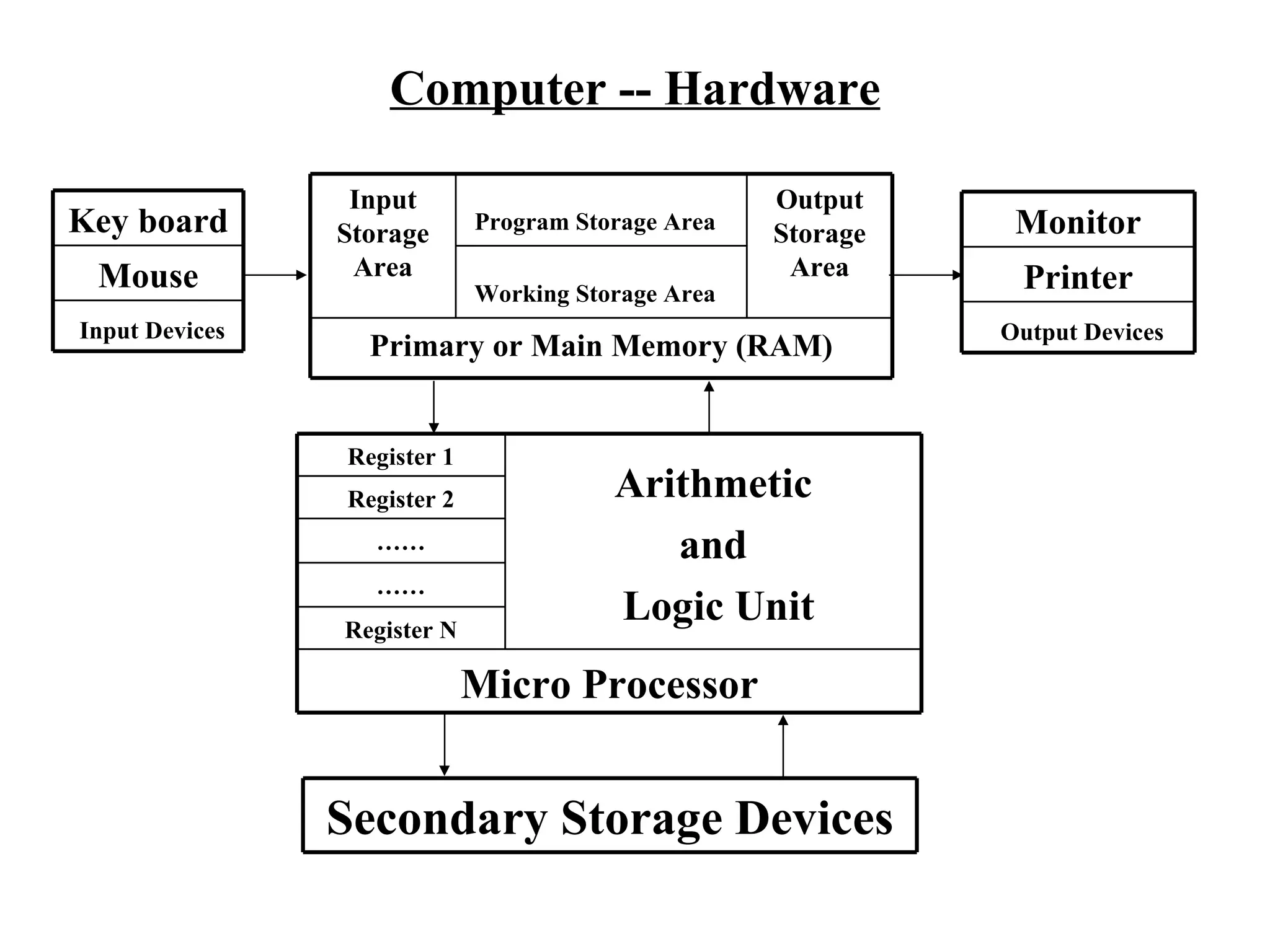
Computer -- Hardware Key board Mouse Input Devices Monitor Printer Output Devices Secondary Storage Devices Input Storage Area Program Storage Area   Output Storage Area Working Storage Area   Primary or Main Memory (RAM) Register 1 Arithmetic and Logic Unit Register 2 …… …… Register N Micro Processor
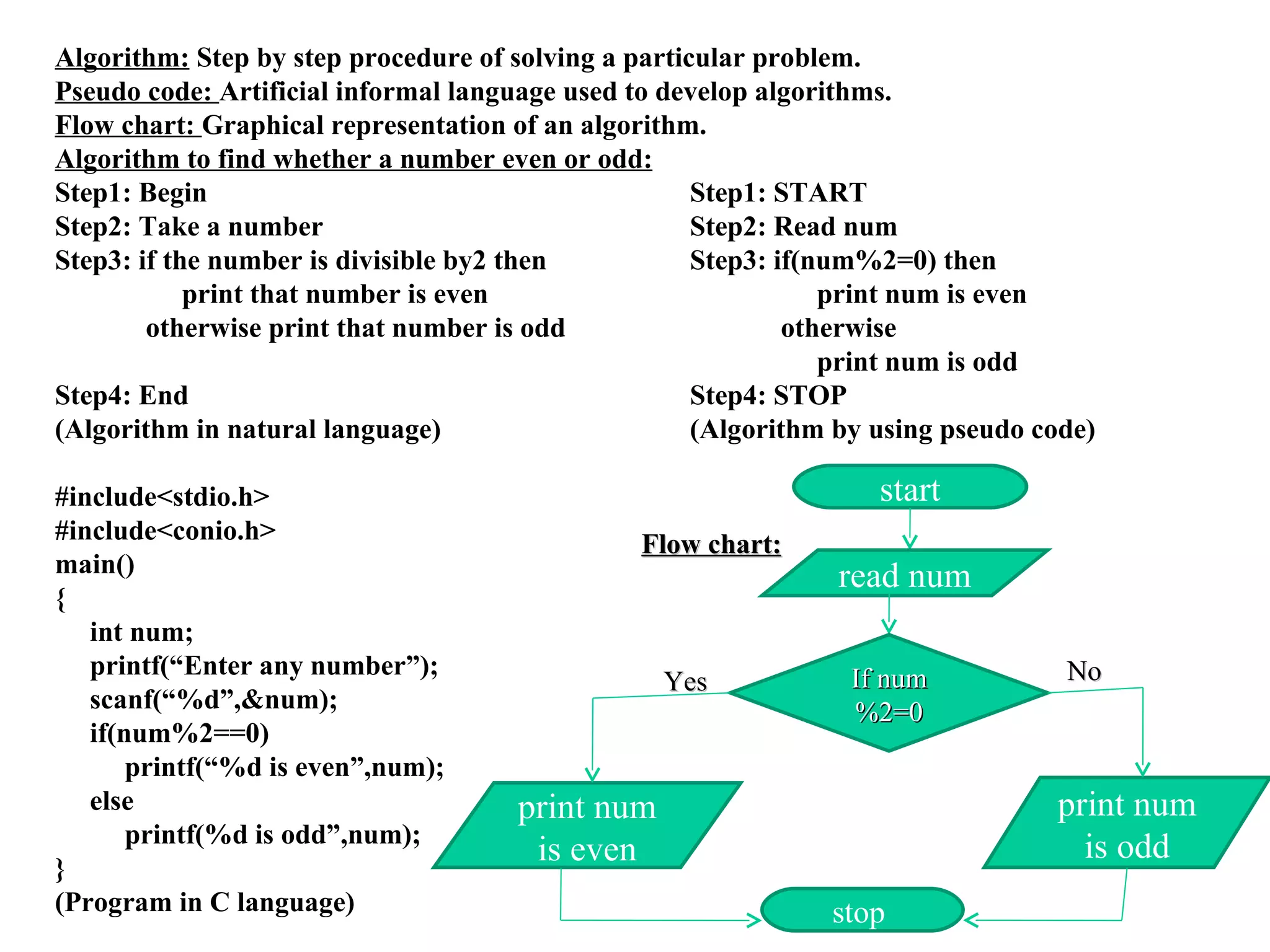
Algorithm:  Step by step procedure of solving a particular problem. Pseudo code:  Artificial informal language used to develop algorithms. Flow chart:  Graphical representation of an algorithm. Algorithm to find whether a number even or odd: Step1: Begin Step1: START Step2: Take a number Step2: Read num Step3: if the number is divisible by2 then Step3: if(num%2=0) then print that number is even print num is even otherwise print that number is odd   otherwise  print num is odd Step4: End Step4: STOP (Algorithm in natural language) (Algorithm by using pseudo code) #include<stdio.h> #include<conio.h> main() { int num; printf(“Enter any number”); scanf(“%d”,&num); if(num%2==0) printf(“%d is even”,num); else printf(%d is odd”,num);  } (Program in C language) start read num print num is even stop  If num%2=0 print num is odd Flow chart: Yes No
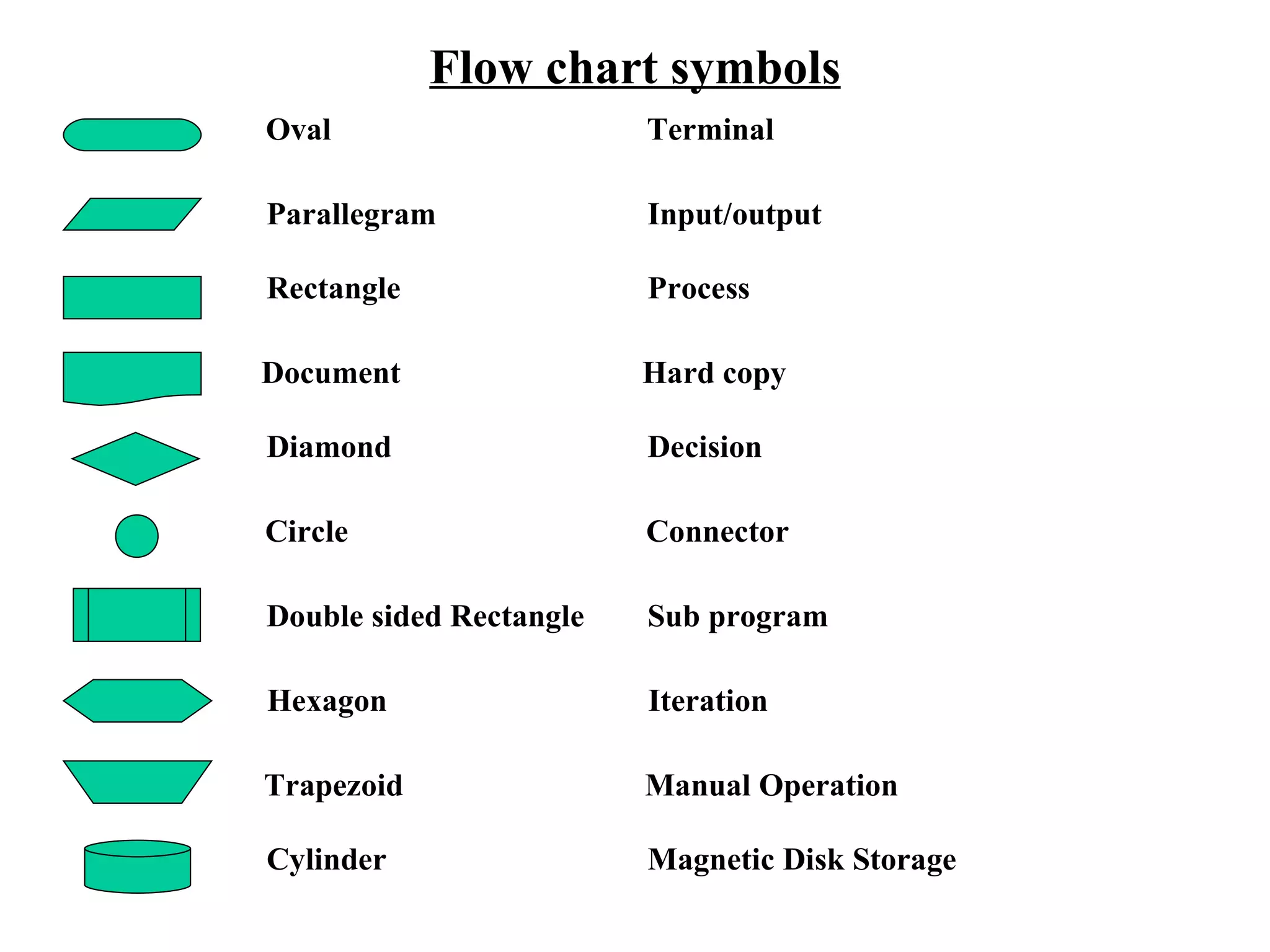
Flow chart symbols Oval Terminal Parallegram Input/output Rectangle Process Document Hard copy Diamond Decision Circle Connector Double sided Rectangle Sub program Hexagon Iteration Trapezoid Manual Operation Cylinder Magnetic Disk Storage
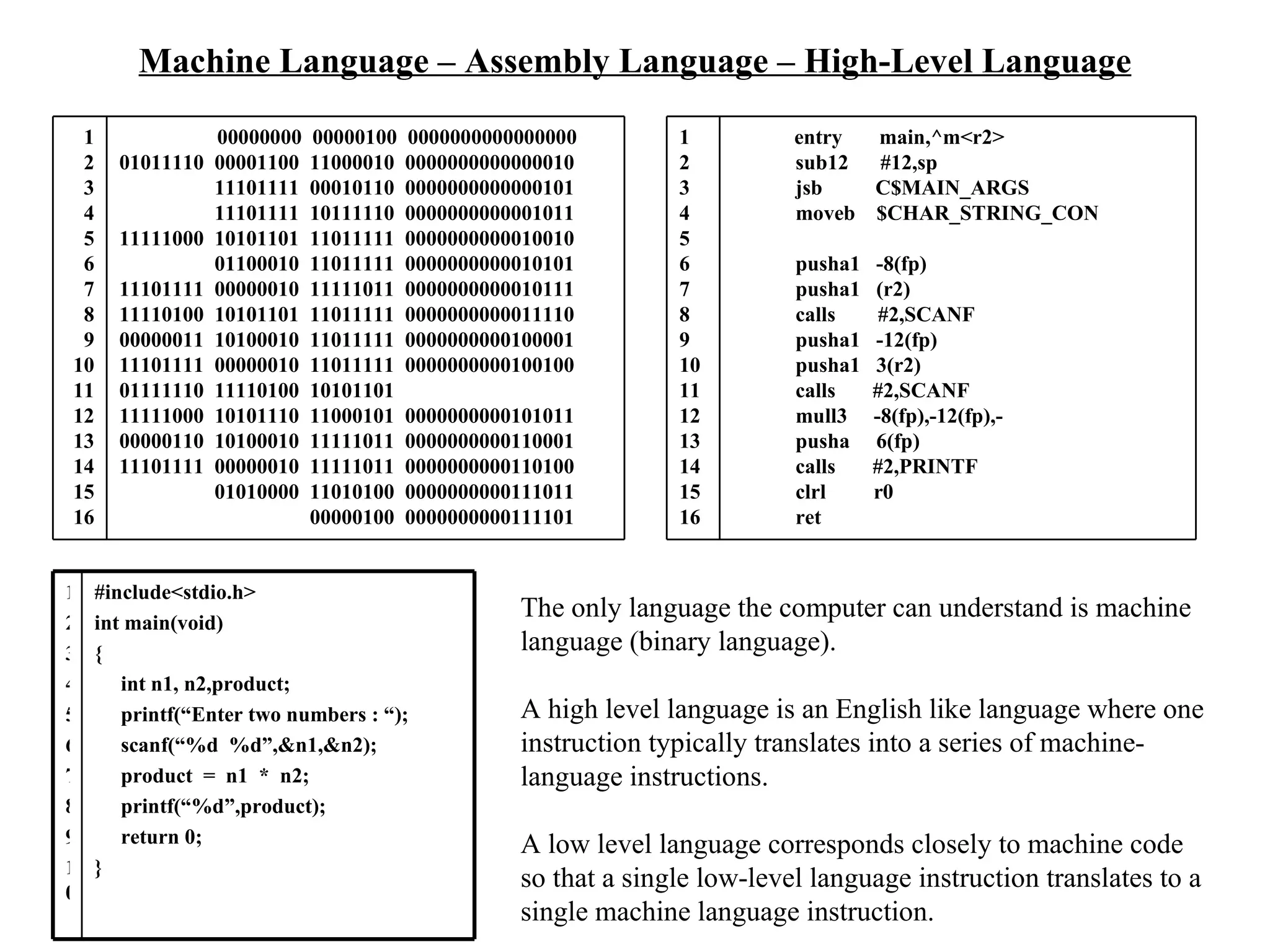
Machine Language – Assembly Language – High-Level Language The only language the computer can understand is machine language (binary language). A high level language is an English like language where one instruction typically translates into a series of machine-language instructions. A low level language corresponds closely to machine code so that a single low-level language instruction translates to a single machine language instruction.  1 2 3 4 5 6 7 8 9 10 11 12 13 14 15 16 entry  main,^m<r2> sub12  #12,sp jsb  C$MAIN_ARGS moveb  $CHAR_STRING_CON pusha1  -8(fp) pusha1  (r2) calls  #2,SCANF pusha1  -12(fp) pusha1  3(r2) calls  #2,SCANF mull3  -8(fp),-12(fp),- pusha  6(fp) calls  #2,PRINTF clrl  r0 ret 1 2 3 4 5 6 7 8 9 10 11 12 13 14 15 16 00000000  00000100  0000000000000000 01011110  00001100  11000010  0000000000000010 11101111  00010110  0000000000000101 11101111  10111110  0000000000001011 11111000  10101101  11011111  0000000000010010 01100010  11011111  0000000000010101 11101111  00000010  11111011  0000000000010111 11110100  10101101  11011111  0000000000011110 00000011  10100010  11011111  0000000000100001 11101111  00000010  11011111  0000000000100100 01111110  11110100  10101101 11111000  10101110  11000101  0000000000101011 00000110  10100010  11111011  0000000000110001 11101111  00000010  11111011  0000000000110100 01010000  11010100  0000000000111011 00000100  0000000000111101 1 2 3 4 5 6 7 8 9 10 #include<stdio.h> int main(void) { int n1, n2,product; printf(“Enter two numbers : “); scanf(“%d  %d”,&n1,&n2); product  =  n1  *  n2; printf(“%d”,product); return 0; }
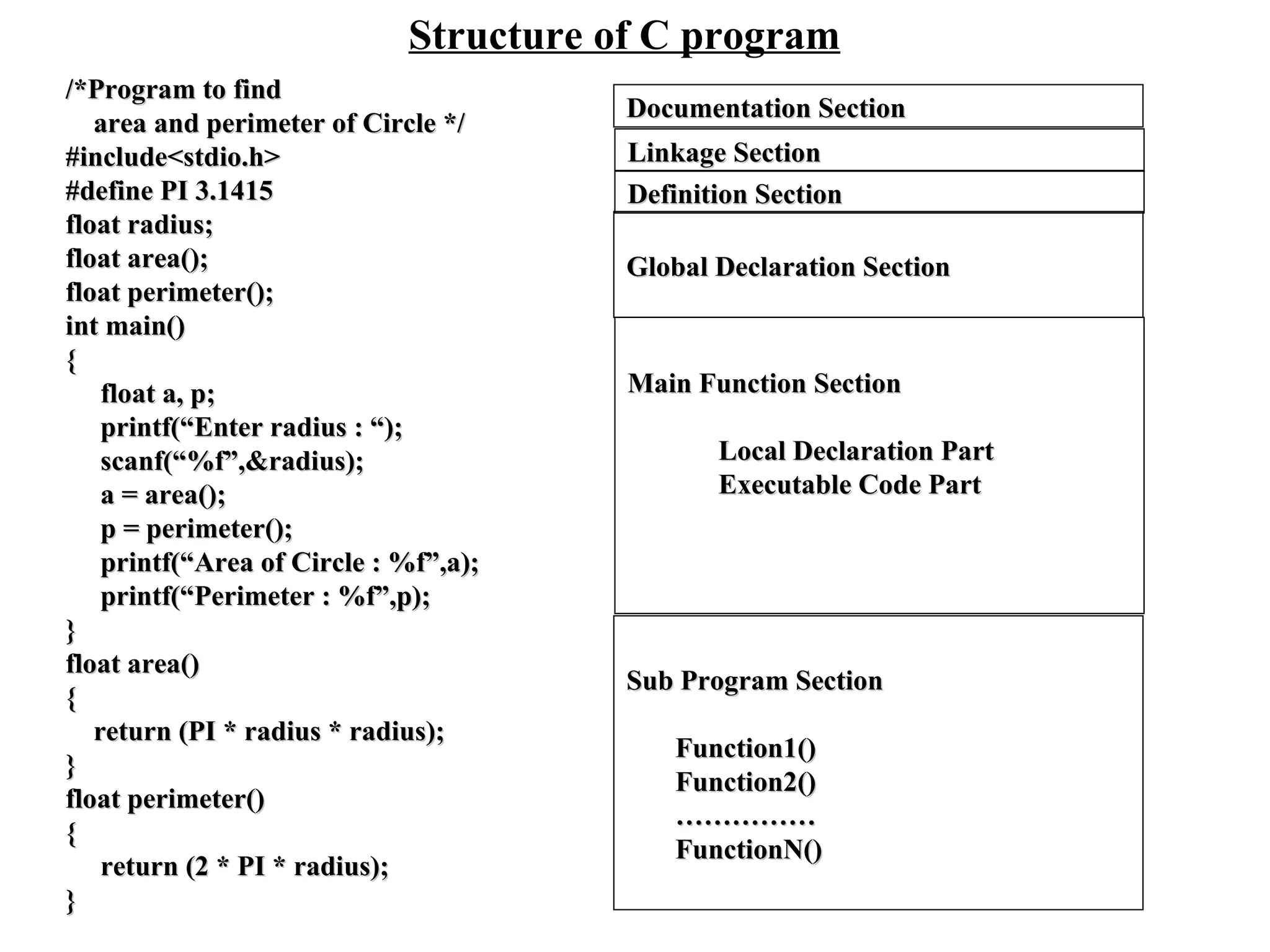
Structure of C program /*Program to find  area and perimeter of Circle */ #include<stdio.h> #define PI 3.1415 float radius; float area(); float perimeter(); int main() { float a, p; printf(“Enter radius : “); scanf(“%f”,&radius); a = area(); p = perimeter(); printf(“Area of Circle : %f”,a); printf(“Perimeter : %f”,p); } float area() { return (PI * radius * radius); } float perimeter() { return (2 * PI * radius); } Documentation Section Linkage Section Definition Section Global Declaration Section Main Function Section Local Declaration Part Executable Code Part Sub Program Section Function1() Function2() …………… FunctionN()
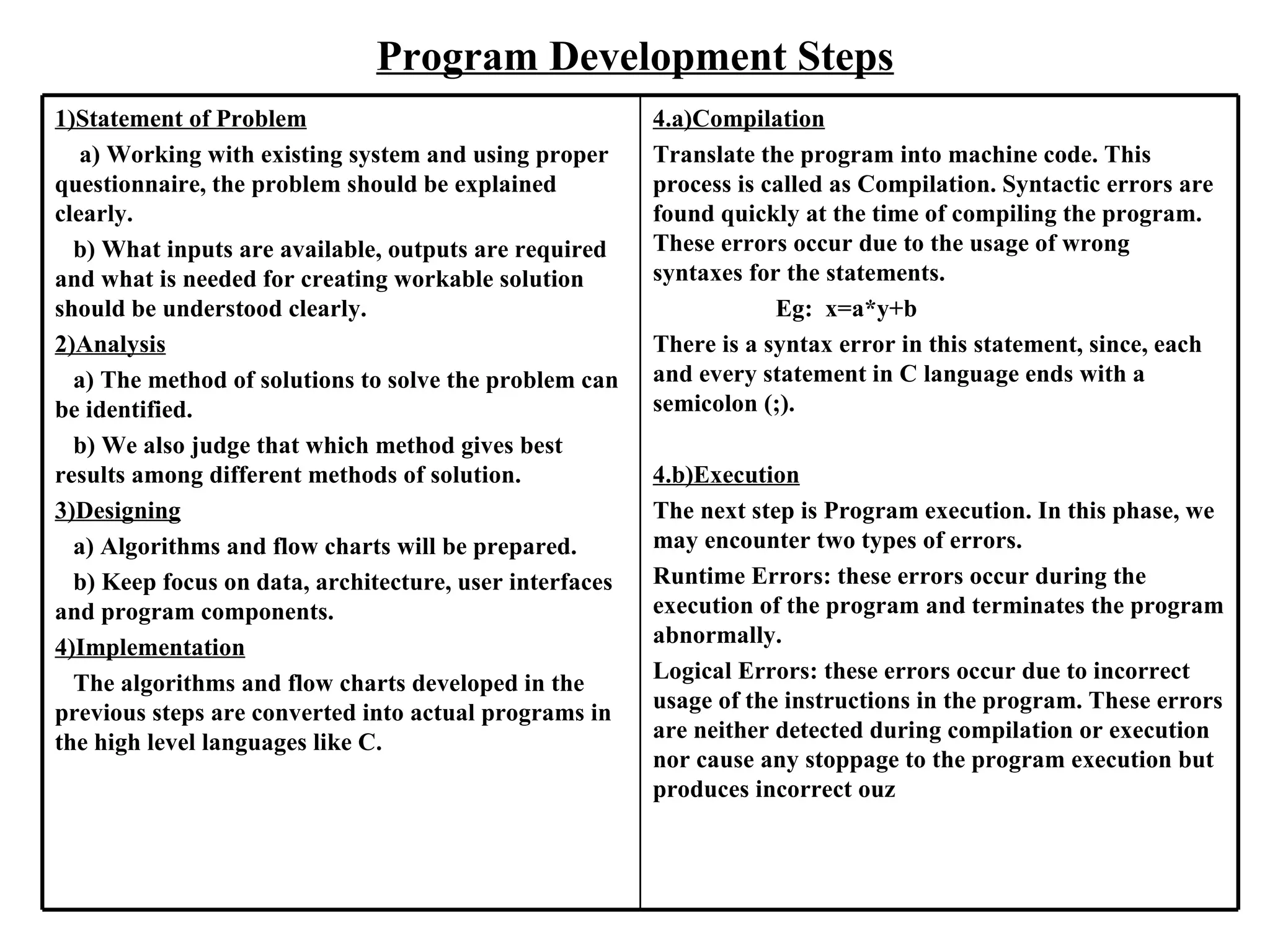
Program Development Steps 1)Statement of Problem   a) Working with existing system and using proper questionnaire, the problem should be explained clearly. b) What inputs are available, outputs are required and what is needed for creating workable solution should be understood clearly. 2)Analysis   a) The method of solutions to solve the problem can be identified.  b) We also judge that which method gives best results among different methods of solution. 3)Designing a) Algorithms and flow charts will be prepared. b) Keep focus on data, architecture, user interfaces and program components.  4)Implementation The algorithms and flow charts developed in the previous steps are converted into actual programs in the high level languages like C.  4.a)Compilation Translate the program into machine code. This process is called as Compilation. Syntactic errors are found quickly at the time of compiling the program. These errors occur due to the usage of wrong syntaxes for the statements. Eg:  x=a*y+b There is a syntax error in this statement, since, each and every statement in C language ends with a semicolon (;). 4.b)Execution The next step is Program execution. In this phase, we may encounter two types of errors. Runtime Errors: these errors occur during the execution of the program and terminates the program abnormally. Logical Errors: these errors occur due to incorrect usage of the instructions in the program. These errors are neither detected during compilation or execution nor cause any stoppage to the program execution but produces incorrect ouz
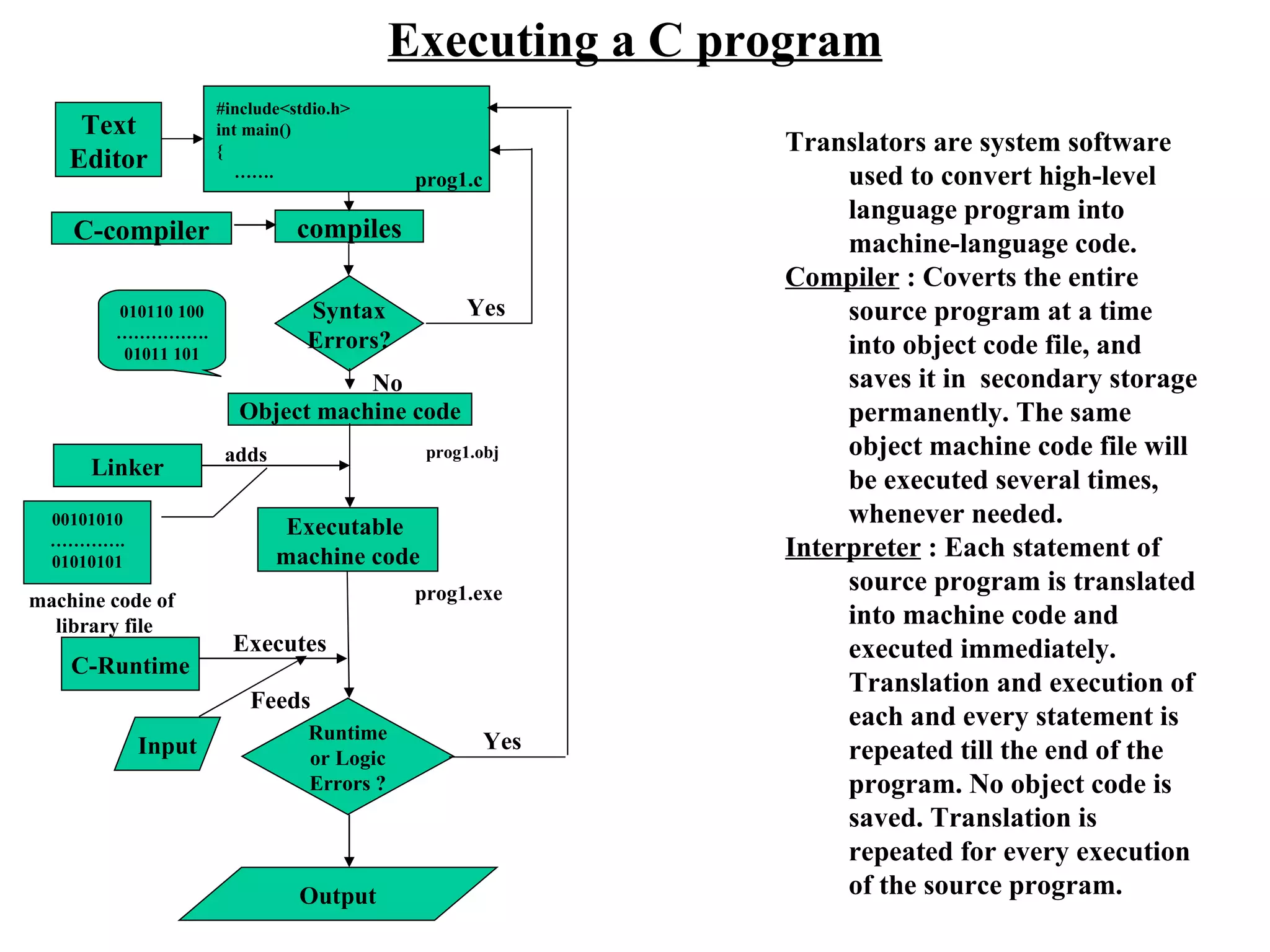
Executing a C program compiles Syntax Errors? Yes Object machine code 010110 100 …………… . 01011 101 C-compiler #include<stdio.h> int main() {  …… . Text Editor prog1.c prog1.obj Linker Executable  machine code 00101010 ………… . 01010101 adds Translators are system software used to convert high-level language program into machine-language code. Compiler  : Coverts the entire source program at a time into object code file, and saves it in  secondary storage  permanently. The same object machine code file will be executed several times, whenever needed. Interpreter  : Each statement of source program is translated into machine code and executed immediately. Translation and execution of each and every statement is repeated till the end of the program. No object code is saved. Translation is repeated for every execution of the source program. machine code of library file Input prog1.exe No C-Runtime Executes Feeds Runtime or Logic  Errors ? Yes Output
C-Language Keywords(C99) auto  double  int  struct break  else  long  switch case  enum  register  typedef char  extern  return  union const  float  short  unsigned continue  for  signed  void default  goto  sizeof  volatile do  if  static  while _Bool  _Imaginary  restrict _Complex inline Character Set of C-Language Alphabets : A-Z and a-z Digits : 0-9 Special Symbols : ~ ! @ # $ % ^ & ( ) _ - + = | \ { } [ ] : ; “ ‘    < > , . ? / White Spaces : space , Horizontal tab, Vertical tab, New Line Form Feed.
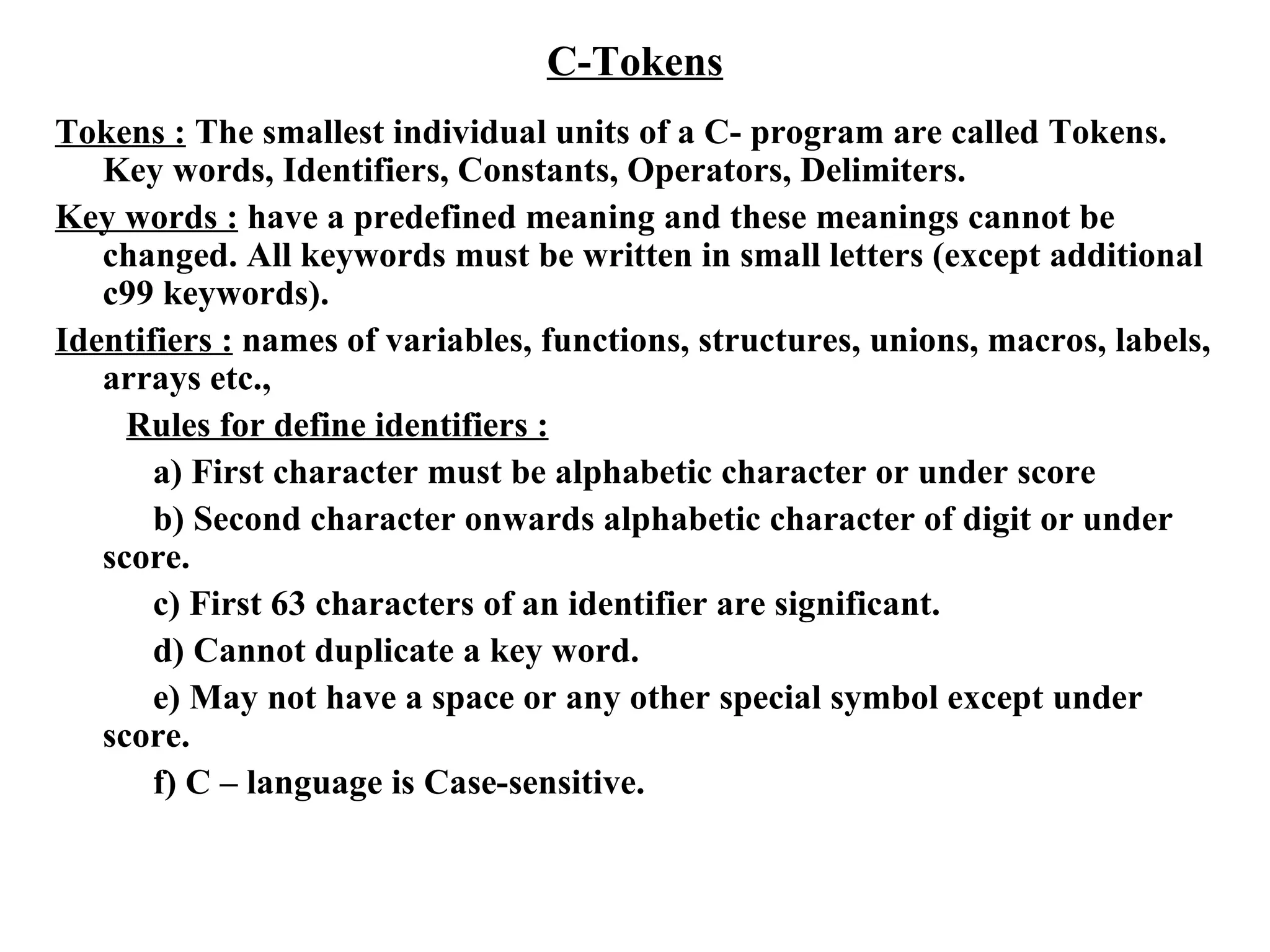
C-Tokens Tokens :  The smallest individual units of a C- program are called Tokens. Key words, Identifiers, Constants, Operators, Delimiters. Key words :  have a predefined meaning and these meanings cannot be changed. All keywords must be written in small letters (except additional c99 keywords). Identifiers :  names of variables, functions, structures, unions, macros, labels, arrays etc., Rules for define identifiers : a) First character must be alphabetic character or under score b) Second character onwards alphabetic character of digit or under score. c) First 63 characters of an identifier are significant. d) Cannot duplicate a key word. e) May not have a space or any other special symbol except under score. f) C – language is Case-sensitive.
C-Tokens Constants :  fixed values that do not change during execution of a program.  Boolean constants :  0 ( false) and 1 (true) Character constants : only one character enclosed between two single quotes ( except  escape  characters ).  wide character type - wchar_t - for Unicode characters. Integer constants :  +123, -3454 , 0235 (octal value), 0x43d98 ( hexa - decimal value)  54764U, 124356578L, 124567856UL Float constants :  0.2 , 876.345, .345623 , 23.4E+8, 47.45e+6 String Constants :  “Hello world” , “Have a nice day!” Complex Constants :  real part + imaginary part * I  ex : 12.3 + 3.45 * I Operators :  a symbol, which indicates an operation to be performed. Operators are used to manipulate data in program. Delimiters :  Language Pattern of c-language uses special kind of symbols : (colon, used for labels) ; (semicolon terminates statement ) ( ) parameter list  [ ] ( array declaration and subscript ),  { } ( block statement ) # ( hash for preprocessor directive )  , (comma variable separator )
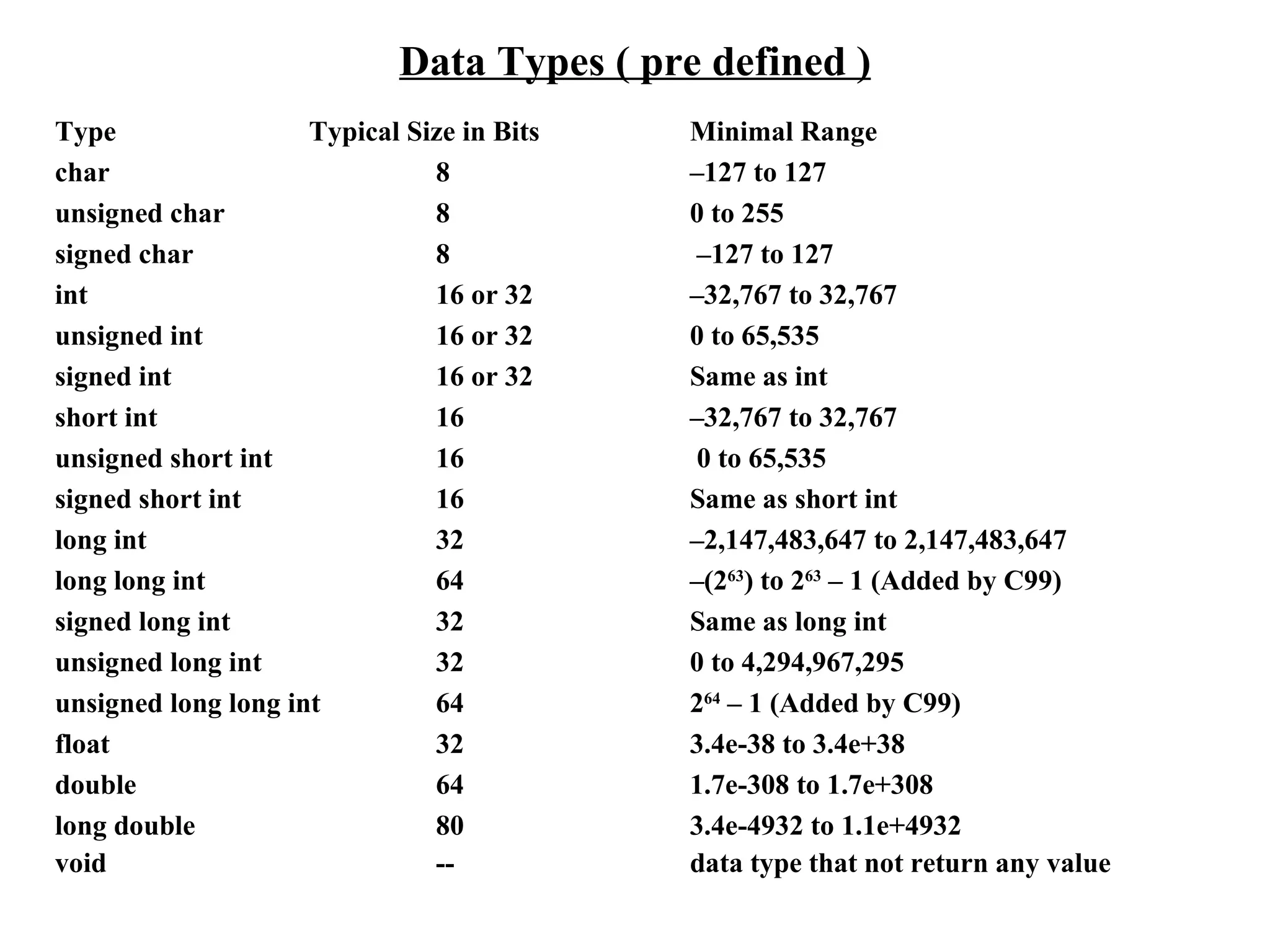
Data Types ( pre defined ) Type   Typical Size in Bits  Minimal Range char  8  –127 to 127 unsigned char  8  0 to 255 signed char  8  –127 to 127 int  16 or 32  –32,767 to 32,767 unsigned int  16 or 32  0 to 65,535 signed int  16 or 32  Same as int short int  16  –32,767 to 32,767 unsigned short int  16  0 to 65,535 signed short int  16  Same as short int long int  32  –2,147,483,647 to 2,147,483,647 long long int  64  –(2 63 ) to 2 63  – 1 (Added by C99) signed long int  32  Same as long int unsigned long int 32  0 to 4,294,967,295 unsigned long long int  64  2 64  – 1 (Added by C99) float  32  3.4e-38 to 3.4e+38 double  64  1.7e-308 to 1.7e+308 long double  80  3.4e-4932 to 1.1e+4932 void -- data type that not return any value
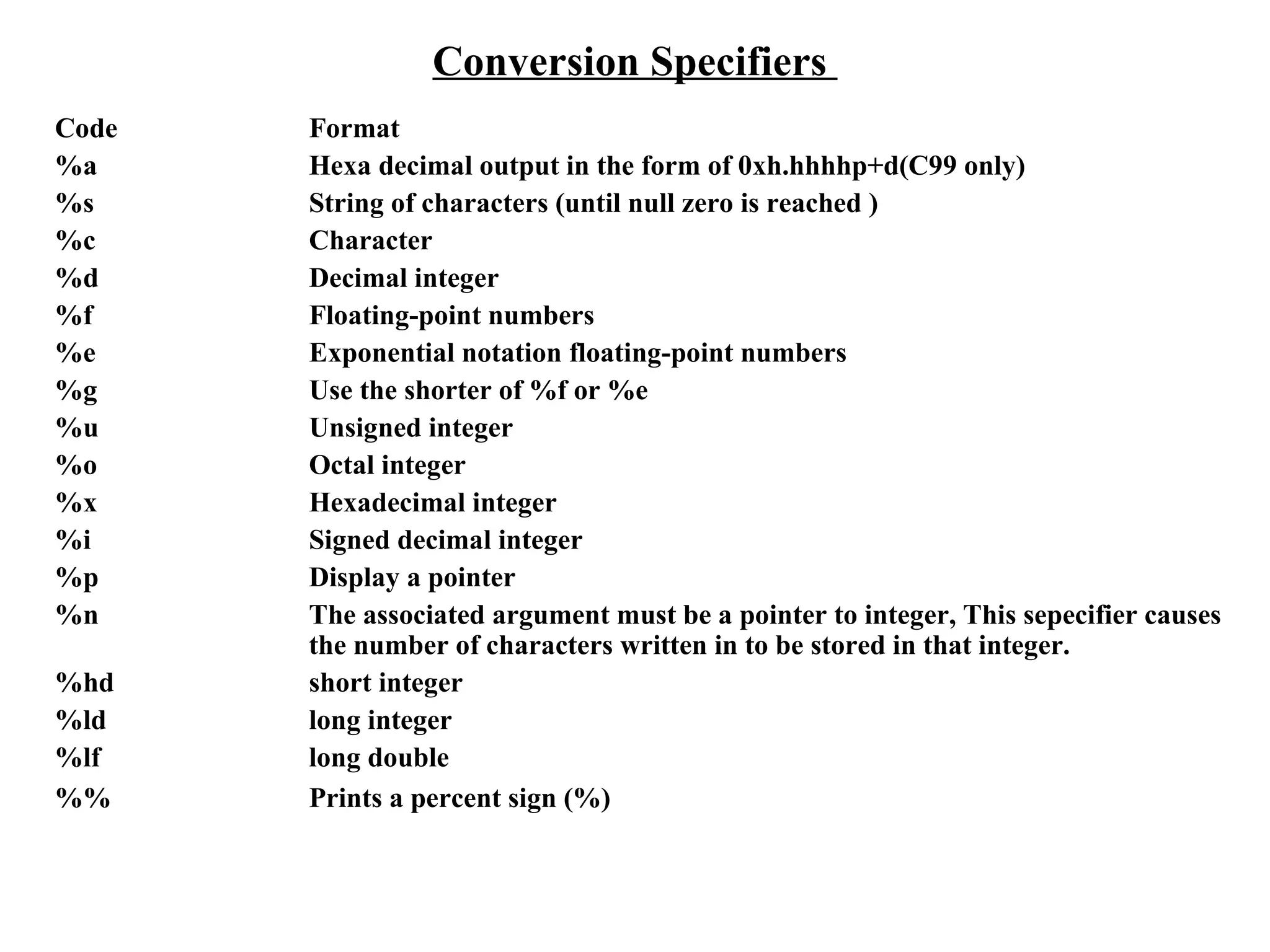
Conversion Specifiers  Code Format %a   Hexa decimal output in the form of 0xh.hhhhp+d(C99 only) %s String of characters (until null zero is reached ) %c Character %d Decimal integer %f Floating-point numbers %e Exponential notation floating-point numbers %g Use the shorter of %f or %e %u Unsigned integer %o Octal integer %x Hexadecimal integer %i Signed decimal integer %p Display a pointer %n The associated argument must be a pointer to integer, This sepecifier causes  the number of characters written in to be stored in that integer. %hd short integer %ld long integer %lf long double %% Prints a percent sign (%)
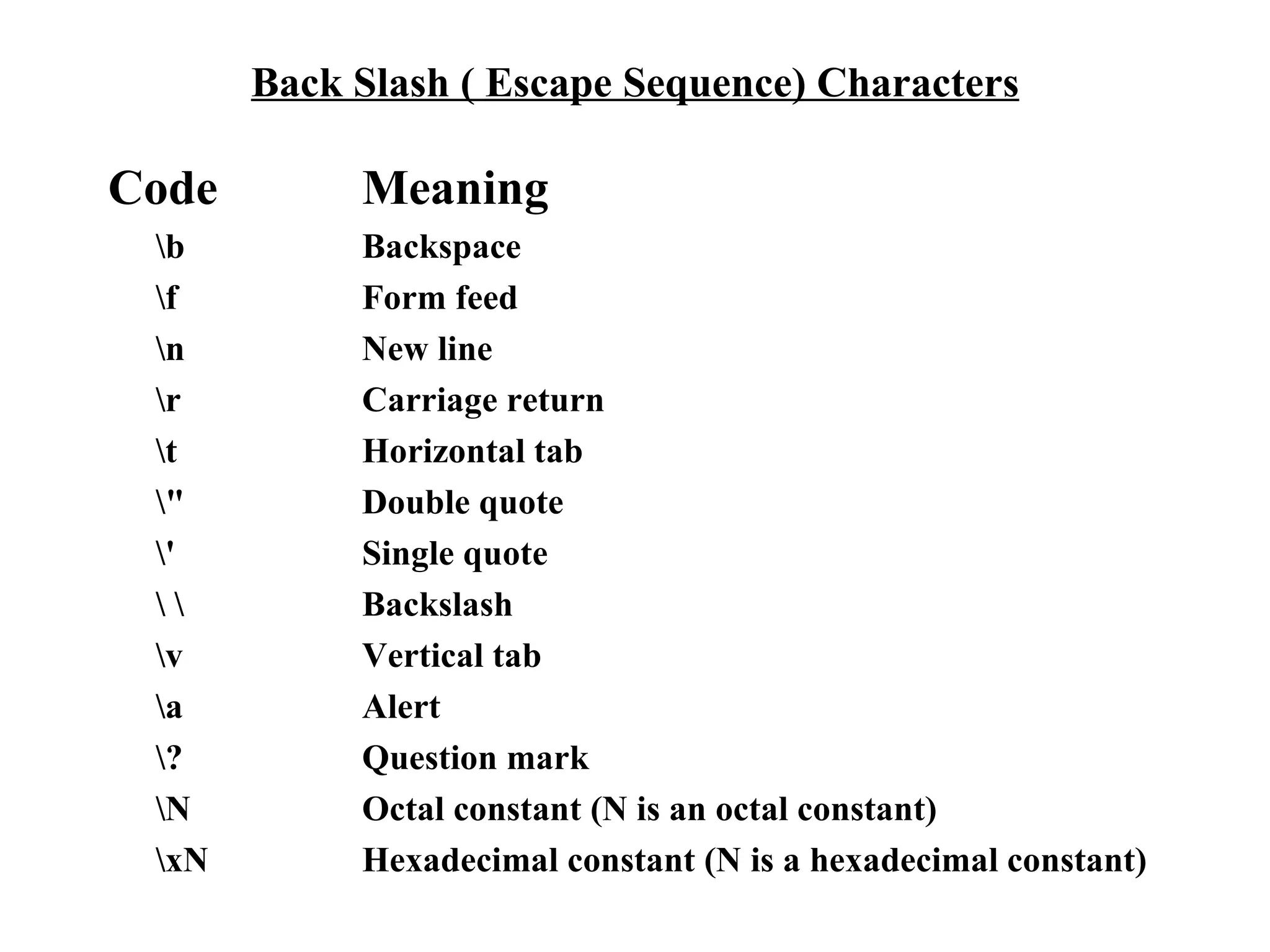
Back Slash ( Escape Sequence) Characters Code  Meaning \b  Backspace \f  Form feed \n  New line \r  Carriage return \t  Horizontal tab \&quot;  Double quote \'  Single quote \ \  Backslash \v  Vertical tab \a  Alert \?  Question mark \N  Octal constant (N is an octal constant) \xN  Hexadecimal constant (N is a hexadecimal constant)
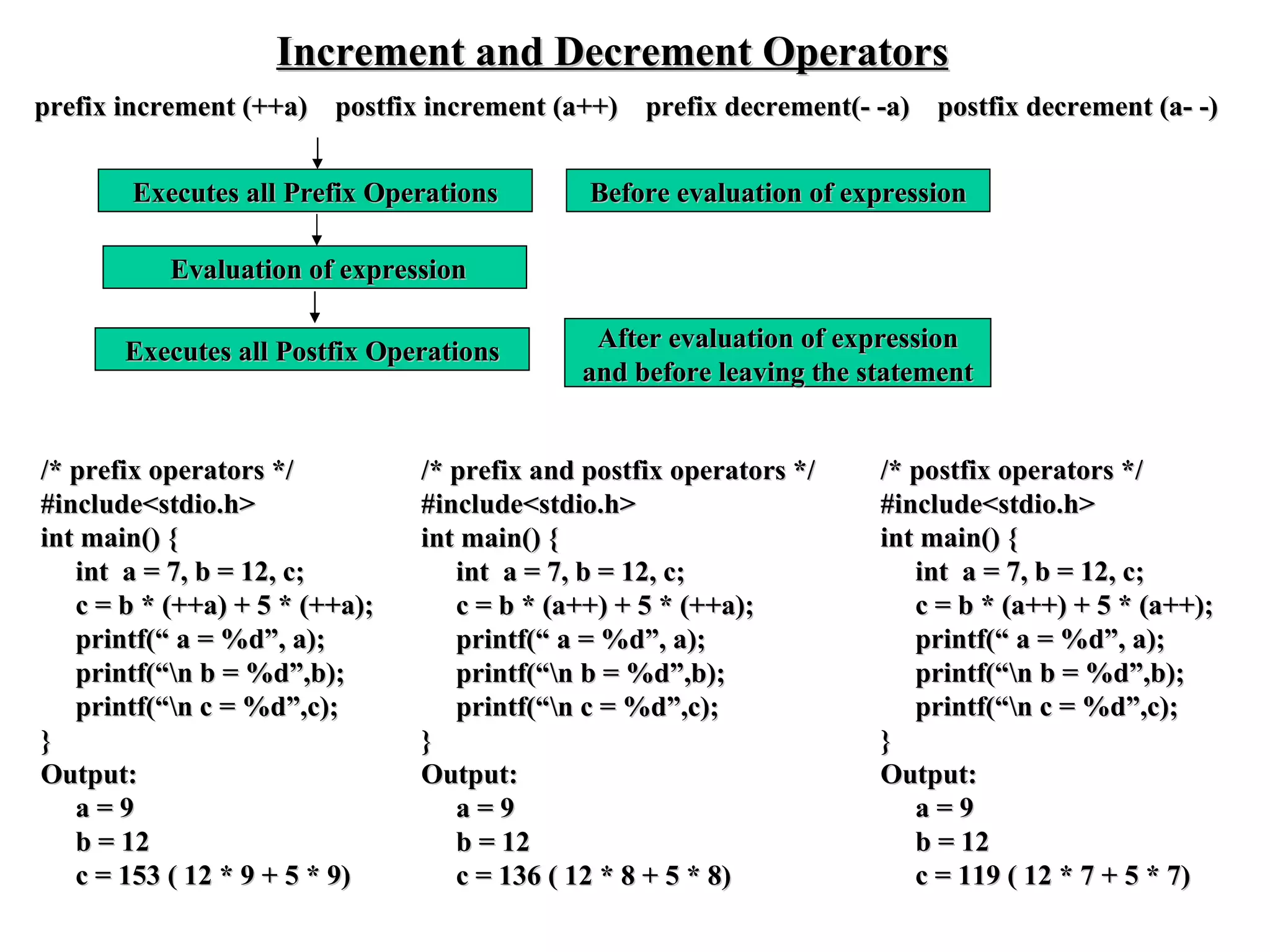
Increment and Decrement Operators prefix increment (++a)  postfix increment (a++)  prefix decrement(- -a)  postfix decrement (a- -) Before evaluation of expression Evaluation of expression After evaluation of expression and before leaving the statement Executes all Prefix Operations Executes all Postfix Operations /* prefix operators */ #include<stdio.h> int main() { int  a = 7, b = 12, c; c = b * (++a) + 5 * (++a); printf(“ a = %d”, a); printf(“\n b = %d”,b); printf(“\n c = %d”,c); } Output: a = 9 b = 12 c = 153 ( 12 * 9 + 5 * 9) /* prefix and postfix operators */ #include<stdio.h> int main() { int  a = 7, b = 12, c; c = b * (a++) + 5 * (++a); printf(“ a = %d”, a); printf(“\n b = %d”,b); printf(“\n c = %d”,c); } Output: a = 9 b = 12 c = 136 ( 12 * 8 + 5 * 8) /* postfix operators */ #include<stdio.h> int main() { int  a = 7, b = 12, c; c = b * (a++) + 5 * (a++); printf(“ a = %d”, a); printf(“\n b = %d”,b); printf(“\n c = %d”,c); } Output: a = 9 b = 12 c = 119 ( 12 * 7 + 5 * 7)
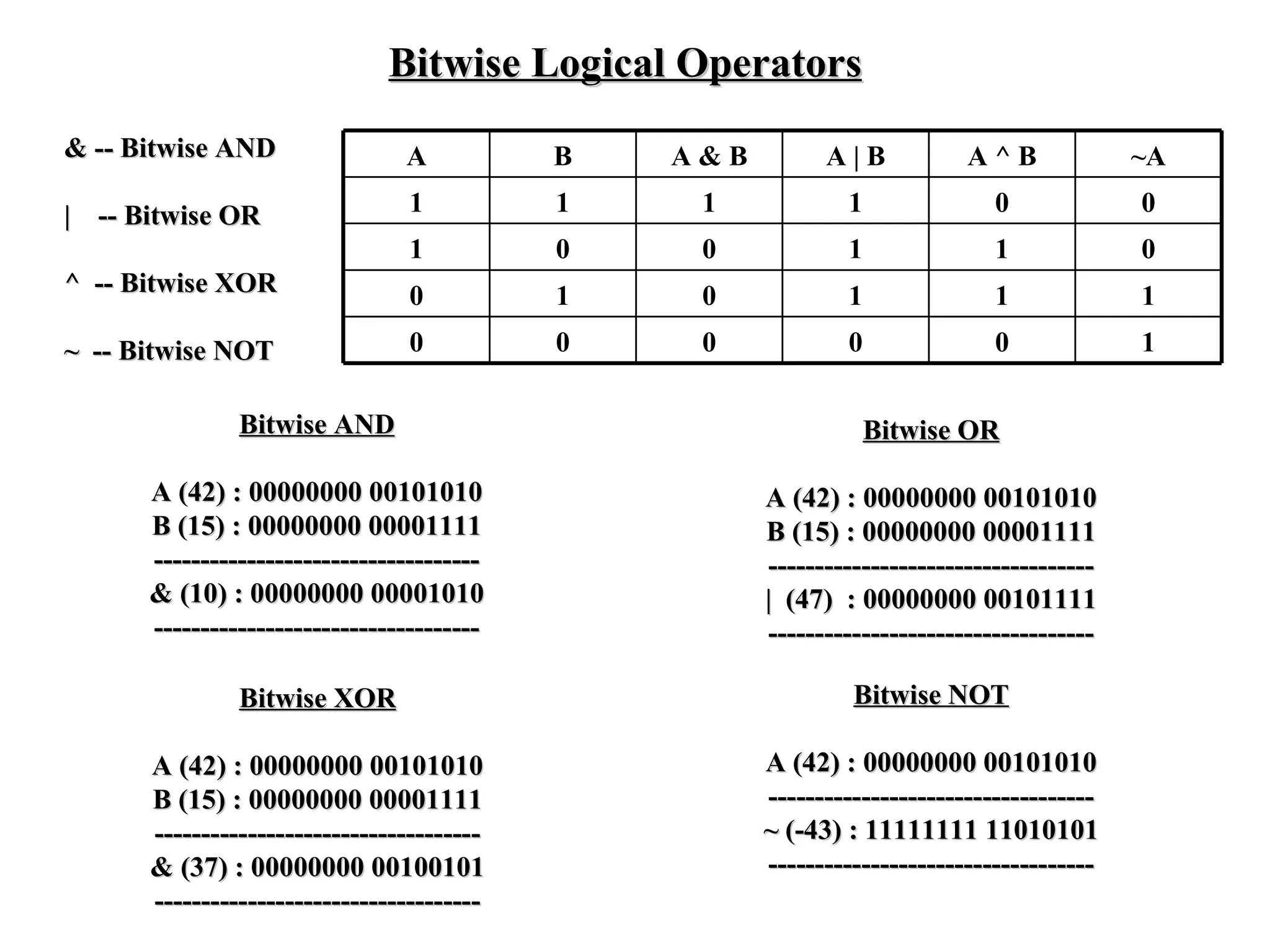
Bitwise Logical Operators & -- Bitwise AND |  -- Bitwise OR ^  -- Bitwise XOR ~  -- Bitwise NOT Bitwise AND A (42) : 00000000 00101010 B (15) : 00000000 00001111 ----------------------------------- & (10) : 00000000 00001010 ----------------------------------- Bitwise OR A (42) : 00000000 00101010 B (15) : 00000000 00001111 ----------------------------------- |  (47)  : 00000000 00101111 ----------------------------------- Bitwise XOR A (42) : 00000000 00101010 B (15) : 00000000 00001111 ----------------------------------- & (37) : 00000000 00100101 ----------------------------------- Bitwise NOT A (42) : 00000000 00101010 ----------------------------------- ~ (-43) : 11111111 11010101 ----------------------------------- A B A & B A | B A ^ B ~A 1 1 1 1 0 0 1 0 0 1 1 0 0 1 0 1 1 1 0 0 0 0 0 1
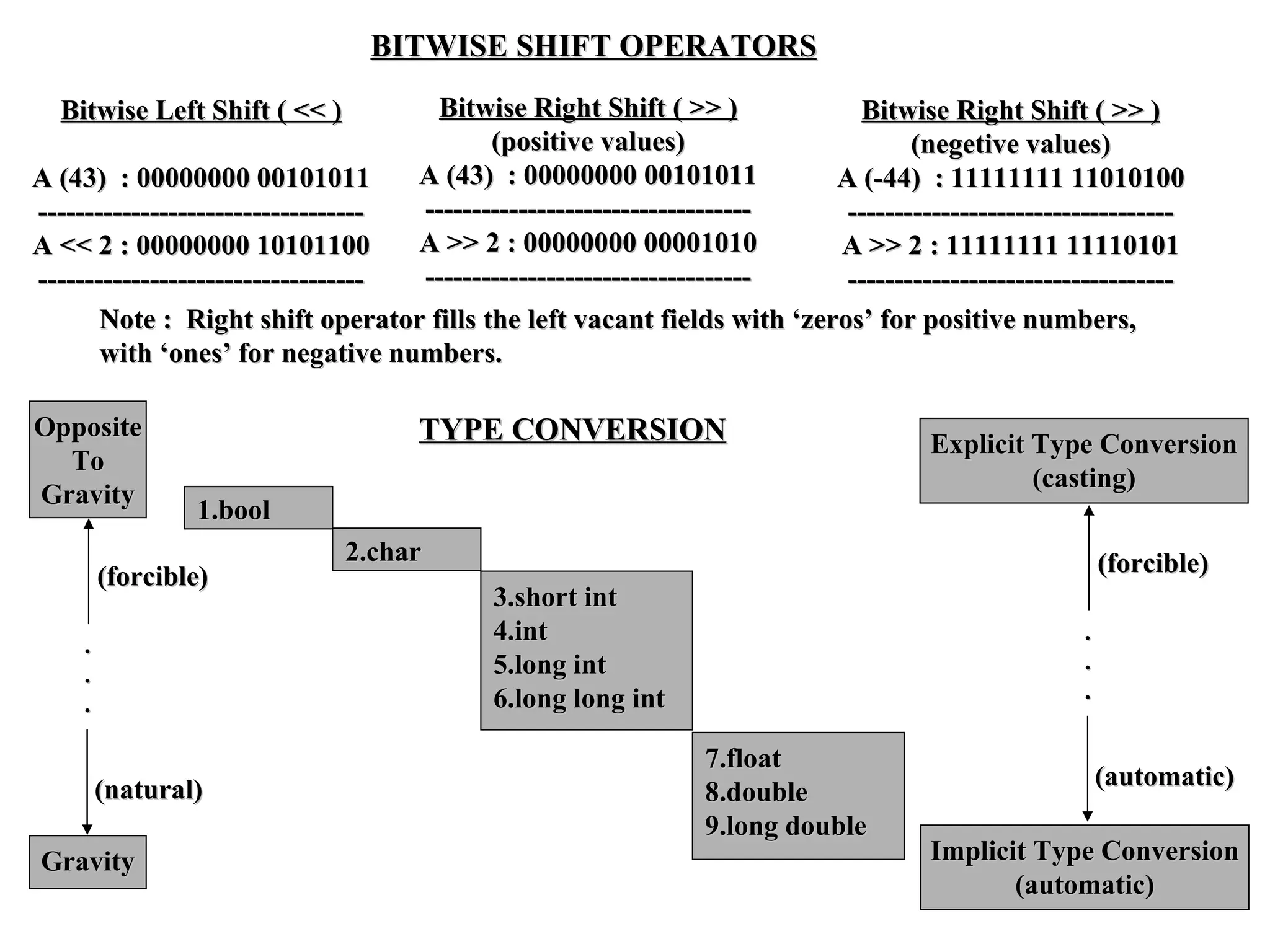
BITWISE SHIFT OPERATORS Bitwise Left Shift ( << ) A (43)  : 00000000 00101011 ----------------------------------- A << 2 : 00000000 10101100 ----------------------------------- Bitwise Right Shift ( >> ) (positive values) A (43)  : 00000000 00101011 ----------------------------------- A >> 2 : 00000000 00001010 ----------------------------------- Bitwise Right Shift ( >> ) (negetive values) A (-44)  : 11111111 11010100 ----------------------------------- A >> 2 : 11111111 11110101 ----------------------------------- Note :  Right shift operator fills the left vacant fields   with   ‘zeros’ for positive numbers,  with ‘ones’ for negative numbers. TYPE CONVERSION 1.bool 2.char 3.short int 4.int 5.long int  6.long long int  7.float 8.double 9.long double Opposite To Gravity Gravity . . . (forcible) (natural) Explicit Type Conversion (casting) Implicit Type Conversion (automatic) . . . (forcible) (automatic)
Precedence and Associativity of Operators Precdence Group Operators Associativity (Highest to Lowest ) (param) subscript etc.,  ( ) [ ]  –>.   L    R Unary operators - + ! ~ ++ – –  (type) * & sizeof   R    L Multiplicative * / %  L    R Additive + –  L    R Bitwise shift << >>  L    R Relational <  <=  >  >=  L    R Equality = = !=  L    R Bitwise AND &  L    R Bitwise exclusive OR ^  L    R Bitwise OR |  L    R Logical AND  &&  L    R Logical OR | |  L    R Conditional ?:  R    L Assignment =  +=  – =  *=  /=  %=  &= ^=  R    L |=  <<=  >>= Comma ,  L    R
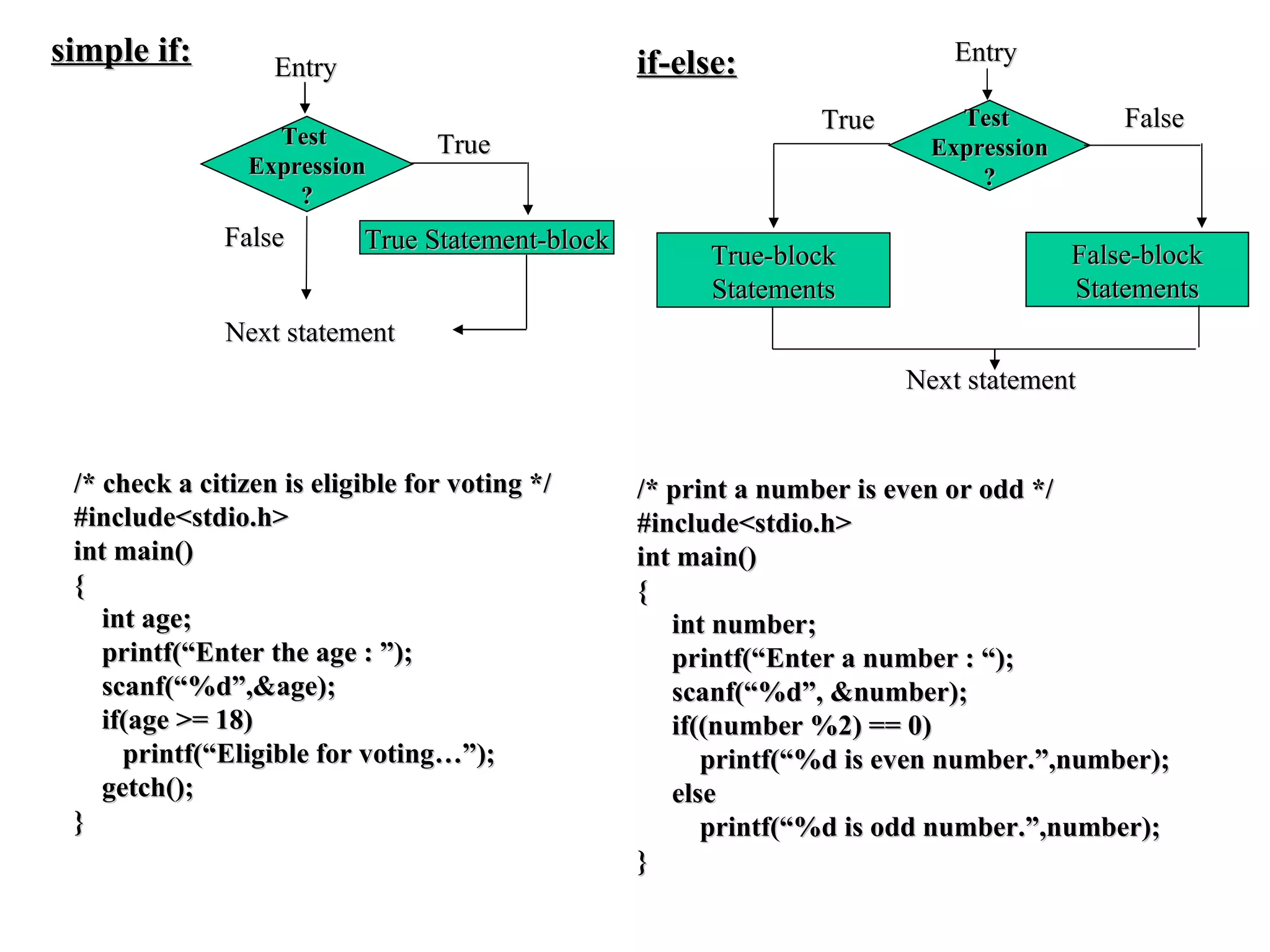
Test  Expression ? Entry False Next statement True Statement-block True simple if: Test  Expression ? Entry True-block Statements False False-block Statements True Next statement if-else: /* check a citizen is eligible for voting */ #include<stdio.h> int main() { int age; printf(“Enter the age : ”); scanf(“%d”,&age); if(age >= 18) printf(“Eligible for voting…”); getch(); } /* print a number is even or odd */ #include<stdio.h> int main() { int number; printf(“Enter a number : “); scanf(“%d”, &number); if((number %2) == 0) printf(“%d is even number.”,number); else printf(“%d is odd number.”,number); }
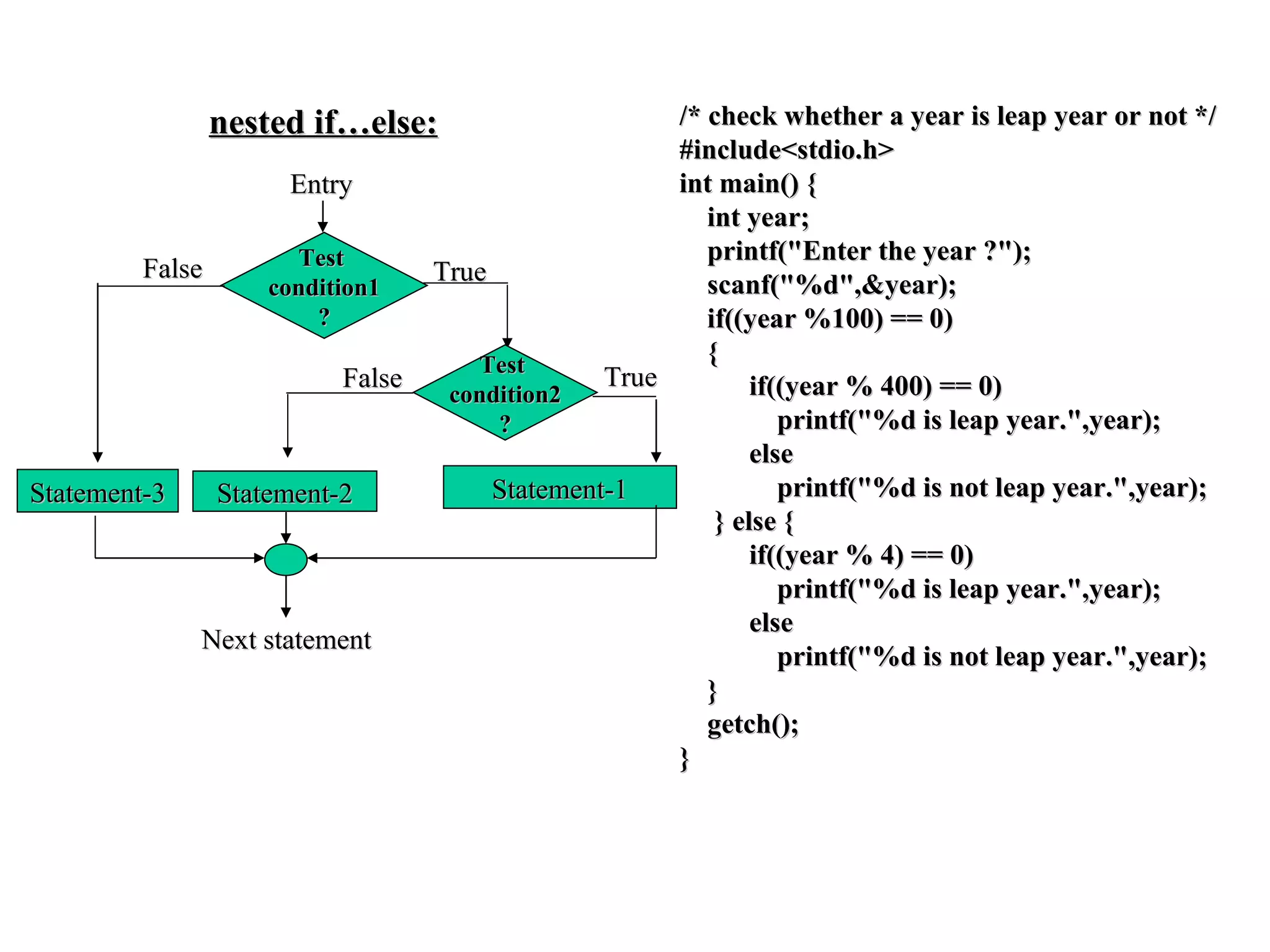
Test  condition1 ? Entry Statement-3 True Test  condition2 ? False Statement-2 Statement-1 True False Next statement nested if…else: /* check whether a year is leap year or not */ #include<stdio.h> int main() { int year; printf(&quot;Enter the year ?&quot;); scanf(&quot;%d&quot;,&year); if((year %100) == 0) { if((year % 400) == 0) printf(&quot;%d is leap year.&quot;,year); else printf(&quot;%d is not leap year.&quot;,year); } else { if((year % 4) == 0) printf(&quot;%d is leap year.&quot;,year); else printf(&quot;%d is not leap year.&quot;,year); } getch(); }
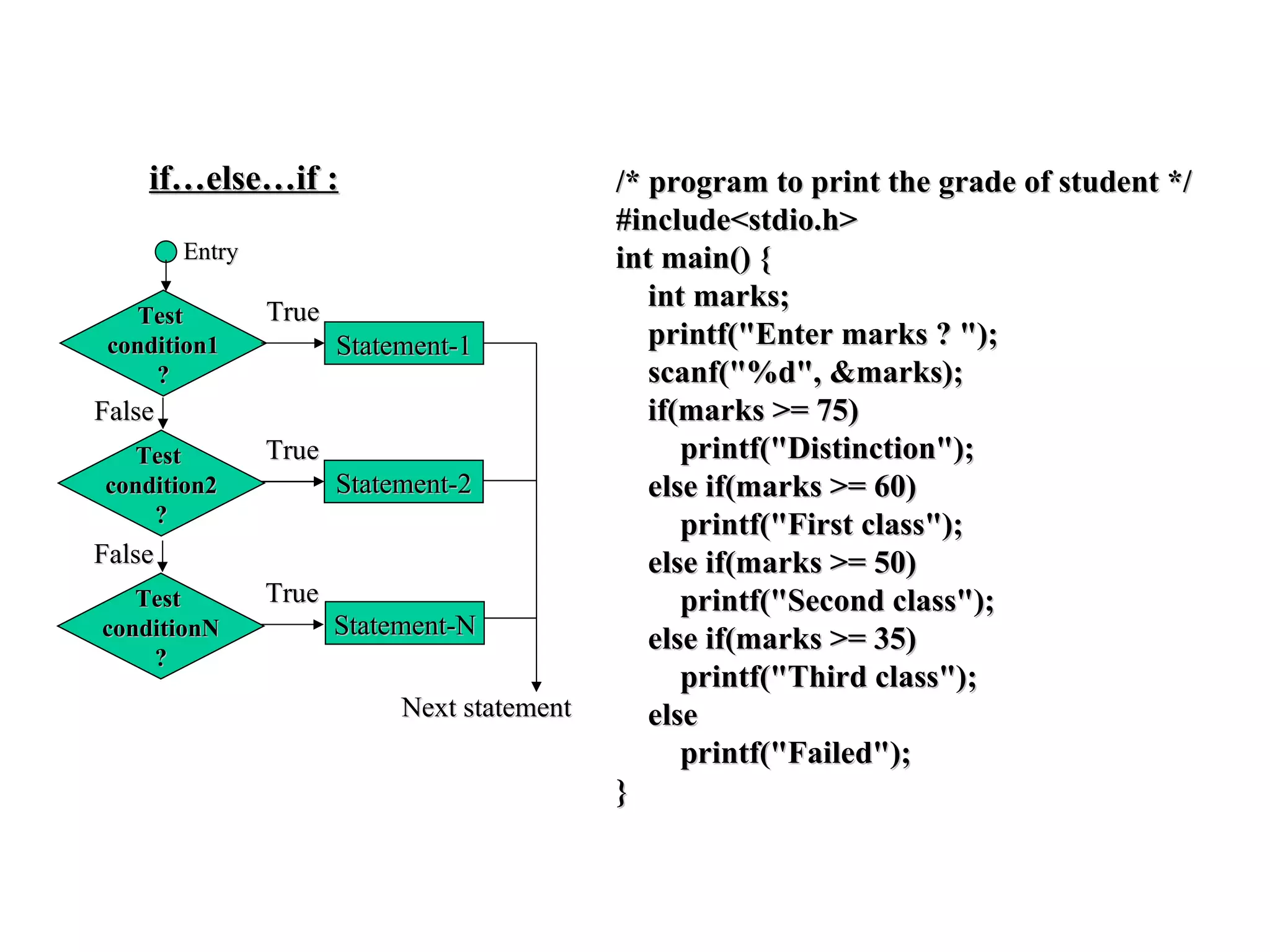
if…else…if : Entry Test  condition1 ? True Statement-1 True Statement-2 Test  condition2 ? False True Test  conditionN ? False Statement-N Next statement /* program to print the grade of student */ #include<stdio.h> int main() { int marks; printf(&quot;Enter marks ? &quot;); scanf(&quot;%d&quot;, &marks); if(marks >= 75) printf(&quot;Distinction&quot;); else if(marks >= 60) printf(&quot;First class&quot;); else if(marks >= 50) printf(&quot;Second class&quot;); else if(marks >= 35) printf(&quot;Third class&quot;); else printf(&quot;Failed&quot;); }
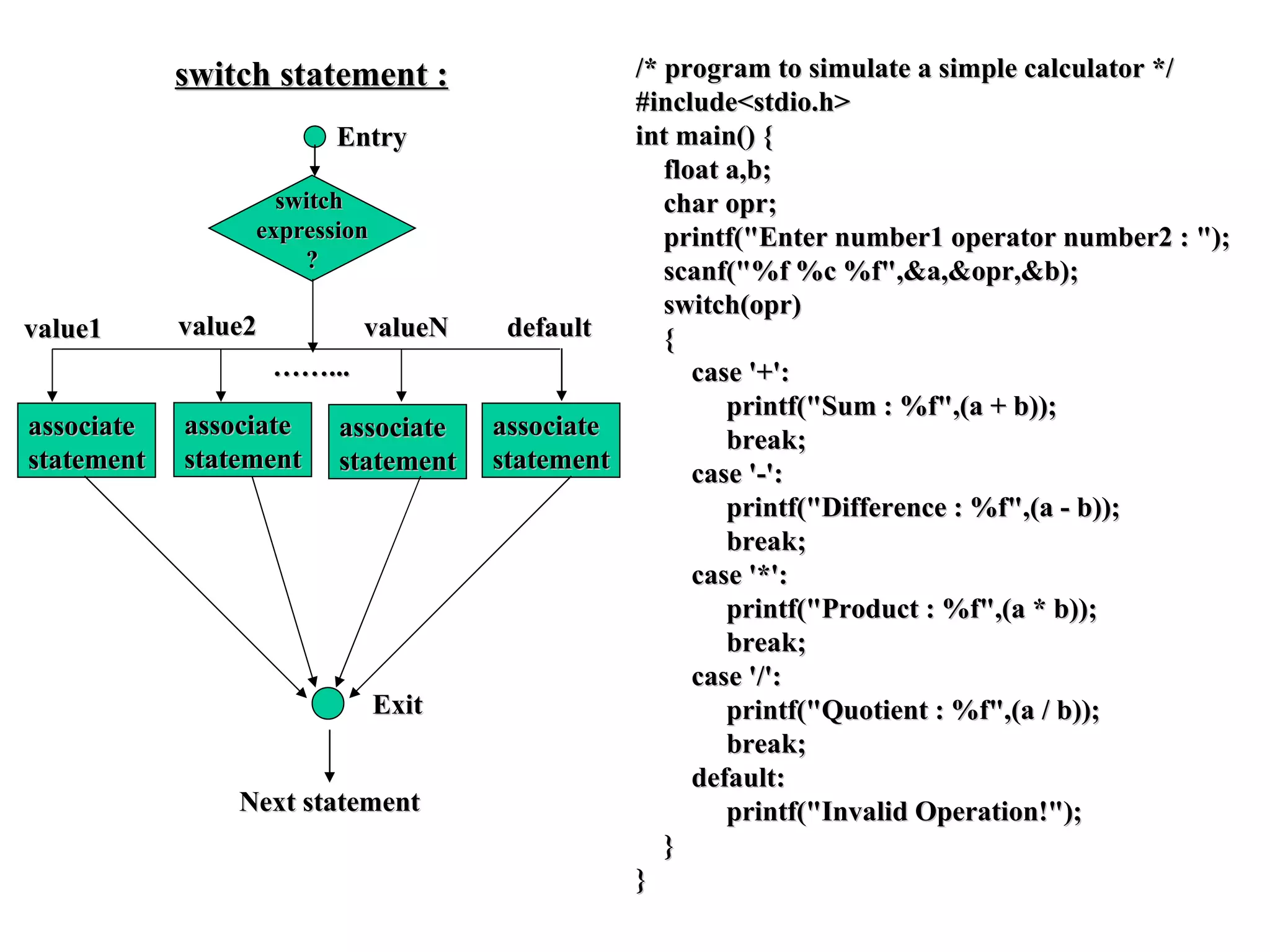
switch statement : Entry switch  expression ? Next statement /* program to simulate a simple calculator */ #include<stdio.h> int main() { float a,b; char opr; printf(&quot;Enter number1 operator number2 : &quot;); scanf(&quot;%f %c %f&quot;,&a,&opr,&b);  switch(opr) { case '+': printf(&quot;Sum : %f&quot;,(a + b)); break; case '-': printf(&quot;Difference : %f&quot;,(a - b)); break; case '*': printf(&quot;Product : %f&quot;,(a * b)); break; case '/': printf(&quot;Quotient : %f&quot;,(a / b)); break; default: printf(&quot;Invalid Operation!&quot;); } } associate statement associate statement associate statement associate statement value1 value2 valueN default Exit …… ...
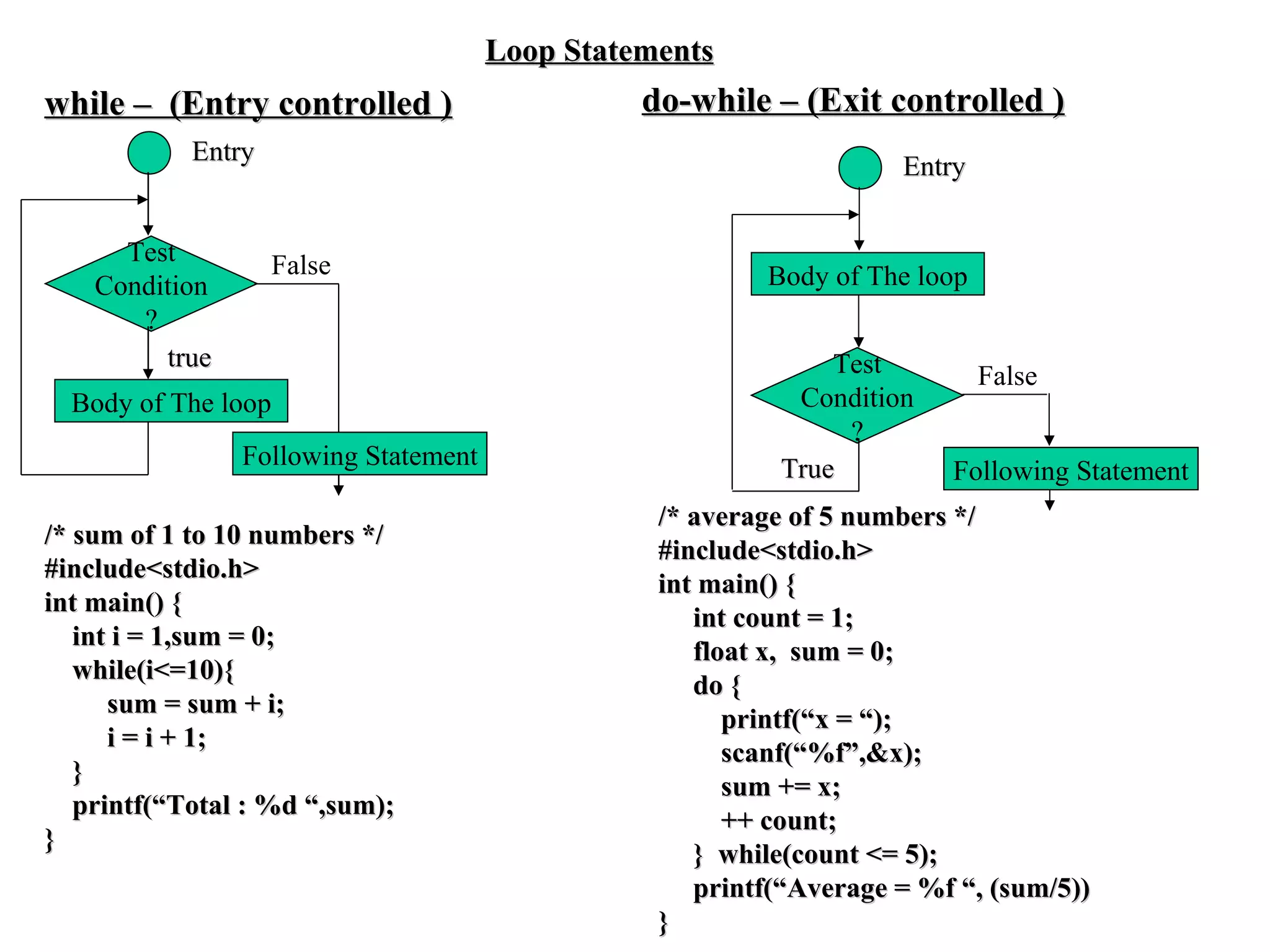
Test Condition ? Body of The loop False true while –  (Entry controlled ) Entry Loop Statements Following Statement Test Condition ? Body of The loop False True Entry Following Statement do-while – (Exit controlled ) /* sum of 1 to 10 numbers */ #include<stdio.h> int main() { int i = 1,sum = 0; while(i<=10){ sum = sum + i; i = i + 1; }  printf(“Total : %d “,sum); }  /* average of 5 numbers */ #include<stdio.h> int main() { int count = 1; float x,  sum = 0; do { printf(“x = “); scanf(“%f”,&x); sum += x; ++ count; }  while(count <= 5); printf(“Average = %f “, (sum/5)) }
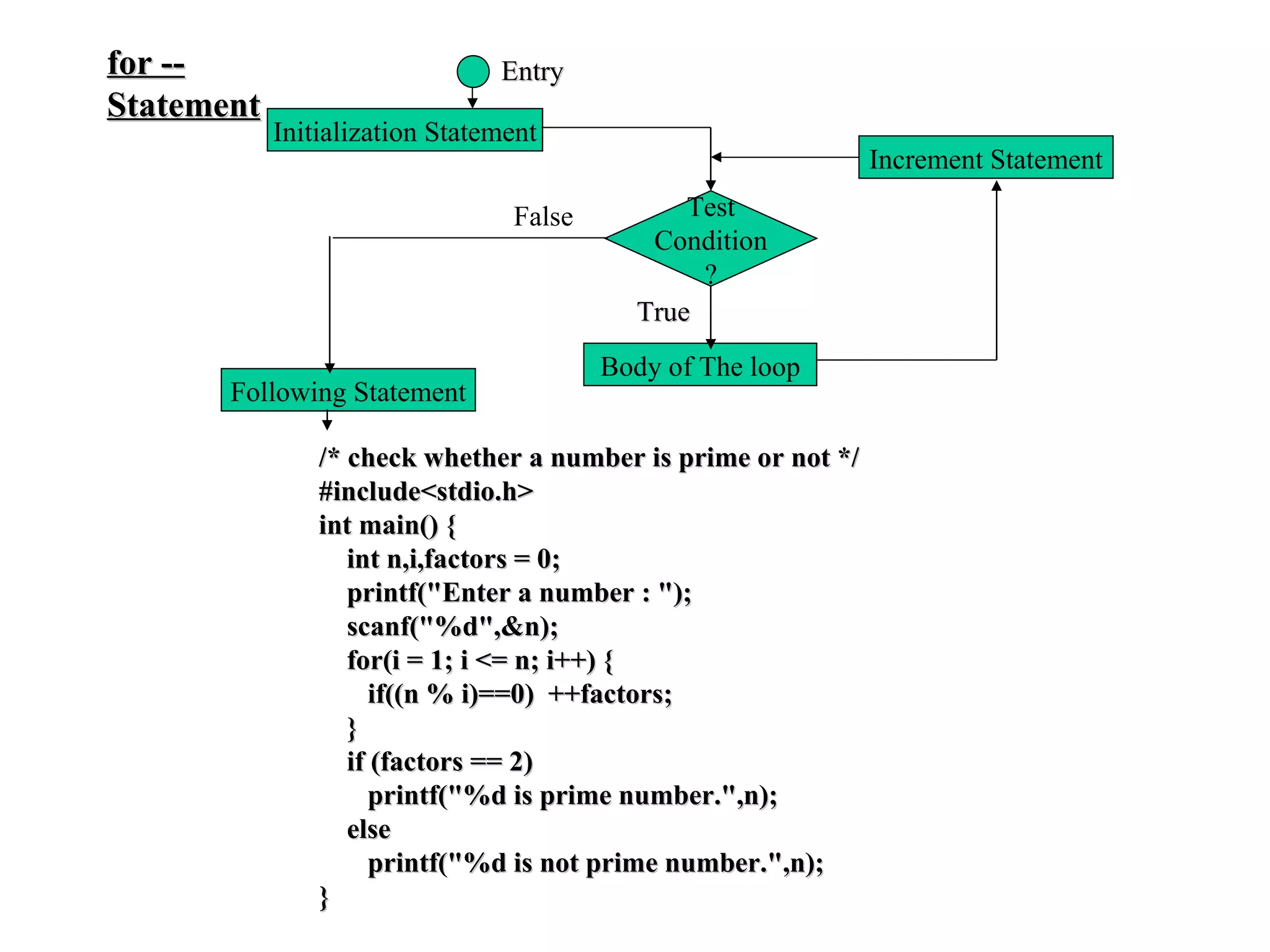
for -- Statement Initialization Statement Increment Statement Test Condition ? Body of The loop Entry True Following Statement False /* check whether a number is prime or not */ #include<stdio.h> int main() { int n,i,factors = 0; printf(&quot;Enter a number : &quot;); scanf(&quot;%d&quot;,&n); for(i = 1; i <= n; i++) { if((n % i)==0)  ++factors; } if (factors == 2) printf(&quot;%d is prime number.&quot;,n); else printf(&quot;%d is not prime number.&quot;,n); }
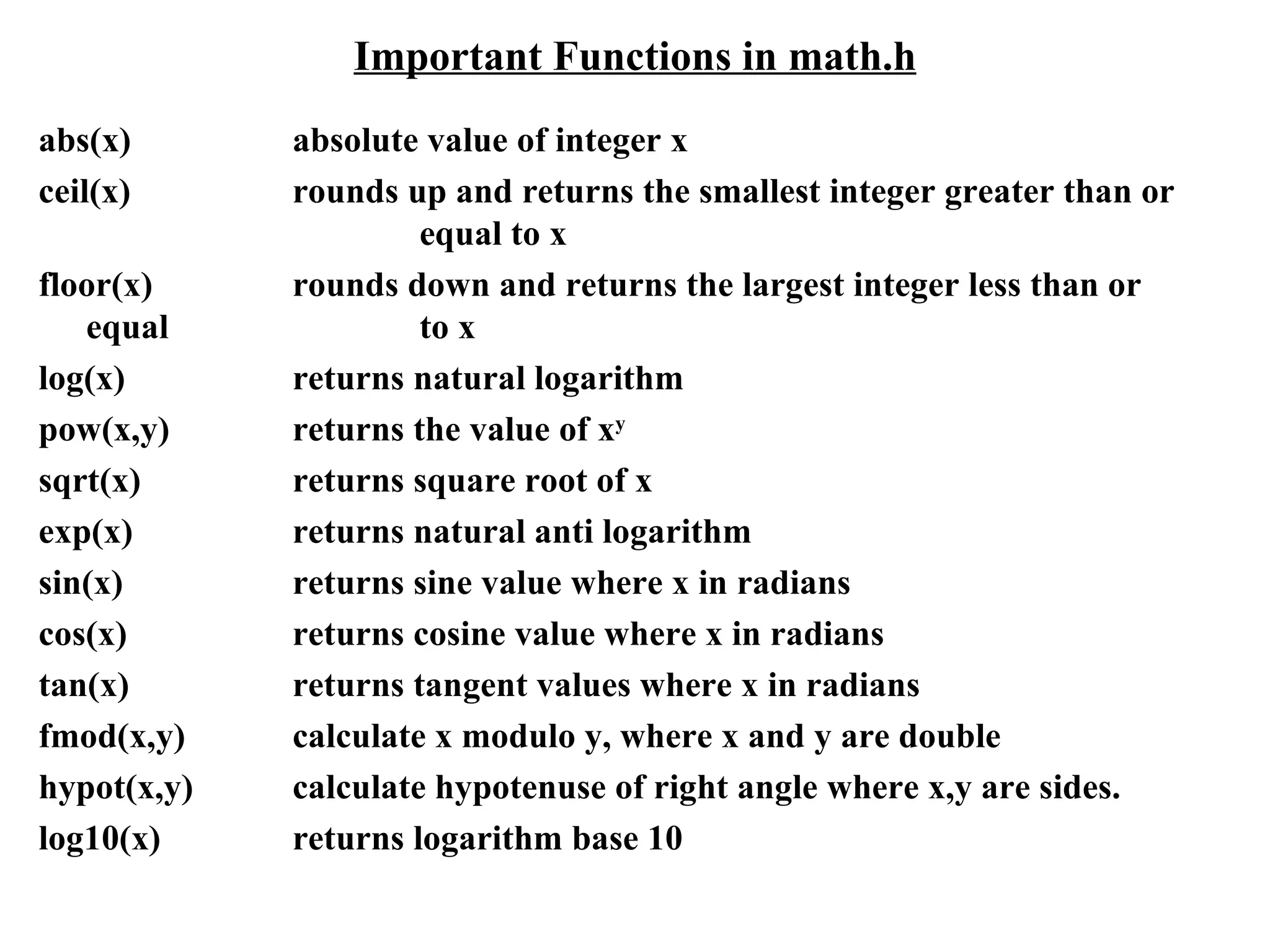
Important Functions in math.h abs(x)  absolute value of integer x ceil(x) rounds up and returns the smallest integer greater than or  equal to x floor(x) rounds down and returns the largest integer less than or equal  to x log(x) returns natural logarithm pow(x,y) returns the value of x y sqrt(x) returns square root of x exp(x) returns natural anti logarithm sin(x) returns sine value where x in radians cos(x) returns cosine value where x in radians tan(x) returns tangent values where x in radians fmod(x,y) calculate x modulo y, where x and y are double hypot(x,y) calculate hypotenuse of right angle where x,y are sides. log10(x) returns logarithm base 10

Unit1 C

  • 1.
    Computer -- HardwareKey board Mouse Input Devices Monitor Printer Output Devices Secondary Storage Devices Input Storage Area Program Storage Area Output Storage Area Working Storage Area Primary or Main Memory (RAM) Register 1 Arithmetic and Logic Unit Register 2 …… …… Register N Micro Processor
  • 2.
    Algorithm: Stepby step procedure of solving a particular problem. Pseudo code: Artificial informal language used to develop algorithms. Flow chart: Graphical representation of an algorithm. Algorithm to find whether a number even or odd: Step1: Begin Step1: START Step2: Take a number Step2: Read num Step3: if the number is divisible by2 then Step3: if(num%2=0) then print that number is even print num is even otherwise print that number is odd otherwise print num is odd Step4: End Step4: STOP (Algorithm in natural language) (Algorithm by using pseudo code) #include<stdio.h> #include<conio.h> main() { int num; printf(“Enter any number”); scanf(“%d”,&num); if(num%2==0) printf(“%d is even”,num); else printf(%d is odd”,num); } (Program in C language) start read num print num is even stop If num%2=0 print num is odd Flow chart: Yes No
  • 3.
    Flow chart symbolsOval Terminal Parallegram Input/output Rectangle Process Document Hard copy Diamond Decision Circle Connector Double sided Rectangle Sub program Hexagon Iteration Trapezoid Manual Operation Cylinder Magnetic Disk Storage
  • 4.
    Machine Language –Assembly Language – High-Level Language The only language the computer can understand is machine language (binary language). A high level language is an English like language where one instruction typically translates into a series of machine-language instructions. A low level language corresponds closely to machine code so that a single low-level language instruction translates to a single machine language instruction. 1 2 3 4 5 6 7 8 9 10 11 12 13 14 15 16 entry main,^m<r2> sub12 #12,sp jsb C$MAIN_ARGS moveb $CHAR_STRING_CON pusha1 -8(fp) pusha1 (r2) calls #2,SCANF pusha1 -12(fp) pusha1 3(r2) calls #2,SCANF mull3 -8(fp),-12(fp),- pusha 6(fp) calls #2,PRINTF clrl r0 ret 1 2 3 4 5 6 7 8 9 10 11 12 13 14 15 16 00000000 00000100 0000000000000000 01011110 00001100 11000010 0000000000000010 11101111 00010110 0000000000000101 11101111 10111110 0000000000001011 11111000 10101101 11011111 0000000000010010 01100010 11011111 0000000000010101 11101111 00000010 11111011 0000000000010111 11110100 10101101 11011111 0000000000011110 00000011 10100010 11011111 0000000000100001 11101111 00000010 11011111 0000000000100100 01111110 11110100 10101101 11111000 10101110 11000101 0000000000101011 00000110 10100010 11111011 0000000000110001 11101111 00000010 11111011 0000000000110100 01010000 11010100 0000000000111011 00000100 0000000000111101 1 2 3 4 5 6 7 8 9 10 #include<stdio.h> int main(void) { int n1, n2,product; printf(“Enter two numbers : “); scanf(“%d %d”,&n1,&n2); product = n1 * n2; printf(“%d”,product); return 0; }
  • 5.
    Structure of Cprogram /*Program to find area and perimeter of Circle */ #include<stdio.h> #define PI 3.1415 float radius; float area(); float perimeter(); int main() { float a, p; printf(“Enter radius : “); scanf(“%f”,&radius); a = area(); p = perimeter(); printf(“Area of Circle : %f”,a); printf(“Perimeter : %f”,p); } float area() { return (PI * radius * radius); } float perimeter() { return (2 * PI * radius); } Documentation Section Linkage Section Definition Section Global Declaration Section Main Function Section Local Declaration Part Executable Code Part Sub Program Section Function1() Function2() …………… FunctionN()
  • 6.
    Program Development Steps1)Statement of Problem a) Working with existing system and using proper questionnaire, the problem should be explained clearly. b) What inputs are available, outputs are required and what is needed for creating workable solution should be understood clearly. 2)Analysis a) The method of solutions to solve the problem can be identified. b) We also judge that which method gives best results among different methods of solution. 3)Designing a) Algorithms and flow charts will be prepared. b) Keep focus on data, architecture, user interfaces and program components. 4)Implementation The algorithms and flow charts developed in the previous steps are converted into actual programs in the high level languages like C. 4.a)Compilation Translate the program into machine code. This process is called as Compilation. Syntactic errors are found quickly at the time of compiling the program. These errors occur due to the usage of wrong syntaxes for the statements. Eg: x=a*y+b There is a syntax error in this statement, since, each and every statement in C language ends with a semicolon (;). 4.b)Execution The next step is Program execution. In this phase, we may encounter two types of errors. Runtime Errors: these errors occur during the execution of the program and terminates the program abnormally. Logical Errors: these errors occur due to incorrect usage of the instructions in the program. These errors are neither detected during compilation or execution nor cause any stoppage to the program execution but produces incorrect ouz
  • 7.
    Executing a Cprogram compiles Syntax Errors? Yes Object machine code 010110 100 …………… . 01011 101 C-compiler #include<stdio.h> int main() { …… . Text Editor prog1.c prog1.obj Linker Executable machine code 00101010 ………… . 01010101 adds Translators are system software used to convert high-level language program into machine-language code. Compiler : Coverts the entire source program at a time into object code file, and saves it in secondary storage permanently. The same object machine code file will be executed several times, whenever needed. Interpreter : Each statement of source program is translated into machine code and executed immediately. Translation and execution of each and every statement is repeated till the end of the program. No object code is saved. Translation is repeated for every execution of the source program. machine code of library file Input prog1.exe No C-Runtime Executes Feeds Runtime or Logic Errors ? Yes Output
  • 8.
    C-Language Keywords(C99) auto double int struct break else long switch case enum register typedef char extern return union const float short unsigned continue for signed void default goto sizeof volatile do if static while _Bool _Imaginary restrict _Complex inline Character Set of C-Language Alphabets : A-Z and a-z Digits : 0-9 Special Symbols : ~ ! @ # $ % ^ & ( ) _ - + = | \ { } [ ] : ; “ ‘ < > , . ? / White Spaces : space , Horizontal tab, Vertical tab, New Line Form Feed.
  • 9.
    C-Tokens Tokens : The smallest individual units of a C- program are called Tokens. Key words, Identifiers, Constants, Operators, Delimiters. Key words : have a predefined meaning and these meanings cannot be changed. All keywords must be written in small letters (except additional c99 keywords). Identifiers : names of variables, functions, structures, unions, macros, labels, arrays etc., Rules for define identifiers : a) First character must be alphabetic character or under score b) Second character onwards alphabetic character of digit or under score. c) First 63 characters of an identifier are significant. d) Cannot duplicate a key word. e) May not have a space or any other special symbol except under score. f) C – language is Case-sensitive.
  • 10.
    C-Tokens Constants : fixed values that do not change during execution of a program. Boolean constants : 0 ( false) and 1 (true) Character constants : only one character enclosed between two single quotes ( except escape characters ). wide character type - wchar_t - for Unicode characters. Integer constants : +123, -3454 , 0235 (octal value), 0x43d98 ( hexa - decimal value) 54764U, 124356578L, 124567856UL Float constants : 0.2 , 876.345, .345623 , 23.4E+8, 47.45e+6 String Constants : “Hello world” , “Have a nice day!” Complex Constants : real part + imaginary part * I ex : 12.3 + 3.45 * I Operators : a symbol, which indicates an operation to be performed. Operators are used to manipulate data in program. Delimiters : Language Pattern of c-language uses special kind of symbols : (colon, used for labels) ; (semicolon terminates statement ) ( ) parameter list [ ] ( array declaration and subscript ), { } ( block statement ) # ( hash for preprocessor directive ) , (comma variable separator )
  • 11.
    Data Types (pre defined ) Type Typical Size in Bits Minimal Range char 8 –127 to 127 unsigned char 8 0 to 255 signed char 8 –127 to 127 int 16 or 32 –32,767 to 32,767 unsigned int 16 or 32 0 to 65,535 signed int 16 or 32 Same as int short int 16 –32,767 to 32,767 unsigned short int 16 0 to 65,535 signed short int 16 Same as short int long int 32 –2,147,483,647 to 2,147,483,647 long long int 64 –(2 63 ) to 2 63 – 1 (Added by C99) signed long int 32 Same as long int unsigned long int 32 0 to 4,294,967,295 unsigned long long int 64 2 64 – 1 (Added by C99) float 32 3.4e-38 to 3.4e+38 double 64 1.7e-308 to 1.7e+308 long double 80 3.4e-4932 to 1.1e+4932 void -- data type that not return any value
  • 12.
    Conversion Specifiers Code Format %a Hexa decimal output in the form of 0xh.hhhhp+d(C99 only) %s String of characters (until null zero is reached ) %c Character %d Decimal integer %f Floating-point numbers %e Exponential notation floating-point numbers %g Use the shorter of %f or %e %u Unsigned integer %o Octal integer %x Hexadecimal integer %i Signed decimal integer %p Display a pointer %n The associated argument must be a pointer to integer, This sepecifier causes the number of characters written in to be stored in that integer. %hd short integer %ld long integer %lf long double %% Prints a percent sign (%)
  • 13.
    Back Slash (Escape Sequence) Characters Code Meaning \b Backspace \f Form feed \n New line \r Carriage return \t Horizontal tab \&quot; Double quote \' Single quote \ \ Backslash \v Vertical tab \a Alert \? Question mark \N Octal constant (N is an octal constant) \xN Hexadecimal constant (N is a hexadecimal constant)
  • 14.
    Increment and DecrementOperators prefix increment (++a) postfix increment (a++) prefix decrement(- -a) postfix decrement (a- -) Before evaluation of expression Evaluation of expression After evaluation of expression and before leaving the statement Executes all Prefix Operations Executes all Postfix Operations /* prefix operators */ #include<stdio.h> int main() { int a = 7, b = 12, c; c = b * (++a) + 5 * (++a); printf(“ a = %d”, a); printf(“\n b = %d”,b); printf(“\n c = %d”,c); } Output: a = 9 b = 12 c = 153 ( 12 * 9 + 5 * 9) /* prefix and postfix operators */ #include<stdio.h> int main() { int a = 7, b = 12, c; c = b * (a++) + 5 * (++a); printf(“ a = %d”, a); printf(“\n b = %d”,b); printf(“\n c = %d”,c); } Output: a = 9 b = 12 c = 136 ( 12 * 8 + 5 * 8) /* postfix operators */ #include<stdio.h> int main() { int a = 7, b = 12, c; c = b * (a++) + 5 * (a++); printf(“ a = %d”, a); printf(“\n b = %d”,b); printf(“\n c = %d”,c); } Output: a = 9 b = 12 c = 119 ( 12 * 7 + 5 * 7)
  • 15.
    Bitwise Logical Operators& -- Bitwise AND | -- Bitwise OR ^ -- Bitwise XOR ~ -- Bitwise NOT Bitwise AND A (42) : 00000000 00101010 B (15) : 00000000 00001111 ----------------------------------- & (10) : 00000000 00001010 ----------------------------------- Bitwise OR A (42) : 00000000 00101010 B (15) : 00000000 00001111 ----------------------------------- | (47) : 00000000 00101111 ----------------------------------- Bitwise XOR A (42) : 00000000 00101010 B (15) : 00000000 00001111 ----------------------------------- & (37) : 00000000 00100101 ----------------------------------- Bitwise NOT A (42) : 00000000 00101010 ----------------------------------- ~ (-43) : 11111111 11010101 ----------------------------------- A B A & B A | B A ^ B ~A 1 1 1 1 0 0 1 0 0 1 1 0 0 1 0 1 1 1 0 0 0 0 0 1
  • 16.
    BITWISE SHIFT OPERATORSBitwise Left Shift ( << ) A (43) : 00000000 00101011 ----------------------------------- A << 2 : 00000000 10101100 ----------------------------------- Bitwise Right Shift ( >> ) (positive values) A (43) : 00000000 00101011 ----------------------------------- A >> 2 : 00000000 00001010 ----------------------------------- Bitwise Right Shift ( >> ) (negetive values) A (-44) : 11111111 11010100 ----------------------------------- A >> 2 : 11111111 11110101 ----------------------------------- Note : Right shift operator fills the left vacant fields with ‘zeros’ for positive numbers, with ‘ones’ for negative numbers. TYPE CONVERSION 1.bool 2.char 3.short int 4.int 5.long int 6.long long int 7.float 8.double 9.long double Opposite To Gravity Gravity . . . (forcible) (natural) Explicit Type Conversion (casting) Implicit Type Conversion (automatic) . . . (forcible) (automatic)
  • 17.
    Precedence and Associativityof Operators Precdence Group Operators Associativity (Highest to Lowest ) (param) subscript etc., ( ) [ ] –>. L  R Unary operators - + ! ~ ++ – – (type) * & sizeof R  L Multiplicative * / % L  R Additive + – L  R Bitwise shift << >> L  R Relational < <= > >= L  R Equality = = != L  R Bitwise AND & L  R Bitwise exclusive OR ^ L  R Bitwise OR | L  R Logical AND && L  R Logical OR | | L  R Conditional ?: R  L Assignment = += – = *= /= %= &= ^= R  L |= <<= >>= Comma , L  R
  • 18.
    Test Expression? Entry False Next statement True Statement-block True simple if: Test Expression ? Entry True-block Statements False False-block Statements True Next statement if-else: /* check a citizen is eligible for voting */ #include<stdio.h> int main() { int age; printf(“Enter the age : ”); scanf(“%d”,&age); if(age >= 18) printf(“Eligible for voting…”); getch(); } /* print a number is even or odd */ #include<stdio.h> int main() { int number; printf(“Enter a number : “); scanf(“%d”, &number); if((number %2) == 0) printf(“%d is even number.”,number); else printf(“%d is odd number.”,number); }
  • 19.
    Test condition1? Entry Statement-3 True Test condition2 ? False Statement-2 Statement-1 True False Next statement nested if…else: /* check whether a year is leap year or not */ #include<stdio.h> int main() { int year; printf(&quot;Enter the year ?&quot;); scanf(&quot;%d&quot;,&year); if((year %100) == 0) { if((year % 400) == 0) printf(&quot;%d is leap year.&quot;,year); else printf(&quot;%d is not leap year.&quot;,year); } else { if((year % 4) == 0) printf(&quot;%d is leap year.&quot;,year); else printf(&quot;%d is not leap year.&quot;,year); } getch(); }
  • 20.
    if…else…if : EntryTest condition1 ? True Statement-1 True Statement-2 Test condition2 ? False True Test conditionN ? False Statement-N Next statement /* program to print the grade of student */ #include<stdio.h> int main() { int marks; printf(&quot;Enter marks ? &quot;); scanf(&quot;%d&quot;, &marks); if(marks >= 75) printf(&quot;Distinction&quot;); else if(marks >= 60) printf(&quot;First class&quot;); else if(marks >= 50) printf(&quot;Second class&quot;); else if(marks >= 35) printf(&quot;Third class&quot;); else printf(&quot;Failed&quot;); }
  • 21.
    switch statement :Entry switch expression ? Next statement /* program to simulate a simple calculator */ #include<stdio.h> int main() { float a,b; char opr; printf(&quot;Enter number1 operator number2 : &quot;); scanf(&quot;%f %c %f&quot;,&a,&opr,&b); switch(opr) { case '+': printf(&quot;Sum : %f&quot;,(a + b)); break; case '-': printf(&quot;Difference : %f&quot;,(a - b)); break; case '*': printf(&quot;Product : %f&quot;,(a * b)); break; case '/': printf(&quot;Quotient : %f&quot;,(a / b)); break; default: printf(&quot;Invalid Operation!&quot;); } } associate statement associate statement associate statement associate statement value1 value2 valueN default Exit …… ...
  • 22.
    Test Condition ?Body of The loop False true while – (Entry controlled ) Entry Loop Statements Following Statement Test Condition ? Body of The loop False True Entry Following Statement do-while – (Exit controlled ) /* sum of 1 to 10 numbers */ #include<stdio.h> int main() { int i = 1,sum = 0; while(i<=10){ sum = sum + i; i = i + 1; } printf(“Total : %d “,sum); } /* average of 5 numbers */ #include<stdio.h> int main() { int count = 1; float x, sum = 0; do { printf(“x = “); scanf(“%f”,&x); sum += x; ++ count; } while(count <= 5); printf(“Average = %f “, (sum/5)) }
  • 23.
    for -- StatementInitialization Statement Increment Statement Test Condition ? Body of The loop Entry True Following Statement False /* check whether a number is prime or not */ #include<stdio.h> int main() { int n,i,factors = 0; printf(&quot;Enter a number : &quot;); scanf(&quot;%d&quot;,&n); for(i = 1; i <= n; i++) { if((n % i)==0) ++factors; } if (factors == 2) printf(&quot;%d is prime number.&quot;,n); else printf(&quot;%d is not prime number.&quot;,n); }
  • 24.
    Important Functions inmath.h abs(x) absolute value of integer x ceil(x) rounds up and returns the smallest integer greater than or equal to x floor(x) rounds down and returns the largest integer less than or equal to x log(x) returns natural logarithm pow(x,y) returns the value of x y sqrt(x) returns square root of x exp(x) returns natural anti logarithm sin(x) returns sine value where x in radians cos(x) returns cosine value where x in radians tan(x) returns tangent values where x in radians fmod(x,y) calculate x modulo y, where x and y are double hypot(x,y) calculate hypotenuse of right angle where x,y are sides. log10(x) returns logarithm base 10

Editor's Notes

  • #2 CnDS Aditya Engineering College