Manipulating Data
ObjectivesAfter completing this lesson, you should be able to do the following:Describe each DML statementInsert rows into a tableUpdate rows in a tableDelete rows from a tableControl transactions
Data Manipulation LanguageA DML statement is executed when you:Add new rows to a tableModify existing rows in a tableRemove existing rows from a tableA transaction consists of a collection of DML statements that form a logical unit of work.
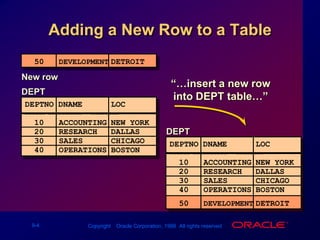
Adding a New Row to a Table50DEVELOPMENTDETROITNew row“…insert a new row into DEPT table…”50DEVELOPMENTDETROITDEPT DEPTNO DNAME     LOC     ------ ----------	--------10ACCOUNTINGNEW YORK20RESEARCHDALLAS30SALESCHICAGO40OPERATIONSBOSTONDEPT DEPTNO DNAME     LOC     ------ ----------	--------10ACCOUNTINGNEW YORK20RESEARCHDALLAS30SALESCHICAGO40OPERATIONSBOSTON
The INSERT StatementAdd new rows to a table by using the INSERT statement.Only one row is inserted at a time with this syntax.INSERT INTOtable [(column [, column...])]VALUES(value [, value...]);
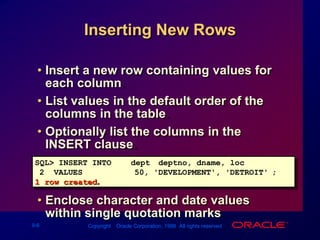
Inserting New RowsInsert a new row containing values for each column.List values in the default order of the columns in the table. Optionally list the columns in the INSERT clause.Enclose character and date values within single quotation marks.SQL> INSERT INTOdept (deptno, dname, loc)2  VALUES		(50, 'DEVELOPMENT', 'DETROIT');1 row created.
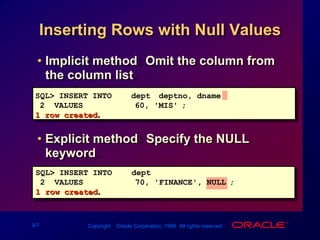
Inserting Rows with Null ValuesImplicit method: Omit the column from the column list.SQL> INSERT INTOdept (deptno, dname )2  VALUES		(60, 'MIS');1 row created.Explicit method: Specify the NULL keyword.SQL> INSERT INTOdept2  VALUES		(70, 'FINANCE', NULL);1 row created.
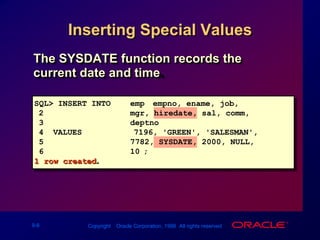
Inserting Special ValuesThe SYSDATE function records the current date and time.SQL> INSERT INTOemp (empno, ename, job,2mgr, hiredate, sal, comm,3deptno)4  VALUES		(7196, 'GREEN', 'SALESMAN',57782, SYSDATE, 2000, NULL,610);1 row created.
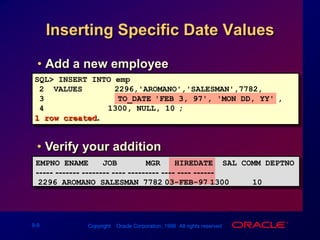
Inserting Specific Date ValuesAdd a new employee.SQL> INSERT INTO emp2  VALUES      (2296,'AROMANO','SALESMAN',7782,3    TO_DATE('FEB 3, 97', 'MON DD, YY'),41300, NULL, 10);1 row created.Verify your addition.EMPNO ENAME   JOB      MGR   HIREDATE  SAL COMM DEPTNO----- ------- -------- ---- --------- ---- ---- ------2296 AROMANO SALESMAN 778203-FEB-97130010
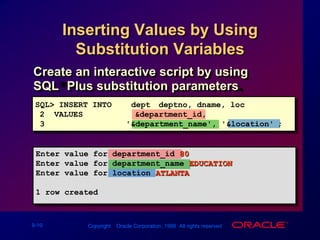
Inserting Values by Using Substitution VariablesCreate an interactive script by using SQL*Plus substitution parameters.SQL> INSERT INTOdept (deptno, dname, loc)2  VALUES	  	(&department_id,3                 '&department_name', '&location');Enter value for department_id: 80Enter value for department_name: EDUCATIONEnter value for location: ATLANTA1 row created.
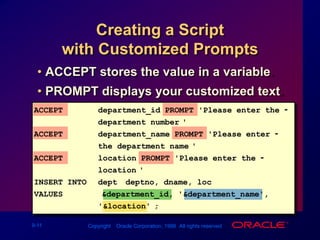
Creating a Script with Customized PromptsACCEPT stores the value in a variable.PROMPT displays your customized text.ACCEPTdepartment_id PROMPT 'Please enter the -department number:'ACCEPT department_name PROMPT 'Please enter -the department name:'ACCEPTlocation PROMPT 'Please enter the -location:'INSERT INTO dept (deptno, dname, loc)VALUES   	(&department_id, '&department_name','&location');
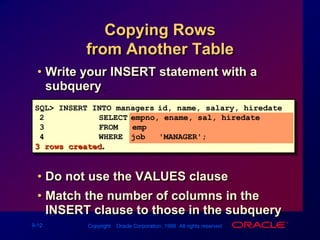
Copying Rows from Another TableWrite your INSERT statement with a subquery.Do not use the VALUES clause.Match the number of columns in the INSERT clause to those in the subquery.SQL> INSERT INTO managers(id, name, salary, hiredate)2SELECTempno, ename, sal, hiredate3FROM   emp4WHEREjob = 'MANAGER';3 rows created.
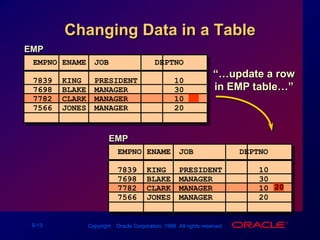
Changing Data in a Table“…update a row in EMP table…”20EMP EMPNO ENAME JOB		 ...  DEPTNO     7839KINGPRESIDENT107698BLAKEMANAGER307782CLARKMANAGER107566JONESMANAGER20  ...EMP EMPNO ENAME JOB		 ...  DEPTNO     7839KINGPRESIDENT107698BLAKEMANAGER307782CLARKMANAGER107566JONESMANAGER20  ...
The UPDATE StatementModify existing rows with the UPDATE statement.Update more than one row at a time, if required.UPDATEtableSETcolumn = value [, column = value, ...][WHERE condition];
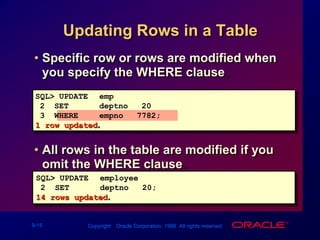
Updating Rows in a TableSpecific row or rows are modified when you specify the WHERE clause.All rows in the table are modified if you omit the WHERE clause.SQL> UPDATE emp2  SET    deptno = 203  WHERE  empno = 7782;1 row updated.SQL> UPDATE employee2  SET    deptno = 20;14 rows updated.
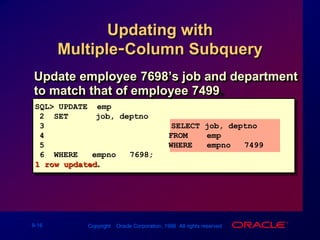
Updating with Multiple-Column SubqueryUpdate employee 7698’s job and department to match that of employee 7499.SQL> UPDATE  emp2  SET     (job, deptno) = 3				  (SELECT job, deptno4                          FROM    emp5                          WHERE   empno = 7499)6  WHERE   empno = 7698;1 row updated.
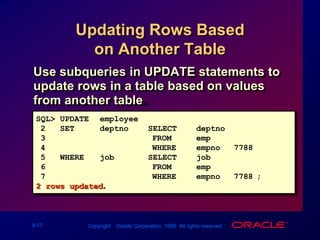
Updating Rows Based on Another TableUse subqueries in UPDATE statements to update rows in a table based on values from another table.SQL>UPDATEemployee2SETdeptno =  (SELECTdeptno3FROMemp 4WHEREempno = 7788)5WHEREjob    =  (SELECTjob6FROMemp7WHEREempno = 7788);2 rows updated.
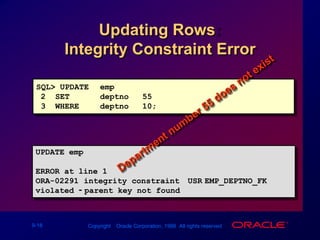
SQL> UPDATEemp2  SETdeptno = 553  WHEREdeptno = 10;UPDATE emp       *ERROR at line 1:ORA-02291: integrity constraint (USR.EMP_DEPTNO_FK) violated - parent key not foundUpdating Rows: Integrity Constraint ErrorDepartment number 55 does not exist
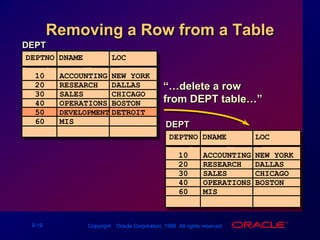
“…delete a row from DEPT table…”Removing a Row from a Table DEPT DEPTNO DNAME     LOC     ------ ----------	--------10ACCOUNTINGNEW YORK20RESEARCHDALLAS30SALESCHICAGO40OPERATIONSBOSTON60MIS   ...DEPT DEPTNO DNAME     LOC     ------ ----------	--------10ACCOUNTINGNEW YORK20RESEARCHDALLAS30SALESCHICAGO40OPERATIONSBOSTON50DEVELOPMENTDETROIT60MIS   ...
The DELETE StatementYou can remove existing rows from a table by using the DELETE statement.DELETE [FROM]	  table[WHEREcondition];
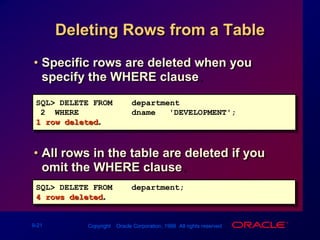
Specific rows are deleted when you specify the WHERE clause.All rows in the table are deleted if you omit the WHERE clause.Deleting Rows from a TableSQL> DELETE FROMdepartment2  WHERE dname = 'DEVELOPMENT'; 1 row deleted.SQL> DELETE FROMdepartment;4 rows deleted.
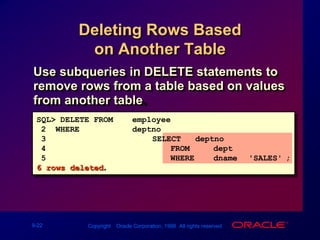
Deleting Rows Based on Another TableUse subqueries in DELETE statements to remove rows from a table based on values from another table.SQL> DELETE FROMemployee2  WHEREdeptno = 3			       (SELECT   deptno4        FROM     dept5        WHERE    dname ='SALES');6 rows deleted.
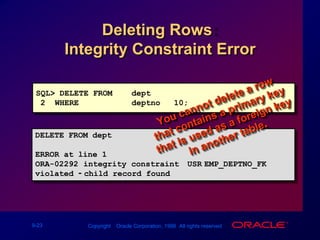
Deleting Rows: Integrity Constraint ErrorSQL> DELETE FROMdept2  WHEREdeptno = 10;You cannot delete a row that contains a primary key that is used as a foreign key in another table.DELETE FROM dept            *ERROR at line 1:ORA-02292: integrity constraint (USR.EMP_DEPTNO_FK) violated - child record found
Database TransactionsConsist of one of the following statements:DML statements that make up one consistent change to the dataOne DDL statementOne DCL statement
Database TransactionsBegin when the first executable SQL statement is executedEnd with one of the following events:COMMIT or ROLLBACK is issuedDDL or DCL statement executes (automatic commit)User exitsSystem crashes
Advantages of COMMIT and ROLLBACK StatementsEnsure data consistencyPreview data changes before making changes permanentGroup logically related operations
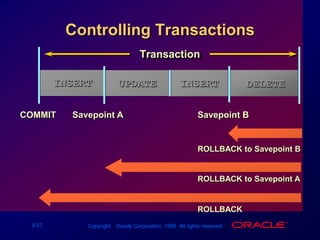
Controlling TransactionsINSERTDELETEINSERTINSERTUPDATEDELETEROLLBACK to Savepoint BROLLBACK to Savepoint AROLLBACKTransactionUPDATEINSERTSavepoint ASavepoint BCOMMIT
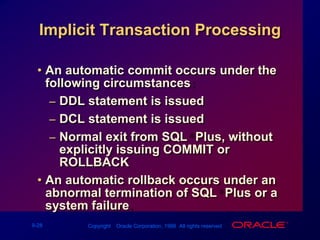
An automatic commit occurs under the following circumstances:DDL statement is issuedDCL statement is issuedNormal exit from SQL*Plus, without explicitly issuing COMMIT or ROLLBACKAn automatic rollback occurs under an abnormal termination of SQL*Plus or a system failure.Implicit Transaction Processing
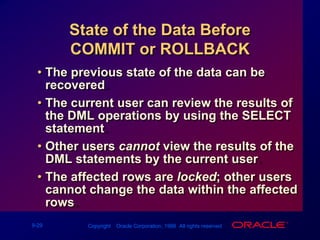
State of the Data Before COMMIT or ROLLBACKThe previous state of the data can be recovered.The current user can review the results of the DML operations by using the SELECT statement.Other users cannot view the results of the DML statements by the current user.The affected rows are locked; other users cannot change the data within the affected rows.
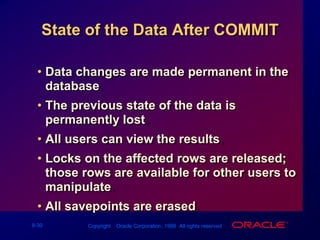
State of the Data After COMMITData changes are made permanent in the database.The previous state of the data is permanently lost.All users can view the results.Locks on the affected rows are released; those rows are available for other users to manipulate.All savepoints are erased.
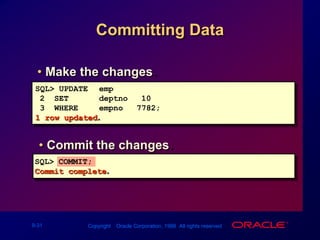
Committing DataMake the changes.SQL> UPDATEemp2  SET deptno = 103  WHEREempno = 7782;1 row updated.Commit the changes.SQL> COMMIT;Commit complete.
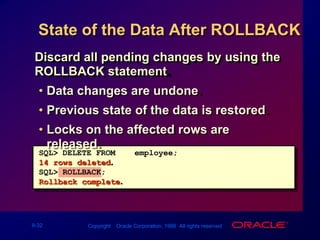
State of the Data After ROLLBACKDiscard all pending changes by using the ROLLBACK statement.Data changes are undone.Previous state of the data is restored.Locks on the affected rows are released.SQL> DELETE FROMemployee;14 rows deleted.SQL> ROLLBACK;Rollback complete.
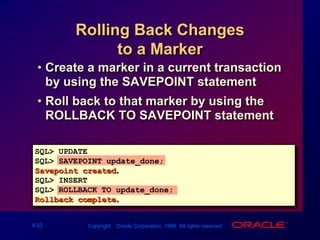
Rolling Back Changes to a MarkerCreate a marker in a current transaction by using the SAVEPOINT statement.Roll back to that marker by using the ROLLBACK TO SAVEPOINT statement.SQL> UPDATE...SQL> SAVEPOINT update_done;Savepoint created.SQL> INSERT...SQL> ROLLBACK TO update_done;Rollback complete.
Statement-Level RollbackIf a single DML statement fails during execution, only that statement is rolled back.The Oracle Server implements an implicit savepoint.All other changes are retained.The user should terminate transactions explicitly by executing a COMMIT or ROLLBACK statement.
Read ConsistencyRead consistency guarantees a consistent view of the data at all times.Changes made by one user do not conflict with changes made by another user. Read consistency ensures that on the same data:Readers do not wait for writersWriters do not wait for readers
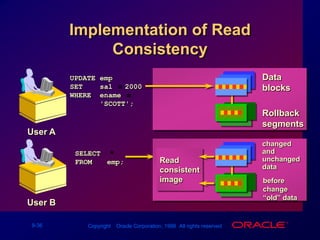
Implementation of Read ConsistencyDatablocksUPDATE empSET    sal = 2000WHERE  ename =         'SCOTT';RollbacksegmentsUser Achangedand unchanged dataSELECT  *FROMemp;Readconsistentimagebefore change“old” dataUser B
LockingOracle locks:Prevent destructive interaction between concurrent transactionsRequire no user actionAutomatically use the lowest level of restrictivenessAre held for the duration of the transactionHave two basic modes: ExclusiveShare
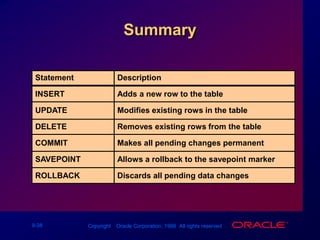
SummaryDescriptionAdds a new row to the tableModifies existing rows in the tableRemoves existing rows from the tableMakes all pending changes permanentAllows a rollback to the savepoint markerDiscards all pending data changesStatementINSERTUPDATEDELETECOMMITSAVEPOINTROLLBACK
Practice OverviewInserting rows into the tablesUpdating and deleting rows in the tableControlling transactions

Les09 Manipulating Data

  • 1.
  • 2.
    ObjectivesAfter completing thislesson, you should be able to do the following:Describe each DML statementInsert rows into a tableUpdate rows in a tableDelete rows from a tableControl transactions
  • 3.
    Data Manipulation LanguageADML statement is executed when you:Add new rows to a tableModify existing rows in a tableRemove existing rows from a tableA transaction consists of a collection of DML statements that form a logical unit of work.
  • 4.
    Adding a NewRow to a Table50DEVELOPMENTDETROITNew row“…insert a new row into DEPT table…”50DEVELOPMENTDETROITDEPT DEPTNO DNAME LOC ------ ---------- --------10ACCOUNTINGNEW YORK20RESEARCHDALLAS30SALESCHICAGO40OPERATIONSBOSTONDEPT DEPTNO DNAME LOC ------ ---------- --------10ACCOUNTINGNEW YORK20RESEARCHDALLAS30SALESCHICAGO40OPERATIONSBOSTON
  • 5.
    The INSERT StatementAddnew rows to a table by using the INSERT statement.Only one row is inserted at a time with this syntax.INSERT INTOtable [(column [, column...])]VALUES(value [, value...]);
  • 6.
    Inserting New RowsInserta new row containing values for each column.List values in the default order of the columns in the table. Optionally list the columns in the INSERT clause.Enclose character and date values within single quotation marks.SQL> INSERT INTOdept (deptno, dname, loc)2 VALUES (50, 'DEVELOPMENT', 'DETROIT');1 row created.
  • 7.
    Inserting Rows withNull ValuesImplicit method: Omit the column from the column list.SQL> INSERT INTOdept (deptno, dname )2 VALUES (60, 'MIS');1 row created.Explicit method: Specify the NULL keyword.SQL> INSERT INTOdept2 VALUES (70, 'FINANCE', NULL);1 row created.
  • 8.
    Inserting Special ValuesTheSYSDATE function records the current date and time.SQL> INSERT INTOemp (empno, ename, job,2mgr, hiredate, sal, comm,3deptno)4 VALUES (7196, 'GREEN', 'SALESMAN',57782, SYSDATE, 2000, NULL,610);1 row created.
  • 9.
    Inserting Specific DateValuesAdd a new employee.SQL> INSERT INTO emp2 VALUES (2296,'AROMANO','SALESMAN',7782,3 TO_DATE('FEB 3, 97', 'MON DD, YY'),41300, NULL, 10);1 row created.Verify your addition.EMPNO ENAME JOB MGR HIREDATE SAL COMM DEPTNO----- ------- -------- ---- --------- ---- ---- ------2296 AROMANO SALESMAN 778203-FEB-97130010
  • 10.
    Inserting Values byUsing Substitution VariablesCreate an interactive script by using SQL*Plus substitution parameters.SQL> INSERT INTOdept (deptno, dname, loc)2 VALUES (&department_id,3 '&department_name', '&location');Enter value for department_id: 80Enter value for department_name: EDUCATIONEnter value for location: ATLANTA1 row created.
  • 11.
    Creating a Scriptwith Customized PromptsACCEPT stores the value in a variable.PROMPT displays your customized text.ACCEPTdepartment_id PROMPT 'Please enter the -department number:'ACCEPT department_name PROMPT 'Please enter -the department name:'ACCEPTlocation PROMPT 'Please enter the -location:'INSERT INTO dept (deptno, dname, loc)VALUES (&department_id, '&department_name','&location');
  • 12.
    Copying Rows fromAnother TableWrite your INSERT statement with a subquery.Do not use the VALUES clause.Match the number of columns in the INSERT clause to those in the subquery.SQL> INSERT INTO managers(id, name, salary, hiredate)2SELECTempno, ename, sal, hiredate3FROM emp4WHEREjob = 'MANAGER';3 rows created.
  • 13.
    Changing Data ina Table“…update a row in EMP table…”20EMP EMPNO ENAME JOB ... DEPTNO 7839KINGPRESIDENT107698BLAKEMANAGER307782CLARKMANAGER107566JONESMANAGER20 ...EMP EMPNO ENAME JOB ... DEPTNO 7839KINGPRESIDENT107698BLAKEMANAGER307782CLARKMANAGER107566JONESMANAGER20 ...
  • 14.
    The UPDATE StatementModifyexisting rows with the UPDATE statement.Update more than one row at a time, if required.UPDATEtableSETcolumn = value [, column = value, ...][WHERE condition];
  • 15.
    Updating Rows ina TableSpecific row or rows are modified when you specify the WHERE clause.All rows in the table are modified if you omit the WHERE clause.SQL> UPDATE emp2 SET deptno = 203 WHERE empno = 7782;1 row updated.SQL> UPDATE employee2 SET deptno = 20;14 rows updated.
  • 16.
    Updating with Multiple-ColumnSubqueryUpdate employee 7698’s job and department to match that of employee 7499.SQL> UPDATE emp2 SET (job, deptno) = 3 (SELECT job, deptno4 FROM emp5 WHERE empno = 7499)6 WHERE empno = 7698;1 row updated.
  • 17.
    Updating Rows Basedon Another TableUse subqueries in UPDATE statements to update rows in a table based on values from another table.SQL>UPDATEemployee2SETdeptno = (SELECTdeptno3FROMemp 4WHEREempno = 7788)5WHEREjob = (SELECTjob6FROMemp7WHEREempno = 7788);2 rows updated.
  • 18.
    SQL> UPDATEemp2 SETdeptno = 553 WHEREdeptno = 10;UPDATE emp *ERROR at line 1:ORA-02291: integrity constraint (USR.EMP_DEPTNO_FK) violated - parent key not foundUpdating Rows: Integrity Constraint ErrorDepartment number 55 does not exist
  • 19.
    “…delete a rowfrom DEPT table…”Removing a Row from a Table DEPT DEPTNO DNAME LOC ------ ---------- --------10ACCOUNTINGNEW YORK20RESEARCHDALLAS30SALESCHICAGO40OPERATIONSBOSTON60MIS ...DEPT DEPTNO DNAME LOC ------ ---------- --------10ACCOUNTINGNEW YORK20RESEARCHDALLAS30SALESCHICAGO40OPERATIONSBOSTON50DEVELOPMENTDETROIT60MIS ...
  • 20.
    The DELETE StatementYoucan remove existing rows from a table by using the DELETE statement.DELETE [FROM] table[WHEREcondition];
  • 21.
    Specific rows aredeleted when you specify the WHERE clause.All rows in the table are deleted if you omit the WHERE clause.Deleting Rows from a TableSQL> DELETE FROMdepartment2 WHERE dname = 'DEVELOPMENT'; 1 row deleted.SQL> DELETE FROMdepartment;4 rows deleted.
  • 22.
    Deleting Rows Basedon Another TableUse subqueries in DELETE statements to remove rows from a table based on values from another table.SQL> DELETE FROMemployee2 WHEREdeptno = 3 (SELECT deptno4 FROM dept5 WHERE dname ='SALES');6 rows deleted.
  • 23.
    Deleting Rows: IntegrityConstraint ErrorSQL> DELETE FROMdept2 WHEREdeptno = 10;You cannot delete a row that contains a primary key that is used as a foreign key in another table.DELETE FROM dept *ERROR at line 1:ORA-02292: integrity constraint (USR.EMP_DEPTNO_FK) violated - child record found
  • 24.
    Database TransactionsConsist ofone of the following statements:DML statements that make up one consistent change to the dataOne DDL statementOne DCL statement
  • 25.
    Database TransactionsBegin whenthe first executable SQL statement is executedEnd with one of the following events:COMMIT or ROLLBACK is issuedDDL or DCL statement executes (automatic commit)User exitsSystem crashes
  • 26.
    Advantages of COMMITand ROLLBACK StatementsEnsure data consistencyPreview data changes before making changes permanentGroup logically related operations
  • 27.
    Controlling TransactionsINSERTDELETEINSERTINSERTUPDATEDELETEROLLBACK toSavepoint BROLLBACK to Savepoint AROLLBACKTransactionUPDATEINSERTSavepoint ASavepoint BCOMMIT
  • 28.
    An automatic commitoccurs under the following circumstances:DDL statement is issuedDCL statement is issuedNormal exit from SQL*Plus, without explicitly issuing COMMIT or ROLLBACKAn automatic rollback occurs under an abnormal termination of SQL*Plus or a system failure.Implicit Transaction Processing
  • 29.
    State of theData Before COMMIT or ROLLBACKThe previous state of the data can be recovered.The current user can review the results of the DML operations by using the SELECT statement.Other users cannot view the results of the DML statements by the current user.The affected rows are locked; other users cannot change the data within the affected rows.
  • 30.
    State of theData After COMMITData changes are made permanent in the database.The previous state of the data is permanently lost.All users can view the results.Locks on the affected rows are released; those rows are available for other users to manipulate.All savepoints are erased.
  • 31.
    Committing DataMake thechanges.SQL> UPDATEemp2 SET deptno = 103 WHEREempno = 7782;1 row updated.Commit the changes.SQL> COMMIT;Commit complete.
  • 32.
    State of theData After ROLLBACKDiscard all pending changes by using the ROLLBACK statement.Data changes are undone.Previous state of the data is restored.Locks on the affected rows are released.SQL> DELETE FROMemployee;14 rows deleted.SQL> ROLLBACK;Rollback complete.
  • 33.
    Rolling Back Changesto a MarkerCreate a marker in a current transaction by using the SAVEPOINT statement.Roll back to that marker by using the ROLLBACK TO SAVEPOINT statement.SQL> UPDATE...SQL> SAVEPOINT update_done;Savepoint created.SQL> INSERT...SQL> ROLLBACK TO update_done;Rollback complete.
  • 34.
    Statement-Level RollbackIf asingle DML statement fails during execution, only that statement is rolled back.The Oracle Server implements an implicit savepoint.All other changes are retained.The user should terminate transactions explicitly by executing a COMMIT or ROLLBACK statement.
  • 35.
    Read ConsistencyRead consistencyguarantees a consistent view of the data at all times.Changes made by one user do not conflict with changes made by another user. Read consistency ensures that on the same data:Readers do not wait for writersWriters do not wait for readers
  • 36.
    Implementation of ReadConsistencyDatablocksUPDATE empSET sal = 2000WHERE ename = 'SCOTT';RollbacksegmentsUser Achangedand unchanged dataSELECT *FROMemp;Readconsistentimagebefore change“old” dataUser B
  • 37.
    LockingOracle locks:Prevent destructiveinteraction between concurrent transactionsRequire no user actionAutomatically use the lowest level of restrictivenessAre held for the duration of the transactionHave two basic modes: ExclusiveShare
  • 38.
    SummaryDescriptionAdds a newrow to the tableModifies existing rows in the tableRemoves existing rows from the tableMakes all pending changes permanentAllows a rollback to the savepoint markerDiscards all pending data changesStatementINSERTUPDATEDELETECOMMITSAVEPOINTROLLBACK
  • 39.
    Practice OverviewInserting rowsinto the tablesUpdating and deleting rows in the tableControlling transactions