Single-Row Functions
ObjectivesAfter completing this lesson, you should be able to do the following:Describe various types of functions available in SQLUse character, number, and date functions in SELECT statementsDescribe the use of conversion functions
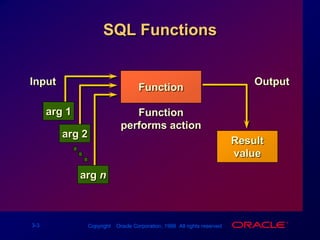
SQL FunctionsInputOutputarg 1arg 2Resultvaluearg nFunctionFunction performs action
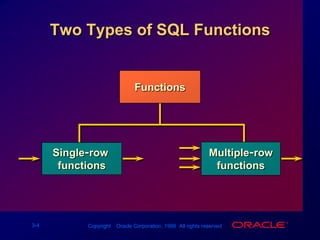
Two Types of SQL FunctionsFunctionsMultiple-rowfunctionsSingle-row functions
Single-Row FunctionsManipulate data itemsAccept arguments and return one valueAct on each row returnedReturn one result per rowMay modify the datatypeCan be nestedfunction_name (column|expression, [arg1, arg2,...])
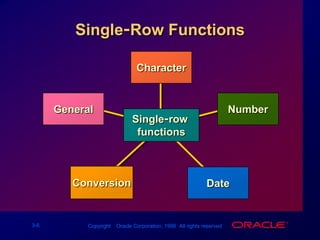
Single-Row FunctionsCharacterNumberGeneralSingle-row functionsConversionDate
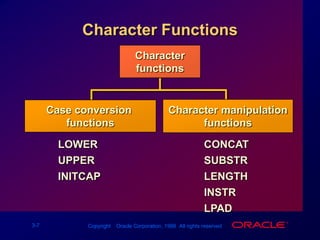
Character FunctionsCharacterfunctionsCharacter manipulationfunctionsCase conversion functionsLOWERUPPERINITCAPCONCATSUBSTRLENGTHINSTRLPAD
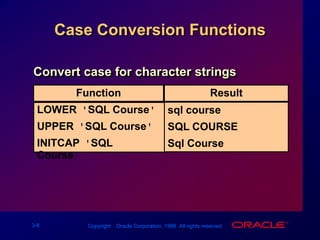
FunctionResultCase Conversion FunctionsConvert case for character stringssql courseSQL COURSESql CourseLOWER('SQL Course')UPPER('SQL Course')INITCAP('SQL Course')
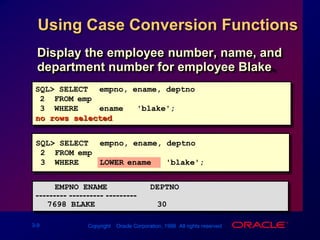
SQL> SELECTempno, ename, deptno2  FROMemp3  WHERE LOWER(ename) = 'blake';    EMPNO ENAME         DEPTNO--------- ---------- ---------7698 BLAKE             30Using Case Conversion FunctionsDisplay the employee number, name, and department number for employee Blake.SQL> SELECTempno, ename, deptno         2  FROMemp3  WHEREename = 'blake';no rows selected
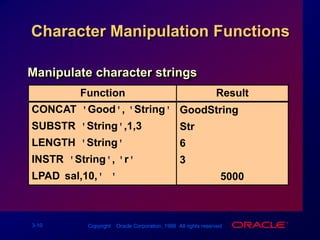
Character Manipulation FunctionsManipulate character stringsFunctionResultGoodStringStr63******5000CONCAT('Good', 'String')SUBSTR('String',1,3)LENGTH('String')INSTR('String', 'r')LPAD(sal,10,'*')
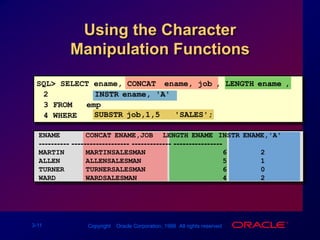
Using the Character Manipulation FunctionsSQL> SELECT ename, CONCAT (ename, job), LENGTH(ename),2INSTR(ename, 'A')3 FROM   emp4 WHERESUBSTR(job,1,5) = 'SALES';ENAME      CONCAT(ENAME,JOB)   LENGTH(ENAME) INSTR(ENAME,'A')---------- ------------------- ------------- ----------------MARTIN     MARTINSALESMAN                  62ALLEN      ALLENSALESMAN                   51TURNER     TURNERSALESMAN                  60WARD       WARDSALESMAN                    42
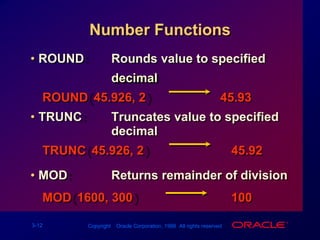
Number FunctionsROUND:		Rounds value to specified decimalROUND(45.926, 2)						45.93TRUNC:			Truncates value to specified decimalTRUNC(45.926, 2)						   45.92MOD:				Returns remainder of divisionMOD(1600, 300)							   100
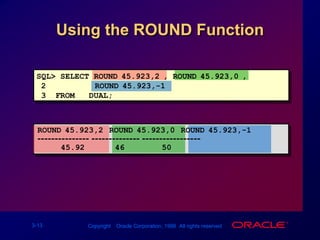
Using the ROUND FunctionSQL> SELECT ROUND(45.923,2), ROUND(45.923,0),2ROUND(45.923,-1)3  FROM   DUAL;ROUND(45.923,2) ROUND(45.923,0) ROUND(45.923,-1)--------------- -------------- -----------------45.924650
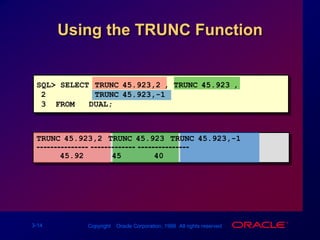
SQL> SELECT TRUNC(45.923,2), TRUNC(45.923),2TRUNC(45.923,-1)3  FROM   DUAL;TRUNC(45.923,2) TRUNC(45.923) TRUNC(45.923,-1)--------------- ------------- ---------------45.924540Using the TRUNC Function
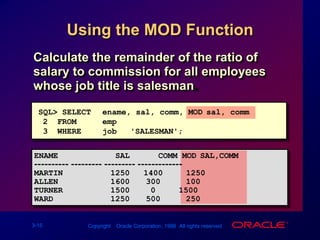
Using the MOD FunctionCalculate the remainder of the ratio of salary to commission for all employees whose job title is salesman.SQL> SELECTename, sal, comm, MOD(sal, comm)2  FROMemp3  WHEREjob = 'SALESMAN';ENAME            SAL      COMM MOD(SAL,COMM)---------- --------- --------- -------------MARTIN          125014001250ALLEN           1600300100TURNER          150001500WARD            1250500250
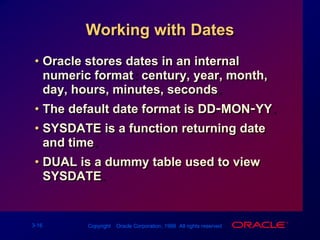
Working with DatesOracle stores dates in an internal numeric format: century, year, month, day, hours, minutes, seconds.The default date format is DD-MON-YY.SYSDATE is a function returning date and time.DUAL is a dummy table used to view SYSDATE.
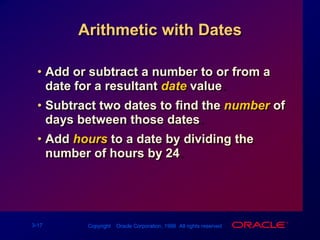
Arithmetic with DatesAdd or subtract a number to or from a date for a resultant date value.Subtract two dates to find the numberof days between those dates.Add hours to a date by dividing the number of hours by 24.
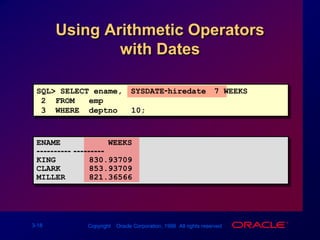
Using Arithmetic Operatorswith DatesSQL> SELECT ename, (SYSDATE-hiredate)/7 WEEKS2  FROM   emp3  WHERE  deptno = 10;ENAME          WEEKS---------- ---------KING       830.93709CLARK      853.93709MILLER     821.36566
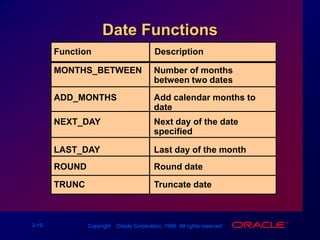
Date FunctionsFunctionDescriptionNumber of monthsbetween two datesMONTHS_BETWEENADD_MONTHSAdd calendar months to dateNEXT_DAYNext day of the date specifiedLAST_DAYLast day of the monthROUNDRound date TRUNC Truncate date
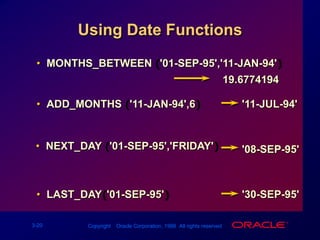
MONTHS_BETWEEN ('01-SEP-95','11-JAN-94')Using Date Functions19.6774194ADD_MONTHS ('11-JAN-94',6)'11-JUL-94'NEXT_DAY ('01-SEP-95','FRIDAY') '08-SEP-95'LAST_DAY('01-SEP-95')'30-SEP-95'
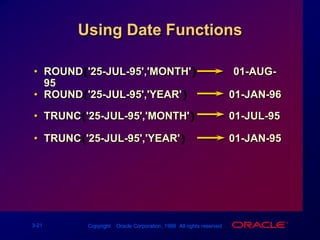
Using Date FunctionsROUND('25-JUL-95','MONTH')            01-AUG-95
ROUND('25-JUL-95','YEAR') 		 01-JAN-96
TRUNC('25-JUL-95','MONTH') 	 01-JUL-95
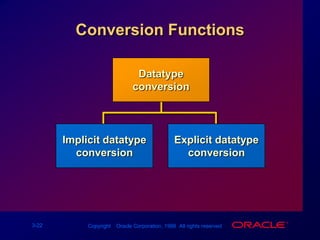
TRUNC('25-JUL-95','YEAR')		 01-JAN-95Conversion FunctionsDatatypeconversionImplicit datatypeconversionExplicit datatypeconversion
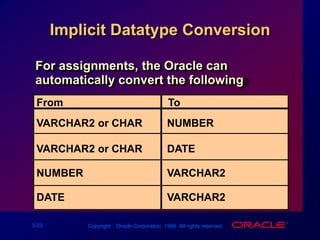
Implicit Datatype ConversionFor assignments, the Oracle can automatically convert the following:FromToVARCHAR2 or CHARNUMBERVARCHAR2 or CHARDATENUMBERVARCHAR2DATEVARCHAR2
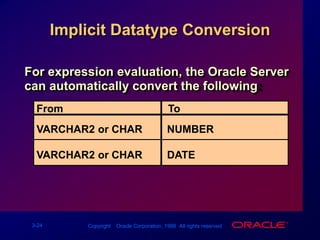
Implicit Datatype ConversionFor expression evaluation, the Oracle Server can automatically convert the following:FromToVARCHAR2 or CHARNUMBERVARCHAR2 or CHARDATE
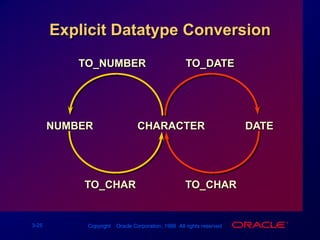
Explicit Datatype ConversionTO_NUMBERTO_DATEDATETO_CHARNUMBERCHARACTERTO_CHAR
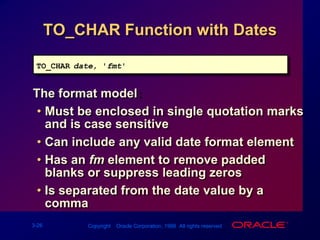
TO_CHAR Function with DatesTO_CHAR(date, 'fmt')The format model:Must be enclosed in single quotation marks and is case sensitiveCan include any valid date format elementHas an fm element to remove padded blanks or suppress leading zerosIs separated from the date value by a comma
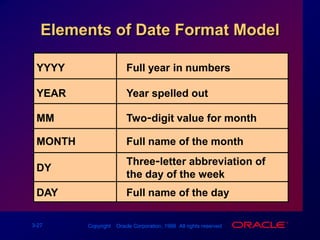
Elements of Date Format ModelYYYYFull year in numbersYEARYear spelled outMMTwo-digit value for monthMONTHFull name of the monthThree-letter abbreviation of the day of the weekDYDAYFull name of the day
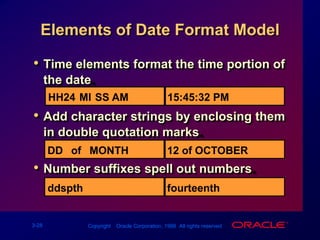
Elements of Date Format ModelHH24:MI:SS AM15:45:32 PMDD "of" MONTH12 of OCTOBERddspthfourteenthTime elements format the time portion of the date.
Add character strings by enclosing them in double quotation marks.
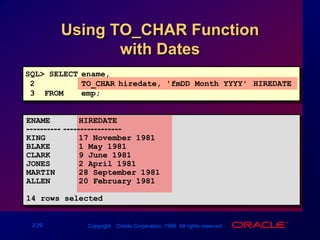
Number suffixes spell out numbers.Using TO_CHAR Function         with DatesSQL> SELECTename, 2TO_CHAR(hiredate, 'fmDD Month YYYY') HIREDATE3  FROM  emp;ENAME      HIREDATE---------- -----------------KING       17 November 1981BLAKE      1 May 1981CLARK      9 June 1981JONES      2 April 1981MARTIN     28 September 1981ALLEN      20 February 1981...14 rows selected.
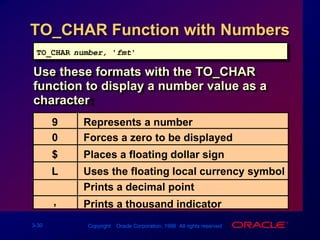
TO_CHAR Function with NumbersTO_CHAR(number, 'fmt')Use these formats with the TO_CHAR function to display a number value as a character:9Represents a number0Forces a zero to be displayed$Places a floating dollar signLUses the floating local currency symbol.Prints a decimal point,Prints a thousand indicator
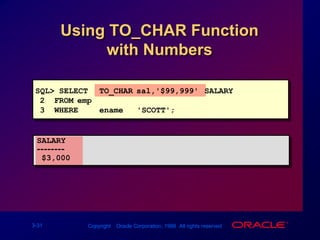
Using TO_CHAR Function         with NumbersSQL> SELECTTO_CHAR(sal,'$99,999') SALARY2  FROMemp3  WHEREename = 'SCOTT';SALARY--------$3,000
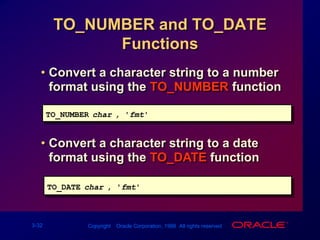
TO_NUMBER and TO_DATE Functions Convert a character string to a number format using the TO_NUMBER functionTO_NUMBER(char[, 'fmt'])Convert a character string to a date format using the TO_DATE functionTO_DATE(char[, 'fmt'])
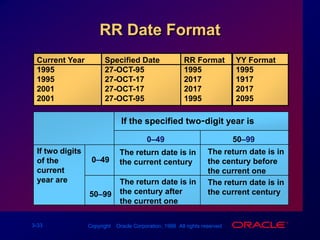
RR Date FormatCurrent Year1995199520012001Specified Date27-OCT-9527-OCT-1727-OCT-1727-OCT-95RR Format1995201720171995YY Format1995191720172095If the specified two-digit year is:0–4950–99If two digits of the current year are:The return date is in the century before the current oneThe return date is in the current century0–49The return date is in the century after the current oneThe return date is in the current century50–99
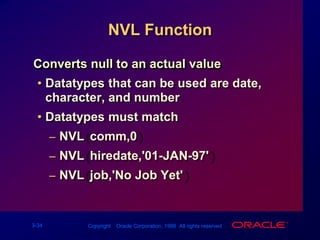
NVL FunctionConverts null to an actual valueDatatypes that can be used are date, character, and number.Datatypes must match NVL(comm,0)NVL(hiredate,'01-JAN-97')NVL(job,'No Job Yet')
SQL> SELECT ename, sal, comm, (sal*12)+NVL(comm,0)2  FROM   emp;ENAME            SAL      COMM (SAL*12)+NVL(COMM,0)---------- --------- --------- --------------------KING            500060000BLAKE           285034200CLARK           245029400JONES           297535700MARTIN          1250140016400ALLEN           160030019500...14 rows selected.Using the NVL Function
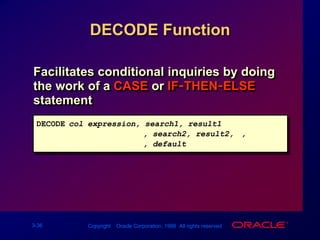
DECODE FunctionFacilitates conditional inquiries by doing the work of a CASE or IF-THEN-ELSE statementDECODE(col/expression, search1, result1[, search2, result2,...,][, default])
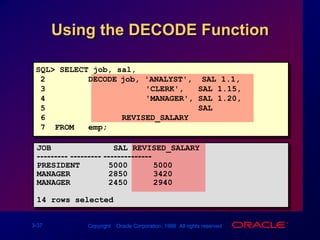
Using the DECODE FunctionSQL> SELECT job, sal,2         DECODE(job, 'ANALYST',  SAL*1.1,3                     'CLERK',   SAL*1.15,4                     'MANAGER', SAL*1.20,5                                SAL)6                REVISED_SALARY7  FROM   emp;JOB             SAL REVISED_SALARY--------- --------- --------------PRESIDENT      50005000MANAGER        28503420MANAGER        24502940...14 rows selected.
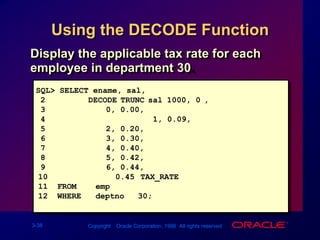
Using the DECODE FunctionDisplay the applicable tax rate for each employee in department 30.SQL> SELECT ename, sal,2         DECODE(TRUNC(sal/1000, 0),30, 0.00,41, 0.09,52, 0.20,63, 0.30,74, 0.40,85, 0.42,96, 0.44,100.45) TAX_RATE11  FROM    emp12  WHERE   deptno = 30;
Nesting FunctionsSingle-row functions can be nested to any level.Nested functions are evaluated from deepest level to the least-deep level.F3(F2(F1(col,arg1),arg2),arg3)Step 1 = Result 1Step 2 = Result 2Step 3 = Result 3
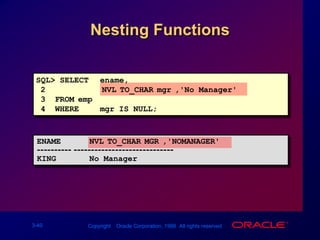
Nesting FunctionsSQL> SELECTename,2     NVL(TO_CHAR(mgr),'No Manager')3  FROMemp4  WHEREmgr IS NULL;ENAME      NVL(TO_CHAR(MGR),'NOMANAGER')---------- -----------------------------KING       No Manager
SummaryUse functions to do the following:Perform calculations on dataModify individual data itemsManipulate output for groups of rowsAlter date formats for displayConvert column datatypes

Les03 Single Row Function

  • 1.
  • 2.
    ObjectivesAfter completing thislesson, you should be able to do the following:Describe various types of functions available in SQLUse character, number, and date functions in SELECT statementsDescribe the use of conversion functions
  • 3.
    SQL FunctionsInputOutputarg 1arg2Resultvaluearg nFunctionFunction performs action
  • 4.
    Two Types ofSQL FunctionsFunctionsMultiple-rowfunctionsSingle-row functions
  • 5.
    Single-Row FunctionsManipulate dataitemsAccept arguments and return one valueAct on each row returnedReturn one result per rowMay modify the datatypeCan be nestedfunction_name (column|expression, [arg1, arg2,...])
  • 6.
  • 7.
    Character FunctionsCharacterfunctionsCharacter manipulationfunctionsCaseconversion functionsLOWERUPPERINITCAPCONCATSUBSTRLENGTHINSTRLPAD
  • 8.
    FunctionResultCase Conversion FunctionsConvertcase for character stringssql courseSQL COURSESql CourseLOWER('SQL Course')UPPER('SQL Course')INITCAP('SQL Course')
  • 9.
    SQL> SELECTempno, ename,deptno2 FROMemp3 WHERE LOWER(ename) = 'blake'; EMPNO ENAME DEPTNO--------- ---------- ---------7698 BLAKE 30Using Case Conversion FunctionsDisplay the employee number, name, and department number for employee Blake.SQL> SELECTempno, ename, deptno 2 FROMemp3 WHEREename = 'blake';no rows selected
  • 10.
    Character Manipulation FunctionsManipulatecharacter stringsFunctionResultGoodStringStr63******5000CONCAT('Good', 'String')SUBSTR('String',1,3)LENGTH('String')INSTR('String', 'r')LPAD(sal,10,'*')
  • 11.
    Using the CharacterManipulation FunctionsSQL> SELECT ename, CONCAT (ename, job), LENGTH(ename),2INSTR(ename, 'A')3 FROM emp4 WHERESUBSTR(job,1,5) = 'SALES';ENAME CONCAT(ENAME,JOB) LENGTH(ENAME) INSTR(ENAME,'A')---------- ------------------- ------------- ----------------MARTIN MARTINSALESMAN 62ALLEN ALLENSALESMAN 51TURNER TURNERSALESMAN 60WARD WARDSALESMAN 42
  • 12.
    Number FunctionsROUND: Rounds valueto specified decimalROUND(45.926, 2) 45.93TRUNC: Truncates value to specified decimalTRUNC(45.926, 2) 45.92MOD: Returns remainder of divisionMOD(1600, 300) 100
  • 13.
    Using the ROUNDFunctionSQL> SELECT ROUND(45.923,2), ROUND(45.923,0),2ROUND(45.923,-1)3 FROM DUAL;ROUND(45.923,2) ROUND(45.923,0) ROUND(45.923,-1)--------------- -------------- -----------------45.924650
  • 14.
    SQL> SELECT TRUNC(45.923,2),TRUNC(45.923),2TRUNC(45.923,-1)3 FROM DUAL;TRUNC(45.923,2) TRUNC(45.923) TRUNC(45.923,-1)--------------- ------------- ---------------45.924540Using the TRUNC Function
  • 15.
    Using the MODFunctionCalculate the remainder of the ratio of salary to commission for all employees whose job title is salesman.SQL> SELECTename, sal, comm, MOD(sal, comm)2 FROMemp3 WHEREjob = 'SALESMAN';ENAME SAL COMM MOD(SAL,COMM)---------- --------- --------- -------------MARTIN 125014001250ALLEN 1600300100TURNER 150001500WARD 1250500250
  • 16.
    Working with DatesOraclestores dates in an internal numeric format: century, year, month, day, hours, minutes, seconds.The default date format is DD-MON-YY.SYSDATE is a function returning date and time.DUAL is a dummy table used to view SYSDATE.
  • 17.
    Arithmetic with DatesAddor subtract a number to or from a date for a resultant date value.Subtract two dates to find the numberof days between those dates.Add hours to a date by dividing the number of hours by 24.
  • 18.
    Using Arithmetic OperatorswithDatesSQL> SELECT ename, (SYSDATE-hiredate)/7 WEEKS2 FROM emp3 WHERE deptno = 10;ENAME WEEKS---------- ---------KING 830.93709CLARK 853.93709MILLER 821.36566
  • 19.
    Date FunctionsFunctionDescriptionNumber ofmonthsbetween two datesMONTHS_BETWEENADD_MONTHSAdd calendar months to dateNEXT_DAYNext day of the date specifiedLAST_DAYLast day of the monthROUNDRound date TRUNC Truncate date
  • 20.
    MONTHS_BETWEEN ('01-SEP-95','11-JAN-94')Using DateFunctions19.6774194ADD_MONTHS ('11-JAN-94',6)'11-JUL-94'NEXT_DAY ('01-SEP-95','FRIDAY') '08-SEP-95'LAST_DAY('01-SEP-95')'30-SEP-95'
  • 21.
  • 22.
  • 23.
  • 24.
  • 25.
    Implicit Datatype ConversionForassignments, the Oracle can automatically convert the following:FromToVARCHAR2 or CHARNUMBERVARCHAR2 or CHARDATENUMBERVARCHAR2DATEVARCHAR2
  • 26.
    Implicit Datatype ConversionForexpression evaluation, the Oracle Server can automatically convert the following:FromToVARCHAR2 or CHARNUMBERVARCHAR2 or CHARDATE
  • 27.
  • 28.
    TO_CHAR Function withDatesTO_CHAR(date, 'fmt')The format model:Must be enclosed in single quotation marks and is case sensitiveCan include any valid date format elementHas an fm element to remove padded blanks or suppress leading zerosIs separated from the date value by a comma
  • 29.
    Elements of DateFormat ModelYYYYFull year in numbersYEARYear spelled outMMTwo-digit value for monthMONTHFull name of the monthThree-letter abbreviation of the day of the weekDYDAYFull name of the day
  • 30.
    Elements of DateFormat ModelHH24:MI:SS AM15:45:32 PMDD "of" MONTH12 of OCTOBERddspthfourteenthTime elements format the time portion of the date.
  • 31.
    Add character stringsby enclosing them in double quotation marks.
  • 32.
    Number suffixes spellout numbers.Using TO_CHAR Function with DatesSQL> SELECTename, 2TO_CHAR(hiredate, 'fmDD Month YYYY') HIREDATE3 FROM emp;ENAME HIREDATE---------- -----------------KING 17 November 1981BLAKE 1 May 1981CLARK 9 June 1981JONES 2 April 1981MARTIN 28 September 1981ALLEN 20 February 1981...14 rows selected.
  • 33.
    TO_CHAR Function withNumbersTO_CHAR(number, 'fmt')Use these formats with the TO_CHAR function to display a number value as a character:9Represents a number0Forces a zero to be displayed$Places a floating dollar signLUses the floating local currency symbol.Prints a decimal point,Prints a thousand indicator
  • 34.
    Using TO_CHAR Function with NumbersSQL> SELECTTO_CHAR(sal,'$99,999') SALARY2 FROMemp3 WHEREename = 'SCOTT';SALARY--------$3,000
  • 35.
    TO_NUMBER and TO_DATEFunctions Convert a character string to a number format using the TO_NUMBER functionTO_NUMBER(char[, 'fmt'])Convert a character string to a date format using the TO_DATE functionTO_DATE(char[, 'fmt'])
  • 36.
    RR Date FormatCurrentYear1995199520012001Specified Date27-OCT-9527-OCT-1727-OCT-1727-OCT-95RR Format1995201720171995YY Format1995191720172095If the specified two-digit year is:0–4950–99If two digits of the current year are:The return date is in the century before the current oneThe return date is in the current century0–49The return date is in the century after the current oneThe return date is in the current century50–99
  • 37.
    NVL FunctionConverts nullto an actual valueDatatypes that can be used are date, character, and number.Datatypes must match NVL(comm,0)NVL(hiredate,'01-JAN-97')NVL(job,'No Job Yet')
  • 38.
    SQL> SELECT ename,sal, comm, (sal*12)+NVL(comm,0)2 FROM emp;ENAME SAL COMM (SAL*12)+NVL(COMM,0)---------- --------- --------- --------------------KING 500060000BLAKE 285034200CLARK 245029400JONES 297535700MARTIN 1250140016400ALLEN 160030019500...14 rows selected.Using the NVL Function
  • 39.
    DECODE FunctionFacilitates conditionalinquiries by doing the work of a CASE or IF-THEN-ELSE statementDECODE(col/expression, search1, result1[, search2, result2,...,][, default])
  • 40.
    Using the DECODEFunctionSQL> SELECT job, sal,2 DECODE(job, 'ANALYST', SAL*1.1,3 'CLERK', SAL*1.15,4 'MANAGER', SAL*1.20,5 SAL)6 REVISED_SALARY7 FROM emp;JOB SAL REVISED_SALARY--------- --------- --------------PRESIDENT 50005000MANAGER 28503420MANAGER 24502940...14 rows selected.
  • 41.
    Using the DECODEFunctionDisplay the applicable tax rate for each employee in department 30.SQL> SELECT ename, sal,2 DECODE(TRUNC(sal/1000, 0),30, 0.00,41, 0.09,52, 0.20,63, 0.30,74, 0.40,85, 0.42,96, 0.44,100.45) TAX_RATE11 FROM emp12 WHERE deptno = 30;
  • 42.
    Nesting FunctionsSingle-row functionscan be nested to any level.Nested functions are evaluated from deepest level to the least-deep level.F3(F2(F1(col,arg1),arg2),arg3)Step 1 = Result 1Step 2 = Result 2Step 3 = Result 3
  • 43.
    Nesting FunctionsSQL> SELECTename,2 NVL(TO_CHAR(mgr),'No Manager')3 FROMemp4 WHEREmgr IS NULL;ENAME NVL(TO_CHAR(MGR),'NOMANAGER')---------- -----------------------------KING No Manager
  • 44.
    SummaryUse functions todo the following:Perform calculations on dataModify individual data itemsManipulate output for groups of rowsAlter date formats for displayConvert column datatypes
  • 45.
    Practice OverviewCreating queriesthat require the use of numeric, character, and date functionsUsing concatenation with functionsWriting case-insensitive queries to test the usefulness of character functionsPerforming calculations of years and months of service for an employeeDetermining the review date for an employee