Symantec Virtualization Launch

    VMworld 2012


Virtualization Launch                1
Agenda


             1          Theme: Deeply Integrated/Highly Protected


             2          Security & Compliance


              3         Backup, Recovery & Archiving


              4         Storage & Availability Management


Virtualization Launch                                               2
Accelerating the Promise of Virtualization


                                        Only Symantec
                                  provides the deep levels of
                                VMware integration necessary
                        to enjoy the high levels of protection required
                              for business critical virtualization.


Virtualization Launch                                                     3
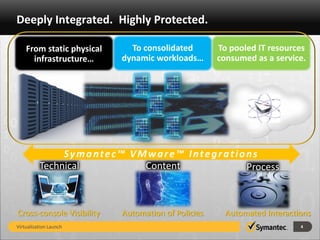
Deeply Integrated. Highly Protected.

    From static physical     To consolidated        To pooled IT resources
      infrastructure…      dynamic workloads…       consumed as a service.


               Symantec™ VMware™ Integrations
          Technical        Content         Process


Cross-console Visibility   Automation of Policies     Automated Interactions
Virtualization Launch                                                    4
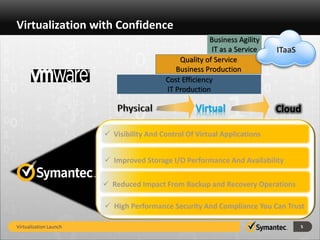
Virtualization with Confidence
                                                        Business Agility
                                                         IT as a Service   ITaaS
                                              Quality of Service
                                             Business Production
                                          Cost Efficiency
                                          IT Production

                                                    Virtual                Cloud

                         Visibility And Control Of Virtual Applications


                         Improved Storage I/O Performance And Availability

                         Reduced Impact From Backup and Recovery Operations

                         High Performance Security And Compliance You Can Trust

Virtualization Launch                                                              5
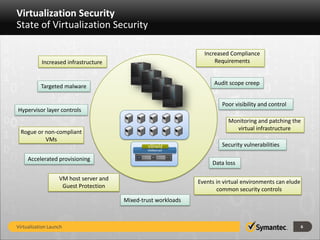
Virtualization Security
State of Virtualization Security

                                                                  Increased Compliance
           Increased infrastructure                                   Requirements


                                                                      Audit scope creep
           Targeted malware

                                                                         Poor visibility and control
Hypervisor layer controls
                                                                           Monitoring and patching the
                                                                             virtual infrastructure
 Rogue or non-compliant
          VMs
                                                vShield                  Security vulnerabilities
                                                VMkernel

     Accelerated provisioning
                                                  z
                                                                     Data loss

                   VM host server and
                                                                Events in virtual environments can elude
                    Guest Protection
                                                                       common security controls
                                        Mixed-trust workloads


Virtualization Launch                                                                                      6
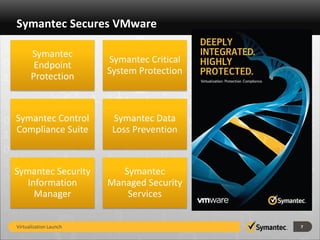
Symantec Secures VMware

      Symantec
                        Symantec Critical
       Endpoint
                        System Protection
      Protection


Symantec Control         Symantec Data
Compliance Suite         Loss Prevention


Symantec Security          Symantec
   Information          Managed Security
     Manager                Services


Virtualization Launch                       7
Enhanced Virtualization Backup and Recovery
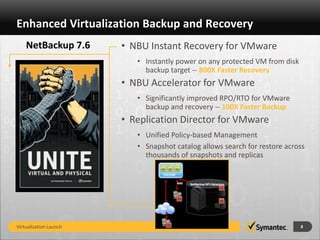
    NetBackup 7.6       • NBU Instant Recovery for VMware
                           • Instantly power on any protected VM from disk
                             backup target -- 800X Faster Recovery
                        • NBU Accelerator for VMware
                           • Significantly improved RPO/RTO for VMware
                             backup and recovery -- 100X Faster Backup
                        • Replication Director for VMware
                           • Unified Policy-based Management
                           • Snapshot catalog allows search for restore across
                             thousands of snapshots and replicas


Virtualization Launch                                                        8
Virtualization Backup Management
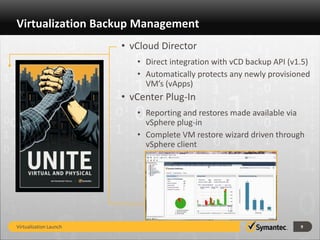
                        • vCloud Director
                           • Direct integration with vCD backup API (v1.5)
                           • Automatically protects any newly provisioned
                             VM’s (vApps)
                        • vCenter Plug-In
                           • Reporting and restores made available via
                             vSphere plug-in
                           • Complete VM restore wizard driven through
                             vSphere client


Virtualization Launch                                                  9
NetBackup Appliance – VMware Ready


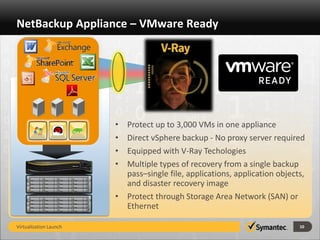
                        • Protect up to 3,000 VMs in one appliance
                        • Direct vSphere backup - No proxy server required
                        • Equipped with V-Ray Techologies
                        • Multiple types of recovery from a single backup
                          pass–single file, applications, application objects,
                          and disaster recovery image
                        • Protect through Storage Area Network (SAN) or
                          Ethernet

Virtualization Launch                                                       10
Virtualize Archiving:
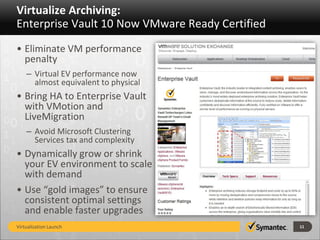
Enterprise Vault 10 Now VMware Ready Certified
• Eliminate VM performance
  penalty
    – Virtual EV performance now
      almost equivalent to physical
• Bring HA to Enterprise Vault
  with VMotion and
  LiveMigration
    – Avoid Microsoft Clustering
      Services tax and complexity
• Dynamically grow or shrink
  your EV environment to scale
  with demand
• Use “gold images” to ensure
  consistent optimal settings
  and enable faster upgrades
Virtualization Launch                            11
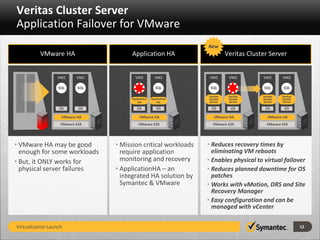
Veritas Cluster Server
Application Failover for VMware
                                                                   New
          VMware HA                    Application HA                        Veritas Cluster Server


                  VM2      VM2           VM2           VM2          VM2       VM2         VM2       VM2

                   SQL      SQL           SQL           SQL         SQL       SQL          SQL       SQL

                                                                   Veritas    Veritas     Veritas   Veritas
                                       Application   Application   Cluster    Cluster     Cluster   Cluster
                                          HA            HA         Server     Server      Server    Server

                   OS       OS            OS            OS          OS         OS          OS        OS

                    VMware HA               VMware HA                 VMware HA              VMware HA
                    VMware ESX             VMware ESX                VMware ESX             VMware ESX


• VMware HA may be good           • Mission critical workloads     • Reduces recovery times by
  enough for some workloads         require application              eliminating VM reboots
• But, it ONLY works for            monitoring and recovery        • Enables physical to virtual failover
  physical server failures        • ApplicationHA – an             • Reduces planned downtime for OS
                                    integrated HA solution by        patches
                                    Symantec & VMware              • Works with vMotion, DRS and Site
                                                                     Recovery Manager
                                                                   • Easy configuration and can be
                                                                     managed with vCenter

Virtualization Launch                                                                                         12
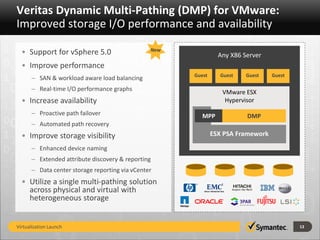
Veritas Dynamic Multi-Pathing (DMP) for VMware:
Improved storage I/O performance and availability
                                                New
  • Support for vSphere 5.0                                     Any X86 Server
  • Improve performance
                                                      Guest     Guest    Guest    Guest
      – SAN & workload aware load balancing
      – Real-time I/O performance graphs                         VMware ESX
  • Increase availability                                         Hypervisor
      – Proactive path failover                          MPP             DMP
      – Automated path recovery
  • Improve storage visibility                                ESX PSA Framework

      – Enhanced device naming
      – Extended attribute discovery & reporting
      – Data center storage reporting via vCenter
  • Utilize a single multi-pathing solution
    across physical and virtual with
    heterogeneous storage


Virtualization Launch                                                                     13
Thank you!
    Person
    Email


    Copyright © 2010 Symantec Corporation. All rights reserved. Symantec and the Symantec Logo are trademarks or registered trademarks of Symantec Corporation or its affiliates in
    the U.S. and other countries. Other names may be trademarks of their respective owners.

    This document is provided for informational purposes only and is not intended as advertising. All warranties relating to the information in this document, either express or implied,
    are disclaimed to the maximum extent allowed by law. The information in this document is subject to change without notice.


Virtualization Launch                                                                                                                                                                       14

Symantec Virtualization Launch VMworld 2012

  • 1.
    Symantec Virtualization Launch VMworld 2012 Virtualization Launch 1
  • 2.
    Agenda 1 Theme: Deeply Integrated/Highly Protected 2 Security & Compliance 3 Backup, Recovery & Archiving 4 Storage & Availability Management Virtualization Launch 2
  • 3.
    Accelerating the Promiseof Virtualization Only Symantec provides the deep levels of VMware integration necessary to enjoy the high levels of protection required for business critical virtualization. Virtualization Launch 3
  • 4.
    Deeply Integrated. HighlyProtected. From static physical To consolidated To pooled IT resources infrastructure… dynamic workloads… consumed as a service. Symantec™ VMware™ Integrations Technical Content Process Cross-console Visibility Automation of Policies Automated Interactions Virtualization Launch 4
  • 5.
    Virtualization with Confidence Business Agility IT as a Service ITaaS Quality of Service Business Production Cost Efficiency IT Production Virtual Cloud  Visibility And Control Of Virtual Applications  Improved Storage I/O Performance And Availability  Reduced Impact From Backup and Recovery Operations  High Performance Security And Compliance You Can Trust Virtualization Launch 5
  • 6.
    Virtualization Security State ofVirtualization Security Increased Compliance Increased infrastructure Requirements Audit scope creep Targeted malware Poor visibility and control Hypervisor layer controls Monitoring and patching the virtual infrastructure Rogue or non-compliant VMs vShield Security vulnerabilities VMkernel Accelerated provisioning z Data loss VM host server and Events in virtual environments can elude Guest Protection common security controls Mixed-trust workloads Virtualization Launch 6
  • 7.
    Symantec Secures VMware Symantec Symantec Critical Endpoint System Protection Protection Symantec Control Symantec Data Compliance Suite Loss Prevention Symantec Security Symantec Information Managed Security Manager Services Virtualization Launch 7
  • 8.
    Enhanced Virtualization Backupand Recovery NetBackup 7.6 • NBU Instant Recovery for VMware • Instantly power on any protected VM from disk backup target -- 800X Faster Recovery • NBU Accelerator for VMware • Significantly improved RPO/RTO for VMware backup and recovery -- 100X Faster Backup • Replication Director for VMware • Unified Policy-based Management • Snapshot catalog allows search for restore across thousands of snapshots and replicas Virtualization Launch 8
  • 9.
    Virtualization Backup Management • vCloud Director • Direct integration with vCD backup API (v1.5) • Automatically protects any newly provisioned VM’s (vApps) • vCenter Plug-In • Reporting and restores made available via vSphere plug-in • Complete VM restore wizard driven through vSphere client Virtualization Launch 9
  • 10.
    NetBackup Appliance –VMware Ready • Protect up to 3,000 VMs in one appliance • Direct vSphere backup - No proxy server required • Equipped with V-Ray Techologies • Multiple types of recovery from a single backup pass–single file, applications, application objects, and disaster recovery image • Protect through Storage Area Network (SAN) or Ethernet Virtualization Launch 10
  • 11.
    Virtualize Archiving: Enterprise Vault10 Now VMware Ready Certified • Eliminate VM performance penalty – Virtual EV performance now almost equivalent to physical • Bring HA to Enterprise Vault with VMotion and LiveMigration – Avoid Microsoft Clustering Services tax and complexity • Dynamically grow or shrink your EV environment to scale with demand • Use “gold images” to ensure consistent optimal settings and enable faster upgrades Virtualization Launch 11
  • 12.
    Veritas Cluster Server ApplicationFailover for VMware New VMware HA Application HA Veritas Cluster Server VM2 VM2 VM2 VM2 VM2 VM2 VM2 VM2 SQL SQL SQL SQL SQL SQL SQL SQL Veritas Veritas Veritas Veritas Application Application Cluster Cluster Cluster Cluster HA HA Server Server Server Server OS OS OS OS OS OS OS OS VMware HA VMware HA VMware HA VMware HA VMware ESX VMware ESX VMware ESX VMware ESX • VMware HA may be good • Mission critical workloads • Reduces recovery times by enough for some workloads require application eliminating VM reboots • But, it ONLY works for monitoring and recovery • Enables physical to virtual failover physical server failures • ApplicationHA – an • Reduces planned downtime for OS integrated HA solution by patches Symantec & VMware • Works with vMotion, DRS and Site Recovery Manager • Easy configuration and can be managed with vCenter Virtualization Launch 12
  • 13.
    Veritas Dynamic Multi-Pathing(DMP) for VMware: Improved storage I/O performance and availability New • Support for vSphere 5.0 Any X86 Server • Improve performance Guest Guest Guest Guest – SAN & workload aware load balancing – Real-time I/O performance graphs VMware ESX • Increase availability Hypervisor – Proactive path failover MPP DMP – Automated path recovery • Improve storage visibility ESX PSA Framework – Enhanced device naming – Extended attribute discovery & reporting – Data center storage reporting via vCenter • Utilize a single multi-pathing solution across physical and virtual with heterogeneous storage Virtualization Launch 13
  • 14.
    Thank you! Person Email Copyright © 2010 Symantec Corporation. All rights reserved. Symantec and the Symantec Logo are trademarks or registered trademarks of Symantec Corporation or its affiliates in the U.S. and other countries. Other names may be trademarks of their respective owners. This document is provided for informational purposes only and is not intended as advertising. All warranties relating to the information in this document, either express or implied, are disclaimed to the maximum extent allowed by law. The information in this document is subject to change without notice. Virtualization Launch 14