Netcentric Fundamentals
(ITT501)
Chapter 1 -
Introduction
Topic Outline
▰ Background and
history of networking
and the internet
▰ Network Architecture
and Protocols
▰ Client/Server
paradigms
▰ Distributed Computing
▰ Mobile and wireless
computing
▰ Network Security
▰ Networked multimedia
system
2
Netcentric Computing
▰ CC2001 introduced a Knowledge Area (KA)
entitled “Net-Centric Computing”, which
encompassed a combination of topics including
traditional networking, web development, and
network security.
▰ range of sub-specialities including:
○ computer communication network concepts
and protocols, multimedia systems, Web
standards and technologies, network security,
wireless and mobile computing, and 3
Netcentric Principle
▰ Net-Centric Computing (NCC) principle is based
on a distributed environment where multiple
components, possibly across geographical
boundaries, that communicate and coordinate
their actions through message passing. [2]
▰ To an actor outside this system, it appears as if a
single coherent system.
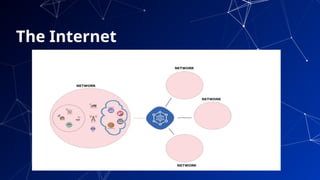
▰ Example : The Internet
4
The Internet
5
6
Background and
history of
networking and
the internet
7
NETWORK
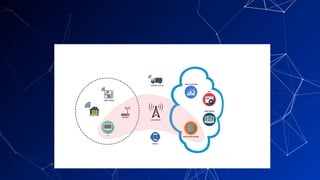
▰ Computer network is a collection of computing
devices that are connected in various ways in
order to communicate and share resources
▰ Usually, the connections between
computers in a network are made using physical
wires or cables
▰ However, some connections are wireless,
using radio waves or infrared signals
8
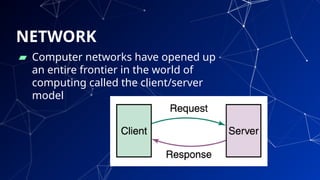
▰ Computer networks have opened up
an entire frontier in the world of
computing called the client/server
model
9
NETWORK
History of Network
▰ The Advanced Research Projects Agency
Network (ARPANET) is one of the world's first packet
switching networks, the first network to implement TCP/IP,
and was the main progenitor of what was to become the
global Internet. (later DARPA)
▰ ARBA network was initially funded by the Advanced
Research Projects Agency (ARPA, later DARPA) within
the U.S. Department of Defense for use by its projects at
universities and research laboratories in the US.
▰ The packet switching of the ARPANET, together with TCP/IP,
would form the backbone of how the Internet works. 10
Network and Internet History
Timeline
▰ https://www.computerhope.com/
history/network.htm
11
INTERNET
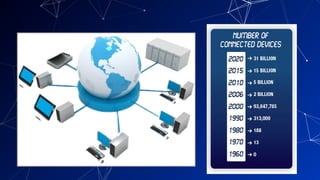
▰ It is the largest network in the world that connects
hundreds of thousands of individual networks all
over the world.
▰ The popular term for the Internet is the
“information highway”.
▰ Rather than moving through geographical space,
it moves your ideas and information through
cyberspace – the space of electronic movement of
ideas and information
12
13
Internet Ownership
▰ No single person or company owns the Internet
or even controls it entirely. As a wide-area
network, it is made up of many smaller
networks. These smaller networks are often
owned and managed by a person or
organization. The Internet, then, is really
defined by how connections can be made
between these networks.
14
World Wide Web (WWW)
▰ The Web (World Wide Web) consists of
information organized into Web pages
containing text and graphic images.
▰ It contains hypertext links, or highlighted
keywords and images that lead to related
information.
▰ A collection of linked Web pages that has a
common theme or focus is called a Web site.
15
16
17
Network
Architecture
and Protocols
Network Architecture
▰ Understanding of the relationships between
(architectural) components of the network.
▰ Network architecture guides the technical
design of the network, through the
application of high-level design principles to
the network building blocks.
▰ The generic term node or host refers to any
device on a network 18
Types of Network
▰ Local-area network (LAN) A network that connects a
relatively small number of machines in a relatively close
geographical area.
▰ Wide-area network (WAN) A network that connects two
or more local-area networks over a potentially large
geographic distance
▰ Metropolitan-area network (MAN) The communication
infrastructures that have been developed in and around large
cities
▰ Wireless Network 19
LAN Topologies(Physical)
1) Bus
2) Star
3) Ring
4) Switched
5) Daisy chains
6) Hierarchies
20
WAN Topologies
1) Peer-to-peer WANs
2) Ring WANs
3) Star WANs
4) Full-mesh WANs
5) Partial-mesh WANs
6) Two-tiered
7) Three-tiered
8) Hybrids
21
Connections
▰ Internet backbone A set of high-speed networks
that carry Internet traffic
▰ Internet service provider (ISP) A company that
provides other companies or individuals with
access to the Internet
22
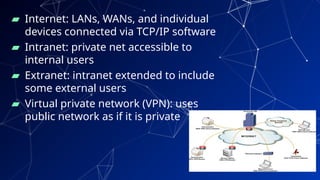
▰ Internet: LANs, WANs, and individual
devices connected via TCP/IP software
▰ Intranet: private net accessible to
internal users
▰ Extranet: intranet extended to include
some external users
▰ Virtual private network (VPN): uses
public network as if it is private
23
Ports and Addresses
24
▰ Ports are destination points within a host
computer.
▰ Processes are attached to the ports, enabling them
to communicate.
▰ Transport layer addresses are composed of
network address of the host computer and a port
number.
▰ In the Internet every host is assigned a unique IP
number which is used in routing.
▰ In an Ethernet each host is responsible for
Protocols
25
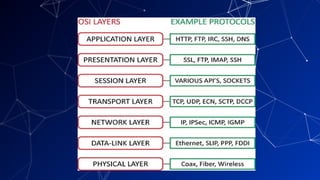
▰ The term protocol refers to a well-known set of rules and
formats to be used in order to perform a task. For example,
a task of communicating between processes.
▰ Parts of a protocol:
○ A specification of a sequence of messages that must be
exchanged.
○ A specification of the format of the data in the
messages.
▰ Existence of well-known (standard) protocols enables the
separate components of the distributed systems to be
developed independently in different languages and on
26
27
Client/Server
paradigms
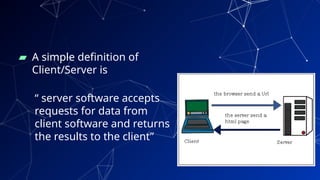
▰ A simple definition of
Client/Server is
“ server software accepts
requests for data from
client software and returns
the results to the client”
28
▰ Servers
○ Run all the time (i.e. infinite)
○ Provide service to any client
○ Typically specialize in providing a certain
type of service, e.g. Mail.
○ Listen to a well-known port and passively
open connection.
▰ Clients
○ Run when needed, then terminate (i.e.
finite)
○ Actively Open TCP or UDP connection with
Server’s socket.
29
▰ Client/server architecture has many variations
based on tiers.
▰ tier architectures try to separate the
components into different tiers/layers
○ Tier: physical separation
○ Layer: logical separation
▰ tier architectures have the same components
o Presentation
o Business/Logic
o Data
30
Layers
▰ Presentation Layer
○ Static or dynamically generated content rendered by the
browser (front-end)
▰ Logic Layer
○ A dynamic content processing and generation level
application server, e.g., Java EE, ASP.NET, PHP, platform
(middleware)
▰ Data Layer
○ A database, comprising both data sets and the database
management system or RDBMS software that manages
and provides access to the data (back-end) 31
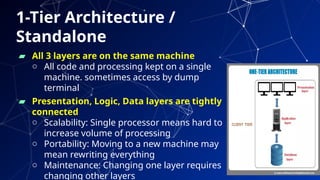
1-Tier Architecture /
Standalone
▰ All 3 layers are on the same machine
o All code and processing kept on a single
machine. sometimes access by dump
terminal
▰ Presentation, Logic, Data layers are tightly
connected
o Scalability: Single processor means hard to
increase volume of processing
o Portability: Moving to a new machine may
mean rewriting everything
o Maintenance: Changing one layer requires
changing other layers 32
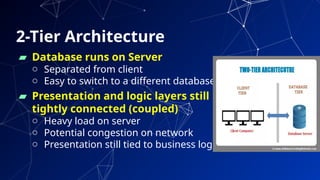
2-Tier Architecture
▰ Database runs on Server
o Separated from client
o Easy to switch to a different database
▰ Presentation and logic layers still
tightly connected (coupled)
o Heavy load on server
o Potential congestion on network
o Presentation still tied to business logic
33
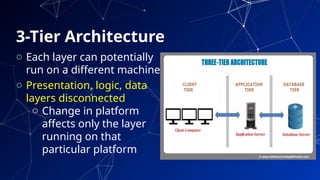
3-Tier Architecture
o Each layer can potentially
run on a different machine
o Presentation, logic, data
layers disconnected
o Change in platform
affects only the layer
running on that
particular platform
34
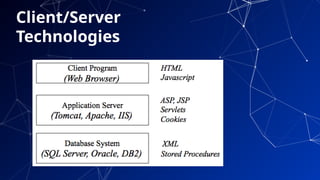
Client/Server
Technologies
35
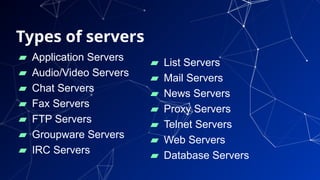
Types of servers
▰ Application Servers
▰ Audio/Video Servers
▰ Chat Servers
▰ Fax Servers
▰ FTP Servers
▰ Groupware Servers
▰ IRC Servers
36
▰ List Servers
▰ Mail Servers
▰ News Servers
▰ Proxy Servers
▰ Telnet Servers
▰ Web Servers
▰ Database Servers
37
Distributed
Computing
Distributed Computing is a field of
computer science that studied distributed
system
▰ A distributed system is one in which
components located at networked computers
communicate and coordinate their actions
only by passing messages.
38
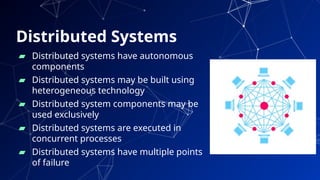
Distributed Systems
39
▰ Distributed systems have autonomous
components
▰ Distributed systems may be built using
heterogeneous technology
▰ Distributed system components may be
used exclusively
▰ Distributed systems are executed in
concurrent processes
▰ Distributed systems have multiple points
of failure
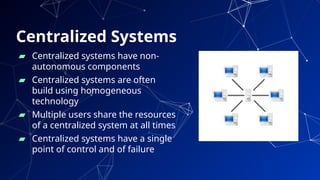
Centralized Systems
40
▰ Centralized systems have non-
autonomous components
▰ Centralized systems are often
build using homogeneous
technology
▰ Multiple users share the resources
of a centralized system at all times
▰ Centralized systems have a single
point of control and of failure
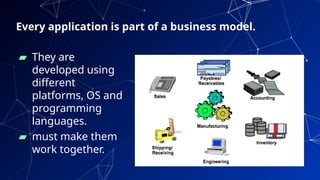
Every application is part of a business model.
▰ They are
developed using
different
platforms, OS and
programming
languages.
▰ must make them
work together.
41
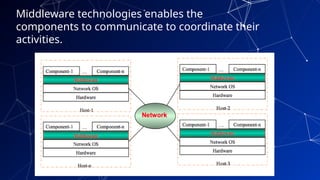
Middleware technologies enables the
components to communicate to coordinate their
activities.
42
Advantages of Distributed
Systems
▰ Collaborative
▰ Expandability
▰ Local autonomy
▰ Improved performance
▰ Improved reliability and availability
▰ Potential cost reductions
43
▰ Network reliance
▰ Complexities
▰ Security
44
Disadvantages of Distributed
Systems
45
Mobile and
wireless
computing
Mobile Computing
▰ Mobile computing is to describe technologies
that
○ enable people to access network services
anyplace, anytime, and anywhere,
○ with portable and wireless computing and
communication devices.
46
▰ Aspects of mobility
○ User mobility
■ Between different geographical locations
■ Between different networks
■ Between different communication devices
■ Between different applications
○ Device portability
■ Between different geographical locations
■ Between different networks
47
Applications of mobile computing
48
▰ Vehicles
○ transmission of news, road condition, weather, music
via DAB
○ personal communication using GSM
○ position via GPS
○ local ad-hoc network with vehicles close-by to prevent
accidents, guidance system, redundancy
○ vehicle data (e.g., from busses, high-speed trains) can
be transmitted in advance for maintenance
▰ Medical
○ Nurses/Doctors in Medical offices are now using
Wireless Tablet PCs/WLAN to collect and share patient
information.
49
▰ Sales
○ Sales representatives are using Tablet PCs with Smart
phones for presentation, transmitting/access
information among office, hotel, and customer
location.
▰ Emergencies
○ Early transmission of patient data to the hospital,
current status, first diagnosis
○ Provide mobile infrastructure in dealing with Natural
Disaster (earthquake, hurricane, fire), terrorist attacks,
war, ...
▰ Smart Environment
○ Smart home, Smart Car, Smart City
Applications of mobile computing
Challenges in mobile
computing
50
▰ Mobility means changes
▰ Hardware
○ Lighter, smaller, energy management, user interface
▰ Low bandwidth, high bandwidth variability
○ Kbit/s to Mbit/s, bandwidth fluctuation
▰ Security risk
○ Devices more vulnerable, endpoint authentication
harder
▰ Heterogeneous network
○ Different devices, interfaces and protocols
51
▰ Location awareness
○ Locality adaptation
▰ Higher loss-rates, higher delays, more jitter
○ Connection setup time, hand-off
▰ Restrictive regulations of frequencies
○ Frequencies have to be coordinated
Challenges in mobile
computing
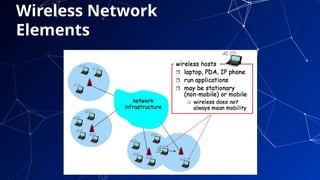
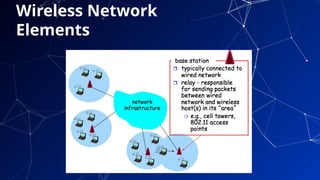
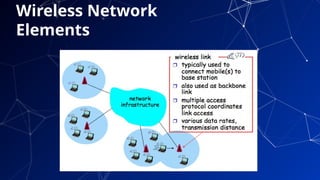
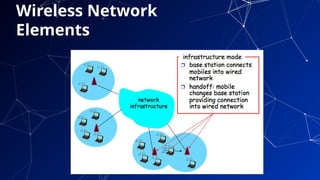
Wireless Network
▰ A wireless network allows devices to stay
connected to the network but roam untethered
to any wires.
▰ Access points amplify Wi-Fi signals, so a device
can be far from a router but still be connected to
the network.
52
Wireless Network
Elements
53
54
Wireless Network
Elements
55
Wireless Network
Elements
56
Wireless Network
Elements
Wireless Ad Hoc Network
57
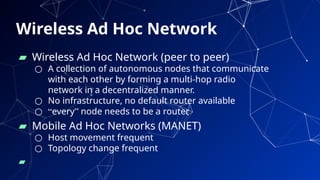
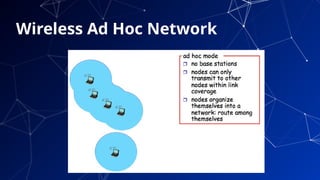
▰ Wireless Ad Hoc Network (peer to peer)
○ A collection of autonomous nodes that communicate
with each other by forming a multi-hop radio
network in a decentralized manner.
○ No infrastructure, no default router available
○ “every” node needs to be a router
▰ Mobile Ad Hoc Networks (MANET)
○ Host movement frequent
○ Topology change frequent
▰
58
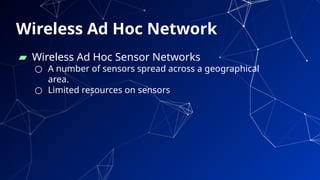
▰ Wireless Ad Hoc Sensor Networks
○ A number of sensors spread across a geographical
area.
○ Limited resources on sensors
Wireless Ad Hoc Network
59
Wireless Ad Hoc Network
60
Network Security
Network Security Key Elements
▰ Confidentiality
○ Preserving authorized restrictions on information
access and disclosure, including means for protecting
personal privacy and proprietary information.
▰ Integrity
○ Guarding against information modifications or
destruction, including ensuring information non-
repudiation and authenticity.
▰ Availability
○ Ensuring timely and reliable access to and use of
information 61
Security Attacks,
Mechanisms & Services
• Security Attack
– Any action that compromises the security of
information
• Security Mechanism
– A process / device that is designed to detect,
prevent or recover from a security attack.
• Security Service
– A service intended to counter security
attacks, typically by implementing one or
more mechanisms.
62
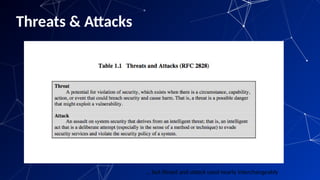
Threats & Attacks
63
… but threat and attack used nearly interchangeably
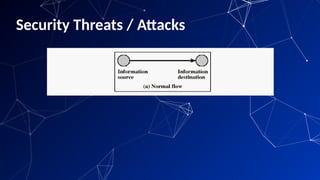
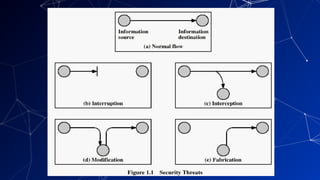
Security Threats / Attacks
64
65
Security Attacks classification
▰ passive attacks - eavesdropping on, or monitoring of,
transmissions to:
○ obtain message contents, or
○ monitor traffic flows
▰ active attacks – modification of data stream to:
○ masquerade of one entity as some other: man-in-the-
middle
○ replay previous messages
○ modify messages in transit
○ denial of service
66
Causes of network security threats
▰ Technology weaknesses
▰ Configuration weaknesses
▰ Policy weaknesses
▰ Human weaknesses
67
68
Networked
multimedia system
Multimedia System
▰ Multimedia system is a computer (machine) that
can transmit and accept information (multiple
media) from the external world.
▰ supports the integrated storage, transmission and
representation of the discrete media types text,
graphics and image and the continuous media
types audio and video on a digital computer.
69
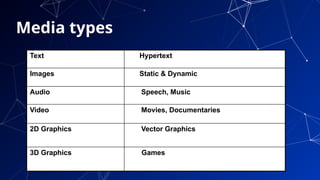
Media types
70
Text Hypertext
Images Static & Dynamic
Audio Speech, Music
Video Movies, Documentaries
2D Graphics Vector Graphics
3D Graphics Games
Features of Multimedia System
▰ Very high processing power
- In the modern multimedia context, movement and
processing of large amounts of data in real-time are
emphasized.
- Include support hardware such as graphics and video
adapters, digital signal processors and etc.
▰ A file system capable of handling multimedia
information
- File systems should have the capability to deal with
streams of data, such as video and audio. 71
Features of Multimedia System
▰ File formats that exploit the inherent properties
of the multimedia information
- The file formats should be easy to handle from the file
system point of view.
▰ Efficient and high I/O rate
- The input and output subsystem should be able to handle
large storage.
- The controller hardware should be able to provide
recording and reading of data from these storages.
72
Features of Multimedia System
▰ Storage and memory
- Caches have to be larger and may have to be in a 2 or 3
level hierarchy for efficient management.
▰ Network support
- To apply client-server paradigm in building multimedia
application, high-speed support from the network
subsystem is needed.
- It should be able to stream the data out of the disk
directly, to minimize delay.
73
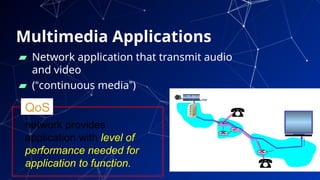
Multimedia Applications
▰ Network application that transmit audio
and video
▰ (“continuous media”)
74
network provides
application with level of
performance needed for
application to function.
QoS
Classes of Multimedia
Applications
▰ Streaming Stored Audio and Video
▰ Streaming Live Audio and Video
▰ Real-Time Interactive Audio and Video
75
Challenges
▰ TCP/UDP/IP suite provides best-effort, no
guarantees on expectation or variance of packet
delay
▰ Performance deteriorate if links are congested
(transoceanic)
▰ Most router implementations use only First-
Come-First-Serve (FCFS) packet processing and
transmission scheduling
76
77
THANKS!
Any questions?

ITT501-Chapter 1.pptx netcentric fundamentals

  • 1.
  • 2.
    Topic Outline ▰ Backgroundand history of networking and the internet ▰ Network Architecture and Protocols ▰ Client/Server paradigms ▰ Distributed Computing ▰ Mobile and wireless computing ▰ Network Security ▰ Networked multimedia system 2
  • 3.
    Netcentric Computing ▰ CC2001introduced a Knowledge Area (KA) entitled “Net-Centric Computing”, which encompassed a combination of topics including traditional networking, web development, and network security. ▰ range of sub-specialities including: ○ computer communication network concepts and protocols, multimedia systems, Web standards and technologies, network security, wireless and mobile computing, and 3
  • 4.
    Netcentric Principle ▰ Net-CentricComputing (NCC) principle is based on a distributed environment where multiple components, possibly across geographical boundaries, that communicate and coordinate their actions through message passing. [2] ▰ To an actor outside this system, it appears as if a single coherent system. ▰ Example : The Internet 4
  • 5.
  • 6.
  • 7.
  • 8.
    NETWORK ▰ Computer networkis a collection of computing devices that are connected in various ways in order to communicate and share resources ▰ Usually, the connections between computers in a network are made using physical wires or cables ▰ However, some connections are wireless, using radio waves or infrared signals 8
  • 9.
    ▰ Computer networkshave opened up an entire frontier in the world of computing called the client/server model 9 NETWORK
  • 10.
    History of Network ▰The Advanced Research Projects Agency Network (ARPANET) is one of the world's first packet switching networks, the first network to implement TCP/IP, and was the main progenitor of what was to become the global Internet. (later DARPA) ▰ ARBA network was initially funded by the Advanced Research Projects Agency (ARPA, later DARPA) within the U.S. Department of Defense for use by its projects at universities and research laboratories in the US. ▰ The packet switching of the ARPANET, together with TCP/IP, would form the backbone of how the Internet works. 10
  • 11.
    Network and InternetHistory Timeline ▰ https://www.computerhope.com/ history/network.htm 11
  • 12.
    INTERNET ▰ It isthe largest network in the world that connects hundreds of thousands of individual networks all over the world. ▰ The popular term for the Internet is the “information highway”. ▰ Rather than moving through geographical space, it moves your ideas and information through cyberspace – the space of electronic movement of ideas and information 12
  • 13.
  • 14.
    Internet Ownership ▰ Nosingle person or company owns the Internet or even controls it entirely. As a wide-area network, it is made up of many smaller networks. These smaller networks are often owned and managed by a person or organization. The Internet, then, is really defined by how connections can be made between these networks. 14
  • 15.
    World Wide Web(WWW) ▰ The Web (World Wide Web) consists of information organized into Web pages containing text and graphic images. ▰ It contains hypertext links, or highlighted keywords and images that lead to related information. ▰ A collection of linked Web pages that has a common theme or focus is called a Web site. 15
  • 16.
  • 17.
  • 18.
    Network Architecture ▰ Understandingof the relationships between (architectural) components of the network. ▰ Network architecture guides the technical design of the network, through the application of high-level design principles to the network building blocks. ▰ The generic term node or host refers to any device on a network 18
  • 19.
    Types of Network ▰Local-area network (LAN) A network that connects a relatively small number of machines in a relatively close geographical area. ▰ Wide-area network (WAN) A network that connects two or more local-area networks over a potentially large geographic distance ▰ Metropolitan-area network (MAN) The communication infrastructures that have been developed in and around large cities ▰ Wireless Network 19
  • 20.
    LAN Topologies(Physical) 1) Bus 2)Star 3) Ring 4) Switched 5) Daisy chains 6) Hierarchies 20
  • 21.
    WAN Topologies 1) Peer-to-peerWANs 2) Ring WANs 3) Star WANs 4) Full-mesh WANs 5) Partial-mesh WANs 6) Two-tiered 7) Three-tiered 8) Hybrids 21
  • 22.
    Connections ▰ Internet backboneA set of high-speed networks that carry Internet traffic ▰ Internet service provider (ISP) A company that provides other companies or individuals with access to the Internet 22
  • 23.
    ▰ Internet: LANs,WANs, and individual devices connected via TCP/IP software ▰ Intranet: private net accessible to internal users ▰ Extranet: intranet extended to include some external users ▰ Virtual private network (VPN): uses public network as if it is private 23
  • 24.
    Ports and Addresses 24 ▰Ports are destination points within a host computer. ▰ Processes are attached to the ports, enabling them to communicate. ▰ Transport layer addresses are composed of network address of the host computer and a port number. ▰ In the Internet every host is assigned a unique IP number which is used in routing. ▰ In an Ethernet each host is responsible for
  • 25.
    Protocols 25 ▰ The termprotocol refers to a well-known set of rules and formats to be used in order to perform a task. For example, a task of communicating between processes. ▰ Parts of a protocol: ○ A specification of a sequence of messages that must be exchanged. ○ A specification of the format of the data in the messages. ▰ Existence of well-known (standard) protocols enables the separate components of the distributed systems to be developed independently in different languages and on
  • 26.
  • 27.
  • 28.
    ▰ A simpledefinition of Client/Server is “ server software accepts requests for data from client software and returns the results to the client” 28
  • 29.
    ▰ Servers ○ Runall the time (i.e. infinite) ○ Provide service to any client ○ Typically specialize in providing a certain type of service, e.g. Mail. ○ Listen to a well-known port and passively open connection. ▰ Clients ○ Run when needed, then terminate (i.e. finite) ○ Actively Open TCP or UDP connection with Server’s socket. 29
  • 30.
    ▰ Client/server architecturehas many variations based on tiers. ▰ tier architectures try to separate the components into different tiers/layers ○ Tier: physical separation ○ Layer: logical separation ▰ tier architectures have the same components o Presentation o Business/Logic o Data 30
  • 31.
    Layers ▰ Presentation Layer ○Static or dynamically generated content rendered by the browser (front-end) ▰ Logic Layer ○ A dynamic content processing and generation level application server, e.g., Java EE, ASP.NET, PHP, platform (middleware) ▰ Data Layer ○ A database, comprising both data sets and the database management system or RDBMS software that manages and provides access to the data (back-end) 31
  • 32.
    1-Tier Architecture / Standalone ▰All 3 layers are on the same machine o All code and processing kept on a single machine. sometimes access by dump terminal ▰ Presentation, Logic, Data layers are tightly connected o Scalability: Single processor means hard to increase volume of processing o Portability: Moving to a new machine may mean rewriting everything o Maintenance: Changing one layer requires changing other layers 32
  • 33.
    2-Tier Architecture ▰ Databaseruns on Server o Separated from client o Easy to switch to a different database ▰ Presentation and logic layers still tightly connected (coupled) o Heavy load on server o Potential congestion on network o Presentation still tied to business logic 33
  • 34.
    3-Tier Architecture o Eachlayer can potentially run on a different machine o Presentation, logic, data layers disconnected o Change in platform affects only the layer running on that particular platform 34
  • 35.
  • 36.
    Types of servers ▰Application Servers ▰ Audio/Video Servers ▰ Chat Servers ▰ Fax Servers ▰ FTP Servers ▰ Groupware Servers ▰ IRC Servers 36 ▰ List Servers ▰ Mail Servers ▰ News Servers ▰ Proxy Servers ▰ Telnet Servers ▰ Web Servers ▰ Database Servers
  • 37.
  • 38.
    Distributed Computing isa field of computer science that studied distributed system ▰ A distributed system is one in which components located at networked computers communicate and coordinate their actions only by passing messages. 38
  • 39.
    Distributed Systems 39 ▰ Distributedsystems have autonomous components ▰ Distributed systems may be built using heterogeneous technology ▰ Distributed system components may be used exclusively ▰ Distributed systems are executed in concurrent processes ▰ Distributed systems have multiple points of failure
  • 40.
    Centralized Systems 40 ▰ Centralizedsystems have non- autonomous components ▰ Centralized systems are often build using homogeneous technology ▰ Multiple users share the resources of a centralized system at all times ▰ Centralized systems have a single point of control and of failure
  • 41.
    Every application ispart of a business model. ▰ They are developed using different platforms, OS and programming languages. ▰ must make them work together. 41
  • 42.
    Middleware technologies enablesthe components to communicate to coordinate their activities. 42
  • 43.
    Advantages of Distributed Systems ▰Collaborative ▰ Expandability ▰ Local autonomy ▰ Improved performance ▰ Improved reliability and availability ▰ Potential cost reductions 43
  • 44.
    ▰ Network reliance ▰Complexities ▰ Security 44 Disadvantages of Distributed Systems
  • 45.
  • 46.
    Mobile Computing ▰ Mobilecomputing is to describe technologies that ○ enable people to access network services anyplace, anytime, and anywhere, ○ with portable and wireless computing and communication devices. 46
  • 47.
    ▰ Aspects ofmobility ○ User mobility ■ Between different geographical locations ■ Between different networks ■ Between different communication devices ■ Between different applications ○ Device portability ■ Between different geographical locations ■ Between different networks 47
  • 48.
    Applications of mobilecomputing 48 ▰ Vehicles ○ transmission of news, road condition, weather, music via DAB ○ personal communication using GSM ○ position via GPS ○ local ad-hoc network with vehicles close-by to prevent accidents, guidance system, redundancy ○ vehicle data (e.g., from busses, high-speed trains) can be transmitted in advance for maintenance ▰ Medical ○ Nurses/Doctors in Medical offices are now using Wireless Tablet PCs/WLAN to collect and share patient information.
  • 49.
    49 ▰ Sales ○ Salesrepresentatives are using Tablet PCs with Smart phones for presentation, transmitting/access information among office, hotel, and customer location. ▰ Emergencies ○ Early transmission of patient data to the hospital, current status, first diagnosis ○ Provide mobile infrastructure in dealing with Natural Disaster (earthquake, hurricane, fire), terrorist attacks, war, ... ▰ Smart Environment ○ Smart home, Smart Car, Smart City Applications of mobile computing
  • 50.
    Challenges in mobile computing 50 ▰Mobility means changes ▰ Hardware ○ Lighter, smaller, energy management, user interface ▰ Low bandwidth, high bandwidth variability ○ Kbit/s to Mbit/s, bandwidth fluctuation ▰ Security risk ○ Devices more vulnerable, endpoint authentication harder ▰ Heterogeneous network ○ Different devices, interfaces and protocols
  • 51.
    51 ▰ Location awareness ○Locality adaptation ▰ Higher loss-rates, higher delays, more jitter ○ Connection setup time, hand-off ▰ Restrictive regulations of frequencies ○ Frequencies have to be coordinated Challenges in mobile computing
  • 52.
    Wireless Network ▰ Awireless network allows devices to stay connected to the network but roam untethered to any wires. ▰ Access points amplify Wi-Fi signals, so a device can be far from a router but still be connected to the network. 52
  • 53.
  • 54.
  • 55.
  • 56.
  • 57.
    Wireless Ad HocNetwork 57 ▰ Wireless Ad Hoc Network (peer to peer) ○ A collection of autonomous nodes that communicate with each other by forming a multi-hop radio network in a decentralized manner. ○ No infrastructure, no default router available ○ “every” node needs to be a router ▰ Mobile Ad Hoc Networks (MANET) ○ Host movement frequent ○ Topology change frequent ▰
  • 58.
    58 ▰ Wireless AdHoc Sensor Networks ○ A number of sensors spread across a geographical area. ○ Limited resources on sensors Wireless Ad Hoc Network
  • 59.
  • 60.
  • 61.
    Network Security KeyElements ▰ Confidentiality ○ Preserving authorized restrictions on information access and disclosure, including means for protecting personal privacy and proprietary information. ▰ Integrity ○ Guarding against information modifications or destruction, including ensuring information non- repudiation and authenticity. ▰ Availability ○ Ensuring timely and reliable access to and use of information 61
  • 62.
    Security Attacks, Mechanisms &Services • Security Attack – Any action that compromises the security of information • Security Mechanism – A process / device that is designed to detect, prevent or recover from a security attack. • Security Service – A service intended to counter security attacks, typically by implementing one or more mechanisms. 62
  • 63.
    Threats & Attacks 63 …but threat and attack used nearly interchangeably
  • 64.
  • 65.
  • 66.
    Security Attacks classification ▰passive attacks - eavesdropping on, or monitoring of, transmissions to: ○ obtain message contents, or ○ monitor traffic flows ▰ active attacks – modification of data stream to: ○ masquerade of one entity as some other: man-in-the- middle ○ replay previous messages ○ modify messages in transit ○ denial of service 66
  • 67.
    Causes of networksecurity threats ▰ Technology weaknesses ▰ Configuration weaknesses ▰ Policy weaknesses ▰ Human weaknesses 67
  • 68.
  • 69.
    Multimedia System ▰ Multimediasystem is a computer (machine) that can transmit and accept information (multiple media) from the external world. ▰ supports the integrated storage, transmission and representation of the discrete media types text, graphics and image and the continuous media types audio and video on a digital computer. 69
  • 70.
    Media types 70 Text Hypertext ImagesStatic & Dynamic Audio Speech, Music Video Movies, Documentaries 2D Graphics Vector Graphics 3D Graphics Games
  • 71.
    Features of MultimediaSystem ▰ Very high processing power - In the modern multimedia context, movement and processing of large amounts of data in real-time are emphasized. - Include support hardware such as graphics and video adapters, digital signal processors and etc. ▰ A file system capable of handling multimedia information - File systems should have the capability to deal with streams of data, such as video and audio. 71
  • 72.
    Features of MultimediaSystem ▰ File formats that exploit the inherent properties of the multimedia information - The file formats should be easy to handle from the file system point of view. ▰ Efficient and high I/O rate - The input and output subsystem should be able to handle large storage. - The controller hardware should be able to provide recording and reading of data from these storages. 72
  • 73.
    Features of MultimediaSystem ▰ Storage and memory - Caches have to be larger and may have to be in a 2 or 3 level hierarchy for efficient management. ▰ Network support - To apply client-server paradigm in building multimedia application, high-speed support from the network subsystem is needed. - It should be able to stream the data out of the disk directly, to minimize delay. 73
  • 74.
    Multimedia Applications ▰ Networkapplication that transmit audio and video ▰ (“continuous media”) 74 network provides application with level of performance needed for application to function. QoS
  • 75.
    Classes of Multimedia Applications ▰Streaming Stored Audio and Video ▰ Streaming Live Audio and Video ▰ Real-Time Interactive Audio and Video 75
  • 76.
    Challenges ▰ TCP/UDP/IP suiteprovides best-effort, no guarantees on expectation or variance of packet delay ▰ Performance deteriorate if links are congested (transoceanic) ▰ Most router implementations use only First- Come-First-Serve (FCFS) packet processing and transmission scheduling 76
  • 77.