Enterprise Messaging With
ActiveMQ and Spring JMS

            Bruce Snyder
   bruce.snyder@springsource.com

            SpringOne
           29 Apr 2009
    Amsterdam, The Netherlands

                                   1
Agenda


 •   Installing ActiveMQ
 •   Configuring ActiveMQ
 •   Using Spring JMS with ActiveMQ
 •   Some ActiveMQ Features


                                      2
What is ActiveMQ?


 • Open source
 • Message-oriented middleware
 • Apache project
   – http://activemq.apache.org/
 • Apache licensed
 • JMS 1.1 compliant
 • Goal:
   – To achieve standards-based, message-oriented
     application integration across many languages and
     platforms


                                                     3
Installing ActiveMQ


 • Download it
 • Unzip it
 • Run it


 • It’s really that simple!


                              4
Configuring ActiveMQ


  (conf/activemq.xml)
                        5
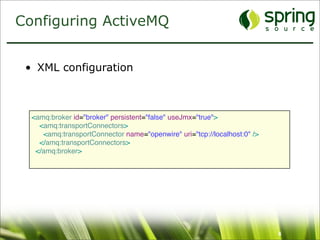
Configuring ActiveMQ


 • XML configuration


  <amq:broker id="broker" persistent="false" useJmx="true">
    <amq:transportConnectors>
     <amq:transportConnector name="openwire" uri="tcp://localhost:0" />
    </amq:transportConnectors>
   </amq:broker>


                                                                          6
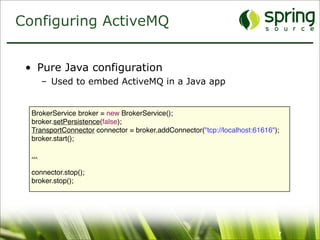
Configuring ActiveMQ


 • Pure Java configuration
        – Used to embed ActiveMQ in a Java app


  BrokerService broker = new BrokerService();
  broker.setPersistence(false);
  TransportConnector connector = broker.addConnector("tcp://localhost:61616");
  broker.start();

  ...
  connector.stop();
  broker.stop();


                                                                             7
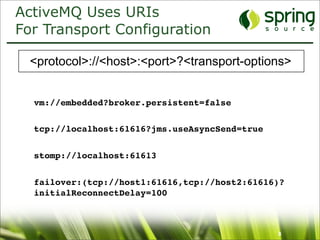
ActiveMQ Uses URIs
For Transport Configuration

  <protocol>://<host>:<port>?<transport-options>


  vm://embedded?broker.persistent=false

  tcp://localhost:61616?jms.useAsyncSend=true


  stomp://localhost:61613


  failover:(tcp://host1:61616,tcp://host2:61616)?
  initialReconnectDelay=100


                                                8
Wire Formats


 • OpenWire
   – The default in ActiveMQ; a binary protocol
   – Clients for C++, Java and .NET
 • STOMP
   – Simple Text Oriented Messaging Protocol; a text based protocol
   – Clients for C, Javascript, Perl, PHP, Python, Ruby and more
 • XMPP
   – The Jabber XML protocol
 • REST
   – HTTP POST and GET


                                                               9
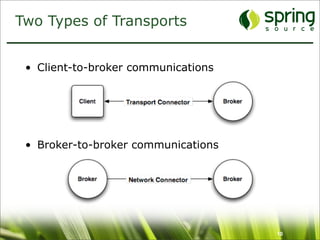
Two Types of Transports


 • Client-to-broker communications


 • Broker-to-broker communications


                                     10
Transport Connectors


 • Client-to-broker connections
   – Similar to JDBC connections to a database
 • Protocols are supported:
   –   TCP
   –   UDP
   –   NIO
   –   SSL
   –   HTTP/S
   –   VM
   –   XMPP


                                                 11
Network Connectors


 • Broker-to-broker connections
   – A cluster of ActiveMQ instances
   – Known as a network of brokers
 • Protocols supported:
   –   Static
   –   Failover
   –   Multicast
   –   Zeroconf
   –   Peer
   –   Fanout
   –   Discovery


                                       12
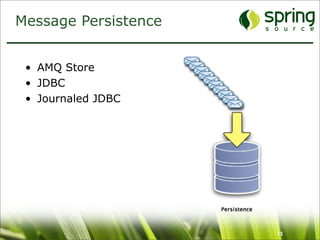
Message Persistence


 • AMQ Store
 • JDBC
 • Journaled JDBC


                      13
AMQ Message Store


 • Transactional message storage solution
 • Fast and reliable
 • Composed of two parts:
   – Data Store - holds messages in a transactional
     journal
   – Reference store - stores message locations for fast
     retrieval
 • The default message store in ActiveMQ 5


                                                       14
Non-Journaled JDBC


 • Transactional message storage solution
 • Reliable but not fast
   – JDBC connection overhead is prohibitively slow


                                                      15
Journaled JDBC


 • Transactional message storage solution
 • Reliable and faster than non-journaled
 • Two-piece store
   – Journal - A high-performance, transactional journal
   – Database - A relational database of your choice
 • Default database in ActiveMQ 4.x was Apache
   Derby


                                                       16
Master/Slave Configurations


 • Pure master/slave
 • Shared filesystem master/slave
 • JDBC master/slave


                                    17
Pure Master/Slave


 • Shared nothing, fully replicated topology
    – Does not depend on shared filesystem or database
 • A Slave broker consumes all commands from
   the master broker (messages, acks, tx states)
 • Slave does not start any networking or
   transport connectors
 • Master broker will only respond to client after a
   message exchange has been successfully
   replicated to the slave broker


                                                     18
Pure Master/Slave


 • If the master fails, the slave optionally has two
   modes of operation:
    – Start up all it’s network and transport connectors
       • All clients connected to failed Master resume on Slave
    – Close down completely
       • Slave is simply used to duplicate state from Master


                                                               19
Shared Filesystem
Master/Slave

 •   Utilizes a directory on a shared filesystem
 •   No restriction on number of brokers
 •   Simple configuration (point to the data dir)
 •   One master selected at random


                                                    20
JDBC Master/Slave


 • Recommended when using a shared database
 • No restriction on the number of brokers
 • Simple configuration
 • Clustered database negates single point of
   failure
 • One master selected at random


                                           21
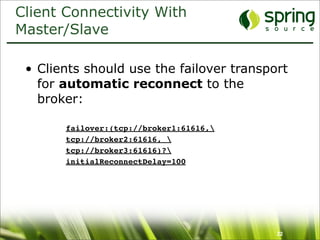
Client Connectivity With
Master/Slave

 • Clients should use the failover transport
   for automatic reconnect to the
   broker:

       failover:(tcp://broker1:61616,
       tcp://broker2:61616, 
       tcp://broker3:61616)?
       initialReconnectDelay=100


                                          22
Broker Security


 • Authentication
   – I.e., are you allowed to connect to ActiveMQ?
   – File based implementation
   – JAAS based implementation


 • Authorization
   – I.e., do you have permission to use that ActiveMQ
     resource?
   – Destination level
   – Message level via custom plugin


                                                         23
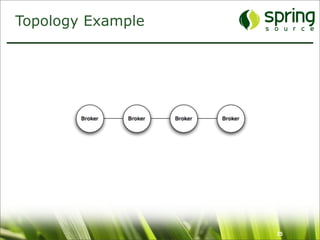
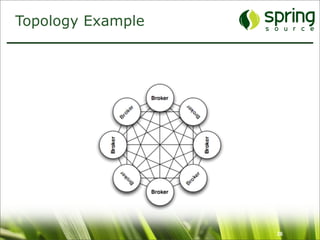
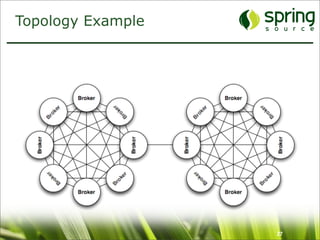
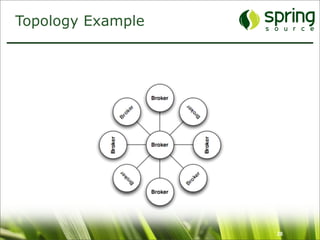
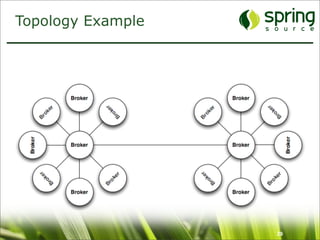
Networks of Brokers


 • Many brokers acting together in a cluster
 • Provides large scalability
 • ActiveMQ store-and-forward allows messages
   to traverse brokers in the network
   – Demand-based forwarding
   – Some people call this distributed queues
 • Many possible configurations or topologies are
   supported


                                                24
Topology Example


                   25
Topology Example


                   26
Topology Example


                   27
Topology Example


                   28
Topology Example


                   29
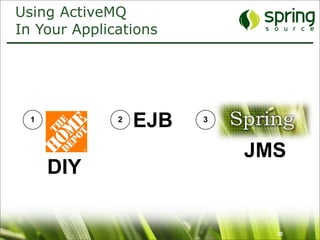
Using ActiveMQ
In Your Applications


  1           2
                  EJB   3


                            JMS
      DIY


                              30
DIY/Roll Your Own


 • Advantages
   – Do whatever you want - it’s a green field!


 • Disadvantages
   – Manual creation of MessageProducers and
     MessageConsumers
   – Manual concurrency management
   – Manual thread management
   – Manual transaction management
   – Manual resource management
      • ConnectionFactory, Connections, Destinations


                                                       31
EJB:Message Driven Beans


 • Advantages
   – Automatic Transaction management
   – Automatic Concurrency
   – Automatic resource management
      • ConnectionFactory, Connections, Destinations


 • Disadvantages
   – Requires EJB container and therefore a JEE server
      • Exception: Apache OpenEJB (http://openejb.apache.org/ )
   – Increased overhead


                                                         32
Spring JMS


 • Advantages
   – No EJB container required (no JEE container)
   – Simplified resource management
      • ConnectionFactory, Connections, Destinations
   – Simplified concurrency management
   – Simplified transaction management


 • Disadvantages
   – Are there any? ;-)


                                                       33
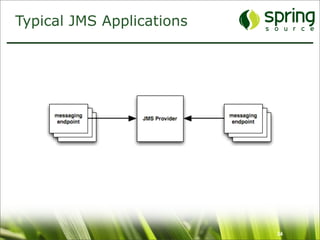
Typical JMS Applications


                           34
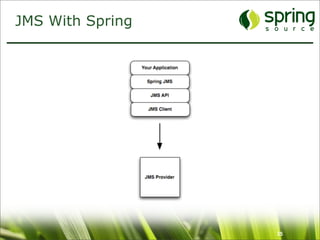
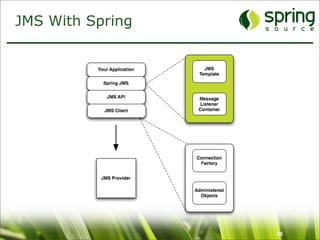
JMS With Spring


                  35
JMS With Spring


                  36
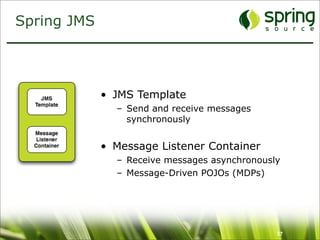
Spring JMS


             • JMS Template
               – Send and receive messages
                 synchronously


             • Message Listener Container
               – Receive messages asynchronously
               – Message-Driven POJOs (MDPs)


                                               37
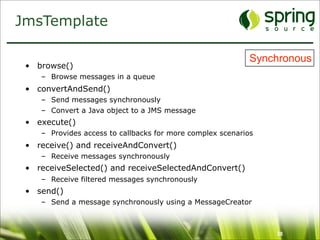
JmsTemplate

                                                            Synchronous
 • browse()
    – Browse messages in a queue
 • convertAndSend()
    – Send messages synchronously
    – Convert a Java object to a JMS message
 • execute()
    – Provides access to callbacks for more complex scenarios
 • receive() and receiveAndConvert()
    – Receive messages synchronously
 • receiveSelected() and receiveSelectedAndConvert()
    – Receive filtered messages synchronously
 • send()
    – Send a message synchronously using a MessageCreator


                                                                38
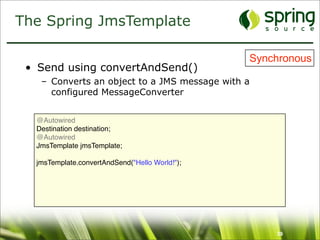
The Spring JmsTemplate

                                                Synchronous
 • Send using convertAndSend()
   – Converts an object to a JMS message with a
     configured MessageConverter


  @Autowired
  Destination destination;
  @Autowired
  JmsTemplate jmsTemplate;

  jmsTemplate.convertAndSend("Hello World!");


                                                    39
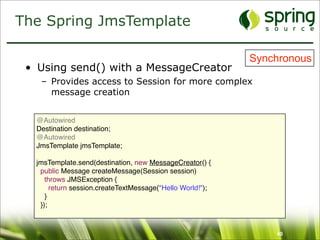
The Spring JmsTemplate

                                                           Synchronous
 • Using send() with a MessageCreator
   – Provides access to Session for more complex
     message creation


  @Autowired
  Destination destination;
  @Autowired
  JmsTemplate jmsTemplate;

  jmsTemplate.send(destination, new MessageCreator() {
   public Message createMessage(Session session)
     throws JMSException {
       return session.createTextMessage("Hello World!");
     }
   });


                                                               40
The Spring JmsTemplate

                                         Synchronous
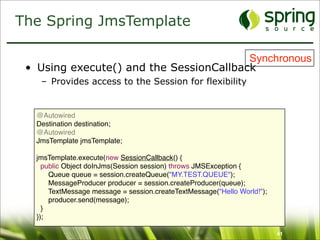
 • Using execute() and the SessionCallback
    – Provides access to the Session for flexibility


   @Autowired
   Destination destination;
   @Autowired
   JmsTemplate jmsTemplate;

   jmsTemplate.execute(new SessionCallback() {
     public Object doInJms(Session session) throws JMSException {
       Queue queue = session.createQueue("MY.TEST.QUEUE");
       MessageProducer producer = session.createProducer(queue);
       TextMessage message = session.createTextMessage("Hello World!");
       producer.send(message);
     }
   });

                                                                          41
The Spring JmsTemplate

                                         Synchronous
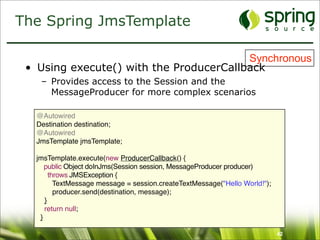
 • Using execute() with the ProducerCallback
    – Provides access to the Session and the
      MessageProducer for more complex scenarios

   @Autowired
   Destination destination;
   @Autowired
   JmsTemplate jmsTemplate;

   jmsTemplate.execute(new ProducerCallback() {
      public Object doInJms(Session session, MessageProducer producer)
        throws JMSException {
          TextMessage message = session.createTextMessage("Hello World!");
          producer.send(destination, message);
      }
      return null;
    }

                                                                             42
The Spring JmsTemplate

                                                 Synchronous
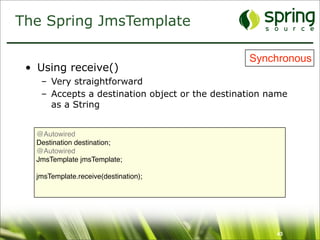
 • Using receive()
    – Very straightforward
    – Accepts a destination object or the destination name
      as a String


   @Autowired
   Destination destination;
   @Autowired
   JmsTemplate jmsTemplate;

   jmsTemplate.receive(destination);


                                                       43
The Spring JmsTemplate

                                                                Synchronous
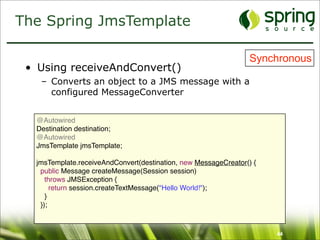
 • Using receiveAndConvert()
   – Converts an object to a JMS message with a
     configured MessageConverter


  @Autowired
  Destination destination;
  @Autowired
  JmsTemplate jmsTemplate;

  jmsTemplate.receiveAndConvert(destination, new MessageCreator() {
   public Message createMessage(Session session)
     throws JMSException {
       return session.createTextMessage("Hello World!");
     }
   });


                                                                      44
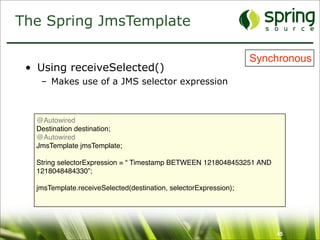
The Spring JmsTemplate

                                                                   Synchronous
 • Using receiveSelected()
    – Makes use of a JMS selector expression


   @Autowired
   Destination destination;
   @Autowired
   JmsTemplate jmsTemplate;

   String selectorExpression = “ Timestamp BETWEEN 1218048453251 AND
   1218048484330”;

   jmsTemplate.receiveSelected(destination, selectorExpression);


                                                                       45
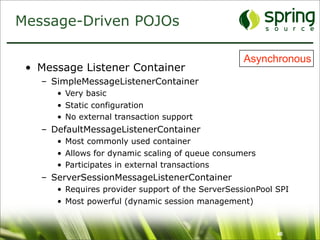
Message-Driven POJOs

                                                   Asynchronous
 • Message Listener Container
   – SimpleMessageListenerContainer
      • Very basic
      • Static configuration
      • No external transaction support
   – DefaultMessageListenerContainer
      • Most commonly used container
      • Allows for dynamic scaling of queue consumers
      • Participates in external transactions
   – ServerSessionMessageListenerContainer
      • Requires provider support of the ServerSessionPool SPI
      • Most powerful (dynamic session management)


                                                           46
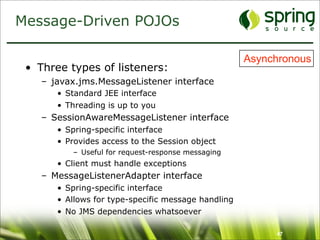
Message-Driven POJOs

                                                     Asynchronous
 • Three types of listeners:
    – javax.jms.MessageListener interface
       • Standard JEE interface
       • Threading is up to you
    – SessionAwareMessageListener interface
       • Spring-specific interface
       • Provides access to the Session object
          – Useful for request-response messaging
       • Client must handle exceptions
    – MessageListenerAdapter interface
       • Spring-specific interface
       • Allows for type-specific message handling
       • No JMS dependencies whatsoever

                                                          47
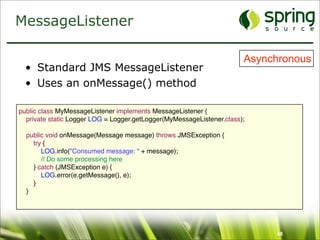
MessageListener

                                                                       Asynchronous
  • Standard JMS MessageListener
  • Uses an onMessage() method

public class MyMessageListener implements MessageListener {
  private static Logger LOG = Logger.getLogger(MyMessageListener.class);

  public void onMessage(Message message) throws JMSException {
    try {
       LOG.info("Consumed message: “ + message);
       // Do some processing here
    } catch (JMSException e) {
       LOG.error(e.getMessage(), e);
    }
  }


                                                                            48
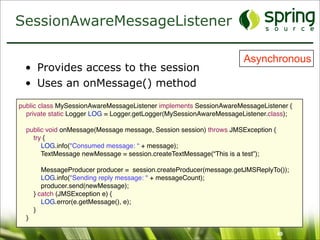
SessionAwareMessageListener

                                                                      Asynchronous
  • Provides access to the session
  • Uses an onMessage() method

public class MySessionAwareMessageListener implements SessionAwareMessageListener {
  private static Logger LOG = Logger.getLogger(MySessionAwareMessageListener.class);

  public void onMessage(Message message, Session session) throws JMSException {
    try {
       LOG.info("Consumed message: “ + message);
       TextMessage newMessage = session.createTextMessage(“This is a test”);

         MessageProducer producer = session.createProducer(message.getJMSReplyTo());
         LOG.info("Sending reply message: " + messageCount);
         producer.send(newMessage);
      } catch (JMSException e) {
         LOG.error(e.getMessage(), e);
      }
  }

                                                                                  49
MessageListenerAdapter

                                               Asynchronous
 • Handles all message contents
 • No reply message is sent (void return)
 public interface MyMessageListenerAdapter {
    void handleMessage(String text);
    void handleMessage(Map map);
    void handleMessage(byte[] bytes);
    void handleMessage(Serializable obj);
  }


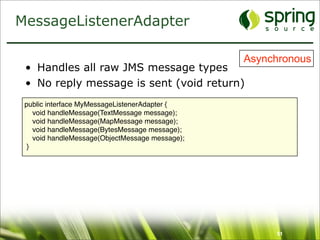
                                                    50
MessageListenerAdapter

                                                 Asynchronous
 • Handles all raw JMS message types
 • No reply message is sent (void return)
 public interface MyMessageListenerAdapter {
    void handleMessage(TextMessage message);
    void handleMessage(MapMessage message);
    void handleMessage(BytesMessage message);
    void handleMessage(ObjectMessage message);
  }


                                                      51
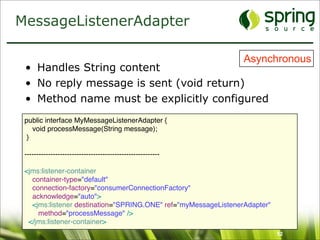
MessageListenerAdapter

                                                                Asynchronous
 • Handles String content
 • No reply message is sent (void return)
 • Method name must be explicitly configured
 public interface MyMessageListenerAdapter {
    void processMessage(String message);
  }

 ---------------------------------------------------------

 <jms:listener-container
   container-type="default"
   connection-factory="consumerConnectionFactory"
   acknowledge="auto">
   <jms:listener destination="SPRING.ONE" ref="myMessageListenerAdapter"
     method="processMessage" />
  </jms:listener-container>
                                                                           52
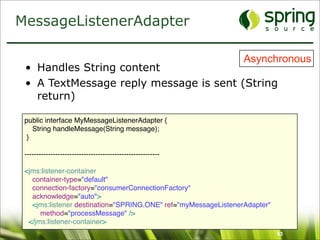
MessageListenerAdapter

                                                                Asynchronous
 • Handles String content
 • A TextMessage reply message is sent (String
   return)

 public interface MyMessageListenerAdapter {
    String handleMessage(String message);
  }

 ---------------------------------------------------------

 <jms:listener-container
   container-type="default"
   connection-factory="consumerConnectionFactory"
   acknowledge="auto">
   <jms:listener destination="SPRING.ONE" ref="myMessageListenerAdapter"
      method="processMessage" />
  </jms:listener-container>
                                                                           53
ActiveMQ Consumer Options


 •   Message prefetch
 •   Exclusive consumer
 •   Consumer priority
 •   Message groups
 •   Redelivery policies
 •   Retroactive consumer
 •   Selectors


                            54
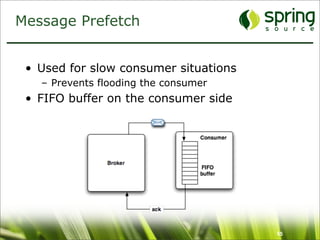
Message Prefetch


 • Used for slow consumer situations
   – Prevents flooding the consumer
 • FIFO buffer on the consumer side


                                       55
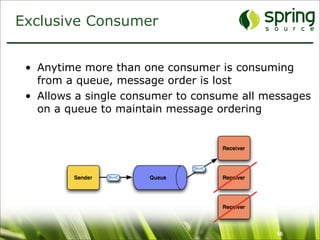
Exclusive Consumer


 • Anytime more than one consumer is consuming
   from a queue, message order is lost
 • Allows a single consumer to consume all messages
   on a queue to maintain message ordering


                                             56
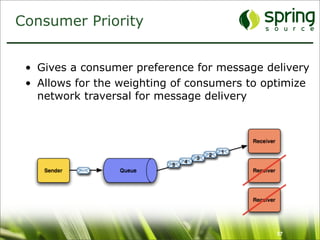
Consumer Priority


 • Gives a consumer preference for message delivery
 • Allows for the weighting of consumers to optimize
   network traversal for message delivery


                                              57
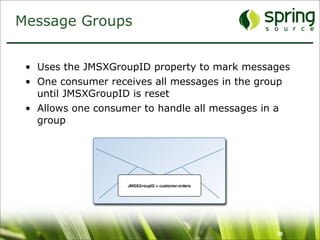
Message Groups


 • Uses the JMSXGroupID property to mark messages
 • One consumer receives all messages in the group
   until JMSXGroupID is reset
 • Allows one consumer to handle all messages in a
   group


                                               58
Redelivery Policy


 • Messages are redelivered to a client when:
    – A transacted session is rolled back
    – A transacted session is closed before commit
    – A session is using CLIENT_ACKNOWLEDGE and
      Session.recover() is explicitly called
 • Clients can override the redelivery policy
    – Must be configured on the
      ActiveMQConnectionFactory or the
      ActiveMQConnection
       • max redeliveries, initial redelivery delay, exponential
         backoff, backoff multiplier, etc.
 • Dead Letter Strategy can be configured using a
   destination policy in the activemq.xml
                                                               59
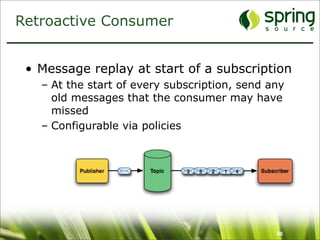
Retroactive Consumer


 • Message replay at start of a subscription
   – At the start of every subscription, send any
     old messages that the consumer may have
     missed
   – Configurable via policies


                                               60
Message Selectors


 • Used to attach a filter to a subscription
 • Defined using a subset SQL 92 syntax
 • JMS selectors
    – Filters only message properties
       • JMSType = ‘stock’ and trader = ‘bob’ and price < ‘105’
 • XPath selectors
    – Filters message bodies that contain XML
       • ‘/message/cheese/text() = 'swiss'’


                                                            61
Other Handy Features


 •   Destination Policies
 •   Virtual Destinations
 •   Total Ordering of Messages
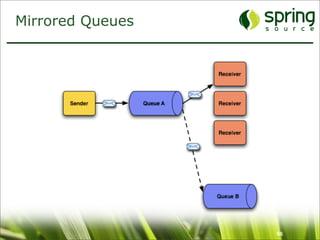
 •   Mirrored Queues


                                  62
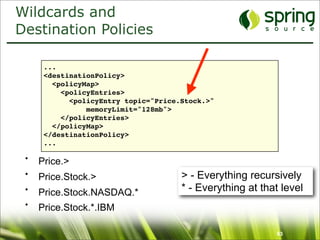
Wildcards and
Destination Policies

      ...
      <destinationPolicy>
        <policyMap>
          <policyEntries>
            <policyEntry topic="Price.Stock.>"
                memoryLimit="128mb">
          </policyEntries>
        </policyMap>
      </destinationPolicy>
      ...

 •   Price.>
 •   Price.Stock.>                    > - Everything recursively
 •   Price.Stock.NASDAQ.*             * - Everything at that level
 •   Price.Stock.*.IBM

                                                           63
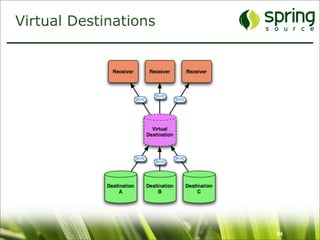
Virtual Destinations


                       64
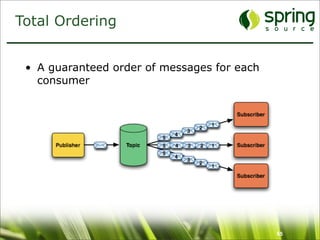
Total Ordering


 • A guaranteed order of messages for each
   consumer


                                             65
Mirrored Queues


                  66
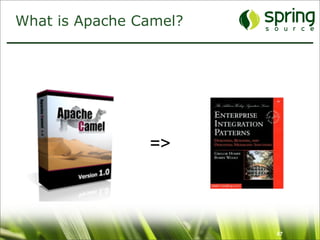
What is Apache Camel?


                =>


                        67
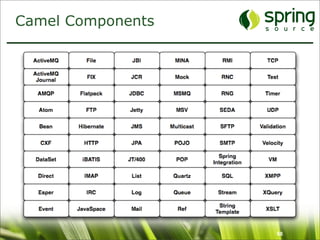
Camel Components


                   68
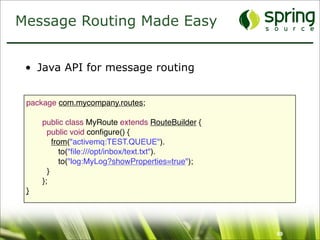
Message Routing Made Easy


 • Java API for message routing


 package com.mycompany.routes;

 
   public class MyRoute extends RouteBuilder {
 
     public void configure() {
 
       from("activemq:TEST.QUEUE").
     
     to("file:///opt/inbox/text.txt").
     
     to("log:MyLog?showProperties=true");
 
     }
 
   };
 }


                                                   69
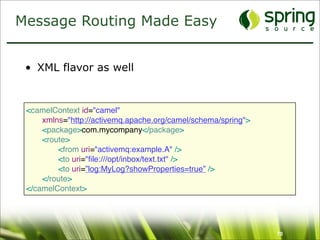
Message Routing Made Easy


 • XML flavor as well


 <camelContext id="camel"
 
   xmlns="http://activemq.apache.org/camel/schema/spring">
 
   <package>com.mycompany</package>
 
   <route>
 
   
   <from uri="activemq:example.A" />
 
   
   <to uri="file:///opt/inbox/text.txt" />
 
   
   <to uri=”log:MyLog?showProperties=true” />
 
   </route>
 </camelContext>


                                                               70
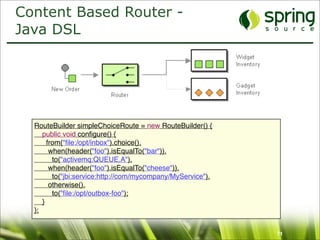
Content Based Router -
Java DSL


  RouteBuilder simpleChoiceRoute = new RouteBuilder() {
     public void configure() {
       from("file:/opt/inbox").choice().
        when(header("foo").isEqualTo("bar")).
         to("activemq:QUEUE.A").
        when(header("foo").isEqualTo("cheese")).
         to("jbi:service:http://com/mycompany/MyService").
        otherwise().
         to("file:/opt/outbox-foo");
     }
  };


                                                             71
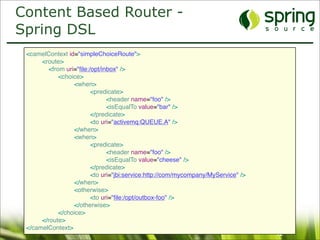
Content Based Router -
Spring DSL
 <camelContext id="simpleChoiceRoute">
 
    <route>
         <from uri="file:/opt/inbox" />
 
    
      <choice>


    <when>


      <predicate>


     <header name="foo" />


     <isEqualTo value="bar" />


      </predicate>


      <to uri="activemq:QUEUE.A" />


    </when>


    <when>


      <predicate>


     <header name="foo" />


     <isEqualTo value="cheese" />


      </predicate>


      <to uri="jbi:service:http://com/mycompany/MyService" />


    </when>


    <otherwise>


      <to uri="file:/opt/outbox-foo" />


    </otherwise>
 
    
      </choice>
 
    </route>
 </camelContext>
                                                                                   72
Thank You For Attending!


 • Questions and answers


   Coming soon:
   ActiveMQ in Action ===>


                             73

Enterprise Messaging With ActiveMQ and Spring JMS

  • 1.
    Enterprise Messaging With ActiveMQand Spring JMS Bruce Snyder bruce.snyder@springsource.com SpringOne 29 Apr 2009 Amsterdam, The Netherlands 1
  • 2.
    Agenda • Installing ActiveMQ • Configuring ActiveMQ • Using Spring JMS with ActiveMQ • Some ActiveMQ Features 2
  • 3.
    What is ActiveMQ? • Open source • Message-oriented middleware • Apache project – http://activemq.apache.org/ • Apache licensed • JMS 1.1 compliant • Goal: – To achieve standards-based, message-oriented application integration across many languages and platforms 3
  • 4.
    Installing ActiveMQ •Download it • Unzip it • Run it • It’s really that simple! 4
  • 5.
    Configuring ActiveMQ (conf/activemq.xml) 5
  • 6.
    Configuring ActiveMQ •XML configuration <amq:broker id="broker" persistent="false" useJmx="true"> <amq:transportConnectors> <amq:transportConnector name="openwire" uri="tcp://localhost:0" /> </amq:transportConnectors> </amq:broker> 6
  • 7.
    Configuring ActiveMQ •Pure Java configuration – Used to embed ActiveMQ in a Java app BrokerService broker = new BrokerService(); broker.setPersistence(false); TransportConnector connector = broker.addConnector("tcp://localhost:61616"); broker.start(); ... connector.stop(); broker.stop(); 7
  • 8.
    ActiveMQ Uses URIs ForTransport Configuration <protocol>://<host>:<port>?<transport-options> vm://embedded?broker.persistent=false tcp://localhost:61616?jms.useAsyncSend=true stomp://localhost:61613 failover:(tcp://host1:61616,tcp://host2:61616)? initialReconnectDelay=100 8
  • 9.
    Wire Formats •OpenWire – The default in ActiveMQ; a binary protocol – Clients for C++, Java and .NET • STOMP – Simple Text Oriented Messaging Protocol; a text based protocol – Clients for C, Javascript, Perl, PHP, Python, Ruby and more • XMPP – The Jabber XML protocol • REST – HTTP POST and GET 9
  • 10.
    Two Types ofTransports • Client-to-broker communications • Broker-to-broker communications 10
  • 11.
    Transport Connectors •Client-to-broker connections – Similar to JDBC connections to a database • Protocols are supported: – TCP – UDP – NIO – SSL – HTTP/S – VM – XMPP 11
  • 12.
    Network Connectors •Broker-to-broker connections – A cluster of ActiveMQ instances – Known as a network of brokers • Protocols supported: – Static – Failover – Multicast – Zeroconf – Peer – Fanout – Discovery 12
  • 13.
    Message Persistence •AMQ Store • JDBC • Journaled JDBC 13
  • 14.
    AMQ Message Store • Transactional message storage solution • Fast and reliable • Composed of two parts: – Data Store - holds messages in a transactional journal – Reference store - stores message locations for fast retrieval • The default message store in ActiveMQ 5 14
  • 15.
    Non-Journaled JDBC •Transactional message storage solution • Reliable but not fast – JDBC connection overhead is prohibitively slow 15
  • 16.
    Journaled JDBC •Transactional message storage solution • Reliable and faster than non-journaled • Two-piece store – Journal - A high-performance, transactional journal – Database - A relational database of your choice • Default database in ActiveMQ 4.x was Apache Derby 16
  • 17.
    Master/Slave Configurations •Pure master/slave • Shared filesystem master/slave • JDBC master/slave 17
  • 18.
    Pure Master/Slave •Shared nothing, fully replicated topology – Does not depend on shared filesystem or database • A Slave broker consumes all commands from the master broker (messages, acks, tx states) • Slave does not start any networking or transport connectors • Master broker will only respond to client after a message exchange has been successfully replicated to the slave broker 18
  • 19.
    Pure Master/Slave •If the master fails, the slave optionally has two modes of operation: – Start up all it’s network and transport connectors • All clients connected to failed Master resume on Slave – Close down completely • Slave is simply used to duplicate state from Master 19
  • 20.
    Shared Filesystem Master/Slave • Utilizes a directory on a shared filesystem • No restriction on number of brokers • Simple configuration (point to the data dir) • One master selected at random 20
  • 21.
    JDBC Master/Slave •Recommended when using a shared database • No restriction on the number of brokers • Simple configuration • Clustered database negates single point of failure • One master selected at random 21
  • 22.
    Client Connectivity With Master/Slave • Clients should use the failover transport for automatic reconnect to the broker: failover:(tcp://broker1:61616, tcp://broker2:61616, tcp://broker3:61616)? initialReconnectDelay=100 22
  • 23.
    Broker Security •Authentication – I.e., are you allowed to connect to ActiveMQ? – File based implementation – JAAS based implementation • Authorization – I.e., do you have permission to use that ActiveMQ resource? – Destination level – Message level via custom plugin 23
  • 24.
    Networks of Brokers • Many brokers acting together in a cluster • Provides large scalability • ActiveMQ store-and-forward allows messages to traverse brokers in the network – Demand-based forwarding – Some people call this distributed queues • Many possible configurations or topologies are supported 24
  • 25.
  • 26.
  • 27.
  • 28.
  • 29.
  • 30.
    Using ActiveMQ In YourApplications 1 2 EJB 3 JMS DIY 30
  • 31.
    DIY/Roll Your Own • Advantages – Do whatever you want - it’s a green field! • Disadvantages – Manual creation of MessageProducers and MessageConsumers – Manual concurrency management – Manual thread management – Manual transaction management – Manual resource management • ConnectionFactory, Connections, Destinations 31
  • 32.
    EJB:Message Driven Beans • Advantages – Automatic Transaction management – Automatic Concurrency – Automatic resource management • ConnectionFactory, Connections, Destinations • Disadvantages – Requires EJB container and therefore a JEE server • Exception: Apache OpenEJB (http://openejb.apache.org/ ) – Increased overhead 32
  • 33.
    Spring JMS •Advantages – No EJB container required (no JEE container) – Simplified resource management • ConnectionFactory, Connections, Destinations – Simplified concurrency management – Simplified transaction management • Disadvantages – Are there any? ;-) 33
  • 34.
  • 35.
  • 36.
  • 37.
    Spring JMS • JMS Template – Send and receive messages synchronously • Message Listener Container – Receive messages asynchronously – Message-Driven POJOs (MDPs) 37
  • 38.
    JmsTemplate Synchronous • browse() – Browse messages in a queue • convertAndSend() – Send messages synchronously – Convert a Java object to a JMS message • execute() – Provides access to callbacks for more complex scenarios • receive() and receiveAndConvert() – Receive messages synchronously • receiveSelected() and receiveSelectedAndConvert() – Receive filtered messages synchronously • send() – Send a message synchronously using a MessageCreator 38
  • 39.
    The Spring JmsTemplate Synchronous • Send using convertAndSend() – Converts an object to a JMS message with a configured MessageConverter @Autowired Destination destination; @Autowired JmsTemplate jmsTemplate; jmsTemplate.convertAndSend("Hello World!"); 39
  • 40.
    The Spring JmsTemplate Synchronous • Using send() with a MessageCreator – Provides access to Session for more complex message creation @Autowired Destination destination; @Autowired JmsTemplate jmsTemplate; jmsTemplate.send(destination, new MessageCreator() { public Message createMessage(Session session) throws JMSException { return session.createTextMessage("Hello World!"); } }); 40
  • 41.
    The Spring JmsTemplate Synchronous • Using execute() and the SessionCallback – Provides access to the Session for flexibility @Autowired Destination destination; @Autowired JmsTemplate jmsTemplate; jmsTemplate.execute(new SessionCallback() { public Object doInJms(Session session) throws JMSException { Queue queue = session.createQueue("MY.TEST.QUEUE"); MessageProducer producer = session.createProducer(queue); TextMessage message = session.createTextMessage("Hello World!"); producer.send(message); } }); 41
  • 42.
    The Spring JmsTemplate Synchronous • Using execute() with the ProducerCallback – Provides access to the Session and the MessageProducer for more complex scenarios @Autowired Destination destination; @Autowired JmsTemplate jmsTemplate; jmsTemplate.execute(new ProducerCallback() { public Object doInJms(Session session, MessageProducer producer) throws JMSException { TextMessage message = session.createTextMessage("Hello World!"); producer.send(destination, message); } return null; } 42
  • 43.
    The Spring JmsTemplate Synchronous • Using receive() – Very straightforward – Accepts a destination object or the destination name as a String @Autowired Destination destination; @Autowired JmsTemplate jmsTemplate; jmsTemplate.receive(destination); 43
  • 44.
    The Spring JmsTemplate Synchronous • Using receiveAndConvert() – Converts an object to a JMS message with a configured MessageConverter @Autowired Destination destination; @Autowired JmsTemplate jmsTemplate; jmsTemplate.receiveAndConvert(destination, new MessageCreator() { public Message createMessage(Session session) throws JMSException { return session.createTextMessage("Hello World!"); } }); 44
  • 45.
    The Spring JmsTemplate Synchronous • Using receiveSelected() – Makes use of a JMS selector expression @Autowired Destination destination; @Autowired JmsTemplate jmsTemplate; String selectorExpression = “ Timestamp BETWEEN 1218048453251 AND 1218048484330”; jmsTemplate.receiveSelected(destination, selectorExpression); 45
  • 46.
    Message-Driven POJOs Asynchronous • Message Listener Container – SimpleMessageListenerContainer • Very basic • Static configuration • No external transaction support – DefaultMessageListenerContainer • Most commonly used container • Allows for dynamic scaling of queue consumers • Participates in external transactions – ServerSessionMessageListenerContainer • Requires provider support of the ServerSessionPool SPI • Most powerful (dynamic session management) 46
  • 47.
    Message-Driven POJOs Asynchronous • Three types of listeners: – javax.jms.MessageListener interface • Standard JEE interface • Threading is up to you – SessionAwareMessageListener interface • Spring-specific interface • Provides access to the Session object – Useful for request-response messaging • Client must handle exceptions – MessageListenerAdapter interface • Spring-specific interface • Allows for type-specific message handling • No JMS dependencies whatsoever 47
  • 48.
    MessageListener Asynchronous • Standard JMS MessageListener • Uses an onMessage() method public class MyMessageListener implements MessageListener { private static Logger LOG = Logger.getLogger(MyMessageListener.class); public void onMessage(Message message) throws JMSException { try { LOG.info("Consumed message: “ + message); // Do some processing here } catch (JMSException e) { LOG.error(e.getMessage(), e); } } 48
  • 49.
    SessionAwareMessageListener Asynchronous • Provides access to the session • Uses an onMessage() method public class MySessionAwareMessageListener implements SessionAwareMessageListener { private static Logger LOG = Logger.getLogger(MySessionAwareMessageListener.class); public void onMessage(Message message, Session session) throws JMSException { try { LOG.info("Consumed message: “ + message); TextMessage newMessage = session.createTextMessage(“This is a test”); MessageProducer producer = session.createProducer(message.getJMSReplyTo()); LOG.info("Sending reply message: " + messageCount); producer.send(newMessage); } catch (JMSException e) { LOG.error(e.getMessage(), e); } } 49
  • 50.
    MessageListenerAdapter Asynchronous • Handles all message contents • No reply message is sent (void return) public interface MyMessageListenerAdapter { void handleMessage(String text); void handleMessage(Map map); void handleMessage(byte[] bytes); void handleMessage(Serializable obj); } 50
  • 51.
    MessageListenerAdapter Asynchronous • Handles all raw JMS message types • No reply message is sent (void return) public interface MyMessageListenerAdapter { void handleMessage(TextMessage message); void handleMessage(MapMessage message); void handleMessage(BytesMessage message); void handleMessage(ObjectMessage message); } 51
  • 52.
    MessageListenerAdapter Asynchronous • Handles String content • No reply message is sent (void return) • Method name must be explicitly configured public interface MyMessageListenerAdapter { void processMessage(String message); } --------------------------------------------------------- <jms:listener-container container-type="default" connection-factory="consumerConnectionFactory" acknowledge="auto"> <jms:listener destination="SPRING.ONE" ref="myMessageListenerAdapter" method="processMessage" /> </jms:listener-container> 52
  • 53.
    MessageListenerAdapter Asynchronous • Handles String content • A TextMessage reply message is sent (String return) public interface MyMessageListenerAdapter { String handleMessage(String message); } --------------------------------------------------------- <jms:listener-container container-type="default" connection-factory="consumerConnectionFactory" acknowledge="auto"> <jms:listener destination="SPRING.ONE" ref="myMessageListenerAdapter" method="processMessage" /> </jms:listener-container> 53
  • 54.
    ActiveMQ Consumer Options • Message prefetch • Exclusive consumer • Consumer priority • Message groups • Redelivery policies • Retroactive consumer • Selectors 54
  • 55.
    Message Prefetch •Used for slow consumer situations – Prevents flooding the consumer • FIFO buffer on the consumer side 55
  • 56.
    Exclusive Consumer •Anytime more than one consumer is consuming from a queue, message order is lost • Allows a single consumer to consume all messages on a queue to maintain message ordering 56
  • 57.
    Consumer Priority •Gives a consumer preference for message delivery • Allows for the weighting of consumers to optimize network traversal for message delivery 57
  • 58.
    Message Groups •Uses the JMSXGroupID property to mark messages • One consumer receives all messages in the group until JMSXGroupID is reset • Allows one consumer to handle all messages in a group 58
  • 59.
    Redelivery Policy •Messages are redelivered to a client when: – A transacted session is rolled back – A transacted session is closed before commit – A session is using CLIENT_ACKNOWLEDGE and Session.recover() is explicitly called • Clients can override the redelivery policy – Must be configured on the ActiveMQConnectionFactory or the ActiveMQConnection • max redeliveries, initial redelivery delay, exponential backoff, backoff multiplier, etc. • Dead Letter Strategy can be configured using a destination policy in the activemq.xml 59
  • 60.
    Retroactive Consumer •Message replay at start of a subscription – At the start of every subscription, send any old messages that the consumer may have missed – Configurable via policies 60
  • 61.
    Message Selectors •Used to attach a filter to a subscription • Defined using a subset SQL 92 syntax • JMS selectors – Filters only message properties • JMSType = ‘stock’ and trader = ‘bob’ and price < ‘105’ • XPath selectors – Filters message bodies that contain XML • ‘/message/cheese/text() = 'swiss'’ 61
  • 62.
    Other Handy Features • Destination Policies • Virtual Destinations • Total Ordering of Messages • Mirrored Queues 62
  • 63.
    Wildcards and Destination Policies ... <destinationPolicy> <policyMap> <policyEntries> <policyEntry topic="Price.Stock.>" memoryLimit="128mb"> </policyEntries> </policyMap> </destinationPolicy> ... • Price.> • Price.Stock.> > - Everything recursively • Price.Stock.NASDAQ.* * - Everything at that level • Price.Stock.*.IBM 63
  • 64.
  • 65.
    Total Ordering •A guaranteed order of messages for each consumer 65
  • 66.
  • 67.
    What is ApacheCamel? => 67
  • 68.
  • 69.
    Message Routing MadeEasy • Java API for message routing package com.mycompany.routes; public class MyRoute extends RouteBuilder { public void configure() { from("activemq:TEST.QUEUE"). to("file:///opt/inbox/text.txt"). to("log:MyLog?showProperties=true"); } }; } 69
  • 70.
    Message Routing MadeEasy • XML flavor as well <camelContext id="camel" xmlns="http://activemq.apache.org/camel/schema/spring"> <package>com.mycompany</package> <route> <from uri="activemq:example.A" /> <to uri="file:///opt/inbox/text.txt" /> <to uri=”log:MyLog?showProperties=true” /> </route> </camelContext> 70
  • 71.
    Content Based Router- Java DSL RouteBuilder simpleChoiceRoute = new RouteBuilder() { public void configure() { from("file:/opt/inbox").choice(). when(header("foo").isEqualTo("bar")). to("activemq:QUEUE.A"). when(header("foo").isEqualTo("cheese")). to("jbi:service:http://com/mycompany/MyService"). otherwise(). to("file:/opt/outbox-foo"); } }; 71
  • 72.
    Content Based Router- Spring DSL <camelContext id="simpleChoiceRoute"> <route> <from uri="file:/opt/inbox" /> <choice> <when> <predicate> <header name="foo" /> <isEqualTo value="bar" /> </predicate> <to uri="activemq:QUEUE.A" /> </when> <when> <predicate> <header name="foo" /> <isEqualTo value="cheese" /> </predicate> <to uri="jbi:service:http://com/mycompany/MyService" /> </when> <otherwise> <to uri="file:/opt/outbox-foo" /> </otherwise> </choice> </route> </camelContext> 72
  • 73.
    Thank You ForAttending! • Questions and answers Coming soon: ActiveMQ in Action ===> 73